Description:
What's in the box
Details:
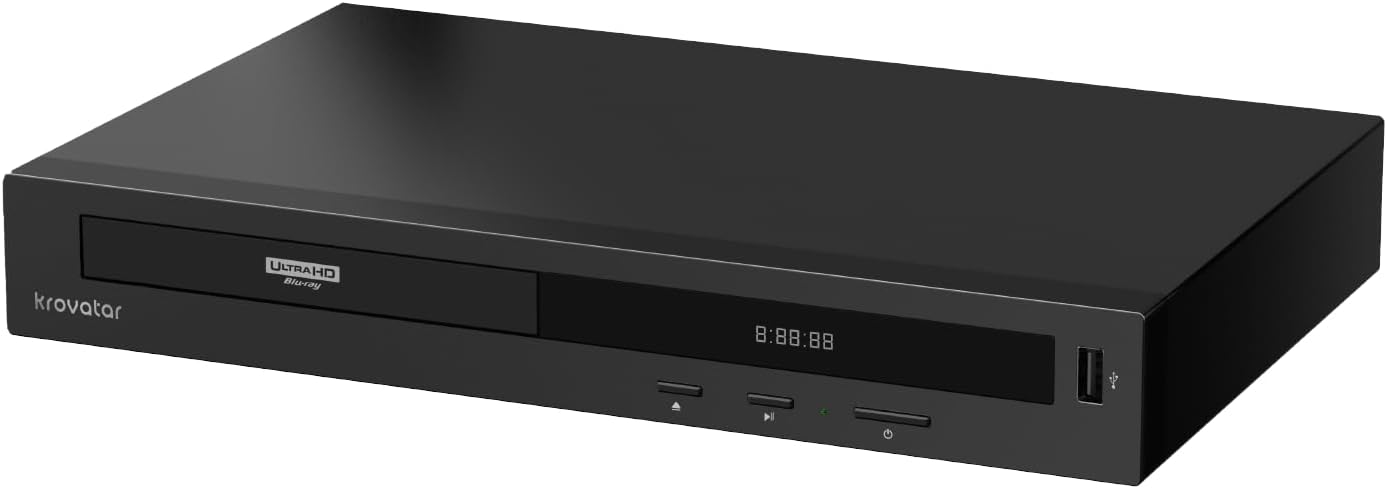
| Brand | krovatar |
|---|---|
| Media Type | BD, BD-R, BD-RE, CD, DVD, CD-R/RW, DVD±R, DVD±RW, VCD, SVCD,SACD |
| Special Feature | 4K UHD, Multi-Format Playback, Multi-Language Support |
| Resolution | 3840x2160 |
| Connector Type | HDMI OUT1, HDMI OUT2, USB2.0, USB3.0, LAN, COAXIAL |
| Connectivity Technology | Bluetooth, Ethernet, HDMI, USB |
| Model Name | KBU-300 |
| Color | Black |
| Item Weight | 1.4 kg |
| Audio Output Mode | Surround, Object-based (Dolby Atmos, DTS:X) |
Visit the krovatar Store
Krovatar 4K UHD Blu-ray Disc Player with Bluetooth Function | Support Blu-ray,3D,4K upscaling,UHD,SACD,DVD,CD,Multi-Format Media Playback,HDMI Cable Included in
AED2,17994
Quantity:
Order today to get by 7-14 business days
This item qualifies for free delivery
 Imported From: United States
At BOLO, we work hard to ensure the products you receive are new, genuine, and sourced from reputable suppliers.
Every product in the BOLO catalogue is sourced through our Verified Global Supply Network of verified sellers, authorized distributors or directly from the manufacturer.
Each product undergoes thorough inspection and verification at our consolidation and fulfilment centers to ensure it meets our strict authenticity and quality standards before being shipped and delivered to you.
If you ever have concerns regarding the authenticity of a product purchased from us, please contact Bolo Support. We will review your inquiry promptly and, if necessary, provide documentation verifying authenticity or offer a suitable resolution.
Your trust is our top priority, and we are committed to maintaining transparency and integrity in every transaction.
While we strive to display accurate information, variations in packaging, labeling, instructions, or formulation may occasionally occur due to regional differences or supplier updates. For detailed or manufacturer-specific information, please contact the brand directly or reach out to BOLO Support for assistance.
Unless otherwise stated, all prices displayed on the product page include applicable taxes and import duties.
BOLO operates in accordance with the laws and regulations of United Arab Emirates. Any items found to be restricted or prohibited for sale within the United Arab Emirates will be cancelled prior to shipment. We take proactive measures to ensure that only products permitted for sale in United Arab Emirates are listed on our website.
All items are shipped by air, and any products classified as “Dangerous Goods (DG)” under IATA regulations will be removed from the order and cancelled.
All orders are processed manually, and we make every effort to process them promptly once confirmed. Products cancelled due to the above reasons will be permanently removed from listings across the website.


Solution+Loader
MediaTek MT8581 4K Flagship Decoding Chip --- 2K Blu-ray,3D Blu-ray,4K upscaling,UHD 4K Blu-ray,SACD,DVD,CD playback smoothly.
Panasonic Optical Pickup --- Quieter and more stable playback.
Can support triple layer 100GB UHD discs.

Support BDAV, DVD Audio discs playback. Support AVCHD,MKV and all recordable formats.
Q: How to get multi-channel audio output?
Our player is a 2.0-channel model. To enable multi-channel playback over HDMI:
Ensure your disc/USB file includes multi-channel audio tracks. Go to Settings → Audio → HDMI and select Bitstream.
PCM: Player decodes audio (downmixed to 2.0ch). Bitstream: Audio is sent to your receiver/amplifier for multi-channel decoding.
Note: Due to hardware limitations, multi-channel output is not supported for SACD and DVD-Audio, even with Bitstream enabled.
Q:Our 4K UHD player may not be compatible with some older TVs, leading to a black screen or inability to open the setup menu. Please troubleshoot as follows:
1. Setup menu visible
Enter the setup menu. When SETUP shows on the front LED, press 9999 on the remote to force resolution to 480i/576i and restore normal display.
2. Completely black screen with no menu
Power off and restart the player. Press the Right Arrow twice, then OK. Once SETUP appears on the front LED, press 9999. The system will automatically lower the resolution to 480i/576i to fix the black screen issue.

Q:How do I get HDR10 when a disc has Dolby Vision?
Go to the display settings and turn Dolby Vision Mode to Off, then you can change the HDR Setting option as you please.
Q:Why does the image flicker slightly when playing some 4K discs?
Please check the following:
. Display Settings: When connected to other devices, please make sure HDR and Deep Color settings are configured correctly. Make sure Dolby vision is set to off if it is HDR10 disc, And ensure color space is correct.
. HDMI Connection: We recommend using the original HDMI cable included with the player for stable performance. Some users resolved flickering or freezing issues by reconnecting the cable or trying a different HDMI port.
. Disc Condition: Please check whether the disc is dirty or scratched,as this may affect playback stability.

aptX High-Res Bluetooth Module
Powered by the Qualcomm QCC Bluetooth chip, supporting aptX HD, aptX Adaptive and SBC, it delivers low-latency sound for smooth viewing and music enjoyment. Compatible with various Bluetooth speakers and headphones.

LAN --- BD LIVE disc playback, DLNA ( You can access the multimedia files shared within the local network.)
HDMI (Main) --- Transmit 4K video and audio simultaneously, and it can all be done with just one cable.
HDMI (Audio Only) --- Pure audio output, Audio-visual separation,without interfering with the main picture transmission.
USB 3.0 ---- Support local playback of USB drives and HDD.
Coaxial --- Digital audio transmission, lossless, compatible with old amplification equipment.

For any questions about product operation or settings, please feel free to reach out to us directly via Amazon's buyer-seller messaging system, and we will provide you with prompt support within 24 hours.
More from this brand
Similar items from “Blu-ray Players”
Share with
Or share with link
https://www.bolo.ae/products/UO0TXAPM86C
Visit the krovatar Store
Krovatar 4K UHD Blu-ray Disc Player with Bluetooth Function | Support Blu-ray,3D,4K upscaling,UHD,SACD,DVD,CD,Multi-Format Media Playback,HDMI Cable Included in
AED2,17994
Quantity:
Order today to get by 7-14 business days
This item qualifies for free delivery
Imported From: United States
At BOLO, we work hard to ensure the products you receive are new, genuine, and sourced from reputable suppliers.
Every product in the BOLO catalogue is sourced through our Verified Global Supply Network of verified sellers, authorized distributors or directly from the manufacturer.
Each product undergoes thorough inspection and verification at our consolidation and fulfilment centers to ensure it meets our strict authenticity and quality standards before being shipped and delivered to you.
If you ever have concerns regarding the authenticity of a product purchased from us, please contact Bolo Support. We will review your inquiry promptly and, if necessary, provide documentation verifying authenticity or offer a suitable resolution.
Your trust is our top priority, and we are committed to maintaining transparency and integrity in every transaction.
While we strive to display accurate information, variations in packaging, labeling, instructions, or formulation may occasionally occur due to regional differences or supplier updates. For detailed or manufacturer-specific information, please contact the brand directly or reach out to BOLO Support for assistance.
Unless otherwise stated, all prices displayed on the product page include applicable taxes and import duties.
BOLO operates in accordance with the laws and regulations of United Arab Emirates. Any items found to be restricted or prohibited for sale within the United Arab Emirates will be cancelled prior to shipment. We take proactive measures to ensure that only products permitted for sale in United Arab Emirates are listed on our website.
All items are shipped by air, and any products classified as “Dangerous Goods (DG)” under IATA regulations will be removed from the order and cancelled.
All orders are processed manually, and we make every effort to process them promptly once confirmed. Products cancelled due to the above reasons will be permanently removed from listings across the website.
Description:
What's in the box
Details:
| Brand | krovatar |
|---|---|
| Media Type | BD, BD-R, BD-RE, CD, DVD, CD-R/RW, DVD±R, DVD±RW, VCD, SVCD,SACD |
| Special Feature | 4K UHD, Multi-Format Playback, Multi-Language Support |
| Resolution | 3840x2160 |
| Connector Type | HDMI OUT1, HDMI OUT2, USB2.0, USB3.0, LAN, COAXIAL |
| Connectivity Technology | Bluetooth, Ethernet, HDMI, USB |
| Model Name | KBU-300 |
| Color | Black |
| Item Weight | 1.4 kg |
| Audio Output Mode | Surround, Object-based (Dolby Atmos, DTS:X) |
Solution+Loader
MediaTek MT8581 4K Flagship Decoding Chip --- 2K Blu-ray,3D Blu-ray,4K upscaling,UHD 4K Blu-ray,SACD,DVD,CD playback smoothly.
Panasonic Optical Pickup --- Quieter and more stable playback.
Can support triple layer 100GB UHD discs.
Support BDAV, DVD Audio discs playback. Support AVCHD,MKV and all recordable formats.
Q: How to get multi-channel audio output?
Our player is a 2.0-channel model. To enable multi-channel playback over HDMI:
Ensure your disc/USB file includes multi-channel audio tracks. Go to Settings → Audio → HDMI and select Bitstream.
PCM: Player decodes audio (downmixed to 2.0ch). Bitstream: Audio is sent to your receiver/amplifier for multi-channel decoding.
Note: Due to hardware limitations, multi-channel output is not supported for SACD and DVD-Audio, even with Bitstream enabled.
Q:Our 4K UHD player may not be compatible with some older TVs, leading to a black screen or inability to open the setup menu. Please troubleshoot as follows:
1. Setup menu visible
Enter the setup menu. When SETUP shows on the front LED, press 9999 on the remote to force resolution to 480i/576i and restore normal display.
2. Completely black screen with no menu
Power off and restart the player. Press the Right Arrow twice, then OK. Once SETUP appears on the front LED, press 9999. The system will automatically lower the resolution to 480i/576i to fix the black screen issue.
Q:How do I get HDR10 when a disc has Dolby Vision?
Go to the display settings and turn Dolby Vision Mode to Off, then you can change the HDR Setting option as you please.
Q:Why does the image flicker slightly when playing some 4K discs?
Please check the following:
. Display Settings: When connected to other devices, please make sure HDR and Deep Color settings are configured correctly. Make sure Dolby vision is set to off if it is HDR10 disc, And ensure color space is correct.
. HDMI Connection: We recommend using the original HDMI cable included with the player for stable performance. Some users resolved flickering or freezing issues by reconnecting the cable or trying a different HDMI port.
. Disc Condition: Please check whether the disc is dirty or scratched,as this may affect playback stability.
aptX High-Res Bluetooth Module
Powered by the Qualcomm QCC Bluetooth chip, supporting aptX HD, aptX Adaptive and SBC, it delivers low-latency sound for smooth viewing and music enjoyment. Compatible with various Bluetooth speakers and headphones.
LAN --- BD LIVE disc playback, DLNA ( You can access the multimedia files shared within the local network.)
HDMI (Main) --- Transmit 4K video and audio simultaneously, and it can all be done with just one cable.
HDMI (Audio Only) --- Pure audio output, Audio-visual separation,without interfering with the main picture transmission.
USB 3.0 ---- Support local playback of USB drives and HDD.
Coaxial --- Digital audio transmission, lossless, compatible with old amplification equipment.
For any questions about product operation or settings, please feel free to reach out to us directly via Amazon's buyer-seller messaging system, and we will provide you with prompt support within 24 hours.
More from this brand
Similar items from “Blu-ray Players”
Share with
Or share with link
https://www.bolo.ae/products/UO0TXAPM86C