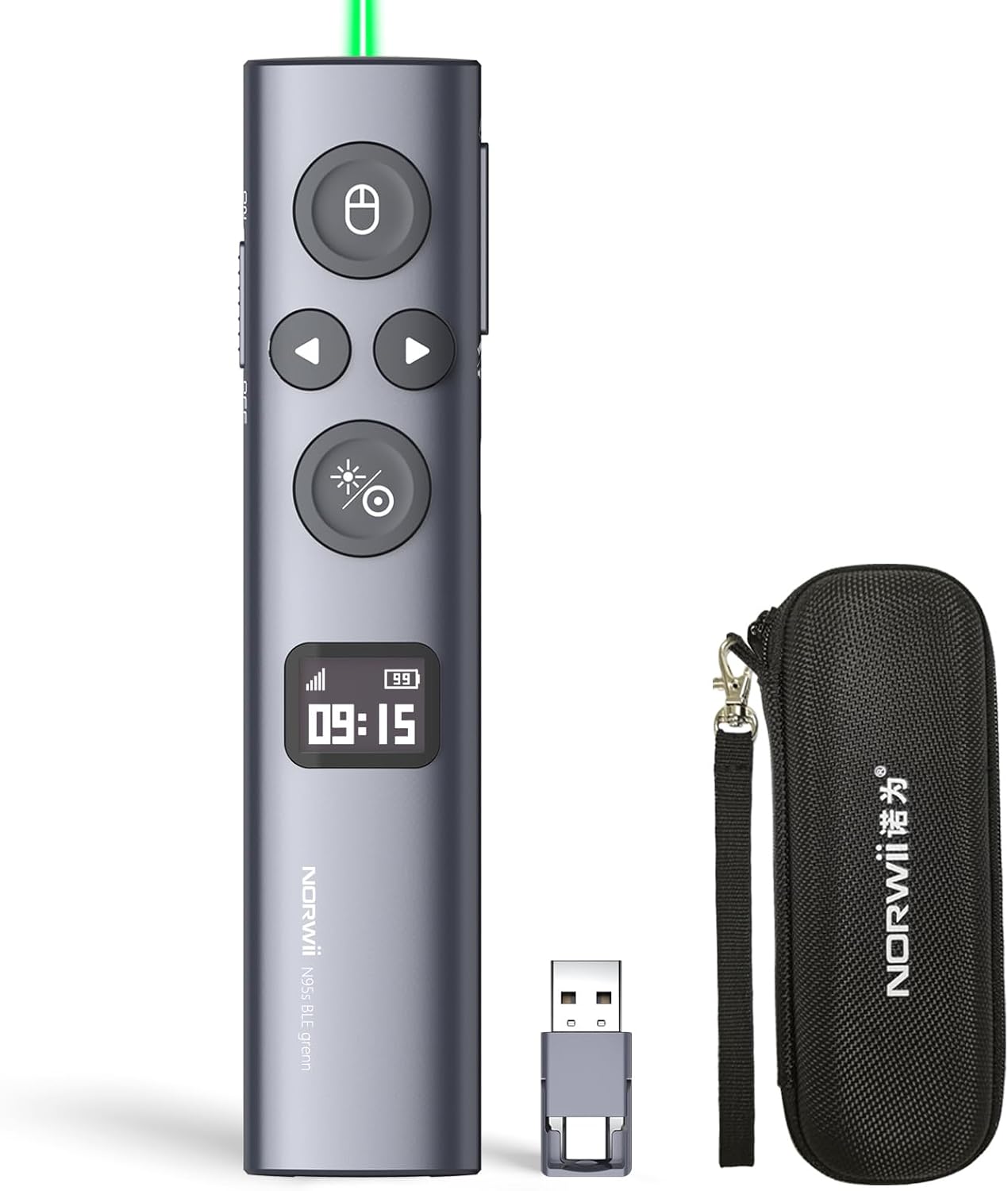
Description:
Details:
| Brand | Norwii |
|---|---|
| Special Feature | Customizable button, Mouse left click, OLED screen shows battery level and signal stength, USB-C quick charging, Vibration Alert |
| Color | Green - Ble&usb-a&c |
| Max Number of Supported Devices | 1 |
| Compatible Devices | The wireless presenter is compatible with devices operating on Windows 10 or macOS 10.15 and later versions. The digital pointer is designed for use on television screens, while the physical pointer is intended for projection screens. |
Visit the Norwii Store
Norwii N95s Presentation Remote, Slide Clicker for PowerPoint Presentations
AED24785


Quantity:
Order today to get by 7-14 business days
This item qualifies for free delivery
 Imported From: United States
At BOLO, we work hard to ensure the products you receive are new, genuine, and sourced from reputable suppliers.
Every product in the BOLO catalogue is sourced through our Verified Global Supply Network of verified sellers, authorized distributors or directly from the manufacturer.
Each product undergoes thorough inspection and verification at our consolidation and fulfilment centers to ensure it meets our strict authenticity and quality standards before being shipped and delivered to you.
If you ever have concerns regarding the authenticity of a product purchased from us, please contact Bolo Support. We will review your inquiry promptly and, if necessary, provide documentation verifying authenticity or offer a suitable resolution.
Your trust is our top priority, and we are committed to maintaining transparency and integrity in every transaction.
While we strive to display accurate information, variations in packaging, labeling, instructions, or formulation may occasionally occur due to regional differences or supplier updates. For detailed or manufacturer-specific information, please contact the brand directly or reach out to BOLO Support for assistance.
Unless otherwise stated, all prices displayed on the product page include applicable taxes and import duties.
BOLO operates in accordance with the laws and regulations of United Arab Emirates. Any items found to be restricted or prohibited for sale within the United Arab Emirates will be cancelled prior to shipment. We take proactive measures to ensure that only products permitted for sale in United Arab Emirates are listed on our website.
All items are shipped by air, and any products classified as “Dangerous Goods (DG)” under IATA regulations will be removed from the order and cancelled.
All orders are processed manually, and we make every effort to process them promptly once confirmed. Products cancelled due to the above reasons will be permanently removed from listings across the website.


-
Master the pace of your presentation with 3 times of vibration to alert the speaker.
-
Show the real battery Level with percentate value and charging status.
-
Show the Signal strength and the connect status
-
Accurately show the time which can be synchronised to the computer.
More Mouse Control Function


-
Annotate in the air to circle the key points of the presentation
-
Magnify the details in your presentation
-
Hight focus area to catch the audience's eye
-
Control the computer's system volume by moving your hand in the air
Function Map

Tips: 1) Only one type of USB receiver in one package, not 2 or more, depending your buying choice when placing the order. 2)Ensure startup the Norwii Presenter software and the presenter is connected. Enable the three authorizations and set the keyboard type as ANSI in macOS
More from this brand
Similar items from “Presentation Remotes”
Share with
Or share with link
https://www.bolo.ae/products/UO0S8J1AX2S
Visit the Norwii Store
Norwii N95s Presentation Remote, Slide Clicker for PowerPoint Presentations
AED24785
Quantity:
Order today to get by 7-14 business days
This item qualifies for free delivery
Imported From: United States
At BOLO, we work hard to ensure the products you receive are new, genuine, and sourced from reputable suppliers.
Every product in the BOLO catalogue is sourced through our Verified Global Supply Network of verified sellers, authorized distributors or directly from the manufacturer.
Each product undergoes thorough inspection and verification at our consolidation and fulfilment centers to ensure it meets our strict authenticity and quality standards before being shipped and delivered to you.
If you ever have concerns regarding the authenticity of a product purchased from us, please contact Bolo Support. We will review your inquiry promptly and, if necessary, provide documentation verifying authenticity or offer a suitable resolution.
Your trust is our top priority, and we are committed to maintaining transparency and integrity in every transaction.
While we strive to display accurate information, variations in packaging, labeling, instructions, or formulation may occasionally occur due to regional differences or supplier updates. For detailed or manufacturer-specific information, please contact the brand directly or reach out to BOLO Support for assistance.
Unless otherwise stated, all prices displayed on the product page include applicable taxes and import duties.
BOLO operates in accordance with the laws and regulations of United Arab Emirates. Any items found to be restricted or prohibited for sale within the United Arab Emirates will be cancelled prior to shipment. We take proactive measures to ensure that only products permitted for sale in United Arab Emirates are listed on our website.
All items are shipped by air, and any products classified as “Dangerous Goods (DG)” under IATA regulations will be removed from the order and cancelled.
All orders are processed manually, and we make every effort to process them promptly once confirmed. Products cancelled due to the above reasons will be permanently removed from listings across the website.
Description:
Details:
| Brand | Norwii |
|---|---|
| Special Feature | Customizable button, Mouse left click, OLED screen shows battery level and signal stength, USB-C quick charging, Vibration Alert |
| Color | Green - Ble&usb-a&c |
| Max Number of Supported Devices | 1 |
| Compatible Devices | The wireless presenter is compatible with devices operating on Windows 10 or macOS 10.15 and later versions. The digital pointer is designed for use on television screens, while the physical pointer is intended for projection screens. |
-
Master the pace of your presentation with 3 times of vibration to alert the speaker.
-
Show the real battery Level with percentate value and charging status.
-
Show the Signal strength and the connect status
-
Accurately show the time which can be synchronised to the computer.
More Mouse Control Function
-
Annotate in the air to circle the key points of the presentation
-
Magnify the details in your presentation
-
Hight focus area to catch the audience's eye
-
Control the computer's system volume by moving your hand in the air
Function Map
Tips: 1) Only one type of USB receiver in one package, not 2 or more, depending your buying choice when placing the order. 2)Ensure startup the Norwii Presenter software and the presenter is connected. Enable the three authorizations and set the keyboard type as ANSI in macOS
More from this brand
Similar items from “Presentation Remotes”
Share with
Or share with link
https://www.bolo.ae/products/UO0S8J1AX2S