Deliver toUnited Arab Emirates
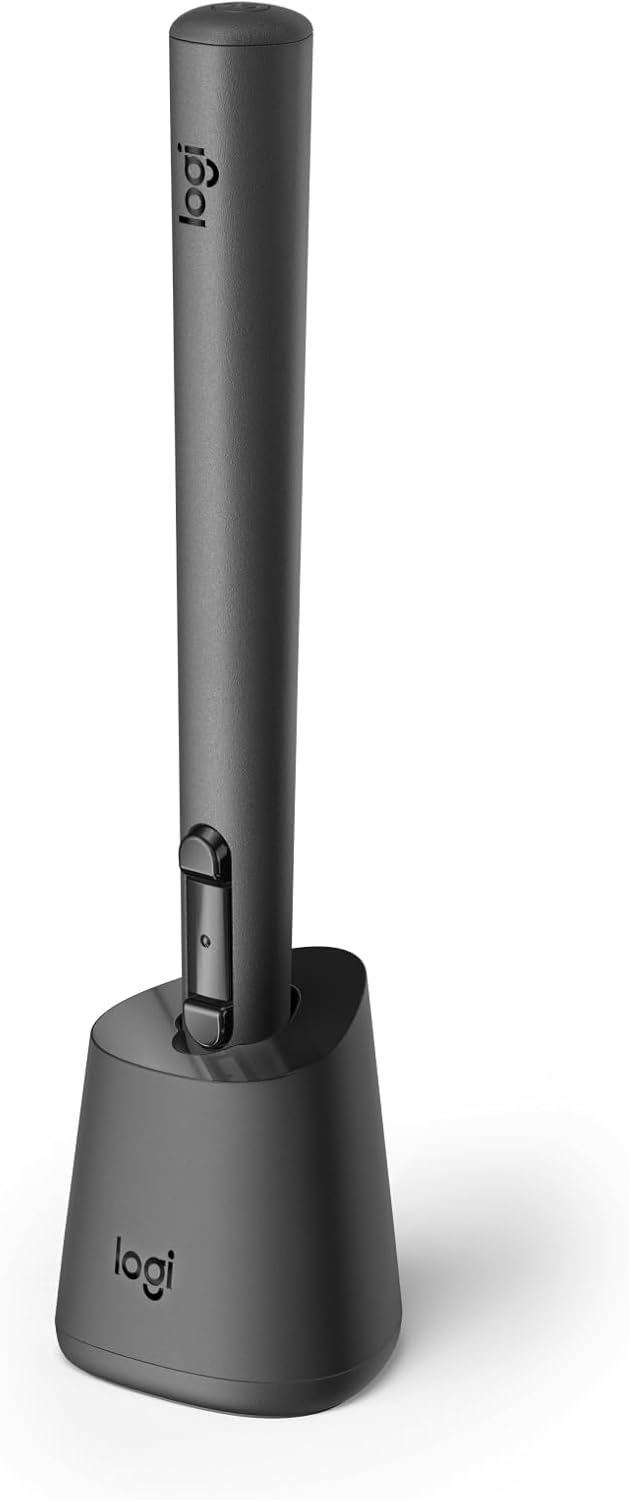
Logitech MX Ink Mixed-Reality (MR) Stylus with Charging Dock Combo, high Precision and Pressure Sensitive, Transforming Ideas in MR from 2D to 3D, for Meta Quest 2, Meta Quest 3, Meta Quest 3S

Description:

  • Experience high-precision creations and operations in Mixed Reality (MR) with the familiar feel of a pen; say goodbye to learning curves, save time, and stay seamlessly in your workflow
  • Easily recharge the wireless MX Ink stylus by simply placing it in the included MX Inkwell Charging Dock or with a USB-C cable (not included)
  • MX Ink MR Stylus is designed and built to effortlessly connect with your Meta Quest and work alongside your Meta Touch Controllers; transition smoothly from 2D to 3D, then back again without disrupting your workflow
  • Enjoy high-precision creativity and control with a pressure-sensitive tip (1 fine tip/ 1 wide tip included) and main button of this stylus; sketch, grab, move, and manipulate fluidly in mixed reality (MR)
  • Deep integration in Meta Settings lets you tailor your control, pressure curves, activation forces; select right or left-handed control, and configure button mapping
  • High-accuracy 6DoF with balanced button feel, pressure, tactility, and haptics achieves seamless spatial tracking; a must for MR applications
  • Last up to 7 hours in a typical workflow; battery life varies significantly based on headset and applications; parameters based on Meta Quest 3 usage estimates

  • MX Ink is a crafted control device with perfected pressure sensitivity and organic form - a tool you do not need to learn. Dive into your creations, in 3D and 2D, with frictionless ease. Pair and control leveraging Meta Horizon app and Meta Settings. Simple and elegant charging with the MX Inkwell Charging Dock. MX Ink was designed to be intuitive and give a masterfully fine-tuned and immersive experience.

    Reviews:

    5.0 out of 5 stars Just a game-changer. The future is now.

    J.J. · January 14, 2025

    I spent NYE drawing in mixed reality, passthrough, with my best friend in the living room using Multi/OpenBrush on our Meta Quest 3 & Pro headsets. It was insane. I got the pad that goes with this pen. We 3D painted and sculpted and then I sat at the table with the pad and transitioned seamlessly to textured 2D planar art. The pressure sensitivity, almost fully parallel button possibilities makes this feature rich AND an interesting Quest controller. I also used this pen to virtually DJ in TribeXR to precisely grip the sound controller knobs, as well as a combined mouse + joystick half/half combo using a regular Quest controller in left hand plus this pen in right hand—playing Path of Exile 2 on PC in Virtual Desktop with this pen was very fun and interesting to me. Think of it as not just an art pencil, but a stylus wand replacement for the Quest controller itself. Many apps already feature a this pen’s features into the control options or take advantage of the pressure sensitivity. I highly recommend getting this pen, it’s such a cool invention and the possibilities for creativity and game control are endless!

    5.0 out of 5 stars Worth every penny for drawing

    D. · March 19, 2025

    I love this pen! I use it with Vermillion on the Quest 3s and it truly feels like I'm using a paintbrush. I wish it had a few more buttons to make it a bit easier to navigate when using it as a temporary controller, but it works very well for it's intended purposes.Future suggestion: make it a bit more difficult to interact with the center button. I constantly hit it on accident.

    3.0 out of 5 stars Great hardware, needs software.

    S.H. · February 15, 2025

    The hardware is fabulous. I can't fault it.But there's like 4 apps which support it properly. ShapesXR, Vermillion, Thrasher, GestureVR.Meta really let Logitec down with their incomplete integration into their platform, which is a real shame because as an input device it's excellent.Though the quest does officially support the pen, Meta didn't even add the pen as a controller type in the store... Meaning developers have little incentive to add support since users of the device will be unable to find them. For example, it really is way easier to do handwriting in the air with this pen. Going back to a controller feels wrong. If you've invested lots of time learning fine motor skills with your fingers and you're frustrated that it's hard to draw with the gun-like game oriented controllers, this could really help.Using the main menu, keyboard, web and computer with it also feels really great.The other reason to get this pen is that you're a developer and you're betting that there will be a major headet that ships with a pen in the future, and you want to make an app for it.I've got a feeling it's destined to become a useless pen-shaped brick once Meta inevitably drops support though, so I'm going to get some use out of it while I can.

    2.0 out of 5 stars Gimmick glazed over with the nuance

    r. · May 20, 2025

    Way over priced for a controller that is missing a button and a toggle. I got this for tracing real world objects in gravity sketch , but I got horrendous results.Gimmick glazed over with the nuance of writing with a pen.Why pay twice as much for something your controllers can already do?Absolutely bonkers!

    5.0 out of 5 stars Great peripheral input device for VR

    M.B. · January 16, 2025

    Really nice device for VR input - it was very easy to set up and worked very well with supported VR applications like ShapesXR, Gravity Sketch, etc..

    4.0 out of 5 stars Good pen, bad product support

    A. · May 23, 2025

    Super cool and accurate, but most apps smooth out the output anyway as if it was a controller, so it COULD be used for writing with the right app, but not currently.

    5.0 out of 5 stars One of the best things for the Quest

    M. · December 20, 2024

    I can't wait to do a bigger review of this online. This is amazing, I never thought a 3D stylus could be this intuitive. And the precision is incredible.

    1.0 out of 5 stars Doesn’t Work with Pro Controllers

    d. · March 11, 2025

    If you have the Pro controllers (you know, the good ones?) you can’t use this.

    左利き注意

    ね. · July 13, 2025

    商品はいいです!でもオープンブラッシュやいくつかのアプリでは左利き使えませんでした…買う前に左利きは確認してください!

    sa sere a rien

    N. · May 26, 2025

    sa sere pas a grand chose on peux fair la meme chose avec les mannette touch

    Logitech MX Ink Mixed-Reality (MR) Stylus with Charging Dock Combo, high Precision and Pressure Sensitive, Transforming Ideas in MR from 2D to 3D, for Meta Quest 2, Meta Quest 3, Meta Quest 3S

    Product ID: UO0QT1X5ID7
    Condition: New

    4

    AED1,08165

    Price includes VAT & Import Duties
    Style: Stylus + Cradle
    Availability: In Stock

    Quantity:

    |

    Order today to get by 7-14 business days

    This item qualifies for free delivery

    Returns & Warranty policies

    Imported From: United States

    At BOLO, we work hard to ensure the products you receive are new, genuine, and sourced from reputable suppliers.

    BOLO is not an authorized or official retailer for most brands, nor are we affiliated with manufacturers unless specifically stated on a product page. Instead, we source verified sellers, authorized distributors or directly from the manufacturer.

    Each product undergoes thorough inspection and verification at our consolidation and fulfilment centers to ensure it meets our strict authenticity and quality standards before being shipped and delivered to you.

    If you ever have concerns regarding the authenticity of a product purchased from us, please contact Bolo Support. We will review your inquiry promptly and, if necessary, provide documentation verifying authenticity or offer a suitable resolution.

    Your trust is our top priority, and we are committed to maintaining transparency and integrity in every transaction.

    All product information, images, descriptions, and reviews originate from the manufacturer or from trusted sellers overseas. BOLO is not affiliated with, endorsed by, or an authorized retailer for most brands listed on our website unless stated otherwise.

    While we strive to display accurate information, variations in packaging, labeling, instructions, or formulation may occasionally occur due to regional differences or supplier updates. For detailed or manufacturer-specific information, please contact the brand directly or reach out to BOLO Support for assistance.

    Unless otherwise stated, all prices displayed on the product page include applicable taxes and import duties.

    BOLO operates in accordance with the laws and regulations of United Arab Emirates. Any items found to be restricted or prohibited for sale within the UAE will be cancelled prior to shipment. We take proactive measures to ensure that only products permitted for sale in United Arab Emirates are listed on our website.

    All items are shipped by air, and any products classified as “Dangerous Goods (DG)” under IATA regulations will be removed from the order and cancelled.

    All orders are processed manually, and we make every effort to process them promptly once confirmed. Products cancelled due to the above reasons will be permanently removed from listings across the website.

    Similar suggestions by Bolo

    More from this brand

    Similar items from “Digital Pens”

    Logitech MX Ink Mixed-Reality (MR) Stylus with Charging Dock Combo, high Precision and Pressure Sensitive, Transforming Ideas in MR from 2D to 3D, for Meta Quest 2, Meta Quest 3, Meta Quest 3S

    Product ID: UO0QT1X5ID7
    Condition: New

    4

    Logitech MX Ink Mixed-Reality (MR) Stylus with Charging Dock Combo, high Precision and Pressure Sensitive, Transforming Ideas in MR from 2D to 3D, for Meta Quest 2, Meta Quest 3, Meta Quest 3S-0
    Style: Stylus + Cradle

    AED1,08165

    Price includes VAT & Import Duties
    Availability: In Stock

    Quantity:

    |

    Order today to get by 7-14 business days

    This item qualifies for free delivery

    Returns & Warranty policies

    Imported From: United States

    At BOLO, we work hard to ensure the products you receive are new, genuine, and sourced from reputable suppliers.

    BOLO is not an authorized or official retailer for most brands, nor are we affiliated with manufacturers unless specifically stated on a product page. Instead, we source verified sellers, authorized distributors or directly from the manufacturer.

    Each product undergoes thorough inspection and verification at our consolidation and fulfilment centers to ensure it meets our strict authenticity and quality standards before being shipped and delivered to you.

    If you ever have concerns regarding the authenticity of a product purchased from us, please contact Bolo Support. We will review your inquiry promptly and, if necessary, provide documentation verifying authenticity or offer a suitable resolution.

    Your trust is our top priority, and we are committed to maintaining transparency and integrity in every transaction.

    All product information, images, descriptions, and reviews originate from the manufacturer or from trusted sellers overseas. BOLO is not affiliated with, endorsed by, or an authorized retailer for most brands listed on our website unless stated otherwise.

    While we strive to display accurate information, variations in packaging, labeling, instructions, or formulation may occasionally occur due to regional differences or supplier updates. For detailed or manufacturer-specific information, please contact the brand directly or reach out to BOLO Support for assistance.

    Unless otherwise stated, all prices displayed on the product page include applicable taxes and import duties.

    BOLO operates in accordance with the laws and regulations of United Arab Emirates. Any items found to be restricted or prohibited for sale within the UAE will be cancelled prior to shipment. We take proactive measures to ensure that only products permitted for sale in United Arab Emirates are listed on our website.

    All items are shipped by air, and any products classified as “Dangerous Goods (DG)” under IATA regulations will be removed from the order and cancelled.

    All orders are processed manually, and we make every effort to process them promptly once confirmed. Products cancelled due to the above reasons will be permanently removed from listings across the website.

    Description:

  • Experience high-precision creations and operations in Mixed Reality (MR) with the familiar feel of a pen; say goodbye to learning curves, save time, and stay seamlessly in your workflow
  • Easily recharge the wireless MX Ink stylus by simply placing it in the included MX Inkwell Charging Dock or with a USB-C cable (not included)
  • MX Ink MR Stylus is designed and built to effortlessly connect with your Meta Quest and work alongside your Meta Touch Controllers; transition smoothly from 2D to 3D, then back again without disrupting your workflow
  • Enjoy high-precision creativity and control with a pressure-sensitive tip (1 fine tip/ 1 wide tip included) and main button of this stylus; sketch, grab, move, and manipulate fluidly in mixed reality (MR)
  • Deep integration in Meta Settings lets you tailor your control, pressure curves, activation forces; select right or left-handed control, and configure button mapping
  • High-accuracy 6DoF with balanced button feel, pressure, tactility, and haptics achieves seamless spatial tracking; a must for MR applications
  • Last up to 7 hours in a typical workflow; battery life varies significantly based on headset and applications; parameters based on Meta Quest 3 usage estimates

  • MX Ink is a crafted control device with perfected pressure sensitivity and organic form - a tool you do not need to learn. Dive into your creations, in 3D and 2D, with frictionless ease. Pair and control leveraging Meta Horizon app and Meta Settings. Simple and elegant charging with the MX Inkwell Charging Dock. MX Ink was designed to be intuitive and give a masterfully fine-tuned and immersive experience.

    Reviews:

    5.0 out of 5 stars Just a game-changer. The future is now.

    J.J. · January 14, 2025

    I spent NYE drawing in mixed reality, passthrough, with my best friend in the living room using Multi/OpenBrush on our Meta Quest 3 & Pro headsets. It was insane. I got the pad that goes with this pen. We 3D painted and sculpted and then I sat at the table with the pad and transitioned seamlessly to textured 2D planar art. The pressure sensitivity, almost fully parallel button possibilities makes this feature rich AND an interesting Quest controller. I also used this pen to virtually DJ in TribeXR to precisely grip the sound controller knobs, as well as a combined mouse + joystick half/half combo using a regular Quest controller in left hand plus this pen in right hand—playing Path of Exile 2 on PC in Virtual Desktop with this pen was very fun and interesting to me. Think of it as not just an art pencil, but a stylus wand replacement for the Quest controller itself. Many apps already feature a this pen’s features into the control options or take advantage of the pressure sensitivity. I highly recommend getting this pen, it’s such a cool invention and the possibilities for creativity and game control are endless!

    5.0 out of 5 stars Worth every penny for drawing

    D. · March 19, 2025

    I love this pen! I use it with Vermillion on the Quest 3s and it truly feels like I'm using a paintbrush. I wish it had a few more buttons to make it a bit easier to navigate when using it as a temporary controller, but it works very well for it's intended purposes.Future suggestion: make it a bit more difficult to interact with the center button. I constantly hit it on accident.

    3.0 out of 5 stars Great hardware, needs software.

    S.H. · February 15, 2025

    The hardware is fabulous. I can't fault it.But there's like 4 apps which support it properly. ShapesXR, Vermillion, Thrasher, GestureVR.Meta really let Logitec down with their incomplete integration into their platform, which is a real shame because as an input device it's excellent.Though the quest does officially support the pen, Meta didn't even add the pen as a controller type in the store... Meaning developers have little incentive to add support since users of the device will be unable to find them. For example, it really is way easier to do handwriting in the air with this pen. Going back to a controller feels wrong. If you've invested lots of time learning fine motor skills with your fingers and you're frustrated that it's hard to draw with the gun-like game oriented controllers, this could really help.Using the main menu, keyboard, web and computer with it also feels really great.The other reason to get this pen is that you're a developer and you're betting that there will be a major headet that ships with a pen in the future, and you want to make an app for it.I've got a feeling it's destined to become a useless pen-shaped brick once Meta inevitably drops support though, so I'm going to get some use out of it while I can.

    2.0 out of 5 stars Gimmick glazed over with the nuance

    r. · May 20, 2025

    Way over priced for a controller that is missing a button and a toggle. I got this for tracing real world objects in gravity sketch , but I got horrendous results.Gimmick glazed over with the nuance of writing with a pen.Why pay twice as much for something your controllers can already do?Absolutely bonkers!

    5.0 out of 5 stars Great peripheral input device for VR

    M.B. · January 16, 2025

    Really nice device for VR input - it was very easy to set up and worked very well with supported VR applications like ShapesXR, Gravity Sketch, etc..

    4.0 out of 5 stars Good pen, bad product support

    A. · May 23, 2025

    Super cool and accurate, but most apps smooth out the output anyway as if it was a controller, so it COULD be used for writing with the right app, but not currently.

    5.0 out of 5 stars One of the best things for the Quest

    M. · December 20, 2024

    I can't wait to do a bigger review of this online. This is amazing, I never thought a 3D stylus could be this intuitive. And the precision is incredible.

    1.0 out of 5 stars Doesn’t Work with Pro Controllers

    d. · March 11, 2025

    If you have the Pro controllers (you know, the good ones?) you can’t use this.

    左利き注意

    ね. · July 13, 2025

    商品はいいです!でもオープンブラッシュやいくつかのアプリでは左利き使えませんでした…買う前に左利きは確認してください!

    sa sere a rien

    N. · May 26, 2025

    sa sere pas a grand chose on peux fair la meme chose avec les mannette touch

    Similar suggestions by Bolo

    More from this brand

    Similar items from “Digital Pens”