Description:
Reviews:
5.0 out of 5 stars Do it
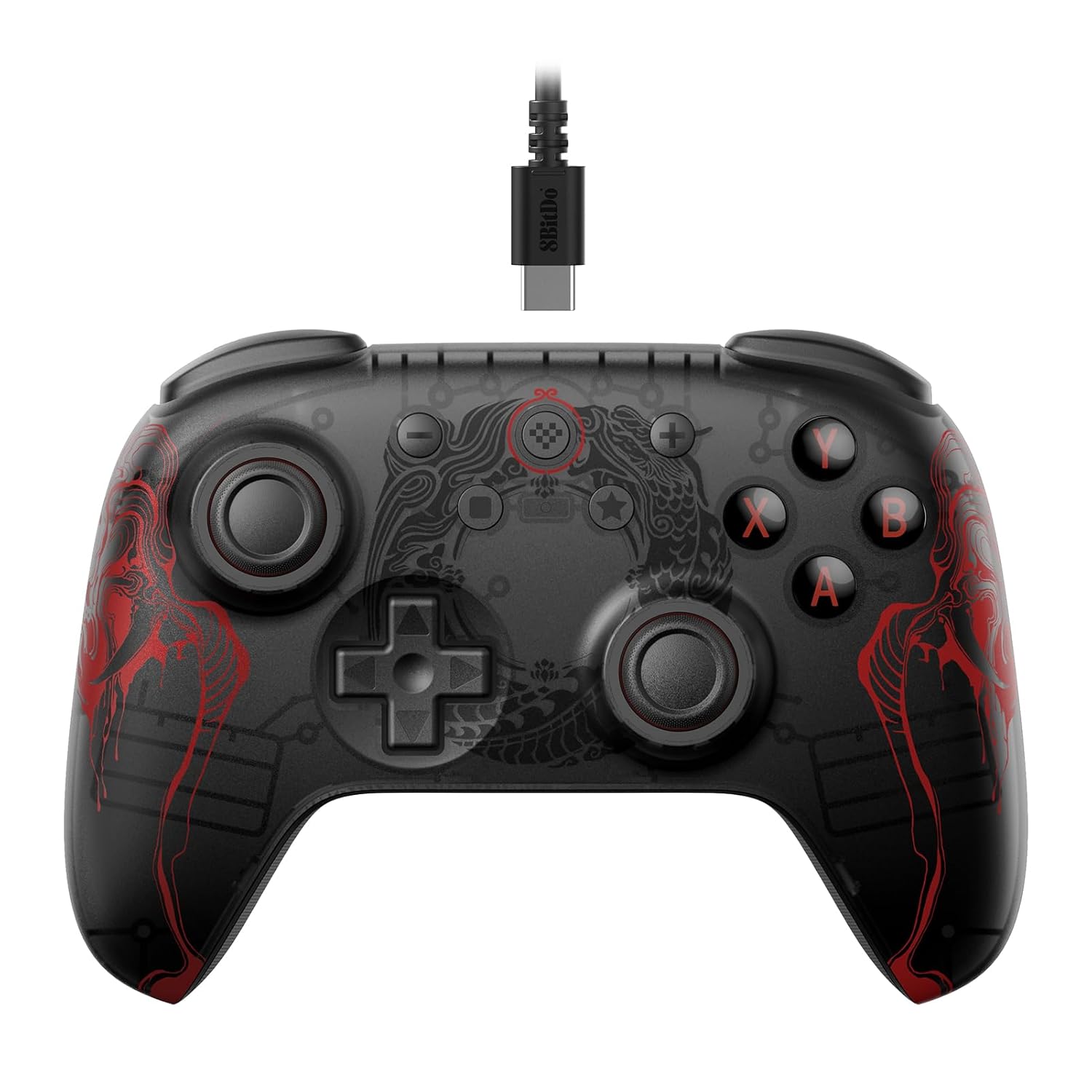
First off, for the current price of barely more than an Andy, this is a no brainer. If you're even slightly considering getting a controller in this category, just do it and save yourself the headache of overthinking it.The good bits. Spoiler: there aren't any actually bad bits. This controller (the Wukong version) looks quite nice, feels good in the hand, and works great. It would be rather difficult to have any issue at all with the basic functionality. It is one of these new-fangled controllers with detachable cable, and the included cable is pretty beefy. Thicker than any of my other USB-C charging cables. All of the buttons are well placed, the sticks are amazing (remniscent of Xbox 360 controller), and the texture of the plastic keeps the controller from feeling slippery. The d-pad is quite alright having a feel perfectly in between mushy and clicky. Probably not going to want to play a fighting game with it, but it's perfect for those utility functions that the d-pad is often assigned in modern games. R4 and L4 are perfectly placed where they aren't too easy to hit accidentally, but also not too hard to hit intentionally. Vibration works out of the box in XInput with no effort from the user. Hall effect sticks and triggers are as accurate as you are.Ok, the "bad" parts. This controller is smaller than it looks. I don't have huge hands and my thumbs can easily overlap at the guide button without adjusting my grip. Not sure why that would be a problem, but whatever. The software has no use for this controller other than updating the firmware. R4/L4 can only be bound with the buttons on the controller itself. This controller presents itself to Windows 11 as a 360 controller, so there is no share button. DirectInput sees it as a 5 axis, 1 POV, 10 button controller, so no Guide button there. The extra buttons (square/bind, star/auto) cannot be set as buttons visible to software, and R4/L4 cannot be set to anything except pre-existing buttons or a combination thereof. If you were hoping to use R4/L4 as legit extra buttons or anything like that, too bad.Having said that, if you're in the market for a modern XInput controller, I have no idea why you would get anything else. The price is too low to ignore, and the quality is there.
5.0 out of 5 stars Well worth the money. High quality
Very good controller for the price. It is very high quality. Has a good weight and looks feels and delivers quality results during use. Well worth it.
5.0 out of 5 stars Great "Budget" Controller That Replaced My XBox Controller
Recently, after about 9 months, my Xbox Shock Blue controller started to experience really bad stick drift in the left analog stick. This was extremely disappointing, especially since the warranty was only 90-days on it. I proceeded to research 3rd party controllers with Hall Effect or TMR sticks. After much research (and needing a controller immediately), I came across the 8bitDo Ultimate 2C controller. I was leaning towards a wireless controller, but I didn't even use wireless with my Shock Blue, so I decided to go with the less expensive 2C version. I was not a fan of the colors until I found the Black Myth Wukong edition which was just $1 USD more. Since it was more like a darker colored controller, I decided to order it based off the many reviews on Bolo and on YouTube. Make no mistake, this is the same as the other Ultimate 2C wired controllers, it's just that it's themed with a Black Myth Wukong design. And it's not totally black as it is transparent if you hold it at the right angle, giving you a peek at the insides of your controller. Also, all 8BitDo controllers come with a one-year manufacturer's warranty, unlike the 90-day warranty for non-Elite Xbox controllers.It comes packaged nicely in a box with Sun Wukong on the cover. Inside, it was wrapped in an EPE bag and was inside a cardboard holder, being held firmly in place so it won't rattle around in the box. The included 1.8m cable was wrapped up nicely as well. Also included was a fold-out set of instructions which is pretty barebones. Not a lot in there and pretty simplistic, but it does give a diagram of the various buttons, including the programming buttons to program the L4/R4 buttons, as well as the button used to enable or disable turbo-mode on specific buttons.Once I unpackaged it and hooked it up to my PC, it was instantly recognized and worked right out of the box. No software to install and the current drivers worked with no issues. I went to the Gamepad Tester site and tested all the buttons, sticks, and the d-pad and they all registered correctly.I myself have fairly long fingers so my hands can seem very large. I loved the feel of the Xbox Shock Blue controller, especially how my thumbs would comfortable rest exactly on top of the two analog sticks. Reviews of the 8BitDo had me a bit worried because many who used it felt it caused them to fold their elbows inward towards the body, giving an unnatural feeling due to how the handles do not fan out as far as the Xbox Controller handles do. But for me, I can't really feel the difference. My main worry was how much with my hands turned inward more than on my Xbox controller would cause my thumbs to possibly extend past the sticks, causing possible fatigue. After several hours of gaming, I can say it feels no different. My thumbs rest comfortably on top of the sticks, and it feels pretty much the same as it did on my Xbox controller. I find that I do have to grip a little higher if I want to easily reach the L4/R4 buttons without accidentally pressing down on the L3/R4 bumpers, but it's still very comfortable.The responsiveness of the sticks, and how they move, feels SO much better to me than on my Xbox controller. And I felt that on my Xbox controller, those sticks moved smoothly and didn't feel like there was a lot of resistance, unlike my Xbox 360 controller where the sticks, triggers, and buttons all felt very stiff. With this, the action is even smoother and feels more responsive, and I really like that.The button placement for the standard X/Y/A/B, bumpers and triggers feel just fine. My only gripe is where the start and menu buttons are. They are immediately up higher and in line with what would be the Xbox button on an Xbox controller. Below are the left square button (for programming the L$/R4 buttons), and the right star button (for turbo mode). Those are what I keep pressing due to muscle memory because they are where the Start and Menu buttons were on my Xbox controller. So that has taken some getting used to. This is really my only "gripe" with this controller, but it's not a deal breaker for me and does not take away from how great this controller really is.The L4/R4 extra buttons location had me worried before I received the controller. I wanted to use them to reprogram/duplicate the functions of some of the other buttons (such as X/Y/A/B or L3/R3), especially in games where maybe the run button is A (such as in some Souls-games). Having an extra run button on the L4/R4 means I no longer have to take my right thumb off of the right stick, so I can still change the camera while running.My fear was if I tried to press the L4/R4 button, I might accidentally press the L2/R2 button. However, the location height-wise is halfway between the Bumper and Trigger and actually is placed very well where I only need to slightly extend my index finger a bit out and down to "click" it. I have yet to accidentally press the bumper or the trigger. I can say for me, it works well as long as I shift my grip up a little higher, but the overall feel and comfort feels perfect. I cannot say how someone with smaller hands and/or shorter fingers might feel about it. It might seem like you have to stretch your finger farther. I wish I could say whether this is true or not, but I have long fingers, so it works well for me. I will say this, if your fingertip can reach up to the outside edge of the Left or Right bumper, you'll probably have no problem with the L4/R4 button. Just something to keep in mind.As for all of the buttons, they respond nicely. I can't tell, but I do not believe they are membrane buttons, as they give a very tactile "clicky" feel to them that is quick in responsiveness. I don't feel like I have to press hard on them. Definitely, not a mushy feeling like on my Shock Blue controller and I can say, I like it a lot. It took some getting used to, but it didn't take long and even when using it for the first time, it just felt right and I didn't have any issues with it.The d-pad was another concern for me. I liked the one on the Shock Blue because I felt the diagonal positions were more easily pressed and I wasn't sure how easy it would be when it's a cross instead of a circular pad. Also, these appear to be tactile switches as well which I have actually grown to like. The d-pad definitely gives a "clicky" feeling that some may not like. But for me, I got used to it very quickly and I like it. My fear of the diagonal presses diminished a lot after using this controller for a few days. What I found out is now I am less likely to accidentally press diagonally when I meant to press up, down, left, or right which has resulted in extremely less input errors, especially if the game uses all 8 positions as opposed to four. I have yet to try this with a game that uses tank controls (such as Resident Evil 1 Remake, or Resident Evil 0), but I think it should still work out fine.The textured handles feel fine. They're not rubber, but it still can help in those "sweaty" sessions where your hands can get sweaty. It doesn't feel rough, and overall, it feels comfortable and not annoying. The rumble motors feel great as well. Not too strong but yet gives enough to make it feel pretty much the same as my Xbox controller did.As for software, I recommend going to 8BitDo's web site and getting the software for the controller. Just be aware the software only is used to update the firmware, which I suggest doing to ensure you have the latest firmware installed. You just hook up the controller to your PC via the USB cable, launch the software, and click the update button. The software will not allow you reprogram the L4/R4 buttons, even though in other versions of the controller, it will.In order to program the L4/R4 buttons, you just press the square button + either the L4 or R4 button (depending on which you want to program), and while holding down on those two, you can press another button (X/Y/A/B/L1/R1/L2/R2/L3/R3/dpad direction) to make it be a copy of that button. With the star button, press and hold the star button, then press any of the other buttons and it turns that button into a rapid-fire button. To turn it off, just hold down star and the button you programmed, and it will turn it back to a single click button. Also, when you program a button to be rapid fire, when you press it, there is an LED light between the square and star button that will flash rapidly when pressing the programmed button. That lets you know that the button is in rapid-fire mode. Turning off rapid fire means the LED will not light up at all. This LED will also flash when you have the L4/R4 button programmed. So, it's a nice feedback feature implemented in the controller.I got this at $20 USD when it's normally $24.99 USD. Overall, even at $24.99 USD for the Wukong edition ($20 for the normal Ultimate 2C), you can't really complain! You get a controller that doesn't feel cheap, actually has some weight to it, and has enough features to make this a great alternative to an Xbox controller for your PC. No extra software is needed except the Ultimate Software to update the firmware. Otherwise, plug it in and it just works for PC. The responsiveness of the buttons, and d-pad are great. The triggers and the analog sticks are Hall Effect and are smooth and very responsive. Definitely a must-buy for those looking to replace their existing controller that might have stick drift or other issues and are not wanting to spend $50+ USD. You also get a one-year manufacturer's warranty which is much better than the 90-day warranty you get for non-Elite Xbox controllers from Microsoft. Xbox needs to rethink this for their non-Elite controllers. 90-days is not enough.Highly recommend this for gamers. Well worth it for the price and the one-year warranty.
安いのに大満足
重すぎず軽すぎず、ちょうど良い持ち具合ですスティックやボタンの反応も今のところは気になりません追加のボタンも背面じゃないのが気になりましたが、自分の使用用途では問題なく使えています既存のABXYといったボタンをトリガーのところにある小さなボタンでも使用できるようにするだけのシンプルな追加ボタンなので、キーボードのとあるキーを割り当てたい等といった使い方はできないので気をつけて下さい
Excellent controller, excellent price!
Great low-cost controller option for PC. With hall effect sticks that won't drift, and responsive feeling buttons. The best wired controller that I've used.
Unschlagbare Qualität und Leistung für den Preis! 🎮
Das ist ohne Zweifel der BESTE Controller, den man für unter 30 Euro finden kann. Die Hall-Effekt-Joysticks sind revolutionär – absolut flüssig und präzise ohne Drift. Alle Tasten fühlen sich unglaublich taktil und reaktionsschnell an, was das Spielen zu einer wahren Freude macht.Die Verarbeitungsqualität ist für den Preis überraschend solide. Ich habe mir den blauen und den pinken geholt, und beide sehen fantastisch aus. Ein wirklich nettes Detail ist, dass das mitgelieferte USB-C-Ladekabel farblich auf den Controller abgestimmt ist!Die Verbindung mit meinem PC ist super schnell und zuverlässig, und der Wechsel zu Bluetooth, um ihn mit meinem Tablet zu verwenden, ist nahtlos. Er liegt auch bei langen Gaming-Sessions super in der Hand. Ich kann diesen Controller nur wärmstens empfehlen – er schlägt teurere Optionen um Längen.
Only for USB 3
Does not work on every USB port for the rest it is good
rapport qualité prix imbattable
Parfait pour moi pour jouer sur un pc, n'ayant pas de consoles de salon je n'ai pas trop d'éléments de comparaison avec les manettes Xbox ou Sony. Peu être un peu petite si on a de grandes mains (fatigue musculaire sur des sessions de jeux intenses) sinon la qualité est irréprochable. les vibrations sont bien restituées sur un jeu de rally.attention c'est bien la version filaire, il existe aussi une version sans fil si c'est important pour vous.
Visit the 8Bitdo Store
8BitDo Ultimate 2C Wired Controller for Windows PC and Android, with Hall Effect Joysticks and Hall Triggers, 1000Hz Polling Rate, and Remappable L4/R4 Bumpers - Black Myth: Wukong
AED15015


Quantity:
Order today to get by 7-14 business days
Delivery fee of AED 20. Free for orders above AED 200.
Imported From: United States
At BOLO, we work hard to ensure the products you receive are new, genuine, and sourced from reputable suppliers.
BOLO is not an authorized or official retailer for most brands, nor are we affiliated with manufacturers unless specifically stated on a product page. Instead, we source verified sellers, authorized distributors or directly from the manufacturer.
Each product undergoes thorough inspection and verification at our consolidation and fulfilment centers to ensure it meets our strict authenticity and quality standards before being shipped and delivered to you.
If you ever have concerns regarding the authenticity of a product purchased from us, please contact Bolo Support. We will review your inquiry promptly and, if necessary, provide documentation verifying authenticity or offer a suitable resolution.
Your trust is our top priority, and we are committed to maintaining transparency and integrity in every transaction.
All product information, images, descriptions, and reviews originate from the manufacturer or from trusted sellers overseas. BOLO is not affiliated with, endorsed by, or an authorized retailer for most brands listed on our website unless stated otherwise.
While we strive to display accurate information, variations in packaging, labeling, instructions, or formulation may occasionally occur due to regional differences or supplier updates. For detailed or manufacturer-specific information, please contact the brand directly or reach out to BOLO Support for assistance.
Unless otherwise stated, all prices displayed on the product page include applicable taxes and import duties.
BOLO operates in accordance with the laws and regulations of United Arab Emirates. Any items found to be restricted or prohibited for sale within the UAE will be cancelled prior to shipment. We take proactive measures to ensure that only products permitted for sale in United Arab Emirates are listed on our website.
All items are shipped by air, and any products classified as “Dangerous Goods (DG)” under IATA regulations will be removed from the order and cancelled.
All orders are processed manually, and we make every effort to process them promptly once confirmed. Products cancelled due to the above reasons will be permanently removed from listings across the website.
Similar suggestions by Bolo
More from this brand
Similar items from “Controllers”
Share with
Or share with link
https://www.bolo.ae/products/UO0QO4AEGOC
Visit the 8Bitdo Store
8BitDo Ultimate 2C Wired Controller for Windows PC and Android, with Hall Effect Joysticks and Hall Triggers, 1000Hz Polling Rate, and Remappable L4/R4 Bumpers - Black Myth: Wukong


AED15015
Quantity:
Order today to get by 7-14 business days
Delivery fee of AED 20. Free for orders above AED 200.
Imported From: United States
At BOLO, we work hard to ensure the products you receive are new, genuine, and sourced from reputable suppliers.
BOLO is not an authorized or official retailer for most brands, nor are we affiliated with manufacturers unless specifically stated on a product page. Instead, we source verified sellers, authorized distributors or directly from the manufacturer.
Each product undergoes thorough inspection and verification at our consolidation and fulfilment centers to ensure it meets our strict authenticity and quality standards before being shipped and delivered to you.
If you ever have concerns regarding the authenticity of a product purchased from us, please contact Bolo Support. We will review your inquiry promptly and, if necessary, provide documentation verifying authenticity or offer a suitable resolution.
Your trust is our top priority, and we are committed to maintaining transparency and integrity in every transaction.
All product information, images, descriptions, and reviews originate from the manufacturer or from trusted sellers overseas. BOLO is not affiliated with, endorsed by, or an authorized retailer for most brands listed on our website unless stated otherwise.
While we strive to display accurate information, variations in packaging, labeling, instructions, or formulation may occasionally occur due to regional differences or supplier updates. For detailed or manufacturer-specific information, please contact the brand directly or reach out to BOLO Support for assistance.
Unless otherwise stated, all prices displayed on the product page include applicable taxes and import duties.
BOLO operates in accordance with the laws and regulations of United Arab Emirates. Any items found to be restricted or prohibited for sale within the UAE will be cancelled prior to shipment. We take proactive measures to ensure that only products permitted for sale in United Arab Emirates are listed on our website.
All items are shipped by air, and any products classified as “Dangerous Goods (DG)” under IATA regulations will be removed from the order and cancelled.
All orders are processed manually, and we make every effort to process them promptly once confirmed. Products cancelled due to the above reasons will be permanently removed from listings across the website.
Description:
Reviews:
5.0 out of 5 stars Do it
First off, for the current price of barely more than an Andy, this is a no brainer. If you're even slightly considering getting a controller in this category, just do it and save yourself the headache of overthinking it.The good bits. Spoiler: there aren't any actually bad bits. This controller (the Wukong version) looks quite nice, feels good in the hand, and works great. It would be rather difficult to have any issue at all with the basic functionality. It is one of these new-fangled controllers with detachable cable, and the included cable is pretty beefy. Thicker than any of my other USB-C charging cables. All of the buttons are well placed, the sticks are amazing (remniscent of Xbox 360 controller), and the texture of the plastic keeps the controller from feeling slippery. The d-pad is quite alright having a feel perfectly in between mushy and clicky. Probably not going to want to play a fighting game with it, but it's perfect for those utility functions that the d-pad is often assigned in modern games. R4 and L4 are perfectly placed where they aren't too easy to hit accidentally, but also not too hard to hit intentionally. Vibration works out of the box in XInput with no effort from the user. Hall effect sticks and triggers are as accurate as you are.Ok, the "bad" parts. This controller is smaller than it looks. I don't have huge hands and my thumbs can easily overlap at the guide button without adjusting my grip. Not sure why that would be a problem, but whatever. The software has no use for this controller other than updating the firmware. R4/L4 can only be bound with the buttons on the controller itself. This controller presents itself to Windows 11 as a 360 controller, so there is no share button. DirectInput sees it as a 5 axis, 1 POV, 10 button controller, so no Guide button there. The extra buttons (square/bind, star/auto) cannot be set as buttons visible to software, and R4/L4 cannot be set to anything except pre-existing buttons or a combination thereof. If you were hoping to use R4/L4 as legit extra buttons or anything like that, too bad.Having said that, if you're in the market for a modern XInput controller, I have no idea why you would get anything else. The price is too low to ignore, and the quality is there.
5.0 out of 5 stars Well worth the money. High quality
Very good controller for the price. It is very high quality. Has a good weight and looks feels and delivers quality results during use. Well worth it.
5.0 out of 5 stars Great "Budget" Controller That Replaced My XBox Controller
Recently, after about 9 months, my Xbox Shock Blue controller started to experience really bad stick drift in the left analog stick. This was extremely disappointing, especially since the warranty was only 90-days on it. I proceeded to research 3rd party controllers with Hall Effect or TMR sticks. After much research (and needing a controller immediately), I came across the 8bitDo Ultimate 2C controller. I was leaning towards a wireless controller, but I didn't even use wireless with my Shock Blue, so I decided to go with the less expensive 2C version. I was not a fan of the colors until I found the Black Myth Wukong edition which was just $1 USD more. Since it was more like a darker colored controller, I decided to order it based off the many reviews on Bolo and on YouTube. Make no mistake, this is the same as the other Ultimate 2C wired controllers, it's just that it's themed with a Black Myth Wukong design. And it's not totally black as it is transparent if you hold it at the right angle, giving you a peek at the insides of your controller. Also, all 8BitDo controllers come with a one-year manufacturer's warranty, unlike the 90-day warranty for non-Elite Xbox controllers.It comes packaged nicely in a box with Sun Wukong on the cover. Inside, it was wrapped in an EPE bag and was inside a cardboard holder, being held firmly in place so it won't rattle around in the box. The included 1.8m cable was wrapped up nicely as well. Also included was a fold-out set of instructions which is pretty barebones. Not a lot in there and pretty simplistic, but it does give a diagram of the various buttons, including the programming buttons to program the L4/R4 buttons, as well as the button used to enable or disable turbo-mode on specific buttons.Once I unpackaged it and hooked it up to my PC, it was instantly recognized and worked right out of the box. No software to install and the current drivers worked with no issues. I went to the Gamepad Tester site and tested all the buttons, sticks, and the d-pad and they all registered correctly.I myself have fairly long fingers so my hands can seem very large. I loved the feel of the Xbox Shock Blue controller, especially how my thumbs would comfortable rest exactly on top of the two analog sticks. Reviews of the 8BitDo had me a bit worried because many who used it felt it caused them to fold their elbows inward towards the body, giving an unnatural feeling due to how the handles do not fan out as far as the Xbox Controller handles do. But for me, I can't really feel the difference. My main worry was how much with my hands turned inward more than on my Xbox controller would cause my thumbs to possibly extend past the sticks, causing possible fatigue. After several hours of gaming, I can say it feels no different. My thumbs rest comfortably on top of the sticks, and it feels pretty much the same as it did on my Xbox controller. I find that I do have to grip a little higher if I want to easily reach the L4/R4 buttons without accidentally pressing down on the L3/R4 bumpers, but it's still very comfortable.The responsiveness of the sticks, and how they move, feels SO much better to me than on my Xbox controller. And I felt that on my Xbox controller, those sticks moved smoothly and didn't feel like there was a lot of resistance, unlike my Xbox 360 controller where the sticks, triggers, and buttons all felt very stiff. With this, the action is even smoother and feels more responsive, and I really like that.The button placement for the standard X/Y/A/B, bumpers and triggers feel just fine. My only gripe is where the start and menu buttons are. They are immediately up higher and in line with what would be the Xbox button on an Xbox controller. Below are the left square button (for programming the L$/R4 buttons), and the right star button (for turbo mode). Those are what I keep pressing due to muscle memory because they are where the Start and Menu buttons were on my Xbox controller. So that has taken some getting used to. This is really my only "gripe" with this controller, but it's not a deal breaker for me and does not take away from how great this controller really is.The L4/R4 extra buttons location had me worried before I received the controller. I wanted to use them to reprogram/duplicate the functions of some of the other buttons (such as X/Y/A/B or L3/R3), especially in games where maybe the run button is A (such as in some Souls-games). Having an extra run button on the L4/R4 means I no longer have to take my right thumb off of the right stick, so I can still change the camera while running.My fear was if I tried to press the L4/R4 button, I might accidentally press the L2/R2 button. However, the location height-wise is halfway between the Bumper and Trigger and actually is placed very well where I only need to slightly extend my index finger a bit out and down to "click" it. I have yet to accidentally press the bumper or the trigger. I can say for me, it works well as long as I shift my grip up a little higher, but the overall feel and comfort feels perfect. I cannot say how someone with smaller hands and/or shorter fingers might feel about it. It might seem like you have to stretch your finger farther. I wish I could say whether this is true or not, but I have long fingers, so it works well for me. I will say this, if your fingertip can reach up to the outside edge of the Left or Right bumper, you'll probably have no problem with the L4/R4 button. Just something to keep in mind.As for all of the buttons, they respond nicely. I can't tell, but I do not believe they are membrane buttons, as they give a very tactile "clicky" feel to them that is quick in responsiveness. I don't feel like I have to press hard on them. Definitely, not a mushy feeling like on my Shock Blue controller and I can say, I like it a lot. It took some getting used to, but it didn't take long and even when using it for the first time, it just felt right and I didn't have any issues with it.The d-pad was another concern for me. I liked the one on the Shock Blue because I felt the diagonal positions were more easily pressed and I wasn't sure how easy it would be when it's a cross instead of a circular pad. Also, these appear to be tactile switches as well which I have actually grown to like. The d-pad definitely gives a "clicky" feeling that some may not like. But for me, I got used to it very quickly and I like it. My fear of the diagonal presses diminished a lot after using this controller for a few days. What I found out is now I am less likely to accidentally press diagonally when I meant to press up, down, left, or right which has resulted in extremely less input errors, especially if the game uses all 8 positions as opposed to four. I have yet to try this with a game that uses tank controls (such as Resident Evil 1 Remake, or Resident Evil 0), but I think it should still work out fine.The textured handles feel fine. They're not rubber, but it still can help in those "sweaty" sessions where your hands can get sweaty. It doesn't feel rough, and overall, it feels comfortable and not annoying. The rumble motors feel great as well. Not too strong but yet gives enough to make it feel pretty much the same as my Xbox controller did.As for software, I recommend going to 8BitDo's web site and getting the software for the controller. Just be aware the software only is used to update the firmware, which I suggest doing to ensure you have the latest firmware installed. You just hook up the controller to your PC via the USB cable, launch the software, and click the update button. The software will not allow you reprogram the L4/R4 buttons, even though in other versions of the controller, it will.In order to program the L4/R4 buttons, you just press the square button + either the L4 or R4 button (depending on which you want to program), and while holding down on those two, you can press another button (X/Y/A/B/L1/R1/L2/R2/L3/R3/dpad direction) to make it be a copy of that button. With the star button, press and hold the star button, then press any of the other buttons and it turns that button into a rapid-fire button. To turn it off, just hold down star and the button you programmed, and it will turn it back to a single click button. Also, when you program a button to be rapid fire, when you press it, there is an LED light between the square and star button that will flash rapidly when pressing the programmed button. That lets you know that the button is in rapid-fire mode. Turning off rapid fire means the LED will not light up at all. This LED will also flash when you have the L4/R4 button programmed. So, it's a nice feedback feature implemented in the controller.I got this at $20 USD when it's normally $24.99 USD. Overall, even at $24.99 USD for the Wukong edition ($20 for the normal Ultimate 2C), you can't really complain! You get a controller that doesn't feel cheap, actually has some weight to it, and has enough features to make this a great alternative to an Xbox controller for your PC. No extra software is needed except the Ultimate Software to update the firmware. Otherwise, plug it in and it just works for PC. The responsiveness of the buttons, and d-pad are great. The triggers and the analog sticks are Hall Effect and are smooth and very responsive. Definitely a must-buy for those looking to replace their existing controller that might have stick drift or other issues and are not wanting to spend $50+ USD. You also get a one-year manufacturer's warranty which is much better than the 90-day warranty you get for non-Elite Xbox controllers from Microsoft. Xbox needs to rethink this for their non-Elite controllers. 90-days is not enough.Highly recommend this for gamers. Well worth it for the price and the one-year warranty.
安いのに大満足
重すぎず軽すぎず、ちょうど良い持ち具合ですスティックやボタンの反応も今のところは気になりません追加のボタンも背面じゃないのが気になりましたが、自分の使用用途では問題なく使えています既存のABXYといったボタンをトリガーのところにある小さなボタンでも使用できるようにするだけのシンプルな追加ボタンなので、キーボードのとあるキーを割り当てたい等といった使い方はできないので気をつけて下さい
Excellent controller, excellent price!
Great low-cost controller option for PC. With hall effect sticks that won't drift, and responsive feeling buttons. The best wired controller that I've used.
Unschlagbare Qualität und Leistung für den Preis! 🎮
Das ist ohne Zweifel der BESTE Controller, den man für unter 30 Euro finden kann. Die Hall-Effekt-Joysticks sind revolutionär – absolut flüssig und präzise ohne Drift. Alle Tasten fühlen sich unglaublich taktil und reaktionsschnell an, was das Spielen zu einer wahren Freude macht.Die Verarbeitungsqualität ist für den Preis überraschend solide. Ich habe mir den blauen und den pinken geholt, und beide sehen fantastisch aus. Ein wirklich nettes Detail ist, dass das mitgelieferte USB-C-Ladekabel farblich auf den Controller abgestimmt ist!Die Verbindung mit meinem PC ist super schnell und zuverlässig, und der Wechsel zu Bluetooth, um ihn mit meinem Tablet zu verwenden, ist nahtlos. Er liegt auch bei langen Gaming-Sessions super in der Hand. Ich kann diesen Controller nur wärmstens empfehlen – er schlägt teurere Optionen um Längen.
Only for USB 3
Does not work on every USB port for the rest it is good
rapport qualité prix imbattable
Parfait pour moi pour jouer sur un pc, n'ayant pas de consoles de salon je n'ai pas trop d'éléments de comparaison avec les manettes Xbox ou Sony. Peu être un peu petite si on a de grandes mains (fatigue musculaire sur des sessions de jeux intenses) sinon la qualité est irréprochable. les vibrations sont bien restituées sur un jeu de rally.attention c'est bien la version filaire, il existe aussi une version sans fil si c'est important pour vous.
Similar suggestions by Bolo
More from this brand
Similar items from “Controllers”
Share with
Or share with link
https://www.bolo.ae/products/UO0QO4AEGOC