Deliver toUnited Arab Emirates
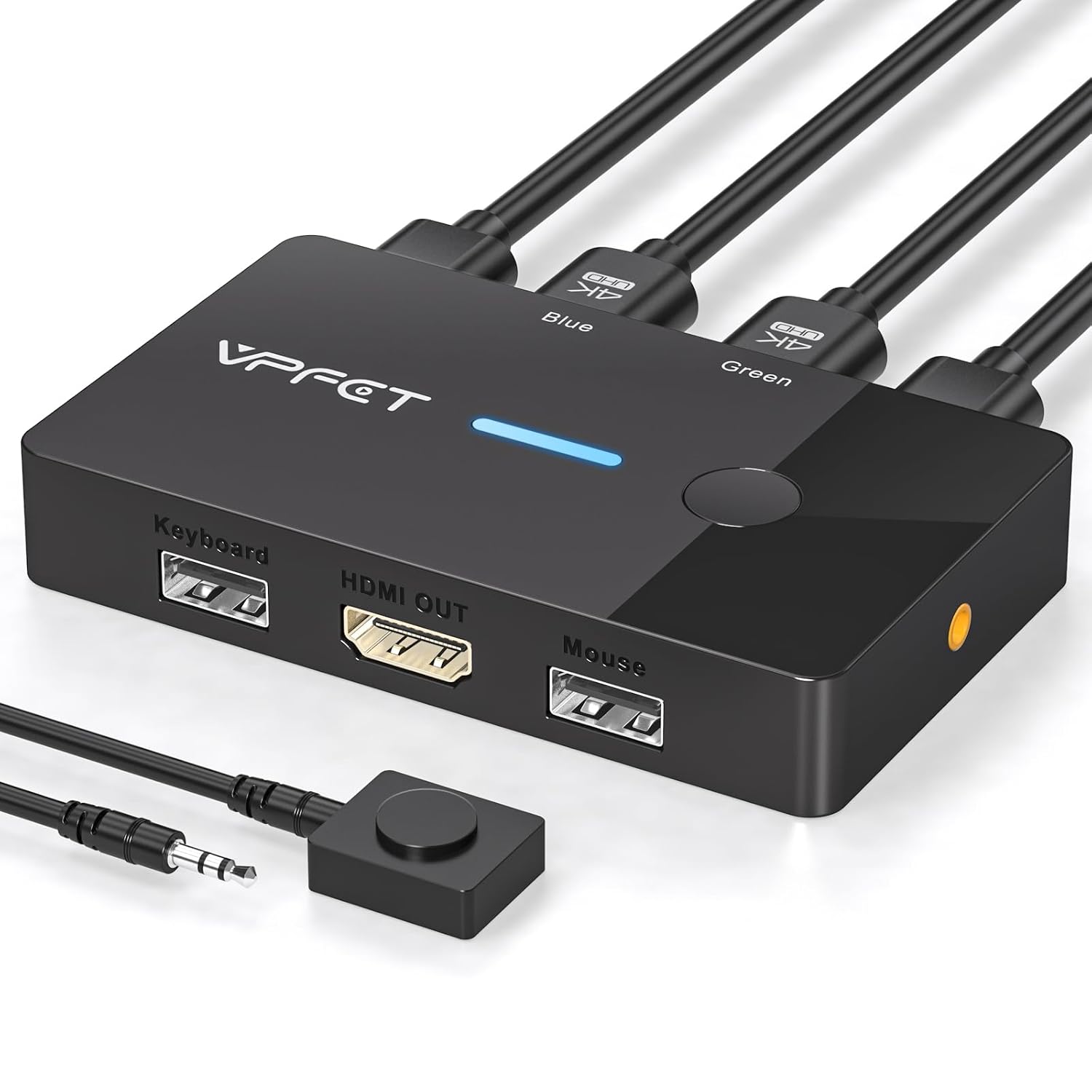
HDMI KVM Switch 1 Monitors 2 Computers 4K@60Hz USB KVM Switches 2 Ports for 2 PC Sharing Single Monitor and Keyboard Mouse with Wired Extend Controller Plug and Play

Description:

  • 【KVM Switch 2 In 1 Out】This KVM switch 1 monitors 2 computers supports sharing a set of mouse and keyboard; simply press the switch button to quickly switch between 2 PCs without having to plug and unplug HDMI and USB cables back and forth, keeping your desktop neat and tidy while increasing your productivity. It also saves you money and reduces the need for duplicate equipment. Note: Each computer and monitor must be equipped with an HDMI port for proper operation. The use of conversion cables or adapters may result in unstable/flickering transmission or failure to transmit images (The device will disconnect intermittently)
  • 【Ultra HD 4k】The HDMI KVM switch supports resolutions up to 4K@60Hz, allowing images to be displayed more beautifully and realistically, and colours will be more vivid and dynamic, and backward compatible with 3840*2160@30Hz, 1920*1080P@60Hz, 1920*1080P@30Hz, etc. Note: KVM requires a high-quality HDMI 2.0 standard cable no longer than 3.3 feet in length, and ensure that your computer and monitor support 4K to ensure the transmission of video signals!
  • 【Desktop Remote Wired Control】The monitor switch for two computers has two switching modes.1) You can switch directly by clicking the button on the body of the KVM switch.2) You can hide the KVM switch and use the desktop controller to switch between the two computers, which makes your desktop cleaner, saves a lot of space and is more convenient to use. Note: This KVM switch does not support hotkey switching
  • 【Mouse Keyboard KVM Switch 】This USB KVM switch has 2 USB 2.0 ports with data transfer speed up to 480Mbps, which can recognise a wired keyboard and mouse or other USB 2.0 devices to move files and photos easily. Different LEDs (green PC1 / blue PC2) clearly show which computer is active. KVM switch is also hot-swappable, allowing you to connect devices without rebooting, ensuring flexibility and portability
  • 【Stable Use & After-sales】Our KVM switches are made of high quality materials, lightweight and compact, low power consumption, excellent compatibility, no driver required; plug and play, no external power supply required. Note: For compatibility reasons this small KVM switch is not recommended for use with Mac devices. If you encounter any problems during use, you can send us an email via the order number. Within 24 months, we will replace the switch at no charge
  • 【Purchase Note & Packing List】If you can't confirm the compatibility of this HDMI KVM switch before purchasing, or find it can't be used after purchasing, please provide us with the video ports of 2 computers and 1 monitor, and we will recommend the most suitable KVM switch for you according to your computer configuration. Package includes: 1*HDMI KVM switch, 1* desktop controller, 2*USB 2.0 cables, 1*after-sales service card, 1*User Manual. No external power supply is needed for the KVM switch (HDMI cable is not included in the package)

  • Reviews:

    5.0 out of 5 stars Does just was it says... it allow to computers to share a keyboard, mouse and monitor.

    R.K. · April 29, 2025

    (function() { P.when('cr-A', 'ready').execute(function(A) { if(typeof A.toggleExpanderAriaLabel === 'function') { A.toggleExpanderAriaLabel('review_text_read_more', 'Read more of this review', 'Read less of this review'); } }); })(); .review-text-read-more-expander:focus-visible { outline: 2px solid #2162a1; outline-offset: 2px; border-radius: 5px; } This item does exactly as described. It allows two separate computers to use the same monitor, keyboard and mouse. I connected two Raspberry Pi computers and am able to easily switch computers with the push of a button.I was worried that each computer would need a separate USB port for the keyboard and the mouse. It doesn't. Only one USB cable is required to carry the keyboard and mouse data to the computer.If you have never used a KVM before, be aware that you cannot look at the video or use the keyboard/mouse for both computers at the same time. You must choose one or the other by pressing the toggle button. (see my photo)

    5.0 out of 5 stars It's working out of the box with no single issue.

    H.K. · May 12, 2025

    No issues.It's connected with a desktop and a notebook on one side, and 4K TV via HDMI port and keyboard and mouse wireless dongles on USB-A ports.Working as expected. I don't notice any screen quality issues at all.There are 2 USB-A to USB-A cables included, which was so sweet.No HDMI cables included.Wired switch is an extra that is so convenient and of course working nicely.(There is a button on the device as well.)I am so satisfied with this device.

    5.0 out of 5 stars So far so good.

    A. · July 11, 2025

    This is the 4th KVM switch I've ordered in the last 4 years; its the best so far. I am about 4 months into owing it and by that same point with all the others, they begin to show problems.

    4.0 out of 5 stars Good Switch

    O. · June 6, 2025

    This works fine as a switch, but it won't show back up drives on the usb ports. I have a hub plugged into this and it doesn't pick up everything I have pluged into it.

    5.0 out of 5 stars This KVM Switch cannot be beat for the price and functionality.

    G.E.S. · April 12, 2025

    I just purchased the "HDMI KVM Switch 1 Monitors 2 Computers 4K@60Hz USB KVM Switches 2 Ports for 2 PC Sharing Single Monitor and Keyboard Mouse with Wired Extend Controller Plug and Play." After trying several other KVM switches, which ALL did not work for my set-up...this switch was an ease to set-up. I had it all hooked up in less than 5 minutes. BINGO...worked the first time. The build quality is excellent and can't be beat for the price. You easily switch between 2 PCs with a press of the button. It works flawlessly each time. I LOVE it! Trust me...you can't go wrong buying this. Easily a 5*****

    3.0 out of 5 stars Easy KVM

    D. · April 21, 2025

    I use KVMs at work and I needed one at home. I wanted something small and thisnwas a good choice. So far I've had no issues and it's been easy to use and install.

    5.0 out of 5 stars Works great, even with a Mac and PC, and wireless mouse

    S. · May 13, 2025

    Just writing a quick review about three things:1. It works with combination of Mac and PC2. There are no HDMI cables included, which is understandable for the price range.3. You can connect your wireless mouse dongle instead of the wired mouse, and it works on both computer. Haven't tried keyboard, since my keyboard is bluetooth and it already can connect to two computers, but I won't be surprised if it works with wireless keyboards as well.

    5.0 out of 5 stars Fast shipment and exactly as was described on site

    J. · July 15, 2025

    Fast shipping and just what I needed to share my monitore with 2 computers; working good so far after a couple weeks of daily use

    efficient solution for anyone juggling multiple computers

    W. · November 15, 2024

    (function() { P.when('cr-A', 'ready').execute(function(A) { if(typeof A.toggleExpanderAriaLabel === 'function') { A.toggleExpanderAriaLabel('review_text_read_more', 'Read more of this review', 'Read less of this review'); } }); })(); .review-text-read-more-expander:focus-visible { outline: 2px solid #2162a1; outline-offset: 2px; border-radius: 5px; } The AILVLVNG KVM Switch is a convenient tool for anyone needing to manage two computers with a single keyboard, mouse, and monitor. Here’s a detailed breakdown of its features and performance:Functionality and PerformanceThis KVM switch is ideal for:Work-from-Home Setups: Easily switch between work and personal computers without the hassle of multiple input devices.Space Saving: Reduces clutter on your physical desk, keeping things tidy and organized.The 4K monitor support is a standout feature, ensuring excellent video quality for modern displays. Switching between inputs is seamless, thanks to the one-touch button functionality.Build Quality and FeaturesUSB 2.0 Ports: While sufficient for most peripherals like keyboards and mice, it would have been great to see USB 3.0 support for gaming keyboards or faster data transfer needs.Ease of Use: Setup is straightforward, and it operates exactly as advertised.Value for MoneyThis KVM switch is priced competitively and delivers good value for the features offered. While it’s not cutting-edge with USB 3.0, it still gets the job done effectively for general use.VerdictThe AILVLVNG KVM Switch is a practical and efficient solution for anyone juggling multiple computers. It’s easy to use, supports high-resolution displays, and helps declutter your workspace. A great choice for productivity, though power users might miss USB 3.0 compatibility.Recommended for everyday use and home office setups!

    Functional & Good Value

    A.R. · October 29, 2024

    This KVM Switch (keyboard, video and mouse) is a gadget you can use to share two computers with a single keyboard and mouse. It's perfect should you be working from home, or need to use two PC's (or laptops) and want to save on the hassle of having to change or purchase multiple input devices and such. Plus it will save on desktop space (your ACTUAL physical desktop where you sit that is.) Not to forget it keeps things nice and tidy. This AILVLVNG switch works exactly as it should and offers value for money, with some good features like the switch to change inputs at a press, and the 4K monitor support. The USB ports are only USB 2.0 which should be fine for most peripherals, but I would have liked to have seen more up to date ports - just in case you need that extra transfer speed for gaming keyboards and such. But still, this is a decent KVM switch that functions as it should.

    2 PCs into 1 screen does go

    G.R. · October 25, 2024

    A neat little switch that allows 2 PCs (or 2 laptops, or combo of both) to share 1 monitor, keyboard and mouse. Currently I have 2 wireless mouse dongles for my PCs and I plug the HDMI cable into whichever PC I am using. What a faff!This 2 to 1 switch does as it says on the tin, however I have a couple of grumbles.- It comes with 2 USB cables to connect from the PCs to the switch, and a separate controller button that allows you to toggle between the 2 PCs. It would have been nice to include 2 HDMI cables. I had 2 spare HDMIs fortunately.- Pressing the switch button switches between each PC (a nice green or blue light shows to let you know which cables will be active) - I have noticed, once in a while, I have to switch the monitor on/off for it to detect one of my PCs - it could be my PC, Once today with one PC off, when toggling the screen shows a "TV transmission card" type of effect. Again it could have been my PC.- Now my desk does have a few extra cables to compete with 2 HDMIs, plus 2 more USBs, plus the once for the switch button - I guess this is a consequence of having a switch, but I have little option to hide all these cablesOverall I am fairly happy, but more worried by the amount of cables now on my desk and wrapped around my monitor.

    Good single monitor 4K@60Hz functionality, USB are only 2.0 & HDMI output on front

    A. · October 24, 2024

    4K60Hz HDMI KVM Switch 1 Monitors 2 ComputersBy connecting a USB-A to USB-A cable (supplied) and HDMI (not supplied) to two PCs/laptops and the switch, you can then share 2 USB 2.0 peripherals and one monitor connected to the switch.Switching between the two machines can be done by top mounted switch or a remote control with wired detector. Unusually you don't need to provide power to the box - probably why it only support 2 USB portsDevice is well made works well for a single 4K@60Hz monitor set-up with two machines. Main limitations is the USBs are only 2.0 (which isn't great for future compatibility but fine for suggested mouse/keyboard usage) & the HDMI output is on the front which might not be great for cable management - 4 stars.Packaging is minimal, zip-lock bag with some items in further plastic bags. Reasonable instruction leaflet included.

    Great for monitor sharing

    M.A.H. · October 21, 2024

    This is a great piece of kit for anyone home working with a company PC or laptop that also has their own home PC which needs to utilise the same monitor.I work from home and have a company laptop and a home desktop. For obvious reasons I want to use my laptop via the large monitor I have for my home PC instead of being hunched over the little laptop screen. This can result in a lot of fiddling about with wires to the one screen that needs to be connected to two different computers. This little box of tricks has made things so much easier. Instead of fiddling with wires all the time I now have both computers inputting their HDMI cables into this hub and then the hub connecting to my monitor. Now at the push of a button I can seamlessly switch between my work laptop and my own PC displaying on the monitors. No more constantly messing with cables. So much simpler!The hub also has USB inputs which switch too so peripherals can be easily shared between the two PCs as well. I uses the same keyboard and mouse with both PCs and again this makes things super simple when swapping between the two machines.If you want to simplify your PC setup when needing to switch between two different devices this hub is an excellent bit of kit. Highly recommended.

    HDMI KVM Switch 1 Monitors 2 Computers 4K@60Hz USB KVM Switches 2 Ports for 2 PC Sharing Single Monitor and Keyboard Mouse with Wired Extend Controller Plug and Play

    Product ID: UO0QMPOFKOL
    Condition: New

    4.4

    AED12048

    Price includes VAT & Import Duties
    Color: Black
    Size: 4K
    Availability: In Stock

    Quantity:

    |

    Order today to get by 7-14 business days

    Delivery fee of AED 20. Free for orders above AED 200.

    Returns & Warranty policies

    Imported From: United States

    At BOLO, we work hard to ensure the products you receive are new, genuine, and sourced from reputable suppliers.

    BOLO is not an authorized or official retailer for most brands, nor are we affiliated with manufacturers unless specifically stated on a product page. Instead, we source verified sellers, authorized distributors or directly from the manufacturer.

    Each product undergoes thorough inspection and verification at our consolidation and fulfilment centers to ensure it meets our strict authenticity and quality standards before being shipped and delivered to you.

    If you ever have concerns regarding the authenticity of a product purchased from us, please contact Bolo Support. We will review your inquiry promptly and, if necessary, provide documentation verifying authenticity or offer a suitable resolution.

    Your trust is our top priority, and we are committed to maintaining transparency and integrity in every transaction.

    All product information, images, descriptions, and reviews originate from the manufacturer or from trusted sellers overseas. BOLO is not affiliated with, endorsed by, or an authorized retailer for most brands listed on our website unless stated otherwise.

    While we strive to display accurate information, variations in packaging, labeling, instructions, or formulation may occasionally occur due to regional differences or supplier updates. For detailed or manufacturer-specific information, please contact the brand directly or reach out to BOLO Support for assistance.

    Unless otherwise stated, all prices displayed on the product page include applicable taxes and import duties.

    BOLO operates in accordance with the laws and regulations of United Arab Emirates. Any items found to be restricted or prohibited for sale within the UAE will be cancelled prior to shipment. We take proactive measures to ensure that only products permitted for sale in United Arab Emirates are listed on our website.

    All items are shipped by air, and any products classified as “Dangerous Goods (DG)” under IATA regulations will be removed from the order and cancelled.

    All orders are processed manually, and we make every effort to process them promptly once confirmed. Products cancelled due to the above reasons will be permanently removed from listings across the website.

    Similar suggestions by Bolo

    More from this brand

    Similar items from “KVM Switches”

    HDMI KVM Switch 1 Monitors 2 Computers 4K@60Hz USB KVM Switches 2 Ports for 2 PC Sharing Single Monitor and Keyboard Mouse with Wired Extend Controller Plug and Play

    Product ID: UO0QMPOFKOL
    Condition: New

    4.4

    HDMI KVM Switch 1 Monitors 2 Computers 4K@60Hz USB KVM Switches 2 Ports for 2 PC Sharing Single Monitor and Keyboard Mouse with Wired Extend Controller Plug and Play-0
    Color: Black
    Size: 4K

    AED12048

    Price includes VAT & Import Duties
    Availability: In Stock

    Quantity:

    |

    Order today to get by 7-14 business days

    Delivery fee of AED 20. Free for orders above AED 200.

    Returns & Warranty policies

    Imported From: United States

    At BOLO, we work hard to ensure the products you receive are new, genuine, and sourced from reputable suppliers.

    BOLO is not an authorized or official retailer for most brands, nor are we affiliated with manufacturers unless specifically stated on a product page. Instead, we source verified sellers, authorized distributors or directly from the manufacturer.

    Each product undergoes thorough inspection and verification at our consolidation and fulfilment centers to ensure it meets our strict authenticity and quality standards before being shipped and delivered to you.

    If you ever have concerns regarding the authenticity of a product purchased from us, please contact Bolo Support. We will review your inquiry promptly and, if necessary, provide documentation verifying authenticity or offer a suitable resolution.

    Your trust is our top priority, and we are committed to maintaining transparency and integrity in every transaction.

    All product information, images, descriptions, and reviews originate from the manufacturer or from trusted sellers overseas. BOLO is not affiliated with, endorsed by, or an authorized retailer for most brands listed on our website unless stated otherwise.

    While we strive to display accurate information, variations in packaging, labeling, instructions, or formulation may occasionally occur due to regional differences or supplier updates. For detailed or manufacturer-specific information, please contact the brand directly or reach out to BOLO Support for assistance.

    Unless otherwise stated, all prices displayed on the product page include applicable taxes and import duties.

    BOLO operates in accordance with the laws and regulations of United Arab Emirates. Any items found to be restricted or prohibited for sale within the UAE will be cancelled prior to shipment. We take proactive measures to ensure that only products permitted for sale in United Arab Emirates are listed on our website.

    All items are shipped by air, and any products classified as “Dangerous Goods (DG)” under IATA regulations will be removed from the order and cancelled.

    All orders are processed manually, and we make every effort to process them promptly once confirmed. Products cancelled due to the above reasons will be permanently removed from listings across the website.

    Description:

  • 【KVM Switch 2 In 1 Out】This KVM switch 1 monitors 2 computers supports sharing a set of mouse and keyboard; simply press the switch button to quickly switch between 2 PCs without having to plug and unplug HDMI and USB cables back and forth, keeping your desktop neat and tidy while increasing your productivity. It also saves you money and reduces the need for duplicate equipment. Note: Each computer and monitor must be equipped with an HDMI port for proper operation. The use of conversion cables or adapters may result in unstable/flickering transmission or failure to transmit images (The device will disconnect intermittently)
  • 【Ultra HD 4k】The HDMI KVM switch supports resolutions up to 4K@60Hz, allowing images to be displayed more beautifully and realistically, and colours will be more vivid and dynamic, and backward compatible with 3840*2160@30Hz, 1920*1080P@60Hz, 1920*1080P@30Hz, etc. Note: KVM requires a high-quality HDMI 2.0 standard cable no longer than 3.3 feet in length, and ensure that your computer and monitor support 4K to ensure the transmission of video signals!
  • 【Desktop Remote Wired Control】The monitor switch for two computers has two switching modes.1) You can switch directly by clicking the button on the body of the KVM switch.2) You can hide the KVM switch and use the desktop controller to switch between the two computers, which makes your desktop cleaner, saves a lot of space and is more convenient to use. Note: This KVM switch does not support hotkey switching
  • 【Mouse Keyboard KVM Switch 】This USB KVM switch has 2 USB 2.0 ports with data transfer speed up to 480Mbps, which can recognise a wired keyboard and mouse or other USB 2.0 devices to move files and photos easily. Different LEDs (green PC1 / blue PC2) clearly show which computer is active. KVM switch is also hot-swappable, allowing you to connect devices without rebooting, ensuring flexibility and portability
  • 【Stable Use & After-sales】Our KVM switches are made of high quality materials, lightweight and compact, low power consumption, excellent compatibility, no driver required; plug and play, no external power supply required. Note: For compatibility reasons this small KVM switch is not recommended for use with Mac devices. If you encounter any problems during use, you can send us an email via the order number. Within 24 months, we will replace the switch at no charge
  • 【Purchase Note & Packing List】If you can't confirm the compatibility of this HDMI KVM switch before purchasing, or find it can't be used after purchasing, please provide us with the video ports of 2 computers and 1 monitor, and we will recommend the most suitable KVM switch for you according to your computer configuration. Package includes: 1*HDMI KVM switch, 1* desktop controller, 2*USB 2.0 cables, 1*after-sales service card, 1*User Manual. No external power supply is needed for the KVM switch (HDMI cable is not included in the package)

  • Reviews:

    5.0 out of 5 stars Does just was it says... it allow to computers to share a keyboard, mouse and monitor.

    R.K. · April 29, 2025

    (function() { P.when('cr-A', 'ready').execute(function(A) { if(typeof A.toggleExpanderAriaLabel === 'function') { A.toggleExpanderAriaLabel('review_text_read_more', 'Read more of this review', 'Read less of this review'); } }); })(); .review-text-read-more-expander:focus-visible { outline: 2px solid #2162a1; outline-offset: 2px; border-radius: 5px; } This item does exactly as described. It allows two separate computers to use the same monitor, keyboard and mouse. I connected two Raspberry Pi computers and am able to easily switch computers with the push of a button.I was worried that each computer would need a separate USB port for the keyboard and the mouse. It doesn't. Only one USB cable is required to carry the keyboard and mouse data to the computer.If you have never used a KVM before, be aware that you cannot look at the video or use the keyboard/mouse for both computers at the same time. You must choose one or the other by pressing the toggle button. (see my photo)

    5.0 out of 5 stars It's working out of the box with no single issue.

    H.K. · May 12, 2025

    No issues.It's connected with a desktop and a notebook on one side, and 4K TV via HDMI port and keyboard and mouse wireless dongles on USB-A ports.Working as expected. I don't notice any screen quality issues at all.There are 2 USB-A to USB-A cables included, which was so sweet.No HDMI cables included.Wired switch is an extra that is so convenient and of course working nicely.(There is a button on the device as well.)I am so satisfied with this device.

    5.0 out of 5 stars So far so good.

    A. · July 11, 2025

    This is the 4th KVM switch I've ordered in the last 4 years; its the best so far. I am about 4 months into owing it and by that same point with all the others, they begin to show problems.

    4.0 out of 5 stars Good Switch

    O. · June 6, 2025

    This works fine as a switch, but it won't show back up drives on the usb ports. I have a hub plugged into this and it doesn't pick up everything I have pluged into it.

    5.0 out of 5 stars This KVM Switch cannot be beat for the price and functionality.

    G.E.S. · April 12, 2025

    I just purchased the "HDMI KVM Switch 1 Monitors 2 Computers 4K@60Hz USB KVM Switches 2 Ports for 2 PC Sharing Single Monitor and Keyboard Mouse with Wired Extend Controller Plug and Play." After trying several other KVM switches, which ALL did not work for my set-up...this switch was an ease to set-up. I had it all hooked up in less than 5 minutes. BINGO...worked the first time. The build quality is excellent and can't be beat for the price. You easily switch between 2 PCs with a press of the button. It works flawlessly each time. I LOVE it! Trust me...you can't go wrong buying this. Easily a 5*****

    3.0 out of 5 stars Easy KVM

    D. · April 21, 2025

    I use KVMs at work and I needed one at home. I wanted something small and thisnwas a good choice. So far I've had no issues and it's been easy to use and install.

    5.0 out of 5 stars Works great, even with a Mac and PC, and wireless mouse

    S. · May 13, 2025

    Just writing a quick review about three things:1. It works with combination of Mac and PC2. There are no HDMI cables included, which is understandable for the price range.3. You can connect your wireless mouse dongle instead of the wired mouse, and it works on both computer. Haven't tried keyboard, since my keyboard is bluetooth and it already can connect to two computers, but I won't be surprised if it works with wireless keyboards as well.

    5.0 out of 5 stars Fast shipment and exactly as was described on site

    J. · July 15, 2025

    Fast shipping and just what I needed to share my monitore with 2 computers; working good so far after a couple weeks of daily use

    efficient solution for anyone juggling multiple computers

    W. · November 15, 2024

    (function() { P.when('cr-A', 'ready').execute(function(A) { if(typeof A.toggleExpanderAriaLabel === 'function') { A.toggleExpanderAriaLabel('review_text_read_more', 'Read more of this review', 'Read less of this review'); } }); })(); .review-text-read-more-expander:focus-visible { outline: 2px solid #2162a1; outline-offset: 2px; border-radius: 5px; } The AILVLVNG KVM Switch is a convenient tool for anyone needing to manage two computers with a single keyboard, mouse, and monitor. Here’s a detailed breakdown of its features and performance:Functionality and PerformanceThis KVM switch is ideal for:Work-from-Home Setups: Easily switch between work and personal computers without the hassle of multiple input devices.Space Saving: Reduces clutter on your physical desk, keeping things tidy and organized.The 4K monitor support is a standout feature, ensuring excellent video quality for modern displays. Switching between inputs is seamless, thanks to the one-touch button functionality.Build Quality and FeaturesUSB 2.0 Ports: While sufficient for most peripherals like keyboards and mice, it would have been great to see USB 3.0 support for gaming keyboards or faster data transfer needs.Ease of Use: Setup is straightforward, and it operates exactly as advertised.Value for MoneyThis KVM switch is priced competitively and delivers good value for the features offered. While it’s not cutting-edge with USB 3.0, it still gets the job done effectively for general use.VerdictThe AILVLVNG KVM Switch is a practical and efficient solution for anyone juggling multiple computers. It’s easy to use, supports high-resolution displays, and helps declutter your workspace. A great choice for productivity, though power users might miss USB 3.0 compatibility.Recommended for everyday use and home office setups!

    Functional & Good Value

    A.R. · October 29, 2024

    This KVM Switch (keyboard, video and mouse) is a gadget you can use to share two computers with a single keyboard and mouse. It's perfect should you be working from home, or need to use two PC's (or laptops) and want to save on the hassle of having to change or purchase multiple input devices and such. Plus it will save on desktop space (your ACTUAL physical desktop where you sit that is.) Not to forget it keeps things nice and tidy. This AILVLVNG switch works exactly as it should and offers value for money, with some good features like the switch to change inputs at a press, and the 4K monitor support. The USB ports are only USB 2.0 which should be fine for most peripherals, but I would have liked to have seen more up to date ports - just in case you need that extra transfer speed for gaming keyboards and such. But still, this is a decent KVM switch that functions as it should.

    2 PCs into 1 screen does go

    G.R. · October 25, 2024

    A neat little switch that allows 2 PCs (or 2 laptops, or combo of both) to share 1 monitor, keyboard and mouse. Currently I have 2 wireless mouse dongles for my PCs and I plug the HDMI cable into whichever PC I am using. What a faff!This 2 to 1 switch does as it says on the tin, however I have a couple of grumbles.- It comes with 2 USB cables to connect from the PCs to the switch, and a separate controller button that allows you to toggle between the 2 PCs. It would have been nice to include 2 HDMI cables. I had 2 spare HDMIs fortunately.- Pressing the switch button switches between each PC (a nice green or blue light shows to let you know which cables will be active) - I have noticed, once in a while, I have to switch the monitor on/off for it to detect one of my PCs - it could be my PC, Once today with one PC off, when toggling the screen shows a "TV transmission card" type of effect. Again it could have been my PC.- Now my desk does have a few extra cables to compete with 2 HDMIs, plus 2 more USBs, plus the once for the switch button - I guess this is a consequence of having a switch, but I have little option to hide all these cablesOverall I am fairly happy, but more worried by the amount of cables now on my desk and wrapped around my monitor.

    Good single monitor 4K@60Hz functionality, USB are only 2.0 & HDMI output on front

    A. · October 24, 2024

    4K60Hz HDMI KVM Switch 1 Monitors 2 ComputersBy connecting a USB-A to USB-A cable (supplied) and HDMI (not supplied) to two PCs/laptops and the switch, you can then share 2 USB 2.0 peripherals and one monitor connected to the switch.Switching between the two machines can be done by top mounted switch or a remote control with wired detector. Unusually you don't need to provide power to the box - probably why it only support 2 USB portsDevice is well made works well for a single 4K@60Hz monitor set-up with two machines. Main limitations is the USBs are only 2.0 (which isn't great for future compatibility but fine for suggested mouse/keyboard usage) & the HDMI output is on the front which might not be great for cable management - 4 stars.Packaging is minimal, zip-lock bag with some items in further plastic bags. Reasonable instruction leaflet included.

    Great for monitor sharing

    M.A.H. · October 21, 2024

    This is a great piece of kit for anyone home working with a company PC or laptop that also has their own home PC which needs to utilise the same monitor.I work from home and have a company laptop and a home desktop. For obvious reasons I want to use my laptop via the large monitor I have for my home PC instead of being hunched over the little laptop screen. This can result in a lot of fiddling about with wires to the one screen that needs to be connected to two different computers. This little box of tricks has made things so much easier. Instead of fiddling with wires all the time I now have both computers inputting their HDMI cables into this hub and then the hub connecting to my monitor. Now at the push of a button I can seamlessly switch between my work laptop and my own PC displaying on the monitors. No more constantly messing with cables. So much simpler!The hub also has USB inputs which switch too so peripherals can be easily shared between the two PCs as well. I uses the same keyboard and mouse with both PCs and again this makes things super simple when swapping between the two machines.If you want to simplify your PC setup when needing to switch between two different devices this hub is an excellent bit of kit. Highly recommended.

    Similar suggestions by Bolo

    More from this brand

    Similar items from “KVM Switches”