Description:
Reviews:
5.0 out of 5 stars Well built, flexible design, needs additional power cables
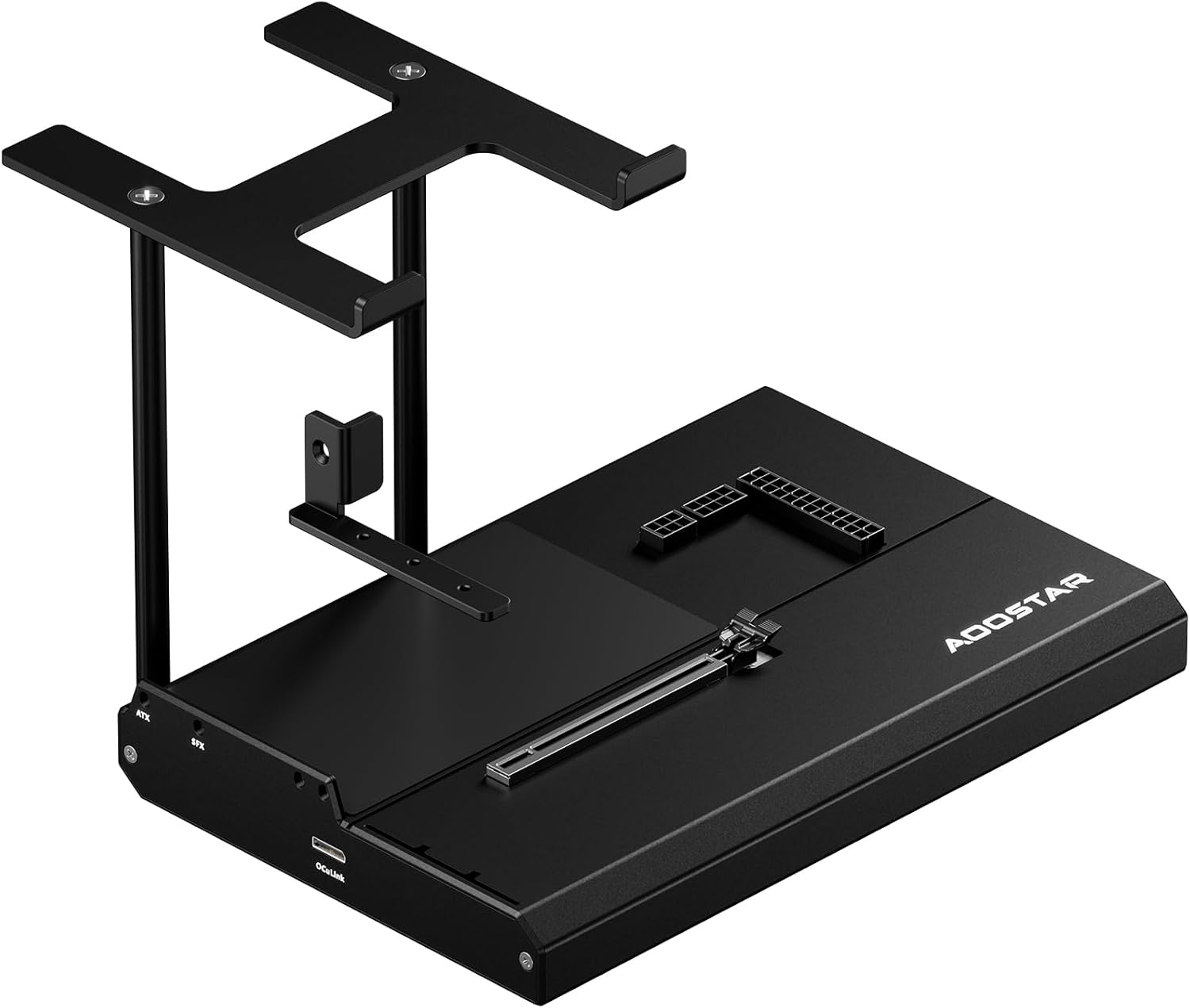
The 5 stars here are warranted due to the dock's build quality and port flexibilityBuild quality: The system uses a name brand, off-the-shelf 1u form factor 80 plus platinum certified power supply - chickony R18-800P2VA. It's efficient and delivers it's rated output; it's durable and shouldn't fail; if it does it's hot-swappable with any 1u standard compliant interface. This is top-tier design-for-repairabilty that all manufacturers should be striving for. The power supply is integrated into the case so it doesn't have awkward spots where you bolt-on a powersupply you provide yourself.Flexibility: USB4/thunderbolt is great for hot plugging devices, but has bandwidth limitations. Oculink is great for bandwidth but isn't hot pluggable on most systems. This dock has both. Most of my use is with the usb4 connection - i don't need bandwith for the most part, but occasionally I do and wanted to see if oculink would work well for me, which is why i chose this one.Other Details:This switches between oculink and usb-c via a pair of PI3DBS16412 pcie switches and PI3EQX16904GL redrivers. It appears the oculink and usb4 pcie pins go into the switches first then the redrivers, but they shouldn't be necessary for the usb4 link and would do more for the oculink signal integrity if they were directly on that input. I don't know why that design decision was made, but i don't know that it's causing any problem.The dock is based on the asmedia 246x chip like many usb4 nvme enclosures. It's newer, cheaper, faster, and runs cooler than lots of the older intel thunderbolt chips that are still in use.My use is for FPGA and security testing; bandwidth doesn't matter so much as hotplug ability. I did test this dock with a few NVME drives and it performed like most other 246x adapters I had - bottlenecked by my laptop's usb4 implementation.Hidden perks: If you solder a header on the internal 'debug' connector, you can see the link training details as you plug and unplug devices. I ran this cable out the front of the chassis so it's there when i need it.Flaws:- For a high power card, you need to buy a separate "12VHPWR" power cable - the cables included will not work for most high power graphics cards. You also make sure you get the right orientation, and the right connectors ('evga type' worked for me). This really should have been included, but i understand why it was not - they're expensive, different gpus have these connectors in different orientations, and only a small portion of the users of this device might actually need that cable. But, aoostar should at least link to known good cables.- the graphics card support bracket isn't great, but does do the job.
4.0 out of 5 stars Good dock
It's pretty big and heavy to lug around and with the GPU connected is topheavy. Connection and stability of GPU is secure and firm with a foot at the base for added safety. Comes with all the cables you would need. Does exactly what its designed to do very well, and runs at maybe 70% performance of the fully installed GPU (5070 Ti) if running via USB4. You can make up the gap using DLSS and framegen (or equivalent). Works great on your handheld gaming PC connected to a monitor or TV, if you can get around the frustrating external controller issues. May be better suited to a mini-PC or laptop with a great CPU and Occulink. Power button is for show and does nothing, so your PSU fan hums away contantly when plugged in.
5.0 out of 5 stars AWESOME eGPU
I have a few minipcs but not all of them have fancy oculink (64gb bandwidth) connections. This dock supports usb4 as well (make sure you also get a usb4 compliant cable - usbc are NOT created equal) the usb4 isn't as fast as the oculink but i'm only seeing between 15-20% which is a hit but still faster than most iGPU's. The case is solid (I don't mind that it's not enclosed) There is a button to power on the GPU but I do wish that the psu powered off and didn't stay on all the time. The switch basically turns off the pcie port but the power remains powered.
5.0 out of 5 stars Its plug in play
Its extremely simple. Pretty much plug in play.I dont like how there is no housing or stronger support for the GPU but it's so fast to replace gpus for testing.It works for the 30 series of nvidia gpus all way down to tesla m10s-k80s gpus ( just from the gpus I have 3080 dell 3050 6gb , Tesla m40, M12 k80 ,quadro p2000 k620 , GTX titan Z 1080ti and arc a310)Make sure to start the egpu first when using occulink. Then your pc. For usb 4 connection do the same. Start the egpu first then pc. You can connect the egpu after the pc starts with usb 4 but you can encounter bugs/glitches. It all depends on your pc.Also just a warning ⚠️ do not unplug the gpus from occulink when the device is running. It will cause damage. It is not hotswap.Unplugging the egpu using the USB 4 will just cause your PC to blue screen.OveralI I recommend this it's one of the cheapest ways to get a good looking occulink USB 4 egpu docks.
3.0 out of 5 stars Decent but where’s the power button??
Cool and works well except the fact that there’s no power button or switch anywhere. If it’s plugged in to the wall, the gpu fans will just spin and spin until it’s unplugged. Which is annoying because I have to plug and unplug this every time I’d like to use it.
5.0 out of 5 stars This helps your laptop play real games like a desktop
This is as the best idea for laptop gaming that’s for sale right now, being able to get those dedicated graphics using thunderbolt 4 with 800w is so awesome. I use this every day and if your GPU isn’t latching right lift up the latch yourself it will work, also make sure you plug it in all the way, the only thing I wish is the button actually stopped power to the GPU, It’s actually super quiet and very efficient. When you turn the laptop off the GPU does turn off so I would really recommend this egpu docking station
1.0 out of 5 stars Didn’t work
Never worked. Tried reseating the GPU (RTX 5060ti) multiple times, bought a separate Thunderbolt cable, etc. Saw various errors in dmesg indicating that it was an issue with the enclosure: “fallen off the bus” errors etc.The GPU is now happily living as an internal GPU.
Makes handheld deadly
Amazing makes my Asus ally x better then my gaming PC running a 5070ti oc
Simple to Set Up, Works As Expected
eGPU dock was very easy to set up, especially paired with a thunderbolt 4 capable machine. It has an 800W power supply which is more than enough to support the 50 series graphics cards. I'm currently using it with my 30 series card and it works phenomenally. I've paired it with a smart plug to turn it on/off as needed, as the fan on the eGPU dock stays on whenever plugged in. Paired with TB4, I turn it on whenever I need it, without having to restart my PC, simply plug n play!
Does the job, but loud when not in use.
Works great. Just wish the power button worked as the psu is a bit loud when not in use. Bought a separate power switch and that fixed the issue.
Visit the AOOSTAR Store
AOOSTAR EG01 OCuLink eGPU Dock Oculink External GPU Enclosure Oculink Interface Graphics Dock Station for PCIe 4.0 x4 Graphics Cards
AED1,76840
Quantity:
Order today to get by 7-14 business days
This item qualifies for free delivery
 Imported From: United States
At BOLO, we work hard to ensure the products you receive are new, genuine, and sourced from reputable suppliers.
BOLO is not an authorized or official retailer for most brands, nor are we affiliated with manufacturers unless specifically stated on a product page. Instead, we source verified sellers, authorized distributors or directly from the manufacturer.
Each product undergoes thorough inspection and verification at our consolidation and fulfilment centers to ensure it meets our strict authenticity and quality standards before being shipped and delivered to you.
If you ever have concerns regarding the authenticity of a product purchased from us, please contact Bolo Support. We will review your inquiry promptly and, if necessary, provide documentation verifying authenticity or offer a suitable resolution.
Your trust is our top priority, and we are committed to maintaining transparency and integrity in every transaction.
All product information, images, descriptions, and reviews originate from the manufacturer or from trusted sellers overseas. BOLO is not affiliated with, endorsed by, or an authorized retailer for most brands listed on our website unless stated otherwise.
While we strive to display accurate information, variations in packaging, labeling, instructions, or formulation may occasionally occur due to regional differences or supplier updates. For detailed or manufacturer-specific information, please contact the brand directly or reach out to BOLO Support for assistance.
Unless otherwise stated, all prices displayed on the product page include applicable taxes and import duties.
BOLO operates in accordance with the laws and regulations of United Arab Emirates. Any items found to be restricted or prohibited for sale within the UAE will be cancelled prior to shipment. We take proactive measures to ensure that only products permitted for sale in United Arab Emirates are listed on our website.
All items are shipped by air, and any products classified as “Dangerous Goods (DG)” under IATA regulations will be removed from the order and cancelled.
All orders are processed manually, and we make every effort to process them promptly once confirmed. Products cancelled due to the above reasons will be permanently removed from listings across the website.
More from this brand
Similar items from “Enclosures”
Share with
Or share with link
https://www.bolo.ae/products/UO0QKGYGYS5
Visit the AOOSTAR Store
AOOSTAR EG01 OCuLink eGPU Dock Oculink External GPU Enclosure Oculink Interface Graphics Dock Station for PCIe 4.0 x4 Graphics Cards
AED1,76840
Quantity:
Order today to get by 7-14 business days
This item qualifies for free delivery
Imported From: United States
At BOLO, we work hard to ensure the products you receive are new, genuine, and sourced from reputable suppliers.
BOLO is not an authorized or official retailer for most brands, nor are we affiliated with manufacturers unless specifically stated on a product page. Instead, we source verified sellers, authorized distributors or directly from the manufacturer.
Each product undergoes thorough inspection and verification at our consolidation and fulfilment centers to ensure it meets our strict authenticity and quality standards before being shipped and delivered to you.
If you ever have concerns regarding the authenticity of a product purchased from us, please contact Bolo Support. We will review your inquiry promptly and, if necessary, provide documentation verifying authenticity or offer a suitable resolution.
Your trust is our top priority, and we are committed to maintaining transparency and integrity in every transaction.
All product information, images, descriptions, and reviews originate from the manufacturer or from trusted sellers overseas. BOLO is not affiliated with, endorsed by, or an authorized retailer for most brands listed on our website unless stated otherwise.
While we strive to display accurate information, variations in packaging, labeling, instructions, or formulation may occasionally occur due to regional differences or supplier updates. For detailed or manufacturer-specific information, please contact the brand directly or reach out to BOLO Support for assistance.
Unless otherwise stated, all prices displayed on the product page include applicable taxes and import duties.
BOLO operates in accordance with the laws and regulations of United Arab Emirates. Any items found to be restricted or prohibited for sale within the UAE will be cancelled prior to shipment. We take proactive measures to ensure that only products permitted for sale in United Arab Emirates are listed on our website.
All items are shipped by air, and any products classified as “Dangerous Goods (DG)” under IATA regulations will be removed from the order and cancelled.
All orders are processed manually, and we make every effort to process them promptly once confirmed. Products cancelled due to the above reasons will be permanently removed from listings across the website.
Description:
Reviews:
5.0 out of 5 stars Well built, flexible design, needs additional power cables
The 5 stars here are warranted due to the dock's build quality and port flexibilityBuild quality: The system uses a name brand, off-the-shelf 1u form factor 80 plus platinum certified power supply - chickony R18-800P2VA. It's efficient and delivers it's rated output; it's durable and shouldn't fail; if it does it's hot-swappable with any 1u standard compliant interface. This is top-tier design-for-repairabilty that all manufacturers should be striving for. The power supply is integrated into the case so it doesn't have awkward spots where you bolt-on a powersupply you provide yourself.Flexibility: USB4/thunderbolt is great for hot plugging devices, but has bandwidth limitations. Oculink is great for bandwidth but isn't hot pluggable on most systems. This dock has both. Most of my use is with the usb4 connection - i don't need bandwith for the most part, but occasionally I do and wanted to see if oculink would work well for me, which is why i chose this one.Other Details:This switches between oculink and usb-c via a pair of PI3DBS16412 pcie switches and PI3EQX16904GL redrivers. It appears the oculink and usb4 pcie pins go into the switches first then the redrivers, but they shouldn't be necessary for the usb4 link and would do more for the oculink signal integrity if they were directly on that input. I don't know why that design decision was made, but i don't know that it's causing any problem.The dock is based on the asmedia 246x chip like many usb4 nvme enclosures. It's newer, cheaper, faster, and runs cooler than lots of the older intel thunderbolt chips that are still in use.My use is for FPGA and security testing; bandwidth doesn't matter so much as hotplug ability. I did test this dock with a few NVME drives and it performed like most other 246x adapters I had - bottlenecked by my laptop's usb4 implementation.Hidden perks: If you solder a header on the internal 'debug' connector, you can see the link training details as you plug and unplug devices. I ran this cable out the front of the chassis so it's there when i need it.Flaws:- For a high power card, you need to buy a separate "12VHPWR" power cable - the cables included will not work for most high power graphics cards. You also make sure you get the right orientation, and the right connectors ('evga type' worked for me). This really should have been included, but i understand why it was not - they're expensive, different gpus have these connectors in different orientations, and only a small portion of the users of this device might actually need that cable. But, aoostar should at least link to known good cables.- the graphics card support bracket isn't great, but does do the job.
4.0 out of 5 stars Good dock
It's pretty big and heavy to lug around and with the GPU connected is topheavy. Connection and stability of GPU is secure and firm with a foot at the base for added safety. Comes with all the cables you would need. Does exactly what its designed to do very well, and runs at maybe 70% performance of the fully installed GPU (5070 Ti) if running via USB4. You can make up the gap using DLSS and framegen (or equivalent). Works great on your handheld gaming PC connected to a monitor or TV, if you can get around the frustrating external controller issues. May be better suited to a mini-PC or laptop with a great CPU and Occulink. Power button is for show and does nothing, so your PSU fan hums away contantly when plugged in.
5.0 out of 5 stars AWESOME eGPU
I have a few minipcs but not all of them have fancy oculink (64gb bandwidth) connections. This dock supports usb4 as well (make sure you also get a usb4 compliant cable - usbc are NOT created equal) the usb4 isn't as fast as the oculink but i'm only seeing between 15-20% which is a hit but still faster than most iGPU's. The case is solid (I don't mind that it's not enclosed) There is a button to power on the GPU but I do wish that the psu powered off and didn't stay on all the time. The switch basically turns off the pcie port but the power remains powered.
5.0 out of 5 stars Its plug in play
Its extremely simple. Pretty much plug in play.I dont like how there is no housing or stronger support for the GPU but it's so fast to replace gpus for testing.It works for the 30 series of nvidia gpus all way down to tesla m10s-k80s gpus ( just from the gpus I have 3080 dell 3050 6gb , Tesla m40, M12 k80 ,quadro p2000 k620 , GTX titan Z 1080ti and arc a310)Make sure to start the egpu first when using occulink. Then your pc. For usb 4 connection do the same. Start the egpu first then pc. You can connect the egpu after the pc starts with usb 4 but you can encounter bugs/glitches. It all depends on your pc.Also just a warning ⚠️ do not unplug the gpus from occulink when the device is running. It will cause damage. It is not hotswap.Unplugging the egpu using the USB 4 will just cause your PC to blue screen.OveralI I recommend this it's one of the cheapest ways to get a good looking occulink USB 4 egpu docks.
3.0 out of 5 stars Decent but where’s the power button??
Cool and works well except the fact that there’s no power button or switch anywhere. If it’s plugged in to the wall, the gpu fans will just spin and spin until it’s unplugged. Which is annoying because I have to plug and unplug this every time I’d like to use it.
5.0 out of 5 stars This helps your laptop play real games like a desktop
This is as the best idea for laptop gaming that’s for sale right now, being able to get those dedicated graphics using thunderbolt 4 with 800w is so awesome. I use this every day and if your GPU isn’t latching right lift up the latch yourself it will work, also make sure you plug it in all the way, the only thing I wish is the button actually stopped power to the GPU, It’s actually super quiet and very efficient. When you turn the laptop off the GPU does turn off so I would really recommend this egpu docking station
1.0 out of 5 stars Didn’t work
Never worked. Tried reseating the GPU (RTX 5060ti) multiple times, bought a separate Thunderbolt cable, etc. Saw various errors in dmesg indicating that it was an issue with the enclosure: “fallen off the bus” errors etc.The GPU is now happily living as an internal GPU.
Makes handheld deadly
Amazing makes my Asus ally x better then my gaming PC running a 5070ti oc
Simple to Set Up, Works As Expected
eGPU dock was very easy to set up, especially paired with a thunderbolt 4 capable machine. It has an 800W power supply which is more than enough to support the 50 series graphics cards. I'm currently using it with my 30 series card and it works phenomenally. I've paired it with a smart plug to turn it on/off as needed, as the fan on the eGPU dock stays on whenever plugged in. Paired with TB4, I turn it on whenever I need it, without having to restart my PC, simply plug n play!
Does the job, but loud when not in use.
Works great. Just wish the power button worked as the psu is a bit loud when not in use. Bought a separate power switch and that fixed the issue.
More from this brand
Similar items from “Enclosures”
Share with
Or share with link
https://www.bolo.ae/products/UO0QKGYGYS5