Deliver toUnited Arab Emirates
5 in 1 External Blu Ray Drive, Portable Blu Ray Player with USB 3.0 Type-C, CD DVD Burner 3D Blu Ray with SD/TF Port, Blu Ray Drive Compatible with Windows Laptop Desktop (Updated Version)

Description:

  • High Performance: The Blu ray DVD drive has impressive high-performance capabilities. Its cutting-edge high-speed 3.0 interface and Type-C interface exhibit exceptional error correction capabilities, impact resistance, low noise, and low power consumption. It can read CDs at speeds of up to 24x, DVDs at up to 8x, and BDs at up to 6x. Additionally, the usb bluray drive external supports burning normal CDs and DVDs in sizes of 8.5GB, 4.7GB, and 700MB, as well as 3D discs.
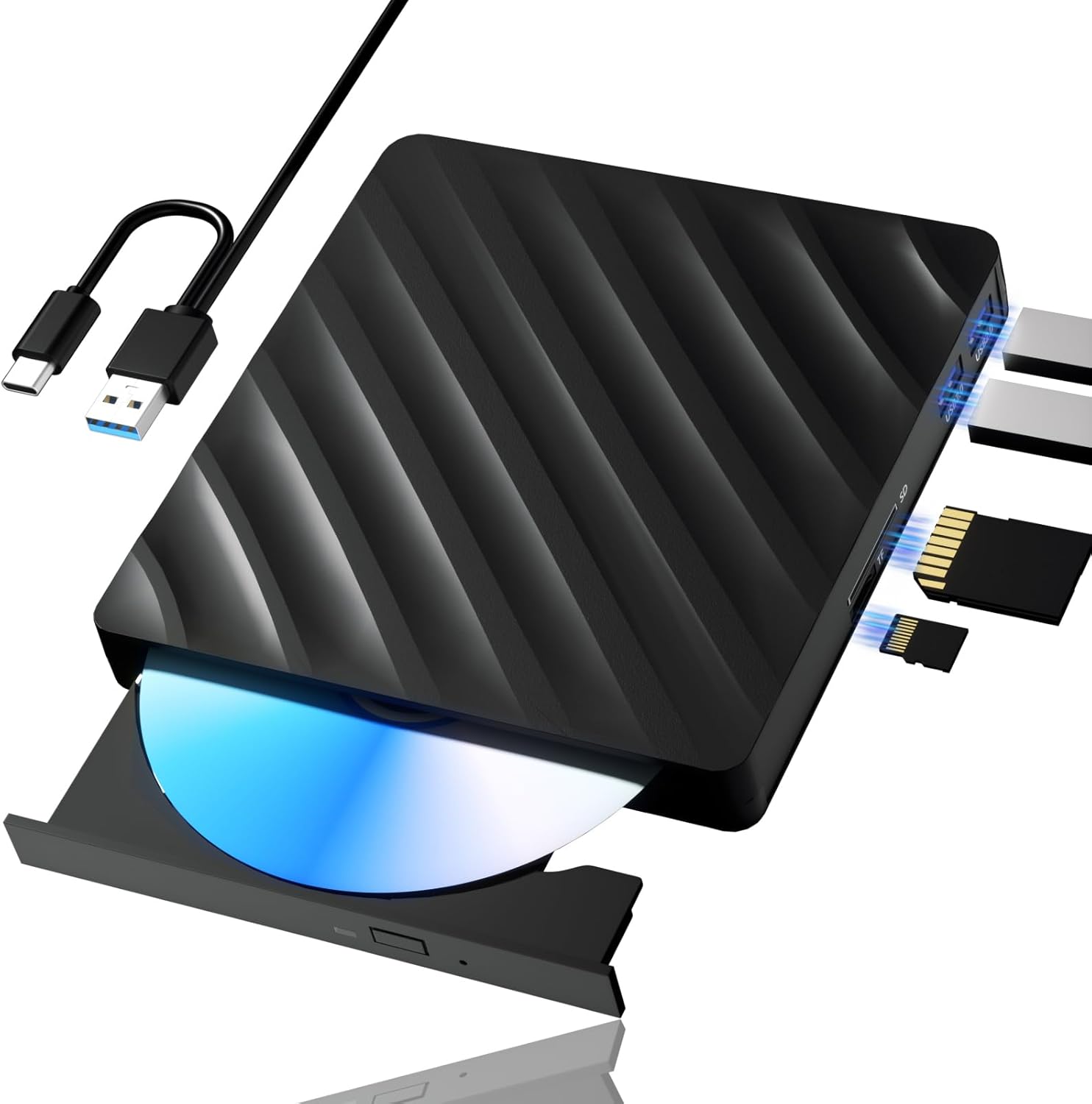
  • Multifunction Blu Ray Drive:This 5 in 1 blu ray player external offers versatile features, plug and play. It can read BD/DVD/CD discs and has 1 SD card slot, 1 TF card slot, and 2 USB 3.0 ports for data transfer or charging purposes. You can easily transfer music, blu ray uhd movies, and data files from SD cards, TF cards, or through the USB/Type-C ports to your computer. Additionally, you can transfer files from a external blu ray drive to an SD card, USB hard drive, or USB flash drive. Please note that you can only use either the SD card or the TF card at a time. However, both can function simultaneously with the 2 USB 3.0 ports.
  • Portable Blu Ray Player: The unique design of our blu ray player for laptop combines both the drive and two different USB cables in one, and the usb bluray player features two concealed wire grooves that are specifically designed to store and carry both USB3.0 and Type-C interfaces. This feature helps users to easily store and transport the external usb blu ray drive without taking up too much space or risk losing one or both cables. The design is both stylish and functional, allowing for hassle-free connectivity and setup. With its innovative design and practical features, our Blu ray drive is an great choice for users seeking a reliable and versatile external optical drive.
  • Wide Compatibility: The Wbacon blu ray dvd drive external is fully compatible with a wide range of operating systems, including Windows 7, 8, 10, Vista, ME, SE, XP, and 2000, as well as Linux and all versions of MAC OS 10 or below. However, that it is not compatible with BD recorders, tablet iPads, Surface tablets, TVs, projectors, smartphones, or cars.
  • Note: (1) Check whether your computer is compatible with the blu ray rw drive external to play by downloading the software 'Cyberlink BD & 3D Advisor’. (2) Make sure you have the appropriate software installed before playing a CD/DVD on your laptop with this BD player. When playing BDs, it is recommended to use the professional BD player 'PowerDVD10-19' (For Mac OS, Macgo Blu ray Player is recommended). (3) Note that including the initial setting, the region code can only be changed 5 times.

  • Reviews:

    5.0 out of 5 stars External Blu Ray Drive

    Z.(.T. · October 3, 2024

    (function() { P.when('cr-A', 'ready').execute(function(A) { if(typeof A.toggleExpanderAriaLabel === 'function') { A.toggleExpanderAriaLabel('review_text_read_more', 'Read more of this review', 'Read less of this review'); } }); })(); .review-text-read-more-expander:focus-visible { outline: 2px solid #2162a1; outline-offset: 2px; border-radius: 5px; } The Cyberlink PowerDVD is expensive the one they suggest to use as it costs here in the states $39.99 ($42.43) however I found an absolutely free yet legal alternative which is "VLC Video Player" and this can be found on Windows, Linux, Mobile, Mac, etc.Also it does play Blu-Ray Discs even though it does not say it on the box, I have tested DVD, CD, along with Blu-Ray and they all work great!VLC Video Player does require some additional steps due to the protection of Blu-Ray content (all it needs is the key to unlock and playback the content which is not illegal as all mainstream Blu-Ray Players also possess this same digital key) i shall explain the additional steps down below.I. You gotta go to a site called "VLC Blu-Ray" from there click on the link called "Fetch the up-to-date file from FindVUK online database and unzip it" that is one of the first ones you spot that will bring you to the AACS Decode Key file that you gotta download. (This one is a tricky one to do cause you gotta enter a program command)II. Go to the command prompt by clicking "Windows + R key at the same time" and type in %APPData% after this click "Open" and it will bring you to the main programs on your PC from here click add "New Folder" and name it "AACS" after this is complete you gotta unzip the key file you downloaded from the site above and copy along with paste just the .key file to the "AACS" folder you had just created.III. Once finshed with the top two tasks go back to the main site and download the "libaacs.dll" file which is also a link towards the bottom of the page as this is what enables VLC to decode the AACS (Advanced Access Code Security) on the Blu Ray Disc after that copy and paste the .dll file to the Root Directory of VLC itself. (Program Files -> VideoLan -> VLC)IV. After all this is done you should be able to play Blu-Ray Discs using the VLC Video Player without any issues.These steps are not too difficult however if everyone wants me to i could set up a video to show you all how to do it as well just hit me up and let me know and I'll gladly help you all save $42.43. (I am not a wealthy man so had to find alternative ways that are legal and i found one💪)

    1.0 out of 5 stars works occasionally, often dismounting CDs repeatedly and causes system crashes.

    M. · January 6, 2025

    Updated 2-12-25I’ve tried a number of CDs that work fine on other drives and they all fail, the drive mounts and dismounts, crashes music player apps and will not stay mounted. I’ve replaced the wires and tried other ports and connecting to other computers. The drive is simply bad. Since I took the time to try and make it work, I’m now out of the return window and I’m stuck with it.Don’t buy this drive!I bought this so I could burn Blu-Ray disks for larger archive backups. The extra ports were nice but I could not get anything to work when plugged into them.Worse, all my older media like DVDs won't play on it even though my 10-year-old drive mounts and plays them fine. I also tried to play an MP3-CD which would not mount but does on my old drive. Regular CDs and Blu-ray disks mounted fine.I normally don't test speeds and just rely on my my impressions of performance. However, these other issues above made me do two tests. I put in three CDs to copy the music to my hard drive from two albums and timed how long it took to copy the music. I did the same copy from my old DVD-RW drive and it was the same speed. That would be okay only they advertised it as being many times faster than older drives. It was no faster at all.If you just need an external drive to play movies it's fine but for anything more, I'd recommend trying another model and brand.

    4.0 out of 5 stars Gets the job done

    A. · April 25, 2025

    I use this to download my DVDs so I can stream them on my computer. It doesn’t always work perfectly and sometimes takes a bit of guesswork, but overall I’m happy with it. Gets the job done.

    5.0 out of 5 stars Recognized when connected immediately

    G. · June 11, 2025

    Works very well with laptop. No special drivers were required for Windows 11.

    2.0 out of 5 stars Included cable is defective

    m.j.l. · April 6, 2025

    Out of the box this would be a one star/return defective piece of garbage, drive would frequently just make clocking sounds like or didn't have enough power, not reading disks at all etc Luckily I read some reviews about faulty cables and decided to spend the extra $10 to see if it would help. After replacing the garbage cable all of a sudden this drive is performing like it should've cost quite a bit more then it did. No failed reads, everything working very smoothly. For the price of they would've included a better cable and raised the price by ten bucks I would give this four stars at least

    3.0 out of 5 stars Inexpensive and eventually sort of worked. Buyer Beware!

    M.B. · April 18, 2025

    Why do I give it 3 stars? Eventually I got it to do what I needed it to do... be able to recognize that a BluRay data disc had been put in it and get the data copied off... and it's cheap.Why ONLY 3 stars? Because it never would recognize the disc when I attached it to my main computer - even after 20+ attempts and all sorts of troubleshooting. And it failed to recognize the disc several times as well when connected to my laptop. I would have given up - but the first time I connected it to my laptop, it DID recognize the disc before I screwed up and disconnected it. Then it failed to see the disc about 5 times when I was trying to get it to work again... before it finally connected properly. I got the data off.Because it eventually got the data off... That is +1 from a junk-rating. Because it was a cheap price, that's a 2nd +1... So 3 stars. Honestly, it doesn't deserve that. It probably deserves 2 stars. Whatever. Buyer beware.

    5.0 out of 5 stars Good product. Recommended.

    M.J.H. · April 6, 2025

    Good product. Does not work with all blu ray players, but found a free blu ray player on microsoft that works just fine. Overall, good player for the price. Plug and play.

    1.0 out of 5 stars Only played DVD movie once and never again. Blu-ray still works.

    B.D. · June 13, 2025

    It seems to work fine (for now) for watching Blu-ray movies. However, we were only able to get DVD movies to work once. After that it will no longer load any DVDs, just Blu-rays.

    5 in 1 External Blu Ray Drive, Portable Blu Ray Player with USB 3.0 Type-C, CD DVD Burner 3D Blu Ray with SD/TF Port, Blu Ray Drive Compatible with Windows Laptop Desktop (Updated Version)

    Product ID: UO0QFOPFEFS
    Condition: New

    3.6

    AED35340

    Price includes VAT & Import Duties
    Style: Updated Version
    Availability: In Stock

    Quantity:

    |

    Order today to get by 7-14 business days

    This item qualifies for free delivery

    Returns & Warranty policies

    Imported From: United States

    At BOLO, we work hard to ensure the products you receive are new, genuine, and sourced from reputable suppliers.

    BOLO is not an authorized or official retailer for most brands, nor are we affiliated with manufacturers unless specifically stated on a product page. Instead, we source verified sellers, authorized distributors or directly from the manufacturer.

    Each product undergoes thorough inspection and verification at our consolidation and fulfilment centers to ensure it meets our strict authenticity and quality standards before being shipped and delivered to you.

    If you ever have concerns regarding the authenticity of a product purchased from us, please contact Bolo Support. We will review your inquiry promptly and, if necessary, provide documentation verifying authenticity or offer a suitable resolution.

    Your trust is our top priority, and we are committed to maintaining transparency and integrity in every transaction.

    All product information, images, descriptions, and reviews originate from the manufacturer or from trusted sellers overseas. BOLO is not affiliated with, endorsed by, or an authorized retailer for most brands listed on our website unless stated otherwise.

    While we strive to display accurate information, variations in packaging, labeling, instructions, or formulation may occasionally occur due to regional differences or supplier updates. For detailed or manufacturer-specific information, please contact the brand directly or reach out to BOLO Support for assistance.

    Unless otherwise stated, all prices displayed on the product page include applicable taxes and import duties.

    BOLO operates in accordance with the laws and regulations of United Arab Emirates. Any items found to be restricted or prohibited for sale within the UAE will be cancelled prior to shipment. We take proactive measures to ensure that only products permitted for sale in United Arab Emirates are listed on our website.

    All items are shipped by air, and any products classified as “Dangerous Goods (DG)” under IATA regulations will be removed from the order and cancelled.

    All orders are processed manually, and we make every effort to process them promptly once confirmed. Products cancelled due to the above reasons will be permanently removed from listings across the website.

    Similar suggestions by Bolo

    More from this brand

    Similar items from “Blu-ray Drives”

    5 in 1 External Blu Ray Drive, Portable Blu Ray Player with USB 3.0 Type-C, CD DVD Burner 3D Blu Ray with SD/TF Port, Blu Ray Drive Compatible with Windows Laptop Desktop (Updated Version)

    Product ID: UO0QFOPFEFS
    Condition: New

    3.6

    5 in 1 External Blu Ray Drive, Portable Blu Ray Player with USB 3.0 Type-C, CD DVD Burner 3D Blu Ray with SD/TF Port, Blu Ray Drive Compatible with Windows Laptop Desktop (Updated Version)-0
    Style: Updated Version

    AED35340

    Price includes VAT & Import Duties
    Availability: In Stock

    Quantity:

    |

    Order today to get by 7-14 business days

    This item qualifies for free delivery

    Returns & Warranty policies

    Imported From: United States

    At BOLO, we work hard to ensure the products you receive are new, genuine, and sourced from reputable suppliers.

    BOLO is not an authorized or official retailer for most brands, nor are we affiliated with manufacturers unless specifically stated on a product page. Instead, we source verified sellers, authorized distributors or directly from the manufacturer.

    Each product undergoes thorough inspection and verification at our consolidation and fulfilment centers to ensure it meets our strict authenticity and quality standards before being shipped and delivered to you.

    If you ever have concerns regarding the authenticity of a product purchased from us, please contact Bolo Support. We will review your inquiry promptly and, if necessary, provide documentation verifying authenticity or offer a suitable resolution.

    Your trust is our top priority, and we are committed to maintaining transparency and integrity in every transaction.

    All product information, images, descriptions, and reviews originate from the manufacturer or from trusted sellers overseas. BOLO is not affiliated with, endorsed by, or an authorized retailer for most brands listed on our website unless stated otherwise.

    While we strive to display accurate information, variations in packaging, labeling, instructions, or formulation may occasionally occur due to regional differences or supplier updates. For detailed or manufacturer-specific information, please contact the brand directly or reach out to BOLO Support for assistance.

    Unless otherwise stated, all prices displayed on the product page include applicable taxes and import duties.

    BOLO operates in accordance with the laws and regulations of United Arab Emirates. Any items found to be restricted or prohibited for sale within the UAE will be cancelled prior to shipment. We take proactive measures to ensure that only products permitted for sale in United Arab Emirates are listed on our website.

    All items are shipped by air, and any products classified as “Dangerous Goods (DG)” under IATA regulations will be removed from the order and cancelled.

    All orders are processed manually, and we make every effort to process them promptly once confirmed. Products cancelled due to the above reasons will be permanently removed from listings across the website.

    Description:

  • High Performance: The Blu ray DVD drive has impressive high-performance capabilities. Its cutting-edge high-speed 3.0 interface and Type-C interface exhibit exceptional error correction capabilities, impact resistance, low noise, and low power consumption. It can read CDs at speeds of up to 24x, DVDs at up to 8x, and BDs at up to 6x. Additionally, the usb bluray drive external supports burning normal CDs and DVDs in sizes of 8.5GB, 4.7GB, and 700MB, as well as 3D discs.
  • Multifunction Blu Ray Drive:This 5 in 1 blu ray player external offers versatile features, plug and play. It can read BD/DVD/CD discs and has 1 SD card slot, 1 TF card slot, and 2 USB 3.0 ports for data transfer or charging purposes. You can easily transfer music, blu ray uhd movies, and data files from SD cards, TF cards, or through the USB/Type-C ports to your computer. Additionally, you can transfer files from a external blu ray drive to an SD card, USB hard drive, or USB flash drive. Please note that you can only use either the SD card or the TF card at a time. However, both can function simultaneously with the 2 USB 3.0 ports.
  • Portable Blu Ray Player: The unique design of our blu ray player for laptop combines both the drive and two different USB cables in one, and the usb bluray player features two concealed wire grooves that are specifically designed to store and carry both USB3.0 and Type-C interfaces. This feature helps users to easily store and transport the external usb blu ray drive without taking up too much space or risk losing one or both cables. The design is both stylish and functional, allowing for hassle-free connectivity and setup. With its innovative design and practical features, our Blu ray drive is an great choice for users seeking a reliable and versatile external optical drive.
  • Wide Compatibility: The Wbacon blu ray dvd drive external is fully compatible with a wide range of operating systems, including Windows 7, 8, 10, Vista, ME, SE, XP, and 2000, as well as Linux and all versions of MAC OS 10 or below. However, that it is not compatible with BD recorders, tablet iPads, Surface tablets, TVs, projectors, smartphones, or cars.
  • Note: (1) Check whether your computer is compatible with the blu ray rw drive external to play by downloading the software 'Cyberlink BD & 3D Advisor’. (2) Make sure you have the appropriate software installed before playing a CD/DVD on your laptop with this BD player. When playing BDs, it is recommended to use the professional BD player 'PowerDVD10-19' (For Mac OS, Macgo Blu ray Player is recommended). (3) Note that including the initial setting, the region code can only be changed 5 times.

  • Reviews:

    5.0 out of 5 stars External Blu Ray Drive

    Z.(.T. · October 3, 2024

    (function() { P.when('cr-A', 'ready').execute(function(A) { if(typeof A.toggleExpanderAriaLabel === 'function') { A.toggleExpanderAriaLabel('review_text_read_more', 'Read more of this review', 'Read less of this review'); } }); })(); .review-text-read-more-expander:focus-visible { outline: 2px solid #2162a1; outline-offset: 2px; border-radius: 5px; } The Cyberlink PowerDVD is expensive the one they suggest to use as it costs here in the states $39.99 ($42.43) however I found an absolutely free yet legal alternative which is "VLC Video Player" and this can be found on Windows, Linux, Mobile, Mac, etc.Also it does play Blu-Ray Discs even though it does not say it on the box, I have tested DVD, CD, along with Blu-Ray and they all work great!VLC Video Player does require some additional steps due to the protection of Blu-Ray content (all it needs is the key to unlock and playback the content which is not illegal as all mainstream Blu-Ray Players also possess this same digital key) i shall explain the additional steps down below.I. You gotta go to a site called "VLC Blu-Ray" from there click on the link called "Fetch the up-to-date file from FindVUK online database and unzip it" that is one of the first ones you spot that will bring you to the AACS Decode Key file that you gotta download. (This one is a tricky one to do cause you gotta enter a program command)II. Go to the command prompt by clicking "Windows + R key at the same time" and type in %APPData% after this click "Open" and it will bring you to the main programs on your PC from here click add "New Folder" and name it "AACS" after this is complete you gotta unzip the key file you downloaded from the site above and copy along with paste just the .key file to the "AACS" folder you had just created.III. Once finshed with the top two tasks go back to the main site and download the "libaacs.dll" file which is also a link towards the bottom of the page as this is what enables VLC to decode the AACS (Advanced Access Code Security) on the Blu Ray Disc after that copy and paste the .dll file to the Root Directory of VLC itself. (Program Files -> VideoLan -> VLC)IV. After all this is done you should be able to play Blu-Ray Discs using the VLC Video Player without any issues.These steps are not too difficult however if everyone wants me to i could set up a video to show you all how to do it as well just hit me up and let me know and I'll gladly help you all save $42.43. (I am not a wealthy man so had to find alternative ways that are legal and i found one💪)

    1.0 out of 5 stars works occasionally, often dismounting CDs repeatedly and causes system crashes.

    M. · January 6, 2025

    Updated 2-12-25I’ve tried a number of CDs that work fine on other drives and they all fail, the drive mounts and dismounts, crashes music player apps and will not stay mounted. I’ve replaced the wires and tried other ports and connecting to other computers. The drive is simply bad. Since I took the time to try and make it work, I’m now out of the return window and I’m stuck with it.Don’t buy this drive!I bought this so I could burn Blu-Ray disks for larger archive backups. The extra ports were nice but I could not get anything to work when plugged into them.Worse, all my older media like DVDs won't play on it even though my 10-year-old drive mounts and plays them fine. I also tried to play an MP3-CD which would not mount but does on my old drive. Regular CDs and Blu-ray disks mounted fine.I normally don't test speeds and just rely on my my impressions of performance. However, these other issues above made me do two tests. I put in three CDs to copy the music to my hard drive from two albums and timed how long it took to copy the music. I did the same copy from my old DVD-RW drive and it was the same speed. That would be okay only they advertised it as being many times faster than older drives. It was no faster at all.If you just need an external drive to play movies it's fine but for anything more, I'd recommend trying another model and brand.

    4.0 out of 5 stars Gets the job done

    A. · April 25, 2025

    I use this to download my DVDs so I can stream them on my computer. It doesn’t always work perfectly and sometimes takes a bit of guesswork, but overall I’m happy with it. Gets the job done.

    5.0 out of 5 stars Recognized when connected immediately

    G. · June 11, 2025

    Works very well with laptop. No special drivers were required for Windows 11.

    2.0 out of 5 stars Included cable is defective

    m.j.l. · April 6, 2025

    Out of the box this would be a one star/return defective piece of garbage, drive would frequently just make clocking sounds like or didn't have enough power, not reading disks at all etc Luckily I read some reviews about faulty cables and decided to spend the extra $10 to see if it would help. After replacing the garbage cable all of a sudden this drive is performing like it should've cost quite a bit more then it did. No failed reads, everything working very smoothly. For the price of they would've included a better cable and raised the price by ten bucks I would give this four stars at least

    3.0 out of 5 stars Inexpensive and eventually sort of worked. Buyer Beware!

    M.B. · April 18, 2025

    Why do I give it 3 stars? Eventually I got it to do what I needed it to do... be able to recognize that a BluRay data disc had been put in it and get the data copied off... and it's cheap.Why ONLY 3 stars? Because it never would recognize the disc when I attached it to my main computer - even after 20+ attempts and all sorts of troubleshooting. And it failed to recognize the disc several times as well when connected to my laptop. I would have given up - but the first time I connected it to my laptop, it DID recognize the disc before I screwed up and disconnected it. Then it failed to see the disc about 5 times when I was trying to get it to work again... before it finally connected properly. I got the data off.Because it eventually got the data off... That is +1 from a junk-rating. Because it was a cheap price, that's a 2nd +1... So 3 stars. Honestly, it doesn't deserve that. It probably deserves 2 stars. Whatever. Buyer beware.

    5.0 out of 5 stars Good product. Recommended.

    M.J.H. · April 6, 2025

    Good product. Does not work with all blu ray players, but found a free blu ray player on microsoft that works just fine. Overall, good player for the price. Plug and play.

    1.0 out of 5 stars Only played DVD movie once and never again. Blu-ray still works.

    B.D. · June 13, 2025

    It seems to work fine (for now) for watching Blu-ray movies. However, we were only able to get DVD movies to work once. After that it will no longer load any DVDs, just Blu-rays.

    Similar suggestions by Bolo

    More from this brand

    Similar items from “Blu-ray Drives”