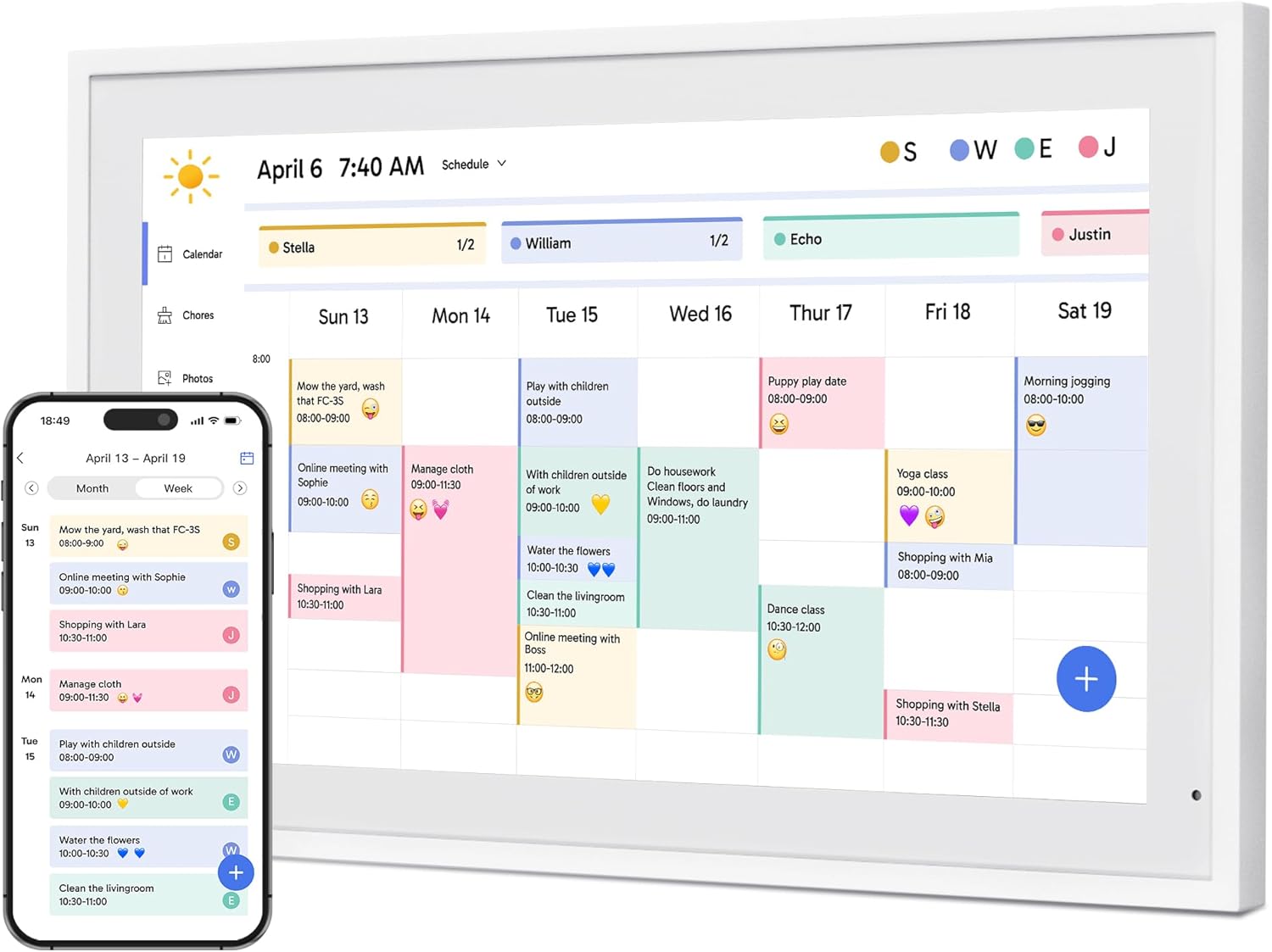
Description:
Dragon Touch 21.5" Digital Calendar Chore Chart – 1080P Full HD Interactive Touchscreen, Smart Family Planner, Hearth Display Digital Calendar Wall & Desk Mountable for Seamless Scheduling
Reviews:
5.0 out of 5 stars Easy setup; bright and clear display, added chores and calendars quickly
(function() { P.when('cr-A', 'ready').execute(function(A) { if(typeof A.toggleExpanderAriaLabel === 'function') { A.toggleExpanderAriaLabel('review_text_read_more', 'Read more of this review', 'Read less of this review'); } }); })(); .review-text-read-more-expander:focus-visible { outline: 2px solid #2162a1; outline-offset: 2px; border-radius: 5px; } Setting up the Digital Calendar out of the box was very straight forward. After booting up, naming, and connecting to my home wifi, I was up and running. Downloading the app and getting connected worked fine for me with no problems. The screen's image is very bright and looks great. The menu controls are all responsive and mostly intuitive.While the included stand is strong and made from metal, I decided to wall mount it in our living room. I really liked the simple inclusion of a wall template to align the mounting screws. The included wall anchors have worked great.I performed a software update after the initial setup, which only took a couple minutes including reboot time. I've made use of the sleep feature to set an active time range each day to have the screen on, which has worked well. Adding my kids to have their own chore list was very intuitive through the device itself. I was able to quickly create multiple chores to assign to each child individually and for all of them.One issue I ran into was while adding chores, when I chose to repeat them, the calendar wasn't giving me more details to choose from. In response, I tried doing it through the app (with new chores and editing existing ones) and the options all came up and have been working fine. Maybe a new software update will fix this, but I actually prefer to use the app anyway, so it wasn't a big deal for me.To add Google Calendars, instead of connecting to my phone, I chose to use the e-mail option. During setup, you'll assign an e-mail address associated with the Digital Calendar. By e-mailing that address the public link for a Google Calendar, it adds it automatically. I had to do this for 4 different sports calendars. One of the calendars I must have pasted the wrong link to, but shortly thereafter, I actually received an e-mail response saying that that particular calendar failed to sync to the device. I then simply sent the correct link and it added just fine. I'm very happy with this feature.The kids have only used the chore chart and calendar functions for a few days, but they seem to easily understand and make use of it. My youngest using it is 8 years old, but I'd imagine younger kids shouldn't have a problem with it. One feature I'll have to look into is if there's a way to lock down some functionality like adding new chores or removing them so the kids don't accidentally (or intentionally) make changes. I did mount it in a position that should be difficult for my 4 year old to reach, so I'm curious if that will become a problem or not.While it's only been up for a short time so far, I'm very happy with the ease of use and features. The app in the Google Play store is rated under 3 stars (at the time I downloaded it), so I was concerned it may be a poor experience, but I'm guessing they've responded to the issues in the reviews, because I've had a very smooth experience so far.Overall, I'd say so far so good and I expect this should be a useful tool for our family.
5.0 out of 5 stars Best family chore chart calendar!
I got 15 inch screen for my kids to use the calendar as a chore chart. I have loved it! I have many children using it at the same time, the updates that have come in have been amazing and very comparable to other chore chart calendars! We loved when the awards feature was added.The size is great, I’d love a larger one when I can afford it. Checking off checklist items is a little slow and multiple kids cannot check off at the same time - even though they try - but it’s not the worst thing.There’s plenty of memory for our family pictures and videos to play. My kids love swiping through our memories almost as much as getting rewards from completing their chores.The brightness is great! Has sleep mode and multiple brightness levels. You can choose to keep the screen on the checklist, calendar, rewards, or pictures. The functions have been easy to use and easy to set up. Checklists did take a while to set up but once they are set up that part is done.I love the app on my phone and how quickly it syncs with the device. It controls the device very well and is an extension of the device.
5.0 out of 5 stars Excellent addition to the living room
I have had this digital calendar and picture frame for a month and I am very happy with my purchase. The set up was extremely easy. I was able to sync two separate Google calendars to it with just a few clicks in the app. Its very straight forward. When an update is made to a calendar either on the computer or in the Google calendar app it shows on the Dragon Touch in a few minutes.The digital picture frame function is excellent too. Switching between the two is very simple. Uploading and arranging the pictures in the app takes just a few minutes and is very intuitive.The resolution of the screen is excellent. The calendar is sharp and easy to read from far away. The pictures are vivid and the structure and quality of the frame itself is sturdy. Its a heavier device than it looks which I appreciate. This isn't a cheap piece of plastic. The app is great during set up. Since the initial setup I have not had to open the app again but there are features in the app that I haven't fully explored yet. The Dragon Touch itself has all the interface you really need on a daily bases without opening the app. Switching between calendar and pictures is done in a few taps of the screen. There are functions right on the screen for all the settings and formats you would want. For instance, if you want to change how long each picture stays up on the screen, or crop a picture or change the order of the pictures, it's all done with a few taps of the screen. Everything in the setting screen is logically displayed. I have not had to refer to the instructions for guidance since setting up the device.I started with the frame in my home office. That was fine but not everyone in the house goes into the office all the time so the shared calendar wasn't being used to its potential. I then tried it in the kitchen and that was a good place but it really found its home in our living room near the TV. We walk by this area often and having the calendar function up during the day and the picture function up at night has been a good mix of utility and enjoyment. It has the option to wall mount it as well. I have a great spot for it and I may try to mount it in a few weeks. I wanted to make sure I liked it enough to put holes in my wall. After a month, I can say that I am happy enough to make those holes.Pictures are attached. I highly recommend the Dragon Touch Calendar and Picture
Easy to set up and works great!
(function() { P.when('cr-A', 'ready').execute(function(A) { if(typeof A.toggleExpanderAriaLabel === 'function') { A.toggleExpanderAriaLabel('review_text_read_more', 'Read more of this review', 'Read less of this review'); } }); })(); .review-text-read-more-expander:focus-visible { outline: 2px solid #2162a1; outline-offset: 2px; border-radius: 5px; } The photo frame was easy to load photos onto. I used a USB as it didnt involve any download of another app. Once loaded, photos started streaming and I was able to make adjustments as needed. Also easy to load additional photos
App not working on the first day itself. Disappointing experience
After setting up my username and password on the newly installed app, I get the error 417, User push token or platform error?Couldn't find any solution on the internet or user manual
Received a damaged product after 2 weeks waiting.
The media could not be loaded.
Visit the Dragon Touch Store
Dragon Touch 21.5" Digital Calendar Chore Chart – 1080P Full HD Interactive Touchscreen, Smart Family Planner, Hearth Display Digital Calendar Wall & Desk Mountable for Seamless Scheduling
AED2,33670
Quantity:
Order today to get by 7-14 business days
This item qualifies for free delivery
Imported From: United States
At BOLO, we work hard to ensure the products you receive are new, genuine, and sourced from reputable suppliers.
BOLO is not an authorized or official retailer for most brands, nor are we affiliated with manufacturers unless specifically stated on a product page. Instead, we source verified sellers, authorized distributors or directly from the manufacturer.
Each product undergoes thorough inspection and verification at our consolidation and fulfilment centers to ensure it meets our strict authenticity and quality standards before being shipped and delivered to you.
If you ever have concerns regarding the authenticity of a product purchased from us, please contact Bolo Support. We will review your inquiry promptly and, if necessary, provide documentation verifying authenticity or offer a suitable resolution.
Your trust is our top priority, and we are committed to maintaining transparency and integrity in every transaction.
All product information, images, descriptions, and reviews originate from the manufacturer or from trusted sellers overseas. BOLO is not affiliated with, endorsed by, or an authorized retailer for most brands listed on our website unless stated otherwise.
While we strive to display accurate information, variations in packaging, labeling, instructions, or formulation may occasionally occur due to regional differences or supplier updates. For detailed or manufacturer-specific information, please contact the brand directly or reach out to BOLO Support for assistance.
Unless otherwise stated, all prices displayed on the product page include applicable taxes and import duties.
BOLO operates in accordance with the laws and regulations of United Arab Emirates. Any items found to be restricted or prohibited for sale within the UAE will be cancelled prior to shipment. We take proactive measures to ensure that only products permitted for sale in United Arab Emirates are listed on our website.
All items are shipped by air, and any products classified as “Dangerous Goods (DG)” under IATA regulations will be removed from the order and cancelled.
All orders are processed manually, and we make every effort to process them promptly once confirmed. Products cancelled due to the above reasons will be permanently removed from listings across the website.
Similar suggestions by Bolo
More from this brand
Similar items from “Digital Picture Frames”
Share with
Or share with link
https://www.bolo.ae/products/UO0QD81FJE8
Visit the Dragon Touch Store
Dragon Touch 21.5" Digital Calendar Chore Chart – 1080P Full HD Interactive Touchscreen, Smart Family Planner, Hearth Display Digital Calendar Wall & Desk Mountable for Seamless Scheduling

AED2,33670
Quantity:
Order today to get by 7-14 business days
This item qualifies for free delivery
Imported From: United States
At BOLO, we work hard to ensure the products you receive are new, genuine, and sourced from reputable suppliers.
BOLO is not an authorized or official retailer for most brands, nor are we affiliated with manufacturers unless specifically stated on a product page. Instead, we source verified sellers, authorized distributors or directly from the manufacturer.
Each product undergoes thorough inspection and verification at our consolidation and fulfilment centers to ensure it meets our strict authenticity and quality standards before being shipped and delivered to you.
If you ever have concerns regarding the authenticity of a product purchased from us, please contact Bolo Support. We will review your inquiry promptly and, if necessary, provide documentation verifying authenticity or offer a suitable resolution.
Your trust is our top priority, and we are committed to maintaining transparency and integrity in every transaction.
All product information, images, descriptions, and reviews originate from the manufacturer or from trusted sellers overseas. BOLO is not affiliated with, endorsed by, or an authorized retailer for most brands listed on our website unless stated otherwise.
While we strive to display accurate information, variations in packaging, labeling, instructions, or formulation may occasionally occur due to regional differences or supplier updates. For detailed or manufacturer-specific information, please contact the brand directly or reach out to BOLO Support for assistance.
Unless otherwise stated, all prices displayed on the product page include applicable taxes and import duties.
BOLO operates in accordance with the laws and regulations of United Arab Emirates. Any items found to be restricted or prohibited for sale within the UAE will be cancelled prior to shipment. We take proactive measures to ensure that only products permitted for sale in United Arab Emirates are listed on our website.
All items are shipped by air, and any products classified as “Dangerous Goods (DG)” under IATA regulations will be removed from the order and cancelled.
All orders are processed manually, and we make every effort to process them promptly once confirmed. Products cancelled due to the above reasons will be permanently removed from listings across the website.
Description:
Dragon Touch 21.5" Digital Calendar Chore Chart – 1080P Full HD Interactive Touchscreen, Smart Family Planner, Hearth Display Digital Calendar Wall & Desk Mountable for Seamless Scheduling
Reviews:
5.0 out of 5 stars Easy setup; bright and clear display, added chores and calendars quickly
(function() { P.when('cr-A', 'ready').execute(function(A) { if(typeof A.toggleExpanderAriaLabel === 'function') { A.toggleExpanderAriaLabel('review_text_read_more', 'Read more of this review', 'Read less of this review'); } }); })(); .review-text-read-more-expander:focus-visible { outline: 2px solid #2162a1; outline-offset: 2px; border-radius: 5px; } Setting up the Digital Calendar out of the box was very straight forward. After booting up, naming, and connecting to my home wifi, I was up and running. Downloading the app and getting connected worked fine for me with no problems. The screen's image is very bright and looks great. The menu controls are all responsive and mostly intuitive.While the included stand is strong and made from metal, I decided to wall mount it in our living room. I really liked the simple inclusion of a wall template to align the mounting screws. The included wall anchors have worked great.I performed a software update after the initial setup, which only took a couple minutes including reboot time. I've made use of the sleep feature to set an active time range each day to have the screen on, which has worked well. Adding my kids to have their own chore list was very intuitive through the device itself. I was able to quickly create multiple chores to assign to each child individually and for all of them.One issue I ran into was while adding chores, when I chose to repeat them, the calendar wasn't giving me more details to choose from. In response, I tried doing it through the app (with new chores and editing existing ones) and the options all came up and have been working fine. Maybe a new software update will fix this, but I actually prefer to use the app anyway, so it wasn't a big deal for me.To add Google Calendars, instead of connecting to my phone, I chose to use the e-mail option. During setup, you'll assign an e-mail address associated with the Digital Calendar. By e-mailing that address the public link for a Google Calendar, it adds it automatically. I had to do this for 4 different sports calendars. One of the calendars I must have pasted the wrong link to, but shortly thereafter, I actually received an e-mail response saying that that particular calendar failed to sync to the device. I then simply sent the correct link and it added just fine. I'm very happy with this feature.The kids have only used the chore chart and calendar functions for a few days, but they seem to easily understand and make use of it. My youngest using it is 8 years old, but I'd imagine younger kids shouldn't have a problem with it. One feature I'll have to look into is if there's a way to lock down some functionality like adding new chores or removing them so the kids don't accidentally (or intentionally) make changes. I did mount it in a position that should be difficult for my 4 year old to reach, so I'm curious if that will become a problem or not.While it's only been up for a short time so far, I'm very happy with the ease of use and features. The app in the Google Play store is rated under 3 stars (at the time I downloaded it), so I was concerned it may be a poor experience, but I'm guessing they've responded to the issues in the reviews, because I've had a very smooth experience so far.Overall, I'd say so far so good and I expect this should be a useful tool for our family.
5.0 out of 5 stars Best family chore chart calendar!
I got 15 inch screen for my kids to use the calendar as a chore chart. I have loved it! I have many children using it at the same time, the updates that have come in have been amazing and very comparable to other chore chart calendars! We loved when the awards feature was added.The size is great, I’d love a larger one when I can afford it. Checking off checklist items is a little slow and multiple kids cannot check off at the same time - even though they try - but it’s not the worst thing.There’s plenty of memory for our family pictures and videos to play. My kids love swiping through our memories almost as much as getting rewards from completing their chores.The brightness is great! Has sleep mode and multiple brightness levels. You can choose to keep the screen on the checklist, calendar, rewards, or pictures. The functions have been easy to use and easy to set up. Checklists did take a while to set up but once they are set up that part is done.I love the app on my phone and how quickly it syncs with the device. It controls the device very well and is an extension of the device.
5.0 out of 5 stars Excellent addition to the living room
I have had this digital calendar and picture frame for a month and I am very happy with my purchase. The set up was extremely easy. I was able to sync two separate Google calendars to it with just a few clicks in the app. Its very straight forward. When an update is made to a calendar either on the computer or in the Google calendar app it shows on the Dragon Touch in a few minutes.The digital picture frame function is excellent too. Switching between the two is very simple. Uploading and arranging the pictures in the app takes just a few minutes and is very intuitive.The resolution of the screen is excellent. The calendar is sharp and easy to read from far away. The pictures are vivid and the structure and quality of the frame itself is sturdy. Its a heavier device than it looks which I appreciate. This isn't a cheap piece of plastic. The app is great during set up. Since the initial setup I have not had to open the app again but there are features in the app that I haven't fully explored yet. The Dragon Touch itself has all the interface you really need on a daily bases without opening the app. Switching between calendar and pictures is done in a few taps of the screen. There are functions right on the screen for all the settings and formats you would want. For instance, if you want to change how long each picture stays up on the screen, or crop a picture or change the order of the pictures, it's all done with a few taps of the screen. Everything in the setting screen is logically displayed. I have not had to refer to the instructions for guidance since setting up the device.I started with the frame in my home office. That was fine but not everyone in the house goes into the office all the time so the shared calendar wasn't being used to its potential. I then tried it in the kitchen and that was a good place but it really found its home in our living room near the TV. We walk by this area often and having the calendar function up during the day and the picture function up at night has been a good mix of utility and enjoyment. It has the option to wall mount it as well. I have a great spot for it and I may try to mount it in a few weeks. I wanted to make sure I liked it enough to put holes in my wall. After a month, I can say that I am happy enough to make those holes.Pictures are attached. I highly recommend the Dragon Touch Calendar and Picture
Easy to set up and works great!
(function() { P.when('cr-A', 'ready').execute(function(A) { if(typeof A.toggleExpanderAriaLabel === 'function') { A.toggleExpanderAriaLabel('review_text_read_more', 'Read more of this review', 'Read less of this review'); } }); })(); .review-text-read-more-expander:focus-visible { outline: 2px solid #2162a1; outline-offset: 2px; border-radius: 5px; } The photo frame was easy to load photos onto. I used a USB as it didnt involve any download of another app. Once loaded, photos started streaming and I was able to make adjustments as needed. Also easy to load additional photos
App not working on the first day itself. Disappointing experience
After setting up my username and password on the newly installed app, I get the error 417, User push token or platform error?Couldn't find any solution on the internet or user manual
Received a damaged product after 2 weeks waiting.
The media could not be loaded.
Similar suggestions by Bolo
More from this brand
Similar items from “Digital Picture Frames”
Share with
Or share with link
https://www.bolo.ae/products/UO0QD81FJE8