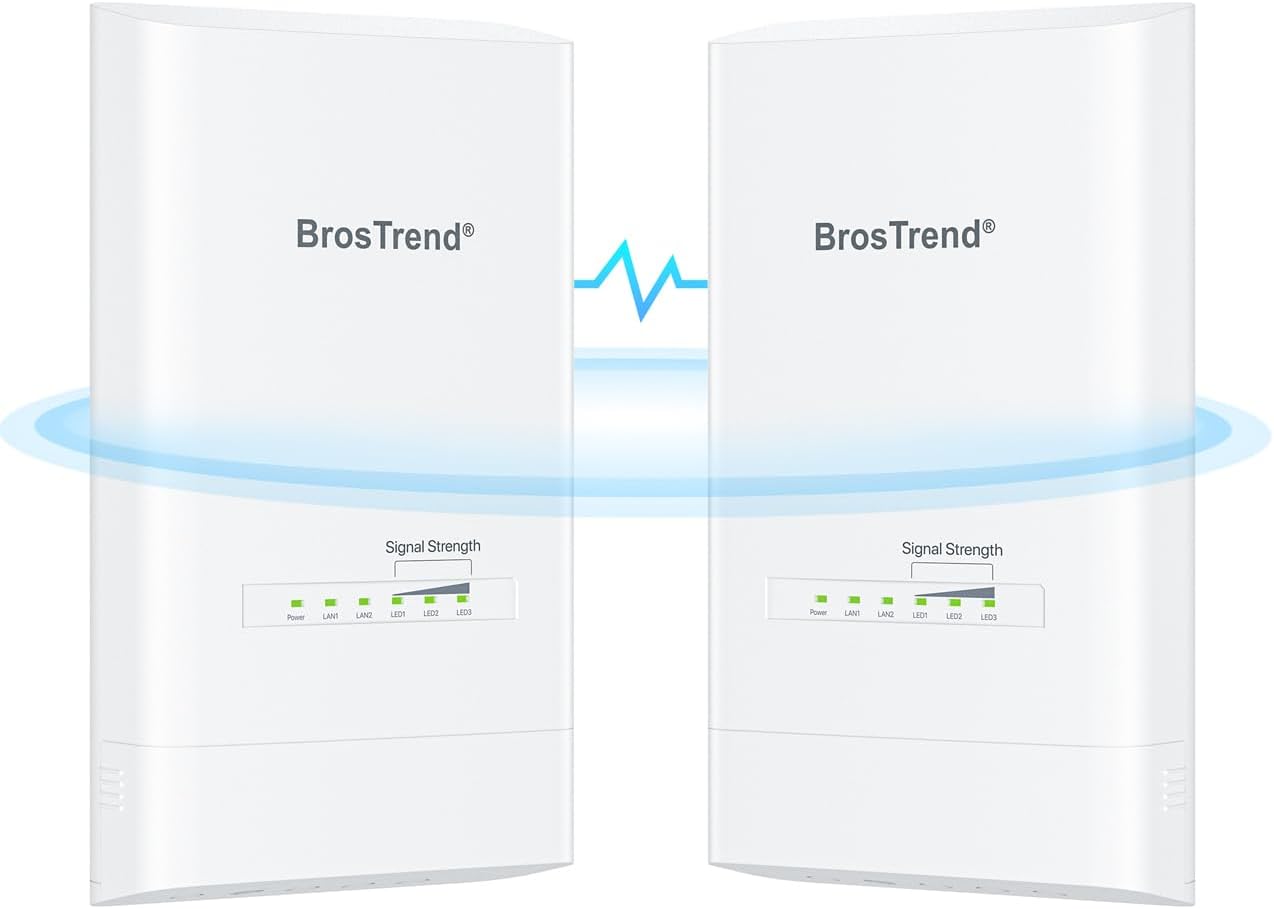
Description:
What's in the box
Details:
| Brand | BrosTrend |
|---|---|
| Model Name | 5 km Outdoor Wireless Bridge Kit |
| Special Feature | Extends the network between buildings, up to 5 km in line-of-sight; Supports Point-to-Point (PtP) and Point-to-Multipoint (PtMP); Delivers 867Mbps wireless transmission on 5GHz WiFi band; Dual Gigabit Ethernet ports; Support PoE power supply; Plug-and-play, comes pre-paired out of the box; Built for outdoor with IP65 waterproof, dustproof and 6KV lightning protection. |
| Frequency Band Class | Single-Band |
| Wireless Communication Standard | 802.11a, 802.11ac, 802.11n |
| Compatible Devices | Compatible with a device with an Ethernet port, such as your WiFi router, camera, etc. |
| Recommended Uses For Product | Perfect for establishing dedicated, high-speed WiFi links between two buildings up to 5 kilometer apart. |
| Included Components | 2 x Outdoor CPEs, 2 x Power Adapters, 2 x Passive PoE Injectors, 2 x PoE Ethernet Cables, 4 x Screws, 4 x Expansion Bolts, 2 x Plastic Straps,1 x Quick Installation Guide |
| Connectivity Technology | Ethernet, Wi-Fi |
| Color | White |
Visit the BrosTrend Store
BrosTrend 5KM Wireless Bridge Point to Point Outdoor with 2X Gigabit Ports
AED81860
Quantity:
Order today to get by 7-14 business days
This item qualifies for free delivery
 Imported From: United States
At BOLO, we work hard to ensure the products you receive are new, genuine, and sourced from reputable suppliers.
Every product in the BOLO catalogue is sourced through our Verified Global Supply Network of verified sellers, authorized distributors or directly from the manufacturer.
Each product undergoes thorough inspection and verification at our consolidation and fulfilment centers to ensure it meets our strict authenticity and quality standards before being shipped and delivered to you.
If you ever have concerns regarding the authenticity of a product purchased from us, please contact Bolo Support. We will review your inquiry promptly and, if necessary, provide documentation verifying authenticity or offer a suitable resolution.
Your trust is our top priority, and we are committed to maintaining transparency and integrity in every transaction.
While we strive to display accurate information, variations in packaging, labeling, instructions, or formulation may occasionally occur due to regional differences or supplier updates. For detailed or manufacturer-specific information, please contact the brand directly or reach out to BOLO Support for assistance.
Unless otherwise stated, all prices displayed on the product page include applicable taxes and import duties.
BOLO operates in accordance with the laws and regulations of United Arab Emirates. Any items found to be restricted or prohibited for sale within the United Arab Emirates will be cancelled prior to shipment. We take proactive measures to ensure that only products permitted for sale in United Arab Emirates are listed on our website.
All items are shipped by air, and any products classified as “Dangerous Goods (DG)” under IATA regulations will be removed from the order and cancelled.
All orders are processed manually, and we make every effort to process them promptly once confirmed. Products cancelled due to the above reasons will be permanently removed from listings across the website.


Easy Setup
-
Step 1: Power the CPEs for Auto Pairing
Place both CPE units in the same room and power them using the included PoE injectors, 802.3af PoE Ethernet switch, or DC power adapters. The CPEs come pre-paired out of the box, with one as AP (Transmitter) and the other as Station (Receiver) in the factory default configuration. You can identify each unit with the labels on their backs.

-
Step 2: Confirm Successful Auto Pairing
When the Signal Strength indicators (LED1/LED2/LED3) on the AP (Transmitter) stay solid and those on the Station (Receiver) blink slowly, the automatic pairing is successful. To confirm, connect the main router to the AP (Transmitter) with an Ethernet cable, then connect the Station (Receiver) to a laptop using another Ethernet cable. If the laptop has Internet access, the pairing is complete.
-
Step 3: Install the CPEs
Mount the CPEs and ensure a clear line of sight between them. For optimal signal transmission, they should be fully face-to-face. In certain cases, ensure the Station is aligned vertically and horizontally with the front of the AP, both within a 30° angle range.
Similar suggestions by Bolo
More from this brand
Similar items from “Wireless Access Points”
Share with
Or share with link
https://www.bolo.ae/products/UO0QCWM9SF6
Visit the BrosTrend Store
BrosTrend 5KM Wireless Bridge Point to Point Outdoor with 2X Gigabit Ports
AED81860
Quantity:
Order today to get by 7-14 business days
This item qualifies for free delivery
Imported From: United States
At BOLO, we work hard to ensure the products you receive are new, genuine, and sourced from reputable suppliers.
Every product in the BOLO catalogue is sourced through our Verified Global Supply Network of verified sellers, authorized distributors or directly from the manufacturer.
Each product undergoes thorough inspection and verification at our consolidation and fulfilment centers to ensure it meets our strict authenticity and quality standards before being shipped and delivered to you.
If you ever have concerns regarding the authenticity of a product purchased from us, please contact Bolo Support. We will review your inquiry promptly and, if necessary, provide documentation verifying authenticity or offer a suitable resolution.
Your trust is our top priority, and we are committed to maintaining transparency and integrity in every transaction.
While we strive to display accurate information, variations in packaging, labeling, instructions, or formulation may occasionally occur due to regional differences or supplier updates. For detailed or manufacturer-specific information, please contact the brand directly or reach out to BOLO Support for assistance.
Unless otherwise stated, all prices displayed on the product page include applicable taxes and import duties.
BOLO operates in accordance with the laws and regulations of United Arab Emirates. Any items found to be restricted or prohibited for sale within the United Arab Emirates will be cancelled prior to shipment. We take proactive measures to ensure that only products permitted for sale in United Arab Emirates are listed on our website.
All items are shipped by air, and any products classified as “Dangerous Goods (DG)” under IATA regulations will be removed from the order and cancelled.
All orders are processed manually, and we make every effort to process them promptly once confirmed. Products cancelled due to the above reasons will be permanently removed from listings across the website.
Description:
What's in the box
Details:
| Brand | BrosTrend |
|---|---|
| Model Name | 5 km Outdoor Wireless Bridge Kit |
| Special Feature | Extends the network between buildings, up to 5 km in line-of-sight; Supports Point-to-Point (PtP) and Point-to-Multipoint (PtMP); Delivers 867Mbps wireless transmission on 5GHz WiFi band; Dual Gigabit Ethernet ports; Support PoE power supply; Plug-and-play, comes pre-paired out of the box; Built for outdoor with IP65 waterproof, dustproof and 6KV lightning protection. |
| Frequency Band Class | Single-Band |
| Wireless Communication Standard | 802.11a, 802.11ac, 802.11n |
| Compatible Devices | Compatible with a device with an Ethernet port, such as your WiFi router, camera, etc. |
| Recommended Uses For Product | Perfect for establishing dedicated, high-speed WiFi links between two buildings up to 5 kilometer apart. |
| Included Components | 2 x Outdoor CPEs, 2 x Power Adapters, 2 x Passive PoE Injectors, 2 x PoE Ethernet Cables, 4 x Screws, 4 x Expansion Bolts, 2 x Plastic Straps,1 x Quick Installation Guide |
| Connectivity Technology | Ethernet, Wi-Fi |
| Color | White |
Easy Setup
-
Step 1: Power the CPEs for Auto Pairing
Place both CPE units in the same room and power them using the included PoE injectors, 802.3af PoE Ethernet switch, or DC power adapters. The CPEs come pre-paired out of the box, with one as AP (Transmitter) and the other as Station (Receiver) in the factory default configuration. You can identify each unit with the labels on their backs.
-
Step 2: Confirm Successful Auto Pairing
When the Signal Strength indicators (LED1/LED2/LED3) on the AP (Transmitter) stay solid and those on the Station (Receiver) blink slowly, the automatic pairing is successful. To confirm, connect the main router to the AP (Transmitter) with an Ethernet cable, then connect the Station (Receiver) to a laptop using another Ethernet cable. If the laptop has Internet access, the pairing is complete.
-
Step 3: Install the CPEs
Mount the CPEs and ensure a clear line of sight between them. For optimal signal transmission, they should be fully face-to-face. In certain cases, ensure the Station is aligned vertically and horizontally with the front of the AP, both within a 30° angle range.
Similar suggestions by Bolo
More from this brand
Similar items from “Wireless Access Points”
Share with
Or share with link
https://www.bolo.ae/products/UO0QCWM9SF6