Deliver toUnited Arab Emirates
HUION Inspiroy Frego Medium Wireless Drawing Tablet, 10 x 6.25 inch Bluetooth Graphics Tablet, Portable for Design, Writing, Photo Editing, Teaching, Compatible with Windows, Mac, Android and Linux

Description:

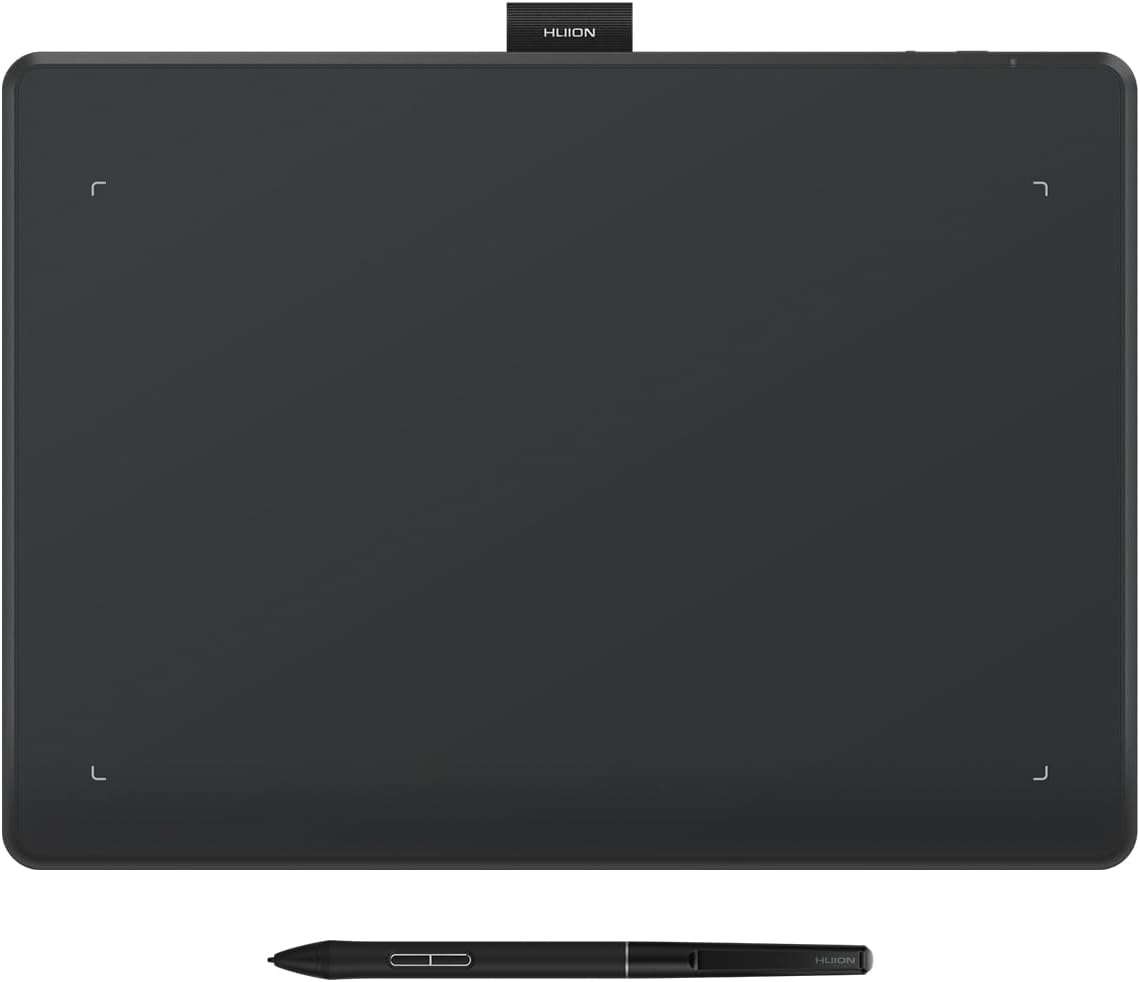
  • [Minimalist Design] Inspiroy Frego art tablet features a minimalist design without physical shortcut keys, providing a smooth and clean drawing canvas. The working area is 10 x 6.25 inches, slightly smaller than an A4 sheet of paper
  • [Flexible Connectivity] Inspiroy Frego drawing tablet for pc can be connected via Bluetooth or directly using USB-C cable. Additionally, it has a powerful battery life that can be fully charged in 2.5 hours, providing up to 24 hours of use
  • [PenTech 3.0+] Inspiroy Frego digital art tablet comes with the slim pen PW550S, which has a 9.5mm diameter and a 0.4mm retraction distance for solid drawing. Additionally, it equips two programmable side keys, allowing you to quickly access functions such as brush, eraser, zoom, and undo
  • [Mobile Supported] Inspiroy Frego osu tablet can be connected not only to an Android phone or tablet, but also to an iPhone or iPad through HiPaint or ibisPaint. HiPaint can also automatically recognize the aspect ratio of your phone or tablet, and map it to the working area of Inspiroy Frego pen tablet to prevent the discrepancy of ratio
  • [Ergonomic Design] The sloping curved edges help to reduce the discomfort on your hands when they touch the edges of the pen tablet. The wrist rest design at the bottom of the pen tablet effectively reduces wrist fatigue during long periods of creation
  • [Easy to Go] With the portable size and the built-in nylon pen holder, Inspiroy Frego digital drawing pad is very convenient to carry with you anywhere, anytime. Its symmetrical design is also friendly for both left-handed and right-handed artists while making their setup more versatile
  • [Compatibility] Wired connection: Windows 7 or later, macOS 10.12 or later and Ubuntu 20.04 LTS; Bluetooth connection: Windows 10 or later 64bit, macOS 10.13 or later and Android 6.0 or later

  • Reviews:

    5.0 out of 5 stars Absolutely Amazing

    T. · September 10, 2018

    I recently decided to upgrade my tablet, realizing how outdated and overly simplified my old one was. This is only my second drawing tablet. My first was a Wacom Intous Pen and Touch CTH 480.I've only had this produce for roughly two weeks, but I love it. I had a question for the seller, who responded promptly about delivery service which was extraordinarily nice. Got this beauty much faster than expected. Downloading the drivers was quick and easy, and didn't take up much space on my laptop which was nice.This tablet is solid. It's well built, well designed, and functional. It doesn't feel flimsy or cheap. The buttons work nicely and there's plenty for me (I've not had shortcuts like them before, so they do the basics I use the most). They give a sharp 'click' when you press on them and aren't wobbly, limp, or use to push by accident.The pen is incredible. I love how it fits in my hand. Even better, I can feel the give in the nib that lets me know if I'm applying too much pressure. It was really easy for me to transition to this baby even with the size difference in work area. The surface isn't textured too which was a huge plus. I've heard some terrible stories about textured work areas, and you won't find this here. The surrounding plastic is, however, textured if that bothers anyone. It doesn't for me in the very least.I've had plenty of time to doodle and color frequently with this tablet now, and I have absolutely no regrets. I can't stop expressing my fondness for this tablet to anyone who will listen.I personally received an extra gift of an Art Glove, which I wasn't excited nor loathing of, but now that I've used it I couldn't be more giddy! I never had too much lag prior without one, but it does allow for a smooth glide of the side of my hand across the surface of the active area. A fair warning: your hand will probably get quite a bit sweaty wearing it though. I've left some streaks on my poor tablet but I wipe it clean with a nice microfiber cloth and it's good as new!The only fault I've found is that I need to always set Administrator Privilege when I plug it in order to use it in my chosen art program. Once I found this out however, it's been a breeze. You really couldn't go wrong here. I've already recommended this tablet to my friends, and will continue to do so to anyone who will listen.Goodbye Wacom, you won't be seeing another penny from me when there's amazing quality products from Huion to buy!

    5.0 out of 5 stars great tablet

    G.O. · May 23, 2021

    This is a large pen tablet at a good price - equal to the much more expensive offerings of Wacom.The battery-free pen is superb. My experience is that the pen's sensitivity of this V2 model is identical to the V1 model - very touchy and nicely pressure sensitive. Pen sensitivity is customized via usage/test calibration.The tablet software is easy to use for customization.I plug the tablet into a USB port. I can only imagine that using the wireless mode is just asking for glitchiness (including perhaps lesser pen sensitivity which other reviews have complained about).I recommend the Huion ST200 adjustable drawing tablet stand, as it makes it easy to put the tablet just how you want it. I was surprised to find that the tablet works best for me at a 45 degree angle.I use a Kensington Orbit trackball mouse with scroll ring (K72337US) for my other main mouse input device. The scroll ring is excellent for scrolling or zooming. Once you get used to a trackball (it takes a couple weeks) you will never go back to a mouse. The combination of this trackball and tablet is ideal for productivity.Finally, I use the Kinesis Advantage2 keyboard (KB600). It is expensive, and is an adjustment, as finger placement is closer than a regular keyboard, and you use your thumbs much more. Like a trackball, once you get used to this keyboard, regular keyboards (including the Microsoft 4000 ergonomic keyboard) seem primitive.

    5.0 out of 5 stars Well built, responsive, quality product at a very competitive price

    R.W. · September 27, 2018

    Installation of the driver was simple and pain free. In fact, on my Windows 10 system the tablet was recognised as soon as I plugged the receiver into the USB port and was immediately usable through the Windows Ink driver. To configure the the eight keys, I installed the Huion driver downloaded from their website. My experience is based on their V14.7.6 driver.The primary applications I use with the Q11K V2 are Affinity Photo and Adobe Lightroom as my interest is mainly photography and illustration for photo books/albums.Using the tablet with Affinity Photo is an absolute pleasure as brush dynamics can be configured to take advantage of pressure and tilt (angle). It's really nice to be able to control hardness just by changing the angle of the pen and get very smooth size transitions with pressure.Lightroom 6 is somewhat limited in its response to pen pressure. The main use of pen pressure is with the adjustment brush where it works fine. There is lag but that is a limitation of Lightroom and not the table/pen; the same lag is seen when using a mouse.The tablet appears to be very well built, slim but with a large working area. For me the tablet size is perfect as it sits perfectly on my lap without wobbling. It is quite light too so I can use it across my forearm though that makes using the configurable keys more difficult unless you want to press them with the pen. The surface is matte and feels nice to draw on. When using the complete area your arm will inevitably need to move. The artist glove that was supplied really helps here; no more does the side of my hand stick to the tablet. A simple thing but very effective. With regards to the active working area, this can be configured in the driver which is nice if you want to limit arm and wrist motion. The tablet can also be configured to operate in any of four orientations. For me, being left-handed, 180 works well. As mentioned earlier, there are eight programmable keys. I use these when working on ideas with the tablet sitting on my lap but when I work at my desktop system I supplement them with a ShuttlePro V2. The Q11k V2 and the ShuttlePro V2 make a really nice combination. Battery life is certainly adequate for me as I hadn't had to charge it since first using it a few weeks ago. I can't comment upon the improvements over the V1 as I haven't used the older model.In summary, I am very impressed with the tablet. It is well built, performs well and exceeded my expectations. I would have no hesitation in recommending the Q11K V2 for photo touch up or illustration work.

    Intuitive and easy to use

    P. · July 21, 2025

    The graphic tablet size is large. Well built. Easy to use, plug and play. Of course, there's a learning curve and bit odd for a beginner but one can learn quickly with regular usage. When using with Android, there's absolutely no lag at all. When using with laptop or PC, there's negligible lag depending upon the application we want to use it in. Hope with new driver updates the latency can be zero'd down.

    Amazing tablet for a minimalist

    M.N. · February 7, 2025

    This is a great little drawing tablet, I love having no wires and the pen does not need a Bater or a charge, I have noticed no lag in apps and really enjoy not having a ton of buttons to navage around.

    pensaba en regresarla por que no funcionaba con android

    L.A.S. · June 18, 2025

    pero para usarlo con android se necesita usar una aplicación llamada hipaint, la pluma es delgada, la tableta es grande por lo que es cómoda de usar, no se necesitan cables para usarla solo bluetooth, bueno y no funciona conectada solo carga

    Great tablet for the price.

    R.M. · April 8, 2025

    Good enough for my use case. Working on Arch linux out of the box, both in wired and Bluetooth mode, without installing additional drivers, with blueman Bluetooth manager. The felt nib feels like sliding chalk on board, the regular nibs provided are much better. Works fine in Rnote.

    Good product

    A.k. · June 28, 2025

    Nice product but it contains only one pencil tip instead of 5 which they mentioned

    HUION Inspiroy Frego Medium Wireless Drawing Tablet, 10 x 6.25 inch Bluetooth Graphics Tablet, Portable for Design, Writing, Photo Editing, Teaching, Compatible with Windows, Mac, Android and Linux

    Product ID: UO0Q8J56JSX
    Condition: New

    4.4

    AED60329

    Price includes VAT & Import Duties
    Size: Medium
    Availability: In Stock

    Quantity:

    |

    Order today to get by 7-14 business days

    This item qualifies for free delivery

    Returns & Warranty policies

    Imported From: United States

    At BOLO, we work hard to ensure the products you receive are new, genuine, and sourced from reputable suppliers.

    BOLO is not an authorized or official retailer for most brands, nor are we affiliated with manufacturers unless specifically stated on a product page. Instead, we source verified sellers, authorized distributors or directly from the manufacturer.

    Each product undergoes thorough inspection and verification at our consolidation and fulfilment centers to ensure it meets our strict authenticity and quality standards before being shipped and delivered to you.

    If you ever have concerns regarding the authenticity of a product purchased from us, please contact Bolo Support. We will review your inquiry promptly and, if necessary, provide documentation verifying authenticity or offer a suitable resolution.

    Your trust is our top priority, and we are committed to maintaining transparency and integrity in every transaction.

    All product information, images, descriptions, and reviews originate from the manufacturer or from trusted sellers overseas. BOLO is not affiliated with, endorsed by, or an authorized retailer for most brands listed on our website unless stated otherwise.

    While we strive to display accurate information, variations in packaging, labeling, instructions, or formulation may occasionally occur due to regional differences or supplier updates. For detailed or manufacturer-specific information, please contact the brand directly or reach out to BOLO Support for assistance.

    Unless otherwise stated, all prices displayed on the product page include applicable taxes and import duties.

    BOLO operates in accordance with the laws and regulations of United Arab Emirates. Any items found to be restricted or prohibited for sale within the UAE will be cancelled prior to shipment. We take proactive measures to ensure that only products permitted for sale in United Arab Emirates are listed on our website.

    All items are shipped by air, and any products classified as “Dangerous Goods (DG)” under IATA regulations will be removed from the order and cancelled.

    All orders are processed manually, and we make every effort to process them promptly once confirmed. Products cancelled due to the above reasons will be permanently removed from listings across the website.

    Similar suggestions by Bolo

    More from this brand

    Similar items from “Graphics Tablets”

    HUION Inspiroy Frego Medium Wireless Drawing Tablet, 10 x 6.25 inch Bluetooth Graphics Tablet, Portable for Design, Writing, Photo Editing, Teaching, Compatible with Windows, Mac, Android and Linux

    Product ID: UO0Q8J56JSX
    Condition: New

    4.4

    HUION Inspiroy Frego Medium Wireless Drawing Tablet, 10 x 6.25 inch Bluetooth Graphics Tablet, Portable for Design, Writing, Photo Editing, Teaching, Compatible with Windows, Mac, Android and Linux-0
    Size: Medium

    AED60329

    Price includes VAT & Import Duties
    Availability: In Stock

    Quantity:

    |

    Order today to get by 7-14 business days

    This item qualifies for free delivery

    Returns & Warranty policies

    Imported From: United States

    At BOLO, we work hard to ensure the products you receive are new, genuine, and sourced from reputable suppliers.

    BOLO is not an authorized or official retailer for most brands, nor are we affiliated with manufacturers unless specifically stated on a product page. Instead, we source verified sellers, authorized distributors or directly from the manufacturer.

    Each product undergoes thorough inspection and verification at our consolidation and fulfilment centers to ensure it meets our strict authenticity and quality standards before being shipped and delivered to you.

    If you ever have concerns regarding the authenticity of a product purchased from us, please contact Bolo Support. We will review your inquiry promptly and, if necessary, provide documentation verifying authenticity or offer a suitable resolution.

    Your trust is our top priority, and we are committed to maintaining transparency and integrity in every transaction.

    All product information, images, descriptions, and reviews originate from the manufacturer or from trusted sellers overseas. BOLO is not affiliated with, endorsed by, or an authorized retailer for most brands listed on our website unless stated otherwise.

    While we strive to display accurate information, variations in packaging, labeling, instructions, or formulation may occasionally occur due to regional differences or supplier updates. For detailed or manufacturer-specific information, please contact the brand directly or reach out to BOLO Support for assistance.

    Unless otherwise stated, all prices displayed on the product page include applicable taxes and import duties.

    BOLO operates in accordance with the laws and regulations of United Arab Emirates. Any items found to be restricted or prohibited for sale within the UAE will be cancelled prior to shipment. We take proactive measures to ensure that only products permitted for sale in United Arab Emirates are listed on our website.

    All items are shipped by air, and any products classified as “Dangerous Goods (DG)” under IATA regulations will be removed from the order and cancelled.

    All orders are processed manually, and we make every effort to process them promptly once confirmed. Products cancelled due to the above reasons will be permanently removed from listings across the website.

    Description:

  • [Minimalist Design] Inspiroy Frego art tablet features a minimalist design without physical shortcut keys, providing a smooth and clean drawing canvas. The working area is 10 x 6.25 inches, slightly smaller than an A4 sheet of paper
  • [Flexible Connectivity] Inspiroy Frego drawing tablet for pc can be connected via Bluetooth or directly using USB-C cable. Additionally, it has a powerful battery life that can be fully charged in 2.5 hours, providing up to 24 hours of use
  • [PenTech 3.0+] Inspiroy Frego digital art tablet comes with the slim pen PW550S, which has a 9.5mm diameter and a 0.4mm retraction distance for solid drawing. Additionally, it equips two programmable side keys, allowing you to quickly access functions such as brush, eraser, zoom, and undo
  • [Mobile Supported] Inspiroy Frego osu tablet can be connected not only to an Android phone or tablet, but also to an iPhone or iPad through HiPaint or ibisPaint. HiPaint can also automatically recognize the aspect ratio of your phone or tablet, and map it to the working area of Inspiroy Frego pen tablet to prevent the discrepancy of ratio
  • [Ergonomic Design] The sloping curved edges help to reduce the discomfort on your hands when they touch the edges of the pen tablet. The wrist rest design at the bottom of the pen tablet effectively reduces wrist fatigue during long periods of creation
  • [Easy to Go] With the portable size and the built-in nylon pen holder, Inspiroy Frego digital drawing pad is very convenient to carry with you anywhere, anytime. Its symmetrical design is also friendly for both left-handed and right-handed artists while making their setup more versatile
  • [Compatibility] Wired connection: Windows 7 or later, macOS 10.12 or later and Ubuntu 20.04 LTS; Bluetooth connection: Windows 10 or later 64bit, macOS 10.13 or later and Android 6.0 or later

  • Reviews:

    5.0 out of 5 stars Absolutely Amazing

    T. · September 10, 2018

    I recently decided to upgrade my tablet, realizing how outdated and overly simplified my old one was. This is only my second drawing tablet. My first was a Wacom Intous Pen and Touch CTH 480.I've only had this produce for roughly two weeks, but I love it. I had a question for the seller, who responded promptly about delivery service which was extraordinarily nice. Got this beauty much faster than expected. Downloading the drivers was quick and easy, and didn't take up much space on my laptop which was nice.This tablet is solid. It's well built, well designed, and functional. It doesn't feel flimsy or cheap. The buttons work nicely and there's plenty for me (I've not had shortcuts like them before, so they do the basics I use the most). They give a sharp 'click' when you press on them and aren't wobbly, limp, or use to push by accident.The pen is incredible. I love how it fits in my hand. Even better, I can feel the give in the nib that lets me know if I'm applying too much pressure. It was really easy for me to transition to this baby even with the size difference in work area. The surface isn't textured too which was a huge plus. I've heard some terrible stories about textured work areas, and you won't find this here. The surrounding plastic is, however, textured if that bothers anyone. It doesn't for me in the very least.I've had plenty of time to doodle and color frequently with this tablet now, and I have absolutely no regrets. I can't stop expressing my fondness for this tablet to anyone who will listen.I personally received an extra gift of an Art Glove, which I wasn't excited nor loathing of, but now that I've used it I couldn't be more giddy! I never had too much lag prior without one, but it does allow for a smooth glide of the side of my hand across the surface of the active area. A fair warning: your hand will probably get quite a bit sweaty wearing it though. I've left some streaks on my poor tablet but I wipe it clean with a nice microfiber cloth and it's good as new!The only fault I've found is that I need to always set Administrator Privilege when I plug it in order to use it in my chosen art program. Once I found this out however, it's been a breeze. You really couldn't go wrong here. I've already recommended this tablet to my friends, and will continue to do so to anyone who will listen.Goodbye Wacom, you won't be seeing another penny from me when there's amazing quality products from Huion to buy!

    5.0 out of 5 stars great tablet

    G.O. · May 23, 2021

    This is a large pen tablet at a good price - equal to the much more expensive offerings of Wacom.The battery-free pen is superb. My experience is that the pen's sensitivity of this V2 model is identical to the V1 model - very touchy and nicely pressure sensitive. Pen sensitivity is customized via usage/test calibration.The tablet software is easy to use for customization.I plug the tablet into a USB port. I can only imagine that using the wireless mode is just asking for glitchiness (including perhaps lesser pen sensitivity which other reviews have complained about).I recommend the Huion ST200 adjustable drawing tablet stand, as it makes it easy to put the tablet just how you want it. I was surprised to find that the tablet works best for me at a 45 degree angle.I use a Kensington Orbit trackball mouse with scroll ring (K72337US) for my other main mouse input device. The scroll ring is excellent for scrolling or zooming. Once you get used to a trackball (it takes a couple weeks) you will never go back to a mouse. The combination of this trackball and tablet is ideal for productivity.Finally, I use the Kinesis Advantage2 keyboard (KB600). It is expensive, and is an adjustment, as finger placement is closer than a regular keyboard, and you use your thumbs much more. Like a trackball, once you get used to this keyboard, regular keyboards (including the Microsoft 4000 ergonomic keyboard) seem primitive.

    5.0 out of 5 stars Well built, responsive, quality product at a very competitive price

    R.W. · September 27, 2018

    Installation of the driver was simple and pain free. In fact, on my Windows 10 system the tablet was recognised as soon as I plugged the receiver into the USB port and was immediately usable through the Windows Ink driver. To configure the the eight keys, I installed the Huion driver downloaded from their website. My experience is based on their V14.7.6 driver.The primary applications I use with the Q11K V2 are Affinity Photo and Adobe Lightroom as my interest is mainly photography and illustration for photo books/albums.Using the tablet with Affinity Photo is an absolute pleasure as brush dynamics can be configured to take advantage of pressure and tilt (angle). It's really nice to be able to control hardness just by changing the angle of the pen and get very smooth size transitions with pressure.Lightroom 6 is somewhat limited in its response to pen pressure. The main use of pen pressure is with the adjustment brush where it works fine. There is lag but that is a limitation of Lightroom and not the table/pen; the same lag is seen when using a mouse.The tablet appears to be very well built, slim but with a large working area. For me the tablet size is perfect as it sits perfectly on my lap without wobbling. It is quite light too so I can use it across my forearm though that makes using the configurable keys more difficult unless you want to press them with the pen. The surface is matte and feels nice to draw on. When using the complete area your arm will inevitably need to move. The artist glove that was supplied really helps here; no more does the side of my hand stick to the tablet. A simple thing but very effective. With regards to the active working area, this can be configured in the driver which is nice if you want to limit arm and wrist motion. The tablet can also be configured to operate in any of four orientations. For me, being left-handed, 180 works well. As mentioned earlier, there are eight programmable keys. I use these when working on ideas with the tablet sitting on my lap but when I work at my desktop system I supplement them with a ShuttlePro V2. The Q11k V2 and the ShuttlePro V2 make a really nice combination. Battery life is certainly adequate for me as I hadn't had to charge it since first using it a few weeks ago. I can't comment upon the improvements over the V1 as I haven't used the older model.In summary, I am very impressed with the tablet. It is well built, performs well and exceeded my expectations. I would have no hesitation in recommending the Q11K V2 for photo touch up or illustration work.

    Intuitive and easy to use

    P. · July 21, 2025

    The graphic tablet size is large. Well built. Easy to use, plug and play. Of course, there's a learning curve and bit odd for a beginner but one can learn quickly with regular usage. When using with Android, there's absolutely no lag at all. When using with laptop or PC, there's negligible lag depending upon the application we want to use it in. Hope with new driver updates the latency can be zero'd down.

    Amazing tablet for a minimalist

    M.N. · February 7, 2025

    This is a great little drawing tablet, I love having no wires and the pen does not need a Bater or a charge, I have noticed no lag in apps and really enjoy not having a ton of buttons to navage around.

    pensaba en regresarla por que no funcionaba con android

    L.A.S. · June 18, 2025

    pero para usarlo con android se necesita usar una aplicación llamada hipaint, la pluma es delgada, la tableta es grande por lo que es cómoda de usar, no se necesitan cables para usarla solo bluetooth, bueno y no funciona conectada solo carga

    Great tablet for the price.

    R.M. · April 8, 2025

    Good enough for my use case. Working on Arch linux out of the box, both in wired and Bluetooth mode, without installing additional drivers, with blueman Bluetooth manager. The felt nib feels like sliding chalk on board, the regular nibs provided are much better. Works fine in Rnote.

    Good product

    A.k. · June 28, 2025

    Nice product but it contains only one pencil tip instead of 5 which they mentioned

    Similar suggestions by Bolo

    More from this brand

    Similar items from “Graphics Tablets”