Description:
Reviews:
5.0 out of 5 stars A Must For a Printer That Doesn't Need Upgrades
I can control all my Bambulab printers with ease. I learned that firmware upgrades could render it unusable, I don't plan on upgrading the firmware, I'm happy with the way the printers work. Installation is straight forward, documentation is good, plus there are many videos with step by step instructions.
5.0 out of 5 stars A must have if you use the screen often. A nice upgrade to have for the P1S
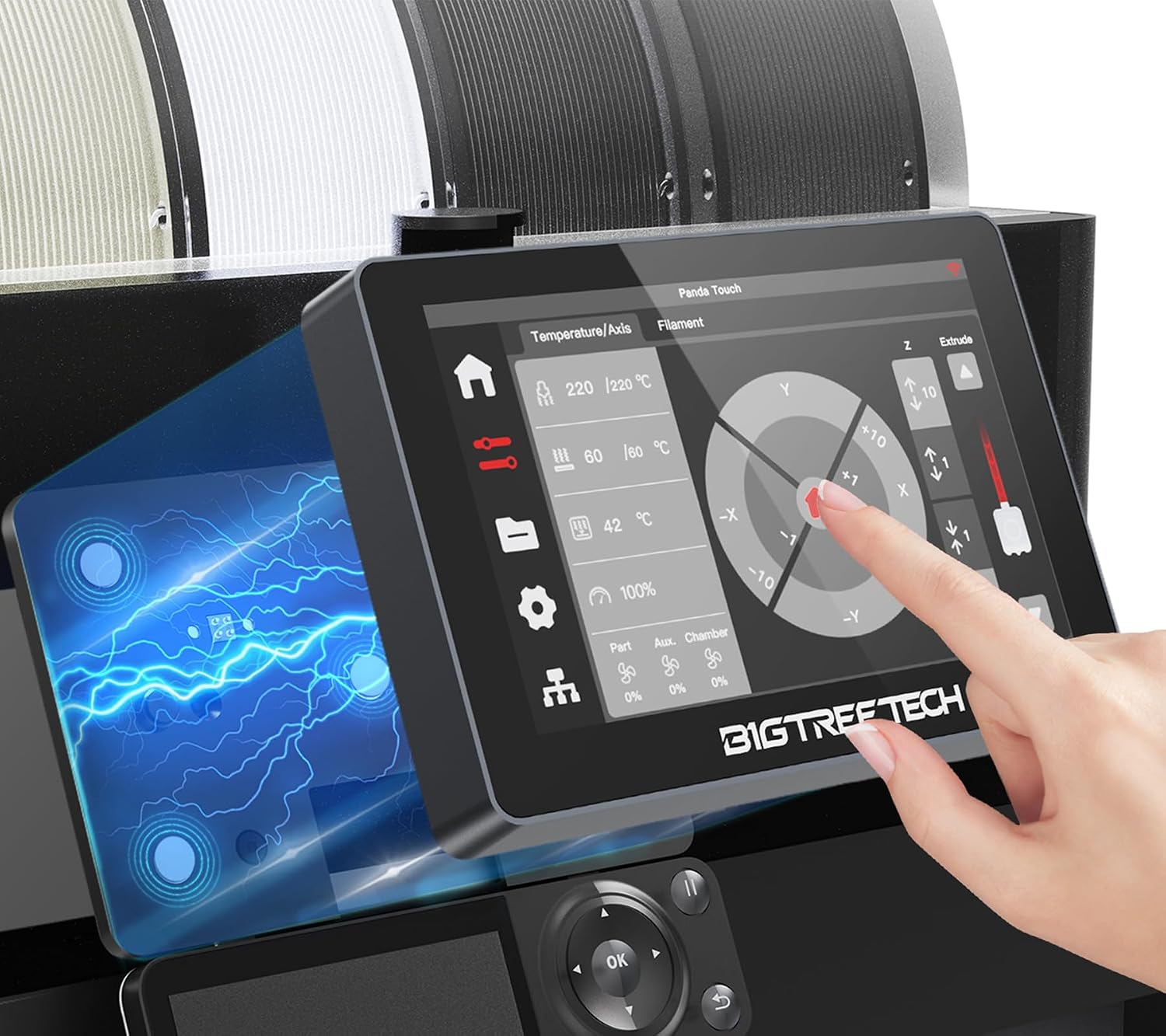
Does what the description says. Much easier to read than the built in P1S screen. Glad to have it. Mounts and installs easily. You don't have to have it, but it's nice if you use the screen often. Looks like a good quality product and the screen is bright, sharp and full of options for your P1S.
3.0 out of 5 stars Better Than the Stock Display
Update: I had to return the item after using it for a day. The screen kept flickering on and off and I went to plug in the cable and the charging port broke off. Not sure if this was why I received it opened as a returned item? I will order a other one as I did like it.I purchased this for the Bambu Lab P1S. It's better than the stock display. It's nice to be able to see all the words on the screen.It was easy to set up, however, you will need to update the firmware and .img file when you get it because it wouldn't authenticate to the Bambu website.The only complaint I have is that I received an opened one. It works and I wasn't happy but didn't want to go through the hassle of a return.
4.0 out of 5 stars It’s a fancy light switch, mostly.
I love the way it looks. Makes the printer look fancy.However this is just a very expensive light switch. All other functions are mostly unused/ unnecessary. (There are some, but those are not used frequently )Light function on P1S factory control is harder to access than on Bigtreetech. On Bigtreetech its on main screen, just touch it, and the light is on, touch it again…..For some reason I did not find a way to activate ams drying on Bigteetech, but it’s not to hard to activate it on factory control. Bigtreetech looses the connection to the printer every once in a while, mostly because it goes to sleep.Touch it and it will wake up, and reconnect within a minute, or sometimes two.Most of the print are sent to my printer wirelessly, from a laptop, or a tablet. So never had tried accessing files via usb stick, that can be plugged in to Bigtreetech.
1.0 out of 5 stars A MESS!!!!
Nice display, looks good but, I had to return it because 3 days after buying it Bambu Labs updated the firmware on my P1S and Panda Touch was not compatible and had to return it and go back to the TERRIBLY SMALL BBL control screen 📺
5.0 out of 5 stars Makes life simple
The Panda touch is a handy gadget. After spending time using touch screens on other printers, I found it hard to go back to the screen the Bambu P1S offers by default. The Panda Touch fills this void. I never plan on updating my printer firmware, so I cannot see a conflict ever occurring with the Panda touch. That is about the only thing I would caution others considering this product. Because if the printer’s firmware does not allow the Panda touch to work, or work fully, you could be stuck.
5.0 out of 5 stars A good addition for the Bambu P1S or P1P
Initially, I liked the unit, but was not overly impressed with it, maybe a 5 out of 10 rating. Then they made the 1.0.6 firmware. This really made great changes for use. View not just the 3D of what is stored memory to print, but history from Bambu, but also from the USB stick if loaded. Mostly I got this to add functionality for the filament load/unload as my PC is across the room and my arms are too short to reach the keyboard, this took care of that and a lot more now as well. Definitely bump my rating to 5 stars now. I also have the Panda light, which is really nice as well - much more light than the original built-in light.
5.0 out of 5 stars Cool little screen.
I bought this for my A1 Mini. It's definitely not needed but it's kinda cool not having to go to the printer to see what's going on. Sure you can just look on the computer or you phone but why when you could buy this and look at it. As far as installation it's pretty easy, nothing too crazy with the install. I've seen other places that people are having problems with the wifi but so far mine has been working flawless. If you have a few bucks lying around and can find it on sale I'd say buy it just for the heck of it.
Visit the BIQU Store
BIGTREETECH Panda Touch Compatible with Bambu-Lab P1P P1S X1C X1E A1 Mini 3D Printers Upgrade Touch Screen Kit Support Multi-Printers Management 2.4G WiFi Wireless Connection
AED47322
Quantity:
Order today to get by 7-14 business days
This item qualifies for free delivery
Imported From: United States
At BOLO, we work hard to ensure the products you receive are new, genuine, and sourced from reputable suppliers.
BOLO is not an authorized or official retailer for most brands, nor are we affiliated with manufacturers unless specifically stated on a product page. Instead, we source verified sellers, authorized distributors or directly from the manufacturer.
Each product undergoes thorough inspection and verification at our consolidation and fulfilment centers to ensure it meets our strict authenticity and quality standards before being shipped and delivered to you.
If you ever have concerns regarding the authenticity of a product purchased from us, please contact Bolo Support. We will review your inquiry promptly and, if necessary, provide documentation verifying authenticity or offer a suitable resolution.
Your trust is our top priority, and we are committed to maintaining transparency and integrity in every transaction.
All product information, images, descriptions, and reviews originate from the manufacturer or from trusted sellers overseas. BOLO is not affiliated with, endorsed by, or an authorized retailer for most brands listed on our website unless stated otherwise.
While we strive to display accurate information, variations in packaging, labeling, instructions, or formulation may occasionally occur due to regional differences or supplier updates. For detailed or manufacturer-specific information, please contact the brand directly or reach out to BOLO Support for assistance.
Unless otherwise stated, all prices displayed on the product page include applicable taxes and import duties.
BOLO operates in accordance with the laws and regulations of United Arab Emirates. Any items found to be restricted or prohibited for sale within the UAE will be cancelled prior to shipment. We take proactive measures to ensure that only products permitted for sale in United Arab Emirates are listed on our website.
All items are shipped by air, and any products classified as “Dangerous Goods (DG)” under IATA regulations will be removed from the order and cancelled.
All orders are processed manually, and we make every effort to process them promptly once confirmed. Products cancelled due to the above reasons will be permanently removed from listings across the website.
Similar suggestions by Bolo
More from this brand
Similar items from “3D Printer Accessories”
Share with
Or share with link
https://www.bolo.ae/products/UO0Q89DFM7X
Visit the BIQU Store
BIGTREETECH Panda Touch Compatible with Bambu-Lab P1P P1S X1C X1E A1 Mini 3D Printers Upgrade Touch Screen Kit Support Multi-Printers Management 2.4G WiFi Wireless Connection

AED47322
Quantity:
Order today to get by 7-14 business days
This item qualifies for free delivery
Imported From: United States
At BOLO, we work hard to ensure the products you receive are new, genuine, and sourced from reputable suppliers.
BOLO is not an authorized or official retailer for most brands, nor are we affiliated with manufacturers unless specifically stated on a product page. Instead, we source verified sellers, authorized distributors or directly from the manufacturer.
Each product undergoes thorough inspection and verification at our consolidation and fulfilment centers to ensure it meets our strict authenticity and quality standards before being shipped and delivered to you.
If you ever have concerns regarding the authenticity of a product purchased from us, please contact Bolo Support. We will review your inquiry promptly and, if necessary, provide documentation verifying authenticity or offer a suitable resolution.
Your trust is our top priority, and we are committed to maintaining transparency and integrity in every transaction.
All product information, images, descriptions, and reviews originate from the manufacturer or from trusted sellers overseas. BOLO is not affiliated with, endorsed by, or an authorized retailer for most brands listed on our website unless stated otherwise.
While we strive to display accurate information, variations in packaging, labeling, instructions, or formulation may occasionally occur due to regional differences or supplier updates. For detailed or manufacturer-specific information, please contact the brand directly or reach out to BOLO Support for assistance.
Unless otherwise stated, all prices displayed on the product page include applicable taxes and import duties.
BOLO operates in accordance with the laws and regulations of United Arab Emirates. Any items found to be restricted or prohibited for sale within the UAE will be cancelled prior to shipment. We take proactive measures to ensure that only products permitted for sale in United Arab Emirates are listed on our website.
All items are shipped by air, and any products classified as “Dangerous Goods (DG)” under IATA regulations will be removed from the order and cancelled.
All orders are processed manually, and we make every effort to process them promptly once confirmed. Products cancelled due to the above reasons will be permanently removed from listings across the website.
Description:
Reviews:
5.0 out of 5 stars A Must For a Printer That Doesn't Need Upgrades
I can control all my Bambulab printers with ease. I learned that firmware upgrades could render it unusable, I don't plan on upgrading the firmware, I'm happy with the way the printers work. Installation is straight forward, documentation is good, plus there are many videos with step by step instructions.
5.0 out of 5 stars A must have if you use the screen often. A nice upgrade to have for the P1S
Does what the description says. Much easier to read than the built in P1S screen. Glad to have it. Mounts and installs easily. You don't have to have it, but it's nice if you use the screen often. Looks like a good quality product and the screen is bright, sharp and full of options for your P1S.
3.0 out of 5 stars Better Than the Stock Display
Update: I had to return the item after using it for a day. The screen kept flickering on and off and I went to plug in the cable and the charging port broke off. Not sure if this was why I received it opened as a returned item? I will order a other one as I did like it.I purchased this for the Bambu Lab P1S. It's better than the stock display. It's nice to be able to see all the words on the screen.It was easy to set up, however, you will need to update the firmware and .img file when you get it because it wouldn't authenticate to the Bambu website.The only complaint I have is that I received an opened one. It works and I wasn't happy but didn't want to go through the hassle of a return.
4.0 out of 5 stars It’s a fancy light switch, mostly.
I love the way it looks. Makes the printer look fancy.However this is just a very expensive light switch. All other functions are mostly unused/ unnecessary. (There are some, but those are not used frequently )Light function on P1S factory control is harder to access than on Bigtreetech. On Bigtreetech its on main screen, just touch it, and the light is on, touch it again…..For some reason I did not find a way to activate ams drying on Bigteetech, but it’s not to hard to activate it on factory control. Bigtreetech looses the connection to the printer every once in a while, mostly because it goes to sleep.Touch it and it will wake up, and reconnect within a minute, or sometimes two.Most of the print are sent to my printer wirelessly, from a laptop, or a tablet. So never had tried accessing files via usb stick, that can be plugged in to Bigtreetech.
1.0 out of 5 stars A MESS!!!!
Nice display, looks good but, I had to return it because 3 days after buying it Bambu Labs updated the firmware on my P1S and Panda Touch was not compatible and had to return it and go back to the TERRIBLY SMALL BBL control screen 📺
5.0 out of 5 stars Makes life simple
The Panda touch is a handy gadget. After spending time using touch screens on other printers, I found it hard to go back to the screen the Bambu P1S offers by default. The Panda Touch fills this void. I never plan on updating my printer firmware, so I cannot see a conflict ever occurring with the Panda touch. That is about the only thing I would caution others considering this product. Because if the printer’s firmware does not allow the Panda touch to work, or work fully, you could be stuck.
5.0 out of 5 stars A good addition for the Bambu P1S or P1P
Initially, I liked the unit, but was not overly impressed with it, maybe a 5 out of 10 rating. Then they made the 1.0.6 firmware. This really made great changes for use. View not just the 3D of what is stored memory to print, but history from Bambu, but also from the USB stick if loaded. Mostly I got this to add functionality for the filament load/unload as my PC is across the room and my arms are too short to reach the keyboard, this took care of that and a lot more now as well. Definitely bump my rating to 5 stars now. I also have the Panda light, which is really nice as well - much more light than the original built-in light.
5.0 out of 5 stars Cool little screen.
I bought this for my A1 Mini. It's definitely not needed but it's kinda cool not having to go to the printer to see what's going on. Sure you can just look on the computer or you phone but why when you could buy this and look at it. As far as installation it's pretty easy, nothing too crazy with the install. I've seen other places that people are having problems with the wifi but so far mine has been working flawless. If you have a few bucks lying around and can find it on sale I'd say buy it just for the heck of it.
Similar suggestions by Bolo
More from this brand
Similar items from “3D Printer Accessories”
Share with
Or share with link
https://www.bolo.ae/products/UO0Q89DFM7X