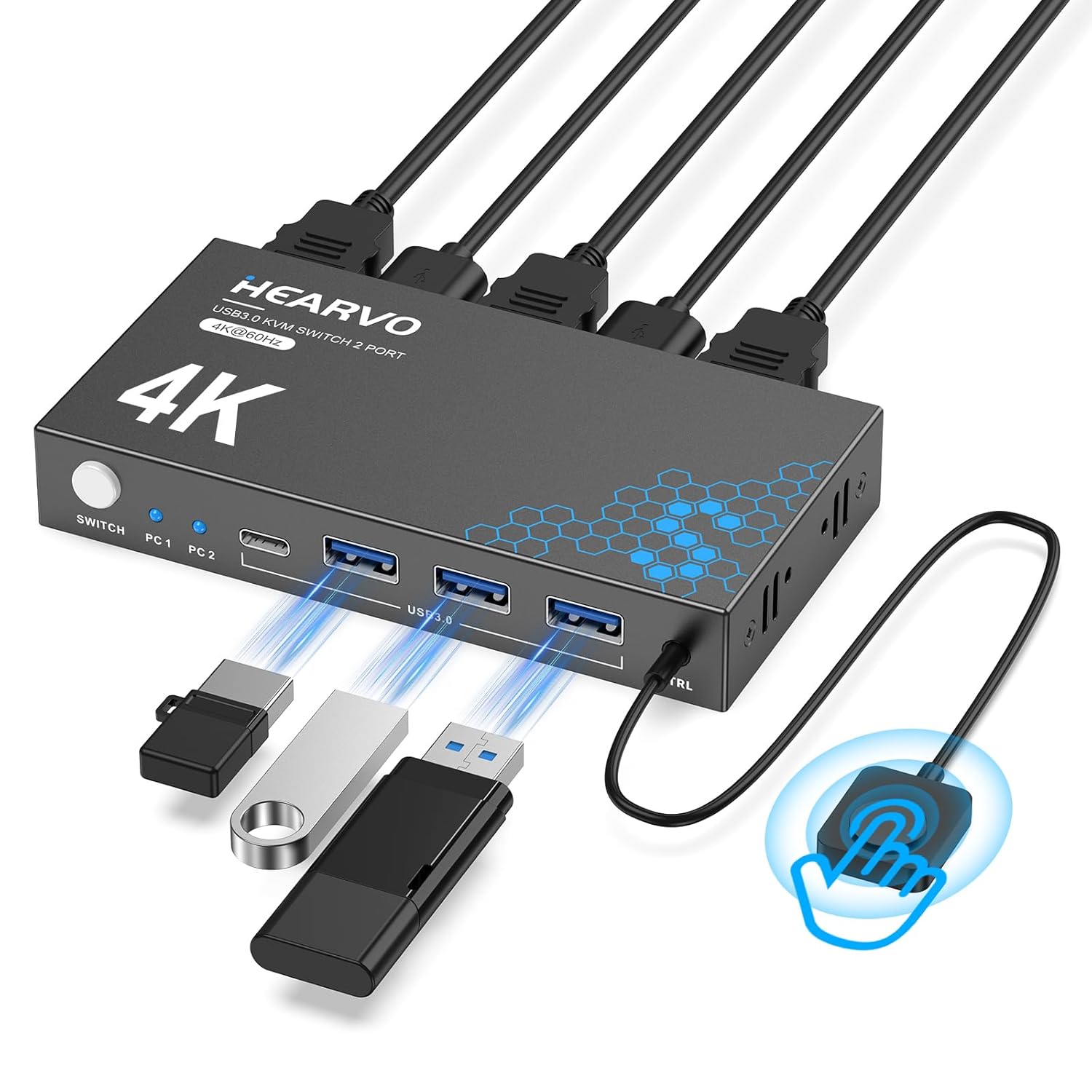
Description:
Reviews:
5.0 out of 5 stars One keyboard, one mouse, two computers… finally
I bought this because I was juggling two computers like a gremlin and losing my mind. This KVM switch did exactly what I needed it to do without turning into a tech nightmare. One monitor, one keyboard, one mouse, two computers — click the button and boom, switched.The picture quality stayed sharp (no weird flickering), and everything worked smoothly at 4K. Setup was way easier than I expected, especially since the cables are included (thank you for not making me buy more stuff). The remote switch is super handy and keeps things simple.No lag, no reconnect drama, no yelling at my desk. It just works. If you’re running multiple computers and want less chaos in your life, this is a solid buy. Updated to add that the 2 monitors feature is absolutely amazing it makes inputting data so much faster and easier !!
5.0 out of 5 stars Tech upgrade I never knew I needed
The USB 3.0 HDMI KVM Switch turned out to be one of those small tech upgrades that makes a big difference. Setup was effortless — just plug in the included USB cables, connect your monitor, and you’re ready to go. Within minutes, I was smoothly switching between my personal laptop and work computer without any lag or fuss. The transition takes about 20 seconds, which feels almost instant when you’re multitasking or moving between projects.The 4K@60Hz video quality is crisp and consistent, with no flicker or signal drop even when streaming or gaming. I was pleasantly surprised by how well it handled both my high-resolution monitor and connected peripherals like my mouse, keyboard, and external hard drive. It truly feels like both computers are fully integrated, and the EDID adaptive feature ensures everything stays perfectly in sync no matter which system I’m on.What makes this KVM switch such a great find is its balance of performance and affordability. It does everything the pricier models promise — reliable switching, clean visuals, stable USB connections — but at a fraction of the cost. For anyone juggling multiple computers, whether for work, gaming, or creative projects, this little device is a total game-changer. Simple, smart, and dependable — exactly how tech should be.
5.0 out of 5 stars Smooth Switching Between PC and DeX — That Remote Button Is a Game-Changer
I picked this up to switch between my TV-connected computer and my phone running DeX, and I’m genuinely impressed. As someone who installs KVMs professionally and works in IT, I’ve used everything from basic manual switches to enterprise-grade setups — and this little unit just works.Setup was plug-and-play easy (though I’ll admit, I’ve probably got an unfair advantage there). I had it up and running in under five minutes, no fuss. It handles both HDMI and USB switching flawlessly, which is crucial for my setup.The star of the show? The remote input switch button. I didn’t think I’d care about it, but now I can’t imagine going back. Instead of fumbling behind the TV or tapping an awkward button on the device, I just hit the remote and bam — instant switch. It’s a small thing that makes a huge difference in daily use.It also plays really nicely with DeX — no "display disconnected" issues when switching inputs, which is vital. Some switches drop the signal entirely when switching, and DeX freaks out. This one doesn’t. The inactive device still thinks it’s connected, so when I switch back, everything is right where I left it.Pros:Remote button is incredibly convenientFlawless switching between systemsNo signal drop or disconnect issues — perfect for DeXUSB and HDMI both switch cleanlySetup was fast and painlessCons:None so far — this thing just worksIf you’re toggling between a phone (especially with DeX) and a PC or second system, this is a fantastic KVM solution.
5.0 out of 5 stars Reliable, Solid Performer — My Experience with the Steetek USB 3.0 HDMI KVM Switch
I’ve been using the Steetek USB 3.0 HDMI KVM Switch (1 Monitor / 2 Computers, 4K@60Hz) for several weeks now, and it has consistently delivered on the “reliable” promise. Here’s why:1. Stable switching between machines:Switching from my desktop to my laptop has been rock-solid. The device doesn’t drop input, stutter, or glitch when using the button or the wired remote. just works. That consistency is exactly what I was missing in other products.2. Strong video performance without flicker or dropoutsI run a 4K@60Hz monitor, and this KVM maintains the display signal without flickering or momentary black screens, even when switching back and forth. The “Adaptive EDID” feature appears to help it negotiate and retain stable video resolution.3. Reliable USB peripheral handlingThe three USB 3.0 ports are a nice bonus. I have multiple devices (keyboard, mouse, external SSD) plugged in, and switching rarely interrupts or confuses the devices. I haven’t encountered “missing device” or recognition issues.4. No external power, yet consistent performanceDespite being bus-powered only, the unit maintains consistent performance under normal loads. That’s one less cable and one less point of failure. The “plug and play” nature saves hassle and reduces one potential weakness.5. Build quality and support confidenceThe unit feels solid and well-built. The inclusion of a “lifetime Protection Plan” seems to support that.Also, the brand has placed it high in the KVM rankings (ranked #3 in KVM Switches on Bolo) which suggests broad adoption.
4.0 out of 5 stars Good KVM switch
I ordered this to replace my old KVM switch that started having issues. Pros: It was easy to setup and has worked fine since it was installed. The cable management is better than my old switch (which had fixed cables, as opposed to this switch where you only plug in what you need). I have it attached under my desk with zip-ties, with the remote button on the desk for switching, which is a neat and clean setup. Cons: Occasionally when switching between computers the monitor will go black for a few seconds and then resume displaying. A minor gripe is the remote button doesn't have a satisfying feel/click to it, and it's all black instead of two-tone like my previous (which is my preference).
KVM SWITCH
Change over between the laptops is very slow.Most of the times it does not work.
Visit the Hearvo Store
USB 3.0 HDMI KVM Switch 1 Monitors 2 Computers, 4K@60Hz KVM Switches for 2 Computers Sharing Monitor Keyboard Mouse Hard Drives Printer, with EDID Adaptive, 2USB Cable and Controller -S7232H
AED26042
Quantity:
Order today to get by 7-14 business days
This item qualifies for free delivery
Imported From: United States
At BOLO, we work hard to ensure the products you receive are new, genuine, and sourced from reputable suppliers.
BOLO is not an authorized or official retailer for most brands, nor are we affiliated with manufacturers unless specifically stated on a product page. Instead, we source verified sellers, authorized distributors or directly from the manufacturer.
Each product undergoes thorough inspection and verification at our consolidation and fulfilment centers to ensure it meets our strict authenticity and quality standards before being shipped and delivered to you.
If you ever have concerns regarding the authenticity of a product purchased from us, please contact Bolo Support. We will review your inquiry promptly and, if necessary, provide documentation verifying authenticity or offer a suitable resolution.
Your trust is our top priority, and we are committed to maintaining transparency and integrity in every transaction.
All product information, images, descriptions, and reviews originate from the manufacturer or from trusted sellers overseas. BOLO is not affiliated with, endorsed by, or an authorized retailer for most brands listed on our website unless stated otherwise.
While we strive to display accurate information, variations in packaging, labeling, instructions, or formulation may occasionally occur due to regional differences or supplier updates. For detailed or manufacturer-specific information, please contact the brand directly or reach out to BOLO Support for assistance.
Unless otherwise stated, all prices displayed on the product page include applicable taxes and import duties.
BOLO operates in accordance with the laws and regulations of United Arab Emirates. Any items found to be restricted or prohibited for sale within the UAE will be cancelled prior to shipment. We take proactive measures to ensure that only products permitted for sale in United Arab Emirates are listed on our website.
All items are shipped by air, and any products classified as “Dangerous Goods (DG)” under IATA regulations will be removed from the order and cancelled.
All orders are processed manually, and we make every effort to process them promptly once confirmed. Products cancelled due to the above reasons will be permanently removed from listings across the website.
More from this brand
Similar items from “KVM Switches”
Share with
Or share with link
https://www.bolo.ae/products/UO0Q5Q4SX1U
Visit the Hearvo Store
USB 3.0 HDMI KVM Switch 1 Monitors 2 Computers, 4K@60Hz KVM Switches for 2 Computers Sharing Monitor Keyboard Mouse Hard Drives Printer, with EDID Adaptive, 2USB Cable and Controller -S7232H

AED26042
Quantity:
Order today to get by 7-14 business days
This item qualifies for free delivery
Imported From: United States
At BOLO, we work hard to ensure the products you receive are new, genuine, and sourced from reputable suppliers.
BOLO is not an authorized or official retailer for most brands, nor are we affiliated with manufacturers unless specifically stated on a product page. Instead, we source verified sellers, authorized distributors or directly from the manufacturer.
Each product undergoes thorough inspection and verification at our consolidation and fulfilment centers to ensure it meets our strict authenticity and quality standards before being shipped and delivered to you.
If you ever have concerns regarding the authenticity of a product purchased from us, please contact Bolo Support. We will review your inquiry promptly and, if necessary, provide documentation verifying authenticity or offer a suitable resolution.
Your trust is our top priority, and we are committed to maintaining transparency and integrity in every transaction.
All product information, images, descriptions, and reviews originate from the manufacturer or from trusted sellers overseas. BOLO is not affiliated with, endorsed by, or an authorized retailer for most brands listed on our website unless stated otherwise.
While we strive to display accurate information, variations in packaging, labeling, instructions, or formulation may occasionally occur due to regional differences or supplier updates. For detailed or manufacturer-specific information, please contact the brand directly or reach out to BOLO Support for assistance.
Unless otherwise stated, all prices displayed on the product page include applicable taxes and import duties.
BOLO operates in accordance with the laws and regulations of United Arab Emirates. Any items found to be restricted or prohibited for sale within the UAE will be cancelled prior to shipment. We take proactive measures to ensure that only products permitted for sale in United Arab Emirates are listed on our website.
All items are shipped by air, and any products classified as “Dangerous Goods (DG)” under IATA regulations will be removed from the order and cancelled.
All orders are processed manually, and we make every effort to process them promptly once confirmed. Products cancelled due to the above reasons will be permanently removed from listings across the website.
Description:
Reviews:
5.0 out of 5 stars One keyboard, one mouse, two computers… finally
I bought this because I was juggling two computers like a gremlin and losing my mind. This KVM switch did exactly what I needed it to do without turning into a tech nightmare. One monitor, one keyboard, one mouse, two computers — click the button and boom, switched.The picture quality stayed sharp (no weird flickering), and everything worked smoothly at 4K. Setup was way easier than I expected, especially since the cables are included (thank you for not making me buy more stuff). The remote switch is super handy and keeps things simple.No lag, no reconnect drama, no yelling at my desk. It just works. If you’re running multiple computers and want less chaos in your life, this is a solid buy. Updated to add that the 2 monitors feature is absolutely amazing it makes inputting data so much faster and easier !!
5.0 out of 5 stars Tech upgrade I never knew I needed
The USB 3.0 HDMI KVM Switch turned out to be one of those small tech upgrades that makes a big difference. Setup was effortless — just plug in the included USB cables, connect your monitor, and you’re ready to go. Within minutes, I was smoothly switching between my personal laptop and work computer without any lag or fuss. The transition takes about 20 seconds, which feels almost instant when you’re multitasking or moving between projects.The 4K@60Hz video quality is crisp and consistent, with no flicker or signal drop even when streaming or gaming. I was pleasantly surprised by how well it handled both my high-resolution monitor and connected peripherals like my mouse, keyboard, and external hard drive. It truly feels like both computers are fully integrated, and the EDID adaptive feature ensures everything stays perfectly in sync no matter which system I’m on.What makes this KVM switch such a great find is its balance of performance and affordability. It does everything the pricier models promise — reliable switching, clean visuals, stable USB connections — but at a fraction of the cost. For anyone juggling multiple computers, whether for work, gaming, or creative projects, this little device is a total game-changer. Simple, smart, and dependable — exactly how tech should be.
5.0 out of 5 stars Smooth Switching Between PC and DeX — That Remote Button Is a Game-Changer
I picked this up to switch between my TV-connected computer and my phone running DeX, and I’m genuinely impressed. As someone who installs KVMs professionally and works in IT, I’ve used everything from basic manual switches to enterprise-grade setups — and this little unit just works.Setup was plug-and-play easy (though I’ll admit, I’ve probably got an unfair advantage there). I had it up and running in under five minutes, no fuss. It handles both HDMI and USB switching flawlessly, which is crucial for my setup.The star of the show? The remote input switch button. I didn’t think I’d care about it, but now I can’t imagine going back. Instead of fumbling behind the TV or tapping an awkward button on the device, I just hit the remote and bam — instant switch. It’s a small thing that makes a huge difference in daily use.It also plays really nicely with DeX — no "display disconnected" issues when switching inputs, which is vital. Some switches drop the signal entirely when switching, and DeX freaks out. This one doesn’t. The inactive device still thinks it’s connected, so when I switch back, everything is right where I left it.Pros:Remote button is incredibly convenientFlawless switching between systemsNo signal drop or disconnect issues — perfect for DeXUSB and HDMI both switch cleanlySetup was fast and painlessCons:None so far — this thing just worksIf you’re toggling between a phone (especially with DeX) and a PC or second system, this is a fantastic KVM solution.
5.0 out of 5 stars Reliable, Solid Performer — My Experience with the Steetek USB 3.0 HDMI KVM Switch
I’ve been using the Steetek USB 3.0 HDMI KVM Switch (1 Monitor / 2 Computers, 4K@60Hz) for several weeks now, and it has consistently delivered on the “reliable” promise. Here’s why:1. Stable switching between machines:Switching from my desktop to my laptop has been rock-solid. The device doesn’t drop input, stutter, or glitch when using the button or the wired remote. just works. That consistency is exactly what I was missing in other products.2. Strong video performance without flicker or dropoutsI run a 4K@60Hz monitor, and this KVM maintains the display signal without flickering or momentary black screens, even when switching back and forth. The “Adaptive EDID” feature appears to help it negotiate and retain stable video resolution.3. Reliable USB peripheral handlingThe three USB 3.0 ports are a nice bonus. I have multiple devices (keyboard, mouse, external SSD) plugged in, and switching rarely interrupts or confuses the devices. I haven’t encountered “missing device” or recognition issues.4. No external power, yet consistent performanceDespite being bus-powered only, the unit maintains consistent performance under normal loads. That’s one less cable and one less point of failure. The “plug and play” nature saves hassle and reduces one potential weakness.5. Build quality and support confidenceThe unit feels solid and well-built. The inclusion of a “lifetime Protection Plan” seems to support that.Also, the brand has placed it high in the KVM rankings (ranked #3 in KVM Switches on Bolo) which suggests broad adoption.
4.0 out of 5 stars Good KVM switch
I ordered this to replace my old KVM switch that started having issues. Pros: It was easy to setup and has worked fine since it was installed. The cable management is better than my old switch (which had fixed cables, as opposed to this switch where you only plug in what you need). I have it attached under my desk with zip-ties, with the remote button on the desk for switching, which is a neat and clean setup. Cons: Occasionally when switching between computers the monitor will go black for a few seconds and then resume displaying. A minor gripe is the remote button doesn't have a satisfying feel/click to it, and it's all black instead of two-tone like my previous (which is my preference).
KVM SWITCH
Change over between the laptops is very slow.Most of the times it does not work.
More from this brand
Similar items from “KVM Switches”
Share with
Or share with link
https://www.bolo.ae/products/UO0Q5Q4SX1U