Deliver toUnited Arab Emirates
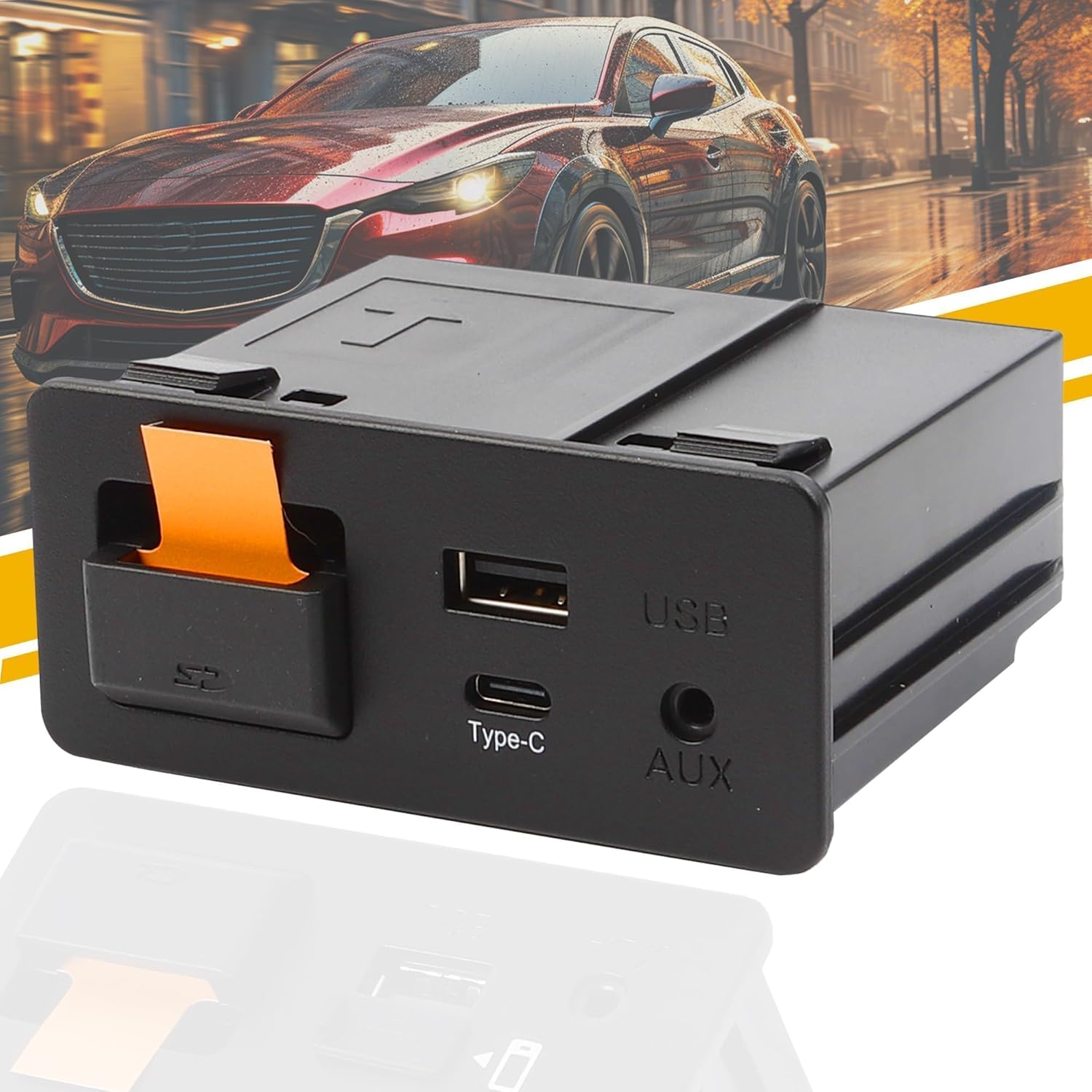
Dasbecan Type-C Wireless Mazda Carplay and Android Auto Retrofit Kit Compatible with Mazda 2/3/6/CX3/CX5/CX9/MX5 2015-2020, TK78-66-9U0C Adapter (Only Support Wireless Carplay NO Android Auto)

Description:

  • 【Support Wireless Carplay No Android Auto 】The Wireless Type-C Mazda Carplay Retrofit Kit, No need to connect your iPhone with one data cable. Note: The version only supports wireless Carplay No Android Auto.
  • 【TYPE-C Interface PD Fast Charging】The type C port at the bottom supports PD fast charging,which can prevent your Carplay / Android Auto phone being out of charge.The maximum charging speed can reach 27W.
  • 【The Carplay Kit fits for Mazda】This mazda apple car play retrofit kit fits for Mazda CX3 2016 - 2019 ; Mazda CX5 2015 - 2020 ; Mazda CX9 2016 - 2020 ; Mazda 2 2016 -2019 ; Mazda 3 2014 - 2018 ; Mazda 6 2016 - 2020 ; Mazda MX-5 Miata Club / Grand Touring 2016 - 2020 ; Mazda MX-5 Miata RF Sport 2018 - 2019 ; Mazda MX-5 Miata Sport 2018 - 2020 ( If your car does not have an MZD connection device, it will not work) ; Replace part number: TK78-66-9U0C K1414 00008FZ34
  • 【2024 NEWEST UPGRADED WIRELESS CARPLAY】Our New UPGRADED Type-C Wireless mazda carplay kit supports all functions of the original car system.It supports Support Voice Control and Hand-free Calling, Original Mazda SD Card Navigation map,Original Car Knob Control,Steering Wheel Operation,Camera & Parking Sensors and more original function.
  • 【OS Version Upgrade】This carplay kit can work with the version 70.00.021 or higher,but if the car is in turbulence causing frequent disconnection of the connected Mazda Carplay, it is due to internal instability of Mazda system. Please update your OS version to above 74.00.021 N AN/ F AN , after testing , this version will be more stable.
  • 【How to Control Wired & Wirless Carplay】The switch port 1 control wireless connect . The switch port 2 control wired connect . The switch port 3 control standard charging speed . The switch 4 control fast charging speed .Only the carplay with the Type-C port has swith "3" “4”
  • 【Attention】1.Please make sure your system must be on version 70.00.021 or higher, if not, pls contact us to help you upgrade the firmware. 2. During installation,the carplay connect is USB1, Siri must be turned on to connect to CarPlay 3.Before upagrading the firmware, you should remove the SD card and insert it when you complete it in case the navigation cannot work.

  • Reviews:

    5.0 out of 5 stars Works well, replaces stock on 2015 Mazda 3, works fine with a USB wireless carplay adapter!

    D.K. · June 18, 2024

    (function() { P.when('cr-A', 'ready').execute(function(A) { if(typeof A.toggleExpanderAriaLabel === 'function') { A.toggleExpanderAriaLabel('review_text_read_more', 'Read more of this review', 'Read less of this review'); } }); })(); .review-text-read-more-expander:focus-visible { outline: 2px solid #2162a1; outline-offset: 2px; border-radius: 5px; } It took a little doing to get the old USB hub out of my car, and even less time to install this.I updated my radio on my 2015 Mazda 3 to the latest firmware before I swapped the hub. You can find instructions and firmware online.I ran the cabling like the instructions said, plugged it into the back of the radio, then fed the cabling through and plugged into this, and pushed it back into the hole and felt a satisfying click, and it is indistinguishable from the OEM quality hub.I tested with a USB-C cable to my Samsung Fold, and voila, Android Auto works!I then used a USB wireless carplay adapter that has a USB-C connection and plugged it in, and voila, wireless Android Auto. I just made my car's resale value greater and I don't have to take my phone out of my pocket when I drive, or I can use that fancy motorized Qi charger and save my USB connector on my phone from wear (it's already a little finicky as it is!).Totally worth the upgrade, it's easy to install.

    5.0 out of 5 stars Worked in 2018 Mazda 3

    R. · March 31, 2025

    The unit functions correctly in 2018 Mazda 3 automatic. Installation around the screen was not overly difficult. Routing the wires behind the dash was moderately difficult. Removing the old USB hub unit was challenging. The choices are to disassemble everything on the center console from the back forward to get the hub out, or break it out, which I did. I removed the faceplate and broke the tabs on the old hub to remove it. Once it was out installing the new one was straightforward. The unit functions as described.

    1.0 out of 5 stars Eh

    R. · March 10, 2025

    Worked for about a month an half now just randomly won’t connect and have to just end up using the regular Bluetooth on the radio

    5.0 out of 5 stars Completely changed car

    T.P. · June 16, 2025

    With this I can now charge my phone super fast without a cigarette lighter adapter. I can use Siri, apple maps, text, change music and so much more hands free. So worth the price. Installation went smoothly with a YouTube video. A tool or two and some patience is required but I couldn’t be happier I installed this. Makes driving so much better and increased my and productivity.

    4.0 out of 5 stars 2016 CX-5 Grand Touring

    K. · November 24, 2024

    If you're looking at this, you're probably wondering if it actually works. For me it was worked well and costs a lot less than the Mazda part. I have used both Android Auto and Apple Carply.Have the following complaints, but has not affected its functionality. 1. Foam tape needs to be wider. It is barely wide enough to wrap fully around the wires. And could should have included a little bit more. 2. The Usb C and A connections seem lose, but are working. So, I guess the connection is good enough, but doesn't seem firm.If planning to install this unit. Make sure to Google directions and watch YouTube videos on install. You do need to make sure your firmware is updated before install or you won't be able to use AA or Carplay. I followed directions for updating to latest firmware and installed part myself. The hardest step was removing the old unit. I ended up breaking the clips with a long screwdriver. The rest of the install was relatively smooth. Watch some videos... You can do it.

    5.0 out of 5 stars 2015 Mazda 3- Wireless Apple CarPlay

    T.S. · May 19, 2025

    The wireless Apple CarPlay plug and play module is dope! I highly recommend. Install wasn’t too bad. There is a YouTube video that shows how to remove the usb unit out of a Mazda 3. That video helped so that I didn’t have to remove the whole center console. It is recommended to unplug the negative terminal from the battery so you don’t short something or blow a fuse. Highly recommended the wireless Apple CarPlay so you don’t have to plug in phone constantly. Plugging in your phone constantly can degrade the battery.

    5.0 out of 5 stars Mazda 3 ACP & AA

    s.s. · May 21, 2025

    Easy to install and work well.

    5.0 out of 5 stars Works well

    R. · January 27, 2025

    The media could not be loaded. Installation wasn’t too bad, the only pain point is feeding the wires through the vehicle. There’s lots of videos on how to install which I highly recommend looking at when doing this.Also be sure you upgrade your systems FW to the latest version as the description specifies.So far everything seems to work well, wireless apple car play is also seamless. Will update if anything changes over time.

    Fast charges, but no touchscreen for Android Auto

    D.P. · September 3, 2024

    (function() { P.when('cr-A', 'ready').execute(function(A) { if(typeof A.toggleExpanderAriaLabel === 'function') { A.toggleExpanderAriaLabel('review_text_read_more', 'Read more of this review', 'Read less of this review'); } }); })(); .review-text-read-more-expander:focus-visible { outline: 2px solid #2162a1; outline-offset: 2px; border-radius: 5px; } Does what is expected. While plugged in it allows for Android auto. Need to have firmware 70.xxxx before you do this. My mx-5 2018 had its last firmware a while ago, v74....324ACharges at 20w on my Xperia vWished touchscreen worked but all steering wheel buttons and infotainment knobs work fine.

    Fake product

    A.G. · February 25, 2024

    I was super excited to turn my infotainment into a car play with this product but after using for 2 months, I realised it is not worth it.A number of times the CarPlay crashes and it becomes a nightmare when you are driving and relying on the GPS navigation. Secondly, the SD card in the SD CARD slot is loose.Not happy with the experience and the product. Would not suggest anyone to buy this.

    Dasbecan Type-C Wireless Mazda Carplay and Android Auto Retrofit Kit Compatible with Mazda 2/3/6/CX3/CX5/CX9/MX5 2015-2020, TK78-66-9U0C Adapter (Only Support Wireless Carplay NO Android Auto)

    Product ID: UO0Q3XJGXP6
    Condition: New

    4.2

    AED90195

    Price includes VAT & Import Duties
    Size: TYPE-C Wireless Mazda Carplay
    Availability: In Stock

    Quantity:

    |

    Order today to get by 7-14 business days

    This item qualifies for free delivery

    Returns & Warranty policies

    Imported From: United States

    At BOLO, we work hard to ensure the products you receive are new, genuine, and sourced from reputable suppliers.

    BOLO is not an authorized or official retailer for most brands, nor are we affiliated with manufacturers unless specifically stated on a product page. Instead, we source verified sellers, authorized distributors or directly from the manufacturer.

    Each product undergoes thorough inspection and verification at our consolidation and fulfilment centers to ensure it meets our strict authenticity and quality standards before being shipped and delivered to you.

    If you ever have concerns regarding the authenticity of a product purchased from us, please contact Bolo Support. We will review your inquiry promptly and, if necessary, provide documentation verifying authenticity or offer a suitable resolution.

    Your trust is our top priority, and we are committed to maintaining transparency and integrity in every transaction.

    All product information, images, descriptions, and reviews originate from the manufacturer or from trusted sellers overseas. BOLO is not affiliated with, endorsed by, or an authorized retailer for most brands listed on our website unless stated otherwise.

    While we strive to display accurate information, variations in packaging, labeling, instructions, or formulation may occasionally occur due to regional differences or supplier updates. For detailed or manufacturer-specific information, please contact the brand directly or reach out to BOLO Support for assistance.

    Unless otherwise stated, all prices displayed on the product page include applicable taxes and import duties.

    BOLO operates in accordance with the laws and regulations of United Arab Emirates. Any items found to be restricted or prohibited for sale within the UAE will be cancelled prior to shipment. We take proactive measures to ensure that only products permitted for sale in United Arab Emirates are listed on our website.

    All items are shipped by air, and any products classified as “Dangerous Goods (DG)” under IATA regulations will be removed from the order and cancelled.

    All orders are processed manually, and we make every effort to process them promptly once confirmed. Products cancelled due to the above reasons will be permanently removed from listings across the website.

    Similar suggestions by Bolo

    More from this brand

    Similar items from “In-Dash Navigation”

    Dasbecan Type-C Wireless Mazda Carplay and Android Auto Retrofit Kit Compatible with Mazda 2/3/6/CX3/CX5/CX9/MX5 2015-2020, TK78-66-9U0C Adapter (Only Support Wireless Carplay NO Android Auto)

    Product ID: UO0Q3XJGXP6
    Condition: New

    4.2

    Dasbecan Type-C Wireless Mazda Carplay and Android Auto Retrofit Kit Compatible with Mazda 2/3/6/CX3/CX5/CX9/MX5 2015-2020, TK78-66-9U0C Adapter (Only Support Wireless Carplay NO Android Auto)-0
    Size: TYPE-C Wireless Mazda Carplay

    AED90195

    Price includes VAT & Import Duties
    Availability: In Stock

    Quantity:

    |

    Order today to get by 7-14 business days

    This item qualifies for free delivery

    Returns & Warranty policies

    Imported From: United States

    At BOLO, we work hard to ensure the products you receive are new, genuine, and sourced from reputable suppliers.

    BOLO is not an authorized or official retailer for most brands, nor are we affiliated with manufacturers unless specifically stated on a product page. Instead, we source verified sellers, authorized distributors or directly from the manufacturer.

    Each product undergoes thorough inspection and verification at our consolidation and fulfilment centers to ensure it meets our strict authenticity and quality standards before being shipped and delivered to you.

    If you ever have concerns regarding the authenticity of a product purchased from us, please contact Bolo Support. We will review your inquiry promptly and, if necessary, provide documentation verifying authenticity or offer a suitable resolution.

    Your trust is our top priority, and we are committed to maintaining transparency and integrity in every transaction.

    All product information, images, descriptions, and reviews originate from the manufacturer or from trusted sellers overseas. BOLO is not affiliated with, endorsed by, or an authorized retailer for most brands listed on our website unless stated otherwise.

    While we strive to display accurate information, variations in packaging, labeling, instructions, or formulation may occasionally occur due to regional differences or supplier updates. For detailed or manufacturer-specific information, please contact the brand directly or reach out to BOLO Support for assistance.

    Unless otherwise stated, all prices displayed on the product page include applicable taxes and import duties.

    BOLO operates in accordance with the laws and regulations of United Arab Emirates. Any items found to be restricted or prohibited for sale within the UAE will be cancelled prior to shipment. We take proactive measures to ensure that only products permitted for sale in United Arab Emirates are listed on our website.

    All items are shipped by air, and any products classified as “Dangerous Goods (DG)” under IATA regulations will be removed from the order and cancelled.

    All orders are processed manually, and we make every effort to process them promptly once confirmed. Products cancelled due to the above reasons will be permanently removed from listings across the website.

    Description:

  • 【Support Wireless Carplay No Android Auto 】The Wireless Type-C Mazda Carplay Retrofit Kit, No need to connect your iPhone with one data cable. Note: The version only supports wireless Carplay No Android Auto.
  • 【TYPE-C Interface PD Fast Charging】The type C port at the bottom supports PD fast charging,which can prevent your Carplay / Android Auto phone being out of charge.The maximum charging speed can reach 27W.
  • 【The Carplay Kit fits for Mazda】This mazda apple car play retrofit kit fits for Mazda CX3 2016 - 2019 ; Mazda CX5 2015 - 2020 ; Mazda CX9 2016 - 2020 ; Mazda 2 2016 -2019 ; Mazda 3 2014 - 2018 ; Mazda 6 2016 - 2020 ; Mazda MX-5 Miata Club / Grand Touring 2016 - 2020 ; Mazda MX-5 Miata RF Sport 2018 - 2019 ; Mazda MX-5 Miata Sport 2018 - 2020 ( If your car does not have an MZD connection device, it will not work) ; Replace part number: TK78-66-9U0C K1414 00008FZ34
  • 【2024 NEWEST UPGRADED WIRELESS CARPLAY】Our New UPGRADED Type-C Wireless mazda carplay kit supports all functions of the original car system.It supports Support Voice Control and Hand-free Calling, Original Mazda SD Card Navigation map,Original Car Knob Control,Steering Wheel Operation,Camera & Parking Sensors and more original function.
  • 【OS Version Upgrade】This carplay kit can work with the version 70.00.021 or higher,but if the car is in turbulence causing frequent disconnection of the connected Mazda Carplay, it is due to internal instability of Mazda system. Please update your OS version to above 74.00.021 N AN/ F AN , after testing , this version will be more stable.
  • 【How to Control Wired & Wirless Carplay】The switch port 1 control wireless connect . The switch port 2 control wired connect . The switch port 3 control standard charging speed . The switch 4 control fast charging speed .Only the carplay with the Type-C port has swith "3" “4”
  • 【Attention】1.Please make sure your system must be on version 70.00.021 or higher, if not, pls contact us to help you upgrade the firmware. 2. During installation,the carplay connect is USB1, Siri must be turned on to connect to CarPlay 3.Before upagrading the firmware, you should remove the SD card and insert it when you complete it in case the navigation cannot work.

  • Reviews:

    5.0 out of 5 stars Works well, replaces stock on 2015 Mazda 3, works fine with a USB wireless carplay adapter!

    D.K. · June 18, 2024

    (function() { P.when('cr-A', 'ready').execute(function(A) { if(typeof A.toggleExpanderAriaLabel === 'function') { A.toggleExpanderAriaLabel('review_text_read_more', 'Read more of this review', 'Read less of this review'); } }); })(); .review-text-read-more-expander:focus-visible { outline: 2px solid #2162a1; outline-offset: 2px; border-radius: 5px; } It took a little doing to get the old USB hub out of my car, and even less time to install this.I updated my radio on my 2015 Mazda 3 to the latest firmware before I swapped the hub. You can find instructions and firmware online.I ran the cabling like the instructions said, plugged it into the back of the radio, then fed the cabling through and plugged into this, and pushed it back into the hole and felt a satisfying click, and it is indistinguishable from the OEM quality hub.I tested with a USB-C cable to my Samsung Fold, and voila, Android Auto works!I then used a USB wireless carplay adapter that has a USB-C connection and plugged it in, and voila, wireless Android Auto. I just made my car's resale value greater and I don't have to take my phone out of my pocket when I drive, or I can use that fancy motorized Qi charger and save my USB connector on my phone from wear (it's already a little finicky as it is!).Totally worth the upgrade, it's easy to install.

    5.0 out of 5 stars Worked in 2018 Mazda 3

    R. · March 31, 2025

    The unit functions correctly in 2018 Mazda 3 automatic. Installation around the screen was not overly difficult. Routing the wires behind the dash was moderately difficult. Removing the old USB hub unit was challenging. The choices are to disassemble everything on the center console from the back forward to get the hub out, or break it out, which I did. I removed the faceplate and broke the tabs on the old hub to remove it. Once it was out installing the new one was straightforward. The unit functions as described.

    1.0 out of 5 stars Eh

    R. · March 10, 2025

    Worked for about a month an half now just randomly won’t connect and have to just end up using the regular Bluetooth on the radio

    5.0 out of 5 stars Completely changed car

    T.P. · June 16, 2025

    With this I can now charge my phone super fast without a cigarette lighter adapter. I can use Siri, apple maps, text, change music and so much more hands free. So worth the price. Installation went smoothly with a YouTube video. A tool or two and some patience is required but I couldn’t be happier I installed this. Makes driving so much better and increased my and productivity.

    4.0 out of 5 stars 2016 CX-5 Grand Touring

    K. · November 24, 2024

    If you're looking at this, you're probably wondering if it actually works. For me it was worked well and costs a lot less than the Mazda part. I have used both Android Auto and Apple Carply.Have the following complaints, but has not affected its functionality. 1. Foam tape needs to be wider. It is barely wide enough to wrap fully around the wires. And could should have included a little bit more. 2. The Usb C and A connections seem lose, but are working. So, I guess the connection is good enough, but doesn't seem firm.If planning to install this unit. Make sure to Google directions and watch YouTube videos on install. You do need to make sure your firmware is updated before install or you won't be able to use AA or Carplay. I followed directions for updating to latest firmware and installed part myself. The hardest step was removing the old unit. I ended up breaking the clips with a long screwdriver. The rest of the install was relatively smooth. Watch some videos... You can do it.

    5.0 out of 5 stars 2015 Mazda 3- Wireless Apple CarPlay

    T.S. · May 19, 2025

    The wireless Apple CarPlay plug and play module is dope! I highly recommend. Install wasn’t too bad. There is a YouTube video that shows how to remove the usb unit out of a Mazda 3. That video helped so that I didn’t have to remove the whole center console. It is recommended to unplug the negative terminal from the battery so you don’t short something or blow a fuse. Highly recommended the wireless Apple CarPlay so you don’t have to plug in phone constantly. Plugging in your phone constantly can degrade the battery.

    5.0 out of 5 stars Mazda 3 ACP & AA

    s.s. · May 21, 2025

    Easy to install and work well.

    5.0 out of 5 stars Works well

    R. · January 27, 2025

    The media could not be loaded. Installation wasn’t too bad, the only pain point is feeding the wires through the vehicle. There’s lots of videos on how to install which I highly recommend looking at when doing this.Also be sure you upgrade your systems FW to the latest version as the description specifies.So far everything seems to work well, wireless apple car play is also seamless. Will update if anything changes over time.

    Fast charges, but no touchscreen for Android Auto

    D.P. · September 3, 2024

    (function() { P.when('cr-A', 'ready').execute(function(A) { if(typeof A.toggleExpanderAriaLabel === 'function') { A.toggleExpanderAriaLabel('review_text_read_more', 'Read more of this review', 'Read less of this review'); } }); })(); .review-text-read-more-expander:focus-visible { outline: 2px solid #2162a1; outline-offset: 2px; border-radius: 5px; } Does what is expected. While plugged in it allows for Android auto. Need to have firmware 70.xxxx before you do this. My mx-5 2018 had its last firmware a while ago, v74....324ACharges at 20w on my Xperia vWished touchscreen worked but all steering wheel buttons and infotainment knobs work fine.

    Fake product

    A.G. · February 25, 2024

    I was super excited to turn my infotainment into a car play with this product but after using for 2 months, I realised it is not worth it.A number of times the CarPlay crashes and it becomes a nightmare when you are driving and relying on the GPS navigation. Secondly, the SD card in the SD CARD slot is loose.Not happy with the experience and the product. Would not suggest anyone to buy this.

    Similar suggestions by Bolo

    More from this brand

    Similar items from “In-Dash Navigation”