Description:
Reviews:
5.0 out of 5 stars The RAID1 functions as expected.
(function() { P.when('cr-A', 'ready').execute(function(A) { if(typeof A.toggleExpanderAriaLabel === 'function') { A.toggleExpanderAriaLabel('review_text_read_more', 'Read more of this review', 'Read less of this review'); } }); })(); .review-text-read-more-expander:focus-visible { outline: 2px solid #2162a1; outline-offset: 2px; border-radius: 5px; } I purchased the D2-320 2-bay RAID enclosure with USB 3.2 Gen 2 10 GbpsMy purpose with this unit was to mirror (RAID1) two 6TB WD Reds with a Linux machine. I’m not familiar with this brand, so I decided to test it a little before copying a lot of my files over to the D2-320.Getting everything working was pretty easy.I pulled out each bay, installing the drive was pretty easy, no screws needed. They provide a video on it if you’re unsure. I set the selector on the back of the unit to RAID1, shoved in both drives, connected the USB (drives are powered but won’t spin up until the USB is connected), then held the RESET button with the provided pin until the disk lights flashed. The system found one drive - as it should have.I wrote approximately 18K files and directories of various sizes to the array and then without disconnecting the USB or turning off the power, I pulled out one drive. I then connect the pulled drive directly to another computer to see that the files were in fact written to the drive. They were. All good to go.I replaced the drive. Both lights are green. Since no changes had been made to either drive, this is perfect, it didn’t try to rebuilt the arrayNext, I pulled the second drive out hot. Then connected that drive to the other computer and checked to make sure all files were also written to this drive as well. They were! It is working as it should be.I then created a couple files on the other drive and then replaced the pulled drive back into the D2-320. One drive light was blinking green, the other blinking yellow. According to the online documentation, this means it is rebuilding the RAID1 mirror. Perfect .. Everything is performing as expected. It did take a few hours to rebuild .. but these are 6TB drives, so that was expected.The USB cable provided seems adequate, USB C on both ends. If you need a different cable, consider that when purchasing.Average 1G file write 156 MB/s, average 1G read 221MB/s. Slow but these are mechanical drives connected via USB. Acceptable. Later, I watched a video using Jellyfin and reading, transcoding, and streaming worked perfectly fine.The large fan is quiet and seems to keep the drives cool. Airflow looks to be sufficient. How noisy the unit will be will depend on your drives. Some are louder than others.These drives will be part of a system I have in place which will be up and running 24/7. I’ll be very interested in seeing how well the Terramaster D2-320 performs in the long run. I’ll post updates after I have used them for some time.
5.0 out of 5 stars So far so good! Works right out of the box. Does not use any proprietary file system or encryption.
Disclaimer: I've only used this for two days.I was hesitant to get this at first. I saw on another brand (QNAP) that it stated "The files and data stored on drives moved to/from a NAS (or another device) will not be recognized." and I wasn't sure if that was specific to them or if it was that way all around. For my purposes, I wanted my drive to be able to be read in pretty much any system. If this broke or was damaged or stopped working, I wanted to be able to put my drives into something else and be able to read them - I didn't want the data to be only able to be read in this box.And this was the case! I have plugged three hard disks in, each one containing data, and it read each of them just fine.Plugging disks is as simple as popping them in the tray, popping the two plastic side pieces in (no screws needed, though you could use them instead of the plastic side pieces, if desired), and pushing it in the bay. That's it.Disks go in easy enough, but they are latched in there, and though they are easy enough to unlatch, they are firm enough that I don't see it possible to "accidentally" unlatch them.The bays are numbered 1-4 on the bottom. My suggestion is to name the enclosure (BackUp, Media, etc.) and then name each drive after their position in the enclosure (Backup_1 or Media_3) etc. This way you can easily tell in Explorer which drive is which, if you were wanting to remove one.I actually ordered a second one. The first one will be used as my primary storage device, plugged into my router (it has a USB port for an external drive). The second will be used as a backup of that.I currently have a variety of drives in it - from a new 18TB to a smaller 8TB, to a really tiny and old 500GB drive I had laying around. It read all of them just fine. The 500GB had much slower write speeds, obviously, but the two larger (and newer) drives were capable of 100-200MB/S speeds.I am very happy with this and I'm glad I bought it.I think I would have liked the option to be able to turn individual drives off, but it's not that big of a deal. So far that's my only complaint, and it's not really much of a complaint!
Maravilloso
(function() { P.when('cr-A', 'ready').execute(function(A) { if(typeof A.toggleExpanderAriaLabel === 'function') { A.toggleExpanderAriaLabel('review_text_read_more', 'Read more of this review', 'Read less of this review'); } }); })(); .review-text-read-more-expander:focus-visible { outline: 2px solid #2162a1; outline-offset: 2px; border-radius: 5px; } Es una aliviané para editar video y audio con los NVMA, transferencia rápida y suficiente, si necesitas más rapidez este no es para ti. Tiene 10gps de velocidad por el USB C- los discos normales para backup son un aliviane.
Funziona, conveniente e pratico.
Non solo è praticissimo per chi deve avere a che fare con tanti HD, "swapping" veloce, USB C e tutto il resto, comodo da morire. Ho pure scoperto che la ditta ha un'assistenza post vendita letteralmente stellare. Avevo bisogno di sapere come comportarmi con il voltaggio differente in USA (120V 60Hz) avendolo comprato in Italia (230V 50Hz) così gli ho scritto una mail con la questione e questi mi hanno mandato alla chetichella e senza neanche fiatare un altro alimentatore con la spina USA, pazzesco ! Soprattutto considerando che A) sarebbe bastato solo il pezzo di spina USA (l'alimentatore si adatta da solo ma l'ho scoperto dopo) e B) il costo dell'intero maccherone è di ben 40.00 USD. Non hanno domandato o voluto un centesimo. Ho visto che ne hanno una versione update, appena posso ne compro un'altro, sono veramente soldi ben spesi.
Tus datos, siempre respaldados
Lo compre cuando cambie de Pc. Rescaté los discos duros de mi anterior ordenador y con un solo puerto usb tengo acceso a todos los archivos de trabajo. Cuando acabo y expulso las unidades, se que tengo una copia de respaldo de toda mi información a un solo click, sin necesidad de subirla a la nube.
Super satisfait du TerraMaster D4-320 !
Honnêtement, il fait parfaitement le job. Je l’ai associé à un serveur NAS Beelink, c’est reconnu tout de suite, on peut faire du ZFS dessus sans aucun souci, le tout est hyper stable.Côté compatibilité, rien à dire, c’est plug & play. J’ai juste remarqué que les infos SMART remontent sur certains disques et pas sur d’autres, mais franchement ce n’est pas bloquant.Le RAID fonctionne , l’interface USB-C est rapide et fiable, c’est simple, ça marche et je n’ai jamais eu de mauvaise surprise. Pour le prix, la qualité est vraiment au rendez-vous, c’est bien construit, pas cheap du tout.C’est aussi un super choix pour tous ceux qui en ont marre de Synology et de leurs restrictions ou de leur matos devenu obsolète. Aujourd’hui, avec des OS open source comme TrueNAS, OpenMediaVault ou UnRAID, on peut avoir une vraie liberté et une machine qui tourne comme on veut, sans se prendre la tête. Faut juste accepter de réapprendre un peu un nouvel OS, mais ça vaut largement le coup.Bref, je recommande à fond !J'ai même commandé un D2-320 en plus :) pour mon PC et MAC
Sehr gute Verarbeitung, sehr leise.
Habe lange überlegt welches TerraMaster Festplattengehäuse ich mit zulege. (dieses hier oder eines der 5-Bay mit RAID). Die Recherche war nicht ganz leicht, da sowohl hier als auch auf der Herstellerwebsite durchaus unterschiedliche Informationen zu finden sind.Der TerraMaster Support über Live-Chat war allerdings sehr kompetent und hilfreich und hat offene Fragen innerhalb von wenigen Minuten klären können.Jetzt zum Produkt:Das Festplattengehäuse hat ein massives Metallgehäuse (Alu?) und sieht sehr wertig aus. Auch die Verarbeitung ist sehr gut. Die Festplatteneinschübe selbst sind aus Kunststoff, was aber völlig ausreichend erscheint. Sie passen perfekt, nichts wackelt oder klappert.Das montieren von 3,5 Zoll HDD's als auch 2,5 Zoll SSD's auf den Einschüben geht problemlos mit jeweils 3 Schrauben. Sicherlich sind die Einschübe nicht zum täglichen Wechseln ausgelegt, dann hätten sie wohl aus Metall sein müssen, aber wer macht das denn bei Consumer-Hardware schon?Der Lüfter ist überraschend leise und durch die weichen Gummifüße werden auch keine Vibrationen übertragen. Selbst auf dem Schreibtisch direkt neben dem PC sind die Geräusche kaum wahrnehmbar.Aktuell steht das Gerät in einem Schrank mit Lüftungsöffnungen. Nachts (bei völliger Stille) ist ein ganz leises Rauschen wahrnehmbar. Dies ist aber leiser als jede Klimaanlage oder Kühlschrank.Sowohl der Stecker den Netzteils als auch der USB-C Stecker des mitgelieferten Kabels passen gut und sitzen sehr fest, was ein versehentliches herausziehen praktisch unmöglich macht.Zu meinem Setup:Ich betreibe die TerraMaster D4-300 an einem Proxmox-Server als Datenspeicher und für tägliche Backups. Deswegen habe ich mich gegen die anderen TerraMaster Variaten mit RAID entschieden, da ich das für meinen Zweck nicht brauche. Die Möglichkeit jede Platte einzeln anzusprechen ist genau das wonach ich gesucht habe.Ich betreibe in den 4 Slots 2 SSD's und 2 große HDD's im Mischbetrieb. Das ist ohne Probleme möglich.Das Temperaturmanagement des Gehäuses ist erstaunlich gut. Auch bei den nächtlichen Backups, wo alle 4 Platten unter Last laufen, steigt die Temperatur der einzelnen HDD's und SSD's nicht über 38 Grad. Das Gehäuse wird maximal handwarm (im geschlossenen Schrank), bei geöffneter Tür nicht wärmer als Zimmertemperatur.Der Stromverbrauch liegt im Idle so grob bei 10-15 Watt, was ich für ganz okay halte.(Habe aber keine Einzelmessung der TerraMaster, nur des Gesamtsystems)Fazit:Wer einfach eine bezahlbare Speicherlösung sucht und kein teures NAS braucht, ist mit den Festplattengehäusen von TerraMaster auf der sicheren Seite.
Visit the TERRAMASTER Store
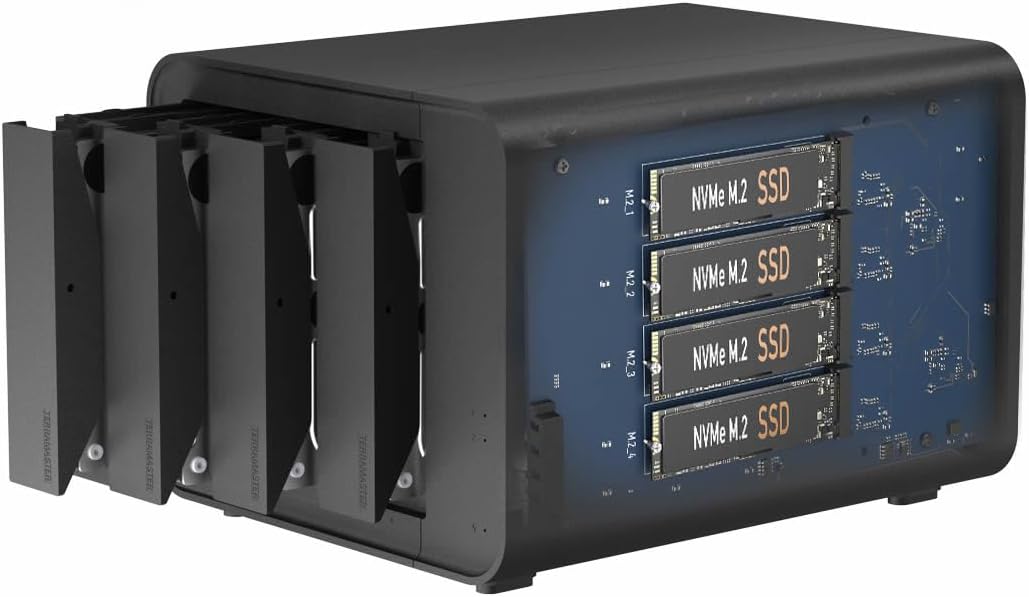
TERRAMASTER D8 Hybrid HDD NVMe Enclosure USB 3.2 Gen 2 10Gbps Type C 8Bay USB Storage Supports RAID 0/1/Single/JBOD Exclusive 2 Plus 6 RAID Hybrid Disk Array, Diskless
AED1,97629
Quantity:
Order today to get by 7-14 business days
This item qualifies for free delivery
Imported From: United States
At BOLO, we work hard to ensure the products you receive are new, genuine, and sourced from reputable suppliers.
BOLO is not an authorized or official retailer for most brands, nor are we affiliated with manufacturers unless specifically stated on a product page. Instead, we source verified sellers, authorized distributors or directly from the manufacturer.
Each product undergoes thorough inspection and verification at our consolidation and fulfilment centers to ensure it meets our strict authenticity and quality standards before being shipped and delivered to you.
If you ever have concerns regarding the authenticity of a product purchased from us, please contact Bolo Support. We will review your inquiry promptly and, if necessary, provide documentation verifying authenticity or offer a suitable resolution.
Your trust is our top priority, and we are committed to maintaining transparency and integrity in every transaction.
All product information, images, descriptions, and reviews originate from the manufacturer or from trusted sellers overseas. BOLO is not affiliated with, endorsed by, or an authorized retailer for most brands listed on our website unless stated otherwise.
While we strive to display accurate information, variations in packaging, labeling, instructions, or formulation may occasionally occur due to regional differences or supplier updates. For detailed or manufacturer-specific information, please contact the brand directly or reach out to BOLO Support for assistance.
Unless otherwise stated, all prices displayed on the product page include applicable taxes and import duties.
BOLO operates in accordance with the laws and regulations of United Arab Emirates. Any items found to be restricted or prohibited for sale within the UAE will be cancelled prior to shipment. We take proactive measures to ensure that only products permitted for sale in United Arab Emirates are listed on our website.
All items are shipped by air, and any products classified as “Dangerous Goods (DG)” under IATA regulations will be removed from the order and cancelled.
All orders are processed manually, and we make every effort to process them promptly once confirmed. Products cancelled due to the above reasons will be permanently removed from listings across the website.
Similar suggestions by Bolo
More from this brand
Similar items from “Enclosures”
Share with
Or share with link
https://www.bolo.ae/products/UO0Q3LMFX95
Visit the TERRAMASTER Store
TERRAMASTER D8 Hybrid HDD NVMe Enclosure USB 3.2 Gen 2 10Gbps Type C 8Bay USB Storage Supports RAID 0/1/Single/JBOD Exclusive 2 Plus 6 RAID Hybrid Disk Array, Diskless

AED1,97629
Quantity:
Order today to get by 7-14 business days
This item qualifies for free delivery
Imported From: United States
At BOLO, we work hard to ensure the products you receive are new, genuine, and sourced from reputable suppliers.
BOLO is not an authorized or official retailer for most brands, nor are we affiliated with manufacturers unless specifically stated on a product page. Instead, we source verified sellers, authorized distributors or directly from the manufacturer.
Each product undergoes thorough inspection and verification at our consolidation and fulfilment centers to ensure it meets our strict authenticity and quality standards before being shipped and delivered to you.
If you ever have concerns regarding the authenticity of a product purchased from us, please contact Bolo Support. We will review your inquiry promptly and, if necessary, provide documentation verifying authenticity or offer a suitable resolution.
Your trust is our top priority, and we are committed to maintaining transparency and integrity in every transaction.
All product information, images, descriptions, and reviews originate from the manufacturer or from trusted sellers overseas. BOLO is not affiliated with, endorsed by, or an authorized retailer for most brands listed on our website unless stated otherwise.
While we strive to display accurate information, variations in packaging, labeling, instructions, or formulation may occasionally occur due to regional differences or supplier updates. For detailed or manufacturer-specific information, please contact the brand directly or reach out to BOLO Support for assistance.
Unless otherwise stated, all prices displayed on the product page include applicable taxes and import duties.
BOLO operates in accordance with the laws and regulations of United Arab Emirates. Any items found to be restricted or prohibited for sale within the UAE will be cancelled prior to shipment. We take proactive measures to ensure that only products permitted for sale in United Arab Emirates are listed on our website.
All items are shipped by air, and any products classified as “Dangerous Goods (DG)” under IATA regulations will be removed from the order and cancelled.
All orders are processed manually, and we make every effort to process them promptly once confirmed. Products cancelled due to the above reasons will be permanently removed from listings across the website.
Description:
Reviews:
5.0 out of 5 stars The RAID1 functions as expected.
(function() { P.when('cr-A', 'ready').execute(function(A) { if(typeof A.toggleExpanderAriaLabel === 'function') { A.toggleExpanderAriaLabel('review_text_read_more', 'Read more of this review', 'Read less of this review'); } }); })(); .review-text-read-more-expander:focus-visible { outline: 2px solid #2162a1; outline-offset: 2px; border-radius: 5px; } I purchased the D2-320 2-bay RAID enclosure with USB 3.2 Gen 2 10 GbpsMy purpose with this unit was to mirror (RAID1) two 6TB WD Reds with a Linux machine. I’m not familiar with this brand, so I decided to test it a little before copying a lot of my files over to the D2-320.Getting everything working was pretty easy.I pulled out each bay, installing the drive was pretty easy, no screws needed. They provide a video on it if you’re unsure. I set the selector on the back of the unit to RAID1, shoved in both drives, connected the USB (drives are powered but won’t spin up until the USB is connected), then held the RESET button with the provided pin until the disk lights flashed. The system found one drive - as it should have.I wrote approximately 18K files and directories of various sizes to the array and then without disconnecting the USB or turning off the power, I pulled out one drive. I then connect the pulled drive directly to another computer to see that the files were in fact written to the drive. They were. All good to go.I replaced the drive. Both lights are green. Since no changes had been made to either drive, this is perfect, it didn’t try to rebuilt the arrayNext, I pulled the second drive out hot. Then connected that drive to the other computer and checked to make sure all files were also written to this drive as well. They were! It is working as it should be.I then created a couple files on the other drive and then replaced the pulled drive back into the D2-320. One drive light was blinking green, the other blinking yellow. According to the online documentation, this means it is rebuilding the RAID1 mirror. Perfect .. Everything is performing as expected. It did take a few hours to rebuild .. but these are 6TB drives, so that was expected.The USB cable provided seems adequate, USB C on both ends. If you need a different cable, consider that when purchasing.Average 1G file write 156 MB/s, average 1G read 221MB/s. Slow but these are mechanical drives connected via USB. Acceptable. Later, I watched a video using Jellyfin and reading, transcoding, and streaming worked perfectly fine.The large fan is quiet and seems to keep the drives cool. Airflow looks to be sufficient. How noisy the unit will be will depend on your drives. Some are louder than others.These drives will be part of a system I have in place which will be up and running 24/7. I’ll be very interested in seeing how well the Terramaster D2-320 performs in the long run. I’ll post updates after I have used them for some time.
5.0 out of 5 stars So far so good! Works right out of the box. Does not use any proprietary file system or encryption.
Disclaimer: I've only used this for two days.I was hesitant to get this at first. I saw on another brand (QNAP) that it stated "The files and data stored on drives moved to/from a NAS (or another device) will not be recognized." and I wasn't sure if that was specific to them or if it was that way all around. For my purposes, I wanted my drive to be able to be read in pretty much any system. If this broke or was damaged or stopped working, I wanted to be able to put my drives into something else and be able to read them - I didn't want the data to be only able to be read in this box.And this was the case! I have plugged three hard disks in, each one containing data, and it read each of them just fine.Plugging disks is as simple as popping them in the tray, popping the two plastic side pieces in (no screws needed, though you could use them instead of the plastic side pieces, if desired), and pushing it in the bay. That's it.Disks go in easy enough, but they are latched in there, and though they are easy enough to unlatch, they are firm enough that I don't see it possible to "accidentally" unlatch them.The bays are numbered 1-4 on the bottom. My suggestion is to name the enclosure (BackUp, Media, etc.) and then name each drive after their position in the enclosure (Backup_1 or Media_3) etc. This way you can easily tell in Explorer which drive is which, if you were wanting to remove one.I actually ordered a second one. The first one will be used as my primary storage device, plugged into my router (it has a USB port for an external drive). The second will be used as a backup of that.I currently have a variety of drives in it - from a new 18TB to a smaller 8TB, to a really tiny and old 500GB drive I had laying around. It read all of them just fine. The 500GB had much slower write speeds, obviously, but the two larger (and newer) drives were capable of 100-200MB/S speeds.I am very happy with this and I'm glad I bought it.I think I would have liked the option to be able to turn individual drives off, but it's not that big of a deal. So far that's my only complaint, and it's not really much of a complaint!
Maravilloso
(function() { P.when('cr-A', 'ready').execute(function(A) { if(typeof A.toggleExpanderAriaLabel === 'function') { A.toggleExpanderAriaLabel('review_text_read_more', 'Read more of this review', 'Read less of this review'); } }); })(); .review-text-read-more-expander:focus-visible { outline: 2px solid #2162a1; outline-offset: 2px; border-radius: 5px; } Es una aliviané para editar video y audio con los NVMA, transferencia rápida y suficiente, si necesitas más rapidez este no es para ti. Tiene 10gps de velocidad por el USB C- los discos normales para backup son un aliviane.
Funziona, conveniente e pratico.
Non solo è praticissimo per chi deve avere a che fare con tanti HD, "swapping" veloce, USB C e tutto il resto, comodo da morire. Ho pure scoperto che la ditta ha un'assistenza post vendita letteralmente stellare. Avevo bisogno di sapere come comportarmi con il voltaggio differente in USA (120V 60Hz) avendolo comprato in Italia (230V 50Hz) così gli ho scritto una mail con la questione e questi mi hanno mandato alla chetichella e senza neanche fiatare un altro alimentatore con la spina USA, pazzesco ! Soprattutto considerando che A) sarebbe bastato solo il pezzo di spina USA (l'alimentatore si adatta da solo ma l'ho scoperto dopo) e B) il costo dell'intero maccherone è di ben 40.00 USD. Non hanno domandato o voluto un centesimo. Ho visto che ne hanno una versione update, appena posso ne compro un'altro, sono veramente soldi ben spesi.
Tus datos, siempre respaldados
Lo compre cuando cambie de Pc. Rescaté los discos duros de mi anterior ordenador y con un solo puerto usb tengo acceso a todos los archivos de trabajo. Cuando acabo y expulso las unidades, se que tengo una copia de respaldo de toda mi información a un solo click, sin necesidad de subirla a la nube.
Super satisfait du TerraMaster D4-320 !
Honnêtement, il fait parfaitement le job. Je l’ai associé à un serveur NAS Beelink, c’est reconnu tout de suite, on peut faire du ZFS dessus sans aucun souci, le tout est hyper stable.Côté compatibilité, rien à dire, c’est plug & play. J’ai juste remarqué que les infos SMART remontent sur certains disques et pas sur d’autres, mais franchement ce n’est pas bloquant.Le RAID fonctionne , l’interface USB-C est rapide et fiable, c’est simple, ça marche et je n’ai jamais eu de mauvaise surprise. Pour le prix, la qualité est vraiment au rendez-vous, c’est bien construit, pas cheap du tout.C’est aussi un super choix pour tous ceux qui en ont marre de Synology et de leurs restrictions ou de leur matos devenu obsolète. Aujourd’hui, avec des OS open source comme TrueNAS, OpenMediaVault ou UnRAID, on peut avoir une vraie liberté et une machine qui tourne comme on veut, sans se prendre la tête. Faut juste accepter de réapprendre un peu un nouvel OS, mais ça vaut largement le coup.Bref, je recommande à fond !J'ai même commandé un D2-320 en plus :) pour mon PC et MAC
Sehr gute Verarbeitung, sehr leise.
Habe lange überlegt welches TerraMaster Festplattengehäuse ich mit zulege. (dieses hier oder eines der 5-Bay mit RAID). Die Recherche war nicht ganz leicht, da sowohl hier als auch auf der Herstellerwebsite durchaus unterschiedliche Informationen zu finden sind.Der TerraMaster Support über Live-Chat war allerdings sehr kompetent und hilfreich und hat offene Fragen innerhalb von wenigen Minuten klären können.Jetzt zum Produkt:Das Festplattengehäuse hat ein massives Metallgehäuse (Alu?) und sieht sehr wertig aus. Auch die Verarbeitung ist sehr gut. Die Festplatteneinschübe selbst sind aus Kunststoff, was aber völlig ausreichend erscheint. Sie passen perfekt, nichts wackelt oder klappert.Das montieren von 3,5 Zoll HDD's als auch 2,5 Zoll SSD's auf den Einschüben geht problemlos mit jeweils 3 Schrauben. Sicherlich sind die Einschübe nicht zum täglichen Wechseln ausgelegt, dann hätten sie wohl aus Metall sein müssen, aber wer macht das denn bei Consumer-Hardware schon?Der Lüfter ist überraschend leise und durch die weichen Gummifüße werden auch keine Vibrationen übertragen. Selbst auf dem Schreibtisch direkt neben dem PC sind die Geräusche kaum wahrnehmbar.Aktuell steht das Gerät in einem Schrank mit Lüftungsöffnungen. Nachts (bei völliger Stille) ist ein ganz leises Rauschen wahrnehmbar. Dies ist aber leiser als jede Klimaanlage oder Kühlschrank.Sowohl der Stecker den Netzteils als auch der USB-C Stecker des mitgelieferten Kabels passen gut und sitzen sehr fest, was ein versehentliches herausziehen praktisch unmöglich macht.Zu meinem Setup:Ich betreibe die TerraMaster D4-300 an einem Proxmox-Server als Datenspeicher und für tägliche Backups. Deswegen habe ich mich gegen die anderen TerraMaster Variaten mit RAID entschieden, da ich das für meinen Zweck nicht brauche. Die Möglichkeit jede Platte einzeln anzusprechen ist genau das wonach ich gesucht habe.Ich betreibe in den 4 Slots 2 SSD's und 2 große HDD's im Mischbetrieb. Das ist ohne Probleme möglich.Das Temperaturmanagement des Gehäuses ist erstaunlich gut. Auch bei den nächtlichen Backups, wo alle 4 Platten unter Last laufen, steigt die Temperatur der einzelnen HDD's und SSD's nicht über 38 Grad. Das Gehäuse wird maximal handwarm (im geschlossenen Schrank), bei geöffneter Tür nicht wärmer als Zimmertemperatur.Der Stromverbrauch liegt im Idle so grob bei 10-15 Watt, was ich für ganz okay halte.(Habe aber keine Einzelmessung der TerraMaster, nur des Gesamtsystems)Fazit:Wer einfach eine bezahlbare Speicherlösung sucht und kein teures NAS braucht, ist mit den Festplattengehäusen von TerraMaster auf der sicheren Seite.
Similar suggestions by Bolo
More from this brand
Similar items from “Enclosures”
Share with
Or share with link
https://www.bolo.ae/products/UO0Q3LMFX95