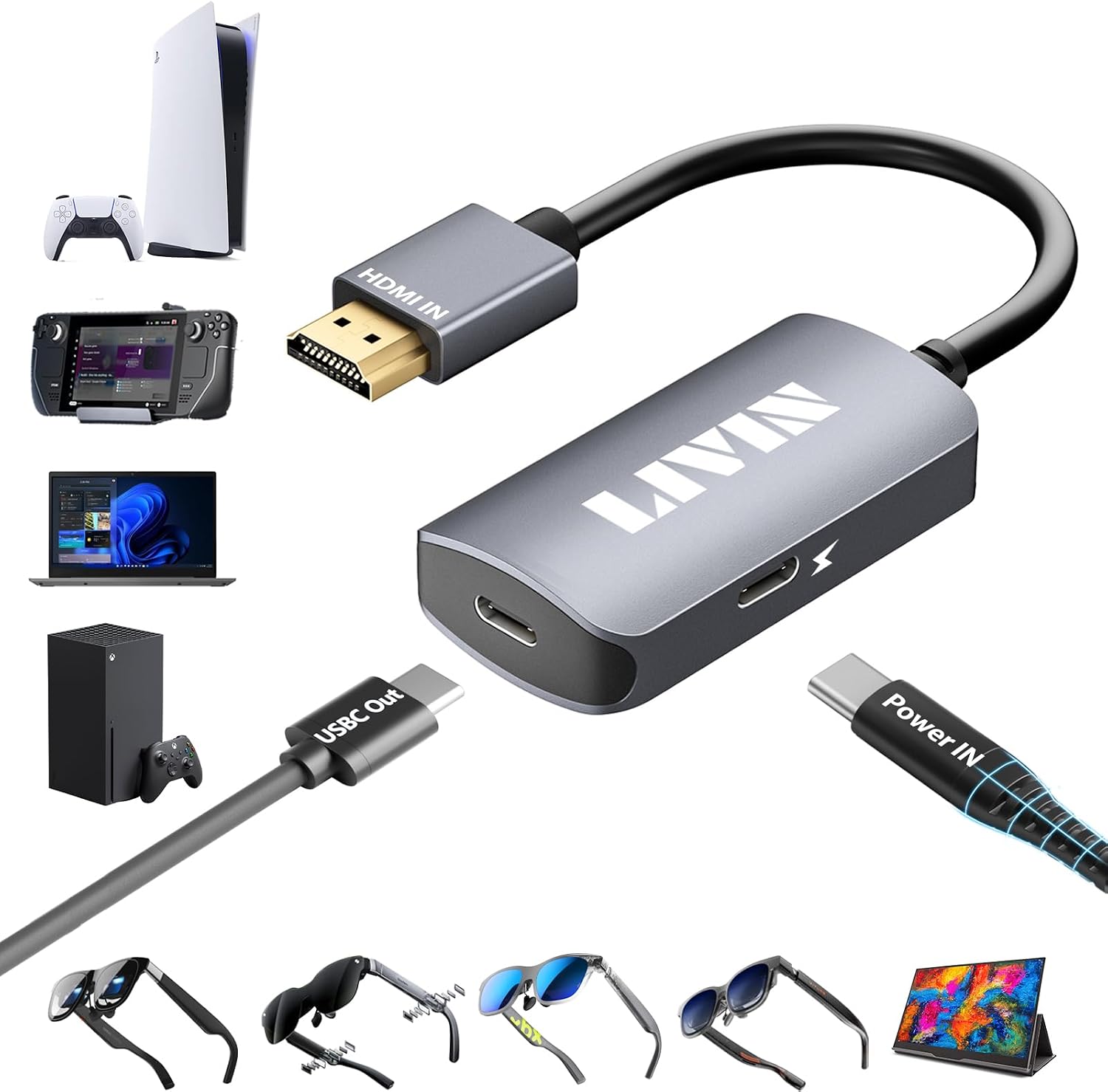
Description:
Details:
| Compatible Devices | Portable Monitor、AR glasses、XREAL:XREAL Air 2 Pro、XREAL One、XREAL Air、XREAL Air 2、XREAL One Pro、XREAL Air 2 Ultra、VITURE:VITURE Pro、VITURE One、RAYNEO:RAYNEO Air 2s、Rokid:Rokid Max、Laptop、Smart glasses、Nintendo Switch、Xbox、PlayStation 4/5、Steam Deck、ROG Ally、Video glasses、MacBook、Android、Windows 、Legion Go and HDMI Male(Source) to USB C Female(Display) Adapter |
|---|---|
| Specific Uses For Product | HDMI Male(Source) to USB C Female(Display) Adapter, Transmit Audio and Video from the HDMI port directly to the USB-C port of Portable Monitor、AR glasses、XREAL:XREAL Air 2 Pro、XREAL One、XREAL Air、XREAL Air 2、XREAL One Pro、XREAL Air 2 Ultra、VITURE:VITURE Pro、VITURE One、RAYNEO:RAYNEO Air 2s、Rokid:Rokid Max、Laptop、Smart glasses、Nintendo Switch、Xbox、PlayStation 4/5、Steam Deck、ROG Ally、Video glasses、MacBook、Android、Windows 、Legion Go and more |
| Connector Type | HDMI |
| Color | HDMI male to USB C female |
| Item dimensions L x W x H | 2.3 x 1.2 x 0.4 inches |
Visit the LIVIN Store
HDMI to USB C Adapter 4K Portable Monitor, AR Glasses XREAL/VITURE/RayNeo
 Imported From: United States
At BOLO, we work hard to ensure the products you receive are new, genuine, and sourced from reputable suppliers.
Every product in the BOLO catalogue is sourced through our Verified Global Supply Network of verified sellers, authorized distributors or directly from the manufacturer.
Each product undergoes thorough inspection and verification at our consolidation and fulfilment centers to ensure it meets our strict authenticity and quality standards before being shipped and delivered to you.
If you ever have concerns regarding the authenticity of a product purchased from us, please contact Bolo Support. We will review your inquiry promptly and, if necessary, provide documentation verifying authenticity or offer a suitable resolution.
Your trust is our top priority, and we are committed to maintaining transparency and integrity in every transaction.
While we strive to display accurate information, variations in packaging, labeling, instructions, or formulation may occasionally occur due to regional differences or supplier updates. For detailed or manufacturer-specific information, please contact the brand directly or reach out to BOLO Support for assistance.
Unless otherwise stated, all prices displayed on the product page include applicable taxes and import duties.
BOLO operates in accordance with the laws and regulations of United Arab Emirates. Any items found to be restricted or prohibited for sale within the United Arab Emirates will be cancelled prior to shipment. We take proactive measures to ensure that only products permitted for sale in United Arab Emirates are listed on our website.
All items are shipped by air, and any products classified as “Dangerous Goods (DG)” under IATA regulations will be removed from the order and cancelled.
All orders are processed manually, and we make every effort to process them promptly once confirmed. Products cancelled due to the above reasons will be permanently removed from listings across the website.

At LIVIN, we don't just sell Sell a variety of exclusive products, we provide an immersive experience that connects buyers to our brand. Our products are designed to enhance people's lives by simplifying their workflows and unlocking their creativity. Our brand culture is centered around building deep connections with our customers by prioritizing after-sales service and valuing their feedback.
We want our buyers to feel a sense of identity when they choose LIVIN. We want them to feel like they are part of a community that values innovation, accessibility, and connectivity. We believe that by building this sense of identity, we create loyal customers who are passionate about our brand and share our values.
At LIVIN, we are not satisfied with just selling products; we want to make a difference in people's lives. We are committed to pushing the boundaries of what is possible to create technology that transforms the way people work and create. We invite buyers to join us on this journey and be a part of the LIVIN community.

If there is no sound when HDMI to USB C Adapter connected to Xreal AR glasses:
1. Please upgrade your Xreal glasses firmware to the latest version (update on your phone's Xreal App)
2. After upgrading, press and hold the brightness button - (ringing once), then press and hold brightness + (ringing twice), wait for 1 second, and the Audio and video will be displayed at the same time (note: this operation is required after each re-plug)
3. The audio output of the HDMI output device also needs to be switched to headphone output or other peripherals
Xreal if connected: desktop computer, laptop, TV box, PS4/5 and other HDMI output devices:
The USB-A power cable included in the HDMI to USB C Adapter needs to be connected to another power source, not the USB-A port of the HDMI output device. This is because the USB-A port of the HDMI output device is underpowered.
Please note: After the firmware of XREAL AR glasses is upgraded to the latest version, press and hold the brightness button - (ringing once), then press and hold brightness + (ringing twice), wait for 1 second, and the audio and video will be displayed at the same time (Note: this operation is required after each replugging)
Xreal if connected to Nintendo Switch:
Both the HDMI to USB C Adapter and the USB-A power cable should be connected to the base of the switch(First, use the original charger to power the base of the switch, then connect, and then connect the adapter after the TV mode is activated)
1. The controller must be removed to operate the game
2. The original Nintendo switch charger must be used to power the base
Please note: After the firmware of XREAL AR glasses is upgraded to the latest version, press and hold the brightness button - (ringing once), then press and hold brightness + (ringing twice), wait for 1 second, and the audio and video will be displayed at the same time (Note: this operation is required after each replugging)
When HDMI to USB C is connected to the Portable Monitor: (must be in this order)
First, use the Type-C power cable included in the package to power the HDMI to USB C Adapter (because the battery is too low to draw power from the HDMI output device) before continuing to connect other ports.

Important Notes:
* External 5V/2A power is required.
* The conversion direction is HDMI source to USB-C display only.
* The USB-C display must support video input.
* A full-featured USB-C video cable must be used.
* The correct connection sequence must be followed.
* Troubleshooting steps are provided for no video, signal interruption, power, cable, and compatibility issues.

HDMI Male to USB C Female Adapter Strong Compatibility:
- Compatible with all kinds of smart glasses: XREAL: XREAL Air 2 Pro、XREAL One、XREAL Air、XREAL Air 2、XREAL One Pro、XREAL Air 2 Ultra,Rokid Air/Max, Viture Pro/One, RayNeo Air 2s XR, Thunderbird AR and more.
- Compatible with Switch, Xbox, PS4/5, Steam Deck, ROG Ally and more.
- Compatible with all kinds of USB-C Portable Monitor, USB-C projector, Google TV, Fire TV Stick, etc.
- Compatible with all kinds of computer hosts, laptops, mobile phones, cameras, monitors, MacBook, iMac, iPad, IOS, Android, Windows, Dell, Asus, Huawei, HP, Lenovo and so on
- More equipment please share, buyers' usage scenarios always surprise us and are also our source of inspiration!

Aluminum Housing:
1. The aluminum shell has strong heat dissipation and maintains a constant temperature when used for a long time
2. The aluminum shell is durable, the shell is hard, and it is resistant to falling, ensuring the integrity of the parts inside
3. Aluminum shell is fashionable and high-end
LIVIN HDMI to USB C Adapter mini size, light weight, convenient to carry, strong compatibility, suitable for a variety of devices and various scenes, occasions!


Similar suggestions by Bolo
More from this brand
Similar items from “Connectors & Adapters”
Share with
Or share with link
https://www.bolo.ae/products/UO0Q2JIOQSW
Visit the LIVIN Store
HDMI to USB C Adapter 4K Portable Monitor, AR Glasses XREAL/VITURE/RayNeo
Imported From: United States
At BOLO, we work hard to ensure the products you receive are new, genuine, and sourced from reputable suppliers.
Every product in the BOLO catalogue is sourced through our Verified Global Supply Network of verified sellers, authorized distributors or directly from the manufacturer.
Each product undergoes thorough inspection and verification at our consolidation and fulfilment centers to ensure it meets our strict authenticity and quality standards before being shipped and delivered to you.
If you ever have concerns regarding the authenticity of a product purchased from us, please contact Bolo Support. We will review your inquiry promptly and, if necessary, provide documentation verifying authenticity or offer a suitable resolution.
Your trust is our top priority, and we are committed to maintaining transparency and integrity in every transaction.
While we strive to display accurate information, variations in packaging, labeling, instructions, or formulation may occasionally occur due to regional differences or supplier updates. For detailed or manufacturer-specific information, please contact the brand directly or reach out to BOLO Support for assistance.
Unless otherwise stated, all prices displayed on the product page include applicable taxes and import duties.
BOLO operates in accordance with the laws and regulations of United Arab Emirates. Any items found to be restricted or prohibited for sale within the United Arab Emirates will be cancelled prior to shipment. We take proactive measures to ensure that only products permitted for sale in United Arab Emirates are listed on our website.
All items are shipped by air, and any products classified as “Dangerous Goods (DG)” under IATA regulations will be removed from the order and cancelled.
All orders are processed manually, and we make every effort to process them promptly once confirmed. Products cancelled due to the above reasons will be permanently removed from listings across the website.
Description:
Details:
| Compatible Devices | Portable Monitor、AR glasses、XREAL:XREAL Air 2 Pro、XREAL One、XREAL Air、XREAL Air 2、XREAL One Pro、XREAL Air 2 Ultra、VITURE:VITURE Pro、VITURE One、RAYNEO:RAYNEO Air 2s、Rokid:Rokid Max、Laptop、Smart glasses、Nintendo Switch、Xbox、PlayStation 4/5、Steam Deck、ROG Ally、Video glasses、MacBook、Android、Windows 、Legion Go and HDMI Male(Source) to USB C Female(Display) Adapter |
|---|---|
| Specific Uses For Product | HDMI Male(Source) to USB C Female(Display) Adapter, Transmit Audio and Video from the HDMI port directly to the USB-C port of Portable Monitor、AR glasses、XREAL:XREAL Air 2 Pro、XREAL One、XREAL Air、XREAL Air 2、XREAL One Pro、XREAL Air 2 Ultra、VITURE:VITURE Pro、VITURE One、RAYNEO:RAYNEO Air 2s、Rokid:Rokid Max、Laptop、Smart glasses、Nintendo Switch、Xbox、PlayStation 4/5、Steam Deck、ROG Ally、Video glasses、MacBook、Android、Windows 、Legion Go and more |
| Connector Type | HDMI |
| Color | HDMI male to USB C female |
| Item dimensions L x W x H | 2.3 x 1.2 x 0.4 inches |
At LIVIN, we don't just sell Sell a variety of exclusive products, we provide an immersive experience that connects buyers to our brand. Our products are designed to enhance people's lives by simplifying their workflows and unlocking their creativity. Our brand culture is centered around building deep connections with our customers by prioritizing after-sales service and valuing their feedback.
We want our buyers to feel a sense of identity when they choose LIVIN. We want them to feel like they are part of a community that values innovation, accessibility, and connectivity. We believe that by building this sense of identity, we create loyal customers who are passionate about our brand and share our values.
At LIVIN, we are not satisfied with just selling products; we want to make a difference in people's lives. We are committed to pushing the boundaries of what is possible to create technology that transforms the way people work and create. We invite buyers to join us on this journey and be a part of the LIVIN community.
If there is no sound when HDMI to USB C Adapter connected to Xreal AR glasses:
1. Please upgrade your Xreal glasses firmware to the latest version (update on your phone's Xreal App)
2. After upgrading, press and hold the brightness button - (ringing once), then press and hold brightness + (ringing twice), wait for 1 second, and the Audio and video will be displayed at the same time (note: this operation is required after each re-plug)
3. The audio output of the HDMI output device also needs to be switched to headphone output or other peripherals
Xreal if connected: desktop computer, laptop, TV box, PS4/5 and other HDMI output devices:
The USB-A power cable included in the HDMI to USB C Adapter needs to be connected to another power source, not the USB-A port of the HDMI output device. This is because the USB-A port of the HDMI output device is underpowered.
Please note: After the firmware of XREAL AR glasses is upgraded to the latest version, press and hold the brightness button - (ringing once), then press and hold brightness + (ringing twice), wait for 1 second, and the audio and video will be displayed at the same time (Note: this operation is required after each replugging)
Xreal if connected to Nintendo Switch:
Both the HDMI to USB C Adapter and the USB-A power cable should be connected to the base of the switch(First, use the original charger to power the base of the switch, then connect, and then connect the adapter after the TV mode is activated)
1. The controller must be removed to operate the game
2. The original Nintendo switch charger must be used to power the base
Please note: After the firmware of XREAL AR glasses is upgraded to the latest version, press and hold the brightness button - (ringing once), then press and hold brightness + (ringing twice), wait for 1 second, and the audio and video will be displayed at the same time (Note: this operation is required after each replugging)
When HDMI to USB C is connected to the Portable Monitor: (must be in this order)
First, use the Type-C power cable included in the package to power the HDMI to USB C Adapter (because the battery is too low to draw power from the HDMI output device) before continuing to connect other ports.
Important Notes:
* External 5V/2A power is required.
* The conversion direction is HDMI source to USB-C display only.
* The USB-C display must support video input.
* A full-featured USB-C video cable must be used.
* The correct connection sequence must be followed.
* Troubleshooting steps are provided for no video, signal interruption, power, cable, and compatibility issues.
HDMI Male to USB C Female Adapter Strong Compatibility:
- Compatible with all kinds of smart glasses: XREAL: XREAL Air 2 Pro、XREAL One、XREAL Air、XREAL Air 2、XREAL One Pro、XREAL Air 2 Ultra,Rokid Air/Max, Viture Pro/One, RayNeo Air 2s XR, Thunderbird AR and more.
- Compatible with Switch, Xbox, PS4/5, Steam Deck, ROG Ally and more.
- Compatible with all kinds of USB-C Portable Monitor, USB-C projector, Google TV, Fire TV Stick, etc.
- Compatible with all kinds of computer hosts, laptops, mobile phones, cameras, monitors, MacBook, iMac, iPad, IOS, Android, Windows, Dell, Asus, Huawei, HP, Lenovo and so on
- More equipment please share, buyers' usage scenarios always surprise us and are also our source of inspiration!
Aluminum Housing:
1. The aluminum shell has strong heat dissipation and maintains a constant temperature when used for a long time
2. The aluminum shell is durable, the shell is hard, and it is resistant to falling, ensuring the integrity of the parts inside
3. Aluminum shell is fashionable and high-end
LIVIN HDMI to USB C Adapter mini size, light weight, convenient to carry, strong compatibility, suitable for a variety of devices and various scenes, occasions!
Similar suggestions by Bolo
More from this brand
Similar items from “Connectors & Adapters”
Share with
Or share with link
https://www.bolo.ae/products/UO0Q2JIOQSW