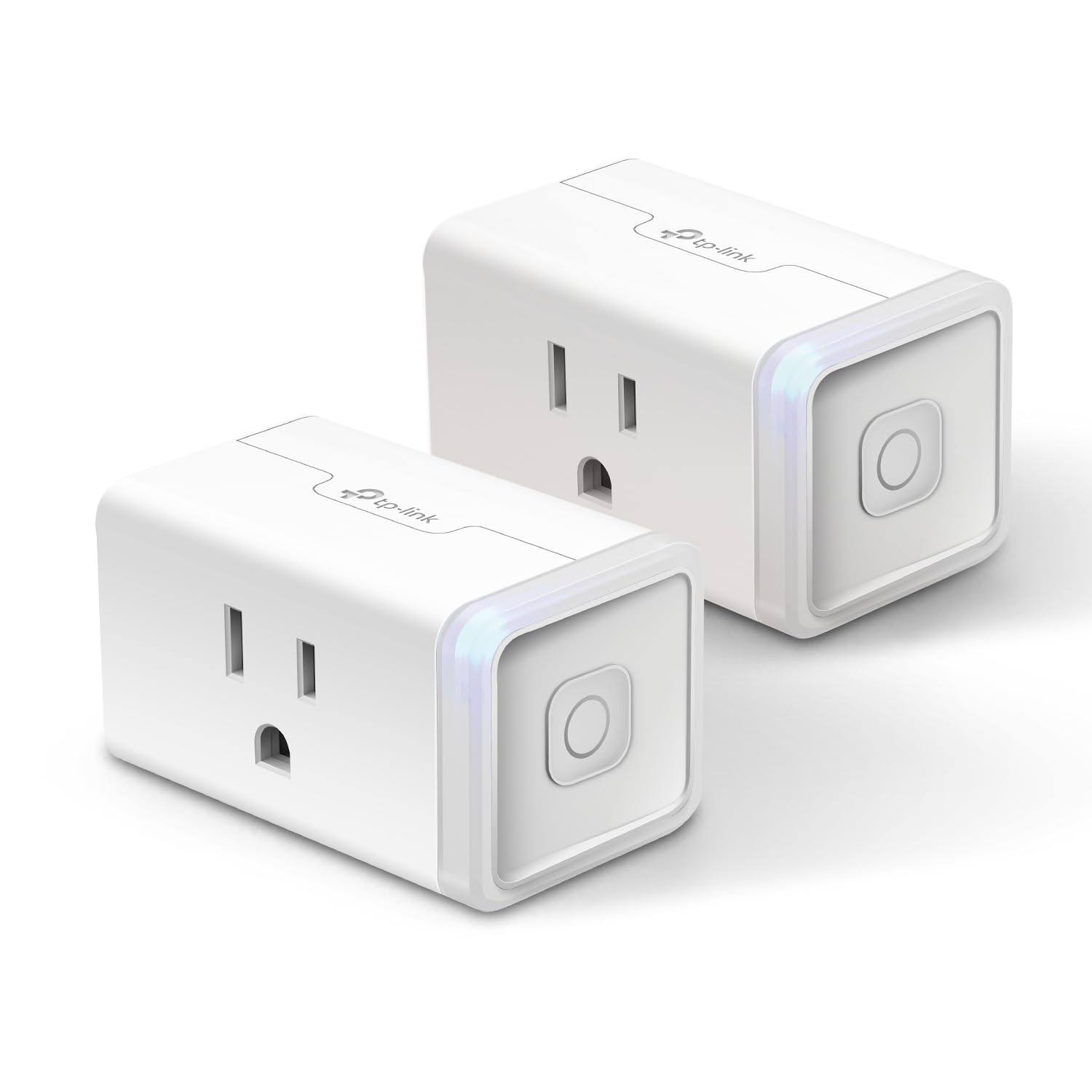
Description:
The EP25 is Kasa’s latest Apple HomeKit supported WiFi mini smart plug that supports 15A maximum load, with Energy Monitoring. You can use it to control lamps, fans, humidifiers, and other home electronic appliances while monitoring each device’s energy consumption. You can also control your plugged-in devices with voice control giving you the option of hands-free convenience. Set schedules, timers, all with the convenience of control from virtually anywhere with your phone. The Kasa app provides a robust suite of features to control your device and enables the plug to work in conjunction with other Kasa Smart devices with smart actions. Installation is a breeze with the simple in app directions and you can connect your smart plug with your home Wi-Fi, Apple HomePod, Amazon Alexa or Google Assistant. EP25 plug supports Amazon Frustration-Free Setup (FFS) & Google Seamless Setup (GSS) for an even simpler setup process.
Reviews:
5.0 out of 5 stars Easy, fast setup. Works well.
(function() { P.when('cr-A', 'ready').execute(function(A) { if(typeof A.toggleExpanderAriaLabel === 'function') { A.toggleExpanderAriaLabel('review_text_read_more', 'Read more of this review', 'Read less of this review'); } }); })(); .review-text-read-more-expander:focus-visible { outline: 2px solid #2162a1; outline-offset: 2px; border-radius: 5px; } Pros:Super easy and fast to set upWorks wellWorks with Alexa, Google Home, IFTTTCons:No Apple HomekitA bit more difficult to set up Google Home than other devicesThis Kasa smart switch by TP-Link was a pleasure to set up.I had it set up literally in less than 5 minutes, and about as long to link to Alexa and Google Home.The set up instructions are really nothing more than a card telling you to download the Kasa app on your smartphone and adding the switch to the app.The set up is easy. As with most WiFi controlled devices, the device goes into AP mode for configuration and then into device mode for operation. Unlike other devices, and seemingly any that support HomeKit, it simply has you connect to that access point on the phone, then go back to the app. The app connects to the device and scans WiFi. You select the WiFi SSID (network name) you want, enter the password, and done.At this point the switch can be controlled from the app. To add Alexa you select the Works with Kasa option in the app, select Alexa. Then enable in Alexa, and done.Google home is a bit less direct, and a bit more clumsy than other devices, but still pretty easy. You need to go into the Google home app, add a device, search for Kasa, then log into Kasa, then configure. A few more steps, but overall not that bad.It also supports IFTTT, and Samsung Smart home that I didn't set up.It does not support Apple HomeKit. That is probably why it was easy to set up. I really would like to be able to use HomeKit, but almost nothing works well with HomeKit. The whole set up with the code mostly doesn't work, and if it does it then gets disconnected.This brings me to why I bought the Kasa in the first place. I had a WeMo (Belkin) smart switch, the equivalent product to this. I couldn't get it to connect after multiple attempts. I called WeMo support (surprisingly a human on a phone). After well over an hour I was finally able to get the WeMo to connect, then get it to connect to HomeKit, Alexa, and Google home. Great. I had the switch in an easy to access socket to set up. I unplugged it to move to where it needed to be and the WeMo stopped connecting to WiFi. After factory resetting the WeMo I was able to get it to connect back to WiFi, but as soon as it was unplugged and plugged back in, it wouldn't connect again. At this point I just gave up and ordered the Kasa based on other reviews. It was night and day to set up.Similar to the WeMo, I used an easy to access socket to set up, then unplugged it and moved it to the location where the light to be controlled is. With the Kasa, no problem. This is the same location, and the same WiFi network. The Kasa works. The WeMo doesn't.Part of the problem is HomeKit. HomeKit compatible devices use the HomeKit set up on iOS devices. Some devices sort of let you bypass this, with the WeMo being one of those devices. This is how I initially got it to connect with customer service, by connecting directly to the switch. If it fails though HomeKit recognizes the WiFi AP as a connected device for at least 15 minutes. You need to wait 15 minutes to try again. The whole thing is a mess. I really like Apple devices, but HomeKit is just way more trouble than its worth. Ironically, the only device that I've found that works with HomeKit is a Sony Android TV! That TV now controls the light plugged into the Kasa switch with Google Home.Again, the setup on the Kasa was really easy, the way it should be. The competing WeMo was hours of frustration with no results. This was the second WeMo (it was part of a 2-pack like the Kasa), and the first one was also difficult and unreliable. Unless you absolutely can't live without HomeKit, buy this Kasa. The Kasa just works.
5.0 out of 5 stars Works perfectly with Alexa – Easy to use and super convenient
The Kasa Smart Plug Ultra Mini has been a great addition to my smart home setup. I set it up quickly with my Alexa, and now I can control my devices with simple voice commands. No hub required, and the Wi-Fi connection is stable. I love being able to turn lights or appliances on and off from my phone or with voice control. It's compact, discreet, and very user-friendly. Highly recommended for anyone starting their smart home journey.
5.0 out of 5 stars Handy Mini Smart Plug
These smart plugs are really handy for automating household devices. I also have an older bulkier model that takes up both outlets, so these are super useful since you can use both outlet plugs. The Kasa app is very responsive and you can check the total runtime of the plug. You will not be able to see energy consumption details, so if you need that information check the other smart plugs that Kasa offers.
4.0 out of 5 stars Great product!
These smart plugs are great! I have multiple of them, controlling things from lights to fans. I have one for my plant grow light setup that has a schedule on it, one for another light that I use with Google assistant/home, and another for a box fan that I turn on using Google/the app as needed. Overall, they are super easy to set up with the app, connect easily to WiFi (getting the MAC address was a struggle for those WiFi networks that are whitelist-locked using the MAC address), and are compatible with Google home and Alexa but also work very well on their own with the app. When turning them on/off, there is a slight click, but I find it useful as it gives me confirmation that it was turned on/off.The only reason I gave this product 4 stars instead of 5 is because of one issue. This product is *only* capable of working over WiFi. At my house, I am able to use it, as I can add it to my WiFi with the MAC address, however, when I am using these in my college dorm, they are as good as manual switches unless you already had a schedule set up. They do not connect to my school WiFi, but their schedule functionality works independently. I wish this product would also have Bluetooth capabilities, allowing them to be controlled by my phone within Bluetooth range, such as some other smart products.Other than that, I would highly recommend this product to anyone looking to automate things like Christmas tree lighting, fans, lighting in general, and more.
5.0 out of 5 stars Super convenient and easy to use with Alexa
I have this Kasa Smart Plug connected to my Echo Show, and it’s been really practical for turning my bedroom lamp on and off. I also have a fan connected to it, and I control everything just by using my voice, which makes life so much easier.Setup was straightforward, and it works reliably over my 2.4G Wi-Fi without needing any extra hubs. If you want a simple and efficient way to smarten up your home devices, this plug is a great choice!
5.0 out of 5 stars Set schedules, save energy, and control devices remotely
Bought this to control lights and small appliances with my phone and voice assistant.What I like• Super easy setup with the Kasa app—up and running in minutes• Works seamlessly with Alexa and Google Assistant• Compact design doesn’t block the second outletWhat could be better• App interface could use a refresh for easier scheduling• Doesn’t support Apple HomeKitBottom line: Reliable and compact smart plug for automating your home. Perfect for beginners or smart home enthusiasts, but look at Meross Smart Plug if you need HomeKit compatibility.
So easy to setup!
(function() { P.when('cr-A', 'ready').execute(function(A) { if(typeof A.toggleExpanderAriaLabel === 'function') { A.toggleExpanderAriaLabel('review_text_read_more', 'Read more of this review', 'Read less of this review'); } }); })(); .review-text-read-more-expander:focus-visible { outline: 2px solid #2162a1; outline-offset: 2px; border-radius: 5px; } Great little Smart Plug. Not expensive and small enough to allow you to use the second outlet. Download the Kasa Smart app from the App Store or Google Play, plug the Smart Plug into the outlet and follow the step by step instructions. Easy to follow and understand. No codes to enter and no holding your phone up to the Smart Plug. No tech knowledge needed.Using the app to connect the plug to my wifi was super simple, and setting up an automated on/off schedule in the app was a breeze. Even adding the two smart plug devices I purchased to my Google Home to enable voice commands took two minutes. I was using an iHome Smart Plug before getting this one, but it was always disconnecting from my wifi and reconnecting it was a nightmare. I got so fed up with it that I almost threw it out the window.Very happy with this purchase!
Execelente para automatizar
Lo compré para automatizar una lámpara y, hasta ahora, funciona perfectamente. Se sincroniza con Alexa y permite programar horarios o usar la función de día/noche, encendiéndose o apagándose automáticamente según la luz, sin importar la hora.
nice and simple to use
nice and simple to use!
Excelentes
Todo lo que sea TP-Link (su marca Kasa y Tapo) son excelentes. La instalación es sumamente fácil, y la integración con Alexa es sencilla. Funcionan muy bien y, en palabras sencillas, su definición es calidad, a un buen costo y que se integra muy bien con todo. 10 de 10.
Easy WiFi setup
Easy to setup.
Visit the Kasa Smart Store
Kasa Smart Plug Mini 15A, Apple HomeKit Supported, Smart Outlet Works with Siri, Alexa & Google Home, UL Certified, App Control, Scheduling, Timer, 2.4G WiFi Only, 2 Count (Pack of 1) (EP25P2), White
AED15754
Quantity:
Order today to get by 7-14 business days
Delivery fee of AED 20. Free for orders above AED 200.
Imported From: United States
At BOLO, we work hard to ensure the products you receive are new, genuine, and sourced from reputable suppliers.
BOLO is not an authorized or official retailer for most brands, nor are we affiliated with manufacturers unless specifically stated on a product page. Instead, we source verified sellers, authorized distributors or directly from the manufacturer.
Each product undergoes thorough inspection and verification at our consolidation and fulfilment centers to ensure it meets our strict authenticity and quality standards before being shipped and delivered to you.
If you ever have concerns regarding the authenticity of a product purchased from us, please contact Bolo Support. We will review your inquiry promptly and, if necessary, provide documentation verifying authenticity or offer a suitable resolution.
Your trust is our top priority, and we are committed to maintaining transparency and integrity in every transaction.
All product information, images, descriptions, and reviews originate from the manufacturer or from trusted sellers overseas. BOLO is not affiliated with, endorsed by, or an authorized retailer for most brands listed on our website unless stated otherwise.
While we strive to display accurate information, variations in packaging, labeling, instructions, or formulation may occasionally occur due to regional differences or supplier updates. For detailed or manufacturer-specific information, please contact the brand directly or reach out to BOLO Support for assistance.
Unless otherwise stated, all prices displayed on the product page include applicable taxes and import duties.
BOLO operates in accordance with the laws and regulations of United Arab Emirates. Any items found to be restricted or prohibited for sale within the UAE will be cancelled prior to shipment. We take proactive measures to ensure that only products permitted for sale in United Arab Emirates are listed on our website.
All items are shipped by air, and any products classified as “Dangerous Goods (DG)” under IATA regulations will be removed from the order and cancelled.
All orders are processed manually, and we make every effort to process them promptly once confirmed. Products cancelled due to the above reasons will be permanently removed from listings across the website.
Similar suggestions by Bolo
More from this brand
Similar items from “Outlet Switches”
Share with
Or share with link
https://www.bolo.ae/products/UO0PUQPLFJ7
Visit the Kasa Smart Store
Kasa Smart Plug Mini 15A, Apple HomeKit Supported, Smart Outlet Works with Siri, Alexa & Google Home, UL Certified, App Control, Scheduling, Timer, 2.4G WiFi Only, 2 Count (Pack of 1) (EP25P2), White

AED15754
Quantity:
Order today to get by 7-14 business days
Delivery fee of AED 20. Free for orders above AED 200.
Imported From: United States
At BOLO, we work hard to ensure the products you receive are new, genuine, and sourced from reputable suppliers.
BOLO is not an authorized or official retailer for most brands, nor are we affiliated with manufacturers unless specifically stated on a product page. Instead, we source verified sellers, authorized distributors or directly from the manufacturer.
Each product undergoes thorough inspection and verification at our consolidation and fulfilment centers to ensure it meets our strict authenticity and quality standards before being shipped and delivered to you.
If you ever have concerns regarding the authenticity of a product purchased from us, please contact Bolo Support. We will review your inquiry promptly and, if necessary, provide documentation verifying authenticity or offer a suitable resolution.
Your trust is our top priority, and we are committed to maintaining transparency and integrity in every transaction.
All product information, images, descriptions, and reviews originate from the manufacturer or from trusted sellers overseas. BOLO is not affiliated with, endorsed by, or an authorized retailer for most brands listed on our website unless stated otherwise.
While we strive to display accurate information, variations in packaging, labeling, instructions, or formulation may occasionally occur due to regional differences or supplier updates. For detailed or manufacturer-specific information, please contact the brand directly or reach out to BOLO Support for assistance.
Unless otherwise stated, all prices displayed on the product page include applicable taxes and import duties.
BOLO operates in accordance with the laws and regulations of United Arab Emirates. Any items found to be restricted or prohibited for sale within the UAE will be cancelled prior to shipment. We take proactive measures to ensure that only products permitted for sale in United Arab Emirates are listed on our website.
All items are shipped by air, and any products classified as “Dangerous Goods (DG)” under IATA regulations will be removed from the order and cancelled.
All orders are processed manually, and we make every effort to process them promptly once confirmed. Products cancelled due to the above reasons will be permanently removed from listings across the website.
Description:
The EP25 is Kasa’s latest Apple HomeKit supported WiFi mini smart plug that supports 15A maximum load, with Energy Monitoring. You can use it to control lamps, fans, humidifiers, and other home electronic appliances while monitoring each device’s energy consumption. You can also control your plugged-in devices with voice control giving you the option of hands-free convenience. Set schedules, timers, all with the convenience of control from virtually anywhere with your phone. The Kasa app provides a robust suite of features to control your device and enables the plug to work in conjunction with other Kasa Smart devices with smart actions. Installation is a breeze with the simple in app directions and you can connect your smart plug with your home Wi-Fi, Apple HomePod, Amazon Alexa or Google Assistant. EP25 plug supports Amazon Frustration-Free Setup (FFS) & Google Seamless Setup (GSS) for an even simpler setup process.
Reviews:
5.0 out of 5 stars Easy, fast setup. Works well.
(function() { P.when('cr-A', 'ready').execute(function(A) { if(typeof A.toggleExpanderAriaLabel === 'function') { A.toggleExpanderAriaLabel('review_text_read_more', 'Read more of this review', 'Read less of this review'); } }); })(); .review-text-read-more-expander:focus-visible { outline: 2px solid #2162a1; outline-offset: 2px; border-radius: 5px; } Pros:Super easy and fast to set upWorks wellWorks with Alexa, Google Home, IFTTTCons:No Apple HomekitA bit more difficult to set up Google Home than other devicesThis Kasa smart switch by TP-Link was a pleasure to set up.I had it set up literally in less than 5 minutes, and about as long to link to Alexa and Google Home.The set up instructions are really nothing more than a card telling you to download the Kasa app on your smartphone and adding the switch to the app.The set up is easy. As with most WiFi controlled devices, the device goes into AP mode for configuration and then into device mode for operation. Unlike other devices, and seemingly any that support HomeKit, it simply has you connect to that access point on the phone, then go back to the app. The app connects to the device and scans WiFi. You select the WiFi SSID (network name) you want, enter the password, and done.At this point the switch can be controlled from the app. To add Alexa you select the Works with Kasa option in the app, select Alexa. Then enable in Alexa, and done.Google home is a bit less direct, and a bit more clumsy than other devices, but still pretty easy. You need to go into the Google home app, add a device, search for Kasa, then log into Kasa, then configure. A few more steps, but overall not that bad.It also supports IFTTT, and Samsung Smart home that I didn't set up.It does not support Apple HomeKit. That is probably why it was easy to set up. I really would like to be able to use HomeKit, but almost nothing works well with HomeKit. The whole set up with the code mostly doesn't work, and if it does it then gets disconnected.This brings me to why I bought the Kasa in the first place. I had a WeMo (Belkin) smart switch, the equivalent product to this. I couldn't get it to connect after multiple attempts. I called WeMo support (surprisingly a human on a phone). After well over an hour I was finally able to get the WeMo to connect, then get it to connect to HomeKit, Alexa, and Google home. Great. I had the switch in an easy to access socket to set up. I unplugged it to move to where it needed to be and the WeMo stopped connecting to WiFi. After factory resetting the WeMo I was able to get it to connect back to WiFi, but as soon as it was unplugged and plugged back in, it wouldn't connect again. At this point I just gave up and ordered the Kasa based on other reviews. It was night and day to set up.Similar to the WeMo, I used an easy to access socket to set up, then unplugged it and moved it to the location where the light to be controlled is. With the Kasa, no problem. This is the same location, and the same WiFi network. The Kasa works. The WeMo doesn't.Part of the problem is HomeKit. HomeKit compatible devices use the HomeKit set up on iOS devices. Some devices sort of let you bypass this, with the WeMo being one of those devices. This is how I initially got it to connect with customer service, by connecting directly to the switch. If it fails though HomeKit recognizes the WiFi AP as a connected device for at least 15 minutes. You need to wait 15 minutes to try again. The whole thing is a mess. I really like Apple devices, but HomeKit is just way more trouble than its worth. Ironically, the only device that I've found that works with HomeKit is a Sony Android TV! That TV now controls the light plugged into the Kasa switch with Google Home.Again, the setup on the Kasa was really easy, the way it should be. The competing WeMo was hours of frustration with no results. This was the second WeMo (it was part of a 2-pack like the Kasa), and the first one was also difficult and unreliable. Unless you absolutely can't live without HomeKit, buy this Kasa. The Kasa just works.
5.0 out of 5 stars Works perfectly with Alexa – Easy to use and super convenient
The Kasa Smart Plug Ultra Mini has been a great addition to my smart home setup. I set it up quickly with my Alexa, and now I can control my devices with simple voice commands. No hub required, and the Wi-Fi connection is stable. I love being able to turn lights or appliances on and off from my phone or with voice control. It's compact, discreet, and very user-friendly. Highly recommended for anyone starting their smart home journey.
5.0 out of 5 stars Handy Mini Smart Plug
These smart plugs are really handy for automating household devices. I also have an older bulkier model that takes up both outlets, so these are super useful since you can use both outlet plugs. The Kasa app is very responsive and you can check the total runtime of the plug. You will not be able to see energy consumption details, so if you need that information check the other smart plugs that Kasa offers.
4.0 out of 5 stars Great product!
These smart plugs are great! I have multiple of them, controlling things from lights to fans. I have one for my plant grow light setup that has a schedule on it, one for another light that I use with Google assistant/home, and another for a box fan that I turn on using Google/the app as needed. Overall, they are super easy to set up with the app, connect easily to WiFi (getting the MAC address was a struggle for those WiFi networks that are whitelist-locked using the MAC address), and are compatible with Google home and Alexa but also work very well on their own with the app. When turning them on/off, there is a slight click, but I find it useful as it gives me confirmation that it was turned on/off.The only reason I gave this product 4 stars instead of 5 is because of one issue. This product is *only* capable of working over WiFi. At my house, I am able to use it, as I can add it to my WiFi with the MAC address, however, when I am using these in my college dorm, they are as good as manual switches unless you already had a schedule set up. They do not connect to my school WiFi, but their schedule functionality works independently. I wish this product would also have Bluetooth capabilities, allowing them to be controlled by my phone within Bluetooth range, such as some other smart products.Other than that, I would highly recommend this product to anyone looking to automate things like Christmas tree lighting, fans, lighting in general, and more.
5.0 out of 5 stars Super convenient and easy to use with Alexa
I have this Kasa Smart Plug connected to my Echo Show, and it’s been really practical for turning my bedroom lamp on and off. I also have a fan connected to it, and I control everything just by using my voice, which makes life so much easier.Setup was straightforward, and it works reliably over my 2.4G Wi-Fi without needing any extra hubs. If you want a simple and efficient way to smarten up your home devices, this plug is a great choice!
5.0 out of 5 stars Set schedules, save energy, and control devices remotely
Bought this to control lights and small appliances with my phone and voice assistant.What I like• Super easy setup with the Kasa app—up and running in minutes• Works seamlessly with Alexa and Google Assistant• Compact design doesn’t block the second outletWhat could be better• App interface could use a refresh for easier scheduling• Doesn’t support Apple HomeKitBottom line: Reliable and compact smart plug for automating your home. Perfect for beginners or smart home enthusiasts, but look at Meross Smart Plug if you need HomeKit compatibility.
So easy to setup!
(function() { P.when('cr-A', 'ready').execute(function(A) { if(typeof A.toggleExpanderAriaLabel === 'function') { A.toggleExpanderAriaLabel('review_text_read_more', 'Read more of this review', 'Read less of this review'); } }); })(); .review-text-read-more-expander:focus-visible { outline: 2px solid #2162a1; outline-offset: 2px; border-radius: 5px; } Great little Smart Plug. Not expensive and small enough to allow you to use the second outlet. Download the Kasa Smart app from the App Store or Google Play, plug the Smart Plug into the outlet and follow the step by step instructions. Easy to follow and understand. No codes to enter and no holding your phone up to the Smart Plug. No tech knowledge needed.Using the app to connect the plug to my wifi was super simple, and setting up an automated on/off schedule in the app was a breeze. Even adding the two smart plug devices I purchased to my Google Home to enable voice commands took two minutes. I was using an iHome Smart Plug before getting this one, but it was always disconnecting from my wifi and reconnecting it was a nightmare. I got so fed up with it that I almost threw it out the window.Very happy with this purchase!
Execelente para automatizar
Lo compré para automatizar una lámpara y, hasta ahora, funciona perfectamente. Se sincroniza con Alexa y permite programar horarios o usar la función de día/noche, encendiéndose o apagándose automáticamente según la luz, sin importar la hora.
nice and simple to use
nice and simple to use!
Excelentes
Todo lo que sea TP-Link (su marca Kasa y Tapo) son excelentes. La instalación es sumamente fácil, y la integración con Alexa es sencilla. Funcionan muy bien y, en palabras sencillas, su definición es calidad, a un buen costo y que se integra muy bien con todo. 10 de 10.
Easy WiFi setup
Easy to setup.
Similar suggestions by Bolo
More from this brand
Similar items from “Outlet Switches”
Share with
Or share with link
https://www.bolo.ae/products/UO0PUQPLFJ7