Description:
Reviews:
5.0 out of 5 stars Great addition to Mac Pro!
Expands port flexibility of Mac Pro dramatically!
4.0 out of 5 stars Quality Option
This review is for the Satechi Dual Display Docking Station for MacBook Pro/Air - 2 HDMI, DisplayPort, USB-C/A, Ethernet, SATA SSD Enclosure.My tech support kid set up a dual monitor WFH with a plug in keyboard an mouse using this docking station. Overall it works well and the displays are great given the age of the monitors. The doc makes it easy for me to bring my laptop home, plug it in, and get back to work.As a not tech person, the two drawbacks I have found: The Dell (not my choice, work issued) gives a slow charge warning. The laptop is on a stand and the cables to plug into the laptop are super short so the doc is propped up under the laptop. Not ideal, but not a deal breaker.
5.0 out of 5 stars Winner, winner, chicken dinner
This does what I want it to do.mbp 14 m3 pro 18/512ObjectiveHave 1 point of contact for laptop, other than power cord, for all devices. One disconnect when we go mobile.100% achieved with this reasonably-priced unit.Extend to two other screens; an old Dell fpd2009 (HDMI to DVI) and a newer 32" LG (HDMI to HDMI). LG is shared between work computer, gaming Wintel and mbp.RJ45 connect.2 external drives: one a usb C and other an A.Wired keyboard (A or C; currently A), Jelly Comb trackball (wireless A), fan.2 generic dongles: 4*A, other has 3*A and 1 C, SD, HDMI.This has been hooked up for an hour; if something fails, I most certainly will return to this review.
1.0 out of 5 stars It was good while it lasted
I received the dock and was excited to deploy it! Installation was easy, I fitted it with my NVME drive and connected my Display Port and HDMI connectors, external drives, and Lightning cable.All was good, though an extra inch on the connection cables would be helpful.And less than a week later, I saw that only one external monitor was working. On closer inspection, all USB connections had dropped along with the internal SSD.I power cycled and troubleshot, but I concluded that the hub had just croaked.
5.0 out of 5 stars Great for MacBook
This is my second Satechi docking station, one for my personal MacBook and now for my work one. Love that I can install an SSD into the docking station for TimeMachine and other extended disc purposes, and there is no shortage of ports.
3.0 out of 5 stars Does not allow two external monitors and M3 MacBook Air screen
I just bought the M3 MacBook Air, which, according to Satechi’s website, is compatible with this dock. The picture on Bolo’s website says that the Mac M1 and M2 are limited to one external monitor in extended mode with this dock. It seems reasonable to conclude that this dock would allow more than one external monitor in extended mode for MacBooks that are not M1 or M2. The included instructions indicate that this dock is plug and play, so the extended mode should activate when the MacBook is connected to the dock using both USB-C ports and two external monitors are connected to the dock. This did not happen. Based on the picture on Bolo’s website, I should be able to use the external monitors AND the MacBook screen, rather than closing it to activate the external screens. I’m definitely glad to be wrong here because then it would function as I expected when I purchased this dock (feel free to chime in, Satechi). Perhaps it’s only M3 MacBooks that are not MacBook Air that provide dual external monitors with this dock. I don’t know. I bought this when I purchased my MacBook so I could have what I already had with my PC laptop - two external monitors and a laptop display. To be sure, the limited external monitor availability is an Apple issue; I just hoped this dock would fix that. The dearth of available ports on the M3 MacBook Air makes this dock somewhat useful but it does not allow for two external monitors in conjunction with the laptop, which is why I bought this dock. I will be glad to revise or update my review if I am wrong and this dock does allow for two external monitors together with my MacBook screen.
4.0 out of 5 stars Worth the Money
I bought a cheaper one a few months ago and 'saved' money. After returning it due to overheating during zoom calls, I decided to splurge and get this one. It's exactly what I needed. I have wired ethernet, HDMI display, speakers, external usb camera/microphone, USB printer and a USB keyboard all plugged in at the same time. No issues at all. A great product! Very practical for a home office.
5.0 out of 5 stars Excelient Idea with SSD in dock
This is great for my M2 Macbook Air, it provides storage for back. I setup up 512G drive with half for backup and other half for storage compatible with windows. It also works on XPS 13 2in1 (latest). I assume it probably for on my XPS 15 but not required because of Dell dock.
Affects WiFi Performance when connected
As a few others have found, when the dock is connected, and particularly when it's used as a stand for the rear of the Macbook Pro, the wifi performance drops off a cliff. Without it connected I can get a consistent 250-300Mbps internet connection (according to speedtest.net), with it connected and used as a stand I get MAYBE 5-7Mbps if I get a connection at all. This is a serious flaw and makes the dock effectively unusable, something I was only able to pin down AFTER the returns period had expired. Not a great feature for such a very expensive piece of hardware.
No funcionaba
no servia cuando llego
Tolle Dockingstation
Ich nutze die Dockingstation sowohl für mein MacBook Air M3 als auch für ein Lenovo-Notebook und bin sehr zufrieden. Beide Geräte laufen problemlos mit zwei externen Bildschirmen. Beim MacBook funktionieren die externen Bildschirme allerdings nur, wenn es geschlossen ist und an das Netzteil angeschlossen wird – das ist aber von Apple so beschrieben und somit kein Fehler der Dockingstation. Beim Lenovo muss man das Notebook nicht schließen, und beide Bildschirme funktionieren zusätzlich zum Laptopbildschirm. Alles in allem eine sehr zuverlässige Lösung!
Excellent product.
Use on MacBook Air and works very well straight out of the box. Use display port for monitor to free up usb c and hdmi.
Perfecto.
Con interruptor, conector interno para SSD.Multipuerto.Muy bien acabado y estable.
Visit the Satechi Store
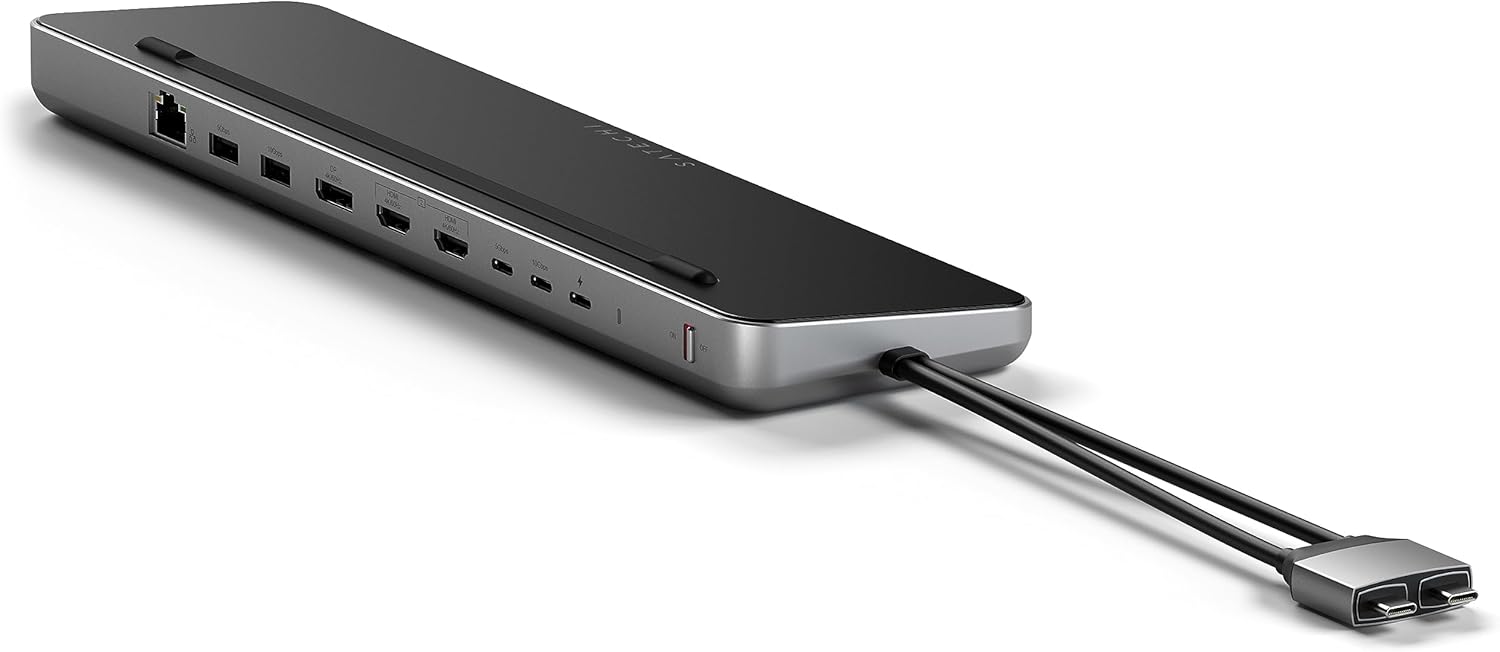
Satechi Dual USB C Docking Station and Stand with Dual 4K HDMI, Display Port, 75W USB C PD Charging, 2 USB C Data, 2 USB-A, Ethernet, SATA and NVMe SSD Enclosure, for MacBook and Windows
AED1,09314
Quantity:
Order today to get by 7-14 business days
This item qualifies for free delivery
Imported From: United States
At BOLO, we work hard to ensure the products you receive are new, genuine, and sourced from reputable suppliers.
BOLO is not an authorized or official retailer for most brands, nor are we affiliated with manufacturers unless specifically stated on a product page. Instead, we source verified sellers, authorized distributors or directly from the manufacturer.
Each product undergoes thorough inspection and verification at our consolidation and fulfilment centers to ensure it meets our strict authenticity and quality standards before being shipped and delivered to you.
If you ever have concerns regarding the authenticity of a product purchased from us, please contact Bolo Support. We will review your inquiry promptly and, if necessary, provide documentation verifying authenticity or offer a suitable resolution.
Your trust is our top priority, and we are committed to maintaining transparency and integrity in every transaction.
All product information, images, descriptions, and reviews originate from the manufacturer or from trusted sellers overseas. BOLO is not affiliated with, endorsed by, or an authorized retailer for most brands listed on our website unless stated otherwise.
While we strive to display accurate information, variations in packaging, labeling, instructions, or formulation may occasionally occur due to regional differences or supplier updates. For detailed or manufacturer-specific information, please contact the brand directly or reach out to BOLO Support for assistance.
Unless otherwise stated, all prices displayed on the product page include applicable taxes and import duties.
BOLO operates in accordance with the laws and regulations of United Arab Emirates. Any items found to be restricted or prohibited for sale within the UAE will be cancelled prior to shipment. We take proactive measures to ensure that only products permitted for sale in United Arab Emirates are listed on our website.
All items are shipped by air, and any products classified as “Dangerous Goods (DG)” under IATA regulations will be removed from the order and cancelled.
All orders are processed manually, and we make every effort to process them promptly once confirmed. Products cancelled due to the above reasons will be permanently removed from listings across the website.
More from this brand
Similar items from “Docking Stations”
Share with
Or share with link
https://www.bolo.ae/products/UO0PSJK61UY
Visit the Satechi Store
Satechi Dual USB C Docking Station and Stand with Dual 4K HDMI, Display Port, 75W USB C PD Charging, 2 USB C Data, 2 USB-A, Ethernet, SATA and NVMe SSD Enclosure, for MacBook and Windows

AED1,09314
Quantity:
Order today to get by 7-14 business days
This item qualifies for free delivery
Imported From: United States
At BOLO, we work hard to ensure the products you receive are new, genuine, and sourced from reputable suppliers.
BOLO is not an authorized or official retailer for most brands, nor are we affiliated with manufacturers unless specifically stated on a product page. Instead, we source verified sellers, authorized distributors or directly from the manufacturer.
Each product undergoes thorough inspection and verification at our consolidation and fulfilment centers to ensure it meets our strict authenticity and quality standards before being shipped and delivered to you.
If you ever have concerns regarding the authenticity of a product purchased from us, please contact Bolo Support. We will review your inquiry promptly and, if necessary, provide documentation verifying authenticity or offer a suitable resolution.
Your trust is our top priority, and we are committed to maintaining transparency and integrity in every transaction.
All product information, images, descriptions, and reviews originate from the manufacturer or from trusted sellers overseas. BOLO is not affiliated with, endorsed by, or an authorized retailer for most brands listed on our website unless stated otherwise.
While we strive to display accurate information, variations in packaging, labeling, instructions, or formulation may occasionally occur due to regional differences or supplier updates. For detailed or manufacturer-specific information, please contact the brand directly or reach out to BOLO Support for assistance.
Unless otherwise stated, all prices displayed on the product page include applicable taxes and import duties.
BOLO operates in accordance with the laws and regulations of United Arab Emirates. Any items found to be restricted or prohibited for sale within the UAE will be cancelled prior to shipment. We take proactive measures to ensure that only products permitted for sale in United Arab Emirates are listed on our website.
All items are shipped by air, and any products classified as “Dangerous Goods (DG)” under IATA regulations will be removed from the order and cancelled.
All orders are processed manually, and we make every effort to process them promptly once confirmed. Products cancelled due to the above reasons will be permanently removed from listings across the website.
Description:
Reviews:
5.0 out of 5 stars Great addition to Mac Pro!
Expands port flexibility of Mac Pro dramatically!
4.0 out of 5 stars Quality Option
This review is for the Satechi Dual Display Docking Station for MacBook Pro/Air - 2 HDMI, DisplayPort, USB-C/A, Ethernet, SATA SSD Enclosure.My tech support kid set up a dual monitor WFH with a plug in keyboard an mouse using this docking station. Overall it works well and the displays are great given the age of the monitors. The doc makes it easy for me to bring my laptop home, plug it in, and get back to work.As a not tech person, the two drawbacks I have found: The Dell (not my choice, work issued) gives a slow charge warning. The laptop is on a stand and the cables to plug into the laptop are super short so the doc is propped up under the laptop. Not ideal, but not a deal breaker.
5.0 out of 5 stars Winner, winner, chicken dinner
This does what I want it to do.mbp 14 m3 pro 18/512ObjectiveHave 1 point of contact for laptop, other than power cord, for all devices. One disconnect when we go mobile.100% achieved with this reasonably-priced unit.Extend to two other screens; an old Dell fpd2009 (HDMI to DVI) and a newer 32" LG (HDMI to HDMI). LG is shared between work computer, gaming Wintel and mbp.RJ45 connect.2 external drives: one a usb C and other an A.Wired keyboard (A or C; currently A), Jelly Comb trackball (wireless A), fan.2 generic dongles: 4*A, other has 3*A and 1 C, SD, HDMI.This has been hooked up for an hour; if something fails, I most certainly will return to this review.
1.0 out of 5 stars It was good while it lasted
I received the dock and was excited to deploy it! Installation was easy, I fitted it with my NVME drive and connected my Display Port and HDMI connectors, external drives, and Lightning cable.All was good, though an extra inch on the connection cables would be helpful.And less than a week later, I saw that only one external monitor was working. On closer inspection, all USB connections had dropped along with the internal SSD.I power cycled and troubleshot, but I concluded that the hub had just croaked.
5.0 out of 5 stars Great for MacBook
This is my second Satechi docking station, one for my personal MacBook and now for my work one. Love that I can install an SSD into the docking station for TimeMachine and other extended disc purposes, and there is no shortage of ports.
3.0 out of 5 stars Does not allow two external monitors and M3 MacBook Air screen
I just bought the M3 MacBook Air, which, according to Satechi’s website, is compatible with this dock. The picture on Bolo’s website says that the Mac M1 and M2 are limited to one external monitor in extended mode with this dock. It seems reasonable to conclude that this dock would allow more than one external monitor in extended mode for MacBooks that are not M1 or M2. The included instructions indicate that this dock is plug and play, so the extended mode should activate when the MacBook is connected to the dock using both USB-C ports and two external monitors are connected to the dock. This did not happen. Based on the picture on Bolo’s website, I should be able to use the external monitors AND the MacBook screen, rather than closing it to activate the external screens. I’m definitely glad to be wrong here because then it would function as I expected when I purchased this dock (feel free to chime in, Satechi). Perhaps it’s only M3 MacBooks that are not MacBook Air that provide dual external monitors with this dock. I don’t know. I bought this when I purchased my MacBook so I could have what I already had with my PC laptop - two external monitors and a laptop display. To be sure, the limited external monitor availability is an Apple issue; I just hoped this dock would fix that. The dearth of available ports on the M3 MacBook Air makes this dock somewhat useful but it does not allow for two external monitors in conjunction with the laptop, which is why I bought this dock. I will be glad to revise or update my review if I am wrong and this dock does allow for two external monitors together with my MacBook screen.
4.0 out of 5 stars Worth the Money
I bought a cheaper one a few months ago and 'saved' money. After returning it due to overheating during zoom calls, I decided to splurge and get this one. It's exactly what I needed. I have wired ethernet, HDMI display, speakers, external usb camera/microphone, USB printer and a USB keyboard all plugged in at the same time. No issues at all. A great product! Very practical for a home office.
5.0 out of 5 stars Excelient Idea with SSD in dock
This is great for my M2 Macbook Air, it provides storage for back. I setup up 512G drive with half for backup and other half for storage compatible with windows. It also works on XPS 13 2in1 (latest). I assume it probably for on my XPS 15 but not required because of Dell dock.
Affects WiFi Performance when connected
As a few others have found, when the dock is connected, and particularly when it's used as a stand for the rear of the Macbook Pro, the wifi performance drops off a cliff. Without it connected I can get a consistent 250-300Mbps internet connection (according to speedtest.net), with it connected and used as a stand I get MAYBE 5-7Mbps if I get a connection at all. This is a serious flaw and makes the dock effectively unusable, something I was only able to pin down AFTER the returns period had expired. Not a great feature for such a very expensive piece of hardware.
No funcionaba
no servia cuando llego
Tolle Dockingstation
Ich nutze die Dockingstation sowohl für mein MacBook Air M3 als auch für ein Lenovo-Notebook und bin sehr zufrieden. Beide Geräte laufen problemlos mit zwei externen Bildschirmen. Beim MacBook funktionieren die externen Bildschirme allerdings nur, wenn es geschlossen ist und an das Netzteil angeschlossen wird – das ist aber von Apple so beschrieben und somit kein Fehler der Dockingstation. Beim Lenovo muss man das Notebook nicht schließen, und beide Bildschirme funktionieren zusätzlich zum Laptopbildschirm. Alles in allem eine sehr zuverlässige Lösung!
Excellent product.
Use on MacBook Air and works very well straight out of the box. Use display port for monitor to free up usb c and hdmi.
Perfecto.
Con interruptor, conector interno para SSD.Multipuerto.Muy bien acabado y estable.
More from this brand
Similar items from “Docking Stations”
Share with
Or share with link
https://www.bolo.ae/products/UO0PSJK61UY