Description:
Reviews:
5.0 out of 5 stars The best Anki controller out there
Excellent size, good battery life, and seems durable. I use this for reviewing Anki cards while on a treadmill or stationary bike, or otherwise when I just don't want to be tapping on my phone for an hour, and it works perfectly. I haven't actually used this for gaming, I anticipate it might be a bit on the small side to use comfortably with both hands. But for my purposes, it's the perfect size. USB-C, thankfully. Fits in a tiny compartment in my backpack, and for $20, you could have multiple of these for various purposes if you wanted. Pairing is easy, too. If you're looking to use it as an Anki controller for iOS, make sure it is set to "S" mode on the bottom option selector. I don't know if that's also the case for Android or Windows unfortunately.
5.0 out of 5 stars Great for Travel on the Go—Super Tiny!
When I travel, I often bring my Steam Deck, and sometimes it's nice to have bring a controller. But obviously space in bags and luggage tends to be at a premium on travel, so hauling around a bulky, hefty console controller isn't ideal. So I picked up the 8BitDo Micro. It works great!And it's called a "Micro" for a reason! It weighs barely anything and it can literally fit in the palm of a single hand, it's that tiny. It's even smaller, width-wise than a Switch JoyCon. If you have bigger hands, that might be something to consider. I'm a smaller person, with smaller hands, so it doesn't bother me so much using this tiny controller. But if it does, 8BitDo has larger-but-still-small controllers. Strongly recommend taking a look at other buyer's pictures to really get a sense of the size. Either way, it's better than having no controller.Pairing was a little confusing, since there are a few different ways to pair, depending on what device you're using (Nintendo Switch vs an Android device, for example) so make sure to read the included manual. But once it's paired, you don't have to worry about that anymore.Battery life is excellent. You can go hours and hours on it, before the need to charge via USB-C cable.Obviously there are no analog sticks. There are also no L3/R3 buttons. If the games you play need those, consider using a different controller like the 8BitDo Lite 2. But otherwise, it has all the rest of the standard buttons, including L1 & L2 and R1 & R2. It does have the Nintendo button layout by default. I prefer the Playstation/Xbox button layouts, so I remapped that on my Steam Deck. Not sure how that works on other devices (phones, tablets, etc).It comes with a little silicone wrist strap and a really short USB-C-to-USB-A charging cable (any cable with USB-C on at least one end should work with it).Again, it's a great little controller for gaming on the go. I might even try pairing it with my phone one of these days and seeing if I can use it with the Steam Link app.
5.0 out of 5 stars Perfect size, great for travel!
This product is a lot smaller than I anticipated, and takes up no room at all. I can totally see myself carrying this controller along my travels and not have to worry about the space it takes.The hardest part for me is to think of what shortcuts I want to set up with the app. There is so much potential, but in my excitement, I didn't really think ahead of what I wanted to set it up for.+ Great feel/quality+ Great size+ Software works just right+ No issues connecting with Bluetooth, was seamless+ Charging was not an issue+ Quality of packaging
4.0 out of 5 stars Works great for some of my uses.....
Use it in my esp32 microcontroller projects and its perfect! Nice and compact to lay around on the desktop without adding noise but connects in a second and works as intended. I use the Bluepad32 library and this controller will only work with esp32 flavors of my chips and does not function with my esp32-s3. I cannot get a confirm from 8bitdo but this would suggests it only supports the BR/EDR protocol and I am unable to find a mode to support BLE connections. The 4star is because despite an attempt to reach out to find out in advance, I did not ever get a reply and had to experiment with a purchase. I love it for what it does but I still need the BLE controller I was originally asking them to help me find - they do have them and yet I am faced with yet another experimental purchase in hopes of getting one. Still no response, but yet still no further purchases as well.
5.0 out of 5 stars gg
I recently started using this controller and it has quickly become my go-to for on-the-go gaming. It’s incredibly lightweight and compact, yet still feels comfortable in hand for short sessions. Pairing with my devices was seamless, and the custom mapping options made it easy to adjust controls for different games and emulators.The battery life is excellent, lasting around ten hours on a single charge, and it recharges quickly. It’s perfect for retro-style or 2D games while traveling or during downtime. The portability, responsiveness, and convenience make it a standout accessory that exceeded my expectations.
Atendimento atencioso e produtos de qualidade
chegou bem antes do prazo e em perfeitas condições
Very professional mini controller
I tried to hold it vertically and use the arrows to navigate wsad on my left hand and use mouse in my right hand. Basically I just wanted to test if my left thumb is only used for movements working or not. And surprisingly it worked. You can customise keys very easy with the app. Connection very steady and easy.I hope in the newer versions they replace the arrow keys with a joystick kind of.
Great and amazing for digital drawing as a shortcut controller
Used for digital drawing on procreate and sketchbook.its so lovely to use, its small enough to hold in one hand and use, in turn it gives you freedom to just have your hand anywhere that feels comfortable.Make sure you connect it to Bluetooth on your chosen device by pairing it, a lot of people got confused by being able to sync a preset without pairing it then thinking they can use it straight away, i got caught doing that. I created presets on the controller menu, it synched but then couldn't figure out why it didn't work on sketchbook afterwards, dont forget to pair it via Bluetooth.It works amazingly, buttons are clicky and responsive, no lag to worry about, its pretty much instant.I dont use it as a gaming controller and wouldn't its far to small for that, but as a tool for digital drawing its simply amazing and far cheaper than huion or other "made" for that purpose hand keyboard.Dor precision zooming i alway use my fingers.Its cheap, great quality, not heavy at all, comfortable for most, its responsive and tge battery last a decent amount but do which it was a bit longer, sometimes when deep into drawing i forget to charge and can be caught by a dead controller BUT it can be plugged in and used at the same time.
Shortcut keypad for windows
Amazing device and have huge multuse , you can reprogram all the keys using an offical app and later used it as shortcut keyboard for your windows computer.
Come si comporta l'erede spirituale di 8BitDo Zero 2?
Partiamo con il contenuto della confezione. All'interno troverete:- 8BitDo micro, controller- Laccio da polso- "Cavo" USB-A -> USB-C per ricarica e connessione. Possiamo subito dire che questo cavetto è praticamente inutile: troppo corto sia per caricare (dovreste lasciarlo a penzoloni sul caricabatterie) sia per l'utilizzo del controller in modalità "con filo" (va da sè che è impossibile).Ho acquistato questo controller, ahimè, non per una vera e propria necessità quanto per la curiosità di provare il successore del Zero 2 (sempre 8BitDo), per la porta USB-C (Zero2 monta una micro-usb) e per il maggior numero di tasti mappabili (12 vs 16, contando anche i tasti direzionali)... ma dopo averlo usato sono stato contento di averlo preso, è un passo avanti in (quasi) tutto rispetto al predecessore.In questo nuovo modello la porta USB-C non serve soltanto per caricare il controller ma, ebbene sì, anche per utilizzare il controller in modalità wired (con filo). Se quindi vi capitasse di rimanere a corto di batterie vi sarà possibile utilizzarlo in modalità cablata.Il mio uso principale non è quello gaming: utilizzo infatti il controller mappando i tasti da PC per utilizzarlo con Photoshop e altri programmi.Rispetto al Zero 2 l'ERGONOMIA, se tenuto in verticale e con una mano sola (vedi foto), è lievemente peggiorata: le forme stondate del vecchio modello erano più "avvolgenti" e stancavano meno l'impugnatura anche prolungata. Se invece lo utilizzate in orizzontale il micro è più comodo e più facilmente impugnabile.La RUMOROSITA' dei tasti del Micro è migliorata: sono più silenziosi, soprattutto i bumper/trigger dorsali (in questo modello sono 4 trigger dorsali in totale, nel modello precedente 2).Il PAIRING è la selezione del dispositivo è più semplice da effettuare nel Micro (nel Zero 2 c'erano combinazioni di 2 tasti da premere in base al dispositivo). In questo ci sono 3 modalità selezionabili con il selettore posizionato nella parte inferiore:-S (switch, per la console)-D (controller Android)-K (tastiera windows)Il tastino laterale, se premuto a lungo, fa entrare il controller in modalità abbinamento.In generale il controller funziona bene, la batteria ha la durata più o meno dichiarata (10-12 ore) e la ricarica impiega circa 1-2 ore.Chiaramente non aspettatevi di riuscire a fare lunghissime sessioni di gaming... le piccole dimensioni sacrificano per forza di cose l'ergonomia. Tuttavia se lo utilizzate in verticale, per usi diversi rispetto al gaming, l'ergonomia è eccellente (non ai livelli di Zero 2, però).Un consiglio se intendete utilizzarlo come me, mappando i tasti. Nelle istruzioni controller viene indicato il programma ufficiale per mappare i tasti, usandolo nella modalità K.Tuttavia mi sono trovato meglio connettendo il controller al PC utilizzando la modalità S (switch), e connettendolo al PC (che lo vedrà come "Pro Controller").Dopodichè installate il programma AntiMicroX (software Open-Source che trovate su GitHub), che vi permetterà di personalizzare il pad in maniera infinita: potrete anche associare alla pressione di un tasto del controller la pressione di più tasti contemporaneamente (es. premo il tasto B per fare copia CTRL-C, e il tasto A per fare in incolla CTRL-V)...Fidatevi, utilizzandolo in questa maniera non tornerete più indietro.In conclusione il controller mi è piaciuto, la qualità è la solita 8BitDo (alta), e la presa USB-C così come l'incrementato numero di tasti (16 in totale) mi hanno convinto alla acquisto.Al prezzo di circa 20€ nell'Ottobre '23.Consigliato!Mi riservo di aggiornare la recensione nel caso in cui vi siano cambiamenti rispetto a quanto scritto sopra.
Visit the 8Bitdo Store
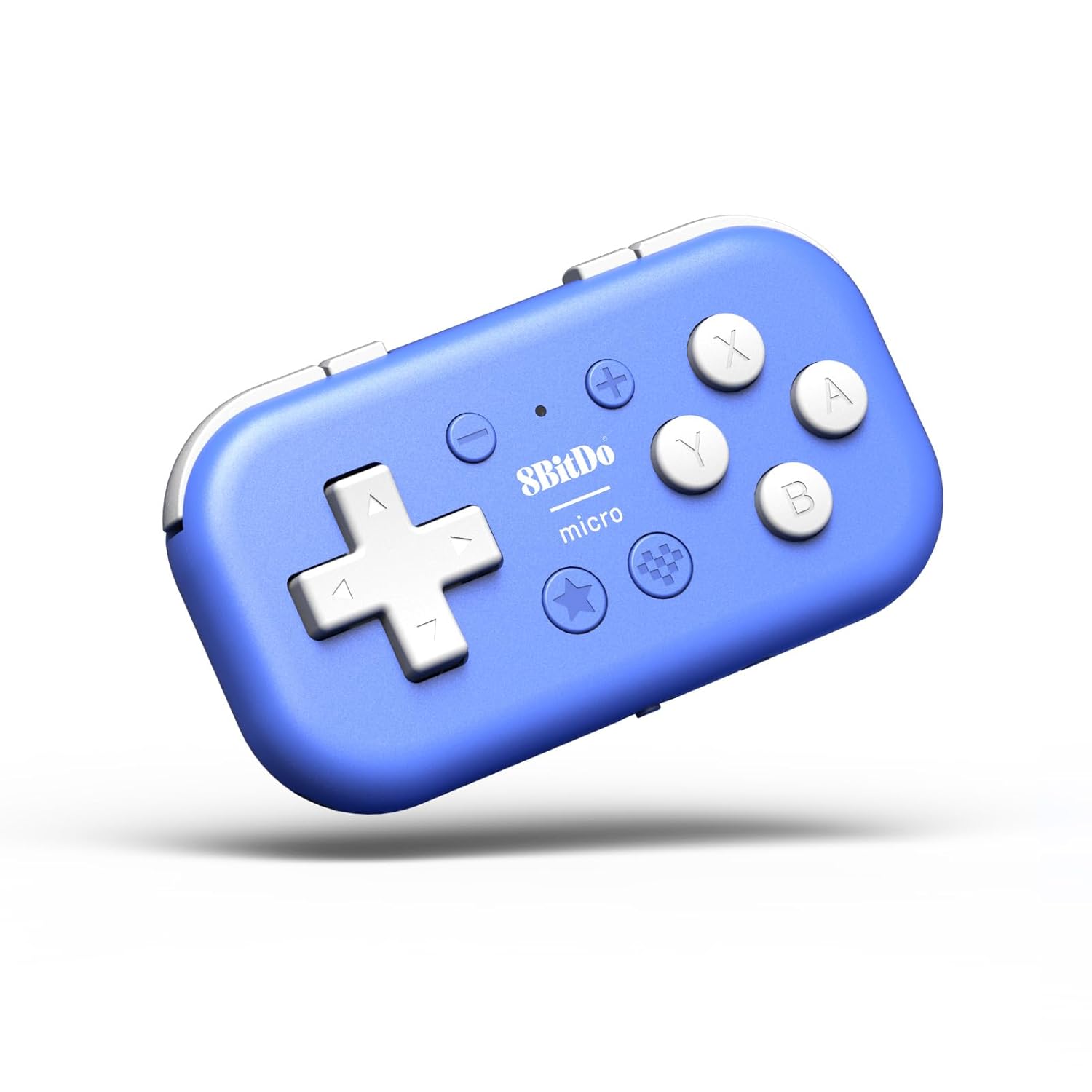
8Bitdo Micro Bluetooth Gamepad Pocket-sized Mini Controller for Switch, Android, and Raspberry Pi, Supports Keyboard Mode (Blue)
AED16586


Quantity:
Order today to get by 7-14 business days
Delivery fee of AED 20. Free for orders above AED 200.
Imported From: United States
At BOLO, we work hard to ensure the products you receive are new, genuine, and sourced from reputable suppliers.
BOLO is not an authorized or official retailer for most brands, nor are we affiliated with manufacturers unless specifically stated on a product page. Instead, we source verified sellers, authorized distributors or directly from the manufacturer.
Each product undergoes thorough inspection and verification at our consolidation and fulfilment centers to ensure it meets our strict authenticity and quality standards before being shipped and delivered to you.
If you ever have concerns regarding the authenticity of a product purchased from us, please contact Bolo Support. We will review your inquiry promptly and, if necessary, provide documentation verifying authenticity or offer a suitable resolution.
Your trust is our top priority, and we are committed to maintaining transparency and integrity in every transaction.
All product information, images, descriptions, and reviews originate from the manufacturer or from trusted sellers overseas. BOLO is not affiliated with, endorsed by, or an authorized retailer for most brands listed on our website unless stated otherwise.
While we strive to display accurate information, variations in packaging, labeling, instructions, or formulation may occasionally occur due to regional differences or supplier updates. For detailed or manufacturer-specific information, please contact the brand directly or reach out to BOLO Support for assistance.
Unless otherwise stated, all prices displayed on the product page include applicable taxes and import duties.
BOLO operates in accordance with the laws and regulations of United Arab Emirates. Any items found to be restricted or prohibited for sale within the UAE will be cancelled prior to shipment. We take proactive measures to ensure that only products permitted for sale in United Arab Emirates are listed on our website.
All items are shipped by air, and any products classified as “Dangerous Goods (DG)” under IATA regulations will be removed from the order and cancelled.
All orders are processed manually, and we make every effort to process them promptly once confirmed. Products cancelled due to the above reasons will be permanently removed from listings across the website.
More from this brand
Share with
Or share with link
https://www.bolo.ae/products/UO0PQT5UPPU
Visit the 8Bitdo Store
8Bitdo Micro Bluetooth Gamepad Pocket-sized Mini Controller for Switch, Android, and Raspberry Pi, Supports Keyboard Mode (Blue)


AED16586
Quantity:
Order today to get by 7-14 business days
Delivery fee of AED 20. Free for orders above AED 200.
Imported From: United States
At BOLO, we work hard to ensure the products you receive are new, genuine, and sourced from reputable suppliers.
BOLO is not an authorized or official retailer for most brands, nor are we affiliated with manufacturers unless specifically stated on a product page. Instead, we source verified sellers, authorized distributors or directly from the manufacturer.
Each product undergoes thorough inspection and verification at our consolidation and fulfilment centers to ensure it meets our strict authenticity and quality standards before being shipped and delivered to you.
If you ever have concerns regarding the authenticity of a product purchased from us, please contact Bolo Support. We will review your inquiry promptly and, if necessary, provide documentation verifying authenticity or offer a suitable resolution.
Your trust is our top priority, and we are committed to maintaining transparency and integrity in every transaction.
All product information, images, descriptions, and reviews originate from the manufacturer or from trusted sellers overseas. BOLO is not affiliated with, endorsed by, or an authorized retailer for most brands listed on our website unless stated otherwise.
While we strive to display accurate information, variations in packaging, labeling, instructions, or formulation may occasionally occur due to regional differences or supplier updates. For detailed or manufacturer-specific information, please contact the brand directly or reach out to BOLO Support for assistance.
Unless otherwise stated, all prices displayed on the product page include applicable taxes and import duties.
BOLO operates in accordance with the laws and regulations of United Arab Emirates. Any items found to be restricted or prohibited for sale within the UAE will be cancelled prior to shipment. We take proactive measures to ensure that only products permitted for sale in United Arab Emirates are listed on our website.
All items are shipped by air, and any products classified as “Dangerous Goods (DG)” under IATA regulations will be removed from the order and cancelled.
All orders are processed manually, and we make every effort to process them promptly once confirmed. Products cancelled due to the above reasons will be permanently removed from listings across the website.
Description:
Reviews:
5.0 out of 5 stars The best Anki controller out there
Excellent size, good battery life, and seems durable. I use this for reviewing Anki cards while on a treadmill or stationary bike, or otherwise when I just don't want to be tapping on my phone for an hour, and it works perfectly. I haven't actually used this for gaming, I anticipate it might be a bit on the small side to use comfortably with both hands. But for my purposes, it's the perfect size. USB-C, thankfully. Fits in a tiny compartment in my backpack, and for $20, you could have multiple of these for various purposes if you wanted. Pairing is easy, too. If you're looking to use it as an Anki controller for iOS, make sure it is set to "S" mode on the bottom option selector. I don't know if that's also the case for Android or Windows unfortunately.
5.0 out of 5 stars Great for Travel on the Go—Super Tiny!
When I travel, I often bring my Steam Deck, and sometimes it's nice to have bring a controller. But obviously space in bags and luggage tends to be at a premium on travel, so hauling around a bulky, hefty console controller isn't ideal. So I picked up the 8BitDo Micro. It works great!And it's called a "Micro" for a reason! It weighs barely anything and it can literally fit in the palm of a single hand, it's that tiny. It's even smaller, width-wise than a Switch JoyCon. If you have bigger hands, that might be something to consider. I'm a smaller person, with smaller hands, so it doesn't bother me so much using this tiny controller. But if it does, 8BitDo has larger-but-still-small controllers. Strongly recommend taking a look at other buyer's pictures to really get a sense of the size. Either way, it's better than having no controller.Pairing was a little confusing, since there are a few different ways to pair, depending on what device you're using (Nintendo Switch vs an Android device, for example) so make sure to read the included manual. But once it's paired, you don't have to worry about that anymore.Battery life is excellent. You can go hours and hours on it, before the need to charge via USB-C cable.Obviously there are no analog sticks. There are also no L3/R3 buttons. If the games you play need those, consider using a different controller like the 8BitDo Lite 2. But otherwise, it has all the rest of the standard buttons, including L1 & L2 and R1 & R2. It does have the Nintendo button layout by default. I prefer the Playstation/Xbox button layouts, so I remapped that on my Steam Deck. Not sure how that works on other devices (phones, tablets, etc).It comes with a little silicone wrist strap and a really short USB-C-to-USB-A charging cable (any cable with USB-C on at least one end should work with it).Again, it's a great little controller for gaming on the go. I might even try pairing it with my phone one of these days and seeing if I can use it with the Steam Link app.
5.0 out of 5 stars Perfect size, great for travel!
This product is a lot smaller than I anticipated, and takes up no room at all. I can totally see myself carrying this controller along my travels and not have to worry about the space it takes.The hardest part for me is to think of what shortcuts I want to set up with the app. There is so much potential, but in my excitement, I didn't really think ahead of what I wanted to set it up for.+ Great feel/quality+ Great size+ Software works just right+ No issues connecting with Bluetooth, was seamless+ Charging was not an issue+ Quality of packaging
4.0 out of 5 stars Works great for some of my uses.....
Use it in my esp32 microcontroller projects and its perfect! Nice and compact to lay around on the desktop without adding noise but connects in a second and works as intended. I use the Bluepad32 library and this controller will only work with esp32 flavors of my chips and does not function with my esp32-s3. I cannot get a confirm from 8bitdo but this would suggests it only supports the BR/EDR protocol and I am unable to find a mode to support BLE connections. The 4star is because despite an attempt to reach out to find out in advance, I did not ever get a reply and had to experiment with a purchase. I love it for what it does but I still need the BLE controller I was originally asking them to help me find - they do have them and yet I am faced with yet another experimental purchase in hopes of getting one. Still no response, but yet still no further purchases as well.
5.0 out of 5 stars gg
I recently started using this controller and it has quickly become my go-to for on-the-go gaming. It’s incredibly lightweight and compact, yet still feels comfortable in hand for short sessions. Pairing with my devices was seamless, and the custom mapping options made it easy to adjust controls for different games and emulators.The battery life is excellent, lasting around ten hours on a single charge, and it recharges quickly. It’s perfect for retro-style or 2D games while traveling or during downtime. The portability, responsiveness, and convenience make it a standout accessory that exceeded my expectations.
Atendimento atencioso e produtos de qualidade
chegou bem antes do prazo e em perfeitas condições
Very professional mini controller
I tried to hold it vertically and use the arrows to navigate wsad on my left hand and use mouse in my right hand. Basically I just wanted to test if my left thumb is only used for movements working or not. And surprisingly it worked. You can customise keys very easy with the app. Connection very steady and easy.I hope in the newer versions they replace the arrow keys with a joystick kind of.
Great and amazing for digital drawing as a shortcut controller
Used for digital drawing on procreate and sketchbook.its so lovely to use, its small enough to hold in one hand and use, in turn it gives you freedom to just have your hand anywhere that feels comfortable.Make sure you connect it to Bluetooth on your chosen device by pairing it, a lot of people got confused by being able to sync a preset without pairing it then thinking they can use it straight away, i got caught doing that. I created presets on the controller menu, it synched but then couldn't figure out why it didn't work on sketchbook afterwards, dont forget to pair it via Bluetooth.It works amazingly, buttons are clicky and responsive, no lag to worry about, its pretty much instant.I dont use it as a gaming controller and wouldn't its far to small for that, but as a tool for digital drawing its simply amazing and far cheaper than huion or other "made" for that purpose hand keyboard.Dor precision zooming i alway use my fingers.Its cheap, great quality, not heavy at all, comfortable for most, its responsive and tge battery last a decent amount but do which it was a bit longer, sometimes when deep into drawing i forget to charge and can be caught by a dead controller BUT it can be plugged in and used at the same time.
Shortcut keypad for windows
Amazing device and have huge multuse , you can reprogram all the keys using an offical app and later used it as shortcut keyboard for your windows computer.
Come si comporta l'erede spirituale di 8BitDo Zero 2?
Partiamo con il contenuto della confezione. All'interno troverete:- 8BitDo micro, controller- Laccio da polso- "Cavo" USB-A -> USB-C per ricarica e connessione. Possiamo subito dire che questo cavetto è praticamente inutile: troppo corto sia per caricare (dovreste lasciarlo a penzoloni sul caricabatterie) sia per l'utilizzo del controller in modalità "con filo" (va da sè che è impossibile).Ho acquistato questo controller, ahimè, non per una vera e propria necessità quanto per la curiosità di provare il successore del Zero 2 (sempre 8BitDo), per la porta USB-C (Zero2 monta una micro-usb) e per il maggior numero di tasti mappabili (12 vs 16, contando anche i tasti direzionali)... ma dopo averlo usato sono stato contento di averlo preso, è un passo avanti in (quasi) tutto rispetto al predecessore.In questo nuovo modello la porta USB-C non serve soltanto per caricare il controller ma, ebbene sì, anche per utilizzare il controller in modalità wired (con filo). Se quindi vi capitasse di rimanere a corto di batterie vi sarà possibile utilizzarlo in modalità cablata.Il mio uso principale non è quello gaming: utilizzo infatti il controller mappando i tasti da PC per utilizzarlo con Photoshop e altri programmi.Rispetto al Zero 2 l'ERGONOMIA, se tenuto in verticale e con una mano sola (vedi foto), è lievemente peggiorata: le forme stondate del vecchio modello erano più "avvolgenti" e stancavano meno l'impugnatura anche prolungata. Se invece lo utilizzate in orizzontale il micro è più comodo e più facilmente impugnabile.La RUMOROSITA' dei tasti del Micro è migliorata: sono più silenziosi, soprattutto i bumper/trigger dorsali (in questo modello sono 4 trigger dorsali in totale, nel modello precedente 2).Il PAIRING è la selezione del dispositivo è più semplice da effettuare nel Micro (nel Zero 2 c'erano combinazioni di 2 tasti da premere in base al dispositivo). In questo ci sono 3 modalità selezionabili con il selettore posizionato nella parte inferiore:-S (switch, per la console)-D (controller Android)-K (tastiera windows)Il tastino laterale, se premuto a lungo, fa entrare il controller in modalità abbinamento.In generale il controller funziona bene, la batteria ha la durata più o meno dichiarata (10-12 ore) e la ricarica impiega circa 1-2 ore.Chiaramente non aspettatevi di riuscire a fare lunghissime sessioni di gaming... le piccole dimensioni sacrificano per forza di cose l'ergonomia. Tuttavia se lo utilizzate in verticale, per usi diversi rispetto al gaming, l'ergonomia è eccellente (non ai livelli di Zero 2, però).Un consiglio se intendete utilizzarlo come me, mappando i tasti. Nelle istruzioni controller viene indicato il programma ufficiale per mappare i tasti, usandolo nella modalità K.Tuttavia mi sono trovato meglio connettendo il controller al PC utilizzando la modalità S (switch), e connettendolo al PC (che lo vedrà come "Pro Controller").Dopodichè installate il programma AntiMicroX (software Open-Source che trovate su GitHub), che vi permetterà di personalizzare il pad in maniera infinita: potrete anche associare alla pressione di un tasto del controller la pressione di più tasti contemporaneamente (es. premo il tasto B per fare copia CTRL-C, e il tasto A per fare in incolla CTRL-V)...Fidatevi, utilizzandolo in questa maniera non tornerete più indietro.In conclusione il controller mi è piaciuto, la qualità è la solita 8BitDo (alta), e la presa USB-C così come l'incrementato numero di tasti (16 in totale) mi hanno convinto alla acquisto.Al prezzo di circa 20€ nell'Ottobre '23.Consigliato!Mi riservo di aggiornare la recensione nel caso in cui vi siano cambiamenti rispetto a quanto scritto sopra.
More from this brand
Share with
Or share with link
https://www.bolo.ae/products/UO0PQT5UPPU