Deliver toUnited Arab Emirates
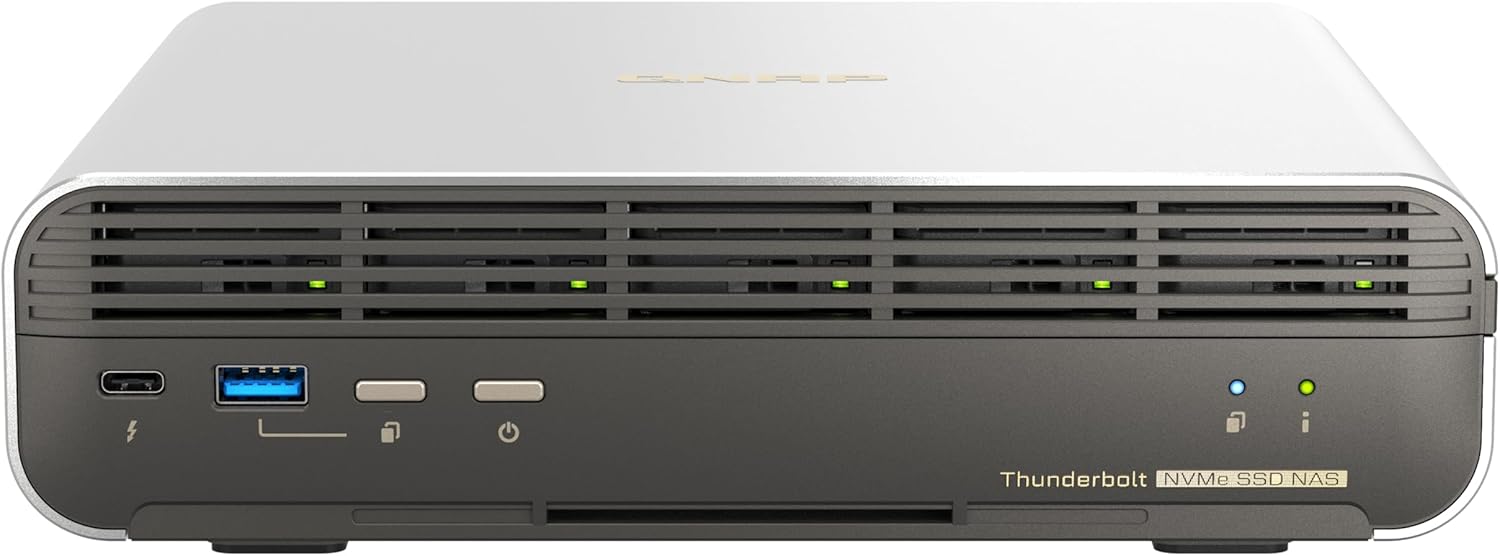
QNAP TBS-h574TX-i3-12G-US 5 Bay High-Performance E1.S All-Flash NASbook with Intel® Core™ Processor, Thunderbolt 4 and 10GbE (5G/2.5G/1G/100M/10M) Network Connectivity (Diskless)

Description:

  • Intel Core i3-1320PE 8C(4P+4E)/12T processor burst up to 4.50 GHz.
  • 12GB onboard (non-expandable) DDR4 RAM
  • 5 x E1.S up to 15mm (5x PCIe Gen3 x2) NVMe SSD for ultimate storage performance (Pre-install adapter to support M.2 2280)
  • Dual High-speed Thunderbol 4 with SMB protocol, allowing Ma and Windows sers to collaborate on media editing.
  • 10GbE (10G/5G/2.5G/1G/100M) and 2.5GbE (/2.5G/1G/100M) accelerate file sharing across teams and devices or streamline large file transfers.
  • 4K media playback and real-time transcoding; display multimedia content saved on the NAS via HDMI 1.4b (4K @30Hz) output.
  • Multiple USB 3.2 Gen 2 ports (type-A & type-C) with up to 10Gb/s transfer speeds, allowing compatibility with newer, faster USB drives/expansion enclosures for transferring large media files
  • Optimized collaboration with seamless file sharing and sync

  • Designed for film sets, small studios, small-scale video production teams and SOHO users, the compact TBS-h574TX Thunderbolt™ 4 all-flash NASbook elevates video production for optimum productivity. It packs high-speed I/O and Intel® Core™ performance required by video production, allowing creators using Mac® or Windows® to enjoy the smoothest experience ever in real-time video editing, large file transfer, video transcoding, and backup. The TBS-h574TX, as the bridge between pre-production and post-production, takes video projects and team collaboration to the next level.

    Reviews:

    5.0 out of 5 stars Fast and... large.

    C. · November 19, 2024

    (function() { P.when('cr-A', 'ready').execute(function(A) { if(typeof A.toggleExpanderAriaLabel === 'function') { A.toggleExpanderAriaLabel('review_text_read_more', 'Read more of this review', 'Read less of this review'); } }); })(); .review-text-read-more-expander:focus-visible { outline: 2px solid #2162a1; outline-offset: 2px; border-radius: 5px; } I got this as an Bolo return for almost half the new retail price. It is very fast via the 10gb interface, of which I wish there were more of because of iSCSI for Proxmox and VMWare. Thunderbolt is very fast and reliable. The only complaint I have is that good NVME flash drives are not more affordable. I only have 5 4TB WD SN850Xs in this thing. I would love to put 5 8TB WD SN850Xs in this. (currently selling for $599.00 each during Black November) but that would cost around $3300.00, which I could do, but still too rich for my taste. I read other folks reviews in the QNAP forums and it seems everyone does RAID 5 on this, which give up way too much expensive storage space, slows the array down and increases write amplification. SSDs a very reliable, but even if I had RAID 5 configured on this or anything else, it is still no substitute for a backup.

    4.0 out of 5 stars Fantastic system. Thunderbolt setup is a bit troublesome, and heat management is poor.

    A.I. · November 8, 2024

    TL;DR?Solid NAS, decent features - but a few quirks and items you need to plan for.The details?This machine solves the majority of MY specific needs.Those are:+ 2 or more ethernet ports.+ at least one 10Gbit RJ45 Ethernet+ 4 or more SSD, M.2 was mandatory, but E1.S compatibility was highly desirable.+ Thunderbolt 4 or better - for BOTH data transfer AND connection to my main machine.I connect to it from my main machine over Thunderbolt 4, and it acts as a gateway for that machine to my router. (That main machine is an M3 Max Macbook - so really appreciate that the QNAP routes the internet for my Mac over its NIC) The rest of my devices see it over the 10Gb connection as expected.I had planned on setting it up over Thunderbolt - but the QNAP utility did not discover it when connected this way as advertised.The typical online reviews and documentation all start their set up from the QNAP utility already having discovered the NAS. It only seems to function that way if connected via ethernet to a functioning network with DHCP available.What I eventually figured out is ... you can attach a monitor and keyboard for initial setup. Obvious in hindsight, but this option was documented nowhere.The initial console set up offers very few options, but it allows the QNAP utility to find it, and then you can log in to its web desktop interface, as documented in many places, and then things really start moving along.Once I got over that hurdle, all worked very well - except that the drives overheated a few times. The "optional" heat sinks are realy not optional at all for M.2 devices. I do hope that QNAP addresses this - they need a bit more space around the drives and slightly larger fans. Also the fan ramp up in the current hardware needs to "shift left" a bit to help avoid nasty warning alarms.(I should note that E1.S drives should both handle heat dissipation better and have higher temperature tolerances. - Alas I am not using any yet.)Fortunately I already have the heat sinks for this chassis on order as I anticipated this ... but I wanted to play before they arrived, so I take my share of the blame.Speaking of the alarms - they are loud and repetitive. You can disable them, but there was no option I could find to make them a bit less, well ... alarming. If you have this in your workspace they are too loud, even if you work with headphones. If you have it in a network closet or remote location, you will be dependent on messaging/SMS/email for alerts ... so they missed an opportunity to make this a more comfortable experience. Once I configured those notification systems, I silenced all alarms on this device.This was my first QNAP and QuTS Hero system, overall I am pleased. I do wish similar hardware was available with more OS options. (TrueNAS, UnRaid, Open Media Vault, etc.) I found the QuTS System to be a bit difficult to find stuff initially... but as I got used to the system of course it got easier. Plan on spending some time learning it to take full advantage of this device.The rating of 4 out of 5 stars is based on just a week or so of use. I can not speak to long term durability, reliability, or support yet.I took off 1 star because they didn't document the Thunderbolt connection and initial set up, and for the subpar thermal management. The alarm criticism is not affecting my rating, nor is my opinion of how hard/easy it was to find stuff as a new QuTS user.Looking forward to a next iteration - I am hoping for Thunderbolt 5, and if they could swap the 2.5g Ethernet for a 40 or 100G SFP port. An ARM processor would be welcome for this device as well - anything to bring the power draw and heat generation down. Also - it would be nice if theyBy the time I am ready to migrate to that, I'll probably appreciate the option for 8 or 16 drive bays.

    5.0 out of 5 stars works as advertised

    J.H. · December 13, 2024

    For SSD's I used SAMSUNG 990 PRO Heatsink SSD 4TB, NVMe M.2. I recommend that whatever SSD you use, make sure it has a head sink. The manufacturer even recommends it. That being said, I used the firmware that came with it (then it asked me to upgrade the firmware twice). Bootup takes a while, so you have to be patient. I bought this as a file server and multi-media server as my other NAS (which has an HDD in it, which was overloaded).

    1.0 out of 5 stars Bricked by software update

    J.S. · March 21, 2024

    I recieved this, installed my drives and set it up on my network. Eventually it asked to update which I allowed. Unfortunately it never came back up after the update started.Thinking this was a fluke I returned it and bought another which arrived a week later. The same thing happened.QNAP support said that it could only be fixed by RMA. They don’t have any way to reflash it locally.So be aware about a company that doesn’t test their updates and requires you to send it in at your expense when they break it with a buggy update.Updates:It came back from RMA scratched and with blood on it 🤢

    2.0 out of 5 stars Heat management is an issue

    j.i.C. · July 18, 2024

    This is a fine product, with all of the niceties that we've come to expect from QNAP, and, surprisingly attractive industrial design. For full functionality, you should connect it via Ethernet in addition to Thunderbolt even if you won't be accessing it via Ethernet. That way it can get FW updates and access the network time servers.I'm getting wirespeed transfers for large files over Thunderbolt, both up and down. There have been complaints about fan noise. My unit is quiet except for sustained wirespeed writes of over two minutes. Then the fans come on. They're noisier than the big slow fans that are probably in your workstation, because they have to fit in the small case. I don't consider it a problem.The sleds are slick, as are the M.2 adapters, and QTS Hero is a great OS.Addition after several weeks of usage:There are two big problems.The less severe is the fact that rebooting the NAS drops the Thunderbolt connection. The computer needs to be rebooted to reestablish it. This is not the case with my other Thunderbolt devices.The bigger issue is heat management. With 5 Corsair 8 TB M.2 drives with QNAP's heat sinks added, the SSDs overheat at the end of a 350 GB transfer at 1 GB/s.

    5.0 out of 5 stars LOVE the Thunderbolt speed its like its part of your computer

    G.J. · May 2, 2024

    It is GREAT to have a super fast NAS mass storage unlike the relatively very slow Synology NAS servers I already have., This SSD QNAP can act at Thunderbolt speeds due to he RAID SSD (5 4TB SSD drives) and connect this SSD 16 TB monster fast NAS to my Mac Studio with a Thunderbolt cable. It screams fast. Files copy from this NAS to my Mac SSD at 1.5 GigaBYTES per second. I can store ALL of my active FCPX projects on it. So convenient. I also back up to the Synology NAS drives at night by copying.

    QNAP TBS-h574TX-i3-12G-US 5 Bay High-Performance E1.S All-Flash NASbook with Intel® Core™ Processor, Thunderbolt 4 and 10GbE (5G/2.5G/1G/100M/10M) Network Connectivity (Diskless)

    Product ID: UO0PCEDSPY6
    Condition: New

    3.9

    AED7,49039

    Price includes VAT & Import Duties
    Size: Intel core i3
    Availability: In Stock

    Quantity:

    |

    Order today to get by 7-14 business days

    This item qualifies for free delivery

    Returns & Warranty policies

    Imported From: United States

    At BOLO, we work hard to ensure the products you receive are new, genuine, and sourced from reputable suppliers.

    BOLO is not an authorized or official retailer for most brands, nor are we affiliated with manufacturers unless specifically stated on a product page. Instead, we source verified sellers, authorized distributors or directly from the manufacturer.

    Each product undergoes thorough inspection and verification at our consolidation and fulfilment centers to ensure it meets our strict authenticity and quality standards before being shipped and delivered to you.

    If you ever have concerns regarding the authenticity of a product purchased from us, please contact Bolo Support. We will review your inquiry promptly and, if necessary, provide documentation verifying authenticity or offer a suitable resolution.

    Your trust is our top priority, and we are committed to maintaining transparency and integrity in every transaction.

    All product information, images, descriptions, and reviews originate from the manufacturer or from trusted sellers overseas. BOLO is not affiliated with, endorsed by, or an authorized retailer for most brands listed on our website unless stated otherwise.

    While we strive to display accurate information, variations in packaging, labeling, instructions, or formulation may occasionally occur due to regional differences or supplier updates. For detailed or manufacturer-specific information, please contact the brand directly or reach out to BOLO Support for assistance.

    Unless otherwise stated, all prices displayed on the product page include applicable taxes and import duties.

    BOLO operates in accordance with the laws and regulations of United Arab Emirates. Any items found to be restricted or prohibited for sale within the UAE will be cancelled prior to shipment. We take proactive measures to ensure that only products permitted for sale in United Arab Emirates are listed on our website.

    All items are shipped by air, and any products classified as “Dangerous Goods (DG)” under IATA regulations will be removed from the order and cancelled.

    All orders are processed manually, and we make every effort to process them promptly once confirmed. Products cancelled due to the above reasons will be permanently removed from listings across the website.

    Similar suggestions by Bolo

    More from this brand

    Similar items from “Devices”

    QNAP TBS-h574TX-i3-12G-US 5 Bay High-Performance E1.S All-Flash NASbook with Intel® Core™ Processor, Thunderbolt 4 and 10GbE (5G/2.5G/1G/100M/10M) Network Connectivity (Diskless)

    Product ID: UO0PCEDSPY6
    Condition: New

    3.9

    QNAP TBS-h574TX-i3-12G-US 5 Bay High-Performance E1.S All-Flash NASbook with Intel® Core™ Processor, Thunderbolt 4 and 10GbE (5G/2.5G/1G/100M/10M) Network Connectivity (Diskless)-0
    Size: Intel core i3

    AED7,49039

    Price includes VAT & Import Duties
    Availability: In Stock

    Quantity:

    |

    Order today to get by 7-14 business days

    This item qualifies for free delivery

    Returns & Warranty policies

    Imported From: United States

    At BOLO, we work hard to ensure the products you receive are new, genuine, and sourced from reputable suppliers.

    BOLO is not an authorized or official retailer for most brands, nor are we affiliated with manufacturers unless specifically stated on a product page. Instead, we source verified sellers, authorized distributors or directly from the manufacturer.

    Each product undergoes thorough inspection and verification at our consolidation and fulfilment centers to ensure it meets our strict authenticity and quality standards before being shipped and delivered to you.

    If you ever have concerns regarding the authenticity of a product purchased from us, please contact Bolo Support. We will review your inquiry promptly and, if necessary, provide documentation verifying authenticity or offer a suitable resolution.

    Your trust is our top priority, and we are committed to maintaining transparency and integrity in every transaction.

    All product information, images, descriptions, and reviews originate from the manufacturer or from trusted sellers overseas. BOLO is not affiliated with, endorsed by, or an authorized retailer for most brands listed on our website unless stated otherwise.

    While we strive to display accurate information, variations in packaging, labeling, instructions, or formulation may occasionally occur due to regional differences or supplier updates. For detailed or manufacturer-specific information, please contact the brand directly or reach out to BOLO Support for assistance.

    Unless otherwise stated, all prices displayed on the product page include applicable taxes and import duties.

    BOLO operates in accordance with the laws and regulations of United Arab Emirates. Any items found to be restricted or prohibited for sale within the UAE will be cancelled prior to shipment. We take proactive measures to ensure that only products permitted for sale in United Arab Emirates are listed on our website.

    All items are shipped by air, and any products classified as “Dangerous Goods (DG)” under IATA regulations will be removed from the order and cancelled.

    All orders are processed manually, and we make every effort to process them promptly once confirmed. Products cancelled due to the above reasons will be permanently removed from listings across the website.

    Description:

  • Intel Core i3-1320PE 8C(4P+4E)/12T processor burst up to 4.50 GHz.
  • 12GB onboard (non-expandable) DDR4 RAM
  • 5 x E1.S up to 15mm (5x PCIe Gen3 x2) NVMe SSD for ultimate storage performance (Pre-install adapter to support M.2 2280)
  • Dual High-speed Thunderbol 4 with SMB protocol, allowing Ma and Windows sers to collaborate on media editing.
  • 10GbE (10G/5G/2.5G/1G/100M) and 2.5GbE (/2.5G/1G/100M) accelerate file sharing across teams and devices or streamline large file transfers.
  • 4K media playback and real-time transcoding; display multimedia content saved on the NAS via HDMI 1.4b (4K @30Hz) output.
  • Multiple USB 3.2 Gen 2 ports (type-A & type-C) with up to 10Gb/s transfer speeds, allowing compatibility with newer, faster USB drives/expansion enclosures for transferring large media files
  • Optimized collaboration with seamless file sharing and sync

  • Designed for film sets, small studios, small-scale video production teams and SOHO users, the compact TBS-h574TX Thunderbolt™ 4 all-flash NASbook elevates video production for optimum productivity. It packs high-speed I/O and Intel® Core™ performance required by video production, allowing creators using Mac® or Windows® to enjoy the smoothest experience ever in real-time video editing, large file transfer, video transcoding, and backup. The TBS-h574TX, as the bridge between pre-production and post-production, takes video projects and team collaboration to the next level.

    Reviews:

    5.0 out of 5 stars Fast and... large.

    C. · November 19, 2024

    (function() { P.when('cr-A', 'ready').execute(function(A) { if(typeof A.toggleExpanderAriaLabel === 'function') { A.toggleExpanderAriaLabel('review_text_read_more', 'Read more of this review', 'Read less of this review'); } }); })(); .review-text-read-more-expander:focus-visible { outline: 2px solid #2162a1; outline-offset: 2px; border-radius: 5px; } I got this as an Bolo return for almost half the new retail price. It is very fast via the 10gb interface, of which I wish there were more of because of iSCSI for Proxmox and VMWare. Thunderbolt is very fast and reliable. The only complaint I have is that good NVME flash drives are not more affordable. I only have 5 4TB WD SN850Xs in this thing. I would love to put 5 8TB WD SN850Xs in this. (currently selling for $599.00 each during Black November) but that would cost around $3300.00, which I could do, but still too rich for my taste. I read other folks reviews in the QNAP forums and it seems everyone does RAID 5 on this, which give up way too much expensive storage space, slows the array down and increases write amplification. SSDs a very reliable, but even if I had RAID 5 configured on this or anything else, it is still no substitute for a backup.

    4.0 out of 5 stars Fantastic system. Thunderbolt setup is a bit troublesome, and heat management is poor.

    A.I. · November 8, 2024

    TL;DR?Solid NAS, decent features - but a few quirks and items you need to plan for.The details?This machine solves the majority of MY specific needs.Those are:+ 2 or more ethernet ports.+ at least one 10Gbit RJ45 Ethernet+ 4 or more SSD, M.2 was mandatory, but E1.S compatibility was highly desirable.+ Thunderbolt 4 or better - for BOTH data transfer AND connection to my main machine.I connect to it from my main machine over Thunderbolt 4, and it acts as a gateway for that machine to my router. (That main machine is an M3 Max Macbook - so really appreciate that the QNAP routes the internet for my Mac over its NIC) The rest of my devices see it over the 10Gb connection as expected.I had planned on setting it up over Thunderbolt - but the QNAP utility did not discover it when connected this way as advertised.The typical online reviews and documentation all start their set up from the QNAP utility already having discovered the NAS. It only seems to function that way if connected via ethernet to a functioning network with DHCP available.What I eventually figured out is ... you can attach a monitor and keyboard for initial setup. Obvious in hindsight, but this option was documented nowhere.The initial console set up offers very few options, but it allows the QNAP utility to find it, and then you can log in to its web desktop interface, as documented in many places, and then things really start moving along.Once I got over that hurdle, all worked very well - except that the drives overheated a few times. The "optional" heat sinks are realy not optional at all for M.2 devices. I do hope that QNAP addresses this - they need a bit more space around the drives and slightly larger fans. Also the fan ramp up in the current hardware needs to "shift left" a bit to help avoid nasty warning alarms.(I should note that E1.S drives should both handle heat dissipation better and have higher temperature tolerances. - Alas I am not using any yet.)Fortunately I already have the heat sinks for this chassis on order as I anticipated this ... but I wanted to play before they arrived, so I take my share of the blame.Speaking of the alarms - they are loud and repetitive. You can disable them, but there was no option I could find to make them a bit less, well ... alarming. If you have this in your workspace they are too loud, even if you work with headphones. If you have it in a network closet or remote location, you will be dependent on messaging/SMS/email for alerts ... so they missed an opportunity to make this a more comfortable experience. Once I configured those notification systems, I silenced all alarms on this device.This was my first QNAP and QuTS Hero system, overall I am pleased. I do wish similar hardware was available with more OS options. (TrueNAS, UnRaid, Open Media Vault, etc.) I found the QuTS System to be a bit difficult to find stuff initially... but as I got used to the system of course it got easier. Plan on spending some time learning it to take full advantage of this device.The rating of 4 out of 5 stars is based on just a week or so of use. I can not speak to long term durability, reliability, or support yet.I took off 1 star because they didn't document the Thunderbolt connection and initial set up, and for the subpar thermal management. The alarm criticism is not affecting my rating, nor is my opinion of how hard/easy it was to find stuff as a new QuTS user.Looking forward to a next iteration - I am hoping for Thunderbolt 5, and if they could swap the 2.5g Ethernet for a 40 or 100G SFP port. An ARM processor would be welcome for this device as well - anything to bring the power draw and heat generation down. Also - it would be nice if theyBy the time I am ready to migrate to that, I'll probably appreciate the option for 8 or 16 drive bays.

    5.0 out of 5 stars works as advertised

    J.H. · December 13, 2024

    For SSD's I used SAMSUNG 990 PRO Heatsink SSD 4TB, NVMe M.2. I recommend that whatever SSD you use, make sure it has a head sink. The manufacturer even recommends it. That being said, I used the firmware that came with it (then it asked me to upgrade the firmware twice). Bootup takes a while, so you have to be patient. I bought this as a file server and multi-media server as my other NAS (which has an HDD in it, which was overloaded).

    1.0 out of 5 stars Bricked by software update

    J.S. · March 21, 2024

    I recieved this, installed my drives and set it up on my network. Eventually it asked to update which I allowed. Unfortunately it never came back up after the update started.Thinking this was a fluke I returned it and bought another which arrived a week later. The same thing happened.QNAP support said that it could only be fixed by RMA. They don’t have any way to reflash it locally.So be aware about a company that doesn’t test their updates and requires you to send it in at your expense when they break it with a buggy update.Updates:It came back from RMA scratched and with blood on it 🤢

    2.0 out of 5 stars Heat management is an issue

    j.i.C. · July 18, 2024

    This is a fine product, with all of the niceties that we've come to expect from QNAP, and, surprisingly attractive industrial design. For full functionality, you should connect it via Ethernet in addition to Thunderbolt even if you won't be accessing it via Ethernet. That way it can get FW updates and access the network time servers.I'm getting wirespeed transfers for large files over Thunderbolt, both up and down. There have been complaints about fan noise. My unit is quiet except for sustained wirespeed writes of over two minutes. Then the fans come on. They're noisier than the big slow fans that are probably in your workstation, because they have to fit in the small case. I don't consider it a problem.The sleds are slick, as are the M.2 adapters, and QTS Hero is a great OS.Addition after several weeks of usage:There are two big problems.The less severe is the fact that rebooting the NAS drops the Thunderbolt connection. The computer needs to be rebooted to reestablish it. This is not the case with my other Thunderbolt devices.The bigger issue is heat management. With 5 Corsair 8 TB M.2 drives with QNAP's heat sinks added, the SSDs overheat at the end of a 350 GB transfer at 1 GB/s.

    5.0 out of 5 stars LOVE the Thunderbolt speed its like its part of your computer

    G.J. · May 2, 2024

    It is GREAT to have a super fast NAS mass storage unlike the relatively very slow Synology NAS servers I already have., This SSD QNAP can act at Thunderbolt speeds due to he RAID SSD (5 4TB SSD drives) and connect this SSD 16 TB monster fast NAS to my Mac Studio with a Thunderbolt cable. It screams fast. Files copy from this NAS to my Mac SSD at 1.5 GigaBYTES per second. I can store ALL of my active FCPX projects on it. So convenient. I also back up to the Synology NAS drives at night by copying.

    Similar suggestions by Bolo

    More from this brand

    Similar items from “Devices”