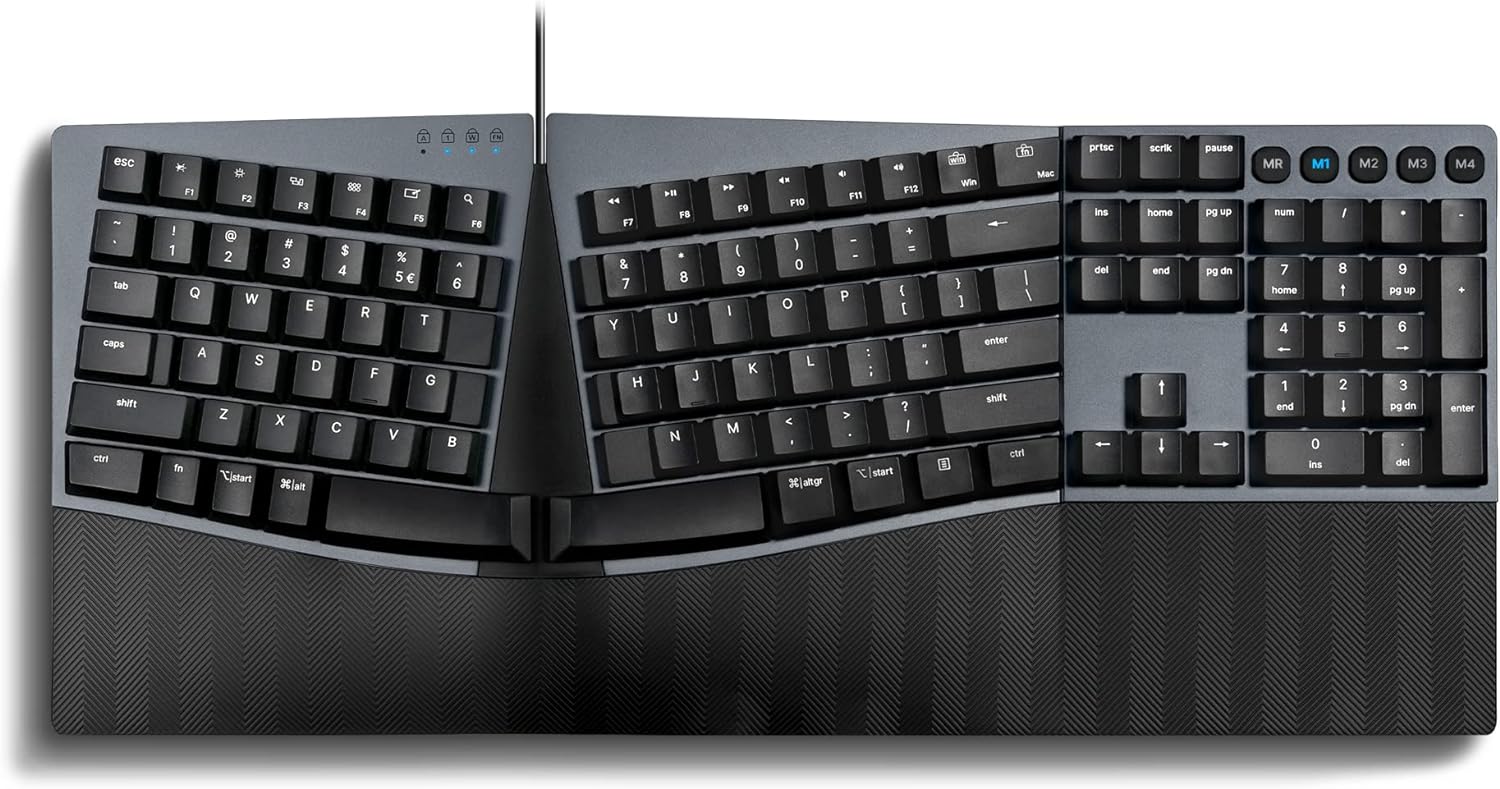
Description:
What's in the box
Reviews:
Oh So Good! Typing Heaven!
This is a very fine and well made keyboard. It is a pleasure to type with. The sound feedback (the click) is not too loud as to disturb others, but good for those who like the click. I type all day long and have used a lot of the ergonomic keyboards...and this is by far the best I have every used. The feel is just right. Keys pop back ever so nicely. The return key, enter, and shift key are larger for easy tapping. Love this keyboard. The extra $30.00 dollars over the others is well worth the price. So So GOOD!!!
Best Keyboard I've Owned, and I've Owned Many!
This keyboard combines all the elegance of a gaming keyboard with the ergonomics of, well, an ergonomic keyboard. The Cloud 9 keyboard was the first mechanical ergonomic board I've owned, but I think this one is better in many ways: 1) it is a smaller form factor and takes up much less desk space; 2) the low-profile switches make typing a breeze and with less effort; 3) the classic layout doesn't try to do anything "cute," so I do not have to get used to a different location of, for example, the delete, home, end, page up, page down, etc. keys; and 4) the price is very reasonable compared to competitors of similar products. There are probably other reasons I am forgetting to mention, but I wholeheartedly encourage anyone who is looking for an ergonomic keyboard to start using this one. If you've never used mechanical switches before, you've been missing out. I like the blue/clicky switches, but they're not for everyone. The brown (tactile) or red (straight) switches may be to your preference. Either way, they add a lot of pleasure to the typing experience. And in a world where many spend half of their waking life in front of a computer, you should have nothing but the best.
Good Keyboard (but not as good as the Microsoft Natural Ergonomic 4000 Keyboard)
I have used the Microsoft Natural Ergonomic 4000 Keyboard at home and at work for at least 10 years (and the similar Microsoft Natural Keyboard Elite for many years before that). I love that keyboard design, and even though the letters have rubbed off some of the more frequently used keys, both of my Microsoft Natural Ergonomic 4000 Keyboards have held up well and still work perfectly. However, after switching to Mac at home, I wanted to find a keyboard with four keys to the left of the spacebar, including an "fn" key, to match the layout on my MacBook's keyboard.The Periboard-535 seemed like it would be a great replacement. It has the exact same keyboard layout as the Microsoft Natural Ergonomic 4000 Keyboard, except that it has four modifier keys on each side of the spacebar instead of three--which is what I wanted, and it has a similar split and sloped ergonomic design (but see "Cons" below).Unfortunately, it turns out that the "fn" key on the Periboard-535 is not a fully functional "fn" key. It can only be used to perform actions on the keyboard itself in combination with other keys (e.g., in combination with the F1 - F12 keys). When the "fn" key on the Periboard-535 is pressed, no signal or key code is sent from the keyboard to the operating system. (I confirmed with Perixx support that that is how the Periboard-535 is designed and that there is no way to reprogram the "fn" key or use it to perform a macro when pressed by itself.) For me, that was a deal killer because that was the entire reason for looking for a replacement for my Microsoft Natural Ergonomic 4000 Keyboard, and I had to return the Periboard-535.If my Microsoft Natural Ergonomic 4000 Keyboards had broken, I probably would have kept the Periboard-535, because it might be the best available substitute. But I did not find the Periboard-535 to be a good replacement for a working Microsoft Natural Ergonomic 4000 Keyboard.Pros:* The mechanical brown tactile switches have a nice feel. They aren't the same as the Microsoft Natural Ergonomic 4000 Keyboard, but the keys press smoothly and seemed "faster".* The keyboard layout matches the Microsoft Natural Ergonomic 4000 Keyboard and includes full number pad* The ergonomic design is decent and is both split and sloped, but not as good as the Microsoft Natural Ergonomic 4000 Keyboard (see below)* The USB cord to connect the keyboard to the computer is braided and a good lengthCons:* The "fn" key is not a true, fully functional "fn" key.* The ergonomic design is not as good as the Microsoft Natural Ergonomic 4000 Keyboard, which has a "wave" design. The Microsoft Natural Ergonomic 4000 Keyboard has a split design that is actually slightly curved, compared to the Periboard-535's split design that is straight. Similarly, the slope on the Microsoft Natural Ergonomic 4000 Keyboard is curved, compared to the Periboard-535's slope design that is a straight angle. For me, the curved split and curved slope on the Microsoft Natural Ergonomic 4000 Keyboard are more comfortable--at least after a decade of using that design.* The palm rest on the Periboard-535 is hard, textured plastic and not cushioned leather (or imitation leather) like the Microsoft Natural Ergonomic 4000 Keyboard. I didn't think that would really matter, but it was surprising to me how noticeable the difference was.* The palm rest on the Periboard-535 is a bit too small and the keyboard has sort of sharp corners.Missing Bonus Feature:* Although not really a true "con", it would have been nice if the Periboard-535 had backlit keys (at least plain white) like its cousin, the wireless Periboard-835 (which has RGB backlighting). I would like to have a backlit keyboard, but I am only interested in a wired keyboard because I don't want to have to think about charging the keyboard or deal with an aging battery several years down the road.
Review from a Microsoft Sculpt Keyboard User
Before I got this keyboard I was a user of the Microsoft Ergonomic Keyboard which I loved and used for about 8 years. It was time for me to retire that reliable keyboard and I was interested in trying something new but was still wanted a split keyboard design but also had a 10 key pad since since the sculpt’s 10 key was separate from the keyboard. I debated between this keyboard and the Logitech Ergonomic keyboard but decided to give this a try because of the mechanical keys and have not been disappointed so far.1. I don’t mind that the wrist rest isn’t padded. My old keyboard pad wore out and there were permanent marks from where my wrist rested that no amount of cleaning could ever remove. This wrist rest is still comfortable and I don’t think it will show signs of wear like a padded rest would.2. I got the tactile buttons (brown switches) and the buttons don’t make that much noise. I love the feeling of pressing these keys.3. I don’t use the programmable macro keys so I can’t speak on their usefulness. I use this keyboard for my job and mostly am creating spreadsheets and writing e-mails.I can’t complain about this keyboard so far. I’m very used to the split keyboard design and have no problems getting adjusted to this. My only slight gripe is that the keyboard does occupy more space then the MS Sculpt do my mouse had to be out further than my body than I’m used to but I have adjusted. This is the only company that I was able to find that has an ergonomic keyboard with mechanical keys. I will update this review if I run into any problems.
Visit the Perixx Store
Perixx PERIBOARD-535BR Wired Ergonomic Mechanical Split Keyboard - Low-Profile Brown Tactile Switches - Programmable Feature with Macro Keys - Compatible with Windows and Mac OS X - US English, Black
AED73241
Quantity:
Order today to get by 7-14 business days
This item qualifies for free delivery
Imported From: United States
At BOLO, we work hard to ensure the products you receive are new, genuine, and sourced from reputable suppliers.
BOLO is not an authorized or official retailer for most brands, nor are we affiliated with manufacturers unless specifically stated on a product page. Instead, we source verified sellers, authorized distributors or directly from the manufacturer.
Each product undergoes thorough inspection and verification at our consolidation and fulfilment centers to ensure it meets our strict authenticity and quality standards before being shipped and delivered to you.
If you ever have concerns regarding the authenticity of a product purchased from us, please contact Bolo Support. We will review your inquiry promptly and, if necessary, provide documentation verifying authenticity or offer a suitable resolution.
Your trust is our top priority, and we are committed to maintaining transparency and integrity in every transaction.
All product information, images, descriptions, and reviews originate from the manufacturer or from trusted sellers overseas. BOLO is not affiliated with, endorsed by, or an authorized retailer for most brands listed on our website unless stated otherwise.
While we strive to display accurate information, variations in packaging, labeling, instructions, or formulation may occasionally occur due to regional differences or supplier updates. For detailed or manufacturer-specific information, please contact the brand directly or reach out to BOLO Support for assistance.
Unless otherwise stated, all prices displayed on the product page include applicable taxes and import duties.
BOLO operates in accordance with the laws and regulations of United Arab Emirates. Any items found to be restricted or prohibited for sale within the UAE will be cancelled prior to shipment. We take proactive measures to ensure that only products permitted for sale in United Arab Emirates are listed on our website.
All items are shipped by air, and any products classified as “Dangerous Goods (DG)” under IATA regulations will be removed from the order and cancelled.
All orders are processed manually, and we make every effort to process them promptly once confirmed. Products cancelled due to the above reasons will be permanently removed from listings across the website.
More from this brand
Similar items from “Keyboards”
Share with
Or share with link
https://www.bolo.ae/products/UO0OYGD7TF7
Visit the Perixx Store
Perixx PERIBOARD-535BR Wired Ergonomic Mechanical Split Keyboard - Low-Profile Brown Tactile Switches - Programmable Feature with Macro Keys - Compatible with Windows and Mac OS X - US English, Black

AED73241
Quantity:
Order today to get by 7-14 business days
This item qualifies for free delivery
Imported From: United States
At BOLO, we work hard to ensure the products you receive are new, genuine, and sourced from reputable suppliers.
BOLO is not an authorized or official retailer for most brands, nor are we affiliated with manufacturers unless specifically stated on a product page. Instead, we source verified sellers, authorized distributors or directly from the manufacturer.
Each product undergoes thorough inspection and verification at our consolidation and fulfilment centers to ensure it meets our strict authenticity and quality standards before being shipped and delivered to you.
If you ever have concerns regarding the authenticity of a product purchased from us, please contact Bolo Support. We will review your inquiry promptly and, if necessary, provide documentation verifying authenticity or offer a suitable resolution.
Your trust is our top priority, and we are committed to maintaining transparency and integrity in every transaction.
All product information, images, descriptions, and reviews originate from the manufacturer or from trusted sellers overseas. BOLO is not affiliated with, endorsed by, or an authorized retailer for most brands listed on our website unless stated otherwise.
While we strive to display accurate information, variations in packaging, labeling, instructions, or formulation may occasionally occur due to regional differences or supplier updates. For detailed or manufacturer-specific information, please contact the brand directly or reach out to BOLO Support for assistance.
Unless otherwise stated, all prices displayed on the product page include applicable taxes and import duties.
BOLO operates in accordance with the laws and regulations of United Arab Emirates. Any items found to be restricted or prohibited for sale within the UAE will be cancelled prior to shipment. We take proactive measures to ensure that only products permitted for sale in United Arab Emirates are listed on our website.
All items are shipped by air, and any products classified as “Dangerous Goods (DG)” under IATA regulations will be removed from the order and cancelled.
All orders are processed manually, and we make every effort to process them promptly once confirmed. Products cancelled due to the above reasons will be permanently removed from listings across the website.
Description:
What's in the box
Reviews:
Oh So Good! Typing Heaven!
This is a very fine and well made keyboard. It is a pleasure to type with. The sound feedback (the click) is not too loud as to disturb others, but good for those who like the click. I type all day long and have used a lot of the ergonomic keyboards...and this is by far the best I have every used. The feel is just right. Keys pop back ever so nicely. The return key, enter, and shift key are larger for easy tapping. Love this keyboard. The extra $30.00 dollars over the others is well worth the price. So So GOOD!!!
Best Keyboard I've Owned, and I've Owned Many!
This keyboard combines all the elegance of a gaming keyboard with the ergonomics of, well, an ergonomic keyboard. The Cloud 9 keyboard was the first mechanical ergonomic board I've owned, but I think this one is better in many ways: 1) it is a smaller form factor and takes up much less desk space; 2) the low-profile switches make typing a breeze and with less effort; 3) the classic layout doesn't try to do anything "cute," so I do not have to get used to a different location of, for example, the delete, home, end, page up, page down, etc. keys; and 4) the price is very reasonable compared to competitors of similar products. There are probably other reasons I am forgetting to mention, but I wholeheartedly encourage anyone who is looking for an ergonomic keyboard to start using this one. If you've never used mechanical switches before, you've been missing out. I like the blue/clicky switches, but they're not for everyone. The brown (tactile) or red (straight) switches may be to your preference. Either way, they add a lot of pleasure to the typing experience. And in a world where many spend half of their waking life in front of a computer, you should have nothing but the best.
Good Keyboard (but not as good as the Microsoft Natural Ergonomic 4000 Keyboard)
I have used the Microsoft Natural Ergonomic 4000 Keyboard at home and at work for at least 10 years (and the similar Microsoft Natural Keyboard Elite for many years before that). I love that keyboard design, and even though the letters have rubbed off some of the more frequently used keys, both of my Microsoft Natural Ergonomic 4000 Keyboards have held up well and still work perfectly. However, after switching to Mac at home, I wanted to find a keyboard with four keys to the left of the spacebar, including an "fn" key, to match the layout on my MacBook's keyboard.The Periboard-535 seemed like it would be a great replacement. It has the exact same keyboard layout as the Microsoft Natural Ergonomic 4000 Keyboard, except that it has four modifier keys on each side of the spacebar instead of three--which is what I wanted, and it has a similar split and sloped ergonomic design (but see "Cons" below).Unfortunately, it turns out that the "fn" key on the Periboard-535 is not a fully functional "fn" key. It can only be used to perform actions on the keyboard itself in combination with other keys (e.g., in combination with the F1 - F12 keys). When the "fn" key on the Periboard-535 is pressed, no signal or key code is sent from the keyboard to the operating system. (I confirmed with Perixx support that that is how the Periboard-535 is designed and that there is no way to reprogram the "fn" key or use it to perform a macro when pressed by itself.) For me, that was a deal killer because that was the entire reason for looking for a replacement for my Microsoft Natural Ergonomic 4000 Keyboard, and I had to return the Periboard-535.If my Microsoft Natural Ergonomic 4000 Keyboards had broken, I probably would have kept the Periboard-535, because it might be the best available substitute. But I did not find the Periboard-535 to be a good replacement for a working Microsoft Natural Ergonomic 4000 Keyboard.Pros:* The mechanical brown tactile switches have a nice feel. They aren't the same as the Microsoft Natural Ergonomic 4000 Keyboard, but the keys press smoothly and seemed "faster".* The keyboard layout matches the Microsoft Natural Ergonomic 4000 Keyboard and includes full number pad* The ergonomic design is decent and is both split and sloped, but not as good as the Microsoft Natural Ergonomic 4000 Keyboard (see below)* The USB cord to connect the keyboard to the computer is braided and a good lengthCons:* The "fn" key is not a true, fully functional "fn" key.* The ergonomic design is not as good as the Microsoft Natural Ergonomic 4000 Keyboard, which has a "wave" design. The Microsoft Natural Ergonomic 4000 Keyboard has a split design that is actually slightly curved, compared to the Periboard-535's split design that is straight. Similarly, the slope on the Microsoft Natural Ergonomic 4000 Keyboard is curved, compared to the Periboard-535's slope design that is a straight angle. For me, the curved split and curved slope on the Microsoft Natural Ergonomic 4000 Keyboard are more comfortable--at least after a decade of using that design.* The palm rest on the Periboard-535 is hard, textured plastic and not cushioned leather (or imitation leather) like the Microsoft Natural Ergonomic 4000 Keyboard. I didn't think that would really matter, but it was surprising to me how noticeable the difference was.* The palm rest on the Periboard-535 is a bit too small and the keyboard has sort of sharp corners.Missing Bonus Feature:* Although not really a true "con", it would have been nice if the Periboard-535 had backlit keys (at least plain white) like its cousin, the wireless Periboard-835 (which has RGB backlighting). I would like to have a backlit keyboard, but I am only interested in a wired keyboard because I don't want to have to think about charging the keyboard or deal with an aging battery several years down the road.
Review from a Microsoft Sculpt Keyboard User
Before I got this keyboard I was a user of the Microsoft Ergonomic Keyboard which I loved and used for about 8 years. It was time for me to retire that reliable keyboard and I was interested in trying something new but was still wanted a split keyboard design but also had a 10 key pad since since the sculpt’s 10 key was separate from the keyboard. I debated between this keyboard and the Logitech Ergonomic keyboard but decided to give this a try because of the mechanical keys and have not been disappointed so far.1. I don’t mind that the wrist rest isn’t padded. My old keyboard pad wore out and there were permanent marks from where my wrist rested that no amount of cleaning could ever remove. This wrist rest is still comfortable and I don’t think it will show signs of wear like a padded rest would.2. I got the tactile buttons (brown switches) and the buttons don’t make that much noise. I love the feeling of pressing these keys.3. I don’t use the programmable macro keys so I can’t speak on their usefulness. I use this keyboard for my job and mostly am creating spreadsheets and writing e-mails.I can’t complain about this keyboard so far. I’m very used to the split keyboard design and have no problems getting adjusted to this. My only slight gripe is that the keyboard does occupy more space then the MS Sculpt do my mouse had to be out further than my body than I’m used to but I have adjusted. This is the only company that I was able to find that has an ergonomic keyboard with mechanical keys. I will update this review if I run into any problems.
More from this brand
Similar items from “Keyboards”
Share with
Or share with link
https://www.bolo.ae/products/UO0OYGD7TF7