Description:
Reviews:
5.0 out of 5 stars Awesome functioning KVI Switch with up to 4 computers and 3 usb devices
(function() { P.when('cr-A', 'ready').execute(function(A) { if(typeof A.toggleExpanderAriaLabel === 'function') { A.toggleExpanderAriaLabel('review_text_read_more', 'Read more of this review', 'Read less of this review'); } }); })(); .review-text-read-more-expander:focus-visible { outline: 2px solid #2162a1; outline-offset: 2px; border-radius: 5px; } This KVI Switch is awesome. I have 3 computers 1 keyboard and 1 mouse. I hooked it up and bang it is working. with the simple push of a button, I can switch from one computer to another. It came with a 1 year warranty and a support website, that I did not need at all. Instructions were very clear. It cost more than the cheap one I had to return. Twice the price, but worth it.
5.0 out of 5 stars Compact, Reliable, Great Value, Room for Improvement
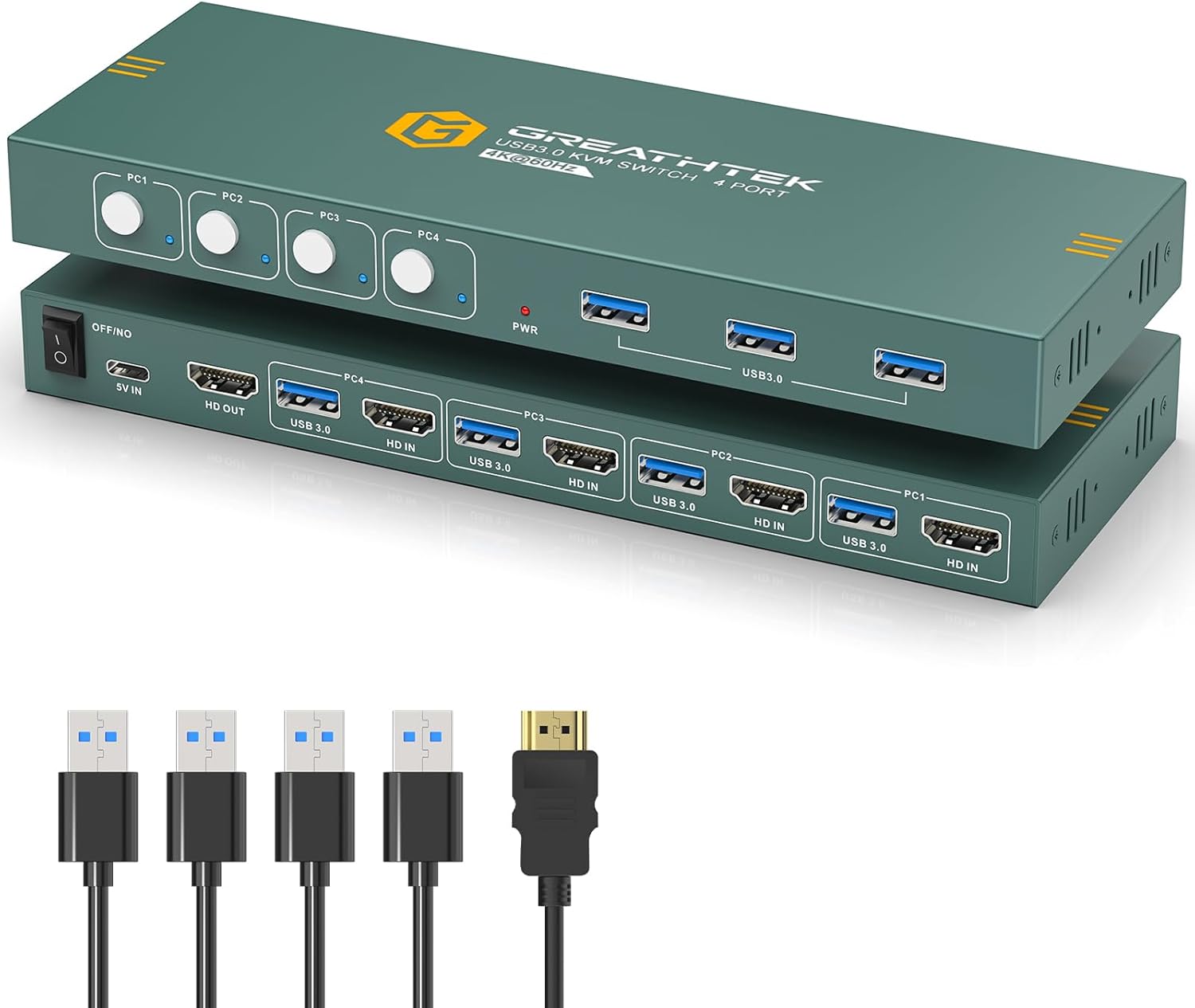
For the price, you simply can't beat this KVM! It has a nice compact footprint, is super-quiet (no cooling fans, etc.), transitions from session to session smoothly with little lag and uses standard USB and HDMI cables (no proprietary KVM cables needed).My main complaint is when switching from host to host the USB devices are connected/disconnected - this causes the sound for "USB Device Disconnected" to be played on the machine you are transitioning from, and "USB Device Reconnected" to be played on the machine you are transitioning to. Of course this is SUPER annoying, but you can turn off these sounds in the Themes on each of the machines connected to the KVM (unfortunately this will apply to ALL USB Connect/Disconnect actions not just those on the KVM). The sounds can be dealt with, but because of the way the KVM manages these devices you're going to see a LOT of USB Device Disconnect/Reconnect messages in your hardware audit log, and of course this introduces a slight lag when transitioning from session to session. My prior KVM (a Belkin F1DP116G) kept signal to the keyboard and mouse on each host machine active (whether USB or PS/2) so this was not a problem - if this KVM could do something similar it would be a HUGE improvement!Gripe #2 is the location of the 3 USB ports, they are all in the front of the unit. Meanwhile all OTHER cables connect in the back. I think it's great to have USB ports in the front for things you might want to plug in and take out (like a thumbdrive), but could you put at least two or three in the BACK so we can connect the keyboard and mouse (and maybe one other permanent device) in the back and not have their cables visible on the front of the unit?Lastly, the unit is powered by a USB-C cable to an AC power adapter. I have this plugged into a power distribution switch on the same circuit as my monitors. At the end of the day I flip the switch to turn off this circuit to power down my monitors and KVM switch - but the KVM still has power! It must be drawing power from the USB cable to one of the hosts (that is up and running 24/7)! It would be helpful if the KVM would power down when the power supply to it via the USB-C cable is terminated.Bottom line: Great value for the price, seems efficient and reliable - but with room for improvement.
5.0 out of 5 stars Cables are a little bit too short
I have three computers: An older Win 10 (my primary machine), an older Fedora Linux, and a newer Win 11 Laptop. I *can* sort of switch between them to do most of what I want do using Cygwin from the Windows machine and ssh to create remotely and I already had a 2-way KVM. The 4-way switch now allows me to also access the laptop with a real keyboard and a much larger screen. I don't use the last port, but it does work properly.I used the extra (for me) HDMI cable to attach the switch to the monitor (bundling the wire) and can't find the the extra USB cable now. (I wanted to measure its exact length.)My older Win 10 uses a graphics card that doesn't have HDMI output, so I needed to get a DVI to HDMI dongle. While waiting for it to arrive, I used the Fedora as the primary. This worked out mostly OK, but not completely. When the dongle arrived I shut down the Win 10 machine, connected the monitor via the dongle, and restarted it. This sort of worked for a short time. The monitor was OK, but windows wasn't happy with the keyboard/mouse. These have a wireless connection plugged into the KVM. The mouse was erratic and would stop. Win 10 eventually complained too, and completely disconnected the USB port. I switched the connection over to port 4 and Windows complained that it couldn't handle it. I suspected that there might be a cable problem, but tried rebooting the Windows machine first. Voila, it started with no mouse/keyboard problem. I hot switched it back to port 1 with no problem. The new switch remained on during all this time. Maybe the Windows problem was due to having the keyboard and mouse connected (but unused) and not the video. I don't know, but there's no problem now, except:The cables are about six feet long, but that's a bit too short for one machine. I'd like the switch to be about an inch or two closer to the front of the desk. Now I have to reach under the monitor to switch. By the way, you *need* to attach the little plastic feet that come with the switch package to the bottom to keep it from sliding on your desk.The picture in the add shows the front and back side of the switch. It should just show the front side and the back side as an alternate picture. The switch is one box, roughly 8" wide x 3" deep x 1 1/8" high (with the feet.) The USB ports switch along with everything else so this is really a KVMU switch, obviously the U for USB.I like the switch, otherwise I wouldn't have spent an inordinate amount of time writing this review. It switches pretty quickly, less than 2 seconds. This is hard to measure exactly because it also takes some time for the OS to respond. I have to hold the switch when pressing the button to keep it from sliding, but I'm not switching often enough for that to be a real problem for me.
4.0 out of 5 stars Works, Mac might sometimes be flaky
Pretty good KVM for the price and its USB3. IT does come with USB3 cables but you need to supply your own HDMI cables for connecting computers. Overall it worked better than my earlier KVM which had issues with blanking monitor especially with MAC.This KVM is more reliable, yet sometimes on switching the MAC does not display till a few keyboard clicks and mouse movements. At times I have to open the Mac and login to get the display and Keyboards to work again.Other than that issue, it has been reliable, thought it is relatively short period. I have had. Will see over long term and update.There is not a lot of options with 4 computers and at this price range.
Best KVM Switch I've Tried
(function() { P.when('cr-A', 'ready').execute(function(A) { if(typeof A.toggleExpanderAriaLabel === 'function') { A.toggleExpanderAriaLabel('review_text_read_more', 'Read more of this review', 'Read less of this review'); } }); })(); .review-text-read-more-expander:focus-visible { outline: 2px solid #2162a1; outline-offset: 2px; border-radius: 5px; } I've been through a few different KVM switches to hopefully try and find one to run three different computers into one monitor in an audio software testing setup. The other KVMs I tried did not provide enough power to the USB port to power my audio interface (SSL2+) stably. This GREATHTEK one works perfectly - switching is super fast, it's nice and small and lightweight, setup was super easy. Super happy with this! Only critique I have is that I would've liked to have seen half the USB ports rear-facing - as you can see in the picture, I've had to loop the USB under the unit which can be quite messy. The provided cables were also a little too short, so now I've got 8 unusable cables in my house going spare.
Excellent KVM supporting 1920x1200 resolution
I tried and send back a few HDMI KVM switchs claiming to support 4K but unable to handle 1920x1200 resolution (16/10 format so appreciated for photo editing).This KVM does it very well. Then, the only missing feature is the remote control meaning the box is to be located on the desk to be accessible.Apart from this, this is a nice device.
Cumple todas las expectativas.
En comparación con un viejo KVM VGA(RGB analógico) al que sustituye, las mejoras saltan a la vista. Una mayor capacidad de resolución para soportar el cambio de monitores al que está destinado , (aunque los conectores son HDMI 1.4 soporta la transmisión HDMI 2.0 de alta resolución).Los diodos led excelentes y muy bien posicionados estéticamente. El Hub para 4 dispositivos USB tiene un pequeño inconveniente como que debería tener 2 entradas B de conexión en la parte frontal para compartir dispositivos Usb, (como pendrives etc.), y las otros dos para el teclado y el ratón detrás, formando parte del cortejo de conexión REAR de los conectores A y HDMI.Los cables suministrados no tienen una longitud excesiva pero son de calidad.No haría falta alimentarlo a 5v. pero yo utilizo el cable de alimentación suministrado para introducirlo en una ranura usb y así alimentarlo desde el PC ya que no trae fuente de alimentación.Por lo demás muy bien. Excelente relación calidad precio, Lo recomiendo para utilizar cuatro ordenadores a la vez con un único teclado y ratón y añadir la posibilidad de extender tus escritorios o pantallas para los 4.
Télétravail ou GameGeek
Que ce soit pour du télétravail, geek ce genre de produit est excellent vous pouvez brancher consoles, pc lecteur/blueray/DVD et tout contrôler avec un clavier / souris ( quand le device le permet ( console pc etc..) vraiment un gain de temps et de place
4K60hz & 1080p@144hz
Une donnée que je n'ai trouvé nulle part:J'ai un écran Full HD (1080p), et ce n'était pas indiqué si le taux de rafraichissement était quand même verouillé à 60hz(à priori tant qu'il y a assez de bande passante pour le flux vidéo ça devrait être OK)Mais je confirme, 1080p@144hz il n'y a aucun soucis :)
Visit the GREATHTEK Store
USB3.0 KVM Switch HDMI 4K@60Hz for 4 Computers Share 1 Monitor, KVM Switch 4 Port with 3 USB 3.0 Ports Share Keyboard Mouse, Support Button Switch, Plug and Play
AED51374
Quantity:
Order today to get by 7-14 business days
This item qualifies for free delivery
Imported From: United States
At BOLO, we work hard to ensure the products you receive are new, genuine, and sourced from reputable suppliers.
BOLO is not an authorized or official retailer for most brands, nor are we affiliated with manufacturers unless specifically stated on a product page. Instead, we source verified sellers, authorized distributors or directly from the manufacturer.
Each product undergoes thorough inspection and verification at our consolidation and fulfilment centers to ensure it meets our strict authenticity and quality standards before being shipped and delivered to you.
If you ever have concerns regarding the authenticity of a product purchased from us, please contact Bolo Support. We will review your inquiry promptly and, if necessary, provide documentation verifying authenticity or offer a suitable resolution.
Your trust is our top priority, and we are committed to maintaining transparency and integrity in every transaction.
All product information, images, descriptions, and reviews originate from the manufacturer or from trusted sellers overseas. BOLO is not affiliated with, endorsed by, or an authorized retailer for most brands listed on our website unless stated otherwise.
While we strive to display accurate information, variations in packaging, labeling, instructions, or formulation may occasionally occur due to regional differences or supplier updates. For detailed or manufacturer-specific information, please contact the brand directly or reach out to BOLO Support for assistance.
Unless otherwise stated, all prices displayed on the product page include applicable taxes and import duties.
BOLO operates in accordance with the laws and regulations of United Arab Emirates. Any items found to be restricted or prohibited for sale within the UAE will be cancelled prior to shipment. We take proactive measures to ensure that only products permitted for sale in United Arab Emirates are listed on our website.
All items are shipped by air, and any products classified as “Dangerous Goods (DG)” under IATA regulations will be removed from the order and cancelled.
All orders are processed manually, and we make every effort to process them promptly once confirmed. Products cancelled due to the above reasons will be permanently removed from listings across the website.
Similar suggestions by Bolo
More from this brand
Similar items from “KVM Switches”
Share with
Or share with link
https://www.bolo.ae/products/UO0OJAQK4IY
Visit the GREATHTEK Store
USB3.0 KVM Switch HDMI 4K@60Hz for 4 Computers Share 1 Monitor, KVM Switch 4 Port with 3 USB 3.0 Ports Share Keyboard Mouse, Support Button Switch, Plug and Play

AED51374
Quantity:
Order today to get by 7-14 business days
This item qualifies for free delivery
Imported From: United States
At BOLO, we work hard to ensure the products you receive are new, genuine, and sourced from reputable suppliers.
BOLO is not an authorized or official retailer for most brands, nor are we affiliated with manufacturers unless specifically stated on a product page. Instead, we source verified sellers, authorized distributors or directly from the manufacturer.
Each product undergoes thorough inspection and verification at our consolidation and fulfilment centers to ensure it meets our strict authenticity and quality standards before being shipped and delivered to you.
If you ever have concerns regarding the authenticity of a product purchased from us, please contact Bolo Support. We will review your inquiry promptly and, if necessary, provide documentation verifying authenticity or offer a suitable resolution.
Your trust is our top priority, and we are committed to maintaining transparency and integrity in every transaction.
All product information, images, descriptions, and reviews originate from the manufacturer or from trusted sellers overseas. BOLO is not affiliated with, endorsed by, or an authorized retailer for most brands listed on our website unless stated otherwise.
While we strive to display accurate information, variations in packaging, labeling, instructions, or formulation may occasionally occur due to regional differences or supplier updates. For detailed or manufacturer-specific information, please contact the brand directly or reach out to BOLO Support for assistance.
Unless otherwise stated, all prices displayed on the product page include applicable taxes and import duties.
BOLO operates in accordance with the laws and regulations of United Arab Emirates. Any items found to be restricted or prohibited for sale within the UAE will be cancelled prior to shipment. We take proactive measures to ensure that only products permitted for sale in United Arab Emirates are listed on our website.
All items are shipped by air, and any products classified as “Dangerous Goods (DG)” under IATA regulations will be removed from the order and cancelled.
All orders are processed manually, and we make every effort to process them promptly once confirmed. Products cancelled due to the above reasons will be permanently removed from listings across the website.
Description:
Reviews:
5.0 out of 5 stars Awesome functioning KVI Switch with up to 4 computers and 3 usb devices
(function() { P.when('cr-A', 'ready').execute(function(A) { if(typeof A.toggleExpanderAriaLabel === 'function') { A.toggleExpanderAriaLabel('review_text_read_more', 'Read more of this review', 'Read less of this review'); } }); })(); .review-text-read-more-expander:focus-visible { outline: 2px solid #2162a1; outline-offset: 2px; border-radius: 5px; } This KVI Switch is awesome. I have 3 computers 1 keyboard and 1 mouse. I hooked it up and bang it is working. with the simple push of a button, I can switch from one computer to another. It came with a 1 year warranty and a support website, that I did not need at all. Instructions were very clear. It cost more than the cheap one I had to return. Twice the price, but worth it.
5.0 out of 5 stars Compact, Reliable, Great Value, Room for Improvement
For the price, you simply can't beat this KVM! It has a nice compact footprint, is super-quiet (no cooling fans, etc.), transitions from session to session smoothly with little lag and uses standard USB and HDMI cables (no proprietary KVM cables needed).My main complaint is when switching from host to host the USB devices are connected/disconnected - this causes the sound for "USB Device Disconnected" to be played on the machine you are transitioning from, and "USB Device Reconnected" to be played on the machine you are transitioning to. Of course this is SUPER annoying, but you can turn off these sounds in the Themes on each of the machines connected to the KVM (unfortunately this will apply to ALL USB Connect/Disconnect actions not just those on the KVM). The sounds can be dealt with, but because of the way the KVM manages these devices you're going to see a LOT of USB Device Disconnect/Reconnect messages in your hardware audit log, and of course this introduces a slight lag when transitioning from session to session. My prior KVM (a Belkin F1DP116G) kept signal to the keyboard and mouse on each host machine active (whether USB or PS/2) so this was not a problem - if this KVM could do something similar it would be a HUGE improvement!Gripe #2 is the location of the 3 USB ports, they are all in the front of the unit. Meanwhile all OTHER cables connect in the back. I think it's great to have USB ports in the front for things you might want to plug in and take out (like a thumbdrive), but could you put at least two or three in the BACK so we can connect the keyboard and mouse (and maybe one other permanent device) in the back and not have their cables visible on the front of the unit?Lastly, the unit is powered by a USB-C cable to an AC power adapter. I have this plugged into a power distribution switch on the same circuit as my monitors. At the end of the day I flip the switch to turn off this circuit to power down my monitors and KVM switch - but the KVM still has power! It must be drawing power from the USB cable to one of the hosts (that is up and running 24/7)! It would be helpful if the KVM would power down when the power supply to it via the USB-C cable is terminated.Bottom line: Great value for the price, seems efficient and reliable - but with room for improvement.
5.0 out of 5 stars Cables are a little bit too short
I have three computers: An older Win 10 (my primary machine), an older Fedora Linux, and a newer Win 11 Laptop. I *can* sort of switch between them to do most of what I want do using Cygwin from the Windows machine and ssh to create remotely and I already had a 2-way KVM. The 4-way switch now allows me to also access the laptop with a real keyboard and a much larger screen. I don't use the last port, but it does work properly.I used the extra (for me) HDMI cable to attach the switch to the monitor (bundling the wire) and can't find the the extra USB cable now. (I wanted to measure its exact length.)My older Win 10 uses a graphics card that doesn't have HDMI output, so I needed to get a DVI to HDMI dongle. While waiting for it to arrive, I used the Fedora as the primary. This worked out mostly OK, but not completely. When the dongle arrived I shut down the Win 10 machine, connected the monitor via the dongle, and restarted it. This sort of worked for a short time. The monitor was OK, but windows wasn't happy with the keyboard/mouse. These have a wireless connection plugged into the KVM. The mouse was erratic and would stop. Win 10 eventually complained too, and completely disconnected the USB port. I switched the connection over to port 4 and Windows complained that it couldn't handle it. I suspected that there might be a cable problem, but tried rebooting the Windows machine first. Voila, it started with no mouse/keyboard problem. I hot switched it back to port 1 with no problem. The new switch remained on during all this time. Maybe the Windows problem was due to having the keyboard and mouse connected (but unused) and not the video. I don't know, but there's no problem now, except:The cables are about six feet long, but that's a bit too short for one machine. I'd like the switch to be about an inch or two closer to the front of the desk. Now I have to reach under the monitor to switch. By the way, you *need* to attach the little plastic feet that come with the switch package to the bottom to keep it from sliding on your desk.The picture in the add shows the front and back side of the switch. It should just show the front side and the back side as an alternate picture. The switch is one box, roughly 8" wide x 3" deep x 1 1/8" high (with the feet.) The USB ports switch along with everything else so this is really a KVMU switch, obviously the U for USB.I like the switch, otherwise I wouldn't have spent an inordinate amount of time writing this review. It switches pretty quickly, less than 2 seconds. This is hard to measure exactly because it also takes some time for the OS to respond. I have to hold the switch when pressing the button to keep it from sliding, but I'm not switching often enough for that to be a real problem for me.
4.0 out of 5 stars Works, Mac might sometimes be flaky
Pretty good KVM for the price and its USB3. IT does come with USB3 cables but you need to supply your own HDMI cables for connecting computers. Overall it worked better than my earlier KVM which had issues with blanking monitor especially with MAC.This KVM is more reliable, yet sometimes on switching the MAC does not display till a few keyboard clicks and mouse movements. At times I have to open the Mac and login to get the display and Keyboards to work again.Other than that issue, it has been reliable, thought it is relatively short period. I have had. Will see over long term and update.There is not a lot of options with 4 computers and at this price range.
Best KVM Switch I've Tried
(function() { P.when('cr-A', 'ready').execute(function(A) { if(typeof A.toggleExpanderAriaLabel === 'function') { A.toggleExpanderAriaLabel('review_text_read_more', 'Read more of this review', 'Read less of this review'); } }); })(); .review-text-read-more-expander:focus-visible { outline: 2px solid #2162a1; outline-offset: 2px; border-radius: 5px; } I've been through a few different KVM switches to hopefully try and find one to run three different computers into one monitor in an audio software testing setup. The other KVMs I tried did not provide enough power to the USB port to power my audio interface (SSL2+) stably. This GREATHTEK one works perfectly - switching is super fast, it's nice and small and lightweight, setup was super easy. Super happy with this! Only critique I have is that I would've liked to have seen half the USB ports rear-facing - as you can see in the picture, I've had to loop the USB under the unit which can be quite messy. The provided cables were also a little too short, so now I've got 8 unusable cables in my house going spare.
Excellent KVM supporting 1920x1200 resolution
I tried and send back a few HDMI KVM switchs claiming to support 4K but unable to handle 1920x1200 resolution (16/10 format so appreciated for photo editing).This KVM does it very well. Then, the only missing feature is the remote control meaning the box is to be located on the desk to be accessible.Apart from this, this is a nice device.
Cumple todas las expectativas.
En comparación con un viejo KVM VGA(RGB analógico) al que sustituye, las mejoras saltan a la vista. Una mayor capacidad de resolución para soportar el cambio de monitores al que está destinado , (aunque los conectores son HDMI 1.4 soporta la transmisión HDMI 2.0 de alta resolución).Los diodos led excelentes y muy bien posicionados estéticamente. El Hub para 4 dispositivos USB tiene un pequeño inconveniente como que debería tener 2 entradas B de conexión en la parte frontal para compartir dispositivos Usb, (como pendrives etc.), y las otros dos para el teclado y el ratón detrás, formando parte del cortejo de conexión REAR de los conectores A y HDMI.Los cables suministrados no tienen una longitud excesiva pero son de calidad.No haría falta alimentarlo a 5v. pero yo utilizo el cable de alimentación suministrado para introducirlo en una ranura usb y así alimentarlo desde el PC ya que no trae fuente de alimentación.Por lo demás muy bien. Excelente relación calidad precio, Lo recomiendo para utilizar cuatro ordenadores a la vez con un único teclado y ratón y añadir la posibilidad de extender tus escritorios o pantallas para los 4.
Télétravail ou GameGeek
Que ce soit pour du télétravail, geek ce genre de produit est excellent vous pouvez brancher consoles, pc lecteur/blueray/DVD et tout contrôler avec un clavier / souris ( quand le device le permet ( console pc etc..) vraiment un gain de temps et de place
4K60hz & 1080p@144hz
Une donnée que je n'ai trouvé nulle part:J'ai un écran Full HD (1080p), et ce n'était pas indiqué si le taux de rafraichissement était quand même verouillé à 60hz(à priori tant qu'il y a assez de bande passante pour le flux vidéo ça devrait être OK)Mais je confirme, 1080p@144hz il n'y a aucun soucis :)
Similar suggestions by Bolo
More from this brand
Similar items from “KVM Switches”
Share with
Or share with link
https://www.bolo.ae/products/UO0OJAQK4IY