Deliver toUnited Arab Emirates
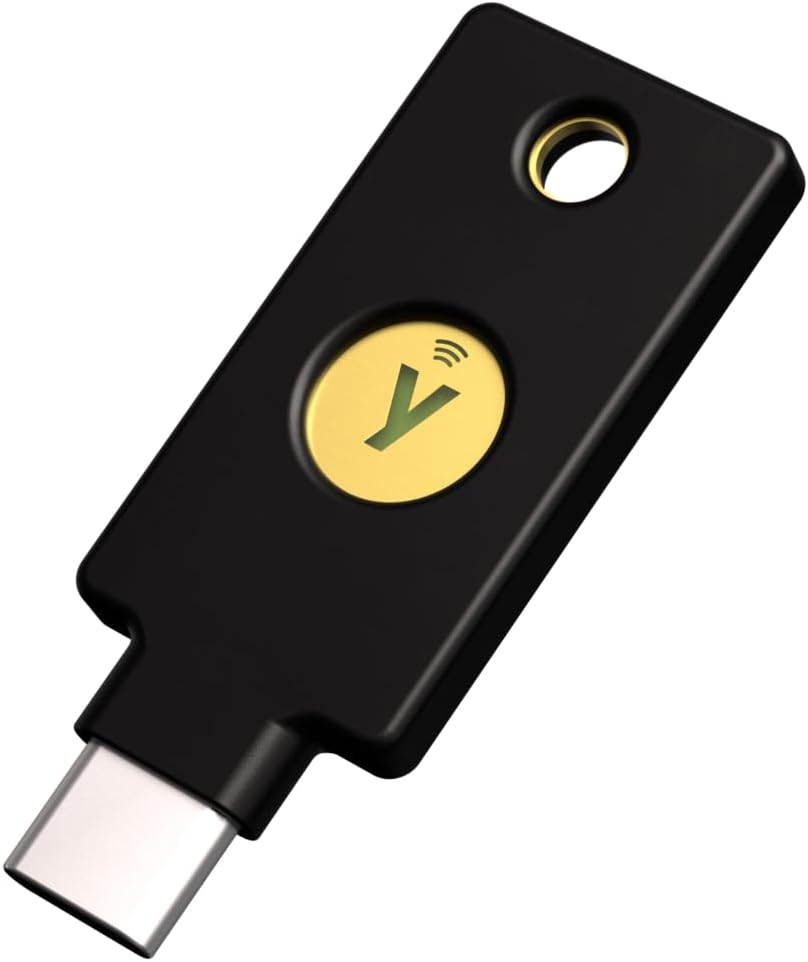
Yubico - Security Key C NFC - Basic Compatibility - Multi-Factor authentication (MFA) Security Key and passkey, Connect via USB-C or NFC, FIDO Certified

Description:

  • POWERFUL SECURITY KEY: The Security Key C NFC is the essential physical passkey for protecting your digital life from phishing attacks. It ensures only you can access your accounts.
  • WORKS WITH 1000+ ACCOUNTS: Compatible with Google, Microsoft, and Apple. A single Security Key C NFC secures 100 of your favorite accounts, including email, password managers, and more.
  • FAST & CONVENIENT LOGIN: Plug in your Security Key C NFC via USB-C and tap it, or tap it against your phone (NFC) to authenticate. No batteries, no internet connection, and no extra fees required.
  • TRUSTED PASSKEY TECHNOLOGY: Uses the latest passkey standards (FIDO2/WebAuthn & FIDO U2F) but does not support One-Time Passwords. For complex needs, check out the YubiKey 5 Series.
  • BUILT TO LAST: Made from tough, waterproof, and crush-resistant materials. Manufactured in Sweden and programmed in the USA with the highest security standards.
  • PRIMARY & SPARE KEY: Just like having a spare house key, we recommend buying two security keys—one for daily use and one as a spare. That way you’ll never get locked out of your accounts.
  • Note: Latest firmware is not assured when purchasing via Amazon.

  • Reviews:

    5.0 out of 5 stars Good Security.

    T. · January 31, 2026

    Works fine. Makes online login secure. Need a couple of backups, because if something goes wrong, you'll be locked out of your account!

    5.0 out of 5 stars Super Replacement for Website Verification

    V.H.C. · January 31, 2026

    Saved me from having to upload new software which saved lots of money! Easy to use!

    5.0 out of 5 stars Enhanced Security at Your Fingertips: A Review of the YubiKey 5 NFC

    S. · March 14, 2024

    Side note - I use the open-source BitWarden password manager, which supports Yubikeys. BitWarden is free on multiple devices like PC, Mac, Linux, and your smartphone - for some of the bells and whistles like supporting a YubiKey you have to upgrade to their $10 a year plan, totally reasonable and you should support this company, they are great and my favorite password manager.Now - on to the Yubikey itself. One of the great selling points is that you cannot log on to services that support Yubikey (e.g. your bank, Facebook, Twitter, etc.) if you do not have physical possession of the Yubikey. If someone happened to obtain your User ID and password somehow, they still wouldn't be able to log in thanks to the Yubikey, so that is peace of mind. Speaking of peace of mind, do yourself a favor and buy 2 because you're going to want to store the backup key somewhere safe and easily accessible in case you ever lose your primary key. It is not technically necessary, but it would be an extra hassle to try and prove to the bank or other service that you are the actual client because you won't be able to log in without the key, so there is no easy password reset that you might be used to. Each company has different procedures if you have to call them if you lost your only Yubikey, for all they know you might be a leet hacker trying to social engineer them, so having the backup key gives peace of mind and you can avoid that problem if you are prone to losing things.In a digital world filled with passwords as long as the Great Wall and security measures more complicated than a Rubik's Cube, finding a solution that balances convenience and protection is a quest worthy of a tech-savvy knight. Enter the YubiKey 5 NFC – a pocket-sized guardian that brings a touch of magic to the realm of online security.At first glance, the YubiKey 5 NFC may seem like a humble USB stick, but beneath its unassuming exterior lies a treasure trove of security features that would make even the most paranoid IT guru grin like a Cheshire cat. With support for a myriad of authentication protocols, including FIDO U2F and FIDO2, OTP, PIV, and smart card, this little key unlocks a world of possibilities for safeguarding your digital kingdom.But what truly sets the YubiKey 5 NFC apart from its peers is its Near Field Communication (NFC) capabilities. With a wave of your hand (or a tap of your phone), you can seamlessly authenticate with your YubiKey using compatible mobile devices, turning your smartphone into a digital Excalibur that vanquishes would-be hackers with ease.Setting up the YubiKey 5 NFC is as simple as pie – even for those whose tech skills are as rusty as an ancient server rack. Just plug it into a USB port or tap it against your NFC-enabled device, follow the prompts to register it with your accounts, and voila! You're one step closer to digital invincibility.The YubiKey 5 NFC is a game-changer in the world of online security – a trusty sidekick for the modern-day digital hero. So, whether you're a code-slinging developer, a data-wrangling sysadmin, or just someone who wants to keep their online accounts safe and sound, the YubiKey 5 NFC is here to save the day (and your passwords).Final note - regular 2FA (two-factor authentication) of the type that sends you a text message with a ~6-digit code can be compromised by "SIM jacking" i.e. a hacker calls and socially engineers your cell phone plan provider like T-Mobile, AT&T, etc., and convinces them that the hacker is you, and you want to transfer your cell service to a new SIM card because you lost yours. The cell providers don't always do a great job in this situation and have been known to transfer your account to the hacker and their SIM card. I guess you would have to be a high-value target for something like this to happen, but it's good to know that the Yubikey protects you from this type of attack and has your back.

    5.0 out of 5 stars A must for every iPhone user

    M. · February 5, 2026

    If you want to use Advanced Data Protection on iPhone 'which everyone should be using' you need two of these. They sync seamlessly and I've yet to have one fail on me. Newer websites use PassKeys however for my most critical accounts I still prefer YubiKeys. Make sure you keep one in a safe location such as a personal safe in your home.

    4.0 out of 5 stars Good, but be careful what you buy

    J.S. · May 6, 2024

    I bought this so I could add a security key to my accounts that was supported by my new iPad. I did not do my research well enough as I thought this was the same as my Yubikey 5 I've purchased in the past but with a different connector on it. It does not support the 2 factor authentication slots like my previous keys as this is strictly a FIDO security key. After I received them and realized they were missing the functionality I was expecting, I saw that they were advertised exactly as they came, but I just didn't realize at the time. I should have realized because they were much cheaper than ones I've bought in the past. As a FIDO key, these work fine and I have had no issues with them.

    5.0 out of 5 stars Ignore the bad reviews! This is a must have

    T.f.T. · February 27, 2026

    YubiKeys are a must at every tech company I've worked for. They offer the highest level of security and are incredibly easy to set up. I’ve used them for over eight years, and they’ve saved me from multiple phishing attempts. If you see negative reviews, ignore them—it’s usually just a lack of technical know-how. Take the time to learn the system; the security payoff is worth it.

    1.0 out of 5 stars The concept is great but in practice not useful

    N. · July 28, 2024

    After reading that even with 2-factor authentication [2FA] or one-time password [OTP] cyberthieves can gain access to your online accounts through a sim swap I thought I should get a physical security key. This little device stores information and generates one-time numbers for you to log in to a site, but you have to register it once, for each online account you use. A bit of online search suggested Yubikey 5 as an affordable, dependable and easy-to-use physical key. One was advised to buy two, with one as a back-up: if you lose one, you still have a second one.After the two keys arrived I tried it out. The first challenge: the key needs a USB-C port for connection to a laptop. My laptop has two USB-C ports. One is used for power, the other for the mouse receiver. So I bought a USB-C splitter. I should have checked online – I found out you can’t plug the power USB-C connection into a splitter [it does not charge], and the Yubikey is not recognized when sharing a spitter with the mouse receiver.However the biggest drawback is that mainstream financial institutions are not set up for use of a security key. One bank uses a security token [which is not the same as a security key], another only goes for two-factor authentication. Basically the only two common online sites for me were Microsoft and Google. Even that was not simple. When you plug the Yubikey into a working USB-C port, you apparently need to set up a pin but if that already exists or if you need to set up a new one is unclear. There is no ‘easy set-up’ or’ set-up for dummies’-something really simple that guides you through a Yubikey set-up even for Microsoft. The Yubikey instructions consist of a 130 page PDF filled with jargon. You apparently have to go into your computer’s Microsoft account settings to include a security key. Also did you know that for Google your pin [4 numbers] is not the same as your Google password? I locked myself out from including the Yubikey on the Google account because I could not understand what the pin was Google was asking for.In addition, I don’t think a security key solves the problem of a sim swap for the average person. Although you could use it to log into Gmail or Microsoft [provided you got that going] on your cell phone using near-field communication [NFC], people don’t usually log in to those accounts separately anyway on a cell phone. Once the phone is off the lock screen, most apps are ready to go without additional authentication. Maybe I am less smart than the average person but in the end, my two Yubikeys and the USB-C splitter will end up on the electronics trash pile.

    Tudo OK

    A.E. · September 29, 2025

    Excelente, funcionando conforme o esperado

    Excelente producto

    Y. · February 26, 2026

    La verdad es un excelente producto para mejorar la seguridad, se activa conectando la USB a un puerto, pero importante mencionar que la PC no reconoce como un dispositivo USB. Una vez que se activa solo podrá configurarse al momento de activar la seguridad en 2 pasos ya sea por NFC o USB, pero si pasan la llave por algún lector NFC o la conectan, el dispositivo no la reconoce inmediatamente, solo lo hace al momento de configurar el 2FA. Me imagino que por eso algunos usuarios comentan que no les sirvió. Tengo una Yubico 5 y esa si se reconoce como USB aunque no la estes usando para configurar en ese momento.

    make sure the services you buy this for actually support using a security key ...

    c. · February 26, 2024

    works fine, but thus far I can only use it on Bolo ... Google in their infinite widsom require purchasing 2 security keys so there is a back up which is VERY irritating ... otherwise, Australian banks and financial institutions are typically WAAAAY behind the rest of the world.

    Un bon niveau de sécurité pour seulement 30€

    G. · February 23, 2026

    Fonctionne bien.Mise en œuvre facile.

    Solid security performance, but design and build leave room for improvement

    A.S.R. · November 16, 2025

    I’ve just started using the Security Key C NFC and wanted to share my early impressions in case they help other buyers.Functionally, the setup went smoothly and the key has worked reliably for authentication so far. From a usability standpoint, it does what I expected.The packaging is extremely compact. That isn’t necessarily bad, but it felt a bit underwhelming for a product in this price range. I also noticed that the device doesn’t have a visible serial number. For me, having one would make it easier to keep track of multiple keys.The design itself leans toward simplicity. The green LED, in my opinion, has more of an older-style appearance, and the overall look doesn’t feel especially premium to me. This is purely a matter of taste, but I expected a bit more visual refinement considering the cost.When comparing it with my Thetis key, I personally feel that the Thetis model has a more solid and polished exterior. Both work, but the Thetis leaves a stronger impression in terms of build aesthetics.Since it’s only day one, I’ll update my thoughts if anything changes with continued use. So far, the performance is on point, while the design elements come across as more basic than I had hoped.

    Yubico - Security Key C NFC - Basic Compatibility - Multi-Factor authentication (MFA) Security Key and passkey, Connect via USB-C or NFC, FIDO Certified

    Product ID: UO0OIAEKSUG
    Condition: New

    4.4

    AED16350

    Price includes VAT & Import Duties
    Size: Security Key C NFC (Black)
    Availability: In Stock

    Quantity:

    |

    Order today to get by 7-14 business days

    Delivery fee of AED 20. Free for orders above AED 200.

    Returns & Warranty policies

    Imported From: United States

    At BOLO, we work hard to ensure the products you receive are new, genuine, and sourced from reputable suppliers.

    BOLO is not an authorized or official retailer for most brands, nor are we affiliated with manufacturers unless specifically stated on a product page. Instead, we source verified sellers, authorized distributors or directly from the manufacturer.

    Each product undergoes thorough inspection and verification at our consolidation and fulfilment centers to ensure it meets our strict authenticity and quality standards before being shipped and delivered to you.

    If you ever have concerns regarding the authenticity of a product purchased from us, please contact Bolo Support. We will review your inquiry promptly and, if necessary, provide documentation verifying authenticity or offer a suitable resolution.

    Your trust is our top priority, and we are committed to maintaining transparency and integrity in every transaction.

    All product information, images, descriptions, and reviews originate from the manufacturer or from trusted sellers overseas. BOLO is not affiliated with, endorsed by, or an authorized retailer for most brands listed on our website unless stated otherwise.

    While we strive to display accurate information, variations in packaging, labeling, instructions, or formulation may occasionally occur due to regional differences or supplier updates. For detailed or manufacturer-specific information, please contact the brand directly or reach out to BOLO Support for assistance.

    Unless otherwise stated, all prices displayed on the product page include applicable taxes and import duties.

    BOLO operates in accordance with the laws and regulations of United Arab Emirates. Any items found to be restricted or prohibited for sale within the UAE will be cancelled prior to shipment. We take proactive measures to ensure that only products permitted for sale in United Arab Emirates are listed on our website.

    All items are shipped by air, and any products classified as “Dangerous Goods (DG)” under IATA regulations will be removed from the order and cancelled.

    All orders are processed manually, and we make every effort to process them promptly once confirmed. Products cancelled due to the above reasons will be permanently removed from listings across the website.

    More from this brand

    Similar items from “USB Gadgets”

    Yubico - Security Key C NFC - Basic Compatibility - Multi-Factor authentication (MFA) Security Key and passkey, Connect via USB-C or NFC, FIDO Certified

    Product ID: UO0OIAEKSUG
    Condition: New

    4.4

    Yubico - Security Key C NFC - Basic Compatibility - Multi-Factor authentication (MFA) Security Key and passkey, Connect via USB-C or NFC, FIDO Certified-0
    Size: Security Key C NFC (Black)

    AED16350

    Price includes VAT & Import Duties
    Availability: In Stock

    Quantity:

    |

    Order today to get by 7-14 business days

    Delivery fee of AED 20. Free for orders above AED 200.

    Returns & Warranty policies

    Imported From: United States

    At BOLO, we work hard to ensure the products you receive are new, genuine, and sourced from reputable suppliers.

    BOLO is not an authorized or official retailer for most brands, nor are we affiliated with manufacturers unless specifically stated on a product page. Instead, we source verified sellers, authorized distributors or directly from the manufacturer.

    Each product undergoes thorough inspection and verification at our consolidation and fulfilment centers to ensure it meets our strict authenticity and quality standards before being shipped and delivered to you.

    If you ever have concerns regarding the authenticity of a product purchased from us, please contact Bolo Support. We will review your inquiry promptly and, if necessary, provide documentation verifying authenticity or offer a suitable resolution.

    Your trust is our top priority, and we are committed to maintaining transparency and integrity in every transaction.

    All product information, images, descriptions, and reviews originate from the manufacturer or from trusted sellers overseas. BOLO is not affiliated with, endorsed by, or an authorized retailer for most brands listed on our website unless stated otherwise.

    While we strive to display accurate information, variations in packaging, labeling, instructions, or formulation may occasionally occur due to regional differences or supplier updates. For detailed or manufacturer-specific information, please contact the brand directly or reach out to BOLO Support for assistance.

    Unless otherwise stated, all prices displayed on the product page include applicable taxes and import duties.

    BOLO operates in accordance with the laws and regulations of United Arab Emirates. Any items found to be restricted or prohibited for sale within the UAE will be cancelled prior to shipment. We take proactive measures to ensure that only products permitted for sale in United Arab Emirates are listed on our website.

    All items are shipped by air, and any products classified as “Dangerous Goods (DG)” under IATA regulations will be removed from the order and cancelled.

    All orders are processed manually, and we make every effort to process them promptly once confirmed. Products cancelled due to the above reasons will be permanently removed from listings across the website.

    Description:

  • POWERFUL SECURITY KEY: The Security Key C NFC is the essential physical passkey for protecting your digital life from phishing attacks. It ensures only you can access your accounts.
  • WORKS WITH 1000+ ACCOUNTS: Compatible with Google, Microsoft, and Apple. A single Security Key C NFC secures 100 of your favorite accounts, including email, password managers, and more.
  • FAST & CONVENIENT LOGIN: Plug in your Security Key C NFC via USB-C and tap it, or tap it against your phone (NFC) to authenticate. No batteries, no internet connection, and no extra fees required.
  • TRUSTED PASSKEY TECHNOLOGY: Uses the latest passkey standards (FIDO2/WebAuthn & FIDO U2F) but does not support One-Time Passwords. For complex needs, check out the YubiKey 5 Series.
  • BUILT TO LAST: Made from tough, waterproof, and crush-resistant materials. Manufactured in Sweden and programmed in the USA with the highest security standards.
  • PRIMARY & SPARE KEY: Just like having a spare house key, we recommend buying two security keys—one for daily use and one as a spare. That way you’ll never get locked out of your accounts.
  • Note: Latest firmware is not assured when purchasing via Amazon.

  • Reviews:

    5.0 out of 5 stars Good Security.

    T. · January 31, 2026

    Works fine. Makes online login secure. Need a couple of backups, because if something goes wrong, you'll be locked out of your account!

    5.0 out of 5 stars Super Replacement for Website Verification

    V.H.C. · January 31, 2026

    Saved me from having to upload new software which saved lots of money! Easy to use!

    5.0 out of 5 stars Enhanced Security at Your Fingertips: A Review of the YubiKey 5 NFC

    S. · March 14, 2024

    Side note - I use the open-source BitWarden password manager, which supports Yubikeys. BitWarden is free on multiple devices like PC, Mac, Linux, and your smartphone - for some of the bells and whistles like supporting a YubiKey you have to upgrade to their $10 a year plan, totally reasonable and you should support this company, they are great and my favorite password manager.Now - on to the Yubikey itself. One of the great selling points is that you cannot log on to services that support Yubikey (e.g. your bank, Facebook, Twitter, etc.) if you do not have physical possession of the Yubikey. If someone happened to obtain your User ID and password somehow, they still wouldn't be able to log in thanks to the Yubikey, so that is peace of mind. Speaking of peace of mind, do yourself a favor and buy 2 because you're going to want to store the backup key somewhere safe and easily accessible in case you ever lose your primary key. It is not technically necessary, but it would be an extra hassle to try and prove to the bank or other service that you are the actual client because you won't be able to log in without the key, so there is no easy password reset that you might be used to. Each company has different procedures if you have to call them if you lost your only Yubikey, for all they know you might be a leet hacker trying to social engineer them, so having the backup key gives peace of mind and you can avoid that problem if you are prone to losing things.In a digital world filled with passwords as long as the Great Wall and security measures more complicated than a Rubik's Cube, finding a solution that balances convenience and protection is a quest worthy of a tech-savvy knight. Enter the YubiKey 5 NFC – a pocket-sized guardian that brings a touch of magic to the realm of online security.At first glance, the YubiKey 5 NFC may seem like a humble USB stick, but beneath its unassuming exterior lies a treasure trove of security features that would make even the most paranoid IT guru grin like a Cheshire cat. With support for a myriad of authentication protocols, including FIDO U2F and FIDO2, OTP, PIV, and smart card, this little key unlocks a world of possibilities for safeguarding your digital kingdom.But what truly sets the YubiKey 5 NFC apart from its peers is its Near Field Communication (NFC) capabilities. With a wave of your hand (or a tap of your phone), you can seamlessly authenticate with your YubiKey using compatible mobile devices, turning your smartphone into a digital Excalibur that vanquishes would-be hackers with ease.Setting up the YubiKey 5 NFC is as simple as pie – even for those whose tech skills are as rusty as an ancient server rack. Just plug it into a USB port or tap it against your NFC-enabled device, follow the prompts to register it with your accounts, and voila! You're one step closer to digital invincibility.The YubiKey 5 NFC is a game-changer in the world of online security – a trusty sidekick for the modern-day digital hero. So, whether you're a code-slinging developer, a data-wrangling sysadmin, or just someone who wants to keep their online accounts safe and sound, the YubiKey 5 NFC is here to save the day (and your passwords).Final note - regular 2FA (two-factor authentication) of the type that sends you a text message with a ~6-digit code can be compromised by "SIM jacking" i.e. a hacker calls and socially engineers your cell phone plan provider like T-Mobile, AT&T, etc., and convinces them that the hacker is you, and you want to transfer your cell service to a new SIM card because you lost yours. The cell providers don't always do a great job in this situation and have been known to transfer your account to the hacker and their SIM card. I guess you would have to be a high-value target for something like this to happen, but it's good to know that the Yubikey protects you from this type of attack and has your back.

    5.0 out of 5 stars A must for every iPhone user

    M. · February 5, 2026

    If you want to use Advanced Data Protection on iPhone 'which everyone should be using' you need two of these. They sync seamlessly and I've yet to have one fail on me. Newer websites use PassKeys however for my most critical accounts I still prefer YubiKeys. Make sure you keep one in a safe location such as a personal safe in your home.

    4.0 out of 5 stars Good, but be careful what you buy

    J.S. · May 6, 2024

    I bought this so I could add a security key to my accounts that was supported by my new iPad. I did not do my research well enough as I thought this was the same as my Yubikey 5 I've purchased in the past but with a different connector on it. It does not support the 2 factor authentication slots like my previous keys as this is strictly a FIDO security key. After I received them and realized they were missing the functionality I was expecting, I saw that they were advertised exactly as they came, but I just didn't realize at the time. I should have realized because they were much cheaper than ones I've bought in the past. As a FIDO key, these work fine and I have had no issues with them.

    5.0 out of 5 stars Ignore the bad reviews! This is a must have

    T.f.T. · February 27, 2026

    YubiKeys are a must at every tech company I've worked for. They offer the highest level of security and are incredibly easy to set up. I’ve used them for over eight years, and they’ve saved me from multiple phishing attempts. If you see negative reviews, ignore them—it’s usually just a lack of technical know-how. Take the time to learn the system; the security payoff is worth it.

    1.0 out of 5 stars The concept is great but in practice not useful

    N. · July 28, 2024

    After reading that even with 2-factor authentication [2FA] or one-time password [OTP] cyberthieves can gain access to your online accounts through a sim swap I thought I should get a physical security key. This little device stores information and generates one-time numbers for you to log in to a site, but you have to register it once, for each online account you use. A bit of online search suggested Yubikey 5 as an affordable, dependable and easy-to-use physical key. One was advised to buy two, with one as a back-up: if you lose one, you still have a second one.After the two keys arrived I tried it out. The first challenge: the key needs a USB-C port for connection to a laptop. My laptop has two USB-C ports. One is used for power, the other for the mouse receiver. So I bought a USB-C splitter. I should have checked online – I found out you can’t plug the power USB-C connection into a splitter [it does not charge], and the Yubikey is not recognized when sharing a spitter with the mouse receiver.However the biggest drawback is that mainstream financial institutions are not set up for use of a security key. One bank uses a security token [which is not the same as a security key], another only goes for two-factor authentication. Basically the only two common online sites for me were Microsoft and Google. Even that was not simple. When you plug the Yubikey into a working USB-C port, you apparently need to set up a pin but if that already exists or if you need to set up a new one is unclear. There is no ‘easy set-up’ or’ set-up for dummies’-something really simple that guides you through a Yubikey set-up even for Microsoft. The Yubikey instructions consist of a 130 page PDF filled with jargon. You apparently have to go into your computer’s Microsoft account settings to include a security key. Also did you know that for Google your pin [4 numbers] is not the same as your Google password? I locked myself out from including the Yubikey on the Google account because I could not understand what the pin was Google was asking for.In addition, I don’t think a security key solves the problem of a sim swap for the average person. Although you could use it to log into Gmail or Microsoft [provided you got that going] on your cell phone using near-field communication [NFC], people don’t usually log in to those accounts separately anyway on a cell phone. Once the phone is off the lock screen, most apps are ready to go without additional authentication. Maybe I am less smart than the average person but in the end, my two Yubikeys and the USB-C splitter will end up on the electronics trash pile.

    Tudo OK

    A.E. · September 29, 2025

    Excelente, funcionando conforme o esperado

    Excelente producto

    Y. · February 26, 2026

    La verdad es un excelente producto para mejorar la seguridad, se activa conectando la USB a un puerto, pero importante mencionar que la PC no reconoce como un dispositivo USB. Una vez que se activa solo podrá configurarse al momento de activar la seguridad en 2 pasos ya sea por NFC o USB, pero si pasan la llave por algún lector NFC o la conectan, el dispositivo no la reconoce inmediatamente, solo lo hace al momento de configurar el 2FA. Me imagino que por eso algunos usuarios comentan que no les sirvió. Tengo una Yubico 5 y esa si se reconoce como USB aunque no la estes usando para configurar en ese momento.

    make sure the services you buy this for actually support using a security key ...

    c. · February 26, 2024

    works fine, but thus far I can only use it on Bolo ... Google in their infinite widsom require purchasing 2 security keys so there is a back up which is VERY irritating ... otherwise, Australian banks and financial institutions are typically WAAAAY behind the rest of the world.

    Un bon niveau de sécurité pour seulement 30€

    G. · February 23, 2026

    Fonctionne bien.Mise en œuvre facile.

    Solid security performance, but design and build leave room for improvement

    A.S.R. · November 16, 2025

    I’ve just started using the Security Key C NFC and wanted to share my early impressions in case they help other buyers.Functionally, the setup went smoothly and the key has worked reliably for authentication so far. From a usability standpoint, it does what I expected.The packaging is extremely compact. That isn’t necessarily bad, but it felt a bit underwhelming for a product in this price range. I also noticed that the device doesn’t have a visible serial number. For me, having one would make it easier to keep track of multiple keys.The design itself leans toward simplicity. The green LED, in my opinion, has more of an older-style appearance, and the overall look doesn’t feel especially premium to me. This is purely a matter of taste, but I expected a bit more visual refinement considering the cost.When comparing it with my Thetis key, I personally feel that the Thetis model has a more solid and polished exterior. Both work, but the Thetis leaves a stronger impression in terms of build aesthetics.Since it’s only day one, I’ll update my thoughts if anything changes with continued use. So far, the performance is on point, while the design elements come across as more basic than I had hoped.

    More from this brand

    Similar items from “USB Gadgets”