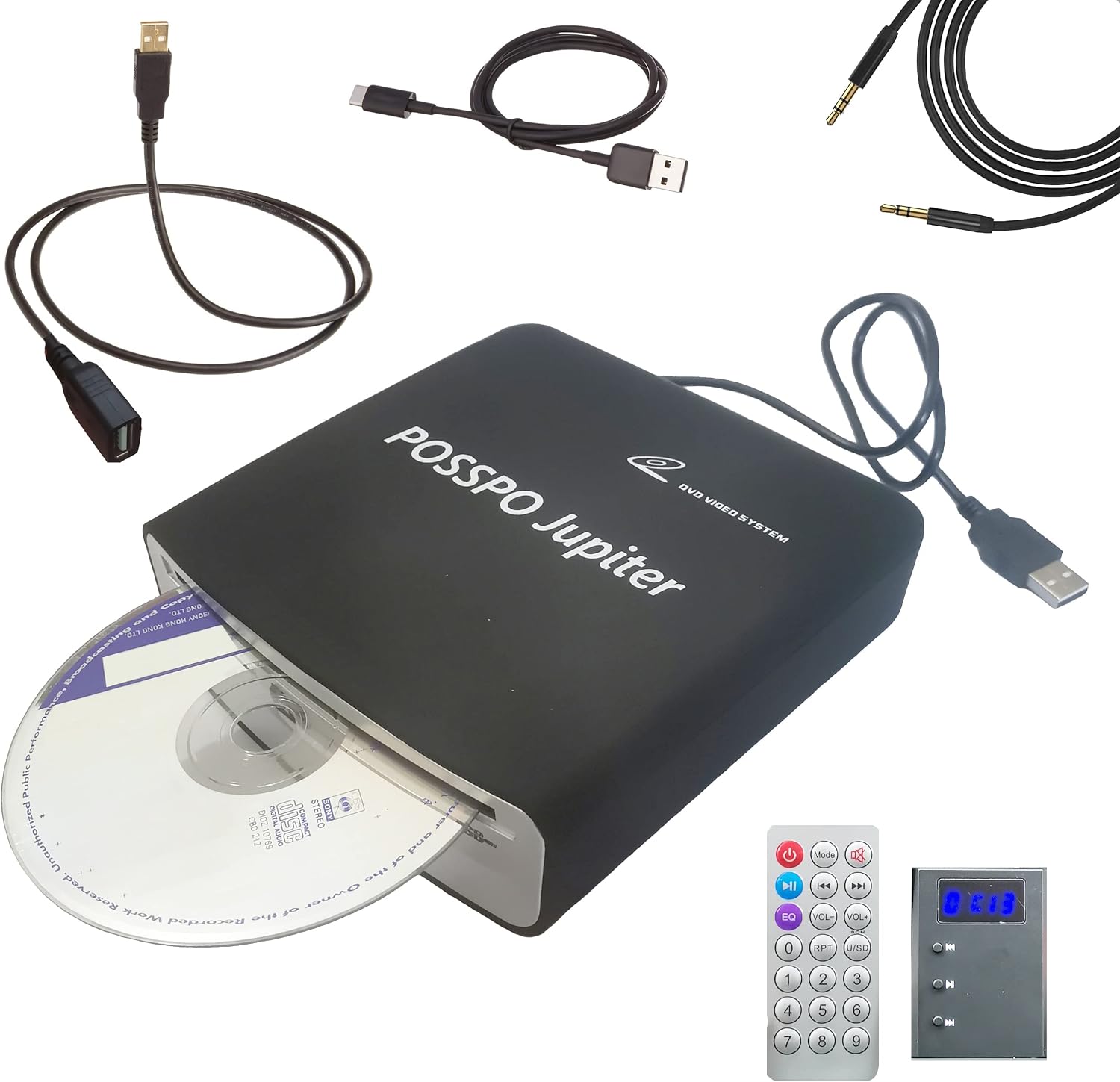
Description:
What's in the box
Details:
| Brand | POSSPO |
|---|---|
| Model Name | Jupiter |
| Color | black |
| Connectivity Technology | Auxiliary, USB, USB-A, USB-C |
| Special Feature | Decoder Included for Enhanced AUX Sound (Clearer & Louder); Balanced Volume; Extra decoder = louder, clearer AUX sound., Easy to Install; USB, USB-A, USB-C or AUX Connection (Car Stereo), Portable External CD/DVD Player; CD-R/RW & DVD±R/RW; Not Blu-ray, Resume Playback; Remembers Where You Left Off, Seamless Track Playback; No Silence Between Tracks |
Visit the POSSPO Store
Jupiter USB CD Player for Car Auto Portable, DVD for PC, Support AUX
 Imported From: United States
At BOLO, we work hard to ensure the products you receive are new, genuine, and sourced from reputable suppliers.
Every product in the BOLO catalogue is sourced through our Verified Global Supply Network of verified sellers, authorized distributors or directly from the manufacturer.
Each product undergoes thorough inspection and verification at our consolidation and fulfilment centers to ensure it meets our strict authenticity and quality standards before being shipped and delivered to you.
If you ever have concerns regarding the authenticity of a product purchased from us, please contact Bolo Support. We will review your inquiry promptly and, if necessary, provide documentation verifying authenticity or offer a suitable resolution.
Your trust is our top priority, and we are committed to maintaining transparency and integrity in every transaction.
While we strive to display accurate information, variations in packaging, labeling, instructions, or formulation may occasionally occur due to regional differences or supplier updates. For detailed or manufacturer-specific information, please contact the brand directly or reach out to BOLO Support for assistance.
Unless otherwise stated, all prices displayed on the product page include applicable taxes and import duties.
BOLO operates in accordance with the laws and regulations of United Arab Emirates. Any items found to be restricted or prohibited for sale within the United Arab Emirates will be cancelled prior to shipment. We take proactive measures to ensure that only products permitted for sale in United Arab Emirates are listed on our website.
All items are shipped by air, and any products classified as “Dangerous Goods (DG)” under IATA regulations will be removed from the order and cancelled.
All orders are processed manually, and we make every effort to process them promptly once confirmed. Products cancelled due to the above reasons will be permanently removed from listings across the website.
External CD Player for Cars Without a Built-In CD Player

Premium Sound Quality & Anti-skip Function. Work on More Cars with Many Different Kinds of Car Stereos. Easy to Insert a CD and Take Out CD
This upgraded USB external CD player is compatible with most cars with Android & Non-Android car radio (including factory car stereo). It is also compatible with laptop, computer, desktop, TV, etc.
- For cars with Android car radio
- For cars with Non-Android radio (compatible with system Linux, Wince, etc.)
- For new cars with factory car radio
- For cars with USB input (make sure car radio supports playing WAV audio files when using this function)
- For cars with AUX input (the 3.5mm auxiliary port) -- Our external USB CD player comes with a decoder. For cars which don't support playing WAV audio files, audio from the CD player can be transferred to the car radio via AUX input. Compatible with all cars that have AUX port.
- For Laptop, computer, Desktop, Portable Speakers with AUX input
NOTE: It is NOT a blue ray CD player.
Disc Format: DVD-ROM, DVD±R, DVD±RW, CD-ROM, CD-R,CD-RW
Sound quality is great. Our CD player also comes with an anti-skip function which works fine.
WHEN Ordering, PLEASE MAKE SURE THE CD PLAYER IS .sold-by "POSSPO-USA". THIS IS VERY IMPORTANT FOR theWARRANTY. WE ARE THE ONLY ONE WHO IS THE MANUFACTURER. ONLY "POSSPO-USA" WILL PROVIDE CUSTOMER-SUPPORT ON THIS PRODUCT.
Compatible with Factory/Stock Radios Manufactured in Recent Years --Sound Quality is great when connecting to car via USB/USB-C or AUX Port

3 Ways to Connect: USB, USB-C or AUX
The CD player is compatible with most new car manufactured in recent years. But you need to check whether your factory car radio supports playing WAV music files or not.
NOTE: Your car radio must be able to play WAV music files in order to use this external USB CD player. Otherwise, your car radio will not be able to play CD disc music.
If you are not sure whether your factory / stock car stereo supports playing WAV music files or not, please kindly contact-us via Amazon .messages. We will help you check this.
If our CD player works on your car, the sound will come through your car's speakers, and you can use your factory steering wheel control ( steering wheel buttons ) to control the CD player.
Three Ways to Connect Our CD Player to Cars (Compatible with More Cars)--Premium Sound Quality :
- For USB Connection, need to make sure your car radio supports playing WAV audio files. For USB Connection, tracks will be displayeed on the screen of car radio.
- For USB-C Connection, need to make sure your vehicle's USB-C port supports WAV audio playback. A USB-A to USB-C adapter is included in the package of the CD player. So the CD player can be also connected to a data Type-C port.
- For AUX Connection, just need to check if your vehicle has the AUX input (the 3.5mm Auxiliary input jack). For AUX connection, please note tracks of CD disc will not be displayed on the screen of the car stereo. Please check the dashboard or the center console to see whether your vehicle has the 3.5mm AUX port. As long as your car has the 3.5mm AUX port, our CD player definitely can be connected to your vehicle via the AUX port, and definitely compatible with your vehicle via AUX connection.
With the decoder added, the AUX connection delivers much better sound quality than many other CD players.
USB Connection – Please Check WAV Playback Support

For USB or USB-C connection, your vehicle’s infotainment system must support playing WAV audio files through the data USB port. After connecting the CD player, switch the audio source to USB and select a track for playback. If you are not sure whether your vehicle supports WAV playback through USB, please contact-us before purchase.
Compatible with Aftermarket Android and Non-Android Car Stereo

Also Work with Aftermarket Non-Android Car Stereo (Compatible with Linux, Wince, etc.). Enhance Your Audio Experience While Driving.
For aftermarket car radio with Non-Android system (compatible with Linux, Wince, etc.), the upgraded CD player is also compatible with the after-market Non-Android car stereo.
Is this USB external CD player compatible withPioneer car stereo? Can it work for .Ken.wood. car radio or for J.V.C head unit? Does it work for.Sony car stereo? Please check your car stereo's user manual to see if it supports USB external CD player or reach out to us to help check for you.
Enhance Your Audio Experience While Driving, which digital streaming like Bluetooth cannot achieve. This optimal CD player will help you enjoy the bass of a song.
This USB AUX CD player is also compatible with other brands' Non-Android Stereo.
Please check if your aftermarket car radio supports playing WAV music files.
Plug & Play--Tracks of Disk Will Be Displayed on the Screen of Radio/Stereo

How to Use the CD/DVD Player
- Plug the CD player into the USB port (USB 2.0) of your car radio.
- Insert the CD disc.
- Go to Media. Change source to USB ( Just need to Select USB ).
- Then all the tracks with WAV format will be displayed on the screen of your car stereo after you plug the CD/DVD player into your car stereo via the USB port.
- You can select one of the tracks to start playing music.
NOTE: After the CD disc is inserted into the CD player, it will take a few seconds for the CD player to index and decode the music files with.cda format on the CD disc.
Only discs with standard CD music format (.cda) can be indexed and decoded by our CD player.
100% Compatible with your car if your car radio supports playing WAV music files & the media file format of your CD disk is .cda--For USB Connection

Pay Attention to Points 1 & 2 (Contac.t us to get a music file which will help you confirm if this CD player is compatible with your car or not)
Our CD/DVD player is definitely compatible with your vehicle if you can confirm the two points below (for USB connection ONLY).
- Your car radio supports playing music files with WAV format.
- The format of music or other audio files on your discs is .cda.
Contact.us for more details if you are not sure. Send us .message. via Amazon or emai.l us (check QA for more information). Then an audio file will be sent out to you to help you confirm if our CD player can work on your vehicle or not.
For example, car owners would like to know if this CD player is compatible with .Ford. vehicles. How to check & confirm whether our USB CD player is compatible with .Ford. vehicles or not?
Here is the important information that we need.
For.Ford SYNC, the website says it supports playing WAV audio files on the USB devices (USB format needs to be FAT16 or FAT32, and USB specification is USB 2.0).
- Our CD player is recognized by car stereo as a USB 2.0 device with format FAT32.
- And the decoded format of the audio files in our CD player is WAV. So our CD player should be compatible with.Ford vehicle if your vehicle does support playing WAV files via USB 2.0 Port.
But for specific.Ford vehicles, we still hope you can check this before purchase.
- If you can check & confirm by yourself that your specific vehicle supports playing WAV audio files, you can order directly.
- But if you are not sure whether your specific vehicle car radio supports playing WAV audio files or not, please kindly .contact. us. We will help you confirm this.
3. Our CD/DVD player is ALSO compatible with your vehicle if your vehicle has the 3.5mm AUX Port (for AUX port connection).
As long as your vehicle has the 3.5mm AUX port, our CD player is compatible with your vehicle. Please check our video to show you how to connect our CD player to your car via AUX port.
Compatible with Factory Radios Manufactured in Recent Years--.Contact.us to check if our CD player is compatible with your car before purchase

(1) For USB Connecton, Need to Make Sure Your Car Supports Playing WAV Audio Files. (2) For AUX Connection, Need to Make Sure Your Car Has AUX Port
For other vehicles/cars which have not been mentioned above & don't have AUX Ports (especially the make is 2025 and 2026), we suggest buyers should contact.us before purchase to confirm if this CD player is compatible with their specific cars when connecting our CD player to cars via USB. Normally we will send buyers a file to test on the car radio. This will help confirm whether our CD player works on a specific car or not. If you do know your car radio supports playing WAV files, you can order it directly. But please do pay attention to the details listed in all of the images above. (Check the QA section with video uploaded to get more information. You can also contact.us).
More from this brand
Similar items from “Portable CD Players”
Share with
Or share with link
https://www.bolo.ae/products/UO0OEU1KCPZ
Visit the POSSPO Store
Jupiter USB CD Player for Car Auto Portable, DVD for PC, Support AUX
Imported From: United States
At BOLO, we work hard to ensure the products you receive are new, genuine, and sourced from reputable suppliers.
Every product in the BOLO catalogue is sourced through our Verified Global Supply Network of verified sellers, authorized distributors or directly from the manufacturer.
Each product undergoes thorough inspection and verification at our consolidation and fulfilment centers to ensure it meets our strict authenticity and quality standards before being shipped and delivered to you.
If you ever have concerns regarding the authenticity of a product purchased from us, please contact Bolo Support. We will review your inquiry promptly and, if necessary, provide documentation verifying authenticity or offer a suitable resolution.
Your trust is our top priority, and we are committed to maintaining transparency and integrity in every transaction.
While we strive to display accurate information, variations in packaging, labeling, instructions, or formulation may occasionally occur due to regional differences or supplier updates. For detailed or manufacturer-specific information, please contact the brand directly or reach out to BOLO Support for assistance.
Unless otherwise stated, all prices displayed on the product page include applicable taxes and import duties.
BOLO operates in accordance with the laws and regulations of United Arab Emirates. Any items found to be restricted or prohibited for sale within the United Arab Emirates will be cancelled prior to shipment. We take proactive measures to ensure that only products permitted for sale in United Arab Emirates are listed on our website.
All items are shipped by air, and any products classified as “Dangerous Goods (DG)” under IATA regulations will be removed from the order and cancelled.
All orders are processed manually, and we make every effort to process them promptly once confirmed. Products cancelled due to the above reasons will be permanently removed from listings across the website.
Description:
What's in the box
Details:
| Brand | POSSPO |
|---|---|
| Model Name | Jupiter |
| Color | black |
| Connectivity Technology | Auxiliary, USB, USB-A, USB-C |
| Special Feature | Decoder Included for Enhanced AUX Sound (Clearer & Louder); Balanced Volume; Extra decoder = louder, clearer AUX sound., Easy to Install; USB, USB-A, USB-C or AUX Connection (Car Stereo), Portable External CD/DVD Player; CD-R/RW & DVD±R/RW; Not Blu-ray, Resume Playback; Remembers Where You Left Off, Seamless Track Playback; No Silence Between Tracks |
External CD Player for Cars Without a Built-In CD Player
Premium Sound Quality & Anti-skip Function. Work on More Cars with Many Different Kinds of Car Stereos. Easy to Insert a CD and Take Out CD
This upgraded USB external CD player is compatible with most cars with Android & Non-Android car radio (including factory car stereo). It is also compatible with laptop, computer, desktop, TV, etc.
- For cars with Android car radio
- For cars with Non-Android radio (compatible with system Linux, Wince, etc.)
- For new cars with factory car radio
- For cars with USB input (make sure car radio supports playing WAV audio files when using this function)
- For cars with AUX input (the 3.5mm auxiliary port) -- Our external USB CD player comes with a decoder. For cars which don't support playing WAV audio files, audio from the CD player can be transferred to the car radio via AUX input. Compatible with all cars that have AUX port.
- For Laptop, computer, Desktop, Portable Speakers with AUX input
NOTE: It is NOT a blue ray CD player.
Disc Format: DVD-ROM, DVD±R, DVD±RW, CD-ROM, CD-R,CD-RW
Sound quality is great. Our CD player also comes with an anti-skip function which works fine.
WHEN Ordering, PLEASE MAKE SURE THE CD PLAYER IS .sold-by "POSSPO-USA". THIS IS VERY IMPORTANT FOR theWARRANTY. WE ARE THE ONLY ONE WHO IS THE MANUFACTURER. ONLY "POSSPO-USA" WILL PROVIDE CUSTOMER-SUPPORT ON THIS PRODUCT.
Compatible with Factory/Stock Radios Manufactured in Recent Years --Sound Quality is great when connecting to car via USB/USB-C or AUX Port
3 Ways to Connect: USB, USB-C or AUX
The CD player is compatible with most new car manufactured in recent years. But you need to check whether your factory car radio supports playing WAV music files or not.
NOTE: Your car radio must be able to play WAV music files in order to use this external USB CD player. Otherwise, your car radio will not be able to play CD disc music.
If you are not sure whether your factory / stock car stereo supports playing WAV music files or not, please kindly contact-us via Amazon .messages. We will help you check this.
If our CD player works on your car, the sound will come through your car's speakers, and you can use your factory steering wheel control ( steering wheel buttons ) to control the CD player.
Three Ways to Connect Our CD Player to Cars (Compatible with More Cars)--Premium Sound Quality :
- For USB Connection, need to make sure your car radio supports playing WAV audio files. For USB Connection, tracks will be displayeed on the screen of car radio.
- For USB-C Connection, need to make sure your vehicle's USB-C port supports WAV audio playback. A USB-A to USB-C adapter is included in the package of the CD player. So the CD player can be also connected to a data Type-C port.
- For AUX Connection, just need to check if your vehicle has the AUX input (the 3.5mm Auxiliary input jack). For AUX connection, please note tracks of CD disc will not be displayed on the screen of the car stereo. Please check the dashboard or the center console to see whether your vehicle has the 3.5mm AUX port. As long as your car has the 3.5mm AUX port, our CD player definitely can be connected to your vehicle via the AUX port, and definitely compatible with your vehicle via AUX connection.
With the decoder added, the AUX connection delivers much better sound quality than many other CD players.
USB Connection – Please Check WAV Playback Support
For USB or USB-C connection, your vehicle’s infotainment system must support playing WAV audio files through the data USB port. After connecting the CD player, switch the audio source to USB and select a track for playback. If you are not sure whether your vehicle supports WAV playback through USB, please contact-us before purchase.
Compatible with Aftermarket Android and Non-Android Car Stereo
Also Work with Aftermarket Non-Android Car Stereo (Compatible with Linux, Wince, etc.). Enhance Your Audio Experience While Driving.
For aftermarket car radio with Non-Android system (compatible with Linux, Wince, etc.), the upgraded CD player is also compatible with the after-market Non-Android car stereo.
Is this USB external CD player compatible withPioneer car stereo? Can it work for .Ken.wood. car radio or for J.V.C head unit? Does it work for.Sony car stereo? Please check your car stereo's user manual to see if it supports USB external CD player or reach out to us to help check for you.
Enhance Your Audio Experience While Driving, which digital streaming like Bluetooth cannot achieve. This optimal CD player will help you enjoy the bass of a song.
This USB AUX CD player is also compatible with other brands' Non-Android Stereo.
Please check if your aftermarket car radio supports playing WAV music files.
Plug & Play--Tracks of Disk Will Be Displayed on the Screen of Radio/Stereo
How to Use the CD/DVD Player
- Plug the CD player into the USB port (USB 2.0) of your car radio.
- Insert the CD disc.
- Go to Media. Change source to USB ( Just need to Select USB ).
- Then all the tracks with WAV format will be displayed on the screen of your car stereo after you plug the CD/DVD player into your car stereo via the USB port.
- You can select one of the tracks to start playing music.
NOTE: After the CD disc is inserted into the CD player, it will take a few seconds for the CD player to index and decode the music files with.cda format on the CD disc.
Only discs with standard CD music format (.cda) can be indexed and decoded by our CD player.
100% Compatible with your car if your car radio supports playing WAV music files & the media file format of your CD disk is .cda--For USB Connection
Pay Attention to Points 1 & 2 (Contac.t us to get a music file which will help you confirm if this CD player is compatible with your car or not)
Our CD/DVD player is definitely compatible with your vehicle if you can confirm the two points below (for USB connection ONLY).
- Your car radio supports playing music files with WAV format.
- The format of music or other audio files on your discs is .cda.
Contact.us for more details if you are not sure. Send us .message. via Amazon or emai.l us (check QA for more information). Then an audio file will be sent out to you to help you confirm if our CD player can work on your vehicle or not.
For example, car owners would like to know if this CD player is compatible with .Ford. vehicles. How to check & confirm whether our USB CD player is compatible with .Ford. vehicles or not?
Here is the important information that we need.
For.Ford SYNC, the website says it supports playing WAV audio files on the USB devices (USB format needs to be FAT16 or FAT32, and USB specification is USB 2.0).
- Our CD player is recognized by car stereo as a USB 2.0 device with format FAT32.
- And the decoded format of the audio files in our CD player is WAV. So our CD player should be compatible with.Ford vehicle if your vehicle does support playing WAV files via USB 2.0 Port.
But for specific.Ford vehicles, we still hope you can check this before purchase.
- If you can check & confirm by yourself that your specific vehicle supports playing WAV audio files, you can order directly.
- But if you are not sure whether your specific vehicle car radio supports playing WAV audio files or not, please kindly .contact. us. We will help you confirm this.
3. Our CD/DVD player is ALSO compatible with your vehicle if your vehicle has the 3.5mm AUX Port (for AUX port connection).
As long as your vehicle has the 3.5mm AUX port, our CD player is compatible with your vehicle. Please check our video to show you how to connect our CD player to your car via AUX port.
Compatible with Factory Radios Manufactured in Recent Years--.Contact.us to check if our CD player is compatible with your car before purchase
(1) For USB Connecton, Need to Make Sure Your Car Supports Playing WAV Audio Files. (2) For AUX Connection, Need to Make Sure Your Car Has AUX Port
For other vehicles/cars which have not been mentioned above & don't have AUX Ports (especially the make is 2025 and 2026), we suggest buyers should contact.us before purchase to confirm if this CD player is compatible with their specific cars when connecting our CD player to cars via USB. Normally we will send buyers a file to test on the car radio. This will help confirm whether our CD player works on a specific car or not. If you do know your car radio supports playing WAV files, you can order it directly. But please do pay attention to the details listed in all of the images above. (Check the QA section with video uploaded to get more information. You can also contact.us).
More from this brand
Similar items from “Portable CD Players”
Share with
Or share with link
https://www.bolo.ae/products/UO0OEU1KCPZ