Deliver toUnited Arab Emirates
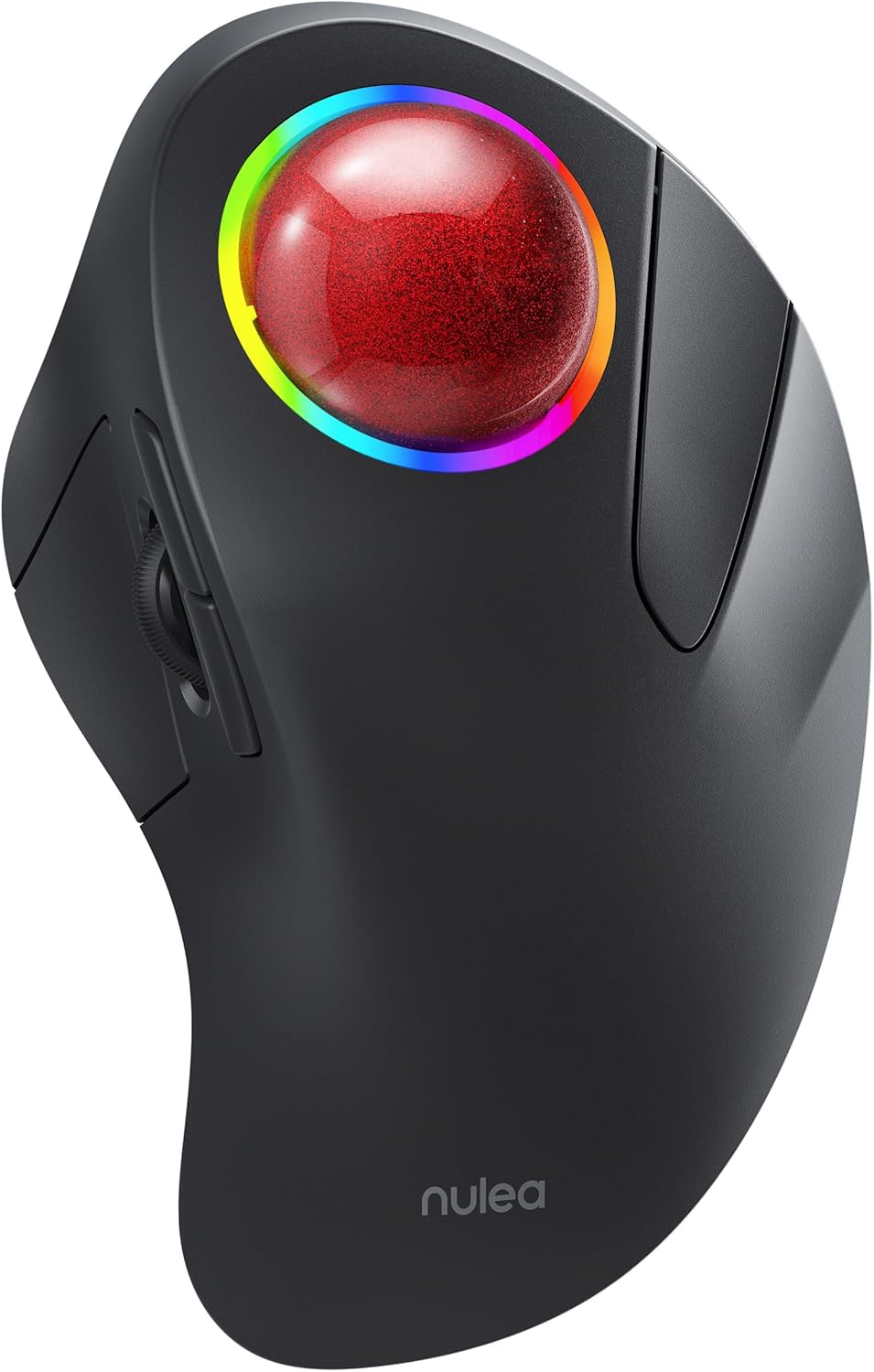
Nulea M505B Wireless Trackball Mouse, Rechargeable Ergonomic RGB Rollerball Mouse, Easy Index Finger Control with 5 Adjustable DPI, 3 Device Connection for PC, Laptop, iPad, Mac, Windows, Android

Description:

  • Ergonomic Design for Comfort: Nulea M505 trackball mouse is designed to fit your hand greatly, reducing muscle stress and promoting comfort. The 44mm index finger trackball enhances cursor control and reduces arm stiffness, making it an effective solution for treating wrist pain.
  • Precise Tracking with Adjustable DPI: With 5 different DPI modes, the trackball mouse allows you to adjust cursor movement for superior accuracy and control. You can easily switch between DPI modes using the button located at the bottom of the mouse.
  • Great for Small Work Spaces: The smooth index finger trackball allows you to navigate your cursor on practically any surface, making it ideal for small workspaces. Whether you're working at a cluttered desk or on a couch or bed, Nulea trackball mouse can boost your efficiency.
  • Long-Lasting Battery: Our ergonomic mouse features a built-in rechargeable battery that lasts up to 45 days on a single full charge. You can use our mouse for extended periods without worrying about charging it.
  • RGB Effect:The index finger trackball mouse comes equipped with an RGB effect that adds a pop of color to your setup. You can turn the light off or on by Long pressing the left and right button for three seconds.

  • Reviews:

    5.0 out of 5 stars Quality mouse with a smooth, solid, satisfying feel

    R.p. · September 13, 2023

    I've been using an elcom thumb trackball mouse for a couple of years. I was "underwhelmed" when I got that one, as it has a very cheap, jankety feel to it. This one, the Nulea, is what I was hoping for when I ordered the elecom. The Nulea has a very solid feel, the trackball is insanely smooth and satisfying to use. The buttons have a very solid click (my elcom will audibly click sometimes, without registering on the computer. Very annoying.) It has a nice matte finish to it. I imagine that'll probably wear through fairly quickly, but it sure looks and feels nice while it's new.Even though it took me a couple of times to get used to, I prefer the index finger location for the trackball, as it feels easier for me for fine motor skills.It pairs nicely with my PC and my iPad via Bluetooth. I haven't tried the dongle, I'd rather not have that hanging up on my computer bag when I put my computer away. So far, it seems that I won't have to. Yay!The only thing that I am not impressed with is the scroll wheel with the iPad. It seems to vary in speed as you scroll through content (perhaps in relation to what you scroll through? I haven't figured that out yet). I'll be spinning it as fast as I can and the page I'm on will be barely crawling by, then it will suddenly lurch forward at a speed you would expect, then return to it's turtle pace, seemingly randomly.I've only used it for a short time on my PC, but the scroll wheel seems to behave perfectly on it.It came charged, I have not had to charge it yet. Nice not to have to put batteries in it.Packaging was really nice, I typically don't care about that much, but unboxing this thing made me think that it was going to be high quality. I have not been disappointed.I love the size of the trackball, but I kinda wish the whole mouse were smaller. It is reasonably comfortable, but I'd like to take it with me sometimes, and it is huge. There is palm support engineered into the back of this thing. It seems to me that they could have eliminated that by chopping 2" or so off of the back and allowed your palm to rest on the desk, then made the whole mouse 1/2-3/4" shorter, vertically. But, maybe they tried that and this felt significantly better? If your not packing it in your computer bag, it's fine as it is.Bottom line, even with my minor gripes, this is my favorite mouse to date. This thing is solid and is very satisfying to use!

    5.0 out of 5 stars So far, so good, works well, and fits my hand

    L. · September 16, 2024

    Easy to use, fits my hand well, and I like that I can easily scroll up and down. Only minor negative is that it has to be woken up sometimes which is easily done by pressing the right button. Also I like that it's wireless.

    4.0 out of 5 stars A very good basic trackball

    W.H.B. · September 19, 2024

    I was looking for a replacement for my decades old trackball that was finally glitching after years of daily use. The reviews for this Nulea M505B Wireless Trackball looked good, the price was reasonable, so I took a chance on a company I've never heard of before. My worries were mainly around it being a cheap Chinese knock-off that wouldn't last.When it arrived, it was what I wanted: a BASIC trackball with left, right, scroll wheel, forward, back, and a decent sized ball. It was plug and play into my Linux box, no setup, no tweaking required.The ball is smooth rolling, but does seem to stick a little bit at a certain point. That is the only reason for four instead of five stars. I think it will smooth out that point with a little cleaning.It took me only a couple of days to get acclimatized to it. The scroll wheel is on the side while I'm used to it being on top. That led to some user errors until I got more used to it. The scroll wheel is, as expected, also the middle button.The light ring around the ball seems, as others have noted, to serve no real purpose other than to look pretty. Left+right for 30 seconds turns it off. The ring only seems to light up while you're directly using the trackball. Let it sit 30 or so seconds and it turns off, so I don't think it takes up that much power. I can't make up my mind if I want it left on or off and keep switching between on and off every once in a while.The trackball is solidly built and doesn't drag on my desktop. The rubbery coating is comfortable and while the ergonomics are different from my old trackball, it is quite comfortable. It did take some messing about to finally figure out the most comfortable position.I'm using the USB dongle that was stored in the bottom in a USB 3.0 port. I'm not seeing any lag and I've not changed off the default DPI setting on the bottom, either. That seems to work just fine for me.The sleep mode, where it turns itself off after 30 minutes of idle time, has caught me a couple of times. As others and the user guide mention, you have to click a button to get it to wake back up. Just moving the ball won't turn it back on. I have no problems with that now that I'm used to it, but the first time that happened I thought the trackball had failed.Charging takes a while, but you can use the trackball while it's charging, so no issues there.None of the buttons are programmable, and I'm quite fine with that.The M505B trackball has some features beyond a mouse: forward/backward buttons (pretty standard on trackballs, though), the DPI adjustments, and the ability to connect to 1 USB and 2 BT ports on different devices. So far I'm using just the USB dongle with my Linux box, but I am curious how well the BT would work with a tablet or laptop. I may try that sometime, but I got it for the main computer and in that role it's working extremely well.The basic functions of a mouse in a trackball format are exactly what I wanted. If you are used to programming oft used functions into trackball buttons, this M505B is not for you. If all you want is a basic trackball with standard mouse functions, I can definitely recommend this unit.UPDATE: Cleaning did not fix the sticking ball, but my old trackball's ball was the same size so I swapped that into the Nuela trackball. That fixed the problem, no more sticking.

    Sehr gute Haptik

    S.K. · October 17, 2023

    Liegt gut in der Hand und sehr genau.

    Il faut un temps d’adaptation

    B.H. · September 30, 2023

    Il m’a fallu quelques jours pour m’adapter à la souris, habitué au souris basique qu’il faut bouger pour faire remuer le curseur sur l’écran celle ci n’a pas besoin d’être bougé, il suffit de s’aider de la boule roule pour orienter le curseur. J’avais également l’habitude de me servir de mon index pour manipuler la roulette sur celle ci c’est le pouce. Je ne pourrais pas dire si c’est mieux ou non qu’une souris basique, tout est une question de goût mais c’est très différent. Son autonomie est excellente, pratiquement 1 mois sans la recharger. Elle se connecte facilement en Bluetooth.

    miglior trackball che ho

    E.M. · June 7, 2023

    il migliore tra i miei trackball. Super smooth and the plastic is silky, setosa molto bella al tatto. La ball è molto molto fluida perfetta per mac OS o windows 11

    super

    C.d. · June 24, 2023

    pour moi

    Apres un temps d'adaptation

    C. · September 21, 2023

    La prise en mains de cette souris requiert un peu de temps mais le gain de confort par la suite est assez énorme.J'avoue avoir galéré les premiers temps à cliquer à coté des boutons, de manquer de précision, mais après quelques jours, c'est un vrai bonheur à utiliser au quotidien.Cette souris ne s'adresse qu'aux droitiers à cause de sa forme asymétrique.C'est une alternative ergonomique que j'utilise professionnellement désormais.

    Nulea M505B Wireless Trackball Mouse, Rechargeable Ergonomic RGB Rollerball Mouse, Easy Index Finger Control with 5 Adjustable DPI, 3 Device Connection for PC, Laptop, iPad, Mac, Windows, Android

    Product ID: UO0OE7XK422
    Condition: New

    4.4

    AED30426

    Price includes VAT & Import Duties
    Availability: In Stock

    Quantity:

    |

    Order today to get by 7-14 business days

    This item qualifies for free delivery

    Returns & Warranty policies

    Imported From: United States

    At BOLO, we work hard to ensure the products you receive are new, genuine, and sourced from reputable suppliers.

    BOLO is not an authorized or official retailer for most brands, nor are we affiliated with manufacturers unless specifically stated on a product page. Instead, we source verified sellers, authorized distributors or directly from the manufacturer.

    Each product undergoes thorough inspection and verification at our consolidation and fulfilment centers to ensure it meets our strict authenticity and quality standards before being shipped and delivered to you.

    If you ever have concerns regarding the authenticity of a product purchased from us, please contact Bolo Support. We will review your inquiry promptly and, if necessary, provide documentation verifying authenticity or offer a suitable resolution.

    Your trust is our top priority, and we are committed to maintaining transparency and integrity in every transaction.

    All product information, images, descriptions, and reviews originate from the manufacturer or from trusted sellers overseas. BOLO is not affiliated with, endorsed by, or an authorized retailer for most brands listed on our website unless stated otherwise.

    While we strive to display accurate information, variations in packaging, labeling, instructions, or formulation may occasionally occur due to regional differences or supplier updates. For detailed or manufacturer-specific information, please contact the brand directly or reach out to BOLO Support for assistance.

    Unless otherwise stated, all prices displayed on the product page include applicable taxes and import duties.

    BOLO operates in accordance with the laws and regulations of United Arab Emirates. Any items found to be restricted or prohibited for sale within the UAE will be cancelled prior to shipment. We take proactive measures to ensure that only products permitted for sale in United Arab Emirates are listed on our website.

    All items are shipped by air, and any products classified as “Dangerous Goods (DG)” under IATA regulations will be removed from the order and cancelled.

    All orders are processed manually, and we make every effort to process them promptly once confirmed. Products cancelled due to the above reasons will be permanently removed from listings across the website.

    More from this brand

    Similar items from “Mice”

    Nulea M505B Wireless Trackball Mouse, Rechargeable Ergonomic RGB Rollerball Mouse, Easy Index Finger Control with 5 Adjustable DPI, 3 Device Connection for PC, Laptop, iPad, Mac, Windows, Android

    Product ID: UO0OE7XK422
    Condition: New

    4.4

    Nulea M505B Wireless Trackball Mouse, Rechargeable Ergonomic RGB Rollerball Mouse, Easy Index Finger Control with 5 Adjustable DPI, 3 Device Connection for PC, Laptop, iPad, Mac, Windows, Android-0

    AED30426

    Price includes VAT & Import Duties
    Availability: In Stock

    Quantity:

    |

    Order today to get by 7-14 business days

    This item qualifies for free delivery

    Returns & Warranty policies

    Imported From: United States

    At BOLO, we work hard to ensure the products you receive are new, genuine, and sourced from reputable suppliers.

    BOLO is not an authorized or official retailer for most brands, nor are we affiliated with manufacturers unless specifically stated on a product page. Instead, we source verified sellers, authorized distributors or directly from the manufacturer.

    Each product undergoes thorough inspection and verification at our consolidation and fulfilment centers to ensure it meets our strict authenticity and quality standards before being shipped and delivered to you.

    If you ever have concerns regarding the authenticity of a product purchased from us, please contact Bolo Support. We will review your inquiry promptly and, if necessary, provide documentation verifying authenticity or offer a suitable resolution.

    Your trust is our top priority, and we are committed to maintaining transparency and integrity in every transaction.

    All product information, images, descriptions, and reviews originate from the manufacturer or from trusted sellers overseas. BOLO is not affiliated with, endorsed by, or an authorized retailer for most brands listed on our website unless stated otherwise.

    While we strive to display accurate information, variations in packaging, labeling, instructions, or formulation may occasionally occur due to regional differences or supplier updates. For detailed or manufacturer-specific information, please contact the brand directly or reach out to BOLO Support for assistance.

    Unless otherwise stated, all prices displayed on the product page include applicable taxes and import duties.

    BOLO operates in accordance with the laws and regulations of United Arab Emirates. Any items found to be restricted or prohibited for sale within the UAE will be cancelled prior to shipment. We take proactive measures to ensure that only products permitted for sale in United Arab Emirates are listed on our website.

    All items are shipped by air, and any products classified as “Dangerous Goods (DG)” under IATA regulations will be removed from the order and cancelled.

    All orders are processed manually, and we make every effort to process them promptly once confirmed. Products cancelled due to the above reasons will be permanently removed from listings across the website.

    Description:

  • Ergonomic Design for Comfort: Nulea M505 trackball mouse is designed to fit your hand greatly, reducing muscle stress and promoting comfort. The 44mm index finger trackball enhances cursor control and reduces arm stiffness, making it an effective solution for treating wrist pain.
  • Precise Tracking with Adjustable DPI: With 5 different DPI modes, the trackball mouse allows you to adjust cursor movement for superior accuracy and control. You can easily switch between DPI modes using the button located at the bottom of the mouse.
  • Great for Small Work Spaces: The smooth index finger trackball allows you to navigate your cursor on practically any surface, making it ideal for small workspaces. Whether you're working at a cluttered desk or on a couch or bed, Nulea trackball mouse can boost your efficiency.
  • Long-Lasting Battery: Our ergonomic mouse features a built-in rechargeable battery that lasts up to 45 days on a single full charge. You can use our mouse for extended periods without worrying about charging it.
  • RGB Effect:The index finger trackball mouse comes equipped with an RGB effect that adds a pop of color to your setup. You can turn the light off or on by Long pressing the left and right button for three seconds.

  • Reviews:

    5.0 out of 5 stars Quality mouse with a smooth, solid, satisfying feel

    R.p. · September 13, 2023

    I've been using an elcom thumb trackball mouse for a couple of years. I was "underwhelmed" when I got that one, as it has a very cheap, jankety feel to it. This one, the Nulea, is what I was hoping for when I ordered the elecom. The Nulea has a very solid feel, the trackball is insanely smooth and satisfying to use. The buttons have a very solid click (my elcom will audibly click sometimes, without registering on the computer. Very annoying.) It has a nice matte finish to it. I imagine that'll probably wear through fairly quickly, but it sure looks and feels nice while it's new.Even though it took me a couple of times to get used to, I prefer the index finger location for the trackball, as it feels easier for me for fine motor skills.It pairs nicely with my PC and my iPad via Bluetooth. I haven't tried the dongle, I'd rather not have that hanging up on my computer bag when I put my computer away. So far, it seems that I won't have to. Yay!The only thing that I am not impressed with is the scroll wheel with the iPad. It seems to vary in speed as you scroll through content (perhaps in relation to what you scroll through? I haven't figured that out yet). I'll be spinning it as fast as I can and the page I'm on will be barely crawling by, then it will suddenly lurch forward at a speed you would expect, then return to it's turtle pace, seemingly randomly.I've only used it for a short time on my PC, but the scroll wheel seems to behave perfectly on it.It came charged, I have not had to charge it yet. Nice not to have to put batteries in it.Packaging was really nice, I typically don't care about that much, but unboxing this thing made me think that it was going to be high quality. I have not been disappointed.I love the size of the trackball, but I kinda wish the whole mouse were smaller. It is reasonably comfortable, but I'd like to take it with me sometimes, and it is huge. There is palm support engineered into the back of this thing. It seems to me that they could have eliminated that by chopping 2" or so off of the back and allowed your palm to rest on the desk, then made the whole mouse 1/2-3/4" shorter, vertically. But, maybe they tried that and this felt significantly better? If your not packing it in your computer bag, it's fine as it is.Bottom line, even with my minor gripes, this is my favorite mouse to date. This thing is solid and is very satisfying to use!

    5.0 out of 5 stars So far, so good, works well, and fits my hand

    L. · September 16, 2024

    Easy to use, fits my hand well, and I like that I can easily scroll up and down. Only minor negative is that it has to be woken up sometimes which is easily done by pressing the right button. Also I like that it's wireless.

    4.0 out of 5 stars A very good basic trackball

    W.H.B. · September 19, 2024

    I was looking for a replacement for my decades old trackball that was finally glitching after years of daily use. The reviews for this Nulea M505B Wireless Trackball looked good, the price was reasonable, so I took a chance on a company I've never heard of before. My worries were mainly around it being a cheap Chinese knock-off that wouldn't last.When it arrived, it was what I wanted: a BASIC trackball with left, right, scroll wheel, forward, back, and a decent sized ball. It was plug and play into my Linux box, no setup, no tweaking required.The ball is smooth rolling, but does seem to stick a little bit at a certain point. That is the only reason for four instead of five stars. I think it will smooth out that point with a little cleaning.It took me only a couple of days to get acclimatized to it. The scroll wheel is on the side while I'm used to it being on top. That led to some user errors until I got more used to it. The scroll wheel is, as expected, also the middle button.The light ring around the ball seems, as others have noted, to serve no real purpose other than to look pretty. Left+right for 30 seconds turns it off. The ring only seems to light up while you're directly using the trackball. Let it sit 30 or so seconds and it turns off, so I don't think it takes up that much power. I can't make up my mind if I want it left on or off and keep switching between on and off every once in a while.The trackball is solidly built and doesn't drag on my desktop. The rubbery coating is comfortable and while the ergonomics are different from my old trackball, it is quite comfortable. It did take some messing about to finally figure out the most comfortable position.I'm using the USB dongle that was stored in the bottom in a USB 3.0 port. I'm not seeing any lag and I've not changed off the default DPI setting on the bottom, either. That seems to work just fine for me.The sleep mode, where it turns itself off after 30 minutes of idle time, has caught me a couple of times. As others and the user guide mention, you have to click a button to get it to wake back up. Just moving the ball won't turn it back on. I have no problems with that now that I'm used to it, but the first time that happened I thought the trackball had failed.Charging takes a while, but you can use the trackball while it's charging, so no issues there.None of the buttons are programmable, and I'm quite fine with that.The M505B trackball has some features beyond a mouse: forward/backward buttons (pretty standard on trackballs, though), the DPI adjustments, and the ability to connect to 1 USB and 2 BT ports on different devices. So far I'm using just the USB dongle with my Linux box, but I am curious how well the BT would work with a tablet or laptop. I may try that sometime, but I got it for the main computer and in that role it's working extremely well.The basic functions of a mouse in a trackball format are exactly what I wanted. If you are used to programming oft used functions into trackball buttons, this M505B is not for you. If all you want is a basic trackball with standard mouse functions, I can definitely recommend this unit.UPDATE: Cleaning did not fix the sticking ball, but my old trackball's ball was the same size so I swapped that into the Nuela trackball. That fixed the problem, no more sticking.

    Sehr gute Haptik

    S.K. · October 17, 2023

    Liegt gut in der Hand und sehr genau.

    Il faut un temps d’adaptation

    B.H. · September 30, 2023

    Il m’a fallu quelques jours pour m’adapter à la souris, habitué au souris basique qu’il faut bouger pour faire remuer le curseur sur l’écran celle ci n’a pas besoin d’être bougé, il suffit de s’aider de la boule roule pour orienter le curseur. J’avais également l’habitude de me servir de mon index pour manipuler la roulette sur celle ci c’est le pouce. Je ne pourrais pas dire si c’est mieux ou non qu’une souris basique, tout est une question de goût mais c’est très différent. Son autonomie est excellente, pratiquement 1 mois sans la recharger. Elle se connecte facilement en Bluetooth.

    miglior trackball che ho

    E.M. · June 7, 2023

    il migliore tra i miei trackball. Super smooth and the plastic is silky, setosa molto bella al tatto. La ball è molto molto fluida perfetta per mac OS o windows 11

    super

    C.d. · June 24, 2023

    pour moi

    Apres un temps d'adaptation

    C. · September 21, 2023

    La prise en mains de cette souris requiert un peu de temps mais le gain de confort par la suite est assez énorme.J'avoue avoir galéré les premiers temps à cliquer à coté des boutons, de manquer de précision, mais après quelques jours, c'est un vrai bonheur à utiliser au quotidien.Cette souris ne s'adresse qu'aux droitiers à cause de sa forme asymétrique.C'est une alternative ergonomique que j'utilise professionnellement désormais.

    More from this brand

    Similar items from “Mice”