Description:
What's in the box
Details:
| Compatible Devices | Headphone Headset Microphone Converter Gaming PC Laptop Mac PS5 PS4 Raspberry Pi |
|---|---|
| Brand | KiwiBird |
| Hardware Interface | USB |
| Audio Output Mode | Stereo |
| Platform | Linux, Mac OS X, PlayStation 4, PlayStation 5, Windows 10, Windows 11, Windows 8, Windows 8 Pro, Windows 8.1 |
Visit the KiwiBird Store
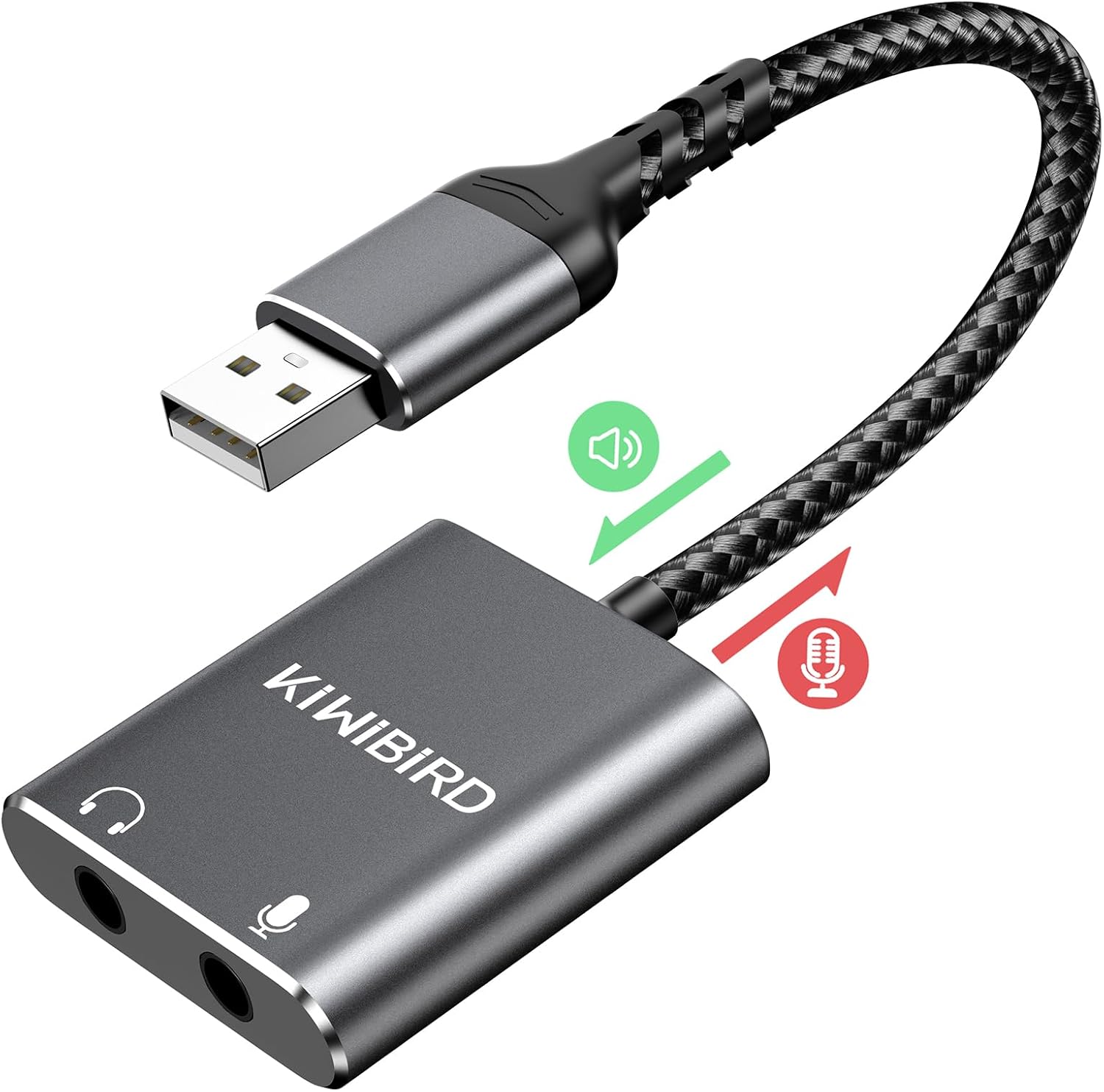
KiWiBiRD External USB Sound Card 3.5mm Jack Audio DAC Stereo Cards Adapter Line in Out Compatible with Headphone Headset Microphone Converter Gaming PC Laptop Mac PS5 PS4 Raspberry Pi Windows Linux
 Imported From: United States
At BOLO, we work hard to ensure the products you receive are new, genuine, and sourced from reputable suppliers.
Every product in the BOLO catalogue is sourced through our Verified Global Supply Network of verified sellers, authorized distributors or directly from the manufacturer.
Each product undergoes thorough inspection and verification at our consolidation and fulfilment centers to ensure it meets our strict authenticity and quality standards before being shipped and delivered to you.
If you ever have concerns regarding the authenticity of a product purchased from us, please contact Bolo Support. We will review your inquiry promptly and, if necessary, provide documentation verifying authenticity or offer a suitable resolution.
Your trust is our top priority, and we are committed to maintaining transparency and integrity in every transaction.
While we strive to display accurate information, variations in packaging, labeling, instructions, or formulation may occasionally occur due to regional differences or supplier updates. For detailed or manufacturer-specific information, please contact the brand directly or reach out to BOLO Support for assistance.
Unless otherwise stated, all prices displayed on the product page include applicable taxes and import duties.
BOLO operates in accordance with the laws and regulations of United Arab Emirates. Any items found to be restricted or prohibited for sale within the United Arab Emirates will be cancelled prior to shipment. We take proactive measures to ensure that only products permitted for sale in United Arab Emirates are listed on our website.
All items are shipped by air, and any products classified as “Dangerous Goods (DG)” under IATA regulations will be removed from the order and cancelled.
All orders are processed manually, and we make every effort to process them promptly once confirmed. Products cancelled due to the above reasons will be permanently removed from listings across the website.

At a Glance:
- USB to 2 x TRS 3-pole CTIA 3.5mm (1/8 inch) Jack
- Audio Output & Microphone Input
- Built-in Noise Reduction DAC Chip
- Robust Aluminium Casing, Reinforced Braided Cable, 12000 Bend Lifetime
- No Driver Needed, Plug & Play
- Fits into your computer USB port snugly, without blocking any adjacent USB ports.
- Lightweight and Portable, Slim and Space saving

Broad Compatibility:
USB Plug for Playback Devices with USB Ports
- PC, Laptop, Desktop, Chromebook, MacBook, Surface Pro, PS5, PS4, Raspberry Pi, etc.
- Does not work with car, TV, projector, Xbox and PS3.
3.5mm Jack for 3-pole TRS or 4-pole TRRS Headphone, Earphone, Headset, Speaker and Microphone
- Gaming headset, earphone with only one single 3.5mm plug (4-pole TRRS).
- Gaming headset, headphone with two 3.5mm plugs ( 2 x 3-pole TRS).
- 3.5mm earphones with 4-pole TRRS CTIA Standard.
- 4-pole TRRS microphone and speaker with 3.5mm TRRS cable.
- 3-pole TRS microphone and speaker with 3.5mm TRS cable.

Kindly Reminder:
- Inline volume and remote control will be disabled when use this adapter.
- NOT compatible with the USB port of TV, Amplifier, CD Player, Car, Projector, PS3, Xbox, Nintendo Switch. Always audio output, microphone input.
- Most operating systems support multiple audio outputs, but only one can be activated at a time. Always select the right audio output through the operating system's built-in audio control panel.

Windows 7/8/8.1/10:
- Step1: Left-click on the sound icon in the taskbar;
- Step2: Select Playback device - headphones (Realtek USB2.0 Audio Device);
- Step3: Adjust the volume on the computer and in the application.

Mac OS:
- Go to System Preferences > Sound > Output or Input > Select a device for sound output > Headphones USB.
Similar suggestions by Bolo
More from this brand
Similar items from “External Sound Cards”
Share with
Or share with link
https://www.bolo.ae/products/UO09ZTQQMJS
Visit the KiwiBird Store
KiWiBiRD External USB Sound Card 3.5mm Jack Audio DAC Stereo Cards Adapter Line in Out Compatible with Headphone Headset Microphone Converter Gaming PC Laptop Mac PS5 PS4 Raspberry Pi Windows Linux
Imported From: United States
At BOLO, we work hard to ensure the products you receive are new, genuine, and sourced from reputable suppliers.
Every product in the BOLO catalogue is sourced through our Verified Global Supply Network of verified sellers, authorized distributors or directly from the manufacturer.
Each product undergoes thorough inspection and verification at our consolidation and fulfilment centers to ensure it meets our strict authenticity and quality standards before being shipped and delivered to you.
If you ever have concerns regarding the authenticity of a product purchased from us, please contact Bolo Support. We will review your inquiry promptly and, if necessary, provide documentation verifying authenticity or offer a suitable resolution.
Your trust is our top priority, and we are committed to maintaining transparency and integrity in every transaction.
While we strive to display accurate information, variations in packaging, labeling, instructions, or formulation may occasionally occur due to regional differences or supplier updates. For detailed or manufacturer-specific information, please contact the brand directly or reach out to BOLO Support for assistance.
Unless otherwise stated, all prices displayed on the product page include applicable taxes and import duties.
BOLO operates in accordance with the laws and regulations of United Arab Emirates. Any items found to be restricted or prohibited for sale within the United Arab Emirates will be cancelled prior to shipment. We take proactive measures to ensure that only products permitted for sale in United Arab Emirates are listed on our website.
All items are shipped by air, and any products classified as “Dangerous Goods (DG)” under IATA regulations will be removed from the order and cancelled.
All orders are processed manually, and we make every effort to process them promptly once confirmed. Products cancelled due to the above reasons will be permanently removed from listings across the website.
Description:
What's in the box
Details:
| Compatible Devices | Headphone Headset Microphone Converter Gaming PC Laptop Mac PS5 PS4 Raspberry Pi |
|---|---|
| Brand | KiwiBird |
| Hardware Interface | USB |
| Audio Output Mode | Stereo |
| Platform | Linux, Mac OS X, PlayStation 4, PlayStation 5, Windows 10, Windows 11, Windows 8, Windows 8 Pro, Windows 8.1 |
At a Glance:
- USB to 2 x TRS 3-pole CTIA 3.5mm (1/8 inch) Jack
- Audio Output & Microphone Input
- Built-in Noise Reduction DAC Chip
- Robust Aluminium Casing, Reinforced Braided Cable, 12000 Bend Lifetime
- No Driver Needed, Plug & Play
- Fits into your computer USB port snugly, without blocking any adjacent USB ports.
- Lightweight and Portable, Slim and Space saving
Broad Compatibility:
USB Plug for Playback Devices with USB Ports
- PC, Laptop, Desktop, Chromebook, MacBook, Surface Pro, PS5, PS4, Raspberry Pi, etc.
- Does not work with car, TV, projector, Xbox and PS3.
3.5mm Jack for 3-pole TRS or 4-pole TRRS Headphone, Earphone, Headset, Speaker and Microphone
- Gaming headset, earphone with only one single 3.5mm plug (4-pole TRRS).
- Gaming headset, headphone with two 3.5mm plugs ( 2 x 3-pole TRS).
- 3.5mm earphones with 4-pole TRRS CTIA Standard.
- 4-pole TRRS microphone and speaker with 3.5mm TRRS cable.
- 3-pole TRS microphone and speaker with 3.5mm TRS cable.
Kindly Reminder:
- Inline volume and remote control will be disabled when use this adapter.
- NOT compatible with the USB port of TV, Amplifier, CD Player, Car, Projector, PS3, Xbox, Nintendo Switch. Always audio output, microphone input.
- Most operating systems support multiple audio outputs, but only one can be activated at a time. Always select the right audio output through the operating system's built-in audio control panel.
Windows 7/8/8.1/10:
- Step1: Left-click on the sound icon in the taskbar;
- Step2: Select Playback device - headphones (Realtek USB2.0 Audio Device);
- Step3: Adjust the volume on the computer and in the application.
Mac OS:
- Go to System Preferences > Sound > Output or Input > Select a device for sound output > Headphones USB.
Similar suggestions by Bolo
More from this brand
Similar items from “External Sound Cards”
Share with
Or share with link
https://www.bolo.ae/products/UO09ZTQQMJS