Deliver toUnited Arab Emirates
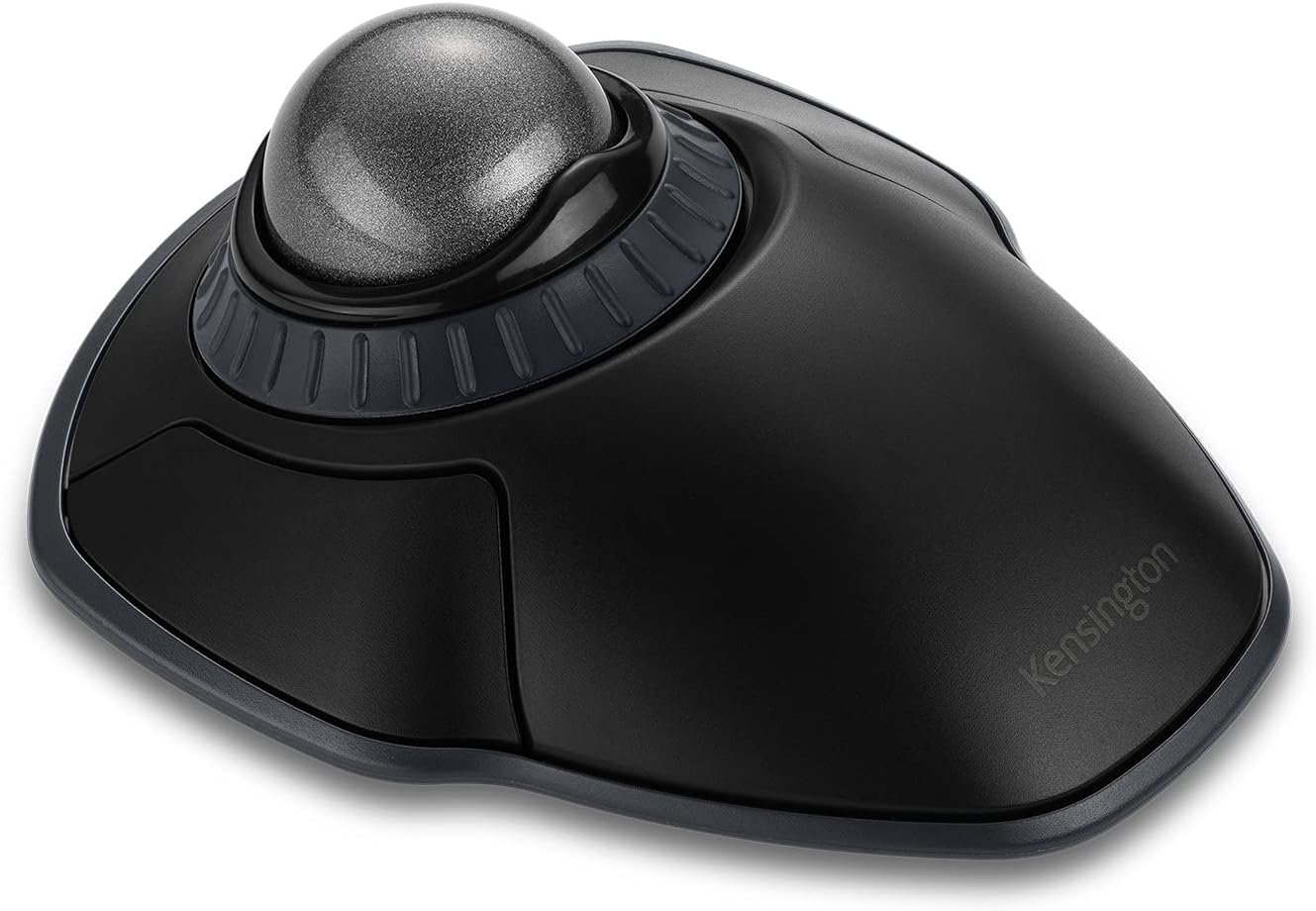
Kensington Orbit Wireless Trackball with Scroll Ring - Space Gray (K72675WW),Black/Grey

Description:

  • Dual wireless connectivity offers the flexibility of 2.4 GHz and Bluetooth (3.0 and LE), with 128-bit AES government-grade encryption security
  • The scroll ring lets you spin the dial to move up and down web pages or documents with complete ease. And the 40mm ball’s hard surface is specially designed as a perfect sphere for precise tracking and control
  • Four DPI settings let you easily adjust the cursor speed to fit your needs by selecting the appropriate level (400, 800, 1,200, or 1,600) — lower DPI for precision editing, and higher DPI for word processing or casual browsing
  • Ambidextrous design works equally well for right-handed and left-handed users. Trackball reduces wrist and hand movement to ease repetitive-stress injuries
  • Free KensingtonKonnect downloadable software provides a personalized experience, giving you the ability to assign a variety of functions (including shortcuts) to the buttons, and adjust cursor and scrolling speed
  • Optical tracking technology delivers precise cursor movement for superior accuracy, so you can get where you want on the screen quickly with less hand movement, improving productivity and efficiency
  • A detachable wrist rest delivers soft cushioning to support the hand and wrist in ergonomic comfort for pain-free productivity during extended periods of activity on the computer
  • Mac and PC compatible

  • The Kensington trackball legacy continues with the latest addition to the patented Orbit Trackball with Scroll Ring — the Orbit Wireless Trackball with Scroll Ring. You asked for wireless, and we delivered, with the same great features that have made the Orbit Trackball with Scroll Ring so popular, including a patented scroll ring that allows you to scroll up and down pages with ease; customizable buttons; dual wireless connectivity offering the flexibility of 2.4 GHz and Bluetooth (3.0 and LE), with 128-bit AES government-grade encryption security; four DPI settings (400, 800, 1,200, or 1,600) that let you easily adjust the cursor speed to fit your needs; a detachable wrist rest; ambidextrous design; and plug-and-play ease for Mac or PC.

    Reviews:

    5.0 out of 5 stars Excellent ambidextrous trackball; anyone know of rechargeable batteries that fit?

    J.J. · May 7, 2023

    I've long been a fan of the Logitech Trackman Marble trackball, but they've stopped making it. It's only available used and for a good bit more money (sadly reminiscent of the Trackman Marble FX), so I've had to look for an alternative. (My thumb hurts if I even look at a trackball set up for a thumb-propelled ball.)Happily, I found this trackball. I wish I'd found it earlier. It's very comfortable. I use Linux, so I can't use KensingtonWorks, but I found that when I connected it, it behaved exactly as I wished, or more accurately it either behaved as I wished or behaved in a way that I realized was just what I wanted when I observed it. Without a window in focus, on Plasma the scroll ring takes me through the virtual workspaces. I don't have to move to the scrollbar to scroll. That may sound trivial, but these days people seem to be making scrollbars insanely narrow--and without the Kensington's scroll ring and that behavior, I've found no way to scroll through the list of Discord servers I participate in.All that and a choice of Bluetooth or wireless connection for a reasonable price. I don't use the included wrist rest, but it's there if you want it. I'd recommend it to anyone.UPDATE: Sadly, after a surprisingly short interval, one of the rubber "feet" on the bottom came off. Anyone know how to put it back on?UPDATE: They take two AA batteries, and some Bolo NiMH batteries I got worked fine...but lately I notice that they're just enough too big that I have to tape the lid on over the batteries. If someone knows of good rechargeable batteries that will actually consistently fit in the trackball, please let me know!

    5.0 out of 5 stars I use it with Logitech right-hand tracking ball mouse to rest my right hand: Pros & Cons

    I. · August 9, 2025

    I am right-handed and for years have used, and enjoyed, the Logitech (now called "Logi") right-hand tracking ball mouse, which unfortunately the company does not make a left-hand version of. Though right handed, my right thumb has begun to hurt from overuse of the right-handed mouse, so I searched hard for a left-hand option so I can use it for a while (either alone or shifting from one mouse to another). After trying a regular "ambidextrous" mouse without a tracking ball, which I returned because it was hard on the wrist, I ordered this Kensington tracking ball mouse which was advertised to be good for (1) ambidextrous (i.e. left and/or right-hand) use, and, (2) large hands (incidentally, "large" is defined as having greater than 7.5" length from the tip of the middle finger to the start of one's wrist; "medium" is 6.5" to 7.5", and "small" is below that). My length is 8". Here's my experience:Pro: I prefer the scroll wheel on the Kensington (which surrounds the track ball) to the scroll wheel on the Logitech (Logi) (which is located on top of the mouse) because it's easier on the hand to rotate the scroll wheel clockwise and counterclockwise on the Kensington mouse than use one's index finger to scroll up and down with the Logi mouse.This scroll wheel feature alone convinced me to keep the Kensington.Pro: As long as you have space on your workspace surface, and have the extra USB port or use the blue tooth function on the Kensington mouse, you can use two computer "mice" simultaneously. I have done so and it's easy. One's computer/laptop simply recognizes whichever mouse you use first, then switches to the other mouse after you stop using the one you're using and start using the other mouse.Pro: It's pretty. I got the red-colored tracking ball and it contrasts positively against the blue-colored tracking ball of my Logitech right-handed tracking ball mouse.Pro: I'm right-handed, so there are cognitive/neurological/brain benefits to using a left-handed mouse (exclusively or in tandem with a right-handed mouse). It's supposed to help prevent Alzheimer's disease, plus it's a lot of fun using my left hand.Pro: Since the Kensington is "ambidextrous" in design, I can use this mouse with my right-hand if I wish, which still would somewhat help alleviate my right-hand thumb pain because the ergonomics of the Kensington are different than the ergonomics of the Logitech tracking ball mouse. But I prefer to use the Kensington fully with my left hand to rest my right thumb and hand.Con (which may be a Pro): The tracking ball is a bit stiffer on the Kensington than the Logi, but (1) that may loosen up over time and (2) that may be an asset (and intentional by Kensington) to prevent accidentally moving the tracking ball on the Kensington, which unlike the Logitech mouse, takes up the top of the mouse instead of being located on the left side of the mouse as is the case for the Logitech tracking ball mouse. Still, I would have loved the tracking ball more if it were just a tad bit smoother/easier to roll. Then again, perhaps my Kensington's tracking ball is a bit stiffer than another tracking ball on the same model mouse: i.e. that may be a problem specific to my "mouse" than the a problem with the design feature itself. But again, it's not overly stiff. It still is easy enough to roll the tracking ball.Con (which has a Pro side): It takes up a bit more space (it's wider) than the Logitech, though this Kensington tracking mouse model is smaller than other Kensington models. Not the worse "bigness", but I cannott use both "mice"/"mouses" (?) at the same time unless I use it at my Varidesk Pro Plus 36 standing desk, which has two mouse pad areas on the left and right of the lower typing level. Due to its lower-sitting size and shape, the Kensington tracking ball mouse is also a bit harder to pick up and move around because it lays flatter and one has less vertical surface to grab onto. But this is not a big problem, plus it may make the Kensington a bit more stable (i.e. harder to topple over).Con (but may be due to newness of use): I did experience some weirdness initially in being unable to "copy" text in order to "paste" it later (the scroll function just froze after rolling down a few sentences) but that may have been due to other laptop factors and not the mouse itself or may have been due to my timing in using the mouse. "Time will tell" because I've only had the mouse for a week, but this perceived problem did not occur enough or persist enough to cause me alarm. 99.5% of the time the scroll wheel function has worked well in copying and pasting.Con (which has a Pro side or logical reason why): It's a bit slower to use the Kensington mouse than the right-handed Logitech, but that may be due to (1) the fact that I'm right-handed, so naturally can use my right-hand better with a right-hand mouse, and, (2) I need more time to get used to the ambidextrous Kensington tracking ball mouse. However, let me repeat, that the Kensington's mouse is easier and faster to use than the Logitech's scroll wheel. Or (3) perhaps the Kensington is a bit slower to use, but it is not annoyingly slower to use.Bottom line: Thus far, after only a week of use, I am happy with this Kensington tracking ball mouse even though I probably would have purchased a left-handed Logitech tracking ball mouse if such a Logitech mouse existed. Then again, maybe not because the scroll wheel on the Kensington is superior to the scroll wheel on the Logitech: it is much easier on the hand to use and faster scrolling up and down (and does not involve the use of one's thumb, so I can still use it with my right-hand that has right-thumb pain). The mouse quality seems pretty good: as good as the Logitech's quality. The weight of both products is similar.

    4.0 out of 5 stars Beats the mouse but has a couple of quirks

    K.C. · September 24, 2022

    I bought this trackball at the end of April, '22, so am coming up on 5 months of use and feel I can now give it a proper review. I had limited space to manipulate a mouse which required me to move the cursor a bit, pick up and return the mouse to the starting point, and incrementally moving it again until I got the cursor where I wanted it. A real pain. The trackball has solved that problem completely.My keyboard and the trackball are on a forward tilting platform. Even so, the design of the trackball resulted ergonomically in my hand being cocked upward forming a V with my arm and bending my wrist at an unnatural angle. So I had to buy a wrist support pad to elevate my wrist and align my hand and arm properly. I can now use the trackball with much less discomfort than I experienced with the mouse, but prolonged use still causes me to have some pain across the back of my hand.I found this trackball easy to use and adapted to it within just a couple of days, now being able to trackball like a pro. I use my second and middle fingers to manipulate the ball, my ring finger to rotate the scrolling ring, and my little finger and thumb respectively to hit the left and right function buttons (I am a southpaw). Using my little finger took a bit of getting used to but now I am quite adept with it. I really like that the scrolling ring used with the CTRL key changes from a scrolling to a zoom function. The software is very versatile and allows me to configure the scrolling speed with an inertia mode function. Using inertia mode is handy because I can scroll slowly in a controlled fashion and then just spin the scrolling ring if I want to rapidly skip to something further up or down. Similarly, the pointer speed and acceleration can be set. However, I have both set to fairly slow because otherwise the pointer speed becomes blinding and is almost uncontrollable. The software also permits configuring the function buttons and reversing the action of the scrolling ring. The composite settings can be saved to and restored from a file. The settings make this a great trackball for use with either hand.I have only had to remove the ball and clean it and the socket a couple of times, when the operation started to become jittery or skip. It is as simple as pushing the ball out of the socket from the rear, then wiping away any dust or debris from both with a soft cloth, and clicking the ball back into the socket.One quirk that is annoying is that at times, the left button is not responsive. It will work fine for weeks and then start working intermittently, then start working normally again. This doesn't happen often but when it does, it is frustrating. The second complaint is that the trackball is just not as precise as a mouse for cursor placement (such as while editing a document). So I keep the mouse handy and still occasionally use it for this purpose. Interestingly enough, the trackball and the mouse work simultaneously and seamlessly and I have gotten quite good at two-handed operation. I understand that reduced precision is a characteristic of trackballs in general so this is only a small negative to me. The DPI switch on the bottom of the trackball housing is a push button, and the DPI is set by repeatedly pushing the button. Unfortunately this is trial and error because there is no way to see what the setting actually is, as would be the case with a position switch. The trackball also has an on/off switch on the bottom. But this is unnecessary for normal use because it turns off automatically if the trackball isn't being used and turns back on when one of the function buttons is clicked.Overall, I really like this trackball. and highly recommend it. There is room for improvement but for the price it is really loaded with features and has really worked well for me.

    Just as described

    G. · December 13, 2024

    Works perfect just as pictured and described

    Muy buen mouse

    I. · July 5, 2025

    Excelente mouse no duele la parte de la muñeca, a diferencia del mouse tradicional

    Stopped working in 6 months and no warranty replacement

    H. · January 4, 2024

    I bought this track ball in India. The left click button stopped working in 6 months of use. When I contacted the support, they told that even though warranty is valid, they do not ship replacement outside UK. If they sell outside UK then why not honour warranty in same place?

    Kensington has the best quality even compared to Logitech and Elecom

    C.K. · September 18, 2023

    Ok, I am a certifiable trackball addict who has purchased >5 trackballs over the past 5 years and still use them regularly. For this brand (Kensington) specifically, I can say that it is of higher quality than Logitech and Elecom. My Logitech MX Ergo's "soft-touch" surface has started wearing out giving it a disgusting mouldy appearance; meanwhile, the newer Logitech M575 didn't even last a year and now the scroll-wheel is broken. I also bought an Elecom Deft Pro and EX-G Pro, both of which don't work anymore, not sure why. I put in fresh batteries but the ball simply doesn't track.By contrast, I bought this Orbit Wireless with scroll-ring because in 2020, I bought the wired version, and 3 years later, it still works. With that vote of confidence, I purchased this wireless model and have been using it happily. The scroll-ring is an excellent feature that perfectly replaces a scroll-wheel in a more conventional mouse or thumb-ball, and allows you even to click, hold, and scroll down, unlike models like the Elecom Deft Pro/Huge where there is a conventional scroll-wheel that has to be thumb-operated, making it unusable simultaneously with the LMB. I have had no connection issues ever with this; for some reason this device has BT 5.0 despite being advertised as 3.0. Buy with confidence (as long as you're ok with using a "finger-ball" of course)!

    Utilissimo

    D. · May 7, 2025

    Molto utile per persone disabile con poca mobilità

    Kensington Orbit Wireless Trackball with Scroll Ring - Space Gray (K72675WW),Black/Grey

    Product ID: UO09Q3EAEWD
    Condition: New

    4.3

    AED40168

    Price includes VAT & Import Duties
    Color: Black-Grey
    Product imageProduct imageProduct image
    Availability: In Stock

    Quantity:

    |

    Order today to get by 7-14 business days

    This item qualifies for free delivery

    Returns & Warranty policies

    Imported From: United States

    At BOLO, we work hard to ensure the products you receive are new, genuine, and sourced from reputable suppliers.

    BOLO is not an authorized or official retailer for most brands, nor are we affiliated with manufacturers unless specifically stated on a product page. Instead, we source verified sellers, authorized distributors or directly from the manufacturer.

    Each product undergoes thorough inspection and verification at our consolidation and fulfilment centers to ensure it meets our strict authenticity and quality standards before being shipped and delivered to you.

    If you ever have concerns regarding the authenticity of a product purchased from us, please contact Bolo Support. We will review your inquiry promptly and, if necessary, provide documentation verifying authenticity or offer a suitable resolution.

    Your trust is our top priority, and we are committed to maintaining transparency and integrity in every transaction.

    All product information, images, descriptions, and reviews originate from the manufacturer or from trusted sellers overseas. BOLO is not affiliated with, endorsed by, or an authorized retailer for most brands listed on our website unless stated otherwise.

    While we strive to display accurate information, variations in packaging, labeling, instructions, or formulation may occasionally occur due to regional differences or supplier updates. For detailed or manufacturer-specific information, please contact the brand directly or reach out to BOLO Support for assistance.

    Unless otherwise stated, all prices displayed on the product page include applicable taxes and import duties.

    BOLO operates in accordance with the laws and regulations of United Arab Emirates. Any items found to be restricted or prohibited for sale within the UAE will be cancelled prior to shipment. We take proactive measures to ensure that only products permitted for sale in United Arab Emirates are listed on our website.

    All items are shipped by air, and any products classified as “Dangerous Goods (DG)” under IATA regulations will be removed from the order and cancelled.

    All orders are processed manually, and we make every effort to process them promptly once confirmed. Products cancelled due to the above reasons will be permanently removed from listings across the website.

    Similar suggestions by Bolo

    More from this brand

    Similar items from “Trackballs”

    Kensington Orbit Wireless Trackball with Scroll Ring - Space Gray (K72675WW),Black/Grey

    Product ID: UO09Q3EAEWD
    Condition: New

    4.3

    Kensington Orbit Wireless Trackball with Scroll Ring - Space Gray (K72675WW),Black/Grey-0
    Color: Black-Grey
    Product imageProduct imageProduct image

    AED40168

    Price includes VAT & Import Duties
    Availability: In Stock

    Quantity:

    |

    Order today to get by 7-14 business days

    This item qualifies for free delivery

    Returns & Warranty policies

    Imported From: United States

    At BOLO, we work hard to ensure the products you receive are new, genuine, and sourced from reputable suppliers.

    BOLO is not an authorized or official retailer for most brands, nor are we affiliated with manufacturers unless specifically stated on a product page. Instead, we source verified sellers, authorized distributors or directly from the manufacturer.

    Each product undergoes thorough inspection and verification at our consolidation and fulfilment centers to ensure it meets our strict authenticity and quality standards before being shipped and delivered to you.

    If you ever have concerns regarding the authenticity of a product purchased from us, please contact Bolo Support. We will review your inquiry promptly and, if necessary, provide documentation verifying authenticity or offer a suitable resolution.

    Your trust is our top priority, and we are committed to maintaining transparency and integrity in every transaction.

    All product information, images, descriptions, and reviews originate from the manufacturer or from trusted sellers overseas. BOLO is not affiliated with, endorsed by, or an authorized retailer for most brands listed on our website unless stated otherwise.

    While we strive to display accurate information, variations in packaging, labeling, instructions, or formulation may occasionally occur due to regional differences or supplier updates. For detailed or manufacturer-specific information, please contact the brand directly or reach out to BOLO Support for assistance.

    Unless otherwise stated, all prices displayed on the product page include applicable taxes and import duties.

    BOLO operates in accordance with the laws and regulations of United Arab Emirates. Any items found to be restricted or prohibited for sale within the UAE will be cancelled prior to shipment. We take proactive measures to ensure that only products permitted for sale in United Arab Emirates are listed on our website.

    All items are shipped by air, and any products classified as “Dangerous Goods (DG)” under IATA regulations will be removed from the order and cancelled.

    All orders are processed manually, and we make every effort to process them promptly once confirmed. Products cancelled due to the above reasons will be permanently removed from listings across the website.

    Description:

  • Dual wireless connectivity offers the flexibility of 2.4 GHz and Bluetooth (3.0 and LE), with 128-bit AES government-grade encryption security
  • The scroll ring lets you spin the dial to move up and down web pages or documents with complete ease. And the 40mm ball’s hard surface is specially designed as a perfect sphere for precise tracking and control
  • Four DPI settings let you easily adjust the cursor speed to fit your needs by selecting the appropriate level (400, 800, 1,200, or 1,600) — lower DPI for precision editing, and higher DPI for word processing or casual browsing
  • Ambidextrous design works equally well for right-handed and left-handed users. Trackball reduces wrist and hand movement to ease repetitive-stress injuries
  • Free KensingtonKonnect downloadable software provides a personalized experience, giving you the ability to assign a variety of functions (including shortcuts) to the buttons, and adjust cursor and scrolling speed
  • Optical tracking technology delivers precise cursor movement for superior accuracy, so you can get where you want on the screen quickly with less hand movement, improving productivity and efficiency
  • A detachable wrist rest delivers soft cushioning to support the hand and wrist in ergonomic comfort for pain-free productivity during extended periods of activity on the computer
  • Mac and PC compatible

  • The Kensington trackball legacy continues with the latest addition to the patented Orbit Trackball with Scroll Ring — the Orbit Wireless Trackball with Scroll Ring. You asked for wireless, and we delivered, with the same great features that have made the Orbit Trackball with Scroll Ring so popular, including a patented scroll ring that allows you to scroll up and down pages with ease; customizable buttons; dual wireless connectivity offering the flexibility of 2.4 GHz and Bluetooth (3.0 and LE), with 128-bit AES government-grade encryption security; four DPI settings (400, 800, 1,200, or 1,600) that let you easily adjust the cursor speed to fit your needs; a detachable wrist rest; ambidextrous design; and plug-and-play ease for Mac or PC.

    Reviews:

    5.0 out of 5 stars Excellent ambidextrous trackball; anyone know of rechargeable batteries that fit?

    J.J. · May 7, 2023

    I've long been a fan of the Logitech Trackman Marble trackball, but they've stopped making it. It's only available used and for a good bit more money (sadly reminiscent of the Trackman Marble FX), so I've had to look for an alternative. (My thumb hurts if I even look at a trackball set up for a thumb-propelled ball.)Happily, I found this trackball. I wish I'd found it earlier. It's very comfortable. I use Linux, so I can't use KensingtonWorks, but I found that when I connected it, it behaved exactly as I wished, or more accurately it either behaved as I wished or behaved in a way that I realized was just what I wanted when I observed it. Without a window in focus, on Plasma the scroll ring takes me through the virtual workspaces. I don't have to move to the scrollbar to scroll. That may sound trivial, but these days people seem to be making scrollbars insanely narrow--and without the Kensington's scroll ring and that behavior, I've found no way to scroll through the list of Discord servers I participate in.All that and a choice of Bluetooth or wireless connection for a reasonable price. I don't use the included wrist rest, but it's there if you want it. I'd recommend it to anyone.UPDATE: Sadly, after a surprisingly short interval, one of the rubber "feet" on the bottom came off. Anyone know how to put it back on?UPDATE: They take two AA batteries, and some Bolo NiMH batteries I got worked fine...but lately I notice that they're just enough too big that I have to tape the lid on over the batteries. If someone knows of good rechargeable batteries that will actually consistently fit in the trackball, please let me know!

    5.0 out of 5 stars I use it with Logitech right-hand tracking ball mouse to rest my right hand: Pros & Cons

    I. · August 9, 2025

    I am right-handed and for years have used, and enjoyed, the Logitech (now called "Logi") right-hand tracking ball mouse, which unfortunately the company does not make a left-hand version of. Though right handed, my right thumb has begun to hurt from overuse of the right-handed mouse, so I searched hard for a left-hand option so I can use it for a while (either alone or shifting from one mouse to another). After trying a regular "ambidextrous" mouse without a tracking ball, which I returned because it was hard on the wrist, I ordered this Kensington tracking ball mouse which was advertised to be good for (1) ambidextrous (i.e. left and/or right-hand) use, and, (2) large hands (incidentally, "large" is defined as having greater than 7.5" length from the tip of the middle finger to the start of one's wrist; "medium" is 6.5" to 7.5", and "small" is below that). My length is 8". Here's my experience:Pro: I prefer the scroll wheel on the Kensington (which surrounds the track ball) to the scroll wheel on the Logitech (Logi) (which is located on top of the mouse) because it's easier on the hand to rotate the scroll wheel clockwise and counterclockwise on the Kensington mouse than use one's index finger to scroll up and down with the Logi mouse.This scroll wheel feature alone convinced me to keep the Kensington.Pro: As long as you have space on your workspace surface, and have the extra USB port or use the blue tooth function on the Kensington mouse, you can use two computer "mice" simultaneously. I have done so and it's easy. One's computer/laptop simply recognizes whichever mouse you use first, then switches to the other mouse after you stop using the one you're using and start using the other mouse.Pro: It's pretty. I got the red-colored tracking ball and it contrasts positively against the blue-colored tracking ball of my Logitech right-handed tracking ball mouse.Pro: I'm right-handed, so there are cognitive/neurological/brain benefits to using a left-handed mouse (exclusively or in tandem with a right-handed mouse). It's supposed to help prevent Alzheimer's disease, plus it's a lot of fun using my left hand.Pro: Since the Kensington is "ambidextrous" in design, I can use this mouse with my right-hand if I wish, which still would somewhat help alleviate my right-hand thumb pain because the ergonomics of the Kensington are different than the ergonomics of the Logitech tracking ball mouse. But I prefer to use the Kensington fully with my left hand to rest my right thumb and hand.Con (which may be a Pro): The tracking ball is a bit stiffer on the Kensington than the Logi, but (1) that may loosen up over time and (2) that may be an asset (and intentional by Kensington) to prevent accidentally moving the tracking ball on the Kensington, which unlike the Logitech mouse, takes up the top of the mouse instead of being located on the left side of the mouse as is the case for the Logitech tracking ball mouse. Still, I would have loved the tracking ball more if it were just a tad bit smoother/easier to roll. Then again, perhaps my Kensington's tracking ball is a bit stiffer than another tracking ball on the same model mouse: i.e. that may be a problem specific to my "mouse" than the a problem with the design feature itself. But again, it's not overly stiff. It still is easy enough to roll the tracking ball.Con (which has a Pro side): It takes up a bit more space (it's wider) than the Logitech, though this Kensington tracking mouse model is smaller than other Kensington models. Not the worse "bigness", but I cannott use both "mice"/"mouses" (?) at the same time unless I use it at my Varidesk Pro Plus 36 standing desk, which has two mouse pad areas on the left and right of the lower typing level. Due to its lower-sitting size and shape, the Kensington tracking ball mouse is also a bit harder to pick up and move around because it lays flatter and one has less vertical surface to grab onto. But this is not a big problem, plus it may make the Kensington a bit more stable (i.e. harder to topple over).Con (but may be due to newness of use): I did experience some weirdness initially in being unable to "copy" text in order to "paste" it later (the scroll function just froze after rolling down a few sentences) but that may have been due to other laptop factors and not the mouse itself or may have been due to my timing in using the mouse. "Time will tell" because I've only had the mouse for a week, but this perceived problem did not occur enough or persist enough to cause me alarm. 99.5% of the time the scroll wheel function has worked well in copying and pasting.Con (which has a Pro side or logical reason why): It's a bit slower to use the Kensington mouse than the right-handed Logitech, but that may be due to (1) the fact that I'm right-handed, so naturally can use my right-hand better with a right-hand mouse, and, (2) I need more time to get used to the ambidextrous Kensington tracking ball mouse. However, let me repeat, that the Kensington's mouse is easier and faster to use than the Logitech's scroll wheel. Or (3) perhaps the Kensington is a bit slower to use, but it is not annoyingly slower to use.Bottom line: Thus far, after only a week of use, I am happy with this Kensington tracking ball mouse even though I probably would have purchased a left-handed Logitech tracking ball mouse if such a Logitech mouse existed. Then again, maybe not because the scroll wheel on the Kensington is superior to the scroll wheel on the Logitech: it is much easier on the hand to use and faster scrolling up and down (and does not involve the use of one's thumb, so I can still use it with my right-hand that has right-thumb pain). The mouse quality seems pretty good: as good as the Logitech's quality. The weight of both products is similar.

    4.0 out of 5 stars Beats the mouse but has a couple of quirks

    K.C. · September 24, 2022

    I bought this trackball at the end of April, '22, so am coming up on 5 months of use and feel I can now give it a proper review. I had limited space to manipulate a mouse which required me to move the cursor a bit, pick up and return the mouse to the starting point, and incrementally moving it again until I got the cursor where I wanted it. A real pain. The trackball has solved that problem completely.My keyboard and the trackball are on a forward tilting platform. Even so, the design of the trackball resulted ergonomically in my hand being cocked upward forming a V with my arm and bending my wrist at an unnatural angle. So I had to buy a wrist support pad to elevate my wrist and align my hand and arm properly. I can now use the trackball with much less discomfort than I experienced with the mouse, but prolonged use still causes me to have some pain across the back of my hand.I found this trackball easy to use and adapted to it within just a couple of days, now being able to trackball like a pro. I use my second and middle fingers to manipulate the ball, my ring finger to rotate the scrolling ring, and my little finger and thumb respectively to hit the left and right function buttons (I am a southpaw). Using my little finger took a bit of getting used to but now I am quite adept with it. I really like that the scrolling ring used with the CTRL key changes from a scrolling to a zoom function. The software is very versatile and allows me to configure the scrolling speed with an inertia mode function. Using inertia mode is handy because I can scroll slowly in a controlled fashion and then just spin the scrolling ring if I want to rapidly skip to something further up or down. Similarly, the pointer speed and acceleration can be set. However, I have both set to fairly slow because otherwise the pointer speed becomes blinding and is almost uncontrollable. The software also permits configuring the function buttons and reversing the action of the scrolling ring. The composite settings can be saved to and restored from a file. The settings make this a great trackball for use with either hand.I have only had to remove the ball and clean it and the socket a couple of times, when the operation started to become jittery or skip. It is as simple as pushing the ball out of the socket from the rear, then wiping away any dust or debris from both with a soft cloth, and clicking the ball back into the socket.One quirk that is annoying is that at times, the left button is not responsive. It will work fine for weeks and then start working intermittently, then start working normally again. This doesn't happen often but when it does, it is frustrating. The second complaint is that the trackball is just not as precise as a mouse for cursor placement (such as while editing a document). So I keep the mouse handy and still occasionally use it for this purpose. Interestingly enough, the trackball and the mouse work simultaneously and seamlessly and I have gotten quite good at two-handed operation. I understand that reduced precision is a characteristic of trackballs in general so this is only a small negative to me. The DPI switch on the bottom of the trackball housing is a push button, and the DPI is set by repeatedly pushing the button. Unfortunately this is trial and error because there is no way to see what the setting actually is, as would be the case with a position switch. The trackball also has an on/off switch on the bottom. But this is unnecessary for normal use because it turns off automatically if the trackball isn't being used and turns back on when one of the function buttons is clicked.Overall, I really like this trackball. and highly recommend it. There is room for improvement but for the price it is really loaded with features and has really worked well for me.

    Just as described

    G. · December 13, 2024

    Works perfect just as pictured and described

    Muy buen mouse

    I. · July 5, 2025

    Excelente mouse no duele la parte de la muñeca, a diferencia del mouse tradicional

    Stopped working in 6 months and no warranty replacement

    H. · January 4, 2024

    I bought this track ball in India. The left click button stopped working in 6 months of use. When I contacted the support, they told that even though warranty is valid, they do not ship replacement outside UK. If they sell outside UK then why not honour warranty in same place?

    Kensington has the best quality even compared to Logitech and Elecom

    C.K. · September 18, 2023

    Ok, I am a certifiable trackball addict who has purchased >5 trackballs over the past 5 years and still use them regularly. For this brand (Kensington) specifically, I can say that it is of higher quality than Logitech and Elecom. My Logitech MX Ergo's "soft-touch" surface has started wearing out giving it a disgusting mouldy appearance; meanwhile, the newer Logitech M575 didn't even last a year and now the scroll-wheel is broken. I also bought an Elecom Deft Pro and EX-G Pro, both of which don't work anymore, not sure why. I put in fresh batteries but the ball simply doesn't track.By contrast, I bought this Orbit Wireless with scroll-ring because in 2020, I bought the wired version, and 3 years later, it still works. With that vote of confidence, I purchased this wireless model and have been using it happily. The scroll-ring is an excellent feature that perfectly replaces a scroll-wheel in a more conventional mouse or thumb-ball, and allows you even to click, hold, and scroll down, unlike models like the Elecom Deft Pro/Huge where there is a conventional scroll-wheel that has to be thumb-operated, making it unusable simultaneously with the LMB. I have had no connection issues ever with this; for some reason this device has BT 5.0 despite being advertised as 3.0. Buy with confidence (as long as you're ok with using a "finger-ball" of course)!

    Utilissimo

    D. · May 7, 2025

    Molto utile per persone disabile con poca mobilità

    Similar suggestions by Bolo

    More from this brand

    Similar items from “Trackballs”