Description:
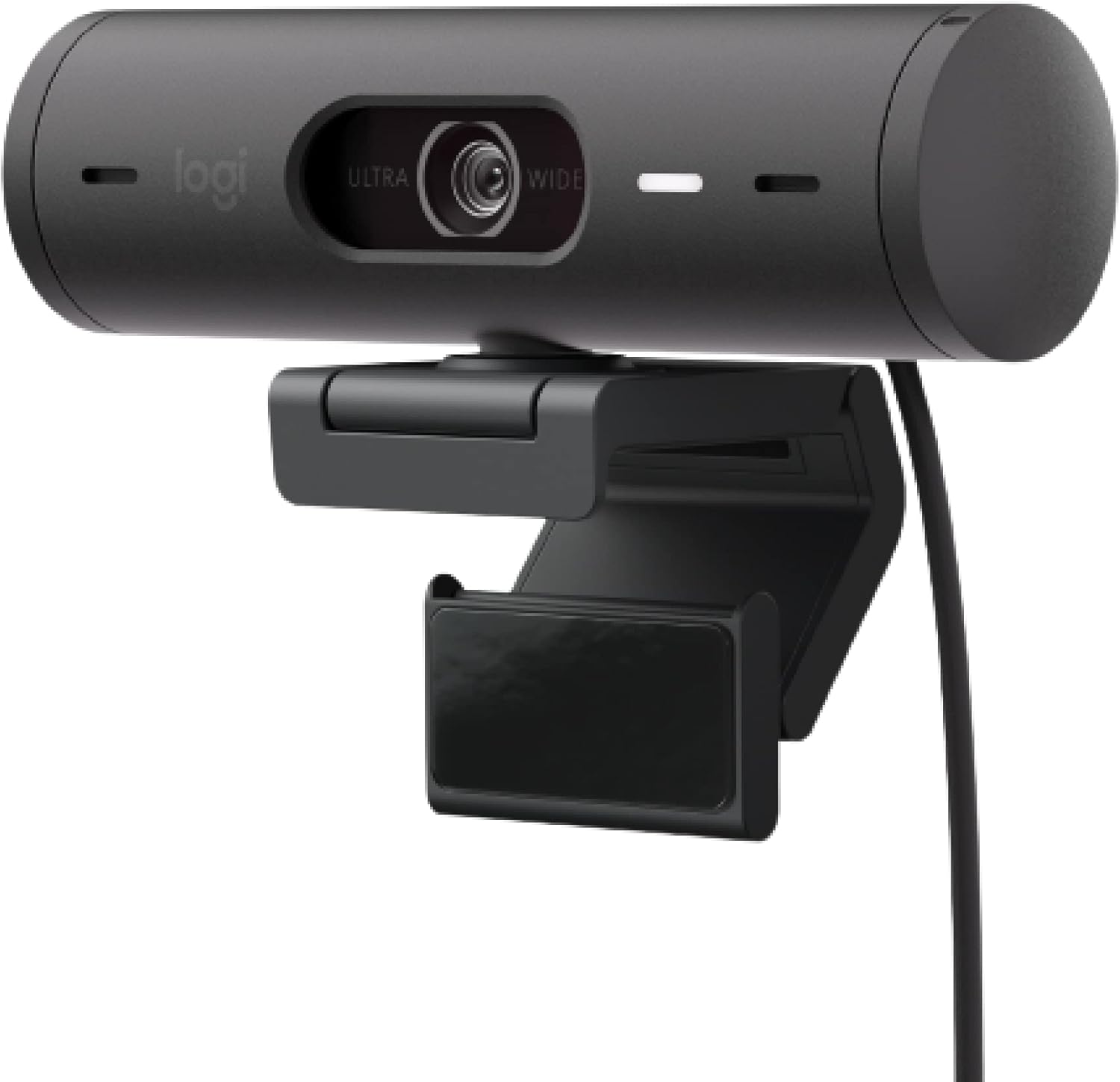
Show up to every video call feeling confident, seen, and heard. Logitech Brio 500 includes features like auto light correction for low-lighting conditions, auto-framing so you can move during calls, and Show Mode for presenting objects on your desk. Brio 500 Webcam creates a more authentic Google, Teams, or Zoom meeting experience, allowing you to connect genuinely with others.
Reviews:
5.0 out of 5 stars Good for work calls
(function() { P.when('cr-A', 'ready').execute(function(A) { if(typeof A.toggleExpanderAriaLabel === 'function') { A.toggleExpanderAriaLabel('review_text_read_more', 'Read more of this review', 'Read less of this review'); } }); })(); .review-text-read-more-expander:focus-visible { outline: 2px solid #2162a1; outline-offset: 2px; border-radius: 5px; } Great webcam, but you need to download a program to change the frame size, which I can't do on my work computer. I use it for work calls on Teams.Resolution is great and it's easy to plug in and use right away. I don't use the microphone, so I can't speak to its functionality.
5.0 out of 5 stars Fantastic video quality (even with poor lighting), useful features.
I have regular videoconference meetings for work, and my aging webcam was having trouble with Google Meet. I'm usually pretty cheap, but I was hoping to find a replacement that would make the video a little more flattering. I have fluorescent lights right above my head in my home office, and I'm bald, so no matter what I tried, the picture was always harsh and my head shiny. After some research I found the Logitech Brio 501, and decided to splurge a little since I could always return it if I didn't think the results justified the price. Spoiler: I did NOT return it!The Brio arrived well packaged in earth-friendly packaging, and was easy to set up. There was no complicated configuration in order to get Google Meet, Zoom or other services to recognize the video and audio from the Brio. I was bracing for problems since the camera is connected to my laptop (Lenovo Yoga) through a USB hub, and not directly to the computer; but had no issues whatsoever. The monitor mount is well designed, and only comes down about 1/8", less than the width of my monitor's bezel, so it doesn't interfere with my screen. If you have an ever narrower bezel, you could easily put some tape under it so it sits slightly above your monitor frame; but most people won't need to do anything.Even before checking out the included LogiTune software, my first video call looked great. The glare off my head was gone, and the color seemed much more natural not just compared to my old webcam, but also to the highly rated Vitade HD Webcam with ring light. While the Vitade was about $45 less, the Brio was absolutely worth it, even without the tuning options in LogiTune. I also like the physical privacy shutter, which is always easy to get to and close quickly.Upon launching LogiTune I quickly found settings that allow you to customize the angle of view, zoom level and camera positioning. This is really useful with my dual monitor setup, as it allows me to position the camera on the right side of my left screen so I can look at either screen without it seeming obvious, and still be centered. Love the zoom, which allows me to appear close to the camera, but not too close. There are numerous settings for exposure, focus, white balance and more, as well as filter effects, I just left all of the settings on auto, except sharpness, which I turned down a bit to hide a few wrinkles. The software does not have backgrounds or blur effects, but the blur and background options in most videoconference services still work just fine. The nice thing about the LogiTune settings is that they stay how you leave them, and are picked up automatically by the different conferencing services without having to retune for each call, or each day.Now, my video is always the best looking on my calls, and the sound is super clear. So yes, a bit more expensive than typical webcams, but the video performance and tuning software are now features I can't live without.
5.0 out of 5 stars My second Brio, and I’ll never go back!
As a solutions architect who has recently started working from home, attending virtual meetings has become a crucial part of my daily routine. I needed a reliable and high-quality webcam for my home office setup, and the Logitech Brio 501 Full HD Webcam has proven to be an outstanding choice.First and foremost, the video quality is exceptional. The Full HD resolution ensures that my video is clear and sharp during virtual meetings on Microsoft Teams, Google Meet, and Zoom. The Auto Light Correction feature is particularly impressive, automatically adjusting the lighting to ensure I look my best even in varying lighting conditions.The Show Mode is a great addition, and although I’ve only used it a few times, it was incredibly valuable when I needed it. It allows me to easily switch to a view of documents or physical items during presentations, which has been useful for explaining complex concepts during meetings.While the dual noise reduction microphones are a standout feature, I found that they did not provide sufficient noise reduction to remove the echo when using my desktop setup with speakers. As a result, I had to utilize another device as the microphone. Despite this, the overall performance of the webcam remains excellent.Privacy is always a concern, and the included privacy cover provides peace of mind when the webcam is not in use. This simple yet effective feature is highly appreciated.The webcam comes with a USB-C cable, making it easy to connect and providing a stable and fast connection. However, the length of the USB-C cable was way too short for my setup on a standing desk with two larger 34” monitors. I ended up needing an extender; otherwise, the cable was going to stand out like a sore thumb. The installation process was otherwise straightforward, and the webcam integrates seamlessly with my setup. The build quality of the Logitech Brio 501 is robust and reliable, meeting my expectations perfectly.Overall, the Logitech Brio 501 Full HD Webcam with Auto Light Correction, Show Mode, Dual Noise Reduction Mics, Privacy Cover, and USB-C Cable is a fantastic addition to my home office setup. It has significantly enhanced my virtual meeting experience, making it a valuable investment for anyone working from home. Highly recommended for professionals who require reliable and high-quality video communication, despite needing an alternative microphone setup for optimal audio quality!
4.0 out of 5 stars Looking good after a week
I like the camera design. It fit onto the top of my 27” Dell monitor nicely. I hadn’t had a microphone or camera on my desktop and this resolves that.My only complaint is that it doesn’t support Windows Hello. I neglected to check that before the purchase. I had just assumed that if the camera built into my 3 year old laptop supports it, surely any new camera in the price range would. That’ll teach me to assume. I’m going to keep the camera but probably would have bought another had I realized this.
5.0 out of 5 stars Can't lose with quality Logitech products
Excellent picture quality. Easy to mount and adjust. Logi Tune is a great (free) set of software tools to manage this camera's features.
Good quality
(function() { P.when('cr-A', 'ready').execute(function(A) { if(typeof A.toggleExpanderAriaLabel === 'function') { A.toggleExpanderAriaLabel('review_text_read_more', 'Read more of this review', 'Read less of this review'); } }); })(); .review-text-read-more-expander:focus-visible { outline: 2px solid #2162a1; outline-offset: 2px; border-radius: 5px; } It was a good deal for a good pink Webcam, but if your looking to do professional youtube get the one up from this one if you can afford it.
Good quality camera with wide angle and clear video
Good video and audio quality and gives a good wide view on zoom calls
Excellent webcam for business or personal use
I replaced my former Razer Kiyo Pro because it always gave me problems with flickering, the auto white balance was poor, and the huge bundle of intrusive software was annoying overkill. The feature set is similar on this camera, in what I consider to be a sleeker, more modern chassis. The video quality is similar. Which is to say, excellent, including in low light and cross-light situations. The auto-framing is a nice feature the Razer didn't have. Logitech's software is more considerate of my system resources, and the in-tray adjustment/preview panel is convenient and quick. No flicker. Rock solid performance. My only disappointment is that (similar to the Razer) the auto white balance tends toward unnatural greens. But overall, I'm very happy I made this switch. And I love the fact that this is made from recycled plastic in a carbon neutral manner. Thank you, Logitech.
Recommended!
Works super good! I like the fact that it has a microphone as well
Great webcam with noise canceling
Great product with noise canceling, I have been using it for more than 1 year, it still works great!
Visit the Logitech Store
Logitech Brio 501 Full HD Webcam with Auto Light Correction,Show Mode, Dual Noise Reduction Mics, Privacy Cover, Works with Microsoft Teams, Google Meet, Zoom, USB-C Cable - Black
AED1,12104


Quantity:
Order today to get by 7-14 business days
This item qualifies for free delivery
Imported From: United States
At BOLO, we work hard to ensure the products you receive are new, genuine, and sourced from reputable suppliers.
BOLO is not an authorized or official retailer for most brands, nor are we affiliated with manufacturers unless specifically stated on a product page. Instead, we source verified sellers, authorized distributors or directly from the manufacturer.
Each product undergoes thorough inspection and verification at our consolidation and fulfilment centers to ensure it meets our strict authenticity and quality standards before being shipped and delivered to you.
If you ever have concerns regarding the authenticity of a product purchased from us, please contact Bolo Support. We will review your inquiry promptly and, if necessary, provide documentation verifying authenticity or offer a suitable resolution.
Your trust is our top priority, and we are committed to maintaining transparency and integrity in every transaction.
All product information, images, descriptions, and reviews originate from the manufacturer or from trusted sellers overseas. BOLO is not affiliated with, endorsed by, or an authorized retailer for most brands listed on our website unless stated otherwise.
While we strive to display accurate information, variations in packaging, labeling, instructions, or formulation may occasionally occur due to regional differences or supplier updates. For detailed or manufacturer-specific information, please contact the brand directly or reach out to BOLO Support for assistance.
Unless otherwise stated, all prices displayed on the product page include applicable taxes and import duties.
BOLO operates in accordance with the laws and regulations of United Arab Emirates. Any items found to be restricted or prohibited for sale within the UAE will be cancelled prior to shipment. We take proactive measures to ensure that only products permitted for sale in United Arab Emirates are listed on our website.
All items are shipped by air, and any products classified as “Dangerous Goods (DG)” under IATA regulations will be removed from the order and cancelled.
All orders are processed manually, and we make every effort to process them promptly once confirmed. Products cancelled due to the above reasons will be permanently removed from listings across the website.
Similar suggestions by Bolo
More from this brand
Similar items from “Webcams”
Share with
Or share with link
https://www.bolo.ae/products/UO09JUGZS23
Visit the Logitech Store
Logitech Brio 501 Full HD Webcam with Auto Light Correction,Show Mode, Dual Noise Reduction Mics, Privacy Cover, Works with Microsoft Teams, Google Meet, Zoom, USB-C Cable - Black


AED1,12104
Quantity:
Order today to get by 7-14 business days
This item qualifies for free delivery
Imported From: United States
At BOLO, we work hard to ensure the products you receive are new, genuine, and sourced from reputable suppliers.
BOLO is not an authorized or official retailer for most brands, nor are we affiliated with manufacturers unless specifically stated on a product page. Instead, we source verified sellers, authorized distributors or directly from the manufacturer.
Each product undergoes thorough inspection and verification at our consolidation and fulfilment centers to ensure it meets our strict authenticity and quality standards before being shipped and delivered to you.
If you ever have concerns regarding the authenticity of a product purchased from us, please contact Bolo Support. We will review your inquiry promptly and, if necessary, provide documentation verifying authenticity or offer a suitable resolution.
Your trust is our top priority, and we are committed to maintaining transparency and integrity in every transaction.
All product information, images, descriptions, and reviews originate from the manufacturer or from trusted sellers overseas. BOLO is not affiliated with, endorsed by, or an authorized retailer for most brands listed on our website unless stated otherwise.
While we strive to display accurate information, variations in packaging, labeling, instructions, or formulation may occasionally occur due to regional differences or supplier updates. For detailed or manufacturer-specific information, please contact the brand directly or reach out to BOLO Support for assistance.
Unless otherwise stated, all prices displayed on the product page include applicable taxes and import duties.
BOLO operates in accordance with the laws and regulations of United Arab Emirates. Any items found to be restricted or prohibited for sale within the UAE will be cancelled prior to shipment. We take proactive measures to ensure that only products permitted for sale in United Arab Emirates are listed on our website.
All items are shipped by air, and any products classified as “Dangerous Goods (DG)” under IATA regulations will be removed from the order and cancelled.
All orders are processed manually, and we make every effort to process them promptly once confirmed. Products cancelled due to the above reasons will be permanently removed from listings across the website.
Description:
Show up to every video call feeling confident, seen, and heard. Logitech Brio 500 includes features like auto light correction for low-lighting conditions, auto-framing so you can move during calls, and Show Mode for presenting objects on your desk. Brio 500 Webcam creates a more authentic Google, Teams, or Zoom meeting experience, allowing you to connect genuinely with others.
Reviews:
5.0 out of 5 stars Good for work calls
(function() { P.when('cr-A', 'ready').execute(function(A) { if(typeof A.toggleExpanderAriaLabel === 'function') { A.toggleExpanderAriaLabel('review_text_read_more', 'Read more of this review', 'Read less of this review'); } }); })(); .review-text-read-more-expander:focus-visible { outline: 2px solid #2162a1; outline-offset: 2px; border-radius: 5px; } Great webcam, but you need to download a program to change the frame size, which I can't do on my work computer. I use it for work calls on Teams.Resolution is great and it's easy to plug in and use right away. I don't use the microphone, so I can't speak to its functionality.
5.0 out of 5 stars Fantastic video quality (even with poor lighting), useful features.
I have regular videoconference meetings for work, and my aging webcam was having trouble with Google Meet. I'm usually pretty cheap, but I was hoping to find a replacement that would make the video a little more flattering. I have fluorescent lights right above my head in my home office, and I'm bald, so no matter what I tried, the picture was always harsh and my head shiny. After some research I found the Logitech Brio 501, and decided to splurge a little since I could always return it if I didn't think the results justified the price. Spoiler: I did NOT return it!The Brio arrived well packaged in earth-friendly packaging, and was easy to set up. There was no complicated configuration in order to get Google Meet, Zoom or other services to recognize the video and audio from the Brio. I was bracing for problems since the camera is connected to my laptop (Lenovo Yoga) through a USB hub, and not directly to the computer; but had no issues whatsoever. The monitor mount is well designed, and only comes down about 1/8", less than the width of my monitor's bezel, so it doesn't interfere with my screen. If you have an ever narrower bezel, you could easily put some tape under it so it sits slightly above your monitor frame; but most people won't need to do anything.Even before checking out the included LogiTune software, my first video call looked great. The glare off my head was gone, and the color seemed much more natural not just compared to my old webcam, but also to the highly rated Vitade HD Webcam with ring light. While the Vitade was about $45 less, the Brio was absolutely worth it, even without the tuning options in LogiTune. I also like the physical privacy shutter, which is always easy to get to and close quickly.Upon launching LogiTune I quickly found settings that allow you to customize the angle of view, zoom level and camera positioning. This is really useful with my dual monitor setup, as it allows me to position the camera on the right side of my left screen so I can look at either screen without it seeming obvious, and still be centered. Love the zoom, which allows me to appear close to the camera, but not too close. There are numerous settings for exposure, focus, white balance and more, as well as filter effects, I just left all of the settings on auto, except sharpness, which I turned down a bit to hide a few wrinkles. The software does not have backgrounds or blur effects, but the blur and background options in most videoconference services still work just fine. The nice thing about the LogiTune settings is that they stay how you leave them, and are picked up automatically by the different conferencing services without having to retune for each call, or each day.Now, my video is always the best looking on my calls, and the sound is super clear. So yes, a bit more expensive than typical webcams, but the video performance and tuning software are now features I can't live without.
5.0 out of 5 stars My second Brio, and I’ll never go back!
As a solutions architect who has recently started working from home, attending virtual meetings has become a crucial part of my daily routine. I needed a reliable and high-quality webcam for my home office setup, and the Logitech Brio 501 Full HD Webcam has proven to be an outstanding choice.First and foremost, the video quality is exceptional. The Full HD resolution ensures that my video is clear and sharp during virtual meetings on Microsoft Teams, Google Meet, and Zoom. The Auto Light Correction feature is particularly impressive, automatically adjusting the lighting to ensure I look my best even in varying lighting conditions.The Show Mode is a great addition, and although I’ve only used it a few times, it was incredibly valuable when I needed it. It allows me to easily switch to a view of documents or physical items during presentations, which has been useful for explaining complex concepts during meetings.While the dual noise reduction microphones are a standout feature, I found that they did not provide sufficient noise reduction to remove the echo when using my desktop setup with speakers. As a result, I had to utilize another device as the microphone. Despite this, the overall performance of the webcam remains excellent.Privacy is always a concern, and the included privacy cover provides peace of mind when the webcam is not in use. This simple yet effective feature is highly appreciated.The webcam comes with a USB-C cable, making it easy to connect and providing a stable and fast connection. However, the length of the USB-C cable was way too short for my setup on a standing desk with two larger 34” monitors. I ended up needing an extender; otherwise, the cable was going to stand out like a sore thumb. The installation process was otherwise straightforward, and the webcam integrates seamlessly with my setup. The build quality of the Logitech Brio 501 is robust and reliable, meeting my expectations perfectly.Overall, the Logitech Brio 501 Full HD Webcam with Auto Light Correction, Show Mode, Dual Noise Reduction Mics, Privacy Cover, and USB-C Cable is a fantastic addition to my home office setup. It has significantly enhanced my virtual meeting experience, making it a valuable investment for anyone working from home. Highly recommended for professionals who require reliable and high-quality video communication, despite needing an alternative microphone setup for optimal audio quality!
4.0 out of 5 stars Looking good after a week
I like the camera design. It fit onto the top of my 27” Dell monitor nicely. I hadn’t had a microphone or camera on my desktop and this resolves that.My only complaint is that it doesn’t support Windows Hello. I neglected to check that before the purchase. I had just assumed that if the camera built into my 3 year old laptop supports it, surely any new camera in the price range would. That’ll teach me to assume. I’m going to keep the camera but probably would have bought another had I realized this.
5.0 out of 5 stars Can't lose with quality Logitech products
Excellent picture quality. Easy to mount and adjust. Logi Tune is a great (free) set of software tools to manage this camera's features.
Good quality
(function() { P.when('cr-A', 'ready').execute(function(A) { if(typeof A.toggleExpanderAriaLabel === 'function') { A.toggleExpanderAriaLabel('review_text_read_more', 'Read more of this review', 'Read less of this review'); } }); })(); .review-text-read-more-expander:focus-visible { outline: 2px solid #2162a1; outline-offset: 2px; border-radius: 5px; } It was a good deal for a good pink Webcam, but if your looking to do professional youtube get the one up from this one if you can afford it.
Good quality camera with wide angle and clear video
Good video and audio quality and gives a good wide view on zoom calls
Excellent webcam for business or personal use
I replaced my former Razer Kiyo Pro because it always gave me problems with flickering, the auto white balance was poor, and the huge bundle of intrusive software was annoying overkill. The feature set is similar on this camera, in what I consider to be a sleeker, more modern chassis. The video quality is similar. Which is to say, excellent, including in low light and cross-light situations. The auto-framing is a nice feature the Razer didn't have. Logitech's software is more considerate of my system resources, and the in-tray adjustment/preview panel is convenient and quick. No flicker. Rock solid performance. My only disappointment is that (similar to the Razer) the auto white balance tends toward unnatural greens. But overall, I'm very happy I made this switch. And I love the fact that this is made from recycled plastic in a carbon neutral manner. Thank you, Logitech.
Recommended!
Works super good! I like the fact that it has a microphone as well
Great webcam with noise canceling
Great product with noise canceling, I have been using it for more than 1 year, it still works great!
Similar suggestions by Bolo
More from this brand
Similar items from “Webcams”
Share with
Or share with link
https://www.bolo.ae/products/UO09JUGZS23