Description:
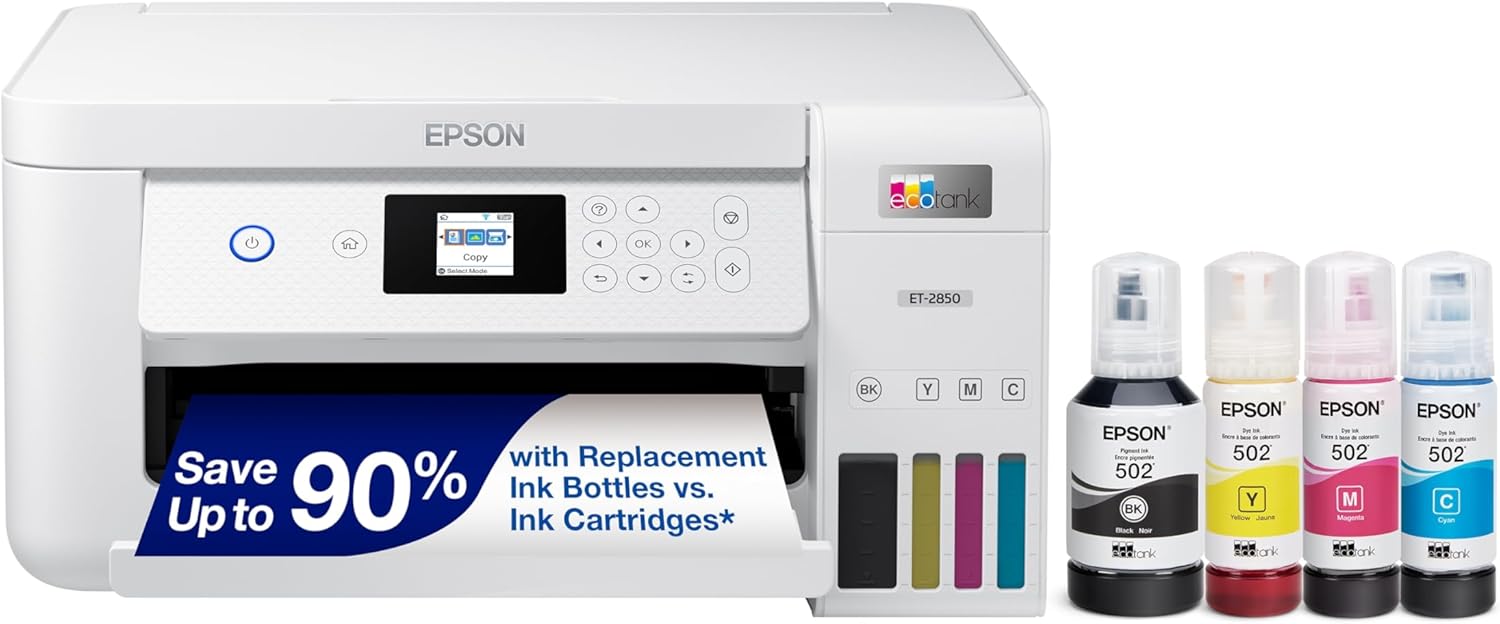
Your home needs a printer that’s fast, affordable, easy to use, and has great features. That’s why we developed the EcoTank ET-2850 – an innovative cartridge-free solution that uses high-capacity, easily refillable ink tanks. So you’ll worry less about running out of ink, and save a lot on replacement ink (1). The ET-2850 features outstanding print quality, auto-duplex printing, a high-resolution flatbed scanner, and convenient color display – making it the perfect family printer.
Epson strongly recommends the use of genuine ink to ensure optimal print quality and performance. Use of non-genuine ink could cause damage not covered under the printer’s ltd. wnty. | 1. Actual savings and costs will vary considerably based on print tasks, print volumes and usage conditions. Savings and cost per ISO page are based on the cost of replacement ink bottles and the cost of enough standard cartridges to achieve the total page yields of the bottles using the MSRP (USD) and yields for Epson standard-capacity ink cartridges for similarly featured Epson consumer inkjet printers as of March 2024. | 2. Individual cartridges estimate based on print yields of an included or replacement set of black and color ink bottles as compared to Epson standard-capacity ink cartridges for similarly featured printers as of March 2024. | 3. Part of the ink from the included bottles is used for initial setup; yields are lower than those of replacement ink bottles. Replacement and included ink bottle yields based on the ISO/IEC 24712 pattern with Epson’s methodology. Actual ink yields will vary considerably for reasons including images printed, print settings, temperature and humidity. Yields may be lower when printing infrequently or predominantly with one ink color. All ink colors are used for printing and printer maintenance, and all colors must be available for printing. For more information, visit www.epson.com/inkinfo | 4. Based on average monthly document print volumes of about 150 pages. | 5. See www.epson.com/voice for device compatibility. Epson Connect account and voice-activated account registration required. | 6. Most features require an Internet connection to the printer, as well as an Internet- and/or email-enabled device. For a list of Epson Connect enabled printers and compatible devices and apps, visit www.epson.com/connect | 7. Requires Epson Smart Panel app download. Data usage fees may apply.
Reviews:
5.0 out of 5 stars Love it so far
(function() { P.when('cr-A', 'ready').execute(function(A) { if(typeof A.toggleExpanderAriaLabel === 'function') { A.toggleExpanderAriaLabel('review_text_read_more', 'Read more of this review', 'Read less of this review'); } }); })(); .review-text-read-more-expander:focus-visible { outline: 2px solid #2162a1; outline-offset: 2px; border-radius: 5px; } Love this printer. Couldn't be happier with it's easy of setup, ease of use and the ecotank system is amazing after using cartridges for years.So I'll start with setup, I wasn't happy to see that the basic setup uses Epson's fluky and antiquated feeling app, but at least with this setup, everything worked out alright. It takes about 15 minutes or so total to get all the tape off, plug it in, fill the inks and get the printer connected. All of which was nice.Speaking of filling the tanks, the ecotank system is amazing. This printer has an enlarged black tank and so comes with a much larger black fill cartridge. It says it's good for over a thousand pages, which is fine with me, but filling was so easy. Each of the refill tanks has a special nozzle so it will only work on the correct color and you can see what level the tank is at with just a quick glance. You can't overfill the tanks because they shut off when full, and ther's also no chance of leakage since the refill tanks won't dispense unless slotted all the way down onto the refill nozzle. Where has this system been my whole life? I looked up costs for refills and they seem reasonable, especially when compared to all the proprietary cartridges most manufacturers use. Five stars just for the ecotank system alone.Connecting to my home wifi was a bit wonky with the app but it worked on the second try, and thankfully this printer is AirPrint compatible so I was able to print straight from my iPhone and iPad without any issues. A quick check of my laptop and desktop and they both detected this printer without issue and soon I was printing off some needed tax documents. Print clarity was fine, the blacks in particular are nice and dark which is most of what I need anyway. After printing about 20 pages I checked the tank and couldn't see that the ink levels had dropped that much if at all, so I'm pretty excited about how useful this printer will be in the future.Overall, super happy with this printer. If you're tired of dealing with cartridges, give this a shot.
5.0 out of 5 stars High Quality Printing Convenient Refillable Ink Extremely Easy Setup
Simple to use, reliable gravity fed paper loading, no paper drawer to get jammed up. Convenient refillable ink tanks, good quality prints, simple WiFi connectivity, easy user interface and scanning capability. And the Epson stamp of quality. This is actually the first printer I've had where I get no complaints from the rest of the family about connecting up to it and printing. Five stars for eliminating the headache of farting and fooling around with everybody else's devices to get them to find and recognize the printer.
5.0 out of 5 stars Wireless connection solution
I like this printer. It is easy to use and easy to load different size papers, print both sides, etc. Print quality is great and I like the ink reservoirs. My problem is that for some reason it loses its wireless connection frequently and I get a message that my printer is offline. The solution is to set the printer as default in Windows 11. It would have been nice if the install process had you set the printer as default. Even though I only have one printer connected, because I have so many wireless devices on this network the printer lost its connection till I made it the default.
4.0 out of 5 stars Very reasonable printer
I bought this Epson ET-2850 to replace a self-bricked HP. Setup was straightforward, using my cell phone. I just followed the instructions and the printer set itself up, step by step. I like the ink tanks rather than overpriced cartridges. The ink bottles have clever keyed openings to ensure the right colors go into the right tanks, and valves to prevent spills. The tanks are translucent, providing a full time view of the ink levels without any stupid electronic confusion. Printing is straightforward and of adequate quality, with the caveat that glossy photo prints are of average sharpness and color. My only disappointment so far is the dark control panel. The panel is not backlit, so the ON switch isn't easy to find. Once you find it and press it, a bright blue circle lights up. The other buttons are unlit I'd prefer to have the switches all light up after the on switch is pressed, perhaps with a time delay turn-off. The teensie-weenie LCD display is cute but difficult to see without a magnifying glass. Other than the hard-to-see controls, my ET-2850 is doing what it's supposed to do: print. I haven't had a need to contact support, so I can't speak for their customer assistance. So far I'm pleased with the straightforward functionality. The printer is a reasonable size, reasonable price, with reasonable features, reasonable setup, hardwires straight to my router, and has a no BS ink supply. I can use a pen light to help find the controls.
Finally a great printer!
(function() { P.when('cr-A', 'ready').execute(function(A) { if(typeof A.toggleExpanderAriaLabel === 'function') { A.toggleExpanderAriaLabel('review_text_read_more', 'Read more of this review', 'Read less of this review'); } }); })(); .review-text-read-more-expander:focus-visible { outline: 2px solid #2162a1; outline-offset: 2px; border-radius: 5px; } This is hands down the best printer I've had in 35+ years of computing. Everything about this printer is great. From the out of box & setup experience, to getting it on a wireless network for PC (Windows) and phone (Android), it was straightforward, and has excellent intuitive wireless printing. See my picture here to see how little ink I've used in 8 months of light / moderate printing. But the absolute best thing about this printer is that it just works when you go to print when you haven't used it for weeks. I've had to run a head cleaning cycle twice, but even that uses barely any ink.
Belle qualité du produit
Utilisation personnelle à la maison.
En periodo de prueba..
Cumple con lo que es, le daré un tiempo para seguir viendo su desempeño, hasta el momento cumple
Excelente opcion!
Excelente adquisicion!
This printer exceeded my expectations!
I operate a small home office and print about 300 pages per month, with approx 10% using various levels of colour. Before this, I used an Epson toner printer sitting next to an HP colour printer. The reason for this was to minimize the cost of constantly printing with expensive colour cartridges. The Toner unit served me well for several years, but it was just time to replace it. I committed to order the ET 2850 on behalf of two respected colleagues. Two aspects caught my attention, one of which was dual-sided printing, and the second was the cost of maintaining an ink supply. Admittedly, I was skeptical about the latter. Bolo delivered as usual (always great to deal with!), and everything exceeded my expectations! I donated the other two printers to a charity. The 2850 is robust, easy to set up, seems to have an endless supply of ink, and the print quality is better than the other two units! I found the WIFI print spooling a little slow, 10-15 seconds, so I cabled it and solved that slight lag. As a sidenote, it had not occurred to me that this printer now sits next to my Epson 400 scanner, my next favourite device! I highly recommend both of these Epson products! Paul
Visit the Epson Store
Epson EcoTank ET-2850 Wireless Color All-in-One Cartridge-Free Supertank Printer with Scan, Copy and Auto 2-Sided Printing - White, Medium
AED1,81137


Quantity:
Order today to get by 7-14 business days
This item qualifies for free delivery
Imported From: United States
At BOLO, we work hard to ensure the products you receive are new, genuine, and sourced from reputable suppliers.
BOLO is not an authorized or official retailer for most brands, nor are we affiliated with manufacturers unless specifically stated on a product page. Instead, we source verified sellers, authorized distributors or directly from the manufacturer.
Each product undergoes thorough inspection and verification at our consolidation and fulfilment centers to ensure it meets our strict authenticity and quality standards before being shipped and delivered to you.
If you ever have concerns regarding the authenticity of a product purchased from us, please contact Bolo Support. We will review your inquiry promptly and, if necessary, provide documentation verifying authenticity or offer a suitable resolution.
Your trust is our top priority, and we are committed to maintaining transparency and integrity in every transaction.
All product information, images, descriptions, and reviews originate from the manufacturer or from trusted sellers overseas. BOLO is not affiliated with, endorsed by, or an authorized retailer for most brands listed on our website unless stated otherwise.
While we strive to display accurate information, variations in packaging, labeling, instructions, or formulation may occasionally occur due to regional differences or supplier updates. For detailed or manufacturer-specific information, please contact the brand directly or reach out to BOLO Support for assistance.
Unless otherwise stated, all prices displayed on the product page include applicable taxes and import duties.
BOLO operates in accordance with the laws and regulations of United Arab Emirates. Any items found to be restricted or prohibited for sale within the UAE will be cancelled prior to shipment. We take proactive measures to ensure that only products permitted for sale in United Arab Emirates are listed on our website.
All items are shipped by air, and any products classified as “Dangerous Goods (DG)” under IATA regulations will be removed from the order and cancelled.
All orders are processed manually, and we make every effort to process them promptly once confirmed. Products cancelled due to the above reasons will be permanently removed from listings across the website.
Similar suggestions by Bolo
More from this brand
Similar items from “Ink Tank Printers”
Share with
Or share with link
https://www.bolo.ae/products/UO096A85MUJ
Visit the Epson Store
Epson EcoTank ET-2850 Wireless Color All-in-One Cartridge-Free Supertank Printer with Scan, Copy and Auto 2-Sided Printing - White, Medium


AED1,81137
Quantity:
Order today to get by 7-14 business days
This item qualifies for free delivery
Imported From: United States
At BOLO, we work hard to ensure the products you receive are new, genuine, and sourced from reputable suppliers.
BOLO is not an authorized or official retailer for most brands, nor are we affiliated with manufacturers unless specifically stated on a product page. Instead, we source verified sellers, authorized distributors or directly from the manufacturer.
Each product undergoes thorough inspection and verification at our consolidation and fulfilment centers to ensure it meets our strict authenticity and quality standards before being shipped and delivered to you.
If you ever have concerns regarding the authenticity of a product purchased from us, please contact Bolo Support. We will review your inquiry promptly and, if necessary, provide documentation verifying authenticity or offer a suitable resolution.
Your trust is our top priority, and we are committed to maintaining transparency and integrity in every transaction.
All product information, images, descriptions, and reviews originate from the manufacturer or from trusted sellers overseas. BOLO is not affiliated with, endorsed by, or an authorized retailer for most brands listed on our website unless stated otherwise.
While we strive to display accurate information, variations in packaging, labeling, instructions, or formulation may occasionally occur due to regional differences or supplier updates. For detailed or manufacturer-specific information, please contact the brand directly or reach out to BOLO Support for assistance.
Unless otherwise stated, all prices displayed on the product page include applicable taxes and import duties.
BOLO operates in accordance with the laws and regulations of United Arab Emirates. Any items found to be restricted or prohibited for sale within the UAE will be cancelled prior to shipment. We take proactive measures to ensure that only products permitted for sale in United Arab Emirates are listed on our website.
All items are shipped by air, and any products classified as “Dangerous Goods (DG)” under IATA regulations will be removed from the order and cancelled.
All orders are processed manually, and we make every effort to process them promptly once confirmed. Products cancelled due to the above reasons will be permanently removed from listings across the website.
Description:
Your home needs a printer that’s fast, affordable, easy to use, and has great features. That’s why we developed the EcoTank ET-2850 – an innovative cartridge-free solution that uses high-capacity, easily refillable ink tanks. So you’ll worry less about running out of ink, and save a lot on replacement ink (1). The ET-2850 features outstanding print quality, auto-duplex printing, a high-resolution flatbed scanner, and convenient color display – making it the perfect family printer.
Epson strongly recommends the use of genuine ink to ensure optimal print quality and performance. Use of non-genuine ink could cause damage not covered under the printer’s ltd. wnty. | 1. Actual savings and costs will vary considerably based on print tasks, print volumes and usage conditions. Savings and cost per ISO page are based on the cost of replacement ink bottles and the cost of enough standard cartridges to achieve the total page yields of the bottles using the MSRP (USD) and yields for Epson standard-capacity ink cartridges for similarly featured Epson consumer inkjet printers as of March 2024. | 2. Individual cartridges estimate based on print yields of an included or replacement set of black and color ink bottles as compared to Epson standard-capacity ink cartridges for similarly featured printers as of March 2024. | 3. Part of the ink from the included bottles is used for initial setup; yields are lower than those of replacement ink bottles. Replacement and included ink bottle yields based on the ISO/IEC 24712 pattern with Epson’s methodology. Actual ink yields will vary considerably for reasons including images printed, print settings, temperature and humidity. Yields may be lower when printing infrequently or predominantly with one ink color. All ink colors are used for printing and printer maintenance, and all colors must be available for printing. For more information, visit www.epson.com/inkinfo | 4. Based on average monthly document print volumes of about 150 pages. | 5. See www.epson.com/voice for device compatibility. Epson Connect account and voice-activated account registration required. | 6. Most features require an Internet connection to the printer, as well as an Internet- and/or email-enabled device. For a list of Epson Connect enabled printers and compatible devices and apps, visit www.epson.com/connect | 7. Requires Epson Smart Panel app download. Data usage fees may apply.
Reviews:
5.0 out of 5 stars Love it so far
(function() { P.when('cr-A', 'ready').execute(function(A) { if(typeof A.toggleExpanderAriaLabel === 'function') { A.toggleExpanderAriaLabel('review_text_read_more', 'Read more of this review', 'Read less of this review'); } }); })(); .review-text-read-more-expander:focus-visible { outline: 2px solid #2162a1; outline-offset: 2px; border-radius: 5px; } Love this printer. Couldn't be happier with it's easy of setup, ease of use and the ecotank system is amazing after using cartridges for years.So I'll start with setup, I wasn't happy to see that the basic setup uses Epson's fluky and antiquated feeling app, but at least with this setup, everything worked out alright. It takes about 15 minutes or so total to get all the tape off, plug it in, fill the inks and get the printer connected. All of which was nice.Speaking of filling the tanks, the ecotank system is amazing. This printer has an enlarged black tank and so comes with a much larger black fill cartridge. It says it's good for over a thousand pages, which is fine with me, but filling was so easy. Each of the refill tanks has a special nozzle so it will only work on the correct color and you can see what level the tank is at with just a quick glance. You can't overfill the tanks because they shut off when full, and ther's also no chance of leakage since the refill tanks won't dispense unless slotted all the way down onto the refill nozzle. Where has this system been my whole life? I looked up costs for refills and they seem reasonable, especially when compared to all the proprietary cartridges most manufacturers use. Five stars just for the ecotank system alone.Connecting to my home wifi was a bit wonky with the app but it worked on the second try, and thankfully this printer is AirPrint compatible so I was able to print straight from my iPhone and iPad without any issues. A quick check of my laptop and desktop and they both detected this printer without issue and soon I was printing off some needed tax documents. Print clarity was fine, the blacks in particular are nice and dark which is most of what I need anyway. After printing about 20 pages I checked the tank and couldn't see that the ink levels had dropped that much if at all, so I'm pretty excited about how useful this printer will be in the future.Overall, super happy with this printer. If you're tired of dealing with cartridges, give this a shot.
5.0 out of 5 stars High Quality Printing Convenient Refillable Ink Extremely Easy Setup
Simple to use, reliable gravity fed paper loading, no paper drawer to get jammed up. Convenient refillable ink tanks, good quality prints, simple WiFi connectivity, easy user interface and scanning capability. And the Epson stamp of quality. This is actually the first printer I've had where I get no complaints from the rest of the family about connecting up to it and printing. Five stars for eliminating the headache of farting and fooling around with everybody else's devices to get them to find and recognize the printer.
5.0 out of 5 stars Wireless connection solution
I like this printer. It is easy to use and easy to load different size papers, print both sides, etc. Print quality is great and I like the ink reservoirs. My problem is that for some reason it loses its wireless connection frequently and I get a message that my printer is offline. The solution is to set the printer as default in Windows 11. It would have been nice if the install process had you set the printer as default. Even though I only have one printer connected, because I have so many wireless devices on this network the printer lost its connection till I made it the default.
4.0 out of 5 stars Very reasonable printer
I bought this Epson ET-2850 to replace a self-bricked HP. Setup was straightforward, using my cell phone. I just followed the instructions and the printer set itself up, step by step. I like the ink tanks rather than overpriced cartridges. The ink bottles have clever keyed openings to ensure the right colors go into the right tanks, and valves to prevent spills. The tanks are translucent, providing a full time view of the ink levels without any stupid electronic confusion. Printing is straightforward and of adequate quality, with the caveat that glossy photo prints are of average sharpness and color. My only disappointment so far is the dark control panel. The panel is not backlit, so the ON switch isn't easy to find. Once you find it and press it, a bright blue circle lights up. The other buttons are unlit I'd prefer to have the switches all light up after the on switch is pressed, perhaps with a time delay turn-off. The teensie-weenie LCD display is cute but difficult to see without a magnifying glass. Other than the hard-to-see controls, my ET-2850 is doing what it's supposed to do: print. I haven't had a need to contact support, so I can't speak for their customer assistance. So far I'm pleased with the straightforward functionality. The printer is a reasonable size, reasonable price, with reasonable features, reasonable setup, hardwires straight to my router, and has a no BS ink supply. I can use a pen light to help find the controls.
Finally a great printer!
(function() { P.when('cr-A', 'ready').execute(function(A) { if(typeof A.toggleExpanderAriaLabel === 'function') { A.toggleExpanderAriaLabel('review_text_read_more', 'Read more of this review', 'Read less of this review'); } }); })(); .review-text-read-more-expander:focus-visible { outline: 2px solid #2162a1; outline-offset: 2px; border-radius: 5px; } This is hands down the best printer I've had in 35+ years of computing. Everything about this printer is great. From the out of box & setup experience, to getting it on a wireless network for PC (Windows) and phone (Android), it was straightforward, and has excellent intuitive wireless printing. See my picture here to see how little ink I've used in 8 months of light / moderate printing. But the absolute best thing about this printer is that it just works when you go to print when you haven't used it for weeks. I've had to run a head cleaning cycle twice, but even that uses barely any ink.
Belle qualité du produit
Utilisation personnelle à la maison.
En periodo de prueba..
Cumple con lo que es, le daré un tiempo para seguir viendo su desempeño, hasta el momento cumple
Excelente opcion!
Excelente adquisicion!
This printer exceeded my expectations!
I operate a small home office and print about 300 pages per month, with approx 10% using various levels of colour. Before this, I used an Epson toner printer sitting next to an HP colour printer. The reason for this was to minimize the cost of constantly printing with expensive colour cartridges. The Toner unit served me well for several years, but it was just time to replace it. I committed to order the ET 2850 on behalf of two respected colleagues. Two aspects caught my attention, one of which was dual-sided printing, and the second was the cost of maintaining an ink supply. Admittedly, I was skeptical about the latter. Bolo delivered as usual (always great to deal with!), and everything exceeded my expectations! I donated the other two printers to a charity. The 2850 is robust, easy to set up, seems to have an endless supply of ink, and the print quality is better than the other two units! I found the WIFI print spooling a little slow, 10-15 seconds, so I cabled it and solved that slight lag. As a sidenote, it had not occurred to me that this printer now sits next to my Epson 400 scanner, my next favourite device! I highly recommend both of these Epson products! Paul
Similar suggestions by Bolo
More from this brand
Similar items from “Ink Tank Printers”
Share with
Or share with link
https://www.bolo.ae/products/UO096A85MUJ