Description:
Reviews:
5.0 out of 5 stars Still works great!
It does what it needs to do! It works amazing and feels really nice to write on. the pressure sensitivity works if u have the drives of course. I got this a while back but I think it was like not too expensive so I liked it. I know a lot of big name brand drawing tablets can be really high up there in price. I loved it. Still use it.
5.0 out of 5 stars very useful
Sorry for the late review. I had it for a while, and I thought it was useless until I started my online tutoring business. It is so easy to use and write on the whiteboard.
4.0 out of 5 stars Good for the price.
Works well for my usecase. Software is a bit buggy on Linux
5.0 out of 5 stars Good Starter
It's a good starting tablet for a reasonable price, have been using it for about two years now
5.0 out of 5 stars Works great
Purchased for a gift and they loved it
3.0 out of 5 stars No me encanta
No se si es pq tengo una Mac pero no logro que escriba en el espacio correspondiente se tarda en reaccionar los botones. No sé tengo que darle otro intento a ver.
5.0 out of 5 stars Good buy
He was very happy
4.0 out of 5 stars Good cheap/beginner tablet
I've been using this for about a year and a half now and it's really good for its price. It has flaws though (of course, it's a cheap tablet)PROS: Generally good to use; low price; has all the key features of a tablet (pressure, tilt, pen angle); plenty of buttons even if I don't use 'emCONS: Screen protector bubbled after a little under a year & before that showed my pen lines; pen angle is pretty janky (maybe I don't know how to use it but it's probably just the cost-cutting measures); the replacement nibs I got were for the screen tablets for some reason (I later bought the correct ones)Overall a really good value IMO. Don't be fooled by the longer looking cons, I just elaborated on them more.
Calidad
Muy excelente, en buen estado, muy funcional
Amazing!
This drawing pad is perfect, a bit om the small size but perfect for any artistic needs!
Unleash Your Creativity with UGEE S640 – A Hidden Gem for Artists!
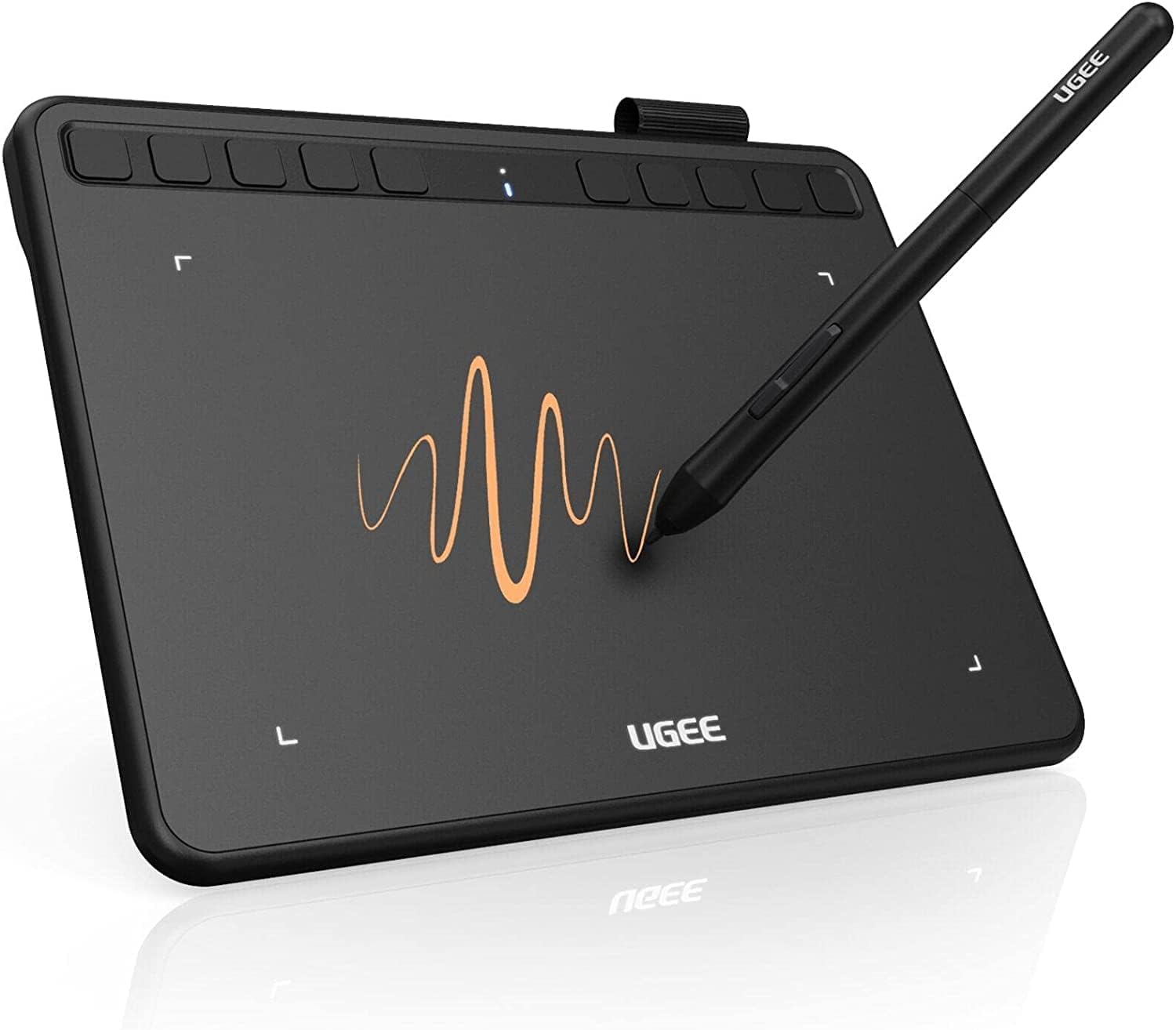
The UGEE S640 Drawing Tablet is an absolute game-changer! From the moment I unboxed it, I was impressed by its sleek design and quality build. Setting it up was a breeze, and it worked flawlessly with my software, giving me immediate creative freedom. The stylus is lightweight and battery-free, so no recharging – just pick it up and start drawing!With 8192 levels of pressure sensitivity, it responds beautifully to even the lightest strokes, making shading and detail work feel as natural as pencil on paper. Plus, the tilt function? A total dream! It allowed me to angle my strokes just right, opening up so many new possibilities in my work. Whether you’re sketching, painting, or diving into digital illustration, this tablet is reliable, precise, and a pleasure to use.For the price, you simply can’t beat the quality – UGEE S640 is a hidden gem that every artist should have in their toolkit!
Superbe!
Très précis et parfait pour tout les dessinateur virtuels!
100% recommend
as someone new to digital this is a rlly good product to start with. i’ve had it for a few days and i think it’s easy to use and understand, the buttons(on the tablet and the pen) are actually more versatile and useful than i thought they would be as they help you access things you’d otherwise have to use your keyboard/mouse to do, and for it’s price the quality is very good.i’ve used a wacom once before and the quality is definitely different (and better tbh) and the overall feel is better, but i don’t think it’s fair to compare the two. this isn’t a wacom, you shouldn’t buy this expecting it to match the feel of when you’d use a wacom (or a more expensive tab). as i’ve only used a wacom once, i barely have room to properly compare the two, so i can easily say it’s an amazing tablet and it genuinely doesnt feel like im missing out on anything. if you do have something more expensive to compare it to, this is a fairly good one and completely worth the price, but probably won’t compare to and i’m guessing definitely won’t outshine it’s more expensive counterpart.it’s a good size and it’s portable, and it’s fairly easy to set up if you follow the instructions that come with it. everything you need to do is in the user manual, and when you go to download the ugee tablet app it’s a clean and easy experience. it has different options for different computers/desktops, i use a macbook air and everything i needed to download went smoothly and has been working great.i’ve seen a few people say the pen leaves scratches, and when i got mine i thought i had that problem as well- turns out i just didn’t peel off the protective layer lmao so make sure you do that.when it comes to the art i’m able to produce with this (i’m new to digital as i said) it’s easier to grasp than you’d think ( as someone who’s been doing traditional) it may take some getting used to to not look down at the tablet as you draw, and rather your computer screen, but once you do it’s fun to use. it’s like using a new medium so don’t be too hard on yourself. as long as you have the knowledge and skill you should be fine. it’ll just take some getting used to. the pen isn’t glitchy, and you’ll be able to achieve smooth lines with it (they get smoother when you adjust the stabilizer on whatever app you’re using)lastly, in my experience so far, i haven’t had to apply any extra pressure to get the pen to work. the normal amount of pressure you’d use for a pencil or pen should be fine for this as well.
Visit the UGEE Store
UGEE S640 Graphics Drawing Tablet, Digital Draw Art Pad with Pen Battery-Free Stylus Tilt Function 8192 Levels Pressure Sensitivity 10 Express Keys for Mac, Windows PC and Android
AED22523
Quantity:
Order today to get by 7-14 business days
This item qualifies for free delivery
Imported From: United States
At BOLO, we work hard to ensure the products you receive are new, genuine, and sourced from reputable suppliers.
BOLO is not an authorized or official retailer for most brands, nor are we affiliated with manufacturers unless specifically stated on a product page. Instead, we source verified sellers, authorized distributors or directly from the manufacturer.
Each product undergoes thorough inspection and verification at our consolidation and fulfilment centers to ensure it meets our strict authenticity and quality standards before being shipped and delivered to you.
If you ever have concerns regarding the authenticity of a product purchased from us, please contact Bolo Support. We will review your inquiry promptly and, if necessary, provide documentation verifying authenticity or offer a suitable resolution.
Your trust is our top priority, and we are committed to maintaining transparency and integrity in every transaction.
All product information, images, descriptions, and reviews originate from the manufacturer or from trusted sellers overseas. BOLO is not affiliated with, endorsed by, or an authorized retailer for most brands listed on our website unless stated otherwise.
While we strive to display accurate information, variations in packaging, labeling, instructions, or formulation may occasionally occur due to regional differences or supplier updates. For detailed or manufacturer-specific information, please contact the brand directly or reach out to BOLO Support for assistance.
Unless otherwise stated, all prices displayed on the product page include applicable taxes and import duties.
BOLO operates in accordance with the laws and regulations of United Arab Emirates. Any items found to be restricted or prohibited for sale within the UAE will be cancelled prior to shipment. We take proactive measures to ensure that only products permitted for sale in United Arab Emirates are listed on our website.
All items are shipped by air, and any products classified as “Dangerous Goods (DG)” under IATA regulations will be removed from the order and cancelled.
All orders are processed manually, and we make every effort to process them promptly once confirmed. Products cancelled due to the above reasons will be permanently removed from listings across the website.
Similar suggestions by Bolo
More from this brand
Similar items from “Graphics Tablets”
Share with
Or share with link
https://www.bolo.ae/products/UO092IZ5PIS
Visit the UGEE Store
UGEE S640 Graphics Drawing Tablet, Digital Draw Art Pad with Pen Battery-Free Stylus Tilt Function 8192 Levels Pressure Sensitivity 10 Express Keys for Mac, Windows PC and Android

AED22523
Quantity:
Order today to get by 7-14 business days
This item qualifies for free delivery
Imported From: United States
At BOLO, we work hard to ensure the products you receive are new, genuine, and sourced from reputable suppliers.
BOLO is not an authorized or official retailer for most brands, nor are we affiliated with manufacturers unless specifically stated on a product page. Instead, we source verified sellers, authorized distributors or directly from the manufacturer.
Each product undergoes thorough inspection and verification at our consolidation and fulfilment centers to ensure it meets our strict authenticity and quality standards before being shipped and delivered to you.
If you ever have concerns regarding the authenticity of a product purchased from us, please contact Bolo Support. We will review your inquiry promptly and, if necessary, provide documentation verifying authenticity or offer a suitable resolution.
Your trust is our top priority, and we are committed to maintaining transparency and integrity in every transaction.
All product information, images, descriptions, and reviews originate from the manufacturer or from trusted sellers overseas. BOLO is not affiliated with, endorsed by, or an authorized retailer for most brands listed on our website unless stated otherwise.
While we strive to display accurate information, variations in packaging, labeling, instructions, or formulation may occasionally occur due to regional differences or supplier updates. For detailed or manufacturer-specific information, please contact the brand directly or reach out to BOLO Support for assistance.
Unless otherwise stated, all prices displayed on the product page include applicable taxes and import duties.
BOLO operates in accordance with the laws and regulations of United Arab Emirates. Any items found to be restricted or prohibited for sale within the UAE will be cancelled prior to shipment. We take proactive measures to ensure that only products permitted for sale in United Arab Emirates are listed on our website.
All items are shipped by air, and any products classified as “Dangerous Goods (DG)” under IATA regulations will be removed from the order and cancelled.
All orders are processed manually, and we make every effort to process them promptly once confirmed. Products cancelled due to the above reasons will be permanently removed from listings across the website.
Description:
Reviews:
5.0 out of 5 stars Still works great!
It does what it needs to do! It works amazing and feels really nice to write on. the pressure sensitivity works if u have the drives of course. I got this a while back but I think it was like not too expensive so I liked it. I know a lot of big name brand drawing tablets can be really high up there in price. I loved it. Still use it.
5.0 out of 5 stars very useful
Sorry for the late review. I had it for a while, and I thought it was useless until I started my online tutoring business. It is so easy to use and write on the whiteboard.
4.0 out of 5 stars Good for the price.
Works well for my usecase. Software is a bit buggy on Linux
5.0 out of 5 stars Good Starter
It's a good starting tablet for a reasonable price, have been using it for about two years now
5.0 out of 5 stars Works great
Purchased for a gift and they loved it
3.0 out of 5 stars No me encanta
No se si es pq tengo una Mac pero no logro que escriba en el espacio correspondiente se tarda en reaccionar los botones. No sé tengo que darle otro intento a ver.
5.0 out of 5 stars Good buy
He was very happy
4.0 out of 5 stars Good cheap/beginner tablet
I've been using this for about a year and a half now and it's really good for its price. It has flaws though (of course, it's a cheap tablet)PROS: Generally good to use; low price; has all the key features of a tablet (pressure, tilt, pen angle); plenty of buttons even if I don't use 'emCONS: Screen protector bubbled after a little under a year & before that showed my pen lines; pen angle is pretty janky (maybe I don't know how to use it but it's probably just the cost-cutting measures); the replacement nibs I got were for the screen tablets for some reason (I later bought the correct ones)Overall a really good value IMO. Don't be fooled by the longer looking cons, I just elaborated on them more.
Calidad
Muy excelente, en buen estado, muy funcional
Amazing!
This drawing pad is perfect, a bit om the small size but perfect for any artistic needs!
Unleash Your Creativity with UGEE S640 – A Hidden Gem for Artists!
The UGEE S640 Drawing Tablet is an absolute game-changer! From the moment I unboxed it, I was impressed by its sleek design and quality build. Setting it up was a breeze, and it worked flawlessly with my software, giving me immediate creative freedom. The stylus is lightweight and battery-free, so no recharging – just pick it up and start drawing!With 8192 levels of pressure sensitivity, it responds beautifully to even the lightest strokes, making shading and detail work feel as natural as pencil on paper. Plus, the tilt function? A total dream! It allowed me to angle my strokes just right, opening up so many new possibilities in my work. Whether you’re sketching, painting, or diving into digital illustration, this tablet is reliable, precise, and a pleasure to use.For the price, you simply can’t beat the quality – UGEE S640 is a hidden gem that every artist should have in their toolkit!
Superbe!
Très précis et parfait pour tout les dessinateur virtuels!
100% recommend
as someone new to digital this is a rlly good product to start with. i’ve had it for a few days and i think it’s easy to use and understand, the buttons(on the tablet and the pen) are actually more versatile and useful than i thought they would be as they help you access things you’d otherwise have to use your keyboard/mouse to do, and for it’s price the quality is very good.i’ve used a wacom once before and the quality is definitely different (and better tbh) and the overall feel is better, but i don’t think it’s fair to compare the two. this isn’t a wacom, you shouldn’t buy this expecting it to match the feel of when you’d use a wacom (or a more expensive tab). as i’ve only used a wacom once, i barely have room to properly compare the two, so i can easily say it’s an amazing tablet and it genuinely doesnt feel like im missing out on anything. if you do have something more expensive to compare it to, this is a fairly good one and completely worth the price, but probably won’t compare to and i’m guessing definitely won’t outshine it’s more expensive counterpart.it’s a good size and it’s portable, and it’s fairly easy to set up if you follow the instructions that come with it. everything you need to do is in the user manual, and when you go to download the ugee tablet app it’s a clean and easy experience. it has different options for different computers/desktops, i use a macbook air and everything i needed to download went smoothly and has been working great.i’ve seen a few people say the pen leaves scratches, and when i got mine i thought i had that problem as well- turns out i just didn’t peel off the protective layer lmao so make sure you do that.when it comes to the art i’m able to produce with this (i’m new to digital as i said) it’s easier to grasp than you’d think ( as someone who’s been doing traditional) it may take some getting used to to not look down at the tablet as you draw, and rather your computer screen, but once you do it’s fun to use. it’s like using a new medium so don’t be too hard on yourself. as long as you have the knowledge and skill you should be fine. it’ll just take some getting used to. the pen isn’t glitchy, and you’ll be able to achieve smooth lines with it (they get smoother when you adjust the stabilizer on whatever app you’re using)lastly, in my experience so far, i haven’t had to apply any extra pressure to get the pen to work. the normal amount of pressure you’d use for a pencil or pen should be fine for this as well.
Similar suggestions by Bolo
More from this brand
Similar items from “Graphics Tablets”
Share with
Or share with link
https://www.bolo.ae/products/UO092IZ5PIS