Deliver toUnited Arab Emirates
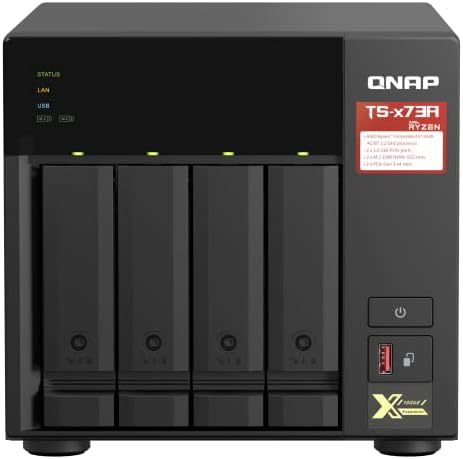
QNAP TS-473A-8G SAN/NAS Storage System, Black

Description:

  • NAS Storage System offers maximum storage productivity with added dependability
  • Can hold 4 HDDs simultaneously
  • DDR4 SDRAM memory technology for desired storage efficiency with accuracy and precision
  • Perform computational tasks effectively accrediting the amd ryzen 2.20 ghz processor
  • Tower form factor is ideal for running internal applications, serving public websites or storing sensitive customer data with maximum productivity
  • 2.5 Gigabit Ethernet Ethernet technology for increasing efficiency with the quicker transfer and sharing of information
  • It's qts 4.5.1 operating system offers powerful platform to efficiently run routine applications

  • The product is multiple voltage compatible, that voltage arrange is 100-240V

    Reviews:

    5.0 out of 5 stars No choice but to buy this, to salvage data from another failed QNAP - and it worked, flawlessly!

    J.S. · April 8, 2023

    More details and some critical comments follow, but per the title, maybe some background is worthwhile:I've been running a QNAP TVS-871 with i7 processor since 2016. That quietly came to an end, apparently at the same time I went to update firmware from 5.0.1.2277 to some newer version. I told it to update and walked away. I forgot about it totally, then realized the next day I couldn't reach my files, and the VMs I had spun up in Virtualization Station were down.I had a pretty complex setup on my TVS-871: One 10G SFP+ card onboard. One QM2 card with a 512G pair of NVMe disks for my VMs. And in the 8 bays, I was running five 6TB disks for bulk storage, one 3TB disk for CCTV storage, and two 512GB SSDs for SSD caching, and for the record, I believe was active when the 871 crashed. That had me concerned because QNAP instructs you to turn off caching before moving your disks to a compatible NAS.Nothing I tried to recover the TVS-871, including booting without disks, power cycling, firmware restore, etc. produced any workable results - I hooked it up to a monitor at boot, and it would reach varying stages of booting, then hang up totally. Very weird. Results were random: Sometimes it would die at the 'loading kernel' stage. Other times it would get to 'loading drivers'. Once it made it to 'starting services' and Qfinder would see it. There was no logical rhyme or reason to the response. The power supply seemed to be outputting on the 12v/5v/3v rails without falter, so I'm assuming the motherboard finally gave up the ghost?Out of desperation, I checked QNAP's "Compatibility for NAS Migration" page to see what systems supported disk-to-disk transfer with my 871. I found the TS-873A was in the list of compatible migrations for the TVS-871, it had 10 bays, 2 PCI-E expansion ports, supported more RAM, was quad core, and even allowed me to add in a couple of extra M.2 disks. And it just so happens Bolo had it available for next-day shipping within 10% of the cheapest price I could find. So I ordered it, knowing I had 32GB in two sticks of PC4 RAM ready to drop into it on arrival.Needless to say, it came in today. I installed the RAM upgrade, then used Qfinder to locate and update the NAS to the same firmware as my old, dead QNAP, per QNAP's recommendation in the migration compatibility instructions. I numbered my disks to make sure they were installed in the same order with the new NAS, then moved them over one-by-one, then installed the 10G and QM2 cards with with both NVMe, and fired it up with my fingers crossed.IT WORKED. Flawlessly, actually. As QNAP stated, the system fired up, with all settings intact. The only thing I needed to do was update IP info in the Network & Virtualization area, and go into the settings tab on each of my VMs to change the processor type from "i7" to "Opteron" so my VMs would launch. Right now, the RAID is rebuilding on my bulk storage array, with 7 hours left to go before completion.To say I'm overjoyed with this result would be an understatement. I'm sad it cost me over a grand to get here, and I'm sad my 871 failed because I loved it, even though it's outdated tech. However, I do have some other critical feedback to share which others may find helpful!The tool-less disk caddies are interesting to say the least. I don't like that they're plastic. I prefer having metal-based disk caddies like the Enterprise-level NAS devices I work with in my work environments. The added heat dissipation metal trays is useful. It's also a bummer you need to remove one of the tool-less side strips on the caddy to use 2.5 disks. For 3.5 disks, I did use the tool-less side strips, but also applied a couple screws in the tray for safety. These plastic caddies, however, are easier to click into place than the metal ones on my 871. Just doesn't feel as robust, and plastic doesn't dissipate heat very well.I love this thing accepts up to 64GB of RAM! I'm at 32GB after upgrade, and I can't imagine wanting or needing to spend the money for a 2x32 kit, but ... it's nice, if you need that much. It was nice to throw double the RAM at my VMs though, since my 871 was capped at 16GB total.I love the storage expandability options, it's great this thing natively supports two extra M.2 disks directly on-board, and access to where they're housed is convenient! I'll need to dig into the pros and cons of migrating my VMs to the native M.2 ports versus using the QM2. I'm interested to do some benchmarking once my RAID rebuild finishes to see which one offers more performance.I'll really miss having a status display on the front of the case - that was one of the really nice things bout my TVS-871 which is clearly missing on the TS-873A. I wish QNAP sold an aftermarket kit which let you upgrade this, for those who'd want it.I'm stoked the QM2-2P-344 expansion card for M.2 disks I had inside my 871 and my 10G SFP+ expansion card transferred with no issues! But for anyone else in this same boat, hope you still have your original boxes for your expansion cards because the 873A uses a full-height plate, versus the half-height earlier models like the 871 used. I had to swap to the taller plate to transfer the cards over.The case internal design for airflow is clever, I like there's a dedicated airspace for the CPU, RAM and M.2/NVMe slots, which pulls air from the front of the chassis, over your hardware, and out the back. However, the tiny little chips they supply to cool your M.2 disks off are complete and utter rubbish. C'mon, QNAP, you can do better!!The footprint of the 873A is almost identical to my 871. It's a tad wider, less than 2" wide, which accounts for the airspace where the CPU heatsink, RAM, and M.2 expansion slots are located.Only three screws to remove on the rear of the chassis to remove the lid versus a half-dozen or more on the TVS-871 is a nice improvement. I really appreciate that, I loathed taking the lid off my 871. This is a step in the right direction, anything more than 5 screws is too much for a chassis like this.Bummer, due to the AMD chip it's running, no native, embedded graphics. You're forced to use one of the PCE-E slots for that, with a card that requires no power. I have yet to find a good solution. And if you're like me, and you already have 2 PCI-E devices installed (my 10G SFP+ card, and a QM2 card) ... you're running headless with no graphics or sacrificing expansion. I guess if the on-board M.2 slots are faster than the QM2 card, I'll migrate that out and swap in a card ... IF a suitable card pops up.Overall, I'm giving this a 5. I spent less buying a new NAS than I would have time and/or money on data recovery. And the fact I didn't need to spend more than 10 minutes reconfiguring the NAS from the ground up is priceless. Seriously. QNAP wins on this one, for me.However, if something goes south, rest assured, there will be an edit below this sentence in the future!The NASCompares website did a great review on this unit if you need a more in-depth deep dive before buying. Highly recommend checking it out if you're on the fence, or need confirmation.

    5.0 out of 5 stars Strong Performer - Really Dong a lot for me

    j.b. · May 14, 2022

    This is an Important decision so I'm spending a bit more time on it.I upgraded this to 64GB of memory and I put in a 1TB SSD card to run VM's primarily. It's running the VM's well after watching a couple of Youtube channels on optimizing the drivers.I have it set as a file server with snapshots. I'm syncing them to a USB drive I have plugged in for a scheduled backup. I also sync them to Microsoft Azure cold storage for an offsite backup. This is all done with HBS Backup which is part of QNAP's os. (FREE)This also runs QuTS Hero as an operating system which is the latest platform. Be sure to choose it during setup. Once you pick the operating system, I don't think you can switch. By default it's QTS which is older. Note: QuTS Hero is a bit more memory intensive so you may want to upgrade that, especially if you are going to want to run a bunch of VM's.Mine is also functioning as a Plex Media Server. It works very well. I installed a a graphics card.it does hardware transcoding to lower resolutions if you want to stream it to your phone remotely. (You need to purchase a "plex pass" from plex to do hardware transcoding or remote viewing. But it's not that expensive.)Lots of videos to help you. I recommend the YouTube channels QNAP UK and NASCompares for some good overviews and how to's. You really can get a lot out of the device if you watch good channels. For example last week, I learned that you can build a shutdown plan if the power fails. I plugged my ups usb in, and it was unbelievably simple to configure.This could handle a medium sized business no problem at all. Extensive raid options, "hot standby" drives, and TONS of features important to a business. For example you can have it be a domain controller or even scan your files for viruses/malware. There's a great app store (all apps appear to be free) and you can also extend the app store to a use community one called QNAP Club. Additionally, you can create these "little" applications called containers which are like little mini servers. There's a tool called container station that let's you quickly install them from a huge array of "docker containers" that are available.The warranty is 3 years! You can purchase 2 more within 60 days (it may be 90, not sure.) Support on the operating system is "lifetime".If you just need disk space this might be overkill. But if you want a platform to help you manage your infrastructure it's amazing. If you have/want a serious home lab -- this is for you.My Installed SSD:Crucial P5 1TB 3D NAND NVMe Internal Gaming SSD, up to 3400MB/s - CT1000P5SSD8My Installed Memory:TEAMGROUP Elite DDR4 64GB Kit (2 x 32GB) 2666MHz PC4-21300 CL19 Unbuffered Non-ECC 1.2V SODIMM 260-Pin Laptop Notebook PC Computer Memory Module Ram Upgrade - TED464G2666C19DC-S01My Installed Graphics Card:ASUS PH-GTX1050TI-4G GeForce GTX 1050 Ti 4GBMy Installed Drives:Seagate 16TB HDD Exos X16 7200 RPM 512e/4Kn SATA 6Gb/s 256MB Cache 3.5-Inch Enterprise Hard Drive (ST16000NM001G)(You need to know what your raid configuration will be. You need a minimum amount of drives for different levels of raid. I used raid 6 which tolerates a 2 drive failure so you need a minimum of 4 drives. They should all be the same size (and speed.) Google "raid calculator" for some good web tools.I have 4 of the drives mentioned. I have room to grow 4 more, but the capacity is like 2 drives now, because of the raid 6 config. Larger drives are no problem but the cost per TB is higher when you get to the top of the available drive sizes. That's why I choose 16TB. Larger ones were much more expensive as of this writing.

    5.0 out of 5 stars GREAT NAS!! Always had good luck with QNAP

    r. · November 13, 2024

    Recently upgraded Qnap NAS from a ts-453be to this TS-873a. I installed a 32gb memory chip from Bolo, I installed 2 M.2 1tb drives that I got from microcenter, I had 4 drives in my old NAS and I purchased 3 more from Bolo, all in new packaging and great pricing. I installed QuTS Hero, I have never used before, but I have read its more secure that QTS and has better Disk Management. From my experience so far its faster and sleeker than QTS, I purchased a 10gb NIC card, im so happy with set up! I would recommend!

    信頼感

    水. · February 20, 2022

    QNAPとSynologyを使っていますが、QNAP NASは保存データファイルのアイコンをカスタマイズできるので気に入っている。

    Love QNAP products

    R. · March 24, 2024

    Works great out of the box. Upgraded RAM to 64Gb and will transition to QuTS soon. Replaced an older QNAP that is no longer supported but still working.

    Para uso en hogar o empresas sin duda

    R.R.M. · August 10, 2021

    El equipo te permite múltiples configuraciones, y si bien no te consideras un experto en el tema, hay millones de videos que te explican como llegar a la configuración que deseas. Con esta nueva actualización del SO se muestra una mayor estabilidad en el NAS. Este NAS presenta mucha escalabilidad, rapidez, pero sobre todo es sumamente robusto para la generación de ambientes virtuales, ya sea con máquinas virtuales o mediante el uso de contenedores con lo cual podrás tener un NAS pero igualmente un servidor WEB, de correo, ambiente de desarrollo, etc.

    873A

    L.E. · May 17, 2023

    There seems to be a fan noise that comes on and offs.

    Potente pero ruidoso

    D. · June 4, 2023

    Recientemente compre este servidor NAS para reemplazar a mi antiguo TS-451+ (también 4 cores) que ya se habia quedado algo corto.Cuando lo compre, tenia serias dudas, pues aunque este equipo tiene 8 hilos, sigue siendo quadcore y al no ser Intel, ya no podia contar con las caracteristicas de aceleracion por Hardware.Pero queda sobradamente compensando ya que dispone de la friolera de 8 bahias para discos convencionales, 2 puertos para instalar discos SSD a 1GB/s (el doble que un SSD normal) y mas de 4 veces las velocidad de un disco convencional (yo empleo Exos x16, x18 o Toshiba MG series que ofrecen mas de 200MB/s) y ademas, la posibilidad de instalar otras 2 tarjetas de expansion, para montar una tarjeta de video (ya tendré aceleracion por hardware) u otro disco SSD, esta vez a 4GB/s !En cuanto a la velocidad de ejecucion de las tareas, se nota una ligera mejoria, pero no excesiva. El uso de CPU ha pasado de algo menos del 50% a aproximadamente el 35%. Posiblemente por el hecho que tuve que ampliar la memoria RAM original desde los 8GB a 64GB (sumando 130€ mas al coste del equipo).Cosas a mejorar:- deberia contar con al menos 32GB de RAM: el fabricante ya avisa que esa es la memoria minima para usar las funciones que incorpora. Los 8 originales solo sirven para encenderlo y poco mas- las bahias de discos convencionales son muy complicadas de manejar. He tenido que conectar y desconectar hasta 8 veces un disco duro para que lo reconozca, posiblemente porque el conector al final se hunde/gira y no hace buen contacto.- los ventiladores hacen un ruido muy molesto cuando estas a menos de 2 metros. Si sales de la habitacion ya no se oye, pero es muy molesto.- el procedimiento de migracion del S.O. falla bastante. Tras seguir todos los pasos descritos por el fabricante, solo reconocio uno de los 3 raid (un RAID1 simple). Tuve que proceder hasta por 4 veces a entrar en el sistema de gestion de discos y reiniciar el NAS otras tantas para que al final lo tuviese instalado.- el procedimiento de migracion de licencias instaladas tambien es mejorable: muchas de las licencias se vinculan al binomio placa base + discos. Cambiar algo signidica perder la licencia, como descubrí por las malas cuando tuve que comprar, otra vez, las licencias del antivirus (otros 25€), y del sistema de vigilancia (otros 70) que aunque se podia transferir, era mentira.Conclusion:- si es tu primer NAS, es una verdadera bestia- si quieres actualizar tu antiguo NAS, piensatelo. Tal vez no valga la pena tener que pagar tanto dinero extra y puedas seguir aprovechando tu antiguo servidor o comprar el hermano pequeño (TS-673A) que cuesta unos 400 € menos, identico en todo, excepto en el numero de bahias de disco (6 en lugar de 8)

    QNAP TS-473A-8G SAN/NAS Storage System, Black

    Product ID: UO092228ZPI
    Condition: New

    4.3

    AED4,99803

    Price includes VAT & Import Duties
    Size: NAS
    Style: 4-bay
    Availability: In Stock

    Quantity:

    |

    Order today to get by 7-14 business days

    This item qualifies for free delivery

    Returns & Warranty policies

    Imported From: United States

    At BOLO, we work hard to ensure the products you receive are new, genuine, and sourced from reputable suppliers.

    BOLO is not an authorized or official retailer for most brands, nor are we affiliated with manufacturers unless specifically stated on a product page. Instead, we source verified sellers, authorized distributors or directly from the manufacturer.

    Each product undergoes thorough inspection and verification at our consolidation and fulfilment centers to ensure it meets our strict authenticity and quality standards before being shipped and delivered to you.

    If you ever have concerns regarding the authenticity of a product purchased from us, please contact Bolo Support. We will review your inquiry promptly and, if necessary, provide documentation verifying authenticity or offer a suitable resolution.

    Your trust is our top priority, and we are committed to maintaining transparency and integrity in every transaction.

    All product information, images, descriptions, and reviews originate from the manufacturer or from trusted sellers overseas. BOLO is not affiliated with, endorsed by, or an authorized retailer for most brands listed on our website unless stated otherwise.

    While we strive to display accurate information, variations in packaging, labeling, instructions, or formulation may occasionally occur due to regional differences or supplier updates. For detailed or manufacturer-specific information, please contact the brand directly or reach out to BOLO Support for assistance.

    Unless otherwise stated, all prices displayed on the product page include applicable taxes and import duties.

    BOLO operates in accordance with the laws and regulations of United Arab Emirates. Any items found to be restricted or prohibited for sale within the UAE will be cancelled prior to shipment. We take proactive measures to ensure that only products permitted for sale in United Arab Emirates are listed on our website.

    All items are shipped by air, and any products classified as “Dangerous Goods (DG)” under IATA regulations will be removed from the order and cancelled.

    All orders are processed manually, and we make every effort to process them promptly once confirmed. Products cancelled due to the above reasons will be permanently removed from listings across the website.

    Similar suggestions by Bolo

    More from this brand

    Similar items from “Devices”

    QNAP TS-473A-8G SAN/NAS Storage System, Black

    Product ID: UO092228ZPI
    Condition: New

    4.3

    QNAP TS-473A-8G SAN/NAS Storage System, Black-0
    Size: NAS
    Style: 4-bay

    AED4,99803

    Price includes VAT & Import Duties
    Availability: In Stock

    Quantity:

    |

    Order today to get by 7-14 business days

    This item qualifies for free delivery

    Returns & Warranty policies

    Imported From: United States

    At BOLO, we work hard to ensure the products you receive are new, genuine, and sourced from reputable suppliers.

    BOLO is not an authorized or official retailer for most brands, nor are we affiliated with manufacturers unless specifically stated on a product page. Instead, we source verified sellers, authorized distributors or directly from the manufacturer.

    Each product undergoes thorough inspection and verification at our consolidation and fulfilment centers to ensure it meets our strict authenticity and quality standards before being shipped and delivered to you.

    If you ever have concerns regarding the authenticity of a product purchased from us, please contact Bolo Support. We will review your inquiry promptly and, if necessary, provide documentation verifying authenticity or offer a suitable resolution.

    Your trust is our top priority, and we are committed to maintaining transparency and integrity in every transaction.

    All product information, images, descriptions, and reviews originate from the manufacturer or from trusted sellers overseas. BOLO is not affiliated with, endorsed by, or an authorized retailer for most brands listed on our website unless stated otherwise.

    While we strive to display accurate information, variations in packaging, labeling, instructions, or formulation may occasionally occur due to regional differences or supplier updates. For detailed or manufacturer-specific information, please contact the brand directly or reach out to BOLO Support for assistance.

    Unless otherwise stated, all prices displayed on the product page include applicable taxes and import duties.

    BOLO operates in accordance with the laws and regulations of United Arab Emirates. Any items found to be restricted or prohibited for sale within the UAE will be cancelled prior to shipment. We take proactive measures to ensure that only products permitted for sale in United Arab Emirates are listed on our website.

    All items are shipped by air, and any products classified as “Dangerous Goods (DG)” under IATA regulations will be removed from the order and cancelled.

    All orders are processed manually, and we make every effort to process them promptly once confirmed. Products cancelled due to the above reasons will be permanently removed from listings across the website.

    Description:

  • NAS Storage System offers maximum storage productivity with added dependability
  • Can hold 4 HDDs simultaneously
  • DDR4 SDRAM memory technology for desired storage efficiency with accuracy and precision
  • Perform computational tasks effectively accrediting the amd ryzen 2.20 ghz processor
  • Tower form factor is ideal for running internal applications, serving public websites or storing sensitive customer data with maximum productivity
  • 2.5 Gigabit Ethernet Ethernet technology for increasing efficiency with the quicker transfer and sharing of information
  • It's qts 4.5.1 operating system offers powerful platform to efficiently run routine applications

  • The product is multiple voltage compatible, that voltage arrange is 100-240V

    Reviews:

    5.0 out of 5 stars No choice but to buy this, to salvage data from another failed QNAP - and it worked, flawlessly!

    J.S. · April 8, 2023

    More details and some critical comments follow, but per the title, maybe some background is worthwhile:I've been running a QNAP TVS-871 with i7 processor since 2016. That quietly came to an end, apparently at the same time I went to update firmware from 5.0.1.2277 to some newer version. I told it to update and walked away. I forgot about it totally, then realized the next day I couldn't reach my files, and the VMs I had spun up in Virtualization Station were down.I had a pretty complex setup on my TVS-871: One 10G SFP+ card onboard. One QM2 card with a 512G pair of NVMe disks for my VMs. And in the 8 bays, I was running five 6TB disks for bulk storage, one 3TB disk for CCTV storage, and two 512GB SSDs for SSD caching, and for the record, I believe was active when the 871 crashed. That had me concerned because QNAP instructs you to turn off caching before moving your disks to a compatible NAS.Nothing I tried to recover the TVS-871, including booting without disks, power cycling, firmware restore, etc. produced any workable results - I hooked it up to a monitor at boot, and it would reach varying stages of booting, then hang up totally. Very weird. Results were random: Sometimes it would die at the 'loading kernel' stage. Other times it would get to 'loading drivers'. Once it made it to 'starting services' and Qfinder would see it. There was no logical rhyme or reason to the response. The power supply seemed to be outputting on the 12v/5v/3v rails without falter, so I'm assuming the motherboard finally gave up the ghost?Out of desperation, I checked QNAP's "Compatibility for NAS Migration" page to see what systems supported disk-to-disk transfer with my 871. I found the TS-873A was in the list of compatible migrations for the TVS-871, it had 10 bays, 2 PCI-E expansion ports, supported more RAM, was quad core, and even allowed me to add in a couple of extra M.2 disks. And it just so happens Bolo had it available for next-day shipping within 10% of the cheapest price I could find. So I ordered it, knowing I had 32GB in two sticks of PC4 RAM ready to drop into it on arrival.Needless to say, it came in today. I installed the RAM upgrade, then used Qfinder to locate and update the NAS to the same firmware as my old, dead QNAP, per QNAP's recommendation in the migration compatibility instructions. I numbered my disks to make sure they were installed in the same order with the new NAS, then moved them over one-by-one, then installed the 10G and QM2 cards with with both NVMe, and fired it up with my fingers crossed.IT WORKED. Flawlessly, actually. As QNAP stated, the system fired up, with all settings intact. The only thing I needed to do was update IP info in the Network & Virtualization area, and go into the settings tab on each of my VMs to change the processor type from "i7" to "Opteron" so my VMs would launch. Right now, the RAID is rebuilding on my bulk storage array, with 7 hours left to go before completion.To say I'm overjoyed with this result would be an understatement. I'm sad it cost me over a grand to get here, and I'm sad my 871 failed because I loved it, even though it's outdated tech. However, I do have some other critical feedback to share which others may find helpful!The tool-less disk caddies are interesting to say the least. I don't like that they're plastic. I prefer having metal-based disk caddies like the Enterprise-level NAS devices I work with in my work environments. The added heat dissipation metal trays is useful. It's also a bummer you need to remove one of the tool-less side strips on the caddy to use 2.5 disks. For 3.5 disks, I did use the tool-less side strips, but also applied a couple screws in the tray for safety. These plastic caddies, however, are easier to click into place than the metal ones on my 871. Just doesn't feel as robust, and plastic doesn't dissipate heat very well.I love this thing accepts up to 64GB of RAM! I'm at 32GB after upgrade, and I can't imagine wanting or needing to spend the money for a 2x32 kit, but ... it's nice, if you need that much. It was nice to throw double the RAM at my VMs though, since my 871 was capped at 16GB total.I love the storage expandability options, it's great this thing natively supports two extra M.2 disks directly on-board, and access to where they're housed is convenient! I'll need to dig into the pros and cons of migrating my VMs to the native M.2 ports versus using the QM2. I'm interested to do some benchmarking once my RAID rebuild finishes to see which one offers more performance.I'll really miss having a status display on the front of the case - that was one of the really nice things bout my TVS-871 which is clearly missing on the TS-873A. I wish QNAP sold an aftermarket kit which let you upgrade this, for those who'd want it.I'm stoked the QM2-2P-344 expansion card for M.2 disks I had inside my 871 and my 10G SFP+ expansion card transferred with no issues! But for anyone else in this same boat, hope you still have your original boxes for your expansion cards because the 873A uses a full-height plate, versus the half-height earlier models like the 871 used. I had to swap to the taller plate to transfer the cards over.The case internal design for airflow is clever, I like there's a dedicated airspace for the CPU, RAM and M.2/NVMe slots, which pulls air from the front of the chassis, over your hardware, and out the back. However, the tiny little chips they supply to cool your M.2 disks off are complete and utter rubbish. C'mon, QNAP, you can do better!!The footprint of the 873A is almost identical to my 871. It's a tad wider, less than 2" wide, which accounts for the airspace where the CPU heatsink, RAM, and M.2 expansion slots are located.Only three screws to remove on the rear of the chassis to remove the lid versus a half-dozen or more on the TVS-871 is a nice improvement. I really appreciate that, I loathed taking the lid off my 871. This is a step in the right direction, anything more than 5 screws is too much for a chassis like this.Bummer, due to the AMD chip it's running, no native, embedded graphics. You're forced to use one of the PCE-E slots for that, with a card that requires no power. I have yet to find a good solution. And if you're like me, and you already have 2 PCI-E devices installed (my 10G SFP+ card, and a QM2 card) ... you're running headless with no graphics or sacrificing expansion. I guess if the on-board M.2 slots are faster than the QM2 card, I'll migrate that out and swap in a card ... IF a suitable card pops up.Overall, I'm giving this a 5. I spent less buying a new NAS than I would have time and/or money on data recovery. And the fact I didn't need to spend more than 10 minutes reconfiguring the NAS from the ground up is priceless. Seriously. QNAP wins on this one, for me.However, if something goes south, rest assured, there will be an edit below this sentence in the future!The NASCompares website did a great review on this unit if you need a more in-depth deep dive before buying. Highly recommend checking it out if you're on the fence, or need confirmation.

    5.0 out of 5 stars Strong Performer - Really Dong a lot for me

    j.b. · May 14, 2022

    This is an Important decision so I'm spending a bit more time on it.I upgraded this to 64GB of memory and I put in a 1TB SSD card to run VM's primarily. It's running the VM's well after watching a couple of Youtube channels on optimizing the drivers.I have it set as a file server with snapshots. I'm syncing them to a USB drive I have plugged in for a scheduled backup. I also sync them to Microsoft Azure cold storage for an offsite backup. This is all done with HBS Backup which is part of QNAP's os. (FREE)This also runs QuTS Hero as an operating system which is the latest platform. Be sure to choose it during setup. Once you pick the operating system, I don't think you can switch. By default it's QTS which is older. Note: QuTS Hero is a bit more memory intensive so you may want to upgrade that, especially if you are going to want to run a bunch of VM's.Mine is also functioning as a Plex Media Server. It works very well. I installed a a graphics card.it does hardware transcoding to lower resolutions if you want to stream it to your phone remotely. (You need to purchase a "plex pass" from plex to do hardware transcoding or remote viewing. But it's not that expensive.)Lots of videos to help you. I recommend the YouTube channels QNAP UK and NASCompares for some good overviews and how to's. You really can get a lot out of the device if you watch good channels. For example last week, I learned that you can build a shutdown plan if the power fails. I plugged my ups usb in, and it was unbelievably simple to configure.This could handle a medium sized business no problem at all. Extensive raid options, "hot standby" drives, and TONS of features important to a business. For example you can have it be a domain controller or even scan your files for viruses/malware. There's a great app store (all apps appear to be free) and you can also extend the app store to a use community one called QNAP Club. Additionally, you can create these "little" applications called containers which are like little mini servers. There's a tool called container station that let's you quickly install them from a huge array of "docker containers" that are available.The warranty is 3 years! You can purchase 2 more within 60 days (it may be 90, not sure.) Support on the operating system is "lifetime".If you just need disk space this might be overkill. But if you want a platform to help you manage your infrastructure it's amazing. If you have/want a serious home lab -- this is for you.My Installed SSD:Crucial P5 1TB 3D NAND NVMe Internal Gaming SSD, up to 3400MB/s - CT1000P5SSD8My Installed Memory:TEAMGROUP Elite DDR4 64GB Kit (2 x 32GB) 2666MHz PC4-21300 CL19 Unbuffered Non-ECC 1.2V SODIMM 260-Pin Laptop Notebook PC Computer Memory Module Ram Upgrade - TED464G2666C19DC-S01My Installed Graphics Card:ASUS PH-GTX1050TI-4G GeForce GTX 1050 Ti 4GBMy Installed Drives:Seagate 16TB HDD Exos X16 7200 RPM 512e/4Kn SATA 6Gb/s 256MB Cache 3.5-Inch Enterprise Hard Drive (ST16000NM001G)(You need to know what your raid configuration will be. You need a minimum amount of drives for different levels of raid. I used raid 6 which tolerates a 2 drive failure so you need a minimum of 4 drives. They should all be the same size (and speed.) Google "raid calculator" for some good web tools.I have 4 of the drives mentioned. I have room to grow 4 more, but the capacity is like 2 drives now, because of the raid 6 config. Larger drives are no problem but the cost per TB is higher when you get to the top of the available drive sizes. That's why I choose 16TB. Larger ones were much more expensive as of this writing.

    5.0 out of 5 stars GREAT NAS!! Always had good luck with QNAP

    r. · November 13, 2024

    Recently upgraded Qnap NAS from a ts-453be to this TS-873a. I installed a 32gb memory chip from Bolo, I installed 2 M.2 1tb drives that I got from microcenter, I had 4 drives in my old NAS and I purchased 3 more from Bolo, all in new packaging and great pricing. I installed QuTS Hero, I have never used before, but I have read its more secure that QTS and has better Disk Management. From my experience so far its faster and sleeker than QTS, I purchased a 10gb NIC card, im so happy with set up! I would recommend!

    信頼感

    水. · February 20, 2022

    QNAPとSynologyを使っていますが、QNAP NASは保存データファイルのアイコンをカスタマイズできるので気に入っている。

    Love QNAP products

    R. · March 24, 2024

    Works great out of the box. Upgraded RAM to 64Gb and will transition to QuTS soon. Replaced an older QNAP that is no longer supported but still working.

    Para uso en hogar o empresas sin duda

    R.R.M. · August 10, 2021

    El equipo te permite múltiples configuraciones, y si bien no te consideras un experto en el tema, hay millones de videos que te explican como llegar a la configuración que deseas. Con esta nueva actualización del SO se muestra una mayor estabilidad en el NAS. Este NAS presenta mucha escalabilidad, rapidez, pero sobre todo es sumamente robusto para la generación de ambientes virtuales, ya sea con máquinas virtuales o mediante el uso de contenedores con lo cual podrás tener un NAS pero igualmente un servidor WEB, de correo, ambiente de desarrollo, etc.

    873A

    L.E. · May 17, 2023

    There seems to be a fan noise that comes on and offs.

    Potente pero ruidoso

    D. · June 4, 2023

    Recientemente compre este servidor NAS para reemplazar a mi antiguo TS-451+ (también 4 cores) que ya se habia quedado algo corto.Cuando lo compre, tenia serias dudas, pues aunque este equipo tiene 8 hilos, sigue siendo quadcore y al no ser Intel, ya no podia contar con las caracteristicas de aceleracion por Hardware.Pero queda sobradamente compensando ya que dispone de la friolera de 8 bahias para discos convencionales, 2 puertos para instalar discos SSD a 1GB/s (el doble que un SSD normal) y mas de 4 veces las velocidad de un disco convencional (yo empleo Exos x16, x18 o Toshiba MG series que ofrecen mas de 200MB/s) y ademas, la posibilidad de instalar otras 2 tarjetas de expansion, para montar una tarjeta de video (ya tendré aceleracion por hardware) u otro disco SSD, esta vez a 4GB/s !En cuanto a la velocidad de ejecucion de las tareas, se nota una ligera mejoria, pero no excesiva. El uso de CPU ha pasado de algo menos del 50% a aproximadamente el 35%. Posiblemente por el hecho que tuve que ampliar la memoria RAM original desde los 8GB a 64GB (sumando 130€ mas al coste del equipo).Cosas a mejorar:- deberia contar con al menos 32GB de RAM: el fabricante ya avisa que esa es la memoria minima para usar las funciones que incorpora. Los 8 originales solo sirven para encenderlo y poco mas- las bahias de discos convencionales son muy complicadas de manejar. He tenido que conectar y desconectar hasta 8 veces un disco duro para que lo reconozca, posiblemente porque el conector al final se hunde/gira y no hace buen contacto.- los ventiladores hacen un ruido muy molesto cuando estas a menos de 2 metros. Si sales de la habitacion ya no se oye, pero es muy molesto.- el procedimiento de migracion del S.O. falla bastante. Tras seguir todos los pasos descritos por el fabricante, solo reconocio uno de los 3 raid (un RAID1 simple). Tuve que proceder hasta por 4 veces a entrar en el sistema de gestion de discos y reiniciar el NAS otras tantas para que al final lo tuviese instalado.- el procedimiento de migracion de licencias instaladas tambien es mejorable: muchas de las licencias se vinculan al binomio placa base + discos. Cambiar algo signidica perder la licencia, como descubrí por las malas cuando tuve que comprar, otra vez, las licencias del antivirus (otros 25€), y del sistema de vigilancia (otros 70) que aunque se podia transferir, era mentira.Conclusion:- si es tu primer NAS, es una verdadera bestia- si quieres actualizar tu antiguo NAS, piensatelo. Tal vez no valga la pena tener que pagar tanto dinero extra y puedas seguir aprovechando tu antiguo servidor o comprar el hermano pequeño (TS-673A) que cuesta unos 400 € menos, identico en todo, excepto en el numero de bahias de disco (6 en lugar de 8)

    Similar suggestions by Bolo

    More from this brand

    Similar items from “Devices”