Description:
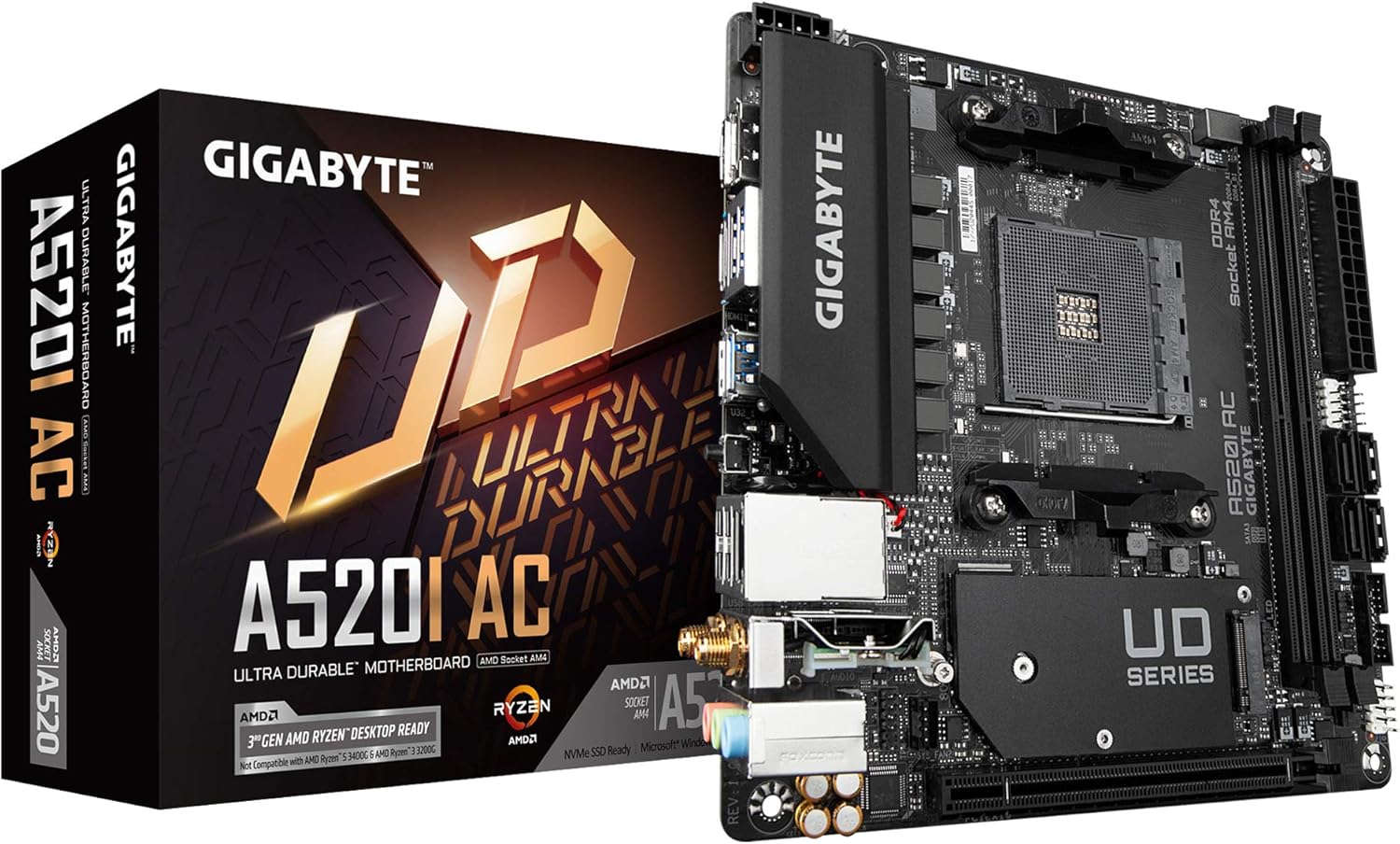
Supports 3rd Gen AMD Ryzen Processors AMD AM4 Socket Dual Channel DDR4, 2 DIMMs Optimized VRM Heatsink Direct 6 Phases Digital PWM with 55A DrMOS PCIe 3.0 x16 Slot 1x NVMe PCIe 3.0 x4 M.2 Slot ALC887 Audio Codec Blazing Fast 1GbE LAN Intel Dual Band AC WiFi and Bluetooth with Ultra Durable Antenna Rear DP & 2x HDMI Support Q-Flash Plus - Easily Flash Your BIOS RGB FUSION 2.0 Mini-ITX Form Factor
Details:
| Brand | GIGABYTE |
|---|---|
| CPU Socket | Socket AM4 |
| Compatible Devices | Desktop, Laptop |
| RAM Memory Technology | DDR4 |
| Compatible Processors | AMD 3rd Generation Ryzen |
| Chipset Type | AMD A520 |
| Platform | Windows 10 |
| Model Name | Gigabyte A520I AC |
| CPU Model | Ryzen 3 |
| Memory Storage Capacity | 1 GB |
Visit the GIGABYTE Store
Gigabyte A520I AC (AMD Ryzen AM4/Mini-ITX/Direct 6 Phases Digital PWM with 55A DrMOS/Gaming GbE LAN/Intel WiFi+Bluetooth/NVMe PCIe 3.0 x4 M.2/3 Display Interfaces/Q-Flash Plus/Motherboard)
AED1,13891
Quantity:
Order today to get by 7-14 business days
This item qualifies for free delivery
 Imported From: United States
At BOLO, we work hard to ensure the products you receive are new, genuine, and sourced from reputable suppliers.
Every product in the BOLO catalogue is sourced through our Verified Global Supply Network of verified sellers, authorized distributors or directly from the manufacturer.
Each product undergoes thorough inspection and verification at our consolidation and fulfilment centers to ensure it meets our strict authenticity and quality standards before being shipped and delivered to you.
If you ever have concerns regarding the authenticity of a product purchased from us, please contact Bolo Support. We will review your inquiry promptly and, if necessary, provide documentation verifying authenticity or offer a suitable resolution.
Your trust is our top priority, and we are committed to maintaining transparency and integrity in every transaction.
While we strive to display accurate information, variations in packaging, labeling, instructions, or formulation may occasionally occur due to regional differences or supplier updates. For detailed or manufacturer-specific information, please contact the brand directly or reach out to BOLO Support for assistance.
Unless otherwise stated, all prices displayed on the product page include applicable taxes and import duties.
BOLO operates in accordance with the laws and regulations of United Arab Emirates. Any items found to be restricted or prohibited for sale within the United Arab Emirates will be cancelled prior to shipment. We take proactive measures to ensure that only products permitted for sale in United Arab Emirates are listed on our website.
All items are shipped by air, and any products classified as “Dangerous Goods (DG)” under IATA regulations will be removed from the order and cancelled.
All orders are processed manually, and we make every effort to process them promptly once confirmed. Products cancelled due to the above reasons will be permanently removed from listings across the website.

Motherboard BIOS update for AMD Ryzen 5000 series processors
- From GIGABYTE’s website, download the latest compressed BIOS update file that matches your motherboard model from its product page.
- Uncompress the downloaded BIOS file, save it to your USB flash drive, and rename it to GIGABYTE.bin. Note: The USB flash drive must use the FAT32/16 file system.
- Insert the USB flash drive into the white USB port or BIOS Q Flash port on the back panel of your motherboard (USB port may not be labelled on all models, checking the user manual is recommended)
- Connect the power cables to the CPU 8 Pin power connector (connect either one if there are two) and mainboard 24 Pin power connector.
- Press the Q-Flash Plus button (location may vary by model) and the system will automatically search and match the BIOS file in the USB flash drive on the white USB port. The QFLED and the Q-Flash Plus button on the rear panel will flash during the BIOS matching and flashing process. Wait for 2-3 minutes and the QFLED will stop flashing when the BIOS flashing is complete.
Similar suggestions by Bolo
More from this brand
Similar items from “Motherboards”
Share with
Or share with link
https://www.bolo.ae/products/UO08S7OUQYL
Visit the GIGABYTE Store
Gigabyte A520I AC (AMD Ryzen AM4/Mini-ITX/Direct 6 Phases Digital PWM with 55A DrMOS/Gaming GbE LAN/Intel WiFi+Bluetooth/NVMe PCIe 3.0 x4 M.2/3 Display Interfaces/Q-Flash Plus/Motherboard)
AED1,13891
Quantity:
Order today to get by 7-14 business days
This item qualifies for free delivery
Imported From: United States
At BOLO, we work hard to ensure the products you receive are new, genuine, and sourced from reputable suppliers.
Every product in the BOLO catalogue is sourced through our Verified Global Supply Network of verified sellers, authorized distributors or directly from the manufacturer.
Each product undergoes thorough inspection and verification at our consolidation and fulfilment centers to ensure it meets our strict authenticity and quality standards before being shipped and delivered to you.
If you ever have concerns regarding the authenticity of a product purchased from us, please contact Bolo Support. We will review your inquiry promptly and, if necessary, provide documentation verifying authenticity or offer a suitable resolution.
Your trust is our top priority, and we are committed to maintaining transparency and integrity in every transaction.
While we strive to display accurate information, variations in packaging, labeling, instructions, or formulation may occasionally occur due to regional differences or supplier updates. For detailed or manufacturer-specific information, please contact the brand directly or reach out to BOLO Support for assistance.
Unless otherwise stated, all prices displayed on the product page include applicable taxes and import duties.
BOLO operates in accordance with the laws and regulations of United Arab Emirates. Any items found to be restricted or prohibited for sale within the United Arab Emirates will be cancelled prior to shipment. We take proactive measures to ensure that only products permitted for sale in United Arab Emirates are listed on our website.
All items are shipped by air, and any products classified as “Dangerous Goods (DG)” under IATA regulations will be removed from the order and cancelled.
All orders are processed manually, and we make every effort to process them promptly once confirmed. Products cancelled due to the above reasons will be permanently removed from listings across the website.
Description:
Supports 3rd Gen AMD Ryzen Processors AMD AM4 Socket Dual Channel DDR4, 2 DIMMs Optimized VRM Heatsink Direct 6 Phases Digital PWM with 55A DrMOS PCIe 3.0 x16 Slot 1x NVMe PCIe 3.0 x4 M.2 Slot ALC887 Audio Codec Blazing Fast 1GbE LAN Intel Dual Band AC WiFi and Bluetooth with Ultra Durable Antenna Rear DP & 2x HDMI Support Q-Flash Plus - Easily Flash Your BIOS RGB FUSION 2.0 Mini-ITX Form Factor
Details:
| Brand | GIGABYTE |
|---|---|
| CPU Socket | Socket AM4 |
| Compatible Devices | Desktop, Laptop |
| RAM Memory Technology | DDR4 |
| Compatible Processors | AMD 3rd Generation Ryzen |
| Chipset Type | AMD A520 |
| Platform | Windows 10 |
| Model Name | Gigabyte A520I AC |
| CPU Model | Ryzen 3 |
| Memory Storage Capacity | 1 GB |
Motherboard BIOS update for AMD Ryzen 5000 series processors
- From GIGABYTE’s website, download the latest compressed BIOS update file that matches your motherboard model from its product page.
- Uncompress the downloaded BIOS file, save it to your USB flash drive, and rename it to GIGABYTE.bin. Note: The USB flash drive must use the FAT32/16 file system.
- Insert the USB flash drive into the white USB port or BIOS Q Flash port on the back panel of your motherboard (USB port may not be labelled on all models, checking the user manual is recommended)
- Connect the power cables to the CPU 8 Pin power connector (connect either one if there are two) and mainboard 24 Pin power connector.
- Press the Q-Flash Plus button (location may vary by model) and the system will automatically search and match the BIOS file in the USB flash drive on the white USB port. The QFLED and the Q-Flash Plus button on the rear panel will flash during the BIOS matching and flashing process. Wait for 2-3 minutes and the QFLED will stop flashing when the BIOS flashing is complete.
Similar suggestions by Bolo
More from this brand
Similar items from “Motherboards”
Share with
Or share with link
https://www.bolo.ae/products/UO08S7OUQYL