Description:
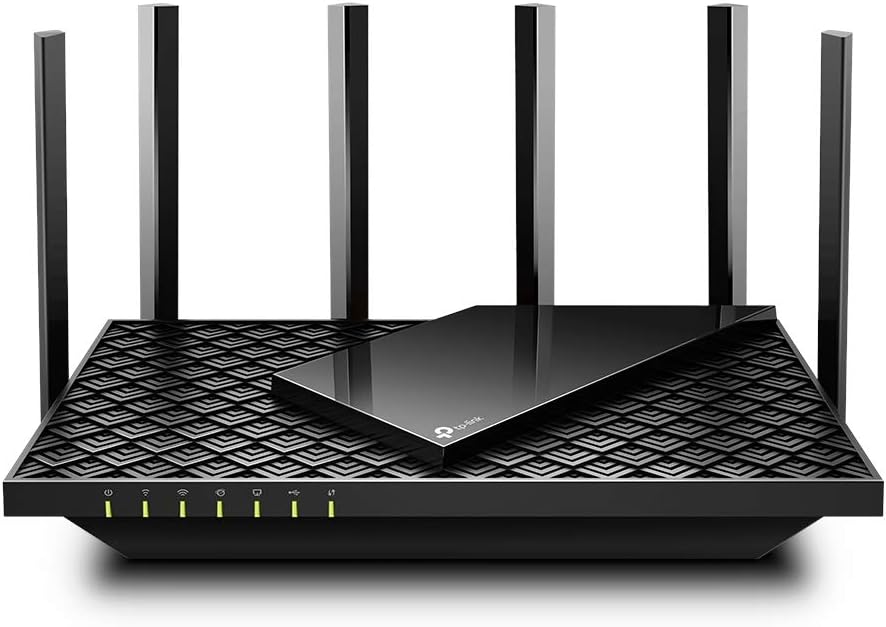
The latest generation of Wi-Fi technology brings faster speeds, less lag, and higher capacity, enabling more simultaneous connections on your home network.Warp Speed for Smooth 8K StreamingDrastically improved speeds enable streaming, fast downloading, and gaming, all at the same time. Need to go faster. Hop on 5 GHz with full speed-boosting features to stream multiple 8K videos without lagging.Extensive Wi-Fi Coverage with Advanced TechnologyEnjoy stable Wi-Fi connections, even in the kitchen and bedroom. High-Power FEM, 6× Antennas, Beamforming, and 4T4R structures combine to adapt Wi-Fi coverage to perfectly fit your home and concentrate signal strength towards your devices. Up to 4x more capacity to easily handle dozens of devices streaming and gaming at the same time — OFDMA and MU-MIMO combine to future-proof your home network by providing greater capacity to connect more devices.Designed to Be CoolThe slant rectangle atop of the scaled armor design provides a contemporary aesthetic. The vent design takes up 167 cm² (25 in²) of its top surface for improved heat dissipation, unleashing the whole machine's full power.TP-Link HomeShield: Advanced Security for Unlimited ClientsHomeShield protects all connected clients against DDoS, malicious sites, and port intrusion, delivering a safe network environment for your data and privacy.TP-Link OneMesh: Flexibly Create Whole Home WiFi with Archer AX73Want to build a whole-home Wi-Fi. Archer AX73 supports OneMesh to form seamless whole-home coverage, preventing drops and lag when moving between signals.
Reviews:
5.0 out of 5 stars An excellent device
(function() { P.when('cr-A', 'ready').execute(function(A) { if(typeof A.toggleExpanderAriaLabel === 'function') { A.toggleExpanderAriaLabel('review_text_read_more', 'Read more of this review', 'Read less of this review'); } }); })(); .review-text-read-more-expander:focus-visible { outline: 2px solid #2162a1; outline-offset: 2px; border-radius: 5px; } The TP-Link AX5400 is a WiFi 6 router with dual band and long range wireless capabilities. Also known as the Archer AX73, the WiFi 6 technology allows this product to achieve speeds up to 5400 Mbps as a theoretical maximum. Even though actual speeds will probably be lower than that, it will still be fast enough to perform bandwidth demanding tasks such as large file transfers over the network or Ultra High Definition streaming on your local home network.Installation is super easy, it’s basically plug and play. You connect the router to your internet modem, and then connect your devices via the WiFi networks. The A5400 will come with default wireless settings, including a predefined network name and password, for easy initial setup. It is strongly recommended to change these settings to your own, for security reasons. Management can be done either via the smartphone app or (very happy about this one) the web interface. More about that later.Aesthetically, you will notice that this router has a rather interesting rectangular design, and it is equipped with 6 (!!!) antennas. Yes, you read that right: 6 antennas. TP-Link claims that this supports large wifi coverage and good signal strength to all devices with their beamforming and 4T4R technologies. Even though I have no practical way of measuring the performance of these technologies, I can attest to the fact that the AX5400’s coverage is excellent and I didn’t notice any dead spots at home (including the devices located outside my home, such as wifi cameras and doorbells). In case you do experience dead spots, you can add an extra TP-Link mesh device compatible with the AX5400 to solve the issue. I talk more about mesh networking below.One of the major features of the AX5400 is mesh networking. Mesh means that all your routers connect with each other, forming a mesh of coverage rather than having one router that acts as a single point of connection. Your wireless device will always connect automatically to the mesh router that provides the strongest signal. This is called Roaming. Much like in telecom/mobile networks, your Wi-Fi devices might change positions and move around your house. This means that the wireless signal between your device and the router gets weaker with distance. With mesh routers your device will automatically connect to a different router unit that offers a stronger signal, without interrupting the running service and streams. This not only increases the coverage vastly, but also offers seamless handovers and transitions of Wi-Fi services as you change your position in your house. In other words, you get Wi-Fi Roaming capabilities that will vastly improve the reliability of your wireless connection. That, of course, means that you need another TP-Link mesh capable device to achieve this functionality. TP-Link provides a list of mesh devices compatible with the AX5400 on their website.So far I have no complains regarding the AX5400’s performance. The Wi-Fi is very quick and outperforms my internet connection. I haven’t noticed any issues with latency either. One remark I want to make here is that, even though older WiFi cards will still be able to connect and operate with the AX5400, you will need a Wi-Fi 6 compatible wireless card to make the most out of the mesh system. Making the most out of it doesn’t mean that you will experience speeds close to 5.4 Gbps. These speeds are a theoretical maximum, they are achieved in the lab and they are impossible to see in the average home network setup. You will see, though, very high speeds depending on the quality of your wireless card (in my tests, I used the TP-Link WiFi 6 AX3000 PCIe WiFi Card), the distance from the router and the obstacles that separate you from it. Bottom line: it’ll be fast, but be realistic with your expectations.But probably one of the things I’m most happy about this router is the availability of a web interface for management. Being the owner/user of the otherwise great TP-Link Deco system, one of my main complaints was the lack of a web interface for network configuration. As a power user, I find it hard to configure my network equipment via the small screen of a smartphone. You can access the web interface by typing the router’s management IP (you can find it listed as Gateway on your computer’s network settings) in your browser. You’ll have to first set up a local password (or create an account with TP-Link) before accessing the router configuration.Once you log in, the first screen you’ll see is the home screen, or a summary screen if you like. You can see the internet status, the router status and some shortcut button to common functions, your mesh devices (if you have any) and the connected client devices. This last bit is quite interesting, since you’ll be able to see the connected devices, their real time speed (up/down), the interface they’re connected to (ethernet, 2.4G or 5G), their “negotiated” max bandwidth, how long they’ve been connected to the router and, finally, a “block” button to deny the device access to the network. Below, I’m going through some of the functions that I find interesting, but I will omit the ones that are so common you can find them virtually in every router out there.On the Wireless screen you’ll find your WiFi settings. You can turn on or off OFDMA, TWT, Smart Connect and, of course, the Wireless radio itself. OFDMA (simultaneous transmission to different devices within the same transmission window) will significantly increase the traffic speed with compatible devices (your device must support OFDMA), TWT will help increase your device’s battery life by maintaining the connection with the router and allowing the device to go to sleep (aka not forcing the device to send keep alive messages to the router too frequently), while Smart Connect optimized the connectivity of the router’s radio bands with the client devices.TP-Link offers a security platform with the AX5400, similar to what they offer with the rest of their flagship devices, HomeShield. The user will get some basic functionality out of the box, and additional sophisticated features and analytics are available with a subscription service.The last screen on the web interface is the Advanced screen, where all the advanced options are located. Power users will definitely appreciate some of these. The first thing that caught my eye was Lan —> Link Aggregation. You can aggregate (combine) up to two Ethernet ports into one (logical) network port, aggregating their bandwidth as well. Of course, you’ll need to aggregate ports on the other end of the connection as well, but that is the other side of the problem. Pretty cool. The router also supports direct DynDNS logins, for those of you who still use a DynDNS client on your computer. Another cool section is Routing. You can use your own static routes defined in the router’s config if you need to direct specific traffic to specific destinations. Use this only if you know what you’re doing, otherwise a bad routing config will probably block your access and traffic. The router comes with a USB port, which is nothing unusual. What is very cool, though, is the fact that the USB port supports (except for mass storage devices) Apple’s Time Machine. Just connect a storage device to the AX5400’s USB port, enable Time Machine in settings, and voila! No need for one of those old Apple AirPort Extreme routers anymore. NAT is, of course, present in this device as well, for your port forwarding needs. Security features include a Firewall, ACLs and MAC spoofing protection (by binding IPs to specific MACs). You have your standard VPN server built in, supporting both OpenVPN and PPTP, IPv6 support for you dual-stackers out there and a bunch of router Admin features (firmware update, backup, remote management, system logs etc.). Last but not least, you can switch the mode of the device between a Router (the device will route traffic and provide routing services) and an Access Point (the device will become a wireless gateway for clients, but you will need to connect it to a router for routing services - this is used mostly to expand the WiFi network).Overall the TP-Link AX5400 WiFi 6 router is a great home routing device and a strong contender in this segment of products. I’m very happy with it for the time I’ve been using it, and I definitely recommend it.
5.0 out of 5 stars Fast and Reliable WiFi Router
The TP-Link AX5400 WiFi 6 Router (Archer AX73) is a high-speed router that provides excellent streaming capabilities and long-range coverage. I have been impressed with the fast and reliable connection this router delivers, making it perfect for streaming movies, gaming, and working from home. The dual-band gigabit wireless internet ensures smooth and uninterrupted performance. Overall, I highly recommend this router for anyone looking for a top-notch WiFi experience.
5.0 out of 5 stars Great Router
Great product for price. Supports wifi6 and doesnt have wip security. Rather it has a more advanced encryption software. Easy to set up, 4 ports, enough antenna to cover 3 floors. One long power cable is unobtrusive and easy to set up, the app is easy to use as well. You can set up some crazy rules and have a guest network that is throttled so your children's friends don't keep hogging all the bandwidth. Make sure to get a modem too, it doesnt work for both.
4.0 out of 5 stars Great Features, Slightly Slower Speeds
I recently upgraded to the TP-Link AX5400 WiFi 6 Router and have been generally impressed with its performance. The setup was a breeze, and the router's coverage throughout my home is excellent, even reaching areas that were previously dead zones. The WiFi 6 technology definitely makes a noticeable difference in connection stability, especially when multiple devices are connected.The range of features offered by the AX5400 is quite impressive. The parental controls and device prioritization options are very handy, allowing me to manage and optimize my network for various tasks. The interface is user-friendly and intuitive, making customization a straightforward process.However, I did notice that the speeds were not as fast as I expected when compared to higher-end models like the TP-Link AX6000. While the AX5400 provides reliable and decent speeds, there's a slight gap when compared to the AX6000. In heavy usage scenarios, I noticed that the speed occasionally dipped more than it did with the higher-tier router.Overall, the TP-Link AX5400 WiFi 6 Router is a solid choice for most households. Its feature set and reliable performance make it a valuable addition to any network setup. However, if you're looking for top-of-the-line speeds, you might want to consider investing in the AX6000 model for that extra boost in performance.
Resolvió mis problemas de Wifi. Wifi 6 y MU-MIMO son una maravilla
(function() { P.when('cr-A', 'ready').execute(function(A) { if(typeof A.toggleExpanderAriaLabel === 'function') { A.toggleExpanderAriaLabel('review_text_read_more', 'Read more of this review', 'Read less of this review'); } }); })(); .review-text-read-more-expander:focus-visible { outline: 2px solid #2162a1; outline-offset: 2px; border-radius: 5px; } Tengo contratados 125 Megas de internet con Izzi y el modem de la compañía me daba muchos problemas de conexión, y este TPLink Archer AX73 me resolvió todos mis problemas de Wifi en casa.Mi casa es de 110 m2 y de 2 pisos, construcción de block y concreto, el router lo tengo ubicado al centro de la casa en 1ra planta debajo de las escaleras, la señal Wifi llega sin ningún problema a toda la casa, la señal 2.4ghz llega casi a full speed (105-115 megas) en la primera planta, y en la segunda como a un 80 o 70% (80-90 megas), pero la señal 5ghz es una maravilla, cada rincón de la casa incluso hasta fuera del cerco de la casa llega a full speed, (120-125 megas), somos 3 personas en casa y cerca de 15 dispositivos conectados (alexa, 3 Tvs, 3 celulares, tablets, laptop, consolas de videojuegos, etc), las habitaciones estan en 2da planta y tenemos 2 consolas PS5 arriba, el Wifi 6 que trae el AX73 es 'día y noche' en comparación al Wifi del modem de Izzi, las PS5 ya no tienen Lag aunque esten jugando las dos al mismo tiempo CoD Warzone (con Ping entre 30 y 40 ya en partida) y con otras Tv's reproduciendo streaming HD de Netflix y celulares conectados (con la opción OFDMA y MU-MIMO activas).En principio tuve problemas con la red 2.4ghz, la señal se iba constantemente, y la velocidad de la red era muy lenta, no obtenía de la 2.4ghz mas de 40 megas y eso estando al lado del router, ya alejado no subía de 10-15 megas, busqué información y encontré en una página de TPLink que uno de sus técnicos sugería cambiar el tipo de señal de 802.11b/g/n/ax a 802.11b/g/n, lo hice y con solo quitar el "ax" de la red 2.4ghz las velocidades subieron a las que mencioné al principio de mi reseña y la señal dejó de desconectarse, por otro lado la red 5ghz nunca me dió problemas, dejo fotos de como lo tengo programado.También les recomiendo que en la app Tether le pongan una "programación de reinicio" 1 vez por semana mínimo, se puede programar para que sea por la madrugada, esto sirve para liberar el caché del router y que el internet siempre sea fluido.
Good on the 5Ghz, so-so on the 2.4Ghz at long distance
The router work great and cover the dead spot from my previously router (EA8100). For some reason, it does not seem to like the older generation WIFI standard on the 2.4GHz band, giving out lower then expected speed at longer distance.Overall I still give this router a 2 thumb up for the no fuss setup as well as it value for money.
Amazing router!
I ordered this router after reading the reviews here and I'm glad I did!It's an amazing router and it has improved my Wifi speeds by a lot. There is now no lag at all.Big thanks to the seller and Bolo too for the speedy delivery!
cool
its cool....exactly what was promised
Very good product
Very good product
Visit the TP-Link Store
TP-Link AX5400 WiFi 6 Router (Archer AX73)- Dual Band Gigabit Wireless Internet Router, High-Speed ax Router for Streaming, Long Range Coverage
AED66879
Quantity:
Order today to get by 7-14 business days
This item qualifies for free delivery
Imported From: United States
At BOLO, we work hard to ensure the products you receive are new, genuine, and sourced from reputable suppliers.
BOLO is not an authorized or official retailer for most brands, nor are we affiliated with manufacturers unless specifically stated on a product page. Instead, we source verified sellers, authorized distributors or directly from the manufacturer.
Each product undergoes thorough inspection and verification at our consolidation and fulfilment centers to ensure it meets our strict authenticity and quality standards before being shipped and delivered to you.
If you ever have concerns regarding the authenticity of a product purchased from us, please contact Bolo Support. We will review your inquiry promptly and, if necessary, provide documentation verifying authenticity or offer a suitable resolution.
Your trust is our top priority, and we are committed to maintaining transparency and integrity in every transaction.
All product information, images, descriptions, and reviews originate from the manufacturer or from trusted sellers overseas. BOLO is not affiliated with, endorsed by, or an authorized retailer for most brands listed on our website unless stated otherwise.
While we strive to display accurate information, variations in packaging, labeling, instructions, or formulation may occasionally occur due to regional differences or supplier updates. For detailed or manufacturer-specific information, please contact the brand directly or reach out to BOLO Support for assistance.
Unless otherwise stated, all prices displayed on the product page include applicable taxes and import duties.
BOLO operates in accordance with the laws and regulations of United Arab Emirates. Any items found to be restricted or prohibited for sale within the UAE will be cancelled prior to shipment. We take proactive measures to ensure that only products permitted for sale in United Arab Emirates are listed on our website.
All items are shipped by air, and any products classified as “Dangerous Goods (DG)” under IATA regulations will be removed from the order and cancelled.
All orders are processed manually, and we make every effort to process them promptly once confirmed. Products cancelled due to the above reasons will be permanently removed from listings across the website.
Similar suggestions by Bolo
More from this brand
Similar items from “Routers”
Share with
Or share with link
https://www.bolo.ae/products/UO08GU4Q3DI
Visit the TP-Link Store
TP-Link AX5400 WiFi 6 Router (Archer AX73)- Dual Band Gigabit Wireless Internet Router, High-Speed ax Router for Streaming, Long Range Coverage

AED66879
Quantity:
Order today to get by 7-14 business days
This item qualifies for free delivery
Imported From: United States
At BOLO, we work hard to ensure the products you receive are new, genuine, and sourced from reputable suppliers.
BOLO is not an authorized or official retailer for most brands, nor are we affiliated with manufacturers unless specifically stated on a product page. Instead, we source verified sellers, authorized distributors or directly from the manufacturer.
Each product undergoes thorough inspection and verification at our consolidation and fulfilment centers to ensure it meets our strict authenticity and quality standards before being shipped and delivered to you.
If you ever have concerns regarding the authenticity of a product purchased from us, please contact Bolo Support. We will review your inquiry promptly and, if necessary, provide documentation verifying authenticity or offer a suitable resolution.
Your trust is our top priority, and we are committed to maintaining transparency and integrity in every transaction.
All product information, images, descriptions, and reviews originate from the manufacturer or from trusted sellers overseas. BOLO is not affiliated with, endorsed by, or an authorized retailer for most brands listed on our website unless stated otherwise.
While we strive to display accurate information, variations in packaging, labeling, instructions, or formulation may occasionally occur due to regional differences or supplier updates. For detailed or manufacturer-specific information, please contact the brand directly or reach out to BOLO Support for assistance.
Unless otherwise stated, all prices displayed on the product page include applicable taxes and import duties.
BOLO operates in accordance with the laws and regulations of United Arab Emirates. Any items found to be restricted or prohibited for sale within the UAE will be cancelled prior to shipment. We take proactive measures to ensure that only products permitted for sale in United Arab Emirates are listed on our website.
All items are shipped by air, and any products classified as “Dangerous Goods (DG)” under IATA regulations will be removed from the order and cancelled.
All orders are processed manually, and we make every effort to process them promptly once confirmed. Products cancelled due to the above reasons will be permanently removed from listings across the website.
Description:
The latest generation of Wi-Fi technology brings faster speeds, less lag, and higher capacity, enabling more simultaneous connections on your home network.Warp Speed for Smooth 8K StreamingDrastically improved speeds enable streaming, fast downloading, and gaming, all at the same time. Need to go faster. Hop on 5 GHz with full speed-boosting features to stream multiple 8K videos without lagging.Extensive Wi-Fi Coverage with Advanced TechnologyEnjoy stable Wi-Fi connections, even in the kitchen and bedroom. High-Power FEM, 6× Antennas, Beamforming, and 4T4R structures combine to adapt Wi-Fi coverage to perfectly fit your home and concentrate signal strength towards your devices. Up to 4x more capacity to easily handle dozens of devices streaming and gaming at the same time — OFDMA and MU-MIMO combine to future-proof your home network by providing greater capacity to connect more devices.Designed to Be CoolThe slant rectangle atop of the scaled armor design provides a contemporary aesthetic. The vent design takes up 167 cm² (25 in²) of its top surface for improved heat dissipation, unleashing the whole machine's full power.TP-Link HomeShield: Advanced Security for Unlimited ClientsHomeShield protects all connected clients against DDoS, malicious sites, and port intrusion, delivering a safe network environment for your data and privacy.TP-Link OneMesh: Flexibly Create Whole Home WiFi with Archer AX73Want to build a whole-home Wi-Fi. Archer AX73 supports OneMesh to form seamless whole-home coverage, preventing drops and lag when moving between signals.
Reviews:
5.0 out of 5 stars An excellent device
(function() { P.when('cr-A', 'ready').execute(function(A) { if(typeof A.toggleExpanderAriaLabel === 'function') { A.toggleExpanderAriaLabel('review_text_read_more', 'Read more of this review', 'Read less of this review'); } }); })(); .review-text-read-more-expander:focus-visible { outline: 2px solid #2162a1; outline-offset: 2px; border-radius: 5px; } The TP-Link AX5400 is a WiFi 6 router with dual band and long range wireless capabilities. Also known as the Archer AX73, the WiFi 6 technology allows this product to achieve speeds up to 5400 Mbps as a theoretical maximum. Even though actual speeds will probably be lower than that, it will still be fast enough to perform bandwidth demanding tasks such as large file transfers over the network or Ultra High Definition streaming on your local home network.Installation is super easy, it’s basically plug and play. You connect the router to your internet modem, and then connect your devices via the WiFi networks. The A5400 will come with default wireless settings, including a predefined network name and password, for easy initial setup. It is strongly recommended to change these settings to your own, for security reasons. Management can be done either via the smartphone app or (very happy about this one) the web interface. More about that later.Aesthetically, you will notice that this router has a rather interesting rectangular design, and it is equipped with 6 (!!!) antennas. Yes, you read that right: 6 antennas. TP-Link claims that this supports large wifi coverage and good signal strength to all devices with their beamforming and 4T4R technologies. Even though I have no practical way of measuring the performance of these technologies, I can attest to the fact that the AX5400’s coverage is excellent and I didn’t notice any dead spots at home (including the devices located outside my home, such as wifi cameras and doorbells). In case you do experience dead spots, you can add an extra TP-Link mesh device compatible with the AX5400 to solve the issue. I talk more about mesh networking below.One of the major features of the AX5400 is mesh networking. Mesh means that all your routers connect with each other, forming a mesh of coverage rather than having one router that acts as a single point of connection. Your wireless device will always connect automatically to the mesh router that provides the strongest signal. This is called Roaming. Much like in telecom/mobile networks, your Wi-Fi devices might change positions and move around your house. This means that the wireless signal between your device and the router gets weaker with distance. With mesh routers your device will automatically connect to a different router unit that offers a stronger signal, without interrupting the running service and streams. This not only increases the coverage vastly, but also offers seamless handovers and transitions of Wi-Fi services as you change your position in your house. In other words, you get Wi-Fi Roaming capabilities that will vastly improve the reliability of your wireless connection. That, of course, means that you need another TP-Link mesh capable device to achieve this functionality. TP-Link provides a list of mesh devices compatible with the AX5400 on their website.So far I have no complains regarding the AX5400’s performance. The Wi-Fi is very quick and outperforms my internet connection. I haven’t noticed any issues with latency either. One remark I want to make here is that, even though older WiFi cards will still be able to connect and operate with the AX5400, you will need a Wi-Fi 6 compatible wireless card to make the most out of the mesh system. Making the most out of it doesn’t mean that you will experience speeds close to 5.4 Gbps. These speeds are a theoretical maximum, they are achieved in the lab and they are impossible to see in the average home network setup. You will see, though, very high speeds depending on the quality of your wireless card (in my tests, I used the TP-Link WiFi 6 AX3000 PCIe WiFi Card), the distance from the router and the obstacles that separate you from it. Bottom line: it’ll be fast, but be realistic with your expectations.But probably one of the things I’m most happy about this router is the availability of a web interface for management. Being the owner/user of the otherwise great TP-Link Deco system, one of my main complaints was the lack of a web interface for network configuration. As a power user, I find it hard to configure my network equipment via the small screen of a smartphone. You can access the web interface by typing the router’s management IP (you can find it listed as Gateway on your computer’s network settings) in your browser. You’ll have to first set up a local password (or create an account with TP-Link) before accessing the router configuration.Once you log in, the first screen you’ll see is the home screen, or a summary screen if you like. You can see the internet status, the router status and some shortcut button to common functions, your mesh devices (if you have any) and the connected client devices. This last bit is quite interesting, since you’ll be able to see the connected devices, their real time speed (up/down), the interface they’re connected to (ethernet, 2.4G or 5G), their “negotiated” max bandwidth, how long they’ve been connected to the router and, finally, a “block” button to deny the device access to the network. Below, I’m going through some of the functions that I find interesting, but I will omit the ones that are so common you can find them virtually in every router out there.On the Wireless screen you’ll find your WiFi settings. You can turn on or off OFDMA, TWT, Smart Connect and, of course, the Wireless radio itself. OFDMA (simultaneous transmission to different devices within the same transmission window) will significantly increase the traffic speed with compatible devices (your device must support OFDMA), TWT will help increase your device’s battery life by maintaining the connection with the router and allowing the device to go to sleep (aka not forcing the device to send keep alive messages to the router too frequently), while Smart Connect optimized the connectivity of the router’s radio bands with the client devices.TP-Link offers a security platform with the AX5400, similar to what they offer with the rest of their flagship devices, HomeShield. The user will get some basic functionality out of the box, and additional sophisticated features and analytics are available with a subscription service.The last screen on the web interface is the Advanced screen, where all the advanced options are located. Power users will definitely appreciate some of these. The first thing that caught my eye was Lan —> Link Aggregation. You can aggregate (combine) up to two Ethernet ports into one (logical) network port, aggregating their bandwidth as well. Of course, you’ll need to aggregate ports on the other end of the connection as well, but that is the other side of the problem. Pretty cool. The router also supports direct DynDNS logins, for those of you who still use a DynDNS client on your computer. Another cool section is Routing. You can use your own static routes defined in the router’s config if you need to direct specific traffic to specific destinations. Use this only if you know what you’re doing, otherwise a bad routing config will probably block your access and traffic. The router comes with a USB port, which is nothing unusual. What is very cool, though, is the fact that the USB port supports (except for mass storage devices) Apple’s Time Machine. Just connect a storage device to the AX5400’s USB port, enable Time Machine in settings, and voila! No need for one of those old Apple AirPort Extreme routers anymore. NAT is, of course, present in this device as well, for your port forwarding needs. Security features include a Firewall, ACLs and MAC spoofing protection (by binding IPs to specific MACs). You have your standard VPN server built in, supporting both OpenVPN and PPTP, IPv6 support for you dual-stackers out there and a bunch of router Admin features (firmware update, backup, remote management, system logs etc.). Last but not least, you can switch the mode of the device between a Router (the device will route traffic and provide routing services) and an Access Point (the device will become a wireless gateway for clients, but you will need to connect it to a router for routing services - this is used mostly to expand the WiFi network).Overall the TP-Link AX5400 WiFi 6 router is a great home routing device and a strong contender in this segment of products. I’m very happy with it for the time I’ve been using it, and I definitely recommend it.
5.0 out of 5 stars Fast and Reliable WiFi Router
The TP-Link AX5400 WiFi 6 Router (Archer AX73) is a high-speed router that provides excellent streaming capabilities and long-range coverage. I have been impressed with the fast and reliable connection this router delivers, making it perfect for streaming movies, gaming, and working from home. The dual-band gigabit wireless internet ensures smooth and uninterrupted performance. Overall, I highly recommend this router for anyone looking for a top-notch WiFi experience.
5.0 out of 5 stars Great Router
Great product for price. Supports wifi6 and doesnt have wip security. Rather it has a more advanced encryption software. Easy to set up, 4 ports, enough antenna to cover 3 floors. One long power cable is unobtrusive and easy to set up, the app is easy to use as well. You can set up some crazy rules and have a guest network that is throttled so your children's friends don't keep hogging all the bandwidth. Make sure to get a modem too, it doesnt work for both.
4.0 out of 5 stars Great Features, Slightly Slower Speeds
I recently upgraded to the TP-Link AX5400 WiFi 6 Router and have been generally impressed with its performance. The setup was a breeze, and the router's coverage throughout my home is excellent, even reaching areas that were previously dead zones. The WiFi 6 technology definitely makes a noticeable difference in connection stability, especially when multiple devices are connected.The range of features offered by the AX5400 is quite impressive. The parental controls and device prioritization options are very handy, allowing me to manage and optimize my network for various tasks. The interface is user-friendly and intuitive, making customization a straightforward process.However, I did notice that the speeds were not as fast as I expected when compared to higher-end models like the TP-Link AX6000. While the AX5400 provides reliable and decent speeds, there's a slight gap when compared to the AX6000. In heavy usage scenarios, I noticed that the speed occasionally dipped more than it did with the higher-tier router.Overall, the TP-Link AX5400 WiFi 6 Router is a solid choice for most households. Its feature set and reliable performance make it a valuable addition to any network setup. However, if you're looking for top-of-the-line speeds, you might want to consider investing in the AX6000 model for that extra boost in performance.
Resolvió mis problemas de Wifi. Wifi 6 y MU-MIMO son una maravilla
(function() { P.when('cr-A', 'ready').execute(function(A) { if(typeof A.toggleExpanderAriaLabel === 'function') { A.toggleExpanderAriaLabel('review_text_read_more', 'Read more of this review', 'Read less of this review'); } }); })(); .review-text-read-more-expander:focus-visible { outline: 2px solid #2162a1; outline-offset: 2px; border-radius: 5px; } Tengo contratados 125 Megas de internet con Izzi y el modem de la compañía me daba muchos problemas de conexión, y este TPLink Archer AX73 me resolvió todos mis problemas de Wifi en casa.Mi casa es de 110 m2 y de 2 pisos, construcción de block y concreto, el router lo tengo ubicado al centro de la casa en 1ra planta debajo de las escaleras, la señal Wifi llega sin ningún problema a toda la casa, la señal 2.4ghz llega casi a full speed (105-115 megas) en la primera planta, y en la segunda como a un 80 o 70% (80-90 megas), pero la señal 5ghz es una maravilla, cada rincón de la casa incluso hasta fuera del cerco de la casa llega a full speed, (120-125 megas), somos 3 personas en casa y cerca de 15 dispositivos conectados (alexa, 3 Tvs, 3 celulares, tablets, laptop, consolas de videojuegos, etc), las habitaciones estan en 2da planta y tenemos 2 consolas PS5 arriba, el Wifi 6 que trae el AX73 es 'día y noche' en comparación al Wifi del modem de Izzi, las PS5 ya no tienen Lag aunque esten jugando las dos al mismo tiempo CoD Warzone (con Ping entre 30 y 40 ya en partida) y con otras Tv's reproduciendo streaming HD de Netflix y celulares conectados (con la opción OFDMA y MU-MIMO activas).En principio tuve problemas con la red 2.4ghz, la señal se iba constantemente, y la velocidad de la red era muy lenta, no obtenía de la 2.4ghz mas de 40 megas y eso estando al lado del router, ya alejado no subía de 10-15 megas, busqué información y encontré en una página de TPLink que uno de sus técnicos sugería cambiar el tipo de señal de 802.11b/g/n/ax a 802.11b/g/n, lo hice y con solo quitar el "ax" de la red 2.4ghz las velocidades subieron a las que mencioné al principio de mi reseña y la señal dejó de desconectarse, por otro lado la red 5ghz nunca me dió problemas, dejo fotos de como lo tengo programado.También les recomiendo que en la app Tether le pongan una "programación de reinicio" 1 vez por semana mínimo, se puede programar para que sea por la madrugada, esto sirve para liberar el caché del router y que el internet siempre sea fluido.
Good on the 5Ghz, so-so on the 2.4Ghz at long distance
The router work great and cover the dead spot from my previously router (EA8100). For some reason, it does not seem to like the older generation WIFI standard on the 2.4GHz band, giving out lower then expected speed at longer distance.Overall I still give this router a 2 thumb up for the no fuss setup as well as it value for money.
Amazing router!
I ordered this router after reading the reviews here and I'm glad I did!It's an amazing router and it has improved my Wifi speeds by a lot. There is now no lag at all.Big thanks to the seller and Bolo too for the speedy delivery!
cool
its cool....exactly what was promised
Very good product
Very good product
Similar suggestions by Bolo
More from this brand
Similar items from “Routers”
Share with
Or share with link
https://www.bolo.ae/products/UO08GU4Q3DI