Deliver toUnited Arab Emirates
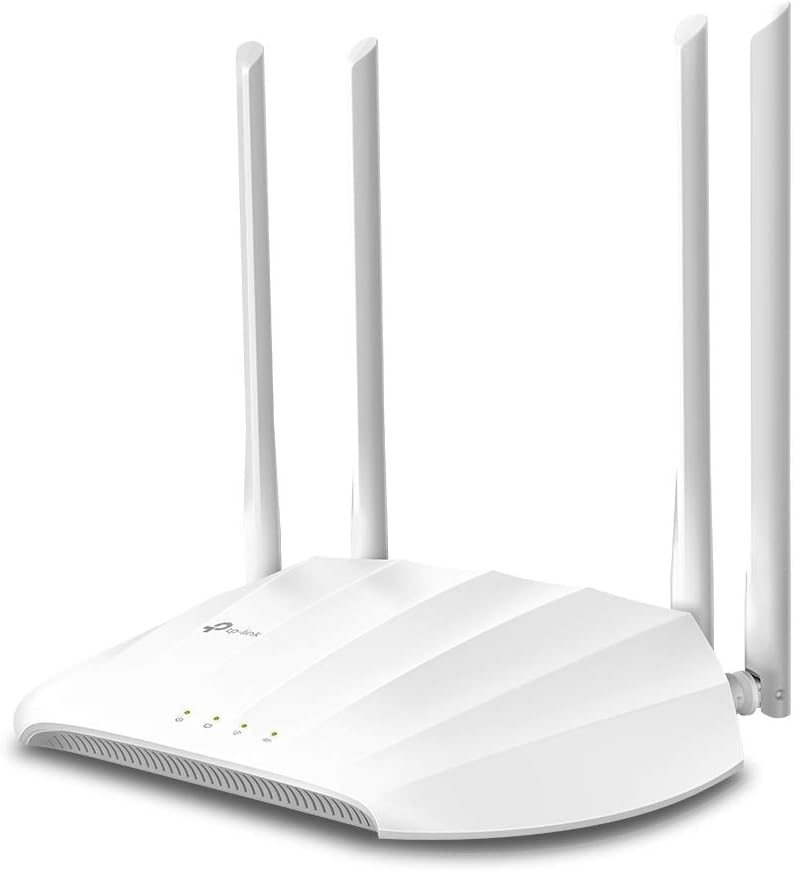
TP-Link AC1200 Wireless Gigabit Access Point Desktop Wi-Fi Bridge MU-MIMO & Beamforming Supports Multi-SSID/Client/Range Extender Mode 4 Fixed Antennas Passive PoE Powered (TL-WA1201)

Description:

  • ๐’๐ฎ๐ฉ๐ž๐ซ๐ข๐จ๐ซ ๐’๐ฉ๐ž๐ž๐๐ฌ ๐ฐ๐ข๐ญ๐ก ๐Œ๐”-๐Œ๐ˆ๐Œ๐Ž: Outfitted with the latest 802.11ac Wave 2 MU-MIMO technology, the TL-WA1201 easily delivers dual-band Wi-Fi speeds of up to 1200 Mbps to multiple devices at the same time.
  • ๐Œ๐ฎ๐ฅ๐ญ๐ข-๐Œ๐จ๐๐ž ๐Ÿ’ ๐ข๐ง ๐Ÿ: Supports Client, Multi-SSID, Range Extender, and AP operation modes to enable various wireless applications to give users a more dynamic and comprehensive experience when using your AP.
  • ๐๐จ๐„ ๐Ÿ๐จ๐ซ ๐„๐š๐ฌ๐ฒ ๐ˆ๐ง๐ฌ๐ญ๐š๐ฅ๐ฅ๐š๐ญ๐ข๐จ๐ง: TL-WA1201 supports Passive PoE power supplies, can be powered by the provided PoE adapter, making deployment effortless and flexible.
  • ๐๐จ๐จ๐ฌ๐ญ๐ž๐ ๐–๐ข-๐…๐ข ๐‚๐จ๐ฏ๐ž๐ซ๐š๐ ๐ž: Four external antennas equipped with Beamforming technology concentrate Wi-Fi signals towards your devices to extend reliable Wi-Fi to every corner of your home or officeโ€”even over long distances.
  • ๐‹๐ข๐ฆ๐ข๐ญ๐ž๐ ๐‹๐ข๐Ÿ๐ž๐ญ๐ข๐ฆ๐ž ๐๐ซ๐จ๐ญ๐ž๐œ๐ญ๐ข๐จ๐ง: Backed by our industry-leading limited lifetime protection and free 24/7 technical support, you can work with confidence.

  • TP-Link AC1200 Wireless Access Point

    Reviews:

    5.0 out of 5 stars Flexible, Reliable, and Seriously Underrated

    I.L.T. ยท March 29, 2025

    This little beast supports four modes out of the box:Access Point Mode โ€“ turn wired into wireless โœ”๏ธRange Extender Mode โ€“ repeat an existing signal โœ”๏ธClient Mode โ€“ convert Ethernet-only devices (like a printer or old PC) into Wi-Fi clients โœ”๏ธMulti-SSID Mode โ€“ create segmented guest networks with VLANs โœ”๏ธI ran this in both Access Point and Extender modes in a tricky layout (concrete walls, multi-floor), and it pushed out clean dual-band signal without any noticeable lag or packet loss. Plus, MU-MIMO and beamforming help direct the signal where it mattersโ€”great for multi-device households or streaming-heavy setups.What I Like:Dual-band speeds (867 Mbps on 5GHz + 300 Mbps on 2.4GHz)โ€”solid for most streaming and gamingGigabit Ethernet port = no bottleneck on backhaul or client modePassive PoE supportโ€”clean mounting, especially if you're running it up a wall or ceilingFour fixed antennas deliver real coverage, not just marketing fluffPro Tips:Pair with a modern router for max benefitโ€”don't bottleneck this thing with an old base stationUse a dedicated SSID in AP mode for clean handoff between routersIn Range Extender mode, place it midway between router and dead zone for best balance of signal vs. speedWhat Could Be Better:Web interface is solid but not quite as slick as newer TP-Link Omada gearFixed antennas = solid signal but less customization of directionNo mesh functionalityโ€”if you want seamless handoff, go Deco insteadTL;DR:The TP-Link TL-WA1201 is a super versatile, cost-effective, and stable Wi-Fi extender/access point. Whether youโ€™re bridging old gear, extending signal to a dead zone, or segmenting networks with VLANsโ€”it handles it all quietly and efficiently.No dropped Zoom calls. No gaming lag. Just clean, customizable Wi-Fi wherever you need it.

    5.0 out of 5 stars Fixed Wifi Problems

    D. ยท June 19, 2025

    Solves signal problem in my house. Using it as an access point for 1/3 of my house. Easy set up. Provides great coverage and much more stable signal.I have a 1980s brick ranch home that's 90' long with sand finish plaster skim coat finish on my walls; the type of construction just kills signals. I was lucky to get a -75 to -85 signal in my office from my hub 40' away; now I'm at -41 and speed is much better too. Even worse in my wife's office at the other end of the house in the room over garage. By dropping access points at both ends, now everything runs much smoother and Ring cameras work much better.

    5.0 out of 5 stars Stock firmware is unstable on 5GHz, but OpenWRT works great

    R.L. ยท September 9, 2021

    TL;dr -- this AP is another case of good hardware, awful firmware. The OEM firmware makes this device unusable, but flashing OpenWRT makes it useful again.Full Review:I bought this access point to use as a wireless client bridge for a computer in my house that gets an extremely poor wireless signal. Initially, I was disappointed because I was limited to a 2.4GHz connection, as the 5GHz connection was too unstable to be used. I'd regularly run into issues watching YouTube videos, browsing the web, or making Zoom calls.The solution was to use the 2.4GHz radio instead. This meant that my connection was limited to ~45-60mbps, which pales in comparison to a typical 5GHz connection speed of ~250-300mbps. For reference, my iPhone 11 is able to pull ~560-620mbps when placed next to the hardwired access point.i initially considered returning the AP, but then I found someone online had ported OpenWRT to this access point. Although this may void the warranty, it solved my issue. No longer do I have stability issues with the 5GHz radio, which means that I have both a reliable and fast connection to the Internet again my home office.OpenWRT is great, although it's far more complicated of an interface than the default TP-Link one. I would not recommend using this device in this configuration unless you're familiar with more advanced networking concepts or are willing to learn.Pros:- Inexpensive- Supports wireless client bridge mode.- Supports PoE using the provided injector. This is extremely beneficial to my setup, since I can place the AP where I best receive a signal, even though I don't have a power outlet nearby.- The Qualcomm Atheros QCA9886 802.11acn wireless radio has excellent performance- Gigabit LAN port (to the reviewer claiming it doesn't have one, this is simply not the case; there's no way I'd be able to pull 300mbps if it had a 10/100 interface).- The default firmware supports bridge mode with DHCP & NAT disabled, which means that every device connected through this AP has its real Ethernet MAC address exposed. If you plan to use this on a college campus or want your connected device(s) to be bridged to the parent network, this is very useful. If you use this mode, you can still control the AP's settings using the assign IP address for the access point itself.Cons:- Default firmware means that the 5GHz radio is unstable. I also had problems with controlling the LEDs and updating settings.Bonus Pro-tip:I only used this device with one computer, but you could easily use an Ethernet switch with the single port on the back of this device to connect multiple computers/devices.

    Wifi router

    J.M. ยท July 5, 2025

    Werkt heel goed

    Excellent item.

    R.A.W. ยท July 27, 2025

    Excellent item delivered very quickly. Very easy to set up.

    Acces Point 2.4 & 5 G

    A.D.N. ยท November 13, 2024

    Het toestel werkt perfekt, met een goede dekking van het volledige huis.

    excellent

    I. ยท October 4, 2023

    Excellent performance, Nice design and good quality.

    Quality and price Good.

    N.A. ยท July 22, 2025

    very nice product i used it as a range extender to boost my wifi signal working very good

    TP-Link AC1200 Wireless Gigabit Access Point Desktop Wi-Fi Bridge MU-MIMO & Beamforming Supports Multi-SSID/Client/Range Extender Mode 4 Fixed Antennas Passive PoE Powered (TL-WA1201)

    Product ID: UO08FOKIFS3
    Condition: New

    4.5

    AED28697

    Price includes VAT & Import Duties
    Style: AC1200
    Availability: In Stock

    Quantity:

    |

    Order today to get by 7-14 business days

    This item qualifies for free delivery

    Returns & Warranty policies

    Imported From: United States

    At BOLO, we work hard to ensure the products you receive are new, genuine, and sourced from reputable suppliers.

    BOLO is not an authorized or official retailer for most brands, nor are we affiliated with manufacturers unless specifically stated on a product page. Instead, we source verified sellers, authorized distributors or directly from the manufacturer.

    Each product undergoes thorough inspection and verification at our consolidation and fulfilment centers to ensure it meets our strict authenticity and quality standards before being shipped and delivered to you.

    If you ever have concerns regarding the authenticity of a product purchased from us, please contact Bolo Support. We will review your inquiry promptly and, if necessary, provide documentation verifying authenticity or offer a suitable resolution.

    Your trust is our top priority, and we are committed to maintaining transparency and integrity in every transaction.

    All product information, images, descriptions, and reviews originate from the manufacturer or from trusted sellers overseas. BOLO is not affiliated with, endorsed by, or an authorized retailer for most brands listed on our website unless stated otherwise.

    While we strive to display accurate information, variations in packaging, labeling, instructions, or formulation may occasionally occur due to regional differences or supplier updates. For detailed or manufacturer-specific information, please contact the brand directly or reach out to BOLO Support for assistance.

    Unless otherwise stated, all prices displayed on the product page include applicable taxes and import duties.

    BOLO operates in accordance with the laws and regulations of United Arab Emirates. Any items found to be restricted or prohibited for sale within the UAE will be cancelled prior to shipment. We take proactive measures to ensure that only products permitted for sale in United Arab Emirates are listed on our website.

    All items are shipped by air, and any products classified as โ€œDangerous Goods (DG)โ€ under IATA regulations will be removed from the order and cancelled.

    All orders are processed manually, and we make every effort to process them promptly once confirmed. Products cancelled due to the above reasons will be permanently removed from listings across the website.

    Similar suggestions by Bolo

    More from this brand

    Similar items from โ€œWireless Access Pointsโ€

    TP-Link AC1200 Wireless Gigabit Access Point Desktop Wi-Fi Bridge MU-MIMO & Beamforming Supports Multi-SSID/Client/Range Extender Mode 4 Fixed Antennas Passive PoE Powered (TL-WA1201)

    Product ID: UO08FOKIFS3
    Condition: New

    4.5

    TP-Link AC1200 Wireless Gigabit Access Point Desktop Wi-Fi Bridge MU-MIMO & Beamforming Supports Multi-SSID/Client/Range Extender Mode 4 Fixed Antennas Passive PoE Powered (TL-WA1201)-0
    Style: AC1200

    AED28697

    Price includes VAT & Import Duties
    Availability: In Stock

    Quantity:

    |

    Order today to get by 7-14 business days

    This item qualifies for free delivery

    Returns & Warranty policies

    Imported From: United States

    At BOLO, we work hard to ensure the products you receive are new, genuine, and sourced from reputable suppliers.

    BOLO is not an authorized or official retailer for most brands, nor are we affiliated with manufacturers unless specifically stated on a product page. Instead, we source verified sellers, authorized distributors or directly from the manufacturer.

    Each product undergoes thorough inspection and verification at our consolidation and fulfilment centers to ensure it meets our strict authenticity and quality standards before being shipped and delivered to you.

    If you ever have concerns regarding the authenticity of a product purchased from us, please contact Bolo Support. We will review your inquiry promptly and, if necessary, provide documentation verifying authenticity or offer a suitable resolution.

    Your trust is our top priority, and we are committed to maintaining transparency and integrity in every transaction.

    All product information, images, descriptions, and reviews originate from the manufacturer or from trusted sellers overseas. BOLO is not affiliated with, endorsed by, or an authorized retailer for most brands listed on our website unless stated otherwise.

    While we strive to display accurate information, variations in packaging, labeling, instructions, or formulation may occasionally occur due to regional differences or supplier updates. For detailed or manufacturer-specific information, please contact the brand directly or reach out to BOLO Support for assistance.

    Unless otherwise stated, all prices displayed on the product page include applicable taxes and import duties.

    BOLO operates in accordance with the laws and regulations of United Arab Emirates. Any items found to be restricted or prohibited for sale within the UAE will be cancelled prior to shipment. We take proactive measures to ensure that only products permitted for sale in United Arab Emirates are listed on our website.

    All items are shipped by air, and any products classified as โ€œDangerous Goods (DG)โ€ under IATA regulations will be removed from the order and cancelled.

    All orders are processed manually, and we make every effort to process them promptly once confirmed. Products cancelled due to the above reasons will be permanently removed from listings across the website.

    Description:

  • ๐’๐ฎ๐ฉ๐ž๐ซ๐ข๐จ๐ซ ๐’๐ฉ๐ž๐ž๐๐ฌ ๐ฐ๐ข๐ญ๐ก ๐Œ๐”-๐Œ๐ˆ๐Œ๐Ž: Outfitted with the latest 802.11ac Wave 2 MU-MIMO technology, the TL-WA1201 easily delivers dual-band Wi-Fi speeds of up to 1200 Mbps to multiple devices at the same time.
  • ๐Œ๐ฎ๐ฅ๐ญ๐ข-๐Œ๐จ๐๐ž ๐Ÿ’ ๐ข๐ง ๐Ÿ: Supports Client, Multi-SSID, Range Extender, and AP operation modes to enable various wireless applications to give users a more dynamic and comprehensive experience when using your AP.
  • ๐๐จ๐„ ๐Ÿ๐จ๐ซ ๐„๐š๐ฌ๐ฒ ๐ˆ๐ง๐ฌ๐ญ๐š๐ฅ๐ฅ๐š๐ญ๐ข๐จ๐ง: TL-WA1201 supports Passive PoE power supplies, can be powered by the provided PoE adapter, making deployment effortless and flexible.
  • ๐๐จ๐จ๐ฌ๐ญ๐ž๐ ๐–๐ข-๐…๐ข ๐‚๐จ๐ฏ๐ž๐ซ๐š๐ ๐ž: Four external antennas equipped with Beamforming technology concentrate Wi-Fi signals towards your devices to extend reliable Wi-Fi to every corner of your home or officeโ€”even over long distances.
  • ๐‹๐ข๐ฆ๐ข๐ญ๐ž๐ ๐‹๐ข๐Ÿ๐ž๐ญ๐ข๐ฆ๐ž ๐๐ซ๐จ๐ญ๐ž๐œ๐ญ๐ข๐จ๐ง: Backed by our industry-leading limited lifetime protection and free 24/7 technical support, you can work with confidence.

  • TP-Link AC1200 Wireless Access Point

    Reviews:

    5.0 out of 5 stars Flexible, Reliable, and Seriously Underrated

    I.L.T. ยท March 29, 2025

    This little beast supports four modes out of the box:Access Point Mode โ€“ turn wired into wireless โœ”๏ธRange Extender Mode โ€“ repeat an existing signal โœ”๏ธClient Mode โ€“ convert Ethernet-only devices (like a printer or old PC) into Wi-Fi clients โœ”๏ธMulti-SSID Mode โ€“ create segmented guest networks with VLANs โœ”๏ธI ran this in both Access Point and Extender modes in a tricky layout (concrete walls, multi-floor), and it pushed out clean dual-band signal without any noticeable lag or packet loss. Plus, MU-MIMO and beamforming help direct the signal where it mattersโ€”great for multi-device households or streaming-heavy setups.What I Like:Dual-band speeds (867 Mbps on 5GHz + 300 Mbps on 2.4GHz)โ€”solid for most streaming and gamingGigabit Ethernet port = no bottleneck on backhaul or client modePassive PoE supportโ€”clean mounting, especially if you're running it up a wall or ceilingFour fixed antennas deliver real coverage, not just marketing fluffPro Tips:Pair with a modern router for max benefitโ€”don't bottleneck this thing with an old base stationUse a dedicated SSID in AP mode for clean handoff between routersIn Range Extender mode, place it midway between router and dead zone for best balance of signal vs. speedWhat Could Be Better:Web interface is solid but not quite as slick as newer TP-Link Omada gearFixed antennas = solid signal but less customization of directionNo mesh functionalityโ€”if you want seamless handoff, go Deco insteadTL;DR:The TP-Link TL-WA1201 is a super versatile, cost-effective, and stable Wi-Fi extender/access point. Whether youโ€™re bridging old gear, extending signal to a dead zone, or segmenting networks with VLANsโ€”it handles it all quietly and efficiently.No dropped Zoom calls. No gaming lag. Just clean, customizable Wi-Fi wherever you need it.

    5.0 out of 5 stars Fixed Wifi Problems

    D. ยท June 19, 2025

    Solves signal problem in my house. Using it as an access point for 1/3 of my house. Easy set up. Provides great coverage and much more stable signal.I have a 1980s brick ranch home that's 90' long with sand finish plaster skim coat finish on my walls; the type of construction just kills signals. I was lucky to get a -75 to -85 signal in my office from my hub 40' away; now I'm at -41 and speed is much better too. Even worse in my wife's office at the other end of the house in the room over garage. By dropping access points at both ends, now everything runs much smoother and Ring cameras work much better.

    5.0 out of 5 stars Stock firmware is unstable on 5GHz, but OpenWRT works great

    R.L. ยท September 9, 2021

    TL;dr -- this AP is another case of good hardware, awful firmware. The OEM firmware makes this device unusable, but flashing OpenWRT makes it useful again.Full Review:I bought this access point to use as a wireless client bridge for a computer in my house that gets an extremely poor wireless signal. Initially, I was disappointed because I was limited to a 2.4GHz connection, as the 5GHz connection was too unstable to be used. I'd regularly run into issues watching YouTube videos, browsing the web, or making Zoom calls.The solution was to use the 2.4GHz radio instead. This meant that my connection was limited to ~45-60mbps, which pales in comparison to a typical 5GHz connection speed of ~250-300mbps. For reference, my iPhone 11 is able to pull ~560-620mbps when placed next to the hardwired access point.i initially considered returning the AP, but then I found someone online had ported OpenWRT to this access point. Although this may void the warranty, it solved my issue. No longer do I have stability issues with the 5GHz radio, which means that I have both a reliable and fast connection to the Internet again my home office.OpenWRT is great, although it's far more complicated of an interface than the default TP-Link one. I would not recommend using this device in this configuration unless you're familiar with more advanced networking concepts or are willing to learn.Pros:- Inexpensive- Supports wireless client bridge mode.- Supports PoE using the provided injector. This is extremely beneficial to my setup, since I can place the AP where I best receive a signal, even though I don't have a power outlet nearby.- The Qualcomm Atheros QCA9886 802.11acn wireless radio has excellent performance- Gigabit LAN port (to the reviewer claiming it doesn't have one, this is simply not the case; there's no way I'd be able to pull 300mbps if it had a 10/100 interface).- The default firmware supports bridge mode with DHCP & NAT disabled, which means that every device connected through this AP has its real Ethernet MAC address exposed. If you plan to use this on a college campus or want your connected device(s) to be bridged to the parent network, this is very useful. If you use this mode, you can still control the AP's settings using the assign IP address for the access point itself.Cons:- Default firmware means that the 5GHz radio is unstable. I also had problems with controlling the LEDs and updating settings.Bonus Pro-tip:I only used this device with one computer, but you could easily use an Ethernet switch with the single port on the back of this device to connect multiple computers/devices.

    Wifi router

    J.M. ยท July 5, 2025

    Werkt heel goed

    Excellent item.

    R.A.W. ยท July 27, 2025

    Excellent item delivered very quickly. Very easy to set up.

    Acces Point 2.4 & 5 G

    A.D.N. ยท November 13, 2024

    Het toestel werkt perfekt, met een goede dekking van het volledige huis.

    excellent

    I. ยท October 4, 2023

    Excellent performance, Nice design and good quality.

    Quality and price Good.

    N.A. ยท July 22, 2025

    very nice product i used it as a range extender to boost my wifi signal working very good

    Similar suggestions by Bolo

    More from this brand

    Similar items from โ€œWireless Access Pointsโ€