Description:
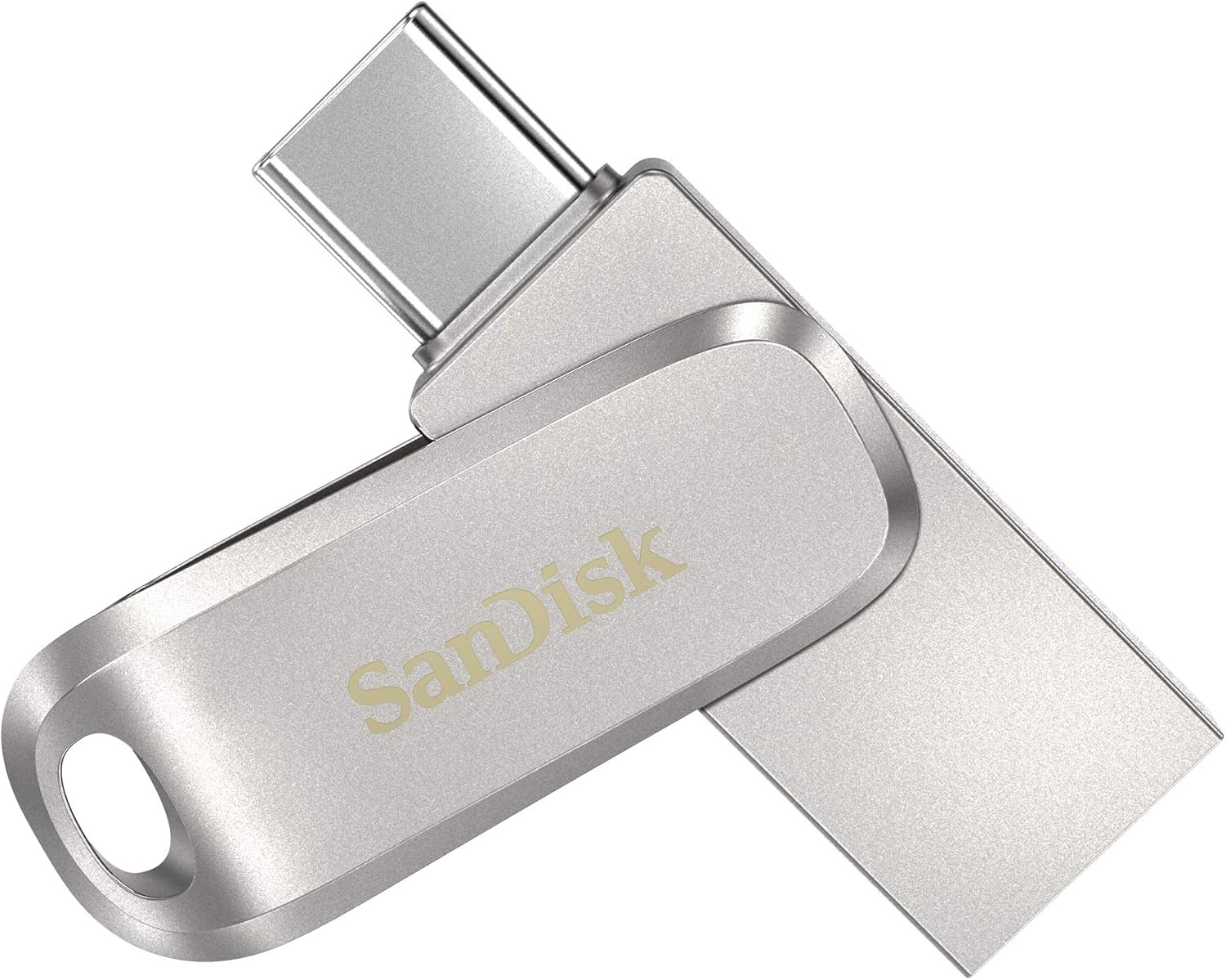
Looking for stylish storage that works across your USB Type-C and Type-A devices? Whether you’re taking amazing photos of your latest adventure or creating content in the office, the SanDisk Ultra Dual Drive Luxe is the all-metal, 2-in-1 flash drive that lets you easily move files between USB Type-C smartphone, tablets and Macs and USB Type-A computers.(2) Just plug in this premium drive to easily free up space on your smartphone or to automatically back up your photos, videos, music, documents and contacts.(3) Plus, the dual-purpose swivel design in a high-quality metal housing protects connectors and features a keyring hole to take your drive on the go. * 1GB = 1,000,000,000 bytes. Actual user storage less. (1)Read speeds up to 150MB/s. Write speed lower and vary by capacity. USB Type-C port with USB 3.1 Gen 1/ USB 3.0 support required. Based on internal testing; performance may be lower depending upon host device, interface, usage conditions and other factors. 1MB = 1,000,000 bytes. (2)Mobile device requires USB Type-C port and On-The-Go (OTG) support. See official SanDisk Dual Drive-C website for list of compatible devices. (3)Download and installation of SanDisk Memory Zone app required. See official SanDisk Memory Zone website for more details..
Reviews:
5.0 out of 5 stars Very fast transfers
(function() { P.when('cr-A', 'ready').execute(function(A) { if(typeof A.toggleExpanderAriaLabel === 'function') { A.toggleExpanderAriaLabel('review_text_read_more', 'Read more of this review', 'Read less of this review'); } }); })(); .review-text-read-more-expander:focus-visible { outline: 2px solid #2162a1; outline-offset: 2px; border-radius: 5px; } Why did you pick this product vs others?:Works well and very fast transfer speeds. Excellent value for the money. Lot's of storage for a reasonable price. I use this a lot at work and was surprised at how fast files transfer on either the USB-C or A connection.Transfer speed:ExcellentStorage capacity:Good value
5.0 out of 5 stars Perfect for Both iPads and Computers
Why did you pick this product vs others?:When airdrop doesn’t work or I’m trying to send files from a PC to my iPad this works perfectly. Also works as an external hard drive for both my iPad and computer.
5.0 out of 5 stars i stick to Sandisk
Real Sandisk products are the best. my data is worth getting the most reliable. IMO.
4.0 out of 5 stars Good speeds, good quality, good handwarmer
I bought this to carry on my key ring so that I could transfer demos and clips between my phone and my laptop on the go. I like this drive, but there's a couple things you should know.Build Quality ✅- The drive is built well and very minimalistic. USB-A side is made of metal and the rotation between the two ports has a satisfying click. No sign of weak points, no complaints here.Speed ☑️- Speed is relative, but it's plenty for me. USB-A side scored 382mb/s read speed and 152mb/s write, while the USB-C side scored surprisingly lower at 358mb/s read and 136mb/s write. The test was done on a TB4 laptop so not sure what happened here. It's possible the drive is optimized for USB A. Regardless, these speeds are good for me, but could be a deal-breaker to some.Thermals 📛- The reviews scattered here are true. This drive got pretty hot after only one test and I'm a little worried about long-term reliability when it's cooking like this. To it's credit, running a test in its hot-state only dropped the speed by ~3mb/s. Luckily this drive cools pretty quickly as well.Size and features ✅- Coming in at around 4.5cm, this drive is small. Not tiny, but small. The key ring addition was my main reason for purchasing and it seems nice. I do wish it had a quick-detach ability but I knew it didn't have that going into this so I can't dock any points. Overall not bad.Value ✅- $25 is hard to beat for a 256GB flash drive from a reputable brand. Especially when you consider it's only $7 more than the 128GB variant. Add in the dual-ports, adequate speed, key ring attachment and all metal body, I think it's a pretty good value for people looking for something with these features, but if you don't need them, you may find better value elsewhere.Conclusion- This is a good quality drive with good speeds and a tendency to get hot. I won't be returning it but with that being said I will be watching it for any issues overheating.
1.0 out of 5 stars Not worth the money and headache.
First of all, I was browsing around for a USB-C flash drive. I mainly see dual drives. The specific USB-C only flash drives are either cheap brands or too pricey. This fits my price range just fine and I don't need to go overboard on buying 1TB or anything. I thought 256Gb was fine because it's a USB, not an external hard drive. I feel like the power isn't there to expect it to meet my file criteria. I came across SanDisk different dual drives, such as the "Ultra Dual Drive" and then "Ultra Dual Drive Go", but after reading their reviews. The speed isn't there. I came across this and the speed was better than both of those. Even though the description says they are all the same speed (150 Megabytes Per Second), but someone in the reviews posted speed test results, so I ended up getting this. The speed so far isn't bad.Important Part:- I plug this into my USB-C port on my desktop, first time it all works fine. 2 Times after, it shuts off my computer. I'm suspecting driver issues, so I've updated my drivers and install any updates I can find for my computer. While everything was installing I thought I had some free time to write this review. Originally it was 3 stars, but then I thought since I'm writing a review, I might as well post a speed test, so I plug in the USB-C and guess what?? It crashed again! (All drivers were done installing, but I didn't restart my computer yet because I wanted to finish writing this review when doing so, luckily I was wary and saved my review in a notepad before plugging in the USB-C). It seems like I need to turn off my computer and plug in the drive before booting up my computer. Kind of a pain to turn off my computer and insert in something that's designed for plug and play. I finally get to do my speed tests and I've included these in the photos for my review. If you're curious about what I'm using to run a speed test, I am using the CrystalDiskMark Shizuku Edition. You can see that I'm a weeb so that I'm really into being the computer nerd I am. The only conclusion I came come to is this flash drive is faulty. I mainly got this to use on my iPad Pro, which seems to work fine. Except for 1 time where it just kind of disconnected from my iPad Pro and no longer shows up (so the USB is causing issues on not just my computer, but also my iPad). I had to unplug and reconnect it. I planned on using this with my iPad for on the go studying, so I store my lectures on the drive. If this keeps up. I'm afraid I'm going to do a whole lot of nothing. I'm going to keep trying this out and see how well it works. I'm going to back up my files on the drive in case it dies on me.- Side note. Since it is a metal body it does run very warm to hot. The build quality seems okay, BUT barely owning it for more than a day. The switch mechanism that flips the USB-C and the traditional Type-A got loose. When I first got it, it's was very sturdy. Now it's starting to dangle... at this point, I'm about to break the switching mechanism off and use it like those fancy non-USB without all the fancy mechanisms.- I'm still going to keep this a little longer because I need it for the time being until I can read some more reviews for a better alternative and I can return this. I'm hoping someone will reach out and maybe help fix these issues? I don't know how SanDisk will handle this.- I gave this 5 stars for easy to use. Yeah, it's easy to plug it in and crash your computer. Any kids can do it. If you have kids and working on a big project without saving yet. Your kid may just decide to plug this USB in because you know. Kids like sticking things into other things... Good Game.
Es portátil, robusta y de calidad, confiable y segura
(function() { P.when('cr-A', 'ready').execute(function(A) { if(typeof A.toggleExpanderAriaLabel === 'function') { A.toggleExpanderAriaLabel('review_text_read_more', 'Read more of this review', 'Read less of this review'); } }); })(); .review-text-read-more-expander:focus-visible { outline: 2px solid #2162a1; outline-offset: 2px; border-radius: 5px; } Para guardar información y poder compartirla
Great
This is a great technicians USB, it's small, fast, has both USB C and USB A, 1TB. Perfect. Yes it heats up, but not hot enough that it's too hot to touch.
Rapidísimo, pequeño y funcional. Compra recomendada.
Este pendrive si merece la pena. 170MBs de escritura con mínimos de 79MBs en archivos grandes y, con archivos pequeños (típicos archivos de mínima expresión en mucha cantidad) una media de 7MBs. Es rapidísimo! Para colmo casi del mismo precio que otros que tienen 4 veces menos su velocidad. Me compré el metálico y se nota que disipa bien el calor porque se pone muy caliente pero eso no es malo, precisamente es que está haciendo su trabajo el metal. El plástico seguro que no se nota tanto pero no sé a la larga si no podría derretirse en ambientes calurosos.Un acierto total. Volveré a comprar este pendrive si necesito
Yazdırma hızı çok iyi
Fiyatı biraz yüksek ama yazdırma hızı mükemmel!
SanDisk Ultra 128 GB Silver och SanDisk Memory Zone appen Perfekt kombination
Jag har en Xiaomi 11T mobiltelefon med över 100 appar och behov av att kunna kopiera in en stor musikfil på ca 20 GB. Den nya trenden hos nya Androidtelefoner är att ta bort minneskortplatsen, vilket försvårar arbetet. Musikfilen är sparad i min PC via överföringsprogrammet HighSuite från min gamla Huawei mobiltelefon.Då Xiaomi inte har något motsvarande överföringsprogram blir frågan hur jag skall kunna få över filen smidigt till min Xiaomi telefon.Jag har köpt en ytterligare Xiaomi 11T mobiltelefon, då jag anser att den är prisvärd och tekniskt mycket bra. Jag vill kunna enkelt överföra allt från den gamla Xiaomi telefonen till den nya telefonen när allt är installerat i den gamla telefonen.Jag ringde Kundsupport på ett stort elektrotekniskt varuhusföretag i Sverige och frågade om dom hade en lösning på mitt problem. Det hade dom då det finns en enkel och prisvärd lösning på mitt problem.Den har använts under många år på Iphone mobiltelefoner.Man köper Sandisk Ultra USB-minne med vändbara USB-A och USB-C anslutningar och installera Appen Sandisk Memory Zone i min gamla och nya Xiaomi 11T mobiltelefon.Jag kollade priset på SanDisk USB-minnet hos dom och tyckte att det var alltför högt och letade runt på internet och fann att Bolo.se hade det bästa priset.Jag köpte SanDisk SDDDC4-128G-G46 Ultra Dual Ride, 128 GB, Silver för 234 kr på Bolo.se. Storleken 128 GB valde jag för att matcha USB-minnet till storleken på internminnet i min Qiaomi mobiltelefon.Då jag har stor erfarenhet av filhantering i PC och även på Android mobiltelefoner så skriver jag ned hur jag utförde överföringsjobbet.Säkerhetskopiera innehållet i gamla Xiaomi telefonen och föra över till nya Xiaomi telefonen:För att rädda telefonuppgifter, SMS , bilder och skärmdumpar så använde jag Säkerhetskopiera via Google Drive på gamla telefonen. Det gör man i Inställningar_Google_Säkerhetskopia.När jag skapade Google kontot i nya telefonen så valde jag att hämta säkerhetskopian från Google Drive. Pefekt nästan alla appar räddades över och allt annat.Nu följde ett arbete med SanDisk Memory Zone appen i mobiltelefonerna som krävde att man har har bra koll på vad man gör. Man blev tvungen hoppa mellan gamla mobiltelefonen, nya mobiltelefonen och PC.Installera SanDisk memory Zone appen i gamla och nya Qiaomi telefonerna:Laddade ned SanDisk Memory Zone appen i varje mobiltelefon.Nästa operation blev att installera appen Memory Zone i båda mobiltelefonerna och ansluta SanDisk Ultra minnet i USB-C porten på gamla mobiltelefonen. Därmed blev minnet formaterat med ett lämpligt format (troligen FAT32), som mobiltelefonen kan hantera.Viktigt att man inte sätter in USB-minnet i en PC som första åtgärd. Den riskerar då att bli formaterad för PC och kan inte läsas av mobiltelefonen.Skapa en undermapp i Phone Internminne Musik i gamla mobiltelefonen:Sandisk Memory Zone appen kan inte skapa undermappar (enda nackdelen).För detta krävs appen File Manager.Du gör så här:Start File Manager_Main Storage_Musik_tre prickar_New_Folder_Skriv in "Musik f PC"_OK.Nu ligger Musik f PC inne i internminnet som en egen rad.Om jag i framtiden vill lagra en ytterligare Musikmapp så är det enkelt att skapa en till mapp i Musik mappen med File Memory.Gör Backup #1 på hela innehållet i gamla Xiaomi telefonen:Jag bytte till Sandisk Memory Zone appen i Xiaomi telefonen för att kunna göra Backup på hela gamla mobiltelefonen till USB minnet.Gör så här:Välj Tools_Backup and Restore_Manual backup_5 Items är förbockade_Klicka på röda Backup.Backupen startar och vänta tills allt är kopierat.Storleken på Backupen ca 3 GB.Kopiera den stora musikfilen i PC till gamla Qiaomi telefonen:Därefter satte jag in USB minnet i USB-A porten i min PC och kopierade den stora filen på 20 GB till USB minnet.Gör så här i Windows 10:Gå till Din Dator_USB-enhet (D) om det endast finns en C-disk. Klicka på den och den lägger sig på nedersta raden som en mapp.När man klickar på den ser man en kort lista på innehållet i min gamla mobiltelefon.Du skall kopiera till Musik f PC, som nyligen skapades. Den är tom.Gå tillbaka till DinDator och leta upp mappen där den stora filen ligger i mitt fall på skrivbordet och kopiera innehållet till Musik f PC i gamla mobiltelefonen.Vänta tills kopieringen är klarKopiera innehållet i Musik f PC till Phone internminne på gamla mobiltelefonen:Detta är inte nödvändigt att göra. Det går att köra musikfilerna med val från SanDisk Drive.Jag tyckte att det var mest smidigt att lägga musikfilerna i internminnet, vilket blir enklare när jag vill lyssna på musik.Sätt nu in USB-minnet i USB-C porten i gamla mobiltelefonen.Klicka på SanDisk drive. Det är här den kopierade stora filen till mappen Musikf PC ligger.Den följande operation för kopiering är rörig och lite svår att förstå och utföra. Beroende på hur man klickar får man olika vägval. Den mest direkta är min angivna nedan.Gör så här:Klicka på nedre raden My Files.Klicka på SanDisk Drive. Ger nytt fönster.Håll ned raden Musik f PC.Klicka på nedre raden röda Copy.Klicka på Phone.Klicka på raden Musik f PC. Ger nytt fönster, som är en tom mapp. Helt OK.Copy ITEMS HERE.Kopieringen startar nu. Vänta tills kopieringen är klar.Redigeringsarbete efter kopiering till Musik f PC i internminnet:Då musikfilen var väldigt stor 142 mappar och 1292 filer blev det en del fel vid kopieringen.Flera mappar hamnade inne i enskilda mappar och måste flyttas ut till huvudmappen Musik f PC. Efter någon halvtimmes arbete var det åtgärdat.Gör Backup #2 på hela innehållet i gamla Xiaomi telefonen efter Kopiering:Jag bytte till Sandisk Memory Zone appen i Xiaomi telefonen för att kunna göra Backup på hela gamla mobiltelefonen till USB minnet.Gör så här:Välj Tools_Backup and Restore_Manual backup_5 Items är förbockade_Klicka på röda Backup.Backupen startar och vänta tills allt är kopierat.Restore på innehållet från gamla mobiltelefonen till nya mobiltelefonen:Kopplade in USB-minnet i USB-C porten i nya mobiltelefonen.Välj SanDisk drive_Tools_Backup and Restore_Backup_Restore from latest backup_Backup_Klicka på röda Restore.Restoren startar och vänta tills allt är kopierat.Nu körs en Restore på ca 23 GB till min nya mobiltelefon.Det blev perfekt. Den stora Musikfilen blev helt korrekt. Inga fel.Viktig information har nu valt Backup helt på SanDisk USB-minne:Viktig information: Nu har jag ca 23 GB i min Backup från gamla mobiltelefonen, som gäller för båda mobiltelefonerna och ligger sparat i mitt USB-minne. Om jag skulle vilja göra en ny Säkerhetskopia med Google Drive så passerar jag 15 GB som är gratis och måste betala för tjänsten att ha mer än 15 GB. Jag tycker att detta är en onödig utgift, när jag har en ett bra USB-minne att lagra på. Vill man kan man ha två USB-minne som extra säkerhet.Avslutande omdöme i min nya mobiltelefon:Efter flyttning av appar och tillverkning av samlingsappar för vissa appar så är nu mina mobiltelefoner helt lika.Jag kan inte nog berömma appen Sandisk Memory Zone. Det är den första appen för filhantering, som fungerar enkelt och klarar av kopiering, göra backup och restore. Sandisk har gjort ett toppenjobb.Om du vill rädda över allt innehåll från en gammal mobiltelefon till en ny mobiltelefon så kan jag inte nog rekommendera appen Sandisk Memory Zone och Sandisk Ultra USB-minne med USB-C 128 GB.
Visit the SanDisk Store
SanDisk 1TB Ultra Dual Drive Luxe USB Type-C - SDDDC4-1T00-G46, Silver
AED50524


Quantity:
Order today to get by 7-14 business days
This item qualifies for free delivery
Imported From: United States
At BOLO, we work hard to ensure the products you receive are new, genuine, and sourced from reputable suppliers.
BOLO is not an authorized or official retailer for most brands, nor are we affiliated with manufacturers unless specifically stated on a product page. Instead, we source verified sellers, authorized distributors or directly from the manufacturer.
Each product undergoes thorough inspection and verification at our consolidation and fulfilment centers to ensure it meets our strict authenticity and quality standards before being shipped and delivered to you.
If you ever have concerns regarding the authenticity of a product purchased from us, please contact Bolo Support. We will review your inquiry promptly and, if necessary, provide documentation verifying authenticity or offer a suitable resolution.
Your trust is our top priority, and we are committed to maintaining transparency and integrity in every transaction.
All product information, images, descriptions, and reviews originate from the manufacturer or from trusted sellers overseas. BOLO is not affiliated with, endorsed by, or an authorized retailer for most brands listed on our website unless stated otherwise.
While we strive to display accurate information, variations in packaging, labeling, instructions, or formulation may occasionally occur due to regional differences or supplier updates. For detailed or manufacturer-specific information, please contact the brand directly or reach out to BOLO Support for assistance.
Unless otherwise stated, all prices displayed on the product page include applicable taxes and import duties.
BOLO operates in accordance with the laws and regulations of United Arab Emirates. Any items found to be restricted or prohibited for sale within the UAE will be cancelled prior to shipment. We take proactive measures to ensure that only products permitted for sale in United Arab Emirates are listed on our website.
All items are shipped by air, and any products classified as “Dangerous Goods (DG)” under IATA regulations will be removed from the order and cancelled.
All orders are processed manually, and we make every effort to process them promptly once confirmed. Products cancelled due to the above reasons will be permanently removed from listings across the website.
Similar suggestions by Bolo
More from this brand
Similar items from “USB Flash Drives”
Share with
Or share with link
https://www.bolo.ae/products/UO0842C5TT5
Visit the SanDisk Store
SanDisk 1TB Ultra Dual Drive Luxe USB Type-C - SDDDC4-1T00-G46, Silver


AED50524
Quantity:
Order today to get by 7-14 business days
This item qualifies for free delivery
Imported From: United States
At BOLO, we work hard to ensure the products you receive are new, genuine, and sourced from reputable suppliers.
BOLO is not an authorized or official retailer for most brands, nor are we affiliated with manufacturers unless specifically stated on a product page. Instead, we source verified sellers, authorized distributors or directly from the manufacturer.
Each product undergoes thorough inspection and verification at our consolidation and fulfilment centers to ensure it meets our strict authenticity and quality standards before being shipped and delivered to you.
If you ever have concerns regarding the authenticity of a product purchased from us, please contact Bolo Support. We will review your inquiry promptly and, if necessary, provide documentation verifying authenticity or offer a suitable resolution.
Your trust is our top priority, and we are committed to maintaining transparency and integrity in every transaction.
All product information, images, descriptions, and reviews originate from the manufacturer or from trusted sellers overseas. BOLO is not affiliated with, endorsed by, or an authorized retailer for most brands listed on our website unless stated otherwise.
While we strive to display accurate information, variations in packaging, labeling, instructions, or formulation may occasionally occur due to regional differences or supplier updates. For detailed or manufacturer-specific information, please contact the brand directly or reach out to BOLO Support for assistance.
Unless otherwise stated, all prices displayed on the product page include applicable taxes and import duties.
BOLO operates in accordance with the laws and regulations of United Arab Emirates. Any items found to be restricted or prohibited for sale within the UAE will be cancelled prior to shipment. We take proactive measures to ensure that only products permitted for sale in United Arab Emirates are listed on our website.
All items are shipped by air, and any products classified as “Dangerous Goods (DG)” under IATA regulations will be removed from the order and cancelled.
All orders are processed manually, and we make every effort to process them promptly once confirmed. Products cancelled due to the above reasons will be permanently removed from listings across the website.
Description:
Looking for stylish storage that works across your USB Type-C and Type-A devices? Whether you’re taking amazing photos of your latest adventure or creating content in the office, the SanDisk Ultra Dual Drive Luxe is the all-metal, 2-in-1 flash drive that lets you easily move files between USB Type-C smartphone, tablets and Macs and USB Type-A computers.(2) Just plug in this premium drive to easily free up space on your smartphone or to automatically back up your photos, videos, music, documents and contacts.(3) Plus, the dual-purpose swivel design in a high-quality metal housing protects connectors and features a keyring hole to take your drive on the go. * 1GB = 1,000,000,000 bytes. Actual user storage less. (1)Read speeds up to 150MB/s. Write speed lower and vary by capacity. USB Type-C port with USB 3.1 Gen 1/ USB 3.0 support required. Based on internal testing; performance may be lower depending upon host device, interface, usage conditions and other factors. 1MB = 1,000,000 bytes. (2)Mobile device requires USB Type-C port and On-The-Go (OTG) support. See official SanDisk Dual Drive-C website for list of compatible devices. (3)Download and installation of SanDisk Memory Zone app required. See official SanDisk Memory Zone website for more details..
Reviews:
5.0 out of 5 stars Very fast transfers
(function() { P.when('cr-A', 'ready').execute(function(A) { if(typeof A.toggleExpanderAriaLabel === 'function') { A.toggleExpanderAriaLabel('review_text_read_more', 'Read more of this review', 'Read less of this review'); } }); })(); .review-text-read-more-expander:focus-visible { outline: 2px solid #2162a1; outline-offset: 2px; border-radius: 5px; } Why did you pick this product vs others?:Works well and very fast transfer speeds. Excellent value for the money. Lot's of storage for a reasonable price. I use this a lot at work and was surprised at how fast files transfer on either the USB-C or A connection.Transfer speed:ExcellentStorage capacity:Good value
5.0 out of 5 stars Perfect for Both iPads and Computers
Why did you pick this product vs others?:When airdrop doesn’t work or I’m trying to send files from a PC to my iPad this works perfectly. Also works as an external hard drive for both my iPad and computer.
5.0 out of 5 stars i stick to Sandisk
Real Sandisk products are the best. my data is worth getting the most reliable. IMO.
4.0 out of 5 stars Good speeds, good quality, good handwarmer
I bought this to carry on my key ring so that I could transfer demos and clips between my phone and my laptop on the go. I like this drive, but there's a couple things you should know.Build Quality ✅- The drive is built well and very minimalistic. USB-A side is made of metal and the rotation between the two ports has a satisfying click. No sign of weak points, no complaints here.Speed ☑️- Speed is relative, but it's plenty for me. USB-A side scored 382mb/s read speed and 152mb/s write, while the USB-C side scored surprisingly lower at 358mb/s read and 136mb/s write. The test was done on a TB4 laptop so not sure what happened here. It's possible the drive is optimized for USB A. Regardless, these speeds are good for me, but could be a deal-breaker to some.Thermals 📛- The reviews scattered here are true. This drive got pretty hot after only one test and I'm a little worried about long-term reliability when it's cooking like this. To it's credit, running a test in its hot-state only dropped the speed by ~3mb/s. Luckily this drive cools pretty quickly as well.Size and features ✅- Coming in at around 4.5cm, this drive is small. Not tiny, but small. The key ring addition was my main reason for purchasing and it seems nice. I do wish it had a quick-detach ability but I knew it didn't have that going into this so I can't dock any points. Overall not bad.Value ✅- $25 is hard to beat for a 256GB flash drive from a reputable brand. Especially when you consider it's only $7 more than the 128GB variant. Add in the dual-ports, adequate speed, key ring attachment and all metal body, I think it's a pretty good value for people looking for something with these features, but if you don't need them, you may find better value elsewhere.Conclusion- This is a good quality drive with good speeds and a tendency to get hot. I won't be returning it but with that being said I will be watching it for any issues overheating.
1.0 out of 5 stars Not worth the money and headache.
First of all, I was browsing around for a USB-C flash drive. I mainly see dual drives. The specific USB-C only flash drives are either cheap brands or too pricey. This fits my price range just fine and I don't need to go overboard on buying 1TB or anything. I thought 256Gb was fine because it's a USB, not an external hard drive. I feel like the power isn't there to expect it to meet my file criteria. I came across SanDisk different dual drives, such as the "Ultra Dual Drive" and then "Ultra Dual Drive Go", but after reading their reviews. The speed isn't there. I came across this and the speed was better than both of those. Even though the description says they are all the same speed (150 Megabytes Per Second), but someone in the reviews posted speed test results, so I ended up getting this. The speed so far isn't bad.Important Part:- I plug this into my USB-C port on my desktop, first time it all works fine. 2 Times after, it shuts off my computer. I'm suspecting driver issues, so I've updated my drivers and install any updates I can find for my computer. While everything was installing I thought I had some free time to write this review. Originally it was 3 stars, but then I thought since I'm writing a review, I might as well post a speed test, so I plug in the USB-C and guess what?? It crashed again! (All drivers were done installing, but I didn't restart my computer yet because I wanted to finish writing this review when doing so, luckily I was wary and saved my review in a notepad before plugging in the USB-C). It seems like I need to turn off my computer and plug in the drive before booting up my computer. Kind of a pain to turn off my computer and insert in something that's designed for plug and play. I finally get to do my speed tests and I've included these in the photos for my review. If you're curious about what I'm using to run a speed test, I am using the CrystalDiskMark Shizuku Edition. You can see that I'm a weeb so that I'm really into being the computer nerd I am. The only conclusion I came come to is this flash drive is faulty. I mainly got this to use on my iPad Pro, which seems to work fine. Except for 1 time where it just kind of disconnected from my iPad Pro and no longer shows up (so the USB is causing issues on not just my computer, but also my iPad). I had to unplug and reconnect it. I planned on using this with my iPad for on the go studying, so I store my lectures on the drive. If this keeps up. I'm afraid I'm going to do a whole lot of nothing. I'm going to keep trying this out and see how well it works. I'm going to back up my files on the drive in case it dies on me.- Side note. Since it is a metal body it does run very warm to hot. The build quality seems okay, BUT barely owning it for more than a day. The switch mechanism that flips the USB-C and the traditional Type-A got loose. When I first got it, it's was very sturdy. Now it's starting to dangle... at this point, I'm about to break the switching mechanism off and use it like those fancy non-USB without all the fancy mechanisms.- I'm still going to keep this a little longer because I need it for the time being until I can read some more reviews for a better alternative and I can return this. I'm hoping someone will reach out and maybe help fix these issues? I don't know how SanDisk will handle this.- I gave this 5 stars for easy to use. Yeah, it's easy to plug it in and crash your computer. Any kids can do it. If you have kids and working on a big project without saving yet. Your kid may just decide to plug this USB in because you know. Kids like sticking things into other things... Good Game.
Es portátil, robusta y de calidad, confiable y segura
(function() { P.when('cr-A', 'ready').execute(function(A) { if(typeof A.toggleExpanderAriaLabel === 'function') { A.toggleExpanderAriaLabel('review_text_read_more', 'Read more of this review', 'Read less of this review'); } }); })(); .review-text-read-more-expander:focus-visible { outline: 2px solid #2162a1; outline-offset: 2px; border-radius: 5px; } Para guardar información y poder compartirla
Great
This is a great technicians USB, it's small, fast, has both USB C and USB A, 1TB. Perfect. Yes it heats up, but not hot enough that it's too hot to touch.
Rapidísimo, pequeño y funcional. Compra recomendada.
Este pendrive si merece la pena. 170MBs de escritura con mínimos de 79MBs en archivos grandes y, con archivos pequeños (típicos archivos de mínima expresión en mucha cantidad) una media de 7MBs. Es rapidísimo! Para colmo casi del mismo precio que otros que tienen 4 veces menos su velocidad. Me compré el metálico y se nota que disipa bien el calor porque se pone muy caliente pero eso no es malo, precisamente es que está haciendo su trabajo el metal. El plástico seguro que no se nota tanto pero no sé a la larga si no podría derretirse en ambientes calurosos.Un acierto total. Volveré a comprar este pendrive si necesito
Yazdırma hızı çok iyi
Fiyatı biraz yüksek ama yazdırma hızı mükemmel!
SanDisk Ultra 128 GB Silver och SanDisk Memory Zone appen Perfekt kombination
Jag har en Xiaomi 11T mobiltelefon med över 100 appar och behov av att kunna kopiera in en stor musikfil på ca 20 GB. Den nya trenden hos nya Androidtelefoner är att ta bort minneskortplatsen, vilket försvårar arbetet. Musikfilen är sparad i min PC via överföringsprogrammet HighSuite från min gamla Huawei mobiltelefon.Då Xiaomi inte har något motsvarande överföringsprogram blir frågan hur jag skall kunna få över filen smidigt till min Xiaomi telefon.Jag har köpt en ytterligare Xiaomi 11T mobiltelefon, då jag anser att den är prisvärd och tekniskt mycket bra. Jag vill kunna enkelt överföra allt från den gamla Xiaomi telefonen till den nya telefonen när allt är installerat i den gamla telefonen.Jag ringde Kundsupport på ett stort elektrotekniskt varuhusföretag i Sverige och frågade om dom hade en lösning på mitt problem. Det hade dom då det finns en enkel och prisvärd lösning på mitt problem.Den har använts under många år på Iphone mobiltelefoner.Man köper Sandisk Ultra USB-minne med vändbara USB-A och USB-C anslutningar och installera Appen Sandisk Memory Zone i min gamla och nya Xiaomi 11T mobiltelefon.Jag kollade priset på SanDisk USB-minnet hos dom och tyckte att det var alltför högt och letade runt på internet och fann att Bolo.se hade det bästa priset.Jag köpte SanDisk SDDDC4-128G-G46 Ultra Dual Ride, 128 GB, Silver för 234 kr på Bolo.se. Storleken 128 GB valde jag för att matcha USB-minnet till storleken på internminnet i min Qiaomi mobiltelefon.Då jag har stor erfarenhet av filhantering i PC och även på Android mobiltelefoner så skriver jag ned hur jag utförde överföringsjobbet.Säkerhetskopiera innehållet i gamla Xiaomi telefonen och föra över till nya Xiaomi telefonen:För att rädda telefonuppgifter, SMS , bilder och skärmdumpar så använde jag Säkerhetskopiera via Google Drive på gamla telefonen. Det gör man i Inställningar_Google_Säkerhetskopia.När jag skapade Google kontot i nya telefonen så valde jag att hämta säkerhetskopian från Google Drive. Pefekt nästan alla appar räddades över och allt annat.Nu följde ett arbete med SanDisk Memory Zone appen i mobiltelefonerna som krävde att man har har bra koll på vad man gör. Man blev tvungen hoppa mellan gamla mobiltelefonen, nya mobiltelefonen och PC.Installera SanDisk memory Zone appen i gamla och nya Qiaomi telefonerna:Laddade ned SanDisk Memory Zone appen i varje mobiltelefon.Nästa operation blev att installera appen Memory Zone i båda mobiltelefonerna och ansluta SanDisk Ultra minnet i USB-C porten på gamla mobiltelefonen. Därmed blev minnet formaterat med ett lämpligt format (troligen FAT32), som mobiltelefonen kan hantera.Viktigt att man inte sätter in USB-minnet i en PC som första åtgärd. Den riskerar då att bli formaterad för PC och kan inte läsas av mobiltelefonen.Skapa en undermapp i Phone Internminne Musik i gamla mobiltelefonen:Sandisk Memory Zone appen kan inte skapa undermappar (enda nackdelen).För detta krävs appen File Manager.Du gör så här:Start File Manager_Main Storage_Musik_tre prickar_New_Folder_Skriv in "Musik f PC"_OK.Nu ligger Musik f PC inne i internminnet som en egen rad.Om jag i framtiden vill lagra en ytterligare Musikmapp så är det enkelt att skapa en till mapp i Musik mappen med File Memory.Gör Backup #1 på hela innehållet i gamla Xiaomi telefonen:Jag bytte till Sandisk Memory Zone appen i Xiaomi telefonen för att kunna göra Backup på hela gamla mobiltelefonen till USB minnet.Gör så här:Välj Tools_Backup and Restore_Manual backup_5 Items är förbockade_Klicka på röda Backup.Backupen startar och vänta tills allt är kopierat.Storleken på Backupen ca 3 GB.Kopiera den stora musikfilen i PC till gamla Qiaomi telefonen:Därefter satte jag in USB minnet i USB-A porten i min PC och kopierade den stora filen på 20 GB till USB minnet.Gör så här i Windows 10:Gå till Din Dator_USB-enhet (D) om det endast finns en C-disk. Klicka på den och den lägger sig på nedersta raden som en mapp.När man klickar på den ser man en kort lista på innehållet i min gamla mobiltelefon.Du skall kopiera till Musik f PC, som nyligen skapades. Den är tom.Gå tillbaka till DinDator och leta upp mappen där den stora filen ligger i mitt fall på skrivbordet och kopiera innehållet till Musik f PC i gamla mobiltelefonen.Vänta tills kopieringen är klarKopiera innehållet i Musik f PC till Phone internminne på gamla mobiltelefonen:Detta är inte nödvändigt att göra. Det går att köra musikfilerna med val från SanDisk Drive.Jag tyckte att det var mest smidigt att lägga musikfilerna i internminnet, vilket blir enklare när jag vill lyssna på musik.Sätt nu in USB-minnet i USB-C porten i gamla mobiltelefonen.Klicka på SanDisk drive. Det är här den kopierade stora filen till mappen Musikf PC ligger.Den följande operation för kopiering är rörig och lite svår att förstå och utföra. Beroende på hur man klickar får man olika vägval. Den mest direkta är min angivna nedan.Gör så här:Klicka på nedre raden My Files.Klicka på SanDisk Drive. Ger nytt fönster.Håll ned raden Musik f PC.Klicka på nedre raden röda Copy.Klicka på Phone.Klicka på raden Musik f PC. Ger nytt fönster, som är en tom mapp. Helt OK.Copy ITEMS HERE.Kopieringen startar nu. Vänta tills kopieringen är klar.Redigeringsarbete efter kopiering till Musik f PC i internminnet:Då musikfilen var väldigt stor 142 mappar och 1292 filer blev det en del fel vid kopieringen.Flera mappar hamnade inne i enskilda mappar och måste flyttas ut till huvudmappen Musik f PC. Efter någon halvtimmes arbete var det åtgärdat.Gör Backup #2 på hela innehållet i gamla Xiaomi telefonen efter Kopiering:Jag bytte till Sandisk Memory Zone appen i Xiaomi telefonen för att kunna göra Backup på hela gamla mobiltelefonen till USB minnet.Gör så här:Välj Tools_Backup and Restore_Manual backup_5 Items är förbockade_Klicka på röda Backup.Backupen startar och vänta tills allt är kopierat.Restore på innehållet från gamla mobiltelefonen till nya mobiltelefonen:Kopplade in USB-minnet i USB-C porten i nya mobiltelefonen.Välj SanDisk drive_Tools_Backup and Restore_Backup_Restore from latest backup_Backup_Klicka på röda Restore.Restoren startar och vänta tills allt är kopierat.Nu körs en Restore på ca 23 GB till min nya mobiltelefon.Det blev perfekt. Den stora Musikfilen blev helt korrekt. Inga fel.Viktig information har nu valt Backup helt på SanDisk USB-minne:Viktig information: Nu har jag ca 23 GB i min Backup från gamla mobiltelefonen, som gäller för båda mobiltelefonerna och ligger sparat i mitt USB-minne. Om jag skulle vilja göra en ny Säkerhetskopia med Google Drive så passerar jag 15 GB som är gratis och måste betala för tjänsten att ha mer än 15 GB. Jag tycker att detta är en onödig utgift, när jag har en ett bra USB-minne att lagra på. Vill man kan man ha två USB-minne som extra säkerhet.Avslutande omdöme i min nya mobiltelefon:Efter flyttning av appar och tillverkning av samlingsappar för vissa appar så är nu mina mobiltelefoner helt lika.Jag kan inte nog berömma appen Sandisk Memory Zone. Det är den första appen för filhantering, som fungerar enkelt och klarar av kopiering, göra backup och restore. Sandisk har gjort ett toppenjobb.Om du vill rädda över allt innehåll från en gammal mobiltelefon till en ny mobiltelefon så kan jag inte nog rekommendera appen Sandisk Memory Zone och Sandisk Ultra USB-minne med USB-C 128 GB.
Similar suggestions by Bolo
More from this brand
Similar items from “USB Flash Drives”
Share with
Or share with link
https://www.bolo.ae/products/UO0842C5TT5