Description:
Reviews:
5.0 out of 5 stars Great for rhythm games
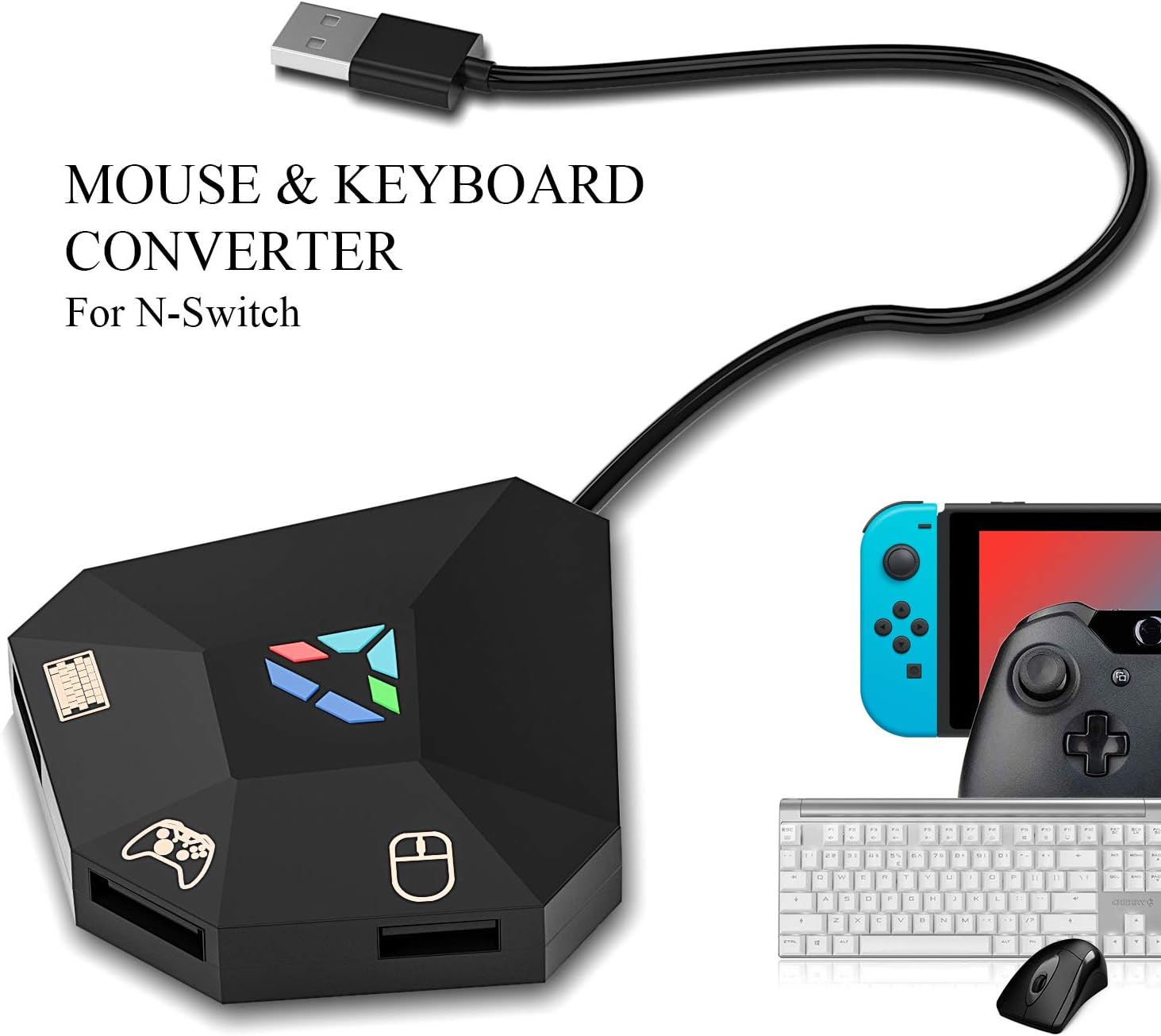
I bought this primarily for playing rhythm games on the Switch, such as Taiko no Tatsujin and Muse Dash with a keyboard. And I can say it works great for this use case! (Can't speak for how well the mouse controls work, since I haven't touched that).Connecting it to the Switch is pretty straightforward. Only point worth noting is that it seems to require more power draw, so you'll need to plug it into the USB port on the back of the Switch dock rather than the ports on the side. (This is also mentioned in the tutorial video).Setting up the button mapping is also pretty straightforward following the instructions in their tutorial video. Just hit F11+F12 to enter mapping mode, and plug in a Pro Controller into the middle slot. From there, you just hold down on the pro controller button you want to map, and press the key on the keyboard you want to map it to.As far as lag goes... I have Muse Dash for both Switch and PC, so this was a useful reference point.I tested it out both in docked mode and in handheld mode using a USB adapter.There was absolutely no noticeable lag in handheld mode. I did notice a bit of lag while playing in docked mode, but I'm guessing this was due to my display rather than the adapter itself. (Worth noting that this is a common issue and most rhythm games have calibration modes to adjust for display lag, and that I've also noticed similar lag when trying to use a wired fightstick for rhythm games. ).
5.0 out of 5 stars Works perfectly
Tried a random adapter that was cheaper didn’t work just buy this one!! Don’t waste your time with the cheap stuff!
1.0 out of 5 stars Doesn't work with OLED switch, returning
My son was excited to try this with his OLED switch... however, it would never connect to the wired controller. The wired controller would work just fine with the switch, but only the first "connected to switch" white light would come on - no other lights would come on when connecting the controller, the mouse or the keyboard - this seems to be common in the reviews, I wonder if there are Quality Control issues - not OK for a $40 piece of plastic. I even tried adding an external power supply just in case, but just got the same result - one white light when connecting to the switch and nothing else... re-read the directions, found the ONE YouTube video, no help, no solution
4.0 out of 5 stars Mouse is off
It does work, but could be better. I will say what I know for anyone having trouble, and why I returned this.1) You do NOT need to have a wired controller, keyboard, or mouse.2) This will work on the Home Screen regardless, but it will not work in game UNLESS you disconnect your joycons when you are ready to open the game.3) Input lag was not an issue for me, I used a wireless keyboard and wireless mouse.4) Some games work better with this than others (ex. mouse is horrible for the game Vigor, but works better for Realm Royale)***5) I am returning this due to micro movements through the mouse not registering, like when you are aiming and just need just the slightest more to the left, it won’t, unless you move it more and pass what you are aiming at. I have tested this in the two games above, with a wireless mouse, and my wired mouse for my PC. It also just didn’t feel right in a way I’m unable to describe.This may not be game-breaking for users who play with low sensitivity, but for high sensitivity players like me it simply just is less frustrating to get better using the joycons.
5.0 out of 5 stars Great for what I wanted to
The device works as expected in Switch and PS4.... I wanna try it out on my PS5... While most people don't like to play with a keyboard... I find some games in the console easier to play with it... I gave it a try and it performed as expected... There's one thing to notice and is that there's a minimum delay when you press the key and the input received in the game, I didn't find it troublesome but I bet some people will... Is a little hard to set up so I had to read carefully the manual to understand the custom setup phase (I like to play with a specific configuration)... Apart from it... great purchase
3.0 out of 5 stars Not compatible with ps4 through iPhone
Son couldn't Figure out how to get it to connect to this playstation 4
5.0 out of 5 stars Simple!
Item was exactly what I expected it to be. Very straightforward. I wish there was a key to the keyboard layout, but it wasn't hard to get the rhythm.
5.0 out of 5 stars Perfect, according to my 11 year old
My son picked this out so that he could connect his keyboard and mouse to his switch. He says it is perfect and loves it. Seems to be durable and works perfectly. He has loved being able to play his games like his is on a computer and it has allowed him to play some of the games he plays better (according to him). He says he would recommend it to a friend and purchase again.
Visit the ECHZOVE Store
ECHZOVE Keyboard and Mouse Adapter for Nintendo Switch, Keyboard and Mouse Adapter for PS4, Xbox One, PS3, Xbox 360
AED35226
Quantity:
Order today to get by 7-14 business days
This item qualifies for free delivery
Imported From: United States
At BOLO, we work hard to ensure the products you receive are new, genuine, and sourced from reputable suppliers.
BOLO is not an authorized or official retailer for most brands, nor are we affiliated with manufacturers unless specifically stated on a product page. Instead, we source verified sellers, authorized distributors or directly from the manufacturer.
Each product undergoes thorough inspection and verification at our consolidation and fulfilment centers to ensure it meets our strict authenticity and quality standards before being shipped and delivered to you.
If you ever have concerns regarding the authenticity of a product purchased from us, please contact Bolo Support. We will review your inquiry promptly and, if necessary, provide documentation verifying authenticity or offer a suitable resolution.
Your trust is our top priority, and we are committed to maintaining transparency and integrity in every transaction.
All product information, images, descriptions, and reviews originate from the manufacturer or from trusted sellers overseas. BOLO is not affiliated with, endorsed by, or an authorized retailer for most brands listed on our website unless stated otherwise.
While we strive to display accurate information, variations in packaging, labeling, instructions, or formulation may occasionally occur due to regional differences or supplier updates. For detailed or manufacturer-specific information, please contact the brand directly or reach out to BOLO Support for assistance.
Unless otherwise stated, all prices displayed on the product page include applicable taxes and import duties.
BOLO operates in accordance with the laws and regulations of United Arab Emirates. Any items found to be restricted or prohibited for sale within the UAE will be cancelled prior to shipment. We take proactive measures to ensure that only products permitted for sale in United Arab Emirates are listed on our website.
All items are shipped by air, and any products classified as “Dangerous Goods (DG)” under IATA regulations will be removed from the order and cancelled.
All orders are processed manually, and we make every effort to process them promptly once confirmed. Products cancelled due to the above reasons will be permanently removed from listings across the website.
More from this brand
Similar items from “Cables & Adapters”
Share with
Or share with link
https://www.bolo.ae/products/UO082KLK8EJ
Visit the ECHZOVE Store
ECHZOVE Keyboard and Mouse Adapter for Nintendo Switch, Keyboard and Mouse Adapter for PS4, Xbox One, PS3, Xbox 360

AED35226
Quantity:
Order today to get by 7-14 business days
This item qualifies for free delivery
Imported From: United States
At BOLO, we work hard to ensure the products you receive are new, genuine, and sourced from reputable suppliers.
BOLO is not an authorized or official retailer for most brands, nor are we affiliated with manufacturers unless specifically stated on a product page. Instead, we source verified sellers, authorized distributors or directly from the manufacturer.
Each product undergoes thorough inspection and verification at our consolidation and fulfilment centers to ensure it meets our strict authenticity and quality standards before being shipped and delivered to you.
If you ever have concerns regarding the authenticity of a product purchased from us, please contact Bolo Support. We will review your inquiry promptly and, if necessary, provide documentation verifying authenticity or offer a suitable resolution.
Your trust is our top priority, and we are committed to maintaining transparency and integrity in every transaction.
All product information, images, descriptions, and reviews originate from the manufacturer or from trusted sellers overseas. BOLO is not affiliated with, endorsed by, or an authorized retailer for most brands listed on our website unless stated otherwise.
While we strive to display accurate information, variations in packaging, labeling, instructions, or formulation may occasionally occur due to regional differences or supplier updates. For detailed or manufacturer-specific information, please contact the brand directly or reach out to BOLO Support for assistance.
Unless otherwise stated, all prices displayed on the product page include applicable taxes and import duties.
BOLO operates in accordance with the laws and regulations of United Arab Emirates. Any items found to be restricted or prohibited for sale within the UAE will be cancelled prior to shipment. We take proactive measures to ensure that only products permitted for sale in United Arab Emirates are listed on our website.
All items are shipped by air, and any products classified as “Dangerous Goods (DG)” under IATA regulations will be removed from the order and cancelled.
All orders are processed manually, and we make every effort to process them promptly once confirmed. Products cancelled due to the above reasons will be permanently removed from listings across the website.
Description:
Reviews:
5.0 out of 5 stars Great for rhythm games
I bought this primarily for playing rhythm games on the Switch, such as Taiko no Tatsujin and Muse Dash with a keyboard. And I can say it works great for this use case! (Can't speak for how well the mouse controls work, since I haven't touched that).Connecting it to the Switch is pretty straightforward. Only point worth noting is that it seems to require more power draw, so you'll need to plug it into the USB port on the back of the Switch dock rather than the ports on the side. (This is also mentioned in the tutorial video).Setting up the button mapping is also pretty straightforward following the instructions in their tutorial video. Just hit F11+F12 to enter mapping mode, and plug in a Pro Controller into the middle slot. From there, you just hold down on the pro controller button you want to map, and press the key on the keyboard you want to map it to.As far as lag goes... I have Muse Dash for both Switch and PC, so this was a useful reference point.I tested it out both in docked mode and in handheld mode using a USB adapter.There was absolutely no noticeable lag in handheld mode. I did notice a bit of lag while playing in docked mode, but I'm guessing this was due to my display rather than the adapter itself. (Worth noting that this is a common issue and most rhythm games have calibration modes to adjust for display lag, and that I've also noticed similar lag when trying to use a wired fightstick for rhythm games. ).
5.0 out of 5 stars Works perfectly
Tried a random adapter that was cheaper didn’t work just buy this one!! Don’t waste your time with the cheap stuff!
1.0 out of 5 stars Doesn't work with OLED switch, returning
My son was excited to try this with his OLED switch... however, it would never connect to the wired controller. The wired controller would work just fine with the switch, but only the first "connected to switch" white light would come on - no other lights would come on when connecting the controller, the mouse or the keyboard - this seems to be common in the reviews, I wonder if there are Quality Control issues - not OK for a $40 piece of plastic. I even tried adding an external power supply just in case, but just got the same result - one white light when connecting to the switch and nothing else... re-read the directions, found the ONE YouTube video, no help, no solution
4.0 out of 5 stars Mouse is off
It does work, but could be better. I will say what I know for anyone having trouble, and why I returned this.1) You do NOT need to have a wired controller, keyboard, or mouse.2) This will work on the Home Screen regardless, but it will not work in game UNLESS you disconnect your joycons when you are ready to open the game.3) Input lag was not an issue for me, I used a wireless keyboard and wireless mouse.4) Some games work better with this than others (ex. mouse is horrible for the game Vigor, but works better for Realm Royale)***5) I am returning this due to micro movements through the mouse not registering, like when you are aiming and just need just the slightest more to the left, it won’t, unless you move it more and pass what you are aiming at. I have tested this in the two games above, with a wireless mouse, and my wired mouse for my PC. It also just didn’t feel right in a way I’m unable to describe.This may not be game-breaking for users who play with low sensitivity, but for high sensitivity players like me it simply just is less frustrating to get better using the joycons.
5.0 out of 5 stars Great for what I wanted to
The device works as expected in Switch and PS4.... I wanna try it out on my PS5... While most people don't like to play with a keyboard... I find some games in the console easier to play with it... I gave it a try and it performed as expected... There's one thing to notice and is that there's a minimum delay when you press the key and the input received in the game, I didn't find it troublesome but I bet some people will... Is a little hard to set up so I had to read carefully the manual to understand the custom setup phase (I like to play with a specific configuration)... Apart from it... great purchase
3.0 out of 5 stars Not compatible with ps4 through iPhone
Son couldn't Figure out how to get it to connect to this playstation 4
5.0 out of 5 stars Simple!
Item was exactly what I expected it to be. Very straightforward. I wish there was a key to the keyboard layout, but it wasn't hard to get the rhythm.
5.0 out of 5 stars Perfect, according to my 11 year old
My son picked this out so that he could connect his keyboard and mouse to his switch. He says it is perfect and loves it. Seems to be durable and works perfectly. He has loved being able to play his games like his is on a computer and it has allowed him to play some of the games he plays better (according to him). He says he would recommend it to a friend and purchase again.
More from this brand
Similar items from “Cables & Adapters”
Share with
Or share with link
https://www.bolo.ae/products/UO082KLK8EJ