Deliver toUnited Arab Emirates
Bluetooth Number Pad, Lekvey Aluminum Rechargeable Wireless Numeric Keypad Slim 34-Keys External Numpad Keyboard Data Entry Compatible for Macbook, MacBook Air/Pro, iMac Windows Laptop Surface Pro etc

Description:

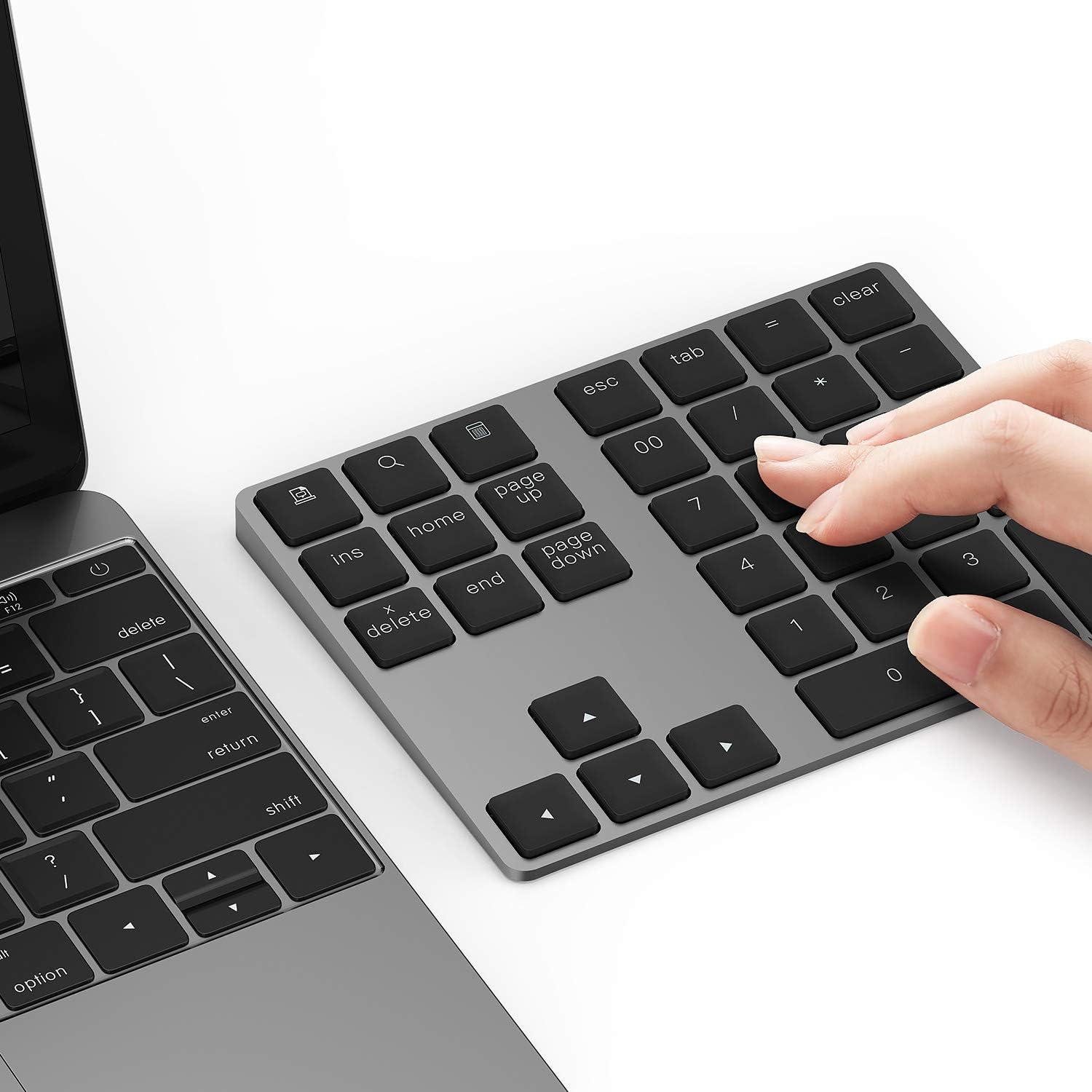
  • Slim Aluminum Design: Lekvey Bluetooth number pad is constructed of solid and premium aluminum materials for long-lasting use, the ergonomic tilt for comfortable typing and good look, slim style appearance ( Only 0.46 lb, 5.7 x 4.4 x 0.47 inch ), exactly matches your Macbook, MacBook Air / Pro, iMac, PC, surface pro, laptop or desktop as the side external wireless numeric keypad
  • Bluetooth 5.0 Connection: Bluetooth 5.0 technology provides a cable-free & clutter-free connection, the external Bluetooth number pad 34-keys full keypad extends your existing keyboard, operating distance 10 m. Note: For Laptop Desktop PC without Bluetooth function, you need to use third-party Bluetooth adapter (not included) before use
  • High-Capacity Rechargeable Battery: Built-in 160 mAh lithium rechargeable battery. The Bluetooth numeric keypad is easily recharged through the included type C cable, no need to change the battery and easy to use. The Bluetooth wireless keypad also has the auto sleep function, lower power consumption, reflect energy saving and humanization of the product. Press any key can wake up the Bluetooth number pad within 3 seconds
  • Widely Compatible: This Bluetooth wireless number pad it includes shortcut keys and low profile quiet scissor-switch keys so you can work comfortably on your computer or laptop. The Bluetooth number pad is compatible with Windows, Android, iMac, MacBook Pro, MacBook Air, MacBook, Surface Pro, Tablet PC Desktop laptop, etc. Note: The Bluetooth 10 key is NOT compatible with ChromeBook. And the "page up", "page down", "search", "screenshot" and "ins" key won't work with Mac OS, but other keys and number keys work well
  • Lekvey Aluminum Luxury Bluetooth Number Pad, Happy Purchasing: Are you still worried about using the traditional large keyboard to process data? Or are you still worried that your laptop without a numeric keypad? Lekvey wireless Bluetooth keypad is just for you! The compact and practical wireless number keypad allows you to take it anywhere. Take it out of your pocket or backpackand you'll be better able to get work done on your tablet or laptop. Enjoy it

  • Reviews:

    5.0 out of 5 stars Not bad

    A. · June 15, 2025

    (function() { P.when('cr-A', 'ready').execute(function(A) { if(typeof A.toggleExpanderAriaLabel === 'function') { A.toggleExpanderAriaLabel('review_text_read_more', 'Read more of this review', 'Read less of this review'); } }); })(); .review-text-read-more-expander:focus-visible { outline: 2px solid #2162a1; outline-offset: 2px; border-radius: 5px; } Not bad

    5.0 out of 5 stars Nice and simple

    M. · May 14, 2025

    First one worked twice then stopped. But their customer service was quick and amazing, and this item gets 5 stars because Susan and her team helped make sure I had a working replacement model quickly. Thank you.

    4.0 out of 5 stars Fantastic customer service

    S. · February 11, 2025

    This unit is fairly fragile but I am bumping my review up from 2 stars to 4 stars due to the amazing customer service response. Upon reading my review, their customer service reached out to me directly and promptly replaced my unit free of charge. That is amazing in today's world. Much appreciated!

    5.0 out of 5 stars Great addition

    L.C. · May 20, 2025

    I love this keyboard. Works like a charm, and I’ve had it awhile!

    5.0 out of 5 stars Bluetooth Number Pad

    H.L. · June 22, 2023

    The media could not be loaded. My productivity has increased because of the seamless interoperability this sleek and rechargeable wireless numeric keypad provides across a variety of devices. As a result, it has become an important component of my digital arsenal. My attention was first drawn to the sleek and contemporary look of the Lekvey Bluetooth Number Pad. This was the first thing that stood out to me about it. The aluminum build oozes toughness and beauty, making it the ideal accessory for both my MacBook and my other electronic gadgets. Because of its small size, it is quite portable, and I am able to simply transport it in the bag I always have with me wherever I go. The low-key appearance not only gives the product an air of elegance but also makes prolonged usage more bearable for the user. The Bluetooth connection was easy to set up once it was established. The number pad connects easily to all of my devices, including my MacBook, MacBook Air/Pro, iMac, Windows laptop, and even my Surface Pro, thanks to a straightforward pairing procedure. The wireless feature allows the ability to position the keypad in the most ergonomic and comfortable way, reducing the trouble of tangled cables and allowing for flexible workplace layouts. Wireless functionality provides freedom to position the keypad in the most ergonomic and convenient manner.

    5.0 out of 5 stars Good News Bad News

    C. · March 16, 2025

    I purchased this keypad for use with my laptop as the previous numeric keypad died. For whatever reason, while the keypad worked with my desktop computer (Mac Mini M2 chip), it would not pair with my laptop (MacBook Air M3 chip). I emailed the company asking for tech support. Their response was almost immediate. The asked a few questions then suggested solutions. With the suggested solutions, the company decided to refund the purchase price as compensation for the aggravation. Although the solutions did not solve the problem, I was impressed by both the responsiveness and the commitment to customer service of the company.

    5.0 out of 5 stars Very nice overall!

    O.O.S. · May 5, 2025

    Really easy to pair. Very good looking. Very nice overall!

    3.0 out of 5 stars Misses the Mark

    k. · February 6, 2020

    **UPDATE 2/6/25**I found myself once again needing a numeric keypad as my 2023 MacBook Air M2 doesn't have one, and I inadvertently purchased this one again, and my original review/complaints stand strong. This really does miss the mark, and it's evident the manufacturer pays no attention to customer reviews when considering whether to release a new and improved version of this keypad. I will be returning and finding something else. Original review follows.__________________________________________________________________The concept of this numeric keypad is great. If you're a Windows user (I am not), it's even better since then at least ALL of the buttons will work for you. However, if you use a Mac, you will not have use of four different buttons: Print Screen, Search, Calculator, and Insert. I knew this going into it, but for me, this still begs the question: why not create a separate version for the multitude of us Mac users out here and eliminate the non-working bits and streamline this thing a bit more?I don't know if this is a consistent issue or not, but each time I power on my number pad, if I am already working in a spreadsheet (as I often am), it will type a series of four 9s on the screen after it connects - and it makes a weird sound as it's typing each of them. This happens each and every time, so it's not some random fluke, and I have not found a way to stop this from happening. While a minor inconvenience needing to go back and delete those 9s from a cell, it's an inconvenience, nonetheless.I also don't care for how this device is sloped. Some might argue this is ergonomics, but I would argue the fact that if we need a number pad, it's because we're working from a notebook computer that doesn't have one - and notebook computers do not have the same "ergonomic slope" this number pad has, so why bother with it? Design the number pad to be as thin as possible, instead.Another thing I don't like about this number pad is the fact that the buttons sit so high up, and the raised part of the 5 button to centre one's fingers properly for 10-key by touch is virtually nonexistent. I use a 2019 model of the MacBook Pro with Touch Bar, and the buttons are nearly flush with the chassis; I also like the response of the keys since there is minimal travel and a wonderful tactile feel as I'm typing. I would like to have seen this number pad have something very similar. Not only are the buttons sitting up too high, but they are VERY spongy/squishy and have a lot of travel and wobble as they are being pressed. This often forces me to ensure I've typed all the numbers I've intended as I'm using this, and roughly 15% of the time, I haven't. When you're working with millions of numbers a day, this is a very high margin of error.Overall, I can state this device is functional - but barely. I like the aluminium body, I like that it comes close to matching the colour of my MBP, and over the last week I've been using it, I haven't had to charge it. However, the charge issue brings up another sticking point. On my MBP, anything else that connects via Bluetooth, I can monitor the current battery level of each device, letting me know when I should charge it and not have to wait for it to actually stop working before I charge it again. Not this number pad. You cannot tell how much charge is remaining on this device at all, and I find that I'm having to keep it plugged into a charger for the sake of it not crapping out on me right in the middle of working on something. To me, this defeats the entire purpose of something being Bluetooth in the first place. We go with Bluetooth so we don't have to have charging cables and more bits and bobs sitting on our workstations as much as each piece of technology permits. Otherwise, why wouldn't we go with a cabled version for home use and a BT version whilst traveling??I would not purchase this device again based upon all of these shortcomings, and I am currently trying to find a better version for my daily use. This device simply falls way too short of hitting its mark to be very useful.

    The best number pad.

    A.C. · July 29, 2023

    (function() { P.when('cr-A', 'ready').execute(function(A) { if(typeof A.toggleExpanderAriaLabel === 'function') { A.toggleExpanderAriaLabel('review_text_read_more', 'Read more of this review', 'Read less of this review'); } }); })(); .review-text-read-more-expander:focus-visible { outline: 2px solid #2162a1; outline-offset: 2px; border-radius: 5px; } Very handy and good quality. Keys are lightweight and smooth. 100 times better than the generic black numerical keypads. Loved it.

    Works great, and adds a nice aesthetic to the office.

    D. · September 27, 2020

    I recently got a new computer, and it doesn't have a number pad like my old one did.Because I'm doing a lot of at-home work lately, I miss my number pad quite a bit. My last one was great, and I would use it all the time, so I had to get a new one. I’ve never worked with an external number pad before, but I was willing to give it a shot! I wanted to make sure it works great since I use it so often, so I justified putting a bit more money in to get a good, proper one.I chose to pick up this one because it has everything I want in a number pad, and it looks like it's good quality. (It also had prime, so I would get it super fast.)I got it in yesterday and when I felt it in hand and actually tried it out, I knew I made the right decision. It had everything I wanted, and on top of that, it adds a nice aesthetic to the in-home office.

    Great addition to any laptop without a numPad

    B. · January 11, 2022

    This stand-alone numPad is sturdy, well designed and does exactly what it promises. It adds a lot of functionality to those compact laptops that lack a built-in numPad. Plus, it's quite elegant.One great feature of such a separate numPad is that you can have your numPad wherever suits you the most : on the left, on the right or on your knees. Great for southpaws !In short, if you work with numbers, you can't do without one.However...- it's made of aluminum with sharp edges that are VERY unpleasant to the skin : its manufacturer should really splurge on sandpaper or a file, and hire a worker or two to round off those edges. As it is, the product feels unfinished. Which is really too bad because it is otherwise excellent.- it lacks backlighting : in these days when even cheap computers come equiped with backlit keyboards, that's a bit disappointing.

    Worked great for a while but number 1 key not working anymore

    A. · February 22, 2024

    Edit:The seller reached out and helped me with my problem. Great customer service. So updated review.Literally perfect the connection is easy too. But all of a sudden the number 1 key just doesn’t press anymore like I have to press 1 directly from my Mac keyboard which is so annoying. And I can’t even find how to contact the seller. Bought for $63 + tax too.

    Matches my keyboard

    P.S. · May 23, 2022

    I started carrying my official keyboard from the fruit company to work, as I wanted the flexibility a Bluetooth keyboard afforded. Especially as the horrible generic keyboards at the office had a horrible finger feel when being used.The downside to that was the loss of a Number pad, which slowly became irritating. In come this item to the rescue. It paired with my laptop quickly, and have had an issue since. Charging is quick, but hardly needed it last quite a long time. The few extra keys like esc and 00 can come in handy. My favorite is the calculator button. Also, it matches my existing keyboard which is why I picked in the first place.

    Bluetooth Number Pad, Lekvey Aluminum Rechargeable Wireless Numeric Keypad Slim 34-Keys External Numpad Keyboard Data Entry Compatible for Macbook, MacBook Air/Pro, iMac Windows Laptop Surface Pro etc

    Product ID: UO07Y139KKM
    Condition: New

    4.4

    AED27893

    Price includes VAT & Import Duties
    Color: Bluetooth - Black
    Product imageProduct image
    Availability: In Stock

    Quantity:

    |

    Order today to get by 7-14 business days

    This item qualifies for free delivery

    Returns & Warranty policies

    Imported From: United States

    At BOLO, we work hard to ensure the products you receive are new, genuine, and sourced from reputable suppliers.

    BOLO is not an authorized or official retailer for most brands, nor are we affiliated with manufacturers unless specifically stated on a product page. Instead, we source verified sellers, authorized distributors or directly from the manufacturer.

    Each product undergoes thorough inspection and verification at our consolidation and fulfilment centers to ensure it meets our strict authenticity and quality standards before being shipped and delivered to you.

    If you ever have concerns regarding the authenticity of a product purchased from us, please contact Bolo Support. We will review your inquiry promptly and, if necessary, provide documentation verifying authenticity or offer a suitable resolution.

    Your trust is our top priority, and we are committed to maintaining transparency and integrity in every transaction.

    All product information, images, descriptions, and reviews originate from the manufacturer or from trusted sellers overseas. BOLO is not affiliated with, endorsed by, or an authorized retailer for most brands listed on our website unless stated otherwise.

    While we strive to display accurate information, variations in packaging, labeling, instructions, or formulation may occasionally occur due to regional differences or supplier updates. For detailed or manufacturer-specific information, please contact the brand directly or reach out to BOLO Support for assistance.

    Unless otherwise stated, all prices displayed on the product page include applicable taxes and import duties.

    BOLO operates in accordance with the laws and regulations of United Arab Emirates. Any items found to be restricted or prohibited for sale within the UAE will be cancelled prior to shipment. We take proactive measures to ensure that only products permitted for sale in United Arab Emirates are listed on our website.

    All items are shipped by air, and any products classified as “Dangerous Goods (DG)” under IATA regulations will be removed from the order and cancelled.

    All orders are processed manually, and we make every effort to process them promptly once confirmed. Products cancelled due to the above reasons will be permanently removed from listings across the website.

    Similar suggestions by Bolo

    More from this brand

    Similar items from “Numeric Keypads”

    Bluetooth Number Pad, Lekvey Aluminum Rechargeable Wireless Numeric Keypad Slim 34-Keys External Numpad Keyboard Data Entry Compatible for Macbook, MacBook Air/Pro, iMac Windows Laptop Surface Pro etc

    Product ID: UO07Y139KKM
    Condition: New

    4.4

    Bluetooth Number Pad, Lekvey Aluminum Rechargeable Wireless Numeric Keypad Slim 34-Keys External Numpad Keyboard Data Entry Compatible for Macbook, MacBook Air/Pro, iMac Windows Laptop Surface Pro etc-0
    Color: Bluetooth - Black
    Product imageProduct image

    AED27893

    Price includes VAT & Import Duties
    Availability: In Stock

    Quantity:

    |

    Order today to get by 7-14 business days

    This item qualifies for free delivery

    Returns & Warranty policies

    Imported From: United States

    At BOLO, we work hard to ensure the products you receive are new, genuine, and sourced from reputable suppliers.

    BOLO is not an authorized or official retailer for most brands, nor are we affiliated with manufacturers unless specifically stated on a product page. Instead, we source verified sellers, authorized distributors or directly from the manufacturer.

    Each product undergoes thorough inspection and verification at our consolidation and fulfilment centers to ensure it meets our strict authenticity and quality standards before being shipped and delivered to you.

    If you ever have concerns regarding the authenticity of a product purchased from us, please contact Bolo Support. We will review your inquiry promptly and, if necessary, provide documentation verifying authenticity or offer a suitable resolution.

    Your trust is our top priority, and we are committed to maintaining transparency and integrity in every transaction.

    All product information, images, descriptions, and reviews originate from the manufacturer or from trusted sellers overseas. BOLO is not affiliated with, endorsed by, or an authorized retailer for most brands listed on our website unless stated otherwise.

    While we strive to display accurate information, variations in packaging, labeling, instructions, or formulation may occasionally occur due to regional differences or supplier updates. For detailed or manufacturer-specific information, please contact the brand directly or reach out to BOLO Support for assistance.

    Unless otherwise stated, all prices displayed on the product page include applicable taxes and import duties.

    BOLO operates in accordance with the laws and regulations of United Arab Emirates. Any items found to be restricted or prohibited for sale within the UAE will be cancelled prior to shipment. We take proactive measures to ensure that only products permitted for sale in United Arab Emirates are listed on our website.

    All items are shipped by air, and any products classified as “Dangerous Goods (DG)” under IATA regulations will be removed from the order and cancelled.

    All orders are processed manually, and we make every effort to process them promptly once confirmed. Products cancelled due to the above reasons will be permanently removed from listings across the website.

    Description:

  • Slim Aluminum Design: Lekvey Bluetooth number pad is constructed of solid and premium aluminum materials for long-lasting use, the ergonomic tilt for comfortable typing and good look, slim style appearance ( Only 0.46 lb, 5.7 x 4.4 x 0.47 inch ), exactly matches your Macbook, MacBook Air / Pro, iMac, PC, surface pro, laptop or desktop as the side external wireless numeric keypad
  • Bluetooth 5.0 Connection: Bluetooth 5.0 technology provides a cable-free & clutter-free connection, the external Bluetooth number pad 34-keys full keypad extends your existing keyboard, operating distance 10 m. Note: For Laptop Desktop PC without Bluetooth function, you need to use third-party Bluetooth adapter (not included) before use
  • High-Capacity Rechargeable Battery: Built-in 160 mAh lithium rechargeable battery. The Bluetooth numeric keypad is easily recharged through the included type C cable, no need to change the battery and easy to use. The Bluetooth wireless keypad also has the auto sleep function, lower power consumption, reflect energy saving and humanization of the product. Press any key can wake up the Bluetooth number pad within 3 seconds
  • Widely Compatible: This Bluetooth wireless number pad it includes shortcut keys and low profile quiet scissor-switch keys so you can work comfortably on your computer or laptop. The Bluetooth number pad is compatible with Windows, Android, iMac, MacBook Pro, MacBook Air, MacBook, Surface Pro, Tablet PC Desktop laptop, etc. Note: The Bluetooth 10 key is NOT compatible with ChromeBook. And the "page up", "page down", "search", "screenshot" and "ins" key won't work with Mac OS, but other keys and number keys work well
  • Lekvey Aluminum Luxury Bluetooth Number Pad, Happy Purchasing: Are you still worried about using the traditional large keyboard to process data? Or are you still worried that your laptop without a numeric keypad? Lekvey wireless Bluetooth keypad is just for you! The compact and practical wireless number keypad allows you to take it anywhere. Take it out of your pocket or backpackand you'll be better able to get work done on your tablet or laptop. Enjoy it

  • Reviews:

    5.0 out of 5 stars Not bad

    A. · June 15, 2025

    (function() { P.when('cr-A', 'ready').execute(function(A) { if(typeof A.toggleExpanderAriaLabel === 'function') { A.toggleExpanderAriaLabel('review_text_read_more', 'Read more of this review', 'Read less of this review'); } }); })(); .review-text-read-more-expander:focus-visible { outline: 2px solid #2162a1; outline-offset: 2px; border-radius: 5px; } Not bad

    5.0 out of 5 stars Nice and simple

    M. · May 14, 2025

    First one worked twice then stopped. But their customer service was quick and amazing, and this item gets 5 stars because Susan and her team helped make sure I had a working replacement model quickly. Thank you.

    4.0 out of 5 stars Fantastic customer service

    S. · February 11, 2025

    This unit is fairly fragile but I am bumping my review up from 2 stars to 4 stars due to the amazing customer service response. Upon reading my review, their customer service reached out to me directly and promptly replaced my unit free of charge. That is amazing in today's world. Much appreciated!

    5.0 out of 5 stars Great addition

    L.C. · May 20, 2025

    I love this keyboard. Works like a charm, and I’ve had it awhile!

    5.0 out of 5 stars Bluetooth Number Pad

    H.L. · June 22, 2023

    The media could not be loaded. My productivity has increased because of the seamless interoperability this sleek and rechargeable wireless numeric keypad provides across a variety of devices. As a result, it has become an important component of my digital arsenal. My attention was first drawn to the sleek and contemporary look of the Lekvey Bluetooth Number Pad. This was the first thing that stood out to me about it. The aluminum build oozes toughness and beauty, making it the ideal accessory for both my MacBook and my other electronic gadgets. Because of its small size, it is quite portable, and I am able to simply transport it in the bag I always have with me wherever I go. The low-key appearance not only gives the product an air of elegance but also makes prolonged usage more bearable for the user. The Bluetooth connection was easy to set up once it was established. The number pad connects easily to all of my devices, including my MacBook, MacBook Air/Pro, iMac, Windows laptop, and even my Surface Pro, thanks to a straightforward pairing procedure. The wireless feature allows the ability to position the keypad in the most ergonomic and comfortable way, reducing the trouble of tangled cables and allowing for flexible workplace layouts. Wireless functionality provides freedom to position the keypad in the most ergonomic and convenient manner.

    5.0 out of 5 stars Good News Bad News

    C. · March 16, 2025

    I purchased this keypad for use with my laptop as the previous numeric keypad died. For whatever reason, while the keypad worked with my desktop computer (Mac Mini M2 chip), it would not pair with my laptop (MacBook Air M3 chip). I emailed the company asking for tech support. Their response was almost immediate. The asked a few questions then suggested solutions. With the suggested solutions, the company decided to refund the purchase price as compensation for the aggravation. Although the solutions did not solve the problem, I was impressed by both the responsiveness and the commitment to customer service of the company.

    5.0 out of 5 stars Very nice overall!

    O.O.S. · May 5, 2025

    Really easy to pair. Very good looking. Very nice overall!

    3.0 out of 5 stars Misses the Mark

    k. · February 6, 2020

    **UPDATE 2/6/25**I found myself once again needing a numeric keypad as my 2023 MacBook Air M2 doesn't have one, and I inadvertently purchased this one again, and my original review/complaints stand strong. This really does miss the mark, and it's evident the manufacturer pays no attention to customer reviews when considering whether to release a new and improved version of this keypad. I will be returning and finding something else. Original review follows.__________________________________________________________________The concept of this numeric keypad is great. If you're a Windows user (I am not), it's even better since then at least ALL of the buttons will work for you. However, if you use a Mac, you will not have use of four different buttons: Print Screen, Search, Calculator, and Insert. I knew this going into it, but for me, this still begs the question: why not create a separate version for the multitude of us Mac users out here and eliminate the non-working bits and streamline this thing a bit more?I don't know if this is a consistent issue or not, but each time I power on my number pad, if I am already working in a spreadsheet (as I often am), it will type a series of four 9s on the screen after it connects - and it makes a weird sound as it's typing each of them. This happens each and every time, so it's not some random fluke, and I have not found a way to stop this from happening. While a minor inconvenience needing to go back and delete those 9s from a cell, it's an inconvenience, nonetheless.I also don't care for how this device is sloped. Some might argue this is ergonomics, but I would argue the fact that if we need a number pad, it's because we're working from a notebook computer that doesn't have one - and notebook computers do not have the same "ergonomic slope" this number pad has, so why bother with it? Design the number pad to be as thin as possible, instead.Another thing I don't like about this number pad is the fact that the buttons sit so high up, and the raised part of the 5 button to centre one's fingers properly for 10-key by touch is virtually nonexistent. I use a 2019 model of the MacBook Pro with Touch Bar, and the buttons are nearly flush with the chassis; I also like the response of the keys since there is minimal travel and a wonderful tactile feel as I'm typing. I would like to have seen this number pad have something very similar. Not only are the buttons sitting up too high, but they are VERY spongy/squishy and have a lot of travel and wobble as they are being pressed. This often forces me to ensure I've typed all the numbers I've intended as I'm using this, and roughly 15% of the time, I haven't. When you're working with millions of numbers a day, this is a very high margin of error.Overall, I can state this device is functional - but barely. I like the aluminium body, I like that it comes close to matching the colour of my MBP, and over the last week I've been using it, I haven't had to charge it. However, the charge issue brings up another sticking point. On my MBP, anything else that connects via Bluetooth, I can monitor the current battery level of each device, letting me know when I should charge it and not have to wait for it to actually stop working before I charge it again. Not this number pad. You cannot tell how much charge is remaining on this device at all, and I find that I'm having to keep it plugged into a charger for the sake of it not crapping out on me right in the middle of working on something. To me, this defeats the entire purpose of something being Bluetooth in the first place. We go with Bluetooth so we don't have to have charging cables and more bits and bobs sitting on our workstations as much as each piece of technology permits. Otherwise, why wouldn't we go with a cabled version for home use and a BT version whilst traveling??I would not purchase this device again based upon all of these shortcomings, and I am currently trying to find a better version for my daily use. This device simply falls way too short of hitting its mark to be very useful.

    The best number pad.

    A.C. · July 29, 2023

    (function() { P.when('cr-A', 'ready').execute(function(A) { if(typeof A.toggleExpanderAriaLabel === 'function') { A.toggleExpanderAriaLabel('review_text_read_more', 'Read more of this review', 'Read less of this review'); } }); })(); .review-text-read-more-expander:focus-visible { outline: 2px solid #2162a1; outline-offset: 2px; border-radius: 5px; } Very handy and good quality. Keys are lightweight and smooth. 100 times better than the generic black numerical keypads. Loved it.

    Works great, and adds a nice aesthetic to the office.

    D. · September 27, 2020

    I recently got a new computer, and it doesn't have a number pad like my old one did.Because I'm doing a lot of at-home work lately, I miss my number pad quite a bit. My last one was great, and I would use it all the time, so I had to get a new one. I’ve never worked with an external number pad before, but I was willing to give it a shot! I wanted to make sure it works great since I use it so often, so I justified putting a bit more money in to get a good, proper one.I chose to pick up this one because it has everything I want in a number pad, and it looks like it's good quality. (It also had prime, so I would get it super fast.)I got it in yesterday and when I felt it in hand and actually tried it out, I knew I made the right decision. It had everything I wanted, and on top of that, it adds a nice aesthetic to the in-home office.

    Great addition to any laptop without a numPad

    B. · January 11, 2022

    This stand-alone numPad is sturdy, well designed and does exactly what it promises. It adds a lot of functionality to those compact laptops that lack a built-in numPad. Plus, it's quite elegant.One great feature of such a separate numPad is that you can have your numPad wherever suits you the most : on the left, on the right or on your knees. Great for southpaws !In short, if you work with numbers, you can't do without one.However...- it's made of aluminum with sharp edges that are VERY unpleasant to the skin : its manufacturer should really splurge on sandpaper or a file, and hire a worker or two to round off those edges. As it is, the product feels unfinished. Which is really too bad because it is otherwise excellent.- it lacks backlighting : in these days when even cheap computers come equiped with backlit keyboards, that's a bit disappointing.

    Worked great for a while but number 1 key not working anymore

    A. · February 22, 2024

    Edit:The seller reached out and helped me with my problem. Great customer service. So updated review.Literally perfect the connection is easy too. But all of a sudden the number 1 key just doesn’t press anymore like I have to press 1 directly from my Mac keyboard which is so annoying. And I can’t even find how to contact the seller. Bought for $63 + tax too.

    Matches my keyboard

    P.S. · May 23, 2022

    I started carrying my official keyboard from the fruit company to work, as I wanted the flexibility a Bluetooth keyboard afforded. Especially as the horrible generic keyboards at the office had a horrible finger feel when being used.The downside to that was the loss of a Number pad, which slowly became irritating. In come this item to the rescue. It paired with my laptop quickly, and have had an issue since. Charging is quick, but hardly needed it last quite a long time. The few extra keys like esc and 00 can come in handy. My favorite is the calculator button. Also, it matches my existing keyboard which is why I picked in the first place.

    Similar suggestions by Bolo

    More from this brand

    Similar items from “Numeric Keypads”