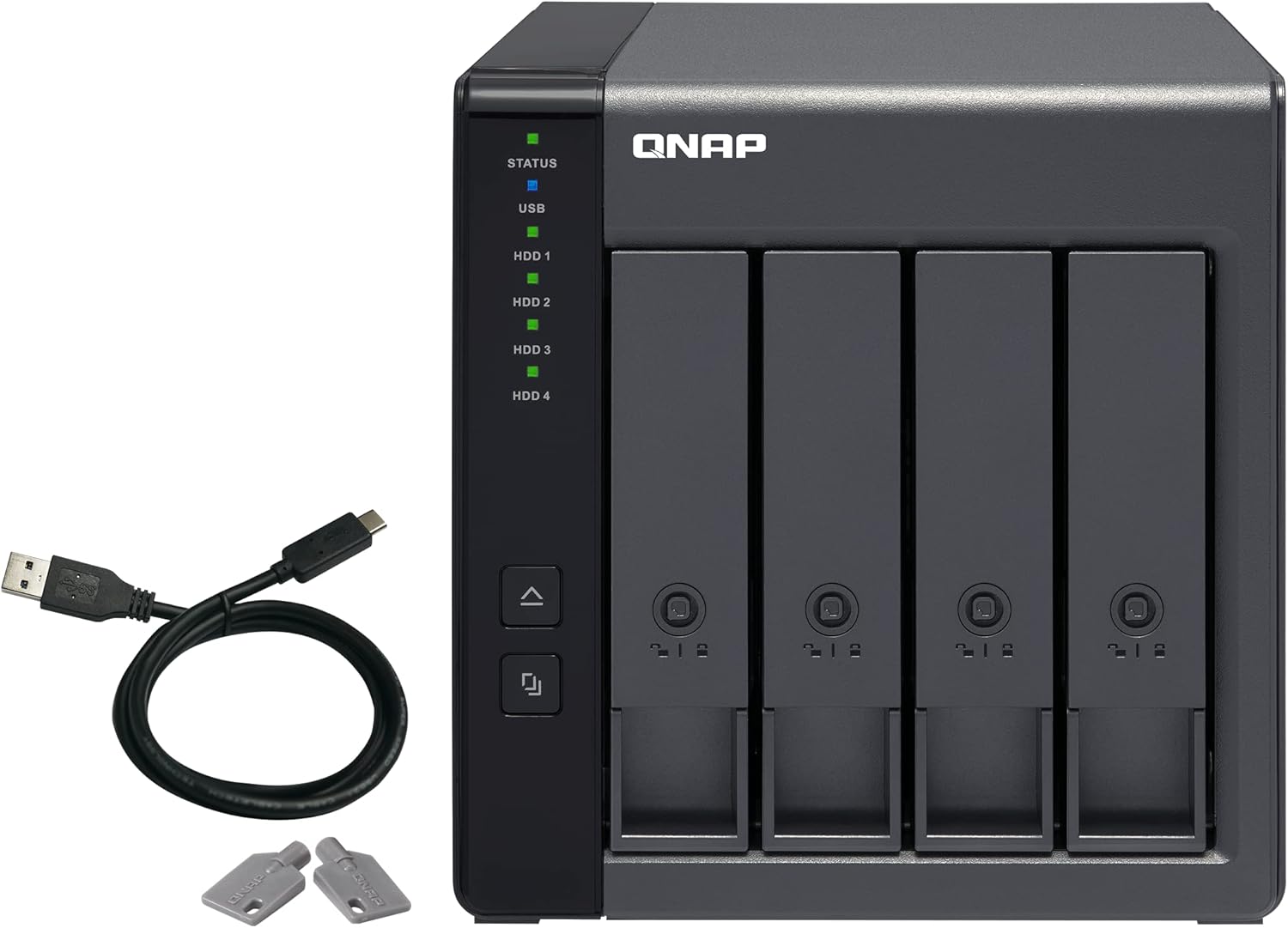
Description:
The product is multiple voltage compatible, that voltage arrange is 100-240V
Reviews:
5.0 out of 5 stars Great affordable RAID enclosure!
(function() { P.when('cr-A', 'ready').execute(function(A) { if(typeof A.toggleExpanderAriaLabel === 'function') { A.toggleExpanderAriaLabel('review_text_read_more', 'Read more of this review', 'Read less of this review'); } }); })(); .review-text-read-more-expander:focus-visible { outline: 2px solid #2162a1; outline-offset: 2px; border-radius: 5px; } Bottom line: I recommend the TR-004 with drives I mention below (or others on its list of supported drives) in one of the 3 modes: Individual, RAID 1/0, or RAID 5. Please keep in mind that RAID is not a substitute for a good backup. You should always keep a backup copy of anything important on a separate device! If you want to know more details, read on.As an IT professional, I appreciate the benefits of using RAID. It provides faster performance than any one of the drives in the array. How much so depends on the type of array you configure. Configured properly (more on that later*), it provides safety against data loss when a drive fails, and that's always a matter of when, not if. My only complaint with the TR-004 is that the trays that the drives go in are a little flimsy.The down side of RAID is often cost - it's not terribly cheap. Building a home network storage server using it can be expensive because motherboards that support it cost more that those that don't. Using a dedicated controller card is often even more so. I could never convince my better half to let me build a file server with enough storage to meet our needs using RAID because of this - until I found the QNAP TR-004.The TR-004 is a great price when you consider that it has the RAID controller built in. It's an even better value because it supports many of the various popular levels of RAID (more on that later*). Add the fact that you don't have to fill every drive slot to use it, and it's a high value for the money. I put it on a tiny PC also available here on Bolo.com for under $200, and **boom** - instant dedicated file server for home!You need to populate the TR-004 with drives, it comes without any. Get good NAS or other server grade drives. I recommend WD RED, WD PURPLE, or WD GOLD from Western Digital, or Seagate's IronWolf or SkyHawk lines. These drives are specifically designed for use in RAID arrays for Network-Attached Storage, also called NAS (WD RED & IronWolf), security camera systems (WD PURPLE & SkyHawk) or other servers (WD GOLD & IronWolf). They are made for very high reliability. At the very least, use either the Western Digital WD BLACK or high-end Seagate Barracuda drives. Anything cheaper, and you'll end up having problems with your RAID array loosing sync."What's that mean?" you ask? In simple terms, all the drives in a RAID array look, to the computer, like a single giant drive. Data gets spread across the drives in chunks. This is how you get the speed performance increase from RAID. While one drive is busy handling one thing, others are frequently able to handle other things. It's also how you get protection against data loss if a drive fails, when you are using a level of RAID that provides this.* Here's the "more on that later" I promised above. RAID comes in different "levels", referred to as RAID x, where x is a number. All RAID arrays are made up of multiple drives. The TR-004 supports 6 different modes, though I only recommend 4 of them. These modes are:Individual - Every drive in the TR-004 is visible to the computer as a separate drive letter (ie: e:, f:, etc). The drives can all be different models, brands, and sizes. I can recommend this mode, but know that data on each drive will be lost if that drive fails and the data on it isn't backed up elsewhere. If you are going to use this mode, you can use any drive the TR-004 will support, not just the ones I mentioned above.JOBD - This stands for Just One Big Drive. All the space of all the drives is available to the computer as one giant drive. It requires at least 2 drives, but supports as many as the controller can handle, 4 in the case of this enclosure. This mode allows the use of different, models, brands, and even sizes of drives. It works by spreading the data within files across all the drives in the array (as do all the RAID levels in one way or another). DANGER: If any drive fails, all data on all drives in this mode is lost, unless it's backed up elsewhere. I do not recommend this mode.RAID 0 - This is technically the first RAID mode. It's the same as JOBD, with the notable exception that all the drives in the array should be identical, the same exact model number, the same brand, the same size. The only difference their should be is the drives' serial numbers. This requirement is continued to all the rest of the RAID levels. RAID 0 is fast, however it has the same danger as JOBD, so I do not recommend this mode, either.RAID 1/0 - This mode is also know as RAID 10. It requires an even number of identical drives, and a minimum of 4 (all bays filled in the TR-004). It copies 2 RAID 0 arrays between each other. In larger arrays, an even number of identical drives is required for RAID 1/0. This is the fastest of the RAID levels, but it has the drawback of only making half the total space of all the drives combined to the computer (ie: 4 drives of 3 TB each would look like 6 TB to the computer [4 drives * 3 TB = 12 TB, 12 TB / 2 = 6 TB]). Although I do not recommend RAID 0, the fact that there are 2 identical copies of a RAID 0 array, any single drive can fail without loosing data. Therefore, I do recommend RAID 1/0 for speed and data redundancy.RAID 5 - This mode is a good compromise between between the speed of RAID 1/0 and the desire to get more storage space from the drives in the array. RAID 5 also requires at identical drives. It needs a minimum of 3, but can go up from there to however many drives the controller can support, in single drive increments. It achieves redundancy, by spreading data across "stripes" that are duplicated on the multiple drives. At it's absolute simplest, it places 2 copies of each stripe in the array. For example, lets say there are 3 stripes stored in a 3-drive array. We'll call the stripes A, B, & C. We'll call the drives 1, 2, & 3. RAID 5 stores a copy of A on 1 & 2, a copy of B on 2 & 3, and a copy of C on 3 & 1. By doing this, any 1 drive can fail but there is still at least 1 usable copy of all stripes in the array. Replace the failed drive, and the controller will copy the necessary stripes to the new drive. The amount of storage available to the computer is the combined total of the storage on all but one of drives in the array (ie 4 drives of 3 TB each would look like 9 TB to the computer [4 drives -1 = 3 drives, 3 drives * 3 TB = 9 TB]). RAID 5 is not as fast as RAID1/0, but it gives more storage from the same drives, so I do recommend it in particular for home servers, where cost is a bigger consideration that many businesses.SFOTWARE CONTROL: When the TR-004 is in this mode, special software must be downloaded and installed on the computer it is attached to. The mode it will run in will then be controlled by the user from within this software. I do not recommend this mode because if you are going to move the TR-004 from one computer to another, you may accidentally loose everything stored on it. You never know when you may have to move it to another computer - say if the one it's on dies?
5.0 out of 5 stars True DAS, has medium speed - but great for the cost, the config utility was not hard to learn
This is a true DAS and you can download the configuration utility from QNAP to set it up, as well as get the full manual. This is a good value, goes up to RAID 5, has moderate speed with RAID 5 array and 4x 4TB WD Reds. I was able to write on one PC about 140-160 MB/sec and read about 200MB/sec. On a second machine it was more, getting about 190MB/sec during writes and 240MB/sec on reads. Once an array has been made, any new Windows PC will see the drive without any additional driver needed other than the built-in Windows driver. Not bad for a $219 DAS.
4.0 out of 5 stars Initial thoughts on set up and performance testing
This review is for the 4-bay TR-004 model and covers my very early impressions and experience with initial set up.Summary:So far, I am fairly impressed with how easy this is to set up and use. Performance is as expected and I had everything up and running in under 30 minutes. Time will tell in terms of reliability.Pros:- Ease of set up- Easy to use RAID Manager software- Good read/write performanceCons:- Drive caddies are all plastic- the TR-004 unit only has a USB 3.0 connector (max 5 Gbit/s) while the smaller 2-bay TR-002 unit has the faster USB 3.1 Gen 2 (max 10 Gbit/s)Unboxing:This comes very well packed and includes the external storage unit, power supply, USB-C to USB-A cable, keys, a USB cable clip, and screws to attach hard drives to the drive caddies. The housing is all metal and feels sturdy. The drive caddies, however, are all plastic and feel flimsy. I'm not loving this, but only time will tell if this becomes an issue and they break.Setup:There are two fairly quick parts to setting this up - the physical installation of the drives and connection to the computer, and software set up. I found this to be very easy and straightforward. Installing the hard drives is very simple and doesn't absolutely require securing them with screws. These slide easily into the drive slots and close securely. Software set up was similar fairly simple - I'm using this with a macOS Ventura workstation. I downloaded the External RAID Manager from the QNAP web site, installed it without issue (it does require a reboot), and used it to set up the RAID volumes (I left the unit in Software Control mode). Starting the unit takes about 30-45 seconds to boot and for the drives to be recognized. Creating the RAID volume using the software manager was trivial and I had a usable drive ready to go in a few minutes.After getting this set up, I used the Blackmagic Disk Speed Test to get a sense for real world read/write performance - I'm getting about 230 MB/s write speeds and 240 MB/s read speeds, which is more than adequate for backup storage. Not blazing fast, but should be sufficient for back ups and retrieval.Of note, I am using four 10 GB Western Digital Red Plus NAS HDD's (7200 rpm, SATA6) and decided on RAID 10 for redundancy and performance and formatted as APFS. The obvious loss was overall storage space: with a total of 40 TB drive space, I have about 18 TB of usable space.Closing Thoughts:I am really looking forward to using this - I have about 12-15 TB of digital images and photos that I would like to copy to a centralized storage unit. The 18 TB of usable storage should be more than enough for my current needs and I can easily upgrade to larger drives as needed.I'll plan to leave an update once I've had more of a chance to use this.
5.0 out of 5 stars My Experience setting up RAID 5 with the TR-004 Model
My experiences with the TR-004 model: The RAID configuration diagram on the unit is inverted, which makes the setup process very confusing. RAID 5 also appears to be buggy—it retains previous configurations, and clearing them is a nightmare. (I’m not sure if this issue was caused by Windows 11 or the TR-002 unit itself.) I initially set up a RAID 5 with 3 disks, but after wiping them to prepare for a 4-disk setup, the system recognized all 4 drives but only reported 36TB of continuous drive space instead of the expected 54TB. My repeated attempts of pressing and holding the reset button for 3 seconds (oh yes, rinse and repeat at least 10 times) didn’t resolve the issue.I eventually managed to get it to recognize the correct capacity by switching to software RAID—using Windows Disk Management, where all 4 drives were correctly detected—then switching back to hardware RAID 5. It was a total pain, but I was very satisfied once it finally worked.For reference, I’m running Windows 11 with four 20TB Seagate drives. I purchased two QNAP TR-004 units, and I am now very satisfied with the product, despite the shortcomings I've mentioned. I give it 5/5 stars!
Easy to setup and quiet running
(function() { P.when('cr-A', 'ready').execute(function(A) { if(typeof A.toggleExpanderAriaLabel === 'function') { A.toggleExpanderAriaLabel('review_text_read_more', 'Read more of this review', 'Read less of this review'); } }); })(); .review-text-read-more-expander:focus-visible { outline: 2px solid #2162a1; outline-offset: 2px; border-radius: 5px; } Setting up is a breeze, using the clips to secure the hard disks to the trays. The fan is also quiet while doing its job. A small detail I appreciate is the inclusion of a cable clip for the USB wire to avoid pulling out of cable by accident or unnecessary stress on the port due to cable weight. The LEDs are also dimmed, but bright enough to see. Does not annoy people like other brands of enclosure that uses super bright LEDs.I join the long list of other users wishing for a way to disable the startup diagnostic beeps. This is perhaps the only ‘on the fence’ point I can think of. Other than that. It works well and looks nice.
Bello ma... baie porta dischi in PLASTICA? Perché in plastica?
The media could not be loaded. Il prodotto sembra pratico. Il fatto che abbia la gestione hardware non solo software lo rende un buon DAS con diverse configurazioni possibili. Abbastanza silenzioso, ventola molto efficace.Alimentatore esterno. Da un lato è meglio perché in caso di problemi all'alimentatore lo cambi ma il box resta, da un lato hai più cavi e disordine.- Positivo: il box è ben realizzato e con la ventola enorme è una galleria del vento per i dischi. Anche se...Leggero e pratico, porta USB C.Raid configurabile senza software. Metti i dischi, anche a caldo, premi il pulsante reset e sei pronto.Negativo: baie porta dischi in plastica. Plastica scadente e fragile. Persino le chiavi degli slot sono in plastica.I dischi scaldano, la plastica alla lunga si cuoce. La plastica non è un conduttore di calore ma un isolante. Se c'è un errore o una cosa a cui prestare attenzione emette fischi che meglio non farlo di notte o svegli il condominio.Il prodotto non è sicuramente pensato per uso professionale o per stare acceso ininterrottamente.Fa il suo dovere di DAS domestico se usato con delicatezza.Lo restituisco in favore di un pari prezzo in metallo.
高速にアクセスできる増設ストレージ
usbで接続できる拡張ストレージです。10tb*4台のhddをRAID5構成で30TBのストレージを構成してます。一度一台のhddが障害になりましたが、ホットスワップで復旧できました。早いし、障害復旧にも優れており、優れもののストレージです。
Keep up the good work, Qnap. Take my money!
In my 30+ years of buying and using external RAID enclosures, I was always attracted to cheaper, lesser known brands and it always came back to bite me where it hurt the most, with problems like unable to connect, disconnections, and the worst, three nightmare situations I experienced.:1) RAID enclosure died, bought replacement unit and found the hardware RAID wasn't compatible despite same brand and model but newer firmware version. Turned out newer firmware wasn't compatible with previous versions. ALL DATA LOST!!2) RAID enclosure died, and they discontinued the model. Other models were incomptible with my dead model. ALL DATA LOST!!3) The RAID enclosure was incompatible with big capacity HDDs. Arrgh! <pointing at you, Asus! Grrrr!>I now learned my lesson. Now I only stick to reputable brands like QNAP. Even when the NAS or enclosure died, you replace it with a different model, the data in the RAID is still compatible and recoverable. <thumbs up!>I've been using the TR-002 (newer USB 3.1 gen 2 model) for a few years and I never had any problems with it, except when it first came out it kept crashing my TS-653B and TS-h973ax NASes. But a couple of firmware updates later, all were fixed. TR-004 has been out even longer than the TR-002 USB 3.1 Gen 2 model, I have no doubt all problems, if any, have since been fixed.Keep up the good work, Qnap. Take my money!
Excelente para tener discos duros externos
Lo compré específicamente para tener varios discos duros externos porque edito muchos videos y así ya no tengo que estar intercambiando discos duros externos. Funciona a la excelencia con Mac y el cable USB tipo C
Visit the QNAP Store
QNAP TR-004 4 Bay USB Type-C Direct Attached Storage (DAS) with hardware RAID (Diskless)
AED1,65767
Quantity:
Order today to get by 7-14 business days
This item qualifies for free delivery
Imported From: United States
At BOLO, we work hard to ensure the products you receive are new, genuine, and sourced from reputable suppliers.
BOLO is not an authorized or official retailer for most brands, nor are we affiliated with manufacturers unless specifically stated on a product page. Instead, we source verified sellers, authorized distributors or directly from the manufacturer.
Each product undergoes thorough inspection and verification at our consolidation and fulfilment centers to ensure it meets our strict authenticity and quality standards before being shipped and delivered to you.
If you ever have concerns regarding the authenticity of a product purchased from us, please contact Bolo Support. We will review your inquiry promptly and, if necessary, provide documentation verifying authenticity or offer a suitable resolution.
Your trust is our top priority, and we are committed to maintaining transparency and integrity in every transaction.
All product information, images, descriptions, and reviews originate from the manufacturer or from trusted sellers overseas. BOLO is not affiliated with, endorsed by, or an authorized retailer for most brands listed on our website unless stated otherwise.
While we strive to display accurate information, variations in packaging, labeling, instructions, or formulation may occasionally occur due to regional differences or supplier updates. For detailed or manufacturer-specific information, please contact the brand directly or reach out to BOLO Support for assistance.
Unless otherwise stated, all prices displayed on the product page include applicable taxes and import duties.
BOLO operates in accordance with the laws and regulations of United Arab Emirates. Any items found to be restricted or prohibited for sale within the UAE will be cancelled prior to shipment. We take proactive measures to ensure that only products permitted for sale in United Arab Emirates are listed on our website.
All items are shipped by air, and any products classified as “Dangerous Goods (DG)” under IATA regulations will be removed from the order and cancelled.
All orders are processed manually, and we make every effort to process them promptly once confirmed. Products cancelled due to the above reasons will be permanently removed from listings across the website.
Similar suggestions by Bolo
More from this brand
Similar items from “Enclosures”
Share with
Or share with link
https://www.bolo.ae/products/UO07X4EP7K9
Visit the QNAP Store
QNAP TR-004 4 Bay USB Type-C Direct Attached Storage (DAS) with hardware RAID (Diskless)

AED1,65767
Quantity:
Order today to get by 7-14 business days
This item qualifies for free delivery
Imported From: United States
At BOLO, we work hard to ensure the products you receive are new, genuine, and sourced from reputable suppliers.
BOLO is not an authorized or official retailer for most brands, nor are we affiliated with manufacturers unless specifically stated on a product page. Instead, we source verified sellers, authorized distributors or directly from the manufacturer.
Each product undergoes thorough inspection and verification at our consolidation and fulfilment centers to ensure it meets our strict authenticity and quality standards before being shipped and delivered to you.
If you ever have concerns regarding the authenticity of a product purchased from us, please contact Bolo Support. We will review your inquiry promptly and, if necessary, provide documentation verifying authenticity or offer a suitable resolution.
Your trust is our top priority, and we are committed to maintaining transparency and integrity in every transaction.
All product information, images, descriptions, and reviews originate from the manufacturer or from trusted sellers overseas. BOLO is not affiliated with, endorsed by, or an authorized retailer for most brands listed on our website unless stated otherwise.
While we strive to display accurate information, variations in packaging, labeling, instructions, or formulation may occasionally occur due to regional differences or supplier updates. For detailed or manufacturer-specific information, please contact the brand directly or reach out to BOLO Support for assistance.
Unless otherwise stated, all prices displayed on the product page include applicable taxes and import duties.
BOLO operates in accordance with the laws and regulations of United Arab Emirates. Any items found to be restricted or prohibited for sale within the UAE will be cancelled prior to shipment. We take proactive measures to ensure that only products permitted for sale in United Arab Emirates are listed on our website.
All items are shipped by air, and any products classified as “Dangerous Goods (DG)” under IATA regulations will be removed from the order and cancelled.
All orders are processed manually, and we make every effort to process them promptly once confirmed. Products cancelled due to the above reasons will be permanently removed from listings across the website.
Description:
The product is multiple voltage compatible, that voltage arrange is 100-240V
Reviews:
5.0 out of 5 stars Great affordable RAID enclosure!
(function() { P.when('cr-A', 'ready').execute(function(A) { if(typeof A.toggleExpanderAriaLabel === 'function') { A.toggleExpanderAriaLabel('review_text_read_more', 'Read more of this review', 'Read less of this review'); } }); })(); .review-text-read-more-expander:focus-visible { outline: 2px solid #2162a1; outline-offset: 2px; border-radius: 5px; } Bottom line: I recommend the TR-004 with drives I mention below (or others on its list of supported drives) in one of the 3 modes: Individual, RAID 1/0, or RAID 5. Please keep in mind that RAID is not a substitute for a good backup. You should always keep a backup copy of anything important on a separate device! If you want to know more details, read on.As an IT professional, I appreciate the benefits of using RAID. It provides faster performance than any one of the drives in the array. How much so depends on the type of array you configure. Configured properly (more on that later*), it provides safety against data loss when a drive fails, and that's always a matter of when, not if. My only complaint with the TR-004 is that the trays that the drives go in are a little flimsy.The down side of RAID is often cost - it's not terribly cheap. Building a home network storage server using it can be expensive because motherboards that support it cost more that those that don't. Using a dedicated controller card is often even more so. I could never convince my better half to let me build a file server with enough storage to meet our needs using RAID because of this - until I found the QNAP TR-004.The TR-004 is a great price when you consider that it has the RAID controller built in. It's an even better value because it supports many of the various popular levels of RAID (more on that later*). Add the fact that you don't have to fill every drive slot to use it, and it's a high value for the money. I put it on a tiny PC also available here on Bolo.com for under $200, and **boom** - instant dedicated file server for home!You need to populate the TR-004 with drives, it comes without any. Get good NAS or other server grade drives. I recommend WD RED, WD PURPLE, or WD GOLD from Western Digital, or Seagate's IronWolf or SkyHawk lines. These drives are specifically designed for use in RAID arrays for Network-Attached Storage, also called NAS (WD RED & IronWolf), security camera systems (WD PURPLE & SkyHawk) or other servers (WD GOLD & IronWolf). They are made for very high reliability. At the very least, use either the Western Digital WD BLACK or high-end Seagate Barracuda drives. Anything cheaper, and you'll end up having problems with your RAID array loosing sync."What's that mean?" you ask? In simple terms, all the drives in a RAID array look, to the computer, like a single giant drive. Data gets spread across the drives in chunks. This is how you get the speed performance increase from RAID. While one drive is busy handling one thing, others are frequently able to handle other things. It's also how you get protection against data loss if a drive fails, when you are using a level of RAID that provides this.* Here's the "more on that later" I promised above. RAID comes in different "levels", referred to as RAID x, where x is a number. All RAID arrays are made up of multiple drives. The TR-004 supports 6 different modes, though I only recommend 4 of them. These modes are:Individual - Every drive in the TR-004 is visible to the computer as a separate drive letter (ie: e:, f:, etc). The drives can all be different models, brands, and sizes. I can recommend this mode, but know that data on each drive will be lost if that drive fails and the data on it isn't backed up elsewhere. If you are going to use this mode, you can use any drive the TR-004 will support, not just the ones I mentioned above.JOBD - This stands for Just One Big Drive. All the space of all the drives is available to the computer as one giant drive. It requires at least 2 drives, but supports as many as the controller can handle, 4 in the case of this enclosure. This mode allows the use of different, models, brands, and even sizes of drives. It works by spreading the data within files across all the drives in the array (as do all the RAID levels in one way or another). DANGER: If any drive fails, all data on all drives in this mode is lost, unless it's backed up elsewhere. I do not recommend this mode.RAID 0 - This is technically the first RAID mode. It's the same as JOBD, with the notable exception that all the drives in the array should be identical, the same exact model number, the same brand, the same size. The only difference their should be is the drives' serial numbers. This requirement is continued to all the rest of the RAID levels. RAID 0 is fast, however it has the same danger as JOBD, so I do not recommend this mode, either.RAID 1/0 - This mode is also know as RAID 10. It requires an even number of identical drives, and a minimum of 4 (all bays filled in the TR-004). It copies 2 RAID 0 arrays between each other. In larger arrays, an even number of identical drives is required for RAID 1/0. This is the fastest of the RAID levels, but it has the drawback of only making half the total space of all the drives combined to the computer (ie: 4 drives of 3 TB each would look like 6 TB to the computer [4 drives * 3 TB = 12 TB, 12 TB / 2 = 6 TB]). Although I do not recommend RAID 0, the fact that there are 2 identical copies of a RAID 0 array, any single drive can fail without loosing data. Therefore, I do recommend RAID 1/0 for speed and data redundancy.RAID 5 - This mode is a good compromise between between the speed of RAID 1/0 and the desire to get more storage space from the drives in the array. RAID 5 also requires at identical drives. It needs a minimum of 3, but can go up from there to however many drives the controller can support, in single drive increments. It achieves redundancy, by spreading data across "stripes" that are duplicated on the multiple drives. At it's absolute simplest, it places 2 copies of each stripe in the array. For example, lets say there are 3 stripes stored in a 3-drive array. We'll call the stripes A, B, & C. We'll call the drives 1, 2, & 3. RAID 5 stores a copy of A on 1 & 2, a copy of B on 2 & 3, and a copy of C on 3 & 1. By doing this, any 1 drive can fail but there is still at least 1 usable copy of all stripes in the array. Replace the failed drive, and the controller will copy the necessary stripes to the new drive. The amount of storage available to the computer is the combined total of the storage on all but one of drives in the array (ie 4 drives of 3 TB each would look like 9 TB to the computer [4 drives -1 = 3 drives, 3 drives * 3 TB = 9 TB]). RAID 5 is not as fast as RAID1/0, but it gives more storage from the same drives, so I do recommend it in particular for home servers, where cost is a bigger consideration that many businesses.SFOTWARE CONTROL: When the TR-004 is in this mode, special software must be downloaded and installed on the computer it is attached to. The mode it will run in will then be controlled by the user from within this software. I do not recommend this mode because if you are going to move the TR-004 from one computer to another, you may accidentally loose everything stored on it. You never know when you may have to move it to another computer - say if the one it's on dies?
5.0 out of 5 stars True DAS, has medium speed - but great for the cost, the config utility was not hard to learn
This is a true DAS and you can download the configuration utility from QNAP to set it up, as well as get the full manual. This is a good value, goes up to RAID 5, has moderate speed with RAID 5 array and 4x 4TB WD Reds. I was able to write on one PC about 140-160 MB/sec and read about 200MB/sec. On a second machine it was more, getting about 190MB/sec during writes and 240MB/sec on reads. Once an array has been made, any new Windows PC will see the drive without any additional driver needed other than the built-in Windows driver. Not bad for a $219 DAS.
4.0 out of 5 stars Initial thoughts on set up and performance testing
This review is for the 4-bay TR-004 model and covers my very early impressions and experience with initial set up.Summary:So far, I am fairly impressed with how easy this is to set up and use. Performance is as expected and I had everything up and running in under 30 minutes. Time will tell in terms of reliability.Pros:- Ease of set up- Easy to use RAID Manager software- Good read/write performanceCons:- Drive caddies are all plastic- the TR-004 unit only has a USB 3.0 connector (max 5 Gbit/s) while the smaller 2-bay TR-002 unit has the faster USB 3.1 Gen 2 (max 10 Gbit/s)Unboxing:This comes very well packed and includes the external storage unit, power supply, USB-C to USB-A cable, keys, a USB cable clip, and screws to attach hard drives to the drive caddies. The housing is all metal and feels sturdy. The drive caddies, however, are all plastic and feel flimsy. I'm not loving this, but only time will tell if this becomes an issue and they break.Setup:There are two fairly quick parts to setting this up - the physical installation of the drives and connection to the computer, and software set up. I found this to be very easy and straightforward. Installing the hard drives is very simple and doesn't absolutely require securing them with screws. These slide easily into the drive slots and close securely. Software set up was similar fairly simple - I'm using this with a macOS Ventura workstation. I downloaded the External RAID Manager from the QNAP web site, installed it without issue (it does require a reboot), and used it to set up the RAID volumes (I left the unit in Software Control mode). Starting the unit takes about 30-45 seconds to boot and for the drives to be recognized. Creating the RAID volume using the software manager was trivial and I had a usable drive ready to go in a few minutes.After getting this set up, I used the Blackmagic Disk Speed Test to get a sense for real world read/write performance - I'm getting about 230 MB/s write speeds and 240 MB/s read speeds, which is more than adequate for backup storage. Not blazing fast, but should be sufficient for back ups and retrieval.Of note, I am using four 10 GB Western Digital Red Plus NAS HDD's (7200 rpm, SATA6) and decided on RAID 10 for redundancy and performance and formatted as APFS. The obvious loss was overall storage space: with a total of 40 TB drive space, I have about 18 TB of usable space.Closing Thoughts:I am really looking forward to using this - I have about 12-15 TB of digital images and photos that I would like to copy to a centralized storage unit. The 18 TB of usable storage should be more than enough for my current needs and I can easily upgrade to larger drives as needed.I'll plan to leave an update once I've had more of a chance to use this.
5.0 out of 5 stars My Experience setting up RAID 5 with the TR-004 Model
My experiences with the TR-004 model: The RAID configuration diagram on the unit is inverted, which makes the setup process very confusing. RAID 5 also appears to be buggy—it retains previous configurations, and clearing them is a nightmare. (I’m not sure if this issue was caused by Windows 11 or the TR-002 unit itself.) I initially set up a RAID 5 with 3 disks, but after wiping them to prepare for a 4-disk setup, the system recognized all 4 drives but only reported 36TB of continuous drive space instead of the expected 54TB. My repeated attempts of pressing and holding the reset button for 3 seconds (oh yes, rinse and repeat at least 10 times) didn’t resolve the issue.I eventually managed to get it to recognize the correct capacity by switching to software RAID—using Windows Disk Management, where all 4 drives were correctly detected—then switching back to hardware RAID 5. It was a total pain, but I was very satisfied once it finally worked.For reference, I’m running Windows 11 with four 20TB Seagate drives. I purchased two QNAP TR-004 units, and I am now very satisfied with the product, despite the shortcomings I've mentioned. I give it 5/5 stars!
Easy to setup and quiet running
(function() { P.when('cr-A', 'ready').execute(function(A) { if(typeof A.toggleExpanderAriaLabel === 'function') { A.toggleExpanderAriaLabel('review_text_read_more', 'Read more of this review', 'Read less of this review'); } }); })(); .review-text-read-more-expander:focus-visible { outline: 2px solid #2162a1; outline-offset: 2px; border-radius: 5px; } Setting up is a breeze, using the clips to secure the hard disks to the trays. The fan is also quiet while doing its job. A small detail I appreciate is the inclusion of a cable clip for the USB wire to avoid pulling out of cable by accident or unnecessary stress on the port due to cable weight. The LEDs are also dimmed, but bright enough to see. Does not annoy people like other brands of enclosure that uses super bright LEDs.I join the long list of other users wishing for a way to disable the startup diagnostic beeps. This is perhaps the only ‘on the fence’ point I can think of. Other than that. It works well and looks nice.
Bello ma... baie porta dischi in PLASTICA? Perché in plastica?
The media could not be loaded. Il prodotto sembra pratico. Il fatto che abbia la gestione hardware non solo software lo rende un buon DAS con diverse configurazioni possibili. Abbastanza silenzioso, ventola molto efficace.Alimentatore esterno. Da un lato è meglio perché in caso di problemi all'alimentatore lo cambi ma il box resta, da un lato hai più cavi e disordine.- Positivo: il box è ben realizzato e con la ventola enorme è una galleria del vento per i dischi. Anche se...Leggero e pratico, porta USB C.Raid configurabile senza software. Metti i dischi, anche a caldo, premi il pulsante reset e sei pronto.Negativo: baie porta dischi in plastica. Plastica scadente e fragile. Persino le chiavi degli slot sono in plastica.I dischi scaldano, la plastica alla lunga si cuoce. La plastica non è un conduttore di calore ma un isolante. Se c'è un errore o una cosa a cui prestare attenzione emette fischi che meglio non farlo di notte o svegli il condominio.Il prodotto non è sicuramente pensato per uso professionale o per stare acceso ininterrottamente.Fa il suo dovere di DAS domestico se usato con delicatezza.Lo restituisco in favore di un pari prezzo in metallo.
高速にアクセスできる増設ストレージ
usbで接続できる拡張ストレージです。10tb*4台のhddをRAID5構成で30TBのストレージを構成してます。一度一台のhddが障害になりましたが、ホットスワップで復旧できました。早いし、障害復旧にも優れており、優れもののストレージです。
Keep up the good work, Qnap. Take my money!
In my 30+ years of buying and using external RAID enclosures, I was always attracted to cheaper, lesser known brands and it always came back to bite me where it hurt the most, with problems like unable to connect, disconnections, and the worst, three nightmare situations I experienced.:1) RAID enclosure died, bought replacement unit and found the hardware RAID wasn't compatible despite same brand and model but newer firmware version. Turned out newer firmware wasn't compatible with previous versions. ALL DATA LOST!!2) RAID enclosure died, and they discontinued the model. Other models were incomptible with my dead model. ALL DATA LOST!!3) The RAID enclosure was incompatible with big capacity HDDs. Arrgh! <pointing at you, Asus! Grrrr!>I now learned my lesson. Now I only stick to reputable brands like QNAP. Even when the NAS or enclosure died, you replace it with a different model, the data in the RAID is still compatible and recoverable. <thumbs up!>I've been using the TR-002 (newer USB 3.1 gen 2 model) for a few years and I never had any problems with it, except when it first came out it kept crashing my TS-653B and TS-h973ax NASes. But a couple of firmware updates later, all were fixed. TR-004 has been out even longer than the TR-002 USB 3.1 Gen 2 model, I have no doubt all problems, if any, have since been fixed.Keep up the good work, Qnap. Take my money!
Excelente para tener discos duros externos
Lo compré específicamente para tener varios discos duros externos porque edito muchos videos y así ya no tengo que estar intercambiando discos duros externos. Funciona a la excelencia con Mac y el cable USB tipo C
Similar suggestions by Bolo
More from this brand
Similar items from “Enclosures”
Share with
Or share with link
https://www.bolo.ae/products/UO07X4EP7K9