Description:
Reviews:
5.0 out of 5 stars AMAZING 3D printer for CRAZY cheap - see review for details regarding set-up
This is my first 3D printer and let met tell you, I am absolutely blown away. I got great results on my first test print. Since then I've printed several things and needed to make minor adjustments but this product allows for easy adjustment and fine-tuning.The packaging is great (tools and extra parts provided), but on to the elephant in the room: assembly and initial calibration/parameter setting. It took me approximately 4 to 4.5 hours from opening the box to my first successful print. Here is what I can tell you about that process:1) TAKE YOUR TIME - The more careful and meticulous you are in this process, the better things go later. I think the reason I had such great success on my first attempt using the printer was due to me taking so long during the set up. I had some moments of frustration, but it really isn't that bad. This is a ~$200 3d printer with the quality and build size of printers that cost 2-3x+. The long initial setup and calibration is well worth it.2) Use multiple sources during set-up - I used the 1 page instructions included, the instruction booklet which can be downloaded here (https://www.creality3d.cn/download/product-file_c0002), and, MOST IMPORTANTLY, this awesome guy's youtube video for the assembly (https://youtu.be/me8Qrwh907Q) and bed leveling (https://youtu.be/5eqTmb01cBk). A little over halfway through the assembly process I gave up on the manual and just carefully watched and re-watched the youtube video steps, cross-referencing with the manual once major steps were completed. LISTEN to this guy when he tells you to take your time! Examples include: ensuring the two main z-direction aluminum posts are equidistant at the top and bottom (bolt tightening trick), tuning the eccentric nuts on the 3-wheel rail sliding assemblies, bed leveling, and more. These small tuning steps during the assembly fix most all problems people have.3) RELAX and realize this isn't an out-of-the-box ready to go 3d printer. It, like all 3d printers, need some tuning and a bit of experimentation/experience to achieve the printer's full potential. For example, the included test print was a smashing success, but my next, custom print didn't turn out as well. It didn't adhere to the bed after several layers and also was a tiny bit stringy in sections. I fixed the adhesion by telling it to print the object with a brim (layer under the object) and also turning on "Z hop when retracted" in case the nozzle was bumping something while it was moving between print areas (this option is in Cura, the slicing software - more about that below). I fixed the stringiness by turning down the nozzle temp about 8-10 degrees.4) If you're having an issue, it's likely that 10 other people have asked about it online. Do some google-fu. This may be the most important part of successful 3d printing. There are SO many great sources and communities out there to help fix issues and speed up your progress.What software does this thing use!? Ok, well I didn't know jack crap about any of this a week ago, but here is what I've learned since. This printer uses g-code files when printing. G-code is a file that tells it where to go (x,y,z), what layer height to use, what printing speed to use, etc. G-code is generated by slicing software from a 3d model (usually a STL file). You can download Ultimaker Cura for FREE here (https://ultimaker.com/en/products/ultimaker-cura-software). In Cura, you can change all the parameters for your 3d printer easily (layer height, wall thickness, infill density, nozzle temperature, build plate temperature, support and adhesion structures, etc). Cura now has the Ender 3 as a printer option.The easiest way to get to 3d printing some cool stuff is to go over to a free 3d model website such as thingiverse (https://www.thingiverse.com/). Download the files for whatever you want to print. Open Cura. Drag and drop the stl file(s) of the object(s) you want to print into Cura. Adjust the aforementioned settings (layer height, speed, etc). Click the "slice" button at the bottom right. At this point I like to hit the "preview" button and drag the slider on the right up and down to look at how the printer will print the object. Once you're satisfied, select "save to file", save it on the micro-sd card, put the card in the printer, and you're ready to go.If you want to customize objects (outside of simple scaling and such) or make your own from scratch, god speed to you. It's a helluva learning curve, but that's what I'm working on now. I've heard Blender is a pretty good, free 3d modeling software (https://www.blender.org/). Most any 3d modeling software allows exporting to a .stl fileOverall, I have to say that my expectations for this product were greatly exceeded. If you have a bit of patience and a willingness or ability to use google-fu to figure some things out, this 3d printer is amazing in both build quality and ease of use (once it's set up). If you don't, well I guess you'll need to shell out 5x+ the price
5.0 out of 5 stars Fast, cheap and very capable. Recommended for beginners. 1+ year ownership review
Let me preface by saying this: There are two camps in the 3D printer world. The printers that are just plug and play, and work out of the box; and the printers that will require some tinkering and will teach you how to tune 3D printers. This particular printer falls squarely in the second camp.For the price, I think this is the perfect beginner printer for the tinkerer, especially because the manufacturer supports open sourceThis works great out of the box with the introductory filament, PLA. It's extremely fast when printing it, and it has the ability to print some of the slightly more demanding filaments like PETG and TPU when it has been properly set up. It also has the capability of printing more demanding filaments like ABS and even Nylon, but you'll need accessories to be successful with it.Other than mistakes on my behalf, this printer really has been trouble free and more than paid for itself in the tools that I've been able to design and print.The only real negative I have that can be attributed to low price or lack of quality is that my print bed is not actually adjustable. It says that it has auto-leveling, but that means that it uses software compensation for any lack of flatness of the printing bed. There is a difference between level and flat. The bed on my printer is level, but it's not flat, there is some cupping in it. There is also no physical adjustment knob of any kind, if you want to get the bed level, you may need to print spacers to improve itIf you want multi-color printers, you should look elsewhere.I have only ever had one clog, parts for the machine are cheap and I will continue using this even though I've now bought a much more capable printer.I would still buy this again as a starter printer. No regrets here.
1.0 out of 5 stars DO NOT BUY - Major Problems - Horrible Costomer Service
I do not recommend this product. This printer does not disclose all the short comings of this printer. The max print bed temperature is 100 degs. The print bed edges do not reach 100 degs thus allowing warpage. We had a constant problem with Creality Slicer & they said to use Creality Print Slicer and we are still having problems. We changed print bed plates to try to cure the printed filament from letting go from the print bed. We have contacted Creality many many times seeking answers. We were told to try purple glue to stop the warping and the adhesion problem. For ABS they told me the print head temperature should be 200 - 240 and the bed temperature should be 100 - 120. Only the bed temperature will only go to 100. And for the bed heating problem, I just receive an e-mail telling me they do not plan to make any software upgrades and that If I need a higher bed temperature then I should buy another one of their printers.UPDATE:Using Creality Print Slicer, after slicing a drawing, the computer still crashes about 40% of the time when trying to print and i have to retry untill it prints. I have even resliced the drawing to try to get it to work. I have been in constant contact with Creality Hong Kong and they give answers that don't work most of the time. I'm still waiting on some answers. I don't think they care to try & correct the problems. It won't hold the print head temperature. It has to be set every time.
Schneller, im Grunde sehr einfach zu bedienender 3D-Drucker zu einem vernünftigen Preis.
Einer meiner besten Drucker im Repertoire. Dazu noch zu einem erschwinglichen Preis.Zusammengebaut ist das Gerät in wenigen Minuten, Die Verkabelung könnte ein wenig besser beschriftet sein. Aber ein Blick in den Quickstart hat auch hier schnell geholfen.Die Druckgeschwindigkeit und die Genauigkeit sind im oberen Bereich anzusiedeln. Die Handhabung ist durch die Autonivellierung sehr einfach, aber erst nach einem sehr komplizierten, zum Glück einmaligen händischen Einstellung. Glücklicherweise gibt es im Netz dazu gute Anleitungen (Videos) zu finden.Die Druckbetthaftung ist sehr gut (PLA, ABS), bei PLA manchmal schon zu gut, es fällt mitunter schwer, das Bauteil zu lösen. Das Metallbett ist sehr stabil, und lässt sich sehr gleichmäßig beheizen.Das Modell ist im Vergleich zu meinen anderen Druckern sehr leise. Die Software einfach zu bedienen und fast schon selbsterklärend.Ein Gerät für den Einsteiger? Für den technisch versierten Anwender mit Sicherheit. Hat man zwei linke Hände, mit ein wenig Unterstützung sollte auch hier der Einstieg gelingen.Alles in allem ein wertiger, empfehlenswerter 3D-Drucker
parfait
Excellente imprimante,montage très facile, fonctionne parfaitement des la mise sous tension avec les réglages d'origine,silencieuse, qualité d'impression au rendez-vous.
Excellente imprimante 3D pour démarer
J'ai démarré l'impression 3D avec cette imprimante et je ne regrette pas !Colis livré rapidement, très bien emballé. Guide d'installation sommaire, mais c'est facile à monter, même si j'ai clairement mis plus de 20mn. Les tutos sont bien faits sur @.Utilisation des filaments PLA et PETG sans aucun problème (Creality et Sunlu).Le logiciel "slicer" Creality est bien fait, et configure automatiquement les bons paramètres d'impression, qui n'ont jamais fait défaut. Pour démarrer, le logiciel de modélisation 3D "basique" Tinkercad va très bien, mais il montre vite ses limites. Pour les courageux, il faudra passer sur Blender (gratuit), mais là aussi il y a beaucoup de autos pour apprendre.Le plateau de la S1 est vraiment bien. Mis à part un manque d'adhérence à la 1ère impression, je n'ai pas eu de problème depuis. L'erreur était liée à la hauteur du plateau, réglée trop proche de la buse. Une fois ce réglage bien fait, plus d'erreur par la suite.Je suis étonné par la qualité d'impression, en paramètrant la meilleure définition. Pour les objets courants, même la qualité d'impression moyenne est excellente.Je n'ai pas eu l'occasion de tester le support.Dommage qu'il n'y ait pas le câble USB adéquat dans le colis pour raccorder l'imprimante au PC. Hormis ce détail, cette imprimante est vraiment géniale.
Montaje sencillo y empezar a imprimir.
Antes de nada, la caja vino con varios celos en las tapas como de haber sido abierta y vuelta a cerrar, me he mosqueado, pero una vez revisado y montado, todo correcto.Soy nuevo en elMundo de la impresión 3D y aunque siempre he sabido que tendría una, esperaba a que estuvieran más desarrolladas y económicas.Realmente ha sido montar (siguiendo los consejos de un youtuber) y empezar a imprimir. Eso si, he tenido que quitar el cristal, ya que al menos de momento era incapaz de que se pegara el PLA al mismo... con la base magnética de lujo. Otro detalle es que si viene revirada la base y no apoya bien, hay que aflojar (no quitar) los tornillos de la H, y volver a apretar una ver apoyen los cuatro tacos de goma por igual en la mesa.Pensé que de serie no sería capaz de imprimir con filamento TPU, pero ya he hecho un par de piezas con éxito, sin problema.Manejo sencillo, ajuste sencillo (un pelin más de tiempo para la mesa) e impresiones bastante buenas, siempre bajo el punto de vista de un profano, algo que a priori también es bueno saber para todo aquel que se meta en este lío sabiendo previamente lo mismo que yo, es decir, nada.
First 3D printer
Easy to setup, instructions a little poor, but plenty on you tube to guide you. First print worked like a dream. The supplied filament worked better than a non Creality brand I bought, so would recommend buying theirs. Biggest learning was understanding how to level the bed, navigate the controls, and slice models. I am hooked ! Recommend as a first printer, but then I have no experience to compare other printers ;-)
Visit the Comgrow Store
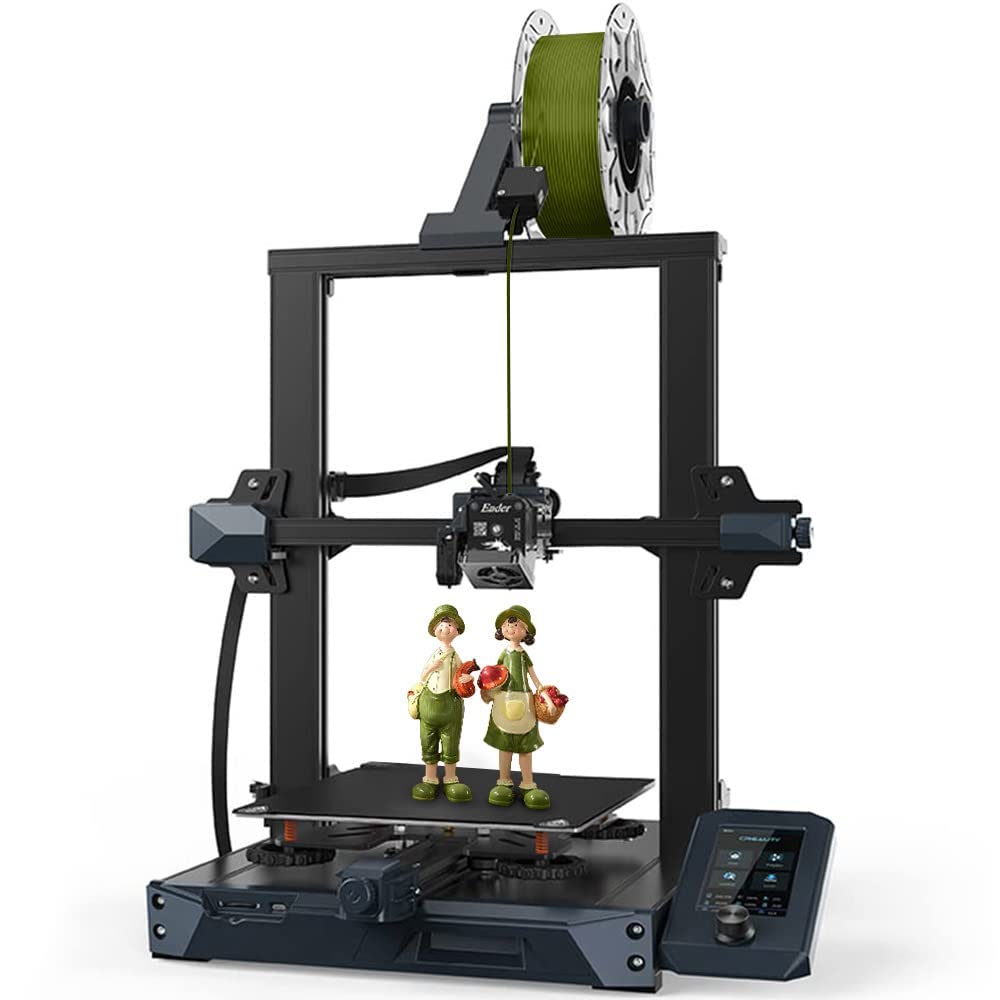
Official Creality Ender 3 S1 3D Printer with Direct Drive Extruder CR Touch Auto Leveling High Precision Double Z-axis Screw Silent Board Printing Size 8.6X8.6X10.6in, Upgrade Ender 3 V2 for Beginners
AED1,28169
Quantity:
Order today to get by 7-14 business days
This item qualifies for free delivery
Imported From: United States
At BOLO, we work hard to ensure the products you receive are new, genuine, and sourced from reputable suppliers.
BOLO is not an authorized or official retailer for most brands, nor are we affiliated with manufacturers unless specifically stated on a product page. Instead, we source verified sellers, authorized distributors or directly from the manufacturer.
Each product undergoes thorough inspection and verification at our consolidation and fulfilment centers to ensure it meets our strict authenticity and quality standards before being shipped and delivered to you.
If you ever have concerns regarding the authenticity of a product purchased from us, please contact Bolo Support. We will review your inquiry promptly and, if necessary, provide documentation verifying authenticity or offer a suitable resolution.
Your trust is our top priority, and we are committed to maintaining transparency and integrity in every transaction.
All product information, images, descriptions, and reviews originate from the manufacturer or from trusted sellers overseas. BOLO is not affiliated with, endorsed by, or an authorized retailer for most brands listed on our website unless stated otherwise.
While we strive to display accurate information, variations in packaging, labeling, instructions, or formulation may occasionally occur due to regional differences or supplier updates. For detailed or manufacturer-specific information, please contact the brand directly or reach out to BOLO Support for assistance.
Unless otherwise stated, all prices displayed on the product page include applicable taxes and import duties.
BOLO operates in accordance with the laws and regulations of United Arab Emirates. Any items found to be restricted or prohibited for sale within the UAE will be cancelled prior to shipment. We take proactive measures to ensure that only products permitted for sale in United Arab Emirates are listed on our website.
All items are shipped by air, and any products classified as “Dangerous Goods (DG)” under IATA regulations will be removed from the order and cancelled.
All orders are processed manually, and we make every effort to process them promptly once confirmed. Products cancelled due to the above reasons will be permanently removed from listings across the website.
More from this brand
Similar items from “3D Printers”
Share with
Or share with link
https://www.bolo.ae/products/UO07QLY9O2F
Visit the Comgrow Store
Official Creality Ender 3 S1 3D Printer with Direct Drive Extruder CR Touch Auto Leveling High Precision Double Z-axis Screw Silent Board Printing Size 8.6X8.6X10.6in, Upgrade Ender 3 V2 for Beginners

AED1,28169
Quantity:
Order today to get by 7-14 business days
This item qualifies for free delivery
Imported From: United States
At BOLO, we work hard to ensure the products you receive are new, genuine, and sourced from reputable suppliers.
BOLO is not an authorized or official retailer for most brands, nor are we affiliated with manufacturers unless specifically stated on a product page. Instead, we source verified sellers, authorized distributors or directly from the manufacturer.
Each product undergoes thorough inspection and verification at our consolidation and fulfilment centers to ensure it meets our strict authenticity and quality standards before being shipped and delivered to you.
If you ever have concerns regarding the authenticity of a product purchased from us, please contact Bolo Support. We will review your inquiry promptly and, if necessary, provide documentation verifying authenticity or offer a suitable resolution.
Your trust is our top priority, and we are committed to maintaining transparency and integrity in every transaction.
All product information, images, descriptions, and reviews originate from the manufacturer or from trusted sellers overseas. BOLO is not affiliated with, endorsed by, or an authorized retailer for most brands listed on our website unless stated otherwise.
While we strive to display accurate information, variations in packaging, labeling, instructions, or formulation may occasionally occur due to regional differences or supplier updates. For detailed or manufacturer-specific information, please contact the brand directly or reach out to BOLO Support for assistance.
Unless otherwise stated, all prices displayed on the product page include applicable taxes and import duties.
BOLO operates in accordance with the laws and regulations of United Arab Emirates. Any items found to be restricted or prohibited for sale within the UAE will be cancelled prior to shipment. We take proactive measures to ensure that only products permitted for sale in United Arab Emirates are listed on our website.
All items are shipped by air, and any products classified as “Dangerous Goods (DG)” under IATA regulations will be removed from the order and cancelled.
All orders are processed manually, and we make every effort to process them promptly once confirmed. Products cancelled due to the above reasons will be permanently removed from listings across the website.
Description:
Reviews:
5.0 out of 5 stars AMAZING 3D printer for CRAZY cheap - see review for details regarding set-up
This is my first 3D printer and let met tell you, I am absolutely blown away. I got great results on my first test print. Since then I've printed several things and needed to make minor adjustments but this product allows for easy adjustment and fine-tuning.The packaging is great (tools and extra parts provided), but on to the elephant in the room: assembly and initial calibration/parameter setting. It took me approximately 4 to 4.5 hours from opening the box to my first successful print. Here is what I can tell you about that process:1) TAKE YOUR TIME - The more careful and meticulous you are in this process, the better things go later. I think the reason I had such great success on my first attempt using the printer was due to me taking so long during the set up. I had some moments of frustration, but it really isn't that bad. This is a ~$200 3d printer with the quality and build size of printers that cost 2-3x+. The long initial setup and calibration is well worth it.2) Use multiple sources during set-up - I used the 1 page instructions included, the instruction booklet which can be downloaded here (https://www.creality3d.cn/download/product-file_c0002), and, MOST IMPORTANTLY, this awesome guy's youtube video for the assembly (https://youtu.be/me8Qrwh907Q) and bed leveling (https://youtu.be/5eqTmb01cBk). A little over halfway through the assembly process I gave up on the manual and just carefully watched and re-watched the youtube video steps, cross-referencing with the manual once major steps were completed. LISTEN to this guy when he tells you to take your time! Examples include: ensuring the two main z-direction aluminum posts are equidistant at the top and bottom (bolt tightening trick), tuning the eccentric nuts on the 3-wheel rail sliding assemblies, bed leveling, and more. These small tuning steps during the assembly fix most all problems people have.3) RELAX and realize this isn't an out-of-the-box ready to go 3d printer. It, like all 3d printers, need some tuning and a bit of experimentation/experience to achieve the printer's full potential. For example, the included test print was a smashing success, but my next, custom print didn't turn out as well. It didn't adhere to the bed after several layers and also was a tiny bit stringy in sections. I fixed the adhesion by telling it to print the object with a brim (layer under the object) and also turning on "Z hop when retracted" in case the nozzle was bumping something while it was moving between print areas (this option is in Cura, the slicing software - more about that below). I fixed the stringiness by turning down the nozzle temp about 8-10 degrees.4) If you're having an issue, it's likely that 10 other people have asked about it online. Do some google-fu. This may be the most important part of successful 3d printing. There are SO many great sources and communities out there to help fix issues and speed up your progress.What software does this thing use!? Ok, well I didn't know jack crap about any of this a week ago, but here is what I've learned since. This printer uses g-code files when printing. G-code is a file that tells it where to go (x,y,z), what layer height to use, what printing speed to use, etc. G-code is generated by slicing software from a 3d model (usually a STL file). You can download Ultimaker Cura for FREE here (https://ultimaker.com/en/products/ultimaker-cura-software). In Cura, you can change all the parameters for your 3d printer easily (layer height, wall thickness, infill density, nozzle temperature, build plate temperature, support and adhesion structures, etc). Cura now has the Ender 3 as a printer option.The easiest way to get to 3d printing some cool stuff is to go over to a free 3d model website such as thingiverse (https://www.thingiverse.com/). Download the files for whatever you want to print. Open Cura. Drag and drop the stl file(s) of the object(s) you want to print into Cura. Adjust the aforementioned settings (layer height, speed, etc). Click the "slice" button at the bottom right. At this point I like to hit the "preview" button and drag the slider on the right up and down to look at how the printer will print the object. Once you're satisfied, select "save to file", save it on the micro-sd card, put the card in the printer, and you're ready to go.If you want to customize objects (outside of simple scaling and such) or make your own from scratch, god speed to you. It's a helluva learning curve, but that's what I'm working on now. I've heard Blender is a pretty good, free 3d modeling software (https://www.blender.org/). Most any 3d modeling software allows exporting to a .stl fileOverall, I have to say that my expectations for this product were greatly exceeded. If you have a bit of patience and a willingness or ability to use google-fu to figure some things out, this 3d printer is amazing in both build quality and ease of use (once it's set up). If you don't, well I guess you'll need to shell out 5x+ the price
5.0 out of 5 stars Fast, cheap and very capable. Recommended for beginners. 1+ year ownership review
Let me preface by saying this: There are two camps in the 3D printer world. The printers that are just plug and play, and work out of the box; and the printers that will require some tinkering and will teach you how to tune 3D printers. This particular printer falls squarely in the second camp.For the price, I think this is the perfect beginner printer for the tinkerer, especially because the manufacturer supports open sourceThis works great out of the box with the introductory filament, PLA. It's extremely fast when printing it, and it has the ability to print some of the slightly more demanding filaments like PETG and TPU when it has been properly set up. It also has the capability of printing more demanding filaments like ABS and even Nylon, but you'll need accessories to be successful with it.Other than mistakes on my behalf, this printer really has been trouble free and more than paid for itself in the tools that I've been able to design and print.The only real negative I have that can be attributed to low price or lack of quality is that my print bed is not actually adjustable. It says that it has auto-leveling, but that means that it uses software compensation for any lack of flatness of the printing bed. There is a difference between level and flat. The bed on my printer is level, but it's not flat, there is some cupping in it. There is also no physical adjustment knob of any kind, if you want to get the bed level, you may need to print spacers to improve itIf you want multi-color printers, you should look elsewhere.I have only ever had one clog, parts for the machine are cheap and I will continue using this even though I've now bought a much more capable printer.I would still buy this again as a starter printer. No regrets here.
1.0 out of 5 stars DO NOT BUY - Major Problems - Horrible Costomer Service
I do not recommend this product. This printer does not disclose all the short comings of this printer. The max print bed temperature is 100 degs. The print bed edges do not reach 100 degs thus allowing warpage. We had a constant problem with Creality Slicer & they said to use Creality Print Slicer and we are still having problems. We changed print bed plates to try to cure the printed filament from letting go from the print bed. We have contacted Creality many many times seeking answers. We were told to try purple glue to stop the warping and the adhesion problem. For ABS they told me the print head temperature should be 200 - 240 and the bed temperature should be 100 - 120. Only the bed temperature will only go to 100. And for the bed heating problem, I just receive an e-mail telling me they do not plan to make any software upgrades and that If I need a higher bed temperature then I should buy another one of their printers.UPDATE:Using Creality Print Slicer, after slicing a drawing, the computer still crashes about 40% of the time when trying to print and i have to retry untill it prints. I have even resliced the drawing to try to get it to work. I have been in constant contact with Creality Hong Kong and they give answers that don't work most of the time. I'm still waiting on some answers. I don't think they care to try & correct the problems. It won't hold the print head temperature. It has to be set every time.
Schneller, im Grunde sehr einfach zu bedienender 3D-Drucker zu einem vernünftigen Preis.
Einer meiner besten Drucker im Repertoire. Dazu noch zu einem erschwinglichen Preis.Zusammengebaut ist das Gerät in wenigen Minuten, Die Verkabelung könnte ein wenig besser beschriftet sein. Aber ein Blick in den Quickstart hat auch hier schnell geholfen.Die Druckgeschwindigkeit und die Genauigkeit sind im oberen Bereich anzusiedeln. Die Handhabung ist durch die Autonivellierung sehr einfach, aber erst nach einem sehr komplizierten, zum Glück einmaligen händischen Einstellung. Glücklicherweise gibt es im Netz dazu gute Anleitungen (Videos) zu finden.Die Druckbetthaftung ist sehr gut (PLA, ABS), bei PLA manchmal schon zu gut, es fällt mitunter schwer, das Bauteil zu lösen. Das Metallbett ist sehr stabil, und lässt sich sehr gleichmäßig beheizen.Das Modell ist im Vergleich zu meinen anderen Druckern sehr leise. Die Software einfach zu bedienen und fast schon selbsterklärend.Ein Gerät für den Einsteiger? Für den technisch versierten Anwender mit Sicherheit. Hat man zwei linke Hände, mit ein wenig Unterstützung sollte auch hier der Einstieg gelingen.Alles in allem ein wertiger, empfehlenswerter 3D-Drucker
parfait
Excellente imprimante,montage très facile, fonctionne parfaitement des la mise sous tension avec les réglages d'origine,silencieuse, qualité d'impression au rendez-vous.
Excellente imprimante 3D pour démarer
J'ai démarré l'impression 3D avec cette imprimante et je ne regrette pas !Colis livré rapidement, très bien emballé. Guide d'installation sommaire, mais c'est facile à monter, même si j'ai clairement mis plus de 20mn. Les tutos sont bien faits sur @.Utilisation des filaments PLA et PETG sans aucun problème (Creality et Sunlu).Le logiciel "slicer" Creality est bien fait, et configure automatiquement les bons paramètres d'impression, qui n'ont jamais fait défaut. Pour démarrer, le logiciel de modélisation 3D "basique" Tinkercad va très bien, mais il montre vite ses limites. Pour les courageux, il faudra passer sur Blender (gratuit), mais là aussi il y a beaucoup de autos pour apprendre.Le plateau de la S1 est vraiment bien. Mis à part un manque d'adhérence à la 1ère impression, je n'ai pas eu de problème depuis. L'erreur était liée à la hauteur du plateau, réglée trop proche de la buse. Une fois ce réglage bien fait, plus d'erreur par la suite.Je suis étonné par la qualité d'impression, en paramètrant la meilleure définition. Pour les objets courants, même la qualité d'impression moyenne est excellente.Je n'ai pas eu l'occasion de tester le support.Dommage qu'il n'y ait pas le câble USB adéquat dans le colis pour raccorder l'imprimante au PC. Hormis ce détail, cette imprimante est vraiment géniale.
Montaje sencillo y empezar a imprimir.
Antes de nada, la caja vino con varios celos en las tapas como de haber sido abierta y vuelta a cerrar, me he mosqueado, pero una vez revisado y montado, todo correcto.Soy nuevo en elMundo de la impresión 3D y aunque siempre he sabido que tendría una, esperaba a que estuvieran más desarrolladas y económicas.Realmente ha sido montar (siguiendo los consejos de un youtuber) y empezar a imprimir. Eso si, he tenido que quitar el cristal, ya que al menos de momento era incapaz de que se pegara el PLA al mismo... con la base magnética de lujo. Otro detalle es que si viene revirada la base y no apoya bien, hay que aflojar (no quitar) los tornillos de la H, y volver a apretar una ver apoyen los cuatro tacos de goma por igual en la mesa.Pensé que de serie no sería capaz de imprimir con filamento TPU, pero ya he hecho un par de piezas con éxito, sin problema.Manejo sencillo, ajuste sencillo (un pelin más de tiempo para la mesa) e impresiones bastante buenas, siempre bajo el punto de vista de un profano, algo que a priori también es bueno saber para todo aquel que se meta en este lío sabiendo previamente lo mismo que yo, es decir, nada.
First 3D printer
Easy to setup, instructions a little poor, but plenty on you tube to guide you. First print worked like a dream. The supplied filament worked better than a non Creality brand I bought, so would recommend buying theirs. Biggest learning was understanding how to level the bed, navigate the controls, and slice models. I am hooked ! Recommend as a first printer, but then I have no experience to compare other printers ;-)
More from this brand
Similar items from “3D Printers”
Share with
Or share with link
https://www.bolo.ae/products/UO07QLY9O2F