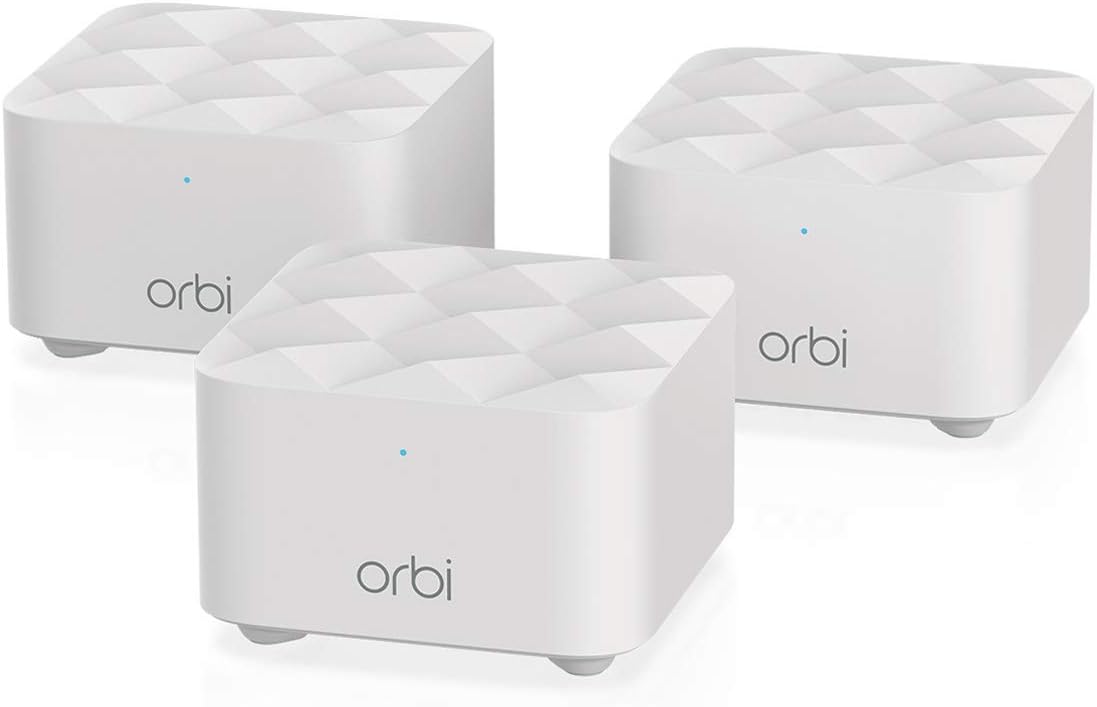
Description:
Orbi whole home Mesh Wi-Fi System delivers up to 1.2Gbps high-performance Wi-Fi with up to 4, 500 square feet of coverage. Expand your home's Wi-Fi coverage to eliminate Wi-Fi dead zones and buffering. Keep a single Wi-Fi name for uninterrupted connections as you move from room-to-room. Orbi is ready right out of the box and works with your service provider, use the Orbi app to get online in minutes. Create a guest network, access parental controls, and run Speed tests right from the app. Use voice commands to control your home network with Amazon Lexa and the Google Assistant.
Reviews:
5.0 out of 5 stars Easy to install, works super well
(function() { P.when('cr-A', 'ready').execute(function(A) { if(typeof A.toggleExpanderAriaLabel === 'function') { A.toggleExpanderAriaLabel('review_text_read_more', 'Read more of this review', 'Read less of this review'); } }); })(); .review-text-read-more-expander:focus-visible { outline: 2px solid #2162a1; outline-offset: 2px; border-radius: 5px; } I had seen reviews saying the install was difficult or that you were forced to subscribe to some dumb security service or something. Luckily none of that was true.Installation was a breeze, took me about 20 min to get all three units going. And most of that time is just waiting for the devices to initialize and connect to each other.Installation was as follows:1. Open box, see two satellite units, 1 router unit. (they are labeled as such with a temporary wrapper, but also are permanently labeled on the bottom).2. Plug ethernet cord from my current (internet provider provided) router/modem combo into the new router unit. Then plug it in for electricity.3. Wait for the light on the front to cycle through flashing and turn solid blue.4. Plug in the two satellite units (to electricity) and let them do their thing until their lights are solid blue (I did this with them all just sitting next to each other in the same room).5. On my phone, connect to the wifi network they are broadcasting (the network ssid and password at written on the bottom of the router unit).6. Open browser on phone and go to the address listed on the installation card that came in the box.7. The website suggests that I download and install their phone app, I declined to do so. Maybe that is where they try to sell you on some security package?8. Follow the steps on the page to set up the devices (setting your admin password etc).9. Then actually log into the router (in your browser, on your phone, same address as before... use the password you just set.)10. To make things easy I chose to name my network the exact name of my old network. So first I also logged into my old router and switched off both wifi networks it was broadcasting (2.4 and 5 ghz). And then on the new router I set up the wifi network with the same name and password. Note: If you name the new wifi network something new, or give it a different password, then of course you're going to have to update every device in your house that you want to connect to it to provide it with the new name and password.11. I had to wait a couple of minutes for all devices in my house to come on line (like 50 things), but they all connected just fine.12. Now everywhere in my house I have full strength wifi signal.
5.0 out of 5 stars It works and priced right.
I bought the Orbi mesh WiFi device to use it overseas in Ethiopia. The product description indicates the device adaptor can use 100 to 240VAC source; however, this wrong. The power supply adptor I received clearly shows that it can only take 110VAC and the adaptor output is 12VDC and 0.5 amp. I had to find 220VAC to 12VDC adptors to use with the Orbi router and the two satellite Orobi devices.Because of complaints by other reviewers, I did not want to use the Netgear app for configuring the Orbi device; therefore I did not install the Netgear app on my phone. I did not want to download and install the Netgear security software, either.Existing router is a D-Link device which combines DSL modem, WiFi, router, and switch. The problem was that the D-Link WiFi signal is very weak and I wanted a second second WiFi network. That is where they Orbi mesh WiFi device comes in. Keep in mind the Orbi router itself combines functionalities of router, WiFi, and a switch. I connected the Ethernet cable (came with Orbi package) to the D-Link Ethernet port and on Orbi router, to the Ethernet port labeled as "Internet".Powered the Orbi router.After few seconds, on my Android phone, I was able to see the WiFi named ORBI26. I connected my Android phone to the ORBI26 WiFi using a password shown on the label affixed to the side of the Orbi router. In my case, the password was "classycurtain078".Next, I opened the Chrome web browser on my phone and entered www.orbilogin.net. This took me to the Orbi configuration page. First, I tried to configure using the setup wizard, but it failed reporting that there is no Internet connection. Then, I selected manual setup and setup a new username and password for the Orbi configuration page. Note that this is separate from the WiFi ID and password. In the WiFi configuration tab, Next, I changed the WiFi ID and password.
Most likely will NEVER buy another Netgear product
(function() { P.when('cr-A', 'ready').execute(function(A) { if(typeof A.toggleExpanderAriaLabel === 'function') { A.toggleExpanderAriaLabel('review_text_read_more', 'Read more of this review', 'Read less of this review'); } }); })(); .review-text-read-more-expander:focus-visible { outline: 2px solid #2162a1; outline-offset: 2px; border-radius: 5px; } The product started out good for the first year or so.. but after the warranty period ended nothing but trouble.the product keeps asking to reset the password to remote in to see wifi status via the appconstantly dropping.. I had to create a backup SSID on my main router due to this dropping issue (what's the point of doing this when you have a Mesh!!!! :( )overall experience is not good...Going to try one of these others - Dlink, TP-Link or Linksys...buyer beware......
K. S. A
المنتج مقبول. يفصل بشكل دائم للنقاط البعيدة.
Visit the NETGEAR Store
NETGEAR Orbi Whole Home Mesh WiFi System (RBK13) – Router Replacement Covers up to 4,500 sq. ft. with 1 Router & 2 Satellites
AED91201
Quantity:
Order today to get by 7-14 business days
This item qualifies for free delivery
Imported From: United States
At BOLO, we work hard to ensure the products you receive are new, genuine, and sourced from reputable suppliers.
BOLO is not an authorized or official retailer for most brands, nor are we affiliated with manufacturers unless specifically stated on a product page. Instead, we source verified sellers, authorized distributors or directly from the manufacturer.
Each product undergoes thorough inspection and verification at our consolidation and fulfilment centers to ensure it meets our strict authenticity and quality standards before being shipped and delivered to you.
If you ever have concerns regarding the authenticity of a product purchased from us, please contact Bolo Support. We will review your inquiry promptly and, if necessary, provide documentation verifying authenticity or offer a suitable resolution.
Your trust is our top priority, and we are committed to maintaining transparency and integrity in every transaction.
All product information, images, descriptions, and reviews originate from the manufacturer or from trusted sellers overseas. BOLO is not affiliated with, endorsed by, or an authorized retailer for most brands listed on our website unless stated otherwise.
While we strive to display accurate information, variations in packaging, labeling, instructions, or formulation may occasionally occur due to regional differences or supplier updates. For detailed or manufacturer-specific information, please contact the brand directly or reach out to BOLO Support for assistance.
Unless otherwise stated, all prices displayed on the product page include applicable taxes and import duties.
BOLO operates in accordance with the laws and regulations of United Arab Emirates. Any items found to be restricted or prohibited for sale within the UAE will be cancelled prior to shipment. We take proactive measures to ensure that only products permitted for sale in United Arab Emirates are listed on our website.
All items are shipped by air, and any products classified as “Dangerous Goods (DG)” under IATA regulations will be removed from the order and cancelled.
All orders are processed manually, and we make every effort to process them promptly once confirmed. Products cancelled due to the above reasons will be permanently removed from listings across the website.
Similar suggestions by Bolo
More from this brand
Similar items from “Whole Home & Mesh Wi-Fi Systems”
Share with
Or share with link
https://www.bolo.ae/products/UO07JGKT3KJ
Visit the NETGEAR Store
NETGEAR Orbi Whole Home Mesh WiFi System (RBK13) – Router Replacement Covers up to 4,500 sq. ft. with 1 Router & 2 Satellites

AED91201
Quantity:
Order today to get by 7-14 business days
This item qualifies for free delivery
Imported From: United States
At BOLO, we work hard to ensure the products you receive are new, genuine, and sourced from reputable suppliers.
BOLO is not an authorized or official retailer for most brands, nor are we affiliated with manufacturers unless specifically stated on a product page. Instead, we source verified sellers, authorized distributors or directly from the manufacturer.
Each product undergoes thorough inspection and verification at our consolidation and fulfilment centers to ensure it meets our strict authenticity and quality standards before being shipped and delivered to you.
If you ever have concerns regarding the authenticity of a product purchased from us, please contact Bolo Support. We will review your inquiry promptly and, if necessary, provide documentation verifying authenticity or offer a suitable resolution.
Your trust is our top priority, and we are committed to maintaining transparency and integrity in every transaction.
All product information, images, descriptions, and reviews originate from the manufacturer or from trusted sellers overseas. BOLO is not affiliated with, endorsed by, or an authorized retailer for most brands listed on our website unless stated otherwise.
While we strive to display accurate information, variations in packaging, labeling, instructions, or formulation may occasionally occur due to regional differences or supplier updates. For detailed or manufacturer-specific information, please contact the brand directly or reach out to BOLO Support for assistance.
Unless otherwise stated, all prices displayed on the product page include applicable taxes and import duties.
BOLO operates in accordance with the laws and regulations of United Arab Emirates. Any items found to be restricted or prohibited for sale within the UAE will be cancelled prior to shipment. We take proactive measures to ensure that only products permitted for sale in United Arab Emirates are listed on our website.
All items are shipped by air, and any products classified as “Dangerous Goods (DG)” under IATA regulations will be removed from the order and cancelled.
All orders are processed manually, and we make every effort to process them promptly once confirmed. Products cancelled due to the above reasons will be permanently removed from listings across the website.
Description:
Orbi whole home Mesh Wi-Fi System delivers up to 1.2Gbps high-performance Wi-Fi with up to 4, 500 square feet of coverage. Expand your home's Wi-Fi coverage to eliminate Wi-Fi dead zones and buffering. Keep a single Wi-Fi name for uninterrupted connections as you move from room-to-room. Orbi is ready right out of the box and works with your service provider, use the Orbi app to get online in minutes. Create a guest network, access parental controls, and run Speed tests right from the app. Use voice commands to control your home network with Amazon Lexa and the Google Assistant.
Reviews:
5.0 out of 5 stars Easy to install, works super well
(function() { P.when('cr-A', 'ready').execute(function(A) { if(typeof A.toggleExpanderAriaLabel === 'function') { A.toggleExpanderAriaLabel('review_text_read_more', 'Read more of this review', 'Read less of this review'); } }); })(); .review-text-read-more-expander:focus-visible { outline: 2px solid #2162a1; outline-offset: 2px; border-radius: 5px; } I had seen reviews saying the install was difficult or that you were forced to subscribe to some dumb security service or something. Luckily none of that was true.Installation was a breeze, took me about 20 min to get all three units going. And most of that time is just waiting for the devices to initialize and connect to each other.Installation was as follows:1. Open box, see two satellite units, 1 router unit. (they are labeled as such with a temporary wrapper, but also are permanently labeled on the bottom).2. Plug ethernet cord from my current (internet provider provided) router/modem combo into the new router unit. Then plug it in for electricity.3. Wait for the light on the front to cycle through flashing and turn solid blue.4. Plug in the two satellite units (to electricity) and let them do their thing until their lights are solid blue (I did this with them all just sitting next to each other in the same room).5. On my phone, connect to the wifi network they are broadcasting (the network ssid and password at written on the bottom of the router unit).6. Open browser on phone and go to the address listed on the installation card that came in the box.7. The website suggests that I download and install their phone app, I declined to do so. Maybe that is where they try to sell you on some security package?8. Follow the steps on the page to set up the devices (setting your admin password etc).9. Then actually log into the router (in your browser, on your phone, same address as before... use the password you just set.)10. To make things easy I chose to name my network the exact name of my old network. So first I also logged into my old router and switched off both wifi networks it was broadcasting (2.4 and 5 ghz). And then on the new router I set up the wifi network with the same name and password. Note: If you name the new wifi network something new, or give it a different password, then of course you're going to have to update every device in your house that you want to connect to it to provide it with the new name and password.11. I had to wait a couple of minutes for all devices in my house to come on line (like 50 things), but they all connected just fine.12. Now everywhere in my house I have full strength wifi signal.
5.0 out of 5 stars It works and priced right.
I bought the Orbi mesh WiFi device to use it overseas in Ethiopia. The product description indicates the device adaptor can use 100 to 240VAC source; however, this wrong. The power supply adptor I received clearly shows that it can only take 110VAC and the adaptor output is 12VDC and 0.5 amp. I had to find 220VAC to 12VDC adptors to use with the Orbi router and the two satellite Orobi devices.Because of complaints by other reviewers, I did not want to use the Netgear app for configuring the Orbi device; therefore I did not install the Netgear app on my phone. I did not want to download and install the Netgear security software, either.Existing router is a D-Link device which combines DSL modem, WiFi, router, and switch. The problem was that the D-Link WiFi signal is very weak and I wanted a second second WiFi network. That is where they Orbi mesh WiFi device comes in. Keep in mind the Orbi router itself combines functionalities of router, WiFi, and a switch. I connected the Ethernet cable (came with Orbi package) to the D-Link Ethernet port and on Orbi router, to the Ethernet port labeled as "Internet".Powered the Orbi router.After few seconds, on my Android phone, I was able to see the WiFi named ORBI26. I connected my Android phone to the ORBI26 WiFi using a password shown on the label affixed to the side of the Orbi router. In my case, the password was "classycurtain078".Next, I opened the Chrome web browser on my phone and entered www.orbilogin.net. This took me to the Orbi configuration page. First, I tried to configure using the setup wizard, but it failed reporting that there is no Internet connection. Then, I selected manual setup and setup a new username and password for the Orbi configuration page. Note that this is separate from the WiFi ID and password. In the WiFi configuration tab, Next, I changed the WiFi ID and password.
Most likely will NEVER buy another Netgear product
(function() { P.when('cr-A', 'ready').execute(function(A) { if(typeof A.toggleExpanderAriaLabel === 'function') { A.toggleExpanderAriaLabel('review_text_read_more', 'Read more of this review', 'Read less of this review'); } }); })(); .review-text-read-more-expander:focus-visible { outline: 2px solid #2162a1; outline-offset: 2px; border-radius: 5px; } The product started out good for the first year or so.. but after the warranty period ended nothing but trouble.the product keeps asking to reset the password to remote in to see wifi status via the appconstantly dropping.. I had to create a backup SSID on my main router due to this dropping issue (what's the point of doing this when you have a Mesh!!!! :( )overall experience is not good...Going to try one of these others - Dlink, TP-Link or Linksys...buyer beware......
K. S. A
المنتج مقبول. يفصل بشكل دائم للنقاط البعيدة.
Similar suggestions by Bolo
More from this brand
Similar items from “Whole Home & Mesh Wi-Fi Systems”
Share with
Or share with link
https://www.bolo.ae/products/UO07JGKT3KJ