Description:
Overview
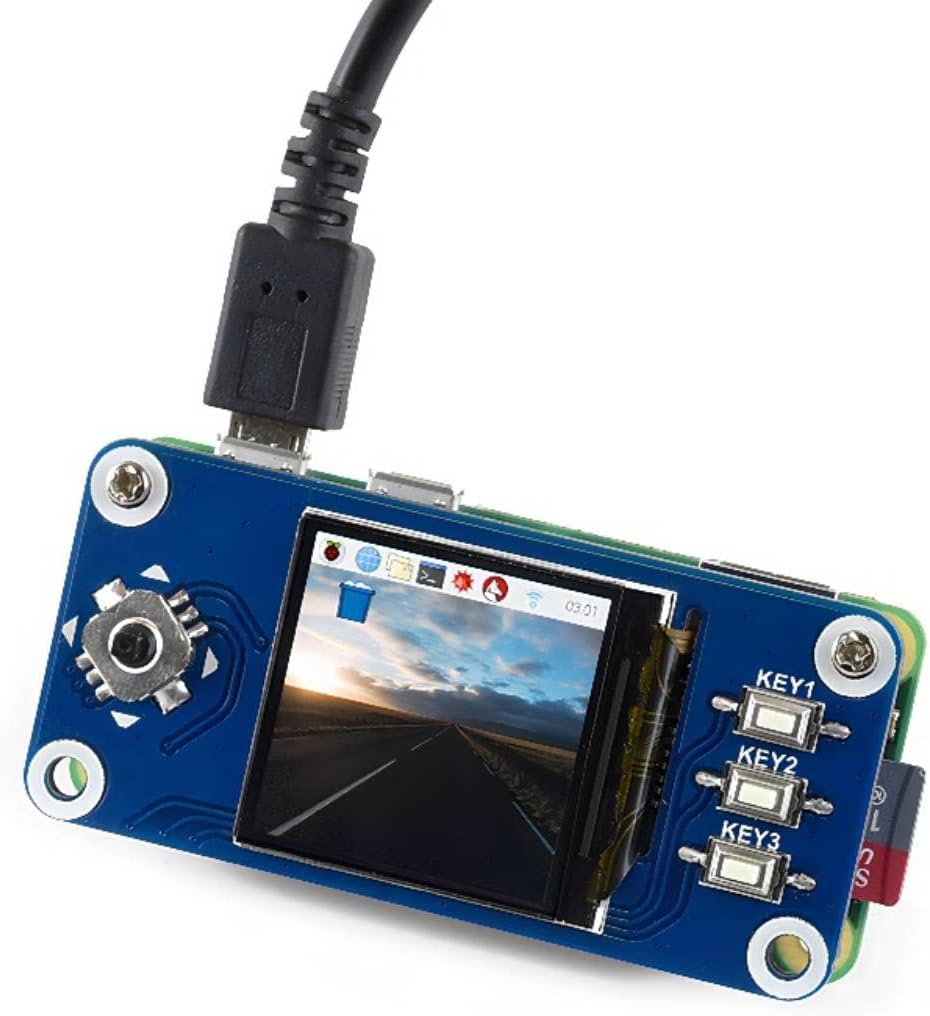
This is an IPS LCD display HAT for Raspberry Pi, 1.3inch diagonal, 240x240 pixels, with embedded controller, communicating via SPI interface. Trying to add a control interface for your Pi? This compact display would be the ideal choice.
Features
Standard Raspberry Pi 40PIN GPIO extension header, supports Raspberry Pi series boards
IPS screen, wide viewing angle, better display
High definition in small size
1x joystick, 3x pushbuttons, handy and useful
Comes with development resources and manual (examples for Raspberry Pi)
Specifications
Operating voltage: 3.3V
Interface: SPI
LCD type: IPS
Controller: ST7789VM
Resolution: 240(H)RGB x 240(V)
Display size: 23.4(H)x 23.4(V)mm
Pixel size: 0.0975(H)x 0.0975(V)mm
Dimension: 65 x 30.2(mm)
User Manual/How to use: //bit.ly/3gcUJWw
LCD and the controller
The ST7789VW is a single-chip controller/driver for 262K-color, graphic type TFT-LCD. It consists of 240 source line and 320 gate line driving circuits. The resolution of this LCD is 240 (H) RGB x 240(V), it supports horizontal mode and vertical mode, and it doesn't use all the RAM of the controller. This LCD accepts 8-bits/9-bits/16-bits/18-bits parallel interface, that are RGB444, RGB565, RGB666. The color format used in demo codes is RGB565. This LCD use a 4-line SPI interface for reducing GPIO and fast speed.LCD.
Package Content
1.3inch LCD HAT x1
RPi screws pack (2pcs) x1
Reviews:
5.0 out of 5 stars Works well
The media could not be loaded. I managed to get this to work with my XIAO ESP32S3 Sense board, which I was super happy about. So far I’ve only managed to draw shapes and print text on the screen but it’s very bright and the colors are crisp for such a cheap display. I’m not a fan of the cable that comes with it. It’s hard to push into the connector on the board and the DuPont connectors on the other end are female. It would have been nice for the DuPont connectors to be male so I can plug them into a breadboard. Alternatively, it would have been nice to include some header pins which I could solder. It’s only a minor inconvenience for a product which pretty much delivers in all other aspects.
5.0 out of 5 stars Great little display
These are pretty fantastic little displays. Bright, work as expected, and high quality overall. Really happy with Waveshare in general, cheers
4.0 out of 5 stars Don't buy this if you want "live view" support on a current raspbian version
It seems like they opted to not support the software for this anymore. It takes quite a bit of figuring to get even their test/demo code running, and in the documentation there's a lot of "doesn't work with 64 bit os" or "doesn't work with bookworm" which is the latest raspbian version. From what I understand it barely worked in the previous version and that's only because raspbian hadn't depricated the drivers this works with to make the "live view" work.That being said, it still can be used for my purpose which is to be a small desktop status display. it'll just require me to write more python code. The display will largely be static but updated through any code that I will have to write.TL:DR: This doesn't seem to be supported as well as it should be so avoid this unless you have hours to burn writing code.
5.0 out of 5 stars Lamar
Works great
1.0 out of 5 stars Waveshare might be selling you a paper weight, be careful.
I just wanted to share my experience with this item. I truly wanted to add this Waveshare 2inch LCD Display to my Raspberry Pi Zero 2 W. After, following the pin out diagram provided by Waveshare, I began the code part of the project and that’s where my problems began. First, I am running Raspberry Pi OS Bookworm, I’m using a 64GB micro SD card. And just incase anyone needs to know the Raspberry Pi Zero 2 W only has 512 MB of RAM. Therefore, just trying to load any website using either of the browsers provided on the Pi Zero has a major problem and freezes up. The suggestion to add the Waveshare display to the Pi Zero that Waveshare provides I’m finding are either very outdated, or you must change your Operating System to a Lite version or obtain (Somehow) a non graphical web browser that will be a bit easier for the RPi OS Bookworm to load. Or, I’m reading on multiple different forums that you can do a swap space command in the terminal that will help your current browser load a website. I think that as nice as the Waveshare products seem, and not bad cost’s as far as Bolo pricing is concerned, if you cannot find suitable alternatives for getting the display to work with your device for your project then what good does it do. I just think there’s cheaper alternatives for Paperweights. Just be certain that you know for certain that your system is compatible with the display you are purchasing, or you know all of the programming tasks that will be required for you to add the Waveshare display to your project. It’s one thing to have to go through the back door to make devices compatible with each other, that’s just part of the way things have to be done sometimes. It’s a complete other to have to cut a hole in the roof of the building next door to get in where you need to be.
5.0 out of 5 stars Excellent
Great little screen. Works very easily on my RPi Zero 2 projects.
5.0 out of 5 stars like OLED
In the past, the main drawback of TFT technology has been the low contrast. Using In-Plane-Switching (IPS), the color is induced in the same plane as the backlight (The term would be wrong in this case, as the light plane is no longer behind the color plane), resulting in very high contrast. This display looks like an OLED display, without the drawbacks of color-fading over time, and price. Driver software is widely available - in the picture I'm using the sample from circuitpython for this chip. So far I have only driven the SPI at 24 Mhz, which the driver chip handles without hiccup. With the high contrast, this 2 inch display is as readable as bigger displays. The resolution of 240x320 gives fine detail, but obviously requires longer for screen refresh, so it's a trade off. For me, IPS displays will be the choice if available, and this display does not disappoint. The board allows for through-hole soldering of your own wires, and the supplied connector with breadboard friendly wires makes prototyping a snap, no soldering required. I will probably use this display for my final result, but will take the connector off, as it requires too much space below the display board.I tested several displays of different sizes and technologies. So far this is my favorite. What I haven't done yet is a power consumption comparison. When only few pixels are "active", OLED would usually consume less power, but I will see how it pans out.
Works Great on Pico 2 w
The media could not be loaded.
Good product
Good product. Working excellent.
Easy to set up via SSH but rapidly heats up and pops open. FAULTY.
Purchased as an upgrade from the 0.96 generic oled screen I've been using on a handy diy device I've come to rely on. Pi 4 with 5 inch touchscreen with software for a neurological disorder that impairs movement, pattern recognition being able to predict when myclonic seizures are likely to a high degree of accuracy greatly improved life but a bit bulky. Set up a pi zero W 2/this hat for the same function, within 48 hours the screen became very hot around the three buttons then when I picked it up the screen opened up like a notepad with little slips of paper falling out everywhere. I'll have to get out the helping hands and fluke but I suspect a fault spawning from key 2. The pi zero 2s SD card slot sustained some damage. I've been a Pi uptaker since the 2B, my work station is a souped up Pi 5, my media centre a pi 4B; never had an issue with anything Pi before. Dam.
Nice display
Connected to raspberry pi and used the luma-oled drivers. Good quality image. Easy to use.
Nice for indoor use
Nice little OLED display. Good colour. Drive it with the Adafruit SSD1351 library from your Arduino framework application.Despite claims of being "bright" it is not even close to sunlight readable like an OLED phone display. I will have to keep looking.
Visit the waveshare Store
waveshare 1.3inch LCD Display HAT for Raspberry Pi 4B/3B+/3B/2B/Zero/Zero W/Zero WH, IPS Screen 240x240 Pixels RGB, 65K Display Color with Embedded Controller Communicating via SPI Interface
AED11069


Quantity:
Order today to get by 7-14 business days
Delivery fee of AED 20. Free for orders above AED 200.
Imported From: United States
At BOLO, we work hard to ensure the products you receive are new, genuine, and sourced from reputable suppliers.
BOLO is not an authorized or official retailer for most brands, nor are we affiliated with manufacturers unless specifically stated on a product page. Instead, we source verified sellers, authorized distributors or directly from the manufacturer.
Each product undergoes thorough inspection and verification at our consolidation and fulfilment centers to ensure it meets our strict authenticity and quality standards before being shipped and delivered to you.
If you ever have concerns regarding the authenticity of a product purchased from us, please contact Bolo Support. We will review your inquiry promptly and, if necessary, provide documentation verifying authenticity or offer a suitable resolution.
Your trust is our top priority, and we are committed to maintaining transparency and integrity in every transaction.
All product information, images, descriptions, and reviews originate from the manufacturer or from trusted sellers overseas. BOLO is not affiliated with, endorsed by, or an authorized retailer for most brands listed on our website unless stated otherwise.
While we strive to display accurate information, variations in packaging, labeling, instructions, or formulation may occasionally occur due to regional differences or supplier updates. For detailed or manufacturer-specific information, please contact the brand directly or reach out to BOLO Support for assistance.
Unless otherwise stated, all prices displayed on the product page include applicable taxes and import duties.
BOLO operates in accordance with the laws and regulations of United Arab Emirates. Any items found to be restricted or prohibited for sale within the UAE will be cancelled prior to shipment. We take proactive measures to ensure that only products permitted for sale in United Arab Emirates are listed on our website.
All items are shipped by air, and any products classified as “Dangerous Goods (DG)” under IATA regulations will be removed from the order and cancelled.
All orders are processed manually, and we make every effort to process them promptly once confirmed. Products cancelled due to the above reasons will be permanently removed from listings across the website.
Similar suggestions by Bolo
More from this brand
Similar items from “Single Board Computers”
Share with
Or share with link
https://www.bolo.ae/products/UO07IW8T6FK
Visit the waveshare Store
waveshare 1.3inch LCD Display HAT for Raspberry Pi 4B/3B+/3B/2B/Zero/Zero W/Zero WH, IPS Screen 240x240 Pixels RGB, 65K Display Color with Embedded Controller Communicating via SPI Interface


AED11069
Quantity:
Order today to get by 7-14 business days
Delivery fee of AED 20. Free for orders above AED 200.
Imported From: United States
At BOLO, we work hard to ensure the products you receive are new, genuine, and sourced from reputable suppliers.
BOLO is not an authorized or official retailer for most brands, nor are we affiliated with manufacturers unless specifically stated on a product page. Instead, we source verified sellers, authorized distributors or directly from the manufacturer.
Each product undergoes thorough inspection and verification at our consolidation and fulfilment centers to ensure it meets our strict authenticity and quality standards before being shipped and delivered to you.
If you ever have concerns regarding the authenticity of a product purchased from us, please contact Bolo Support. We will review your inquiry promptly and, if necessary, provide documentation verifying authenticity or offer a suitable resolution.
Your trust is our top priority, and we are committed to maintaining transparency and integrity in every transaction.
All product information, images, descriptions, and reviews originate from the manufacturer or from trusted sellers overseas. BOLO is not affiliated with, endorsed by, or an authorized retailer for most brands listed on our website unless stated otherwise.
While we strive to display accurate information, variations in packaging, labeling, instructions, or formulation may occasionally occur due to regional differences or supplier updates. For detailed or manufacturer-specific information, please contact the brand directly or reach out to BOLO Support for assistance.
Unless otherwise stated, all prices displayed on the product page include applicable taxes and import duties.
BOLO operates in accordance with the laws and regulations of United Arab Emirates. Any items found to be restricted or prohibited for sale within the UAE will be cancelled prior to shipment. We take proactive measures to ensure that only products permitted for sale in United Arab Emirates are listed on our website.
All items are shipped by air, and any products classified as “Dangerous Goods (DG)” under IATA regulations will be removed from the order and cancelled.
All orders are processed manually, and we make every effort to process them promptly once confirmed. Products cancelled due to the above reasons will be permanently removed from listings across the website.
Description:
Overview
This is an IPS LCD display HAT for Raspberry Pi, 1.3inch diagonal, 240x240 pixels, with embedded controller, communicating via SPI interface. Trying to add a control interface for your Pi? This compact display would be the ideal choice.
Features
Standard Raspberry Pi 40PIN GPIO extension header, supports Raspberry Pi series boards
IPS screen, wide viewing angle, better display
High definition in small size
1x joystick, 3x pushbuttons, handy and useful
Comes with development resources and manual (examples for Raspberry Pi)
Specifications
Operating voltage: 3.3V
Interface: SPI
LCD type: IPS
Controller: ST7789VM
Resolution: 240(H)RGB x 240(V)
Display size: 23.4(H)x 23.4(V)mm
Pixel size: 0.0975(H)x 0.0975(V)mm
Dimension: 65 x 30.2(mm)
User Manual/How to use: //bit.ly/3gcUJWw
LCD and the controller
The ST7789VW is a single-chip controller/driver for 262K-color, graphic type TFT-LCD. It consists of 240 source line and 320 gate line driving circuits. The resolution of this LCD is 240 (H) RGB x 240(V), it supports horizontal mode and vertical mode, and it doesn't use all the RAM of the controller. This LCD accepts 8-bits/9-bits/16-bits/18-bits parallel interface, that are RGB444, RGB565, RGB666. The color format used in demo codes is RGB565. This LCD use a 4-line SPI interface for reducing GPIO and fast speed.LCD.
Package Content
1.3inch LCD HAT x1
RPi screws pack (2pcs) x1
Reviews:
5.0 out of 5 stars Works well
The media could not be loaded. I managed to get this to work with my XIAO ESP32S3 Sense board, which I was super happy about. So far I’ve only managed to draw shapes and print text on the screen but it’s very bright and the colors are crisp for such a cheap display. I’m not a fan of the cable that comes with it. It’s hard to push into the connector on the board and the DuPont connectors on the other end are female. It would have been nice for the DuPont connectors to be male so I can plug them into a breadboard. Alternatively, it would have been nice to include some header pins which I could solder. It’s only a minor inconvenience for a product which pretty much delivers in all other aspects.
5.0 out of 5 stars Great little display
These are pretty fantastic little displays. Bright, work as expected, and high quality overall. Really happy with Waveshare in general, cheers
4.0 out of 5 stars Don't buy this if you want "live view" support on a current raspbian version
It seems like they opted to not support the software for this anymore. It takes quite a bit of figuring to get even their test/demo code running, and in the documentation there's a lot of "doesn't work with 64 bit os" or "doesn't work with bookworm" which is the latest raspbian version. From what I understand it barely worked in the previous version and that's only because raspbian hadn't depricated the drivers this works with to make the "live view" work.That being said, it still can be used for my purpose which is to be a small desktop status display. it'll just require me to write more python code. The display will largely be static but updated through any code that I will have to write.TL:DR: This doesn't seem to be supported as well as it should be so avoid this unless you have hours to burn writing code.
5.0 out of 5 stars Lamar
Works great
1.0 out of 5 stars Waveshare might be selling you a paper weight, be careful.
I just wanted to share my experience with this item. I truly wanted to add this Waveshare 2inch LCD Display to my Raspberry Pi Zero 2 W. After, following the pin out diagram provided by Waveshare, I began the code part of the project and that’s where my problems began. First, I am running Raspberry Pi OS Bookworm, I’m using a 64GB micro SD card. And just incase anyone needs to know the Raspberry Pi Zero 2 W only has 512 MB of RAM. Therefore, just trying to load any website using either of the browsers provided on the Pi Zero has a major problem and freezes up. The suggestion to add the Waveshare display to the Pi Zero that Waveshare provides I’m finding are either very outdated, or you must change your Operating System to a Lite version or obtain (Somehow) a non graphical web browser that will be a bit easier for the RPi OS Bookworm to load. Or, I’m reading on multiple different forums that you can do a swap space command in the terminal that will help your current browser load a website. I think that as nice as the Waveshare products seem, and not bad cost’s as far as Bolo pricing is concerned, if you cannot find suitable alternatives for getting the display to work with your device for your project then what good does it do. I just think there’s cheaper alternatives for Paperweights. Just be certain that you know for certain that your system is compatible with the display you are purchasing, or you know all of the programming tasks that will be required for you to add the Waveshare display to your project. It’s one thing to have to go through the back door to make devices compatible with each other, that’s just part of the way things have to be done sometimes. It’s a complete other to have to cut a hole in the roof of the building next door to get in where you need to be.
5.0 out of 5 stars Excellent
Great little screen. Works very easily on my RPi Zero 2 projects.
5.0 out of 5 stars like OLED
In the past, the main drawback of TFT technology has been the low contrast. Using In-Plane-Switching (IPS), the color is induced in the same plane as the backlight (The term would be wrong in this case, as the light plane is no longer behind the color plane), resulting in very high contrast. This display looks like an OLED display, without the drawbacks of color-fading over time, and price. Driver software is widely available - in the picture I'm using the sample from circuitpython for this chip. So far I have only driven the SPI at 24 Mhz, which the driver chip handles without hiccup. With the high contrast, this 2 inch display is as readable as bigger displays. The resolution of 240x320 gives fine detail, but obviously requires longer for screen refresh, so it's a trade off. For me, IPS displays will be the choice if available, and this display does not disappoint. The board allows for through-hole soldering of your own wires, and the supplied connector with breadboard friendly wires makes prototyping a snap, no soldering required. I will probably use this display for my final result, but will take the connector off, as it requires too much space below the display board.I tested several displays of different sizes and technologies. So far this is my favorite. What I haven't done yet is a power consumption comparison. When only few pixels are "active", OLED would usually consume less power, but I will see how it pans out.
Works Great on Pico 2 w
The media could not be loaded.
Good product
Good product. Working excellent.
Easy to set up via SSH but rapidly heats up and pops open. FAULTY.
Purchased as an upgrade from the 0.96 generic oled screen I've been using on a handy diy device I've come to rely on. Pi 4 with 5 inch touchscreen with software for a neurological disorder that impairs movement, pattern recognition being able to predict when myclonic seizures are likely to a high degree of accuracy greatly improved life but a bit bulky. Set up a pi zero W 2/this hat for the same function, within 48 hours the screen became very hot around the three buttons then when I picked it up the screen opened up like a notepad with little slips of paper falling out everywhere. I'll have to get out the helping hands and fluke but I suspect a fault spawning from key 2. The pi zero 2s SD card slot sustained some damage. I've been a Pi uptaker since the 2B, my work station is a souped up Pi 5, my media centre a pi 4B; never had an issue with anything Pi before. Dam.
Nice display
Connected to raspberry pi and used the luma-oled drivers. Good quality image. Easy to use.
Nice for indoor use
Nice little OLED display. Good colour. Drive it with the Adafruit SSD1351 library from your Arduino framework application.Despite claims of being "bright" it is not even close to sunlight readable like an OLED phone display. I will have to keep looking.
Similar suggestions by Bolo
More from this brand
Similar items from “Single Board Computers”
Share with
Or share with link
https://www.bolo.ae/products/UO07IW8T6FK