Description:
What's in the box
Legal Disclaimer
📢How to Update AL519 Language? 1️⃣Download AL519 update pack from Autel AL519 official web: ( https://www.autel.com/c/www/mk1/3241.jhtml ), extract the zip file, you will get .aut and .bin update files. 2️⃣Download the MaxiLinkII on ( https://support.autel.com/support/solutions/folders/8000079030 ) 3️⃣Install MaxiLinkII on windows P-C (not support MAC). 4️⃣⚠️Long press the Left button on AL519 for about 3 seconds, (this step is not a must, do this step, if normal steps shows: Authorization language not matching!) 5️⃣Connect AL519 with P-C via USB cable. 6️⃣Run maxilinkII on P-C, select the update file you just downloaded to update the AL519. (⚠️Can only update language, no function update). 📢Due to the Secure Gateway (SGW) / FCA AutoAuth security system, this tool is unable to clear OBDII module codes for all vehicles which are equipped with a SGW by Auto manufacturers. Functions not universal, if any concerns, con-tact us via: 📞auteldirect @ outlook . com📞.
Details:
| Brand | Autel |
|---|---|
| Power Source | Corded Electric |
| Product Dimensions | 3.8"L x 1.46"W x 6.91"H |
| Screen Size | 19.89 centimeters |
| Language | English |
Visit the Autel Store
Autel AutoLink AL519 Enhanced Universal OBD2 Scanner Car Diagnostic Tool
AED42714


Quantity:
Order today to get by 7-14 business days
This item qualifies for free delivery
 Imported From: United States
At BOLO, we work hard to ensure the products you receive are new, genuine, and sourced from reputable suppliers.
Every product in the BOLO catalogue is sourced through our Verified Global Supply Network of verified sellers, authorized distributors or directly from the manufacturer.
Each product undergoes thorough inspection and verification at our consolidation and fulfilment centers to ensure it meets our strict authenticity and quality standards before being shipped and delivered to you.
If you ever have concerns regarding the authenticity of a product purchased from us, please contact Bolo Support. We will review your inquiry promptly and, if necessary, provide documentation verifying authenticity or offer a suitable resolution.
Your trust is our top priority, and we are committed to maintaining transparency and integrity in every transaction.
While we strive to display accurate information, variations in packaging, labeling, instructions, or formulation may occasionally occur due to regional differences or supplier updates. For detailed or manufacturer-specific information, please contact the brand directly or reach out to BOLO Support for assistance.
Unless otherwise stated, all prices displayed on the product page include applicable taxes and import duties.
BOLO operates in accordance with the laws and regulations of United Arab Emirates. Any items found to be restricted or prohibited for sale within the United Arab Emirates will be cancelled prior to shipment. We take proactive measures to ensure that only products permitted for sale in United Arab Emirates are listed on our website.
All items are shipped by air, and any products classified as “Dangerous Goods (DG)” under IATA regulations will be removed from the order and cancelled.
All orders are processed manually, and we make every effort to process them promptly once confirmed. Products cancelled due to the above reasons will be permanently removed from listings across the website.
Autel Robust AL519 OBD2 Scanner For Workshops And DIYers - For Ready Test(Yearly Smog Check), Component Test, Live Data, Turn Off Check Engine Lights

Why Autel AL519 Is A Must-have OBD2 Scanner for Workshops And Each Car Owner
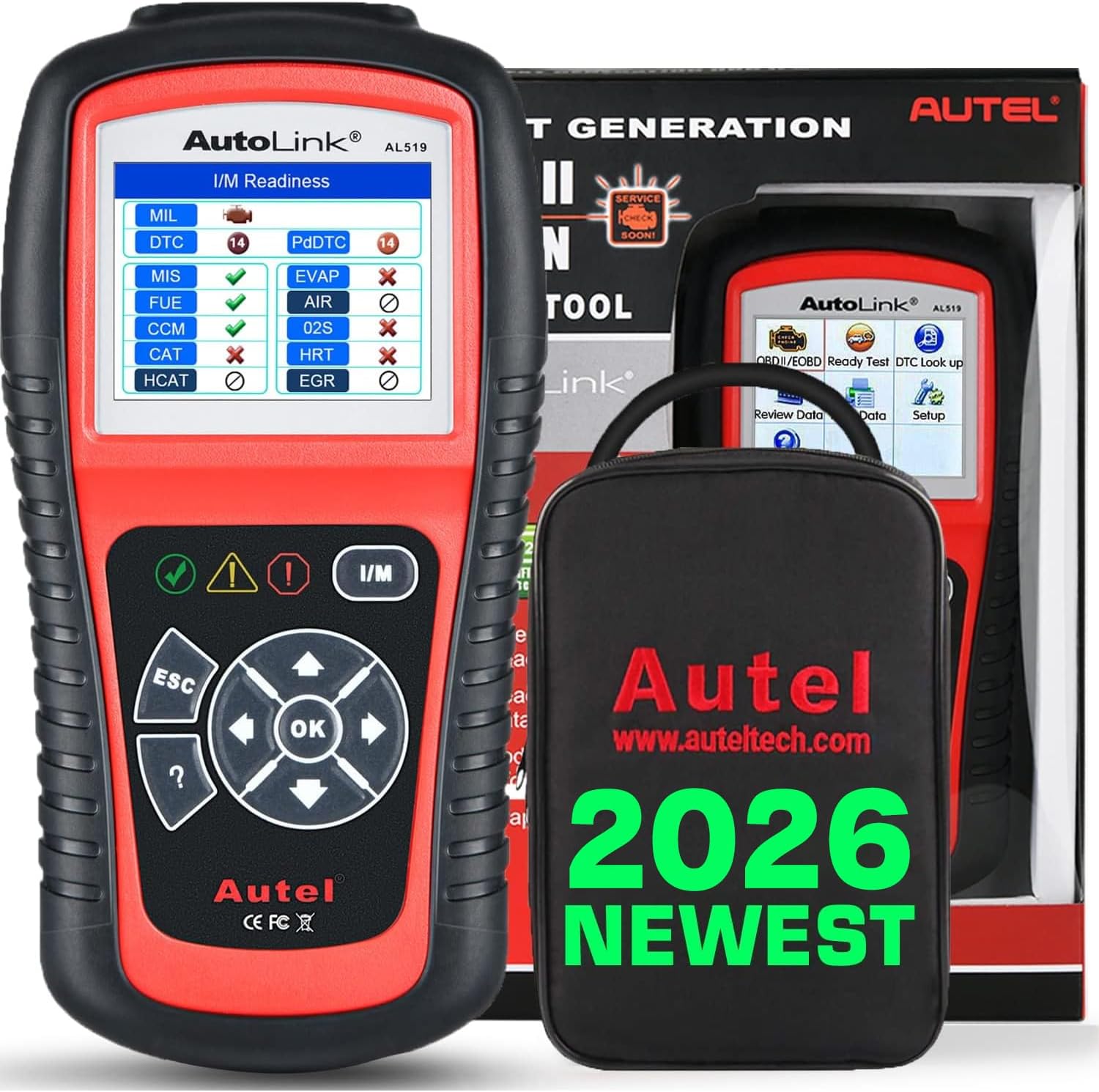
Autel AutoLink AL519 OBDII/EOBD Scanner supports all 10 modes of OBDII test for a complete diagnosis. Featuring the unique patented One-Click I/M Readiness, TFT color display and built-in speaker, the AutoLink AL519 is truly the ultimate in power and affordability, allowing users to do their jobs faster. In addition, thousands of troubleshooter code tips(DTC Library/ DTC Lookup) help technicians to save diagnosis and repair time.
Main Features:
1. Robust materials made, longer life than other code reader. 2. Huge size and ergonomic anti-slip body design - Perfect for a day-long use. 3. Plug & Play scanner. 4. Patented One-Click Readiness Key/ Ready Test. 5. Battery-free scan tool. 6. Retrieve vehicle information/ DTC library/ DTC Lookup. 7. View Live Data/ Recording Data/ Playback Data/ Print Data(Windows-P.C). 8. Turn Off Check Engine Light(MIL). 9. Read/Clear codes and resets monitors. 10. O2 monitor test, On-Board Monitor Test, Component Test. 11. Mulitilingual for different aera use/ 12. Lifetime free updates(Windows-P.C).
Tips:
- Compatible with OBD II vehicles from 1996 onward in the US market.
- Please note that due to the Secure Gateway (SGW) / FCA AutoAuth security system, this tool cannot access OBDII modules to clear codes for FCA vehicles (including Chrysler, Dodge, Jeep, etc.) manufactured after 2017. Other vehicle brands equipped with an SGW are not supported either.
- Functions not universal, please s-end mes-sage via Ama-zon to check before order.
- NOTE: 1. AL519 softwares updating only supports Windows-based P.C , does not support MAC. 2.Autel AL519/ ML519 is the basic obd2 code reader, no need to and can't be registered, thought the softwares are updatable. Any questions or need any tech-support, please feel free to write us via: auteldirect @ outlook . com.
How to Update AL519 Language? 1. Download AL519 update pack from ( https : // www . autel . com/c/ www / mk1 / 3241 . jhtml ), extract the zip file, you will get .aut and .bin update files. 2. Download the MaxiLinkII on ( http : // support . autel . com / support / solutions / folders / 8000079030 ) 3. Install MaxiLinkII on windows P-C (not support MAC). 4. Long press the Left button on AL519 for about 3 seconds, (this step is not a must, do this step, if normal updating shows: Authorization language not matching!) 5. Connect AL519 with P-C via USB cable. 6. Run maxilinkII on P-C, select the update file you just downloaded to update the AL519. (Tips: AL519 is a basic OBDII code reader, it can only update language, no function update)
Full OBDII Functions - All-In-One OBD2 Diagnostic Scan Tool for It's Job.

Ready Test: This function can be used as a convenient readiness test tool by automotive technicians to determine if the tested vehicle is ready for an emission test. By visual and audible indication, you will learn a vehicle’s monitors readiness.
Ready Test APP & One Button I/M Readiness: The purpose of this function is to indicate which of the vehicle’s monitors have run and completed their diagnosis and testing, and which ones have not yet run and completed testing and diagnosis of their designated sections of the vehicle’s emission system. All data shows on one screen, which provides a simple profile of vehicle at a glance, saving diagnosis time and improving technician productivity.
As Post-repair Diagnostic Tool: This function can be used (after the vehicle has done any emission-related repairs) to confirm that the repair has been
performed successfully. After repairs, some drive cycles are required to reset the monitoring systems. Drive cycles vary among vehicles and for each monitor in any particular vehicle.
As Pre-check Diagnostic Tool: Prior to having a vehicle inspected for compliance to a state emissions test, you could use this function to check the readiness status first by yourself.
NOTE: This function reads off the real time data of emission-related monitoring systems readiness status. Once the scan tool has finished other operations, for example, clearing trouble codes, the I/M Readiness Monitor Status program resets status of all the monitors to “INC” condition. In order to set these monitors to a Ready status, the vehicle must be driven through a complete drive cycle. Times for reset vary depending on vehicle. Please refer to your vehicle’s service manual for drive cycle information.
NOTE: In this function, only ESC button is available. The other buttons are disabled to prevent misoperation.

Review Live Data & Recording Data & PlayBack Data
1.View Data function: allows viewing of live or real time PID data of vehicle’s ECU module(s).
- Viewing Complete Data Set/ View live PIDs
- Viewing Custom Data Set/ view customized PID data
2. Recording Data: The Record Data function allows recording vehicle modules’ Parameter Identification (PID) data to help diagnose intermittent vehicle problems. A recording includes 5 frames of live data before trigger event and several frames after trigger event.
3. Playback Data: allows viewing of previously stored PID data.

One Click I/M Readiness Display
One click I/M Readiness function is used to check the operations of the Emission System on OBD2 compliant vehicles. It is an excellent function to use prior to having a vehicle inspected for compliance to a state emissions program.

DTC Look-up/ DTCs Library - Convenient & Save You Time
The DTC Lookup function is used to search for definitions of DTCs stored in the DTC library and for code breaker information.

Plug & Play Scanner - Easy To Use For Everyone
Autel Autolink AL519 is a Plug and Play OBD2 scan tool, provide you professional and easy to use experience.

Robust Body - For All Kinds of Working Condition
Since designed for workshops and home DIYers, Autel AL519 is upgraded from Autel AL319 from hardwares to comprehensive softwares. An all-in-one obd2 scan tool for it's job!

Extensive Vehicle Coverage
- Compatible with OBD II vehicles from 1996 onward in the US market.
- Please note that due to the Secure Gateway (SGW) / FCA AutoAuth security system, this tool cannot access OBDII modules to clear codes for FCA vehicles (including Chrysler, Dodge, Jeep, etc.) manufactured after 2017. Other vehicle brands equipped with an SGW are not supported either.
- Retrieves generic (P0, P2, P3, and U0), manufacturer specific (P1, P3, and U1) codes and pending codes

Data Print- Need Windows-Based P.C
As a workp professional obd2 code reader, AL519 scanner supports data printing via Windows-based P.C (not support MAC) for later customer later analysis.

Lifetime Updates for Different Language Packs
AL519 support multi-languages updates as below:
1. EN_DE_FR_V8.02
2. EN_DE_NL_V8.02
3. EN_FR_ES_V8.02
4. EN_NL_ES_V8.02
5. EN_SE_V8.02
6. NL_PL_IT_V8.02
How to Update AL519 Language? 1. Download AL519 update pack from ( https : // www . autel . com/c/ www / mk1 / 3241 . jhtml ), extract the zip file, you will get .aut and .bin update files. 2. Download the MaxiLinkII on ( http : // support . autel . com / support / solutions / folders / 8000079030 ) 3. Install MaxiLinkII on windows P-C (not support MAC). 4. Long press the Left button on AL519 for about 3 seconds, (this step is not a must, do this step, if normal updating shows: Authorization language not matching!) 5. Connect AL519 with P-C via USB cable. 6. Run maxilinkII on P-C, select the update file you just downloaded to update the AL519. (Tips: AL519 is a basic OBDII code reader, it can only update language, no function update)

Multilingual For Different Working Aeras
Autel AL519 is a multilingual scan tool. It comes with Softwares language in one of below:
1. English + German + French; 2. English + German + Dutch; 3. English + French + Spanish; 4. English + Dutch+ Spanish; 5. English + Swedish; 6. Dutch + Polish+ Italian
If the scan tool comes without your target language, but your languages are included in abve 6 options, you can download "MaxiLinkII" on Autel web to update the softwares. PS: If need any asistance, please feel free to write us.

Similar suggestions by Bolo
More from this brand
Similar items from “Code Readers & Scan Tools”
Share with
Or share with link
https://www.bolo.ae/products/UO07CDU6UFD
Visit the Autel Store
Autel AutoLink AL519 Enhanced Universal OBD2 Scanner Car Diagnostic Tool
AED42714
Quantity:
Order today to get by 7-14 business days
This item qualifies for free delivery
Imported From: United States
At BOLO, we work hard to ensure the products you receive are new, genuine, and sourced from reputable suppliers.
Every product in the BOLO catalogue is sourced through our Verified Global Supply Network of verified sellers, authorized distributors or directly from the manufacturer.
Each product undergoes thorough inspection and verification at our consolidation and fulfilment centers to ensure it meets our strict authenticity and quality standards before being shipped and delivered to you.
If you ever have concerns regarding the authenticity of a product purchased from us, please contact Bolo Support. We will review your inquiry promptly and, if necessary, provide documentation verifying authenticity or offer a suitable resolution.
Your trust is our top priority, and we are committed to maintaining transparency and integrity in every transaction.
While we strive to display accurate information, variations in packaging, labeling, instructions, or formulation may occasionally occur due to regional differences or supplier updates. For detailed or manufacturer-specific information, please contact the brand directly or reach out to BOLO Support for assistance.
Unless otherwise stated, all prices displayed on the product page include applicable taxes and import duties.
BOLO operates in accordance with the laws and regulations of United Arab Emirates. Any items found to be restricted or prohibited for sale within the United Arab Emirates will be cancelled prior to shipment. We take proactive measures to ensure that only products permitted for sale in United Arab Emirates are listed on our website.
All items are shipped by air, and any products classified as “Dangerous Goods (DG)” under IATA regulations will be removed from the order and cancelled.
All orders are processed manually, and we make every effort to process them promptly once confirmed. Products cancelled due to the above reasons will be permanently removed from listings across the website.
Description:
What's in the box
Legal Disclaimer
📢How to Update AL519 Language? 1️⃣Download AL519 update pack from Autel AL519 official web: ( https://www.autel.com/c/www/mk1/3241.jhtml ), extract the zip file, you will get .aut and .bin update files. 2️⃣Download the MaxiLinkII on ( https://support.autel.com/support/solutions/folders/8000079030 ) 3️⃣Install MaxiLinkII on windows P-C (not support MAC). 4️⃣⚠️Long press the Left button on AL519 for about 3 seconds, (this step is not a must, do this step, if normal steps shows: Authorization language not matching!) 5️⃣Connect AL519 with P-C via USB cable. 6️⃣Run maxilinkII on P-C, select the update file you just downloaded to update the AL519. (⚠️Can only update language, no function update). 📢Due to the Secure Gateway (SGW) / FCA AutoAuth security system, this tool is unable to clear OBDII module codes for all vehicles which are equipped with a SGW by Auto manufacturers. Functions not universal, if any concerns, con-tact us via: 📞auteldirect @ outlook . com📞.
Details:
| Brand | Autel |
|---|---|
| Power Source | Corded Electric |
| Product Dimensions | 3.8"L x 1.46"W x 6.91"H |
| Screen Size | 19.89 centimeters |
| Language | English |
Autel Robust AL519 OBD2 Scanner For Workshops And DIYers - For Ready Test(Yearly Smog Check), Component Test, Live Data, Turn Off Check Engine Lights
Why Autel AL519 Is A Must-have OBD2 Scanner for Workshops And Each Car Owner
Autel AutoLink AL519 OBDII/EOBD Scanner supports all 10 modes of OBDII test for a complete diagnosis. Featuring the unique patented One-Click I/M Readiness, TFT color display and built-in speaker, the AutoLink AL519 is truly the ultimate in power and affordability, allowing users to do their jobs faster. In addition, thousands of troubleshooter code tips(DTC Library/ DTC Lookup) help technicians to save diagnosis and repair time.
Main Features:
1. Robust materials made, longer life than other code reader. 2. Huge size and ergonomic anti-slip body design - Perfect for a day-long use. 3. Plug & Play scanner. 4. Patented One-Click Readiness Key/ Ready Test. 5. Battery-free scan tool. 6. Retrieve vehicle information/ DTC library/ DTC Lookup. 7. View Live Data/ Recording Data/ Playback Data/ Print Data(Windows-P.C). 8. Turn Off Check Engine Light(MIL). 9. Read/Clear codes and resets monitors. 10. O2 monitor test, On-Board Monitor Test, Component Test. 11. Mulitilingual for different aera use/ 12. Lifetime free updates(Windows-P.C).
Tips:
- Compatible with OBD II vehicles from 1996 onward in the US market.
- Please note that due to the Secure Gateway (SGW) / FCA AutoAuth security system, this tool cannot access OBDII modules to clear codes for FCA vehicles (including Chrysler, Dodge, Jeep, etc.) manufactured after 2017. Other vehicle brands equipped with an SGW are not supported either.
- Functions not universal, please s-end mes-sage via Ama-zon to check before order.
- NOTE: 1. AL519 softwares updating only supports Windows-based P.C , does not support MAC. 2.Autel AL519/ ML519 is the basic obd2 code reader, no need to and can't be registered, thought the softwares are updatable. Any questions or need any tech-support, please feel free to write us via: auteldirect @ outlook . com.
How to Update AL519 Language? 1. Download AL519 update pack from ( https : // www . autel . com/c/ www / mk1 / 3241 . jhtml ), extract the zip file, you will get .aut and .bin update files. 2. Download the MaxiLinkII on ( http : // support . autel . com / support / solutions / folders / 8000079030 ) 3. Install MaxiLinkII on windows P-C (not support MAC). 4. Long press the Left button on AL519 for about 3 seconds, (this step is not a must, do this step, if normal updating shows: Authorization language not matching!) 5. Connect AL519 with P-C via USB cable. 6. Run maxilinkII on P-C, select the update file you just downloaded to update the AL519. (Tips: AL519 is a basic OBDII code reader, it can only update language, no function update)
Full OBDII Functions - All-In-One OBD2 Diagnostic Scan Tool for It's Job.
Ready Test: This function can be used as a convenient readiness test tool by automotive technicians to determine if the tested vehicle is ready for an emission test. By visual and audible indication, you will learn a vehicle’s monitors readiness.
Ready Test APP & One Button I/M Readiness: The purpose of this function is to indicate which of the vehicle’s monitors have run and completed their diagnosis and testing, and which ones have not yet run and completed testing and diagnosis of their designated sections of the vehicle’s emission system. All data shows on one screen, which provides a simple profile of vehicle at a glance, saving diagnosis time and improving technician productivity.
As Post-repair Diagnostic Tool: This function can be used (after the vehicle has done any emission-related repairs) to confirm that the repair has been
performed successfully. After repairs, some drive cycles are required to reset the monitoring systems. Drive cycles vary among vehicles and for each monitor in any particular vehicle.
As Pre-check Diagnostic Tool: Prior to having a vehicle inspected for compliance to a state emissions test, you could use this function to check the readiness status first by yourself.
NOTE: This function reads off the real time data of emission-related monitoring systems readiness status. Once the scan tool has finished other operations, for example, clearing trouble codes, the I/M Readiness Monitor Status program resets status of all the monitors to “INC” condition. In order to set these monitors to a Ready status, the vehicle must be driven through a complete drive cycle. Times for reset vary depending on vehicle. Please refer to your vehicle’s service manual for drive cycle information.
NOTE: In this function, only ESC button is available. The other buttons are disabled to prevent misoperation.
Review Live Data & Recording Data & PlayBack Data
1.View Data function: allows viewing of live or real time PID data of vehicle’s ECU module(s).
- Viewing Complete Data Set/ View live PIDs
- Viewing Custom Data Set/ view customized PID data
2. Recording Data: The Record Data function allows recording vehicle modules’ Parameter Identification (PID) data to help diagnose intermittent vehicle problems. A recording includes 5 frames of live data before trigger event and several frames after trigger event.
3. Playback Data: allows viewing of previously stored PID data.
One Click I/M Readiness Display
One click I/M Readiness function is used to check the operations of the Emission System on OBD2 compliant vehicles. It is an excellent function to use prior to having a vehicle inspected for compliance to a state emissions program.
DTC Look-up/ DTCs Library - Convenient & Save You Time
The DTC Lookup function is used to search for definitions of DTCs stored in the DTC library and for code breaker information.
Plug & Play Scanner - Easy To Use For Everyone
Autel Autolink AL519 is a Plug and Play OBD2 scan tool, provide you professional and easy to use experience.
Robust Body - For All Kinds of Working Condition
Since designed for workshops and home DIYers, Autel AL519 is upgraded from Autel AL319 from hardwares to comprehensive softwares. An all-in-one obd2 scan tool for it's job!
Extensive Vehicle Coverage
- Compatible with OBD II vehicles from 1996 onward in the US market.
- Please note that due to the Secure Gateway (SGW) / FCA AutoAuth security system, this tool cannot access OBDII modules to clear codes for FCA vehicles (including Chrysler, Dodge, Jeep, etc.) manufactured after 2017. Other vehicle brands equipped with an SGW are not supported either.
- Retrieves generic (P0, P2, P3, and U0), manufacturer specific (P1, P3, and U1) codes and pending codes
Data Print- Need Windows-Based P.C
As a workp professional obd2 code reader, AL519 scanner supports data printing via Windows-based P.C (not support MAC) for later customer later analysis.
Lifetime Updates for Different Language Packs
AL519 support multi-languages updates as below:
1. EN_DE_FR_V8.02
2. EN_DE_NL_V8.02
3. EN_FR_ES_V8.02
4. EN_NL_ES_V8.02
5. EN_SE_V8.02
6. NL_PL_IT_V8.02
How to Update AL519 Language? 1. Download AL519 update pack from ( https : // www . autel . com/c/ www / mk1 / 3241 . jhtml ), extract the zip file, you will get .aut and .bin update files. 2. Download the MaxiLinkII on ( http : // support . autel . com / support / solutions / folders / 8000079030 ) 3. Install MaxiLinkII on windows P-C (not support MAC). 4. Long press the Left button on AL519 for about 3 seconds, (this step is not a must, do this step, if normal updating shows: Authorization language not matching!) 5. Connect AL519 with P-C via USB cable. 6. Run maxilinkII on P-C, select the update file you just downloaded to update the AL519. (Tips: AL519 is a basic OBDII code reader, it can only update language, no function update)
Multilingual For Different Working Aeras
Autel AL519 is a multilingual scan tool. It comes with Softwares language in one of below:
1. English + German + French; 2. English + German + Dutch; 3. English + French + Spanish; 4. English + Dutch+ Spanish; 5. English + Swedish; 6. Dutch + Polish+ Italian
If the scan tool comes without your target language, but your languages are included in abve 6 options, you can download "MaxiLinkII" on Autel web to update the softwares. PS: If need any asistance, please feel free to write us.
Similar suggestions by Bolo
More from this brand
Similar items from “Code Readers & Scan Tools”
Share with
Or share with link
https://www.bolo.ae/products/UO07CDU6UFD