Deliver toUnited Arab Emirates
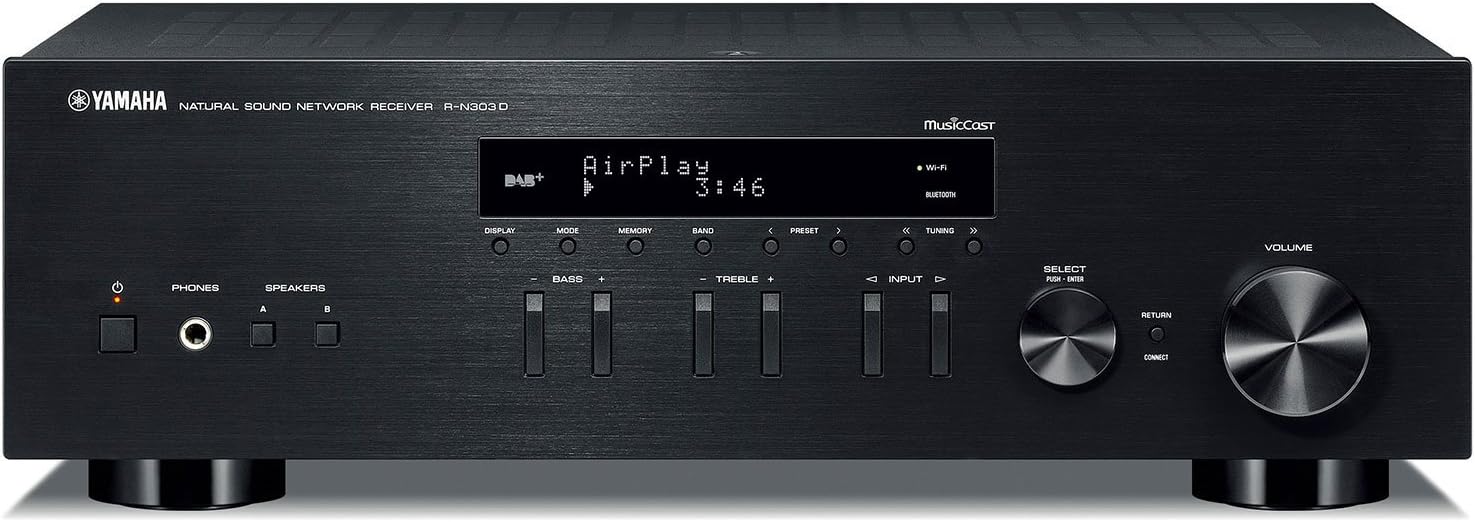
YAMAHA R-N303BL Stereo Receiver with Wi-Fi, Bluetooth & Phono

Description:

  • Works with Alexa for voice control (Alexa device sold separately)
  • Simple and sophisticated design with two channels of 100 W high-power output. Minimum RMS Output Power: 100W plus 100W (8ohms, 40Hz-20kHz, 0.2 percentage THD)
  • Phono input terminals for turn tables voice control using your Alexa device like echo or echo dot. FM 50dB Quieting Sensitivity (IHF, 1kHz, 100% Mod., Mono) - 3 µV (20.8 dBf). FM Signal-to-Noise Ratio (Mono/Stereo) - 65dB / 64dB
  • Optical and coaxial Audio inputs for TV. Frequency Response-0 ± 0.5dB / 0 ± 3.0dB. FM Signal-to-Noise Ratio (Mono/Stereo)-65dB / 64dB
  • Access to your music library, Pandora, Spotify, SiriusXM internet radio, Tidal and Deezer. Standby Power Consumption-0.1W (Network standby on / Wi-Fi connection, 1.8W)
  • Wi-Fi, wireless direct, Bluetooth, airplay, and MusicCast multiform Audio. Network section - DLNA - Version 1.5

  • Yamaha is pushing their Hi-Fi engineering ideas to extend into this entry-class network receiver with modern day wireless connectivity and the nostalgia of vinyl with a phono input terminal. The r-n303 is the perfect blend of technology and timeless elegance.

    Reviews:

    5.0 out of 5 stars great so far for my setup using AirPlay

    M.D.H. · October 2, 2020

    (function() { P.when('cr-A', 'ready').execute(function(A) { if(typeof A.toggleExpanderAriaLabel === 'function') { A.toggleExpanderAriaLabel('review_text_read_more', 'Read more of this review', 'Read less of this review'); } }); })(); .review-text-read-more-expander:focus-visible { outline: 2px solid #2162a1; outline-offset: 2px; border-radius: 5px; } As a straight up stereo receiver, it's hard to beat this. It sounds great. If I didn't want some WiFi capabilities, I'd go with either of the cheaper Yamaha or Sony stereo receivers. For my unique set up, this receiver is a great solution. I primarily use Apple AirPlay to send music from computers and cell phones to the receiver, and it works really well so far. Also, there are no cheaper receivers made by the top AV brands that have AirPlay, so this was also one of the more economical choices.My main complaints are more with AirPlay's limitations than with this particular receiver. Basically, I wish AirPlay would operate more like Bluetooth where you can just stream whatever audio that is playing on your device to a Bluetooth receiver or speaker, but with AirPlay, you're limited to streaming audio on AirPlay enabled apps, like iTunes, to AirPlay receivers or speakers. This generally works for my purposes and there are apps that expand what you can transmit via AirPlay, so it's not a huge problem.AirPlay set up was very easy. Just connect your phone to the receiver via Bluetooth and then you can share your WiFi settings with the receiver so that it connects to the internet wirelessly. And from there, the receiver shows up on all of your devices with AirPlay. I can also start playing music through the receiver from my phone or computer when the receiver is off (or technically on standby mode), so I don't have to turn the receiver on to start streaming music via AirPlay. And I can control the volume from my phone or computer. It's fantastic and basically means I don't have to mess with the receiver once I get it set up initially.In case someone has a similar set up, I'll provide some details. Basically, I wanted high quality wireless connectivity to avoid having messy looking wires in our main living space. We have built in shelves on either side of a fireplace that also have some old school speakers set up in them in such a way that you can't see any of the speaker wires. The speaker wires go from the speaker, into the attic, and then down into some cabinets in another room about 20 feet from the speakers. Our computer is in the room with the speakers but still several few feet away from them and I wanted to avoid having additional wires and electronics going from the computer to the speakers or receiver to keep everything looking nice and wire-free. AirPlay allows this and also allows for higher music quality since WiFi streaming has more bandwidth than Bluetooth. Another issue is that there is not a visual path from my computer to the receiver -- the Bluetooth signal has to travel through a wall or two, which can also mess with the signal. Again, a WiFi receiver with AirPlay allows for me to easily play music on iTunes on the receiver.Bluetooth connectivity has ups and downs overall. It works great on my cell phone even when the signal has had to travel through a wall. In fact, I don't notice a difference in sound quality between AirPlay or Bluetooth, but I was playing MP3's, and I obviously am not an audiophile, so maybe a trained ear would hear the differences. However, my computer's Bluetooth does not recognize the receiver and it never shows up as a Bluetooth device that it can even try to connect to. This may be because the signal has to travel through two walls to get from the receiver to my computer, but the Bluetooth signal from my phone to the receiver works great even next to the computer. My computer is only a couple of years old, just like the receiver, so I would expect them to be compatible. I also worried that the receiver's Bluetooth capabilities would be disrupted by my internet router, which is located close to the receiver, but this hasn't seem to be an issue. I'd give the Bluetooth high ratings overall if my computer could connect with it.So overall, this is a great receiver for my set up. Streaming via AirPlay has been fantastic.

    5.0 out of 5 stars Use MusicCast app; Listen to iTunes Playlists

    T.M. · January 27, 2019

    I want to make two main points:*The main way to interact with this receiver is through the MusicCast app – which is sensational.*Accessing iTunes library and playlistsMusicCastI want to emphasize that the best and easiest way to control this receiver is via the free, non-subscription MusicCast app on your phone. Download it. Install it. You will love it.I bring this up because the description of MusicCast on the Bolo product page presented MusicCast parenthetically as an interesting, non-essential side option. Having had no experience with MusicCast, I had no context, and I suspected it was just another subscription service – that I didn’t want to pay for. Turns out it’s awesome. Get it. Use it.Despite that Yamaha has made other apps available in the Apple Store and Play Store for other receivers -- for this receiver, use the MusicCast app.Finally, the manual that comes with the receiver has a single line in it that mentions the MusicCast app. The rest is devoted to manually controlling the receiver with its on board switches and dials. Forget about those, use the MusicCast app.In my house, two of us have the app loaded on our phones. So, both of us can control the receiver independently.The MusicCast app gives you access to all of the different net channels this receiver is capable of connecting to. This includes many of the different streaming services. I can access hundreds of net radio stations from all over the world. Just search with the app. Find one you like, save it as a net radio favorite. Very nice and easy. I like a jazz station from Scotland. I am super excited to have instant access to KROQ Roq of the 80’s (KROQ HD2) station that is faithfully reprising the station’s 80’s alternative rock playlists.I also use the app to get access to my iTunes music library. I’m going to talk about that next…Accessing iTunes library and playlistsIt was finally time to upgrade my 38-year-old Kenwood KR-65 trusty receiver. I had been playing my iTunes library through this receiver by hooking up either an iPod or a laptop to the AUX input. Using the laptop, I could access my live iTunes library (stored on my desktop computer) through my home network by selecting it in iTunes. The problem with any of these methods is that in order to listen to music, I had to turn on my desktop and my laptop, and load iTunes onto both machines. Time-consuming waiting for the computers to boot and settle down. And the digital-to-audio-conversion (DAC) was done in the ipod or the laptop – not high quality. I needed to have a simpler, speedier, and higher fidelity setup. But I still wanted to have access to my iTunes library. And purchasing a $1000-$2000 Apple iPad or Macbook just to play music was NOT the solution I was going to consider.Here’s how I did it.I bought a 128GB flash drive from Bolo. I plugged that flash drive into a USB port on my wireless router. Then, using my router’s admin app, I configured the flash drive as a Media Server (DNLA). In Windows 10, I configured the flash drive as a network drive. Next, I created the following folders on the flash drive…I:\itunesflash\iTunes Media(I:\ represents the root of the network flash drive. (You can designate the flash drive as a network drive and assign a drive letter to it.)Then I moved my iTunes folders from my desktop hard drive into the I:\itunesflash\iTunes Media folder. So my folder arrangement looks like…I:\itunesflash\iTunes Media\Automatically Add to iTunesI:\itunesflash\iTunes Media\DownloadsI:\itunesflash\iTunes Media\iPod GamesI:\itunesflash\iTunes Media\MusicI:\itunesflash\iTunes Media\TV ShowsHence, all of my iTunes music now is physically stored on the network flash drive.You have to tell iTunes about this move, so…In iTunes do this… Edit->Preferences->Advanced. Then enter the new path in the iTunes Media folder location field.Mine looks like this…I:\itunesflash\iTunes MediaWith this arrangement, I can manage my iTunes music library mainly from my desktop and get access to it on the home network with the Yamaha receiver, PlayStation, Xbox…. So, what about playlists?In order to access playlists, I had to export each iTunes playlist one-at-a-time. I exported them to the following directory…I:\itunesflash\iTunes MediaIn iTunes, open your iTunes library. Select a playlist. Then do this File->Library->Export Playlist. Choose the *.m3u file type.Before you proceed to other playlists, open up the MusicCast app. Choose Server->YourLocalNetworkName->Music->Playlists. Check to see if your playlist shows up. If not, you might need to make some path adjustments so MusicCast can find your playlist on your network drive.If successful, then export all the playlists you want. The only thing is that you will need to export a playlist again if you make any changes to it in iTunes – or when you add new playlists in iTunes.As a result, and with the help of this fabulous Yamaha receiver, I have very successfully made the transition from an entirely wired home music system to a mostly wireless system (still have my Dual turntable connected). Now my principal Digital-to-audio-converter (DAC) resides in the receiver instead of the laptop or ipod. Music quality is stunningly improved. I now have greater access to my music from a variety of devices (Yamaha receiver, Playstation, Xbox) – and I have access instantly. I no longer need to turn on two computers in order to play my iTunes playlists through my receiver and vintage Advent loudspeakers.I hope this helps.

    Amplificador que deja ver la diferencia de música en general y la música en Alta Definición (Hi-Fi)

    R.J. · March 26, 2024

    (function() { P.when('cr-A', 'ready').execute(function(A) { if(typeof A.toggleExpanderAriaLabel === 'function') { A.toggleExpanderAriaLabel('review_text_read_more', 'Read more of this review', 'Read less of this review'); } }); })(); .review-text-read-more-expander:focus-visible { outline: 2px solid #2162a1; outline-offset: 2px; border-radius: 5px; } Sin duda este es un amplificador que permite aprovechar lo mejor de las opciones retro (Phono, CD, etc.) y la música en streaming, Todo siempre en Alta Definición.Por lo tanto se trata de un equipo que te da acceso a lo mejor de los dos mundos, del pasado y del presente. Excelente opción para entrada al Hi Fi.El único pero es que no tiene una salida a subwoofer, pero es una cuestión que tiene una solución muy sencilla con con una conexión de Alto Nivel (conectar las 4 salidas de los 2 parlantes de zona A ó B a las entradas del subwoofer activo según corresponda en Right o Left) para los que prefieren bajos más contundentes.El radio con Antena o en Streaming es de calidad superior.En resumen, feliz por escuchar música en un nivel superior.

    Bom custo benefício

    G.S.N. · September 20, 2022

    o som é otimo mesmo usando streaming.Correspondeu às expectativasRecomendo

    Calidad

    I. · March 22, 2024

    Exelente

    Amplificador A-S 301

    A.A. · January 23, 2023

    Amplificador muito boa qualidade, excelente só não dou 5 estrelas porque não tem retorno para uso com equalizador

    Não Permite/Não Conecta Equalizador Grafico.

    v. · March 8, 2020

    -Bom Produto, porém Não Atendeu o meu objetivo que era Utilizar um Equalizador Grafico., ou seja : Não é possível conectar e funcionar um Equalizador Grafico.-Quanto aos demais 'Funções Vintage', OK. Faltou Entrada/Saída para Equalizador Gráfico.

    YAMAHA R-N303BL Stereo Receiver with Wi-Fi, Bluetooth & Phono

    Product ID: UO074S246Z9
    Condition: New

    4.3

    AED2,43954

    Price includes VAT & Import Duties
    Availability: In Stock

    Quantity:

    |

    Order today to get by 7-14 business days

    This item qualifies for free delivery

    Returns & Warranty policies

    Imported From: United States

    At BOLO, we work hard to ensure the products you receive are new, genuine, and sourced from reputable suppliers.

    BOLO is not an authorized or official retailer for most brands, nor are we affiliated with manufacturers unless specifically stated on a product page. Instead, we source verified sellers, authorized distributors or directly from the manufacturer.

    Each product undergoes thorough inspection and verification at our consolidation and fulfilment centers to ensure it meets our strict authenticity and quality standards before being shipped and delivered to you.

    If you ever have concerns regarding the authenticity of a product purchased from us, please contact Bolo Support. We will review your inquiry promptly and, if necessary, provide documentation verifying authenticity or offer a suitable resolution.

    Your trust is our top priority, and we are committed to maintaining transparency and integrity in every transaction.

    All product information, images, descriptions, and reviews originate from the manufacturer or from trusted sellers overseas. BOLO is not affiliated with, endorsed by, or an authorized retailer for most brands listed on our website unless stated otherwise.

    While we strive to display accurate information, variations in packaging, labeling, instructions, or formulation may occasionally occur due to regional differences or supplier updates. For detailed or manufacturer-specific information, please contact the brand directly or reach out to BOLO Support for assistance.

    Unless otherwise stated, all prices displayed on the product page include applicable taxes and import duties.

    BOLO operates in accordance with the laws and regulations of United Arab Emirates. Any items found to be restricted or prohibited for sale within the UAE will be cancelled prior to shipment. We take proactive measures to ensure that only products permitted for sale in United Arab Emirates are listed on our website.

    All items are shipped by air, and any products classified as “Dangerous Goods (DG)” under IATA regulations will be removed from the order and cancelled.

    All orders are processed manually, and we make every effort to process them promptly once confirmed. Products cancelled due to the above reasons will be permanently removed from listings across the website.

    Similar suggestions by Bolo

    More from this brand

    Similar items from “Receivers”

    YAMAHA R-N303BL Stereo Receiver with Wi-Fi, Bluetooth & Phono

    Product ID: UO074S246Z9
    Condition: New

    4.3

    YAMAHA R-N303BL Stereo Receiver with Wi-Fi, Bluetooth & Phono-0

    AED2,43954

    Price includes VAT & Import Duties
    Availability: In Stock

    Quantity:

    |

    Order today to get by 7-14 business days

    This item qualifies for free delivery

    Returns & Warranty policies

    Imported From: United States

    At BOLO, we work hard to ensure the products you receive are new, genuine, and sourced from reputable suppliers.

    BOLO is not an authorized or official retailer for most brands, nor are we affiliated with manufacturers unless specifically stated on a product page. Instead, we source verified sellers, authorized distributors or directly from the manufacturer.

    Each product undergoes thorough inspection and verification at our consolidation and fulfilment centers to ensure it meets our strict authenticity and quality standards before being shipped and delivered to you.

    If you ever have concerns regarding the authenticity of a product purchased from us, please contact Bolo Support. We will review your inquiry promptly and, if necessary, provide documentation verifying authenticity or offer a suitable resolution.

    Your trust is our top priority, and we are committed to maintaining transparency and integrity in every transaction.

    All product information, images, descriptions, and reviews originate from the manufacturer or from trusted sellers overseas. BOLO is not affiliated with, endorsed by, or an authorized retailer for most brands listed on our website unless stated otherwise.

    While we strive to display accurate information, variations in packaging, labeling, instructions, or formulation may occasionally occur due to regional differences or supplier updates. For detailed or manufacturer-specific information, please contact the brand directly or reach out to BOLO Support for assistance.

    Unless otherwise stated, all prices displayed on the product page include applicable taxes and import duties.

    BOLO operates in accordance with the laws and regulations of United Arab Emirates. Any items found to be restricted or prohibited for sale within the UAE will be cancelled prior to shipment. We take proactive measures to ensure that only products permitted for sale in United Arab Emirates are listed on our website.

    All items are shipped by air, and any products classified as “Dangerous Goods (DG)” under IATA regulations will be removed from the order and cancelled.

    All orders are processed manually, and we make every effort to process them promptly once confirmed. Products cancelled due to the above reasons will be permanently removed from listings across the website.

    Description:

  • Works with Alexa for voice control (Alexa device sold separately)
  • Simple and sophisticated design with two channels of 100 W high-power output. Minimum RMS Output Power: 100W plus 100W (8ohms, 40Hz-20kHz, 0.2 percentage THD)
  • Phono input terminals for turn tables voice control using your Alexa device like echo or echo dot. FM 50dB Quieting Sensitivity (IHF, 1kHz, 100% Mod., Mono) - 3 µV (20.8 dBf). FM Signal-to-Noise Ratio (Mono/Stereo) - 65dB / 64dB
  • Optical and coaxial Audio inputs for TV. Frequency Response-0 ± 0.5dB / 0 ± 3.0dB. FM Signal-to-Noise Ratio (Mono/Stereo)-65dB / 64dB
  • Access to your music library, Pandora, Spotify, SiriusXM internet radio, Tidal and Deezer. Standby Power Consumption-0.1W (Network standby on / Wi-Fi connection, 1.8W)
  • Wi-Fi, wireless direct, Bluetooth, airplay, and MusicCast multiform Audio. Network section - DLNA - Version 1.5

  • Yamaha is pushing their Hi-Fi engineering ideas to extend into this entry-class network receiver with modern day wireless connectivity and the nostalgia of vinyl with a phono input terminal. The r-n303 is the perfect blend of technology and timeless elegance.

    Reviews:

    5.0 out of 5 stars great so far for my setup using AirPlay

    M.D.H. · October 2, 2020

    (function() { P.when('cr-A', 'ready').execute(function(A) { if(typeof A.toggleExpanderAriaLabel === 'function') { A.toggleExpanderAriaLabel('review_text_read_more', 'Read more of this review', 'Read less of this review'); } }); })(); .review-text-read-more-expander:focus-visible { outline: 2px solid #2162a1; outline-offset: 2px; border-radius: 5px; } As a straight up stereo receiver, it's hard to beat this. It sounds great. If I didn't want some WiFi capabilities, I'd go with either of the cheaper Yamaha or Sony stereo receivers. For my unique set up, this receiver is a great solution. I primarily use Apple AirPlay to send music from computers and cell phones to the receiver, and it works really well so far. Also, there are no cheaper receivers made by the top AV brands that have AirPlay, so this was also one of the more economical choices.My main complaints are more with AirPlay's limitations than with this particular receiver. Basically, I wish AirPlay would operate more like Bluetooth where you can just stream whatever audio that is playing on your device to a Bluetooth receiver or speaker, but with AirPlay, you're limited to streaming audio on AirPlay enabled apps, like iTunes, to AirPlay receivers or speakers. This generally works for my purposes and there are apps that expand what you can transmit via AirPlay, so it's not a huge problem.AirPlay set up was very easy. Just connect your phone to the receiver via Bluetooth and then you can share your WiFi settings with the receiver so that it connects to the internet wirelessly. And from there, the receiver shows up on all of your devices with AirPlay. I can also start playing music through the receiver from my phone or computer when the receiver is off (or technically on standby mode), so I don't have to turn the receiver on to start streaming music via AirPlay. And I can control the volume from my phone or computer. It's fantastic and basically means I don't have to mess with the receiver once I get it set up initially.In case someone has a similar set up, I'll provide some details. Basically, I wanted high quality wireless connectivity to avoid having messy looking wires in our main living space. We have built in shelves on either side of a fireplace that also have some old school speakers set up in them in such a way that you can't see any of the speaker wires. The speaker wires go from the speaker, into the attic, and then down into some cabinets in another room about 20 feet from the speakers. Our computer is in the room with the speakers but still several few feet away from them and I wanted to avoid having additional wires and electronics going from the computer to the speakers or receiver to keep everything looking nice and wire-free. AirPlay allows this and also allows for higher music quality since WiFi streaming has more bandwidth than Bluetooth. Another issue is that there is not a visual path from my computer to the receiver -- the Bluetooth signal has to travel through a wall or two, which can also mess with the signal. Again, a WiFi receiver with AirPlay allows for me to easily play music on iTunes on the receiver.Bluetooth connectivity has ups and downs overall. It works great on my cell phone even when the signal has had to travel through a wall. In fact, I don't notice a difference in sound quality between AirPlay or Bluetooth, but I was playing MP3's, and I obviously am not an audiophile, so maybe a trained ear would hear the differences. However, my computer's Bluetooth does not recognize the receiver and it never shows up as a Bluetooth device that it can even try to connect to. This may be because the signal has to travel through two walls to get from the receiver to my computer, but the Bluetooth signal from my phone to the receiver works great even next to the computer. My computer is only a couple of years old, just like the receiver, so I would expect them to be compatible. I also worried that the receiver's Bluetooth capabilities would be disrupted by my internet router, which is located close to the receiver, but this hasn't seem to be an issue. I'd give the Bluetooth high ratings overall if my computer could connect with it.So overall, this is a great receiver for my set up. Streaming via AirPlay has been fantastic.

    5.0 out of 5 stars Use MusicCast app; Listen to iTunes Playlists

    T.M. · January 27, 2019

    I want to make two main points:*The main way to interact with this receiver is through the MusicCast app – which is sensational.*Accessing iTunes library and playlistsMusicCastI want to emphasize that the best and easiest way to control this receiver is via the free, non-subscription MusicCast app on your phone. Download it. Install it. You will love it.I bring this up because the description of MusicCast on the Bolo product page presented MusicCast parenthetically as an interesting, non-essential side option. Having had no experience with MusicCast, I had no context, and I suspected it was just another subscription service – that I didn’t want to pay for. Turns out it’s awesome. Get it. Use it.Despite that Yamaha has made other apps available in the Apple Store and Play Store for other receivers -- for this receiver, use the MusicCast app.Finally, the manual that comes with the receiver has a single line in it that mentions the MusicCast app. The rest is devoted to manually controlling the receiver with its on board switches and dials. Forget about those, use the MusicCast app.In my house, two of us have the app loaded on our phones. So, both of us can control the receiver independently.The MusicCast app gives you access to all of the different net channels this receiver is capable of connecting to. This includes many of the different streaming services. I can access hundreds of net radio stations from all over the world. Just search with the app. Find one you like, save it as a net radio favorite. Very nice and easy. I like a jazz station from Scotland. I am super excited to have instant access to KROQ Roq of the 80’s (KROQ HD2) station that is faithfully reprising the station’s 80’s alternative rock playlists.I also use the app to get access to my iTunes music library. I’m going to talk about that next…Accessing iTunes library and playlistsIt was finally time to upgrade my 38-year-old Kenwood KR-65 trusty receiver. I had been playing my iTunes library through this receiver by hooking up either an iPod or a laptop to the AUX input. Using the laptop, I could access my live iTunes library (stored on my desktop computer) through my home network by selecting it in iTunes. The problem with any of these methods is that in order to listen to music, I had to turn on my desktop and my laptop, and load iTunes onto both machines. Time-consuming waiting for the computers to boot and settle down. And the digital-to-audio-conversion (DAC) was done in the ipod or the laptop – not high quality. I needed to have a simpler, speedier, and higher fidelity setup. But I still wanted to have access to my iTunes library. And purchasing a $1000-$2000 Apple iPad or Macbook just to play music was NOT the solution I was going to consider.Here’s how I did it.I bought a 128GB flash drive from Bolo. I plugged that flash drive into a USB port on my wireless router. Then, using my router’s admin app, I configured the flash drive as a Media Server (DNLA). In Windows 10, I configured the flash drive as a network drive. Next, I created the following folders on the flash drive…I:\itunesflash\iTunes Media(I:\ represents the root of the network flash drive. (You can designate the flash drive as a network drive and assign a drive letter to it.)Then I moved my iTunes folders from my desktop hard drive into the I:\itunesflash\iTunes Media folder. So my folder arrangement looks like…I:\itunesflash\iTunes Media\Automatically Add to iTunesI:\itunesflash\iTunes Media\DownloadsI:\itunesflash\iTunes Media\iPod GamesI:\itunesflash\iTunes Media\MusicI:\itunesflash\iTunes Media\TV ShowsHence, all of my iTunes music now is physically stored on the network flash drive.You have to tell iTunes about this move, so…In iTunes do this… Edit->Preferences->Advanced. Then enter the new path in the iTunes Media folder location field.Mine looks like this…I:\itunesflash\iTunes MediaWith this arrangement, I can manage my iTunes music library mainly from my desktop and get access to it on the home network with the Yamaha receiver, PlayStation, Xbox…. So, what about playlists?In order to access playlists, I had to export each iTunes playlist one-at-a-time. I exported them to the following directory…I:\itunesflash\iTunes MediaIn iTunes, open your iTunes library. Select a playlist. Then do this File->Library->Export Playlist. Choose the *.m3u file type.Before you proceed to other playlists, open up the MusicCast app. Choose Server->YourLocalNetworkName->Music->Playlists. Check to see if your playlist shows up. If not, you might need to make some path adjustments so MusicCast can find your playlist on your network drive.If successful, then export all the playlists you want. The only thing is that you will need to export a playlist again if you make any changes to it in iTunes – or when you add new playlists in iTunes.As a result, and with the help of this fabulous Yamaha receiver, I have very successfully made the transition from an entirely wired home music system to a mostly wireless system (still have my Dual turntable connected). Now my principal Digital-to-audio-converter (DAC) resides in the receiver instead of the laptop or ipod. Music quality is stunningly improved. I now have greater access to my music from a variety of devices (Yamaha receiver, Playstation, Xbox) – and I have access instantly. I no longer need to turn on two computers in order to play my iTunes playlists through my receiver and vintage Advent loudspeakers.I hope this helps.

    Amplificador que deja ver la diferencia de música en general y la música en Alta Definición (Hi-Fi)

    R.J. · March 26, 2024

    (function() { P.when('cr-A', 'ready').execute(function(A) { if(typeof A.toggleExpanderAriaLabel === 'function') { A.toggleExpanderAriaLabel('review_text_read_more', 'Read more of this review', 'Read less of this review'); } }); })(); .review-text-read-more-expander:focus-visible { outline: 2px solid #2162a1; outline-offset: 2px; border-radius: 5px; } Sin duda este es un amplificador que permite aprovechar lo mejor de las opciones retro (Phono, CD, etc.) y la música en streaming, Todo siempre en Alta Definición.Por lo tanto se trata de un equipo que te da acceso a lo mejor de los dos mundos, del pasado y del presente. Excelente opción para entrada al Hi Fi.El único pero es que no tiene una salida a subwoofer, pero es una cuestión que tiene una solución muy sencilla con con una conexión de Alto Nivel (conectar las 4 salidas de los 2 parlantes de zona A ó B a las entradas del subwoofer activo según corresponda en Right o Left) para los que prefieren bajos más contundentes.El radio con Antena o en Streaming es de calidad superior.En resumen, feliz por escuchar música en un nivel superior.

    Bom custo benefício

    G.S.N. · September 20, 2022

    o som é otimo mesmo usando streaming.Correspondeu às expectativasRecomendo

    Calidad

    I. · March 22, 2024

    Exelente

    Amplificador A-S 301

    A.A. · January 23, 2023

    Amplificador muito boa qualidade, excelente só não dou 5 estrelas porque não tem retorno para uso com equalizador

    Não Permite/Não Conecta Equalizador Grafico.

    v. · March 8, 2020

    -Bom Produto, porém Não Atendeu o meu objetivo que era Utilizar um Equalizador Grafico., ou seja : Não é possível conectar e funcionar um Equalizador Grafico.-Quanto aos demais 'Funções Vintage', OK. Faltou Entrada/Saída para Equalizador Gráfico.

    Similar suggestions by Bolo

    More from this brand

    Similar items from “Receivers”