Description:
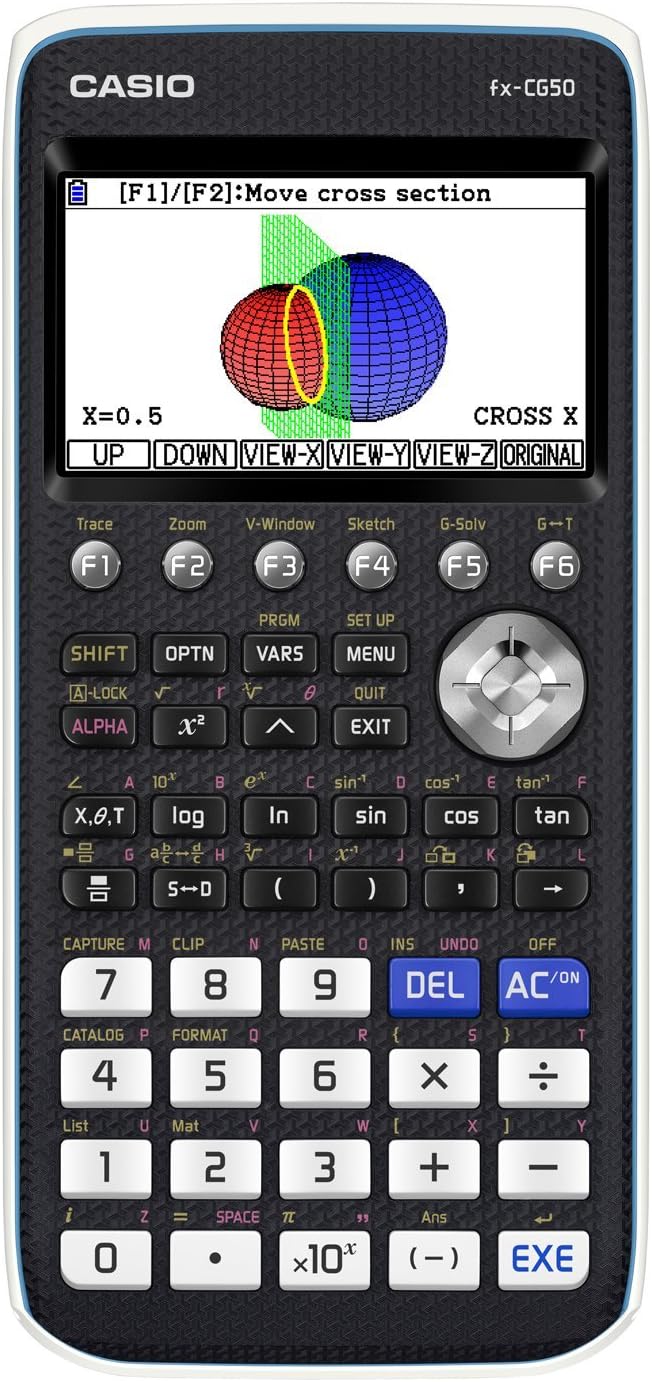
Advanced Color Graphing Calculator with Natural Textbook Display and intuitive icon-based menu. Easy to Use. 3 Dimensional Graphing capability. Improved Catalog function allows for greater engagement and real life application in the mathematics classroom. Approved for AP, SAT I/II, PSAT, NMSQT, ACT Tests (permitted on all major exams).
Reviews:
5.0 out of 5 stars Beautiful and Funtcional calculador
This calculator is very solidly constructed and well designed. Very legible large color display. Easy to set up with an exceptional online user Manual with excellent legibility and copious use of color. Buttons are large and have a very solid feel. Setup is exceptionally easy and virtually automatic. The moment your install the included Panasonic alkaline batteries, the calculator guides you through the setup menu. The most important and frequently used buttons are white and large. Calculations are very fast, even on complex equations. Very functional overall design, and very highly recommended.
5.0 out of 5 stars Underrated calculator
The fx-CG50 is a fairly high end non-CAS (more on this later) graphing calculator. Marketing-wise, it positions itself as a direct competitor to the TI-84 Plus CE, but that's selling it short. In terms of power, it's more similar to the non-CAS TI-Nspire CX II that it is to the TI-84 Plus CE.Here is how it stacks up compared to the 84 Plus CE:Processor speed: The fx-CG50 has a 116 MHz Hitachi SH7305 32/16-bit processor, which is a variant of the CPU that was used in the Sega Dreamcast game console. Oddly, given that this is a calculator, the SH7305 lacks an FPU. This was probably done to make it consume less power. The 84 Plus CE has a 48 MHz Zilog eZ80 16/8-bit processor (also without an FPU). On paper, the difference is massive. In practice, the Casio runs about 2 to 8 times faster than the TI on most operations. That's still significant and you can see it quite dramatically when plotting a graph.Memory: Memory is laid out somewhat differently between the two calculators. The fx-CG50 splits its memory between 61 kb of main memory and 16 Mb of "storage" memory. The "storage" memory serves both as a flash ROM and as a file system. The 84 Plus CE has 149 kb of RAM and 3 Mb of flash ROM for applications. On paper, the TI seems to have more RAM, but a lot of what the TI needs to keep in RAM, the Casio can offload to its bigger "storage" memory, keeping all of thee 61 kb free for use. Which one wins will depend on how you use it, but overall, the two are on the same order of magnitude when it comes to memory. For my use, the Casio's more flexible memory layout makes it more practical.Functionality: Both are advanced scientific calculators with almost everything you can imagine built-in or offered as an "app". Where the fx-CG50 trounces the 84 Plus CE and leaves it bleeding on the floor is that there is a free CAS system available that's a port of Xcas/Giac (the same CAS system that's the basis for the HP Prime), propelling the fx-CG50 into the CAS category of super calculators. If you don't know what CAS is, it's a software system that lets you do symbolic math and exact arithmetic. It's so powerful, that it's banned in almost every exam and even in some regular classes. Where the TI wins is in the vast ecosystem of downloadable apps for every imaginable purpose.Programming: Until recently, the Casio was a clear winner because it comes with a light version of Python built in. But TI has since added Python to the 84 Plus CE. You may still see the 84 advertised as pre-Python, but receive the Python version, however there are no guarantees that you won't get older, pre-Python stock. It used to be that the 84 Plus CE could be programmed in Z80 machine language, but after someone wrote a Z80 program that could inconspicuously disable "exam mode", TI updated the OS to prevent native code, killing one of its best features. It's possible to jailbreak the newer 84s to allow Z80 machine code, but TI could counter that at any time. The Casio, on the other hand, still allows native programming, AND there are tools available to program it (from a PC) using C++ and other languages, making it again the clear winner for programmability. Both calculators have a built-in BASIC-like language, but Casio's is horrible. If you plan to use the BASIC-like programming language, TI-BASIC is the winner by far, and it's better documented.Batteries: The TI is the winner here. It has a nice, slim cell phone style rechargeable battery. But the Casio has a feature that I haven't seen since my old HP 200LX: it can use either disposable alkaline batteries OR Ni-MH rechargeable batteries (which are not recommended for calculators that don't expressly support them). The Casio, however, doesn't recharge the Ni-MH batteries itself. They need to be recharged externally. But it's aware of them (if you tell it) and is able to report the correct charge.Price: Both the Casio and the TI are priced within $20 or $30, the Casio usually being the cheaper of the two, despite being a lot more powerful.Alternatives: Just as the TI-84 Plus CE is an upgrade of the TI-83 Plus, which is now fairly outdated, the Casio fx-CG50 is an upgrade of the Casio fx-9750GIII. However, the 9750GIII is NOT outdated. In fact, some benchmarks show it to be faster than the CG50. It has a lower resolution black-and-white screen, but in all other respects, except for a smaller 3 Mb storage space, it's practically identical to the CG50, right down to the keyboard layout. But it costs peanuts compare to the fx-CG50 or the TI-84. It will cost between a third and half of the price of the color models. I got mine on sale for $30. If you don't mind b&w graphics, it's a phenomenal value.Size: The Casio is thicker, wider, and heavier than the TI. If you're shopping for a case, you'll need one that supports oversized calculators like the Nspire CX II. The Casio won't fit in cases that are made for the TI-84. Some will not like the bulkiness of the Casio.Politics aside, if your choice is between a Casio fx-CG50 and a TI 84 Plus CE Python, the Casio would be your best option by a wide margin. But politics exist. Your school or teacher or standard exam may require the TI and bar the Casio, leaving you little choice. The course material is much more likely to be tailored to the TI. The TI is overwhelmingly the most popular calculator, so you may be surrounded by others who have the 84. This makes it easier to share information, tips, and tricks, or to seek help when you need it.
5.0 out of 5 stars Best graphing calculator ever!
To start things off, I am a computer science major so I will need this a lot for math classes. This graphing calculator is cheaper than the more popular ones, have way more menu options and are so easy to navigate!! The battery life is awesome, it looks very sleek, is sturdy and overall has better features, in my opinion. It gives very accurate answers with the graphing features, which helps A LOT! Been using this since 10th grade and will continue using it for the rest of my life.
5.0 out of 5 stars Beautiful and Functional Calculator
This calculator is very solidly constructed and well designed. Very legible large color display. Easy to set up with an exceptional online user Manual with excellent legibility and copious use of color. Buttons are large and have a very solid feel. Setup is exceptionally easy and virtually automatic. The moment your install the included Panasonic alkaline batteries, the calculator guides you through the setup menu. The most important and frequently used buttons are white and large. Calculations are very fast, even on complex equations. Very functional overall design, and very highly recommended.
5.0 out of 5 stars Buy the CG50 before it gets discontinued.
I was aware that the fx-CG100 would be released as the successor to the CG50, but after trying out the CG100 simulator in advance, I was surprised at how inconvenient and unintuitive the new interface was. That experience made me decide it would be wiser to purchase the CG50 before it gets discontinued.Since the CG50 shares button layout and menu structure with older models like the fx-9860 and fx-991 series, I was able to adapt quickly. With support for CAS functionality through expansion plugins, and considering the overall performance and ease of use at this price point, I'm very satisfied with my purchase.
4.0 out of 5 stars Great calculator but...
How can a calculator with high end features not have % key?? Not the most convenient of commissions.
5.0 out of 5 stars Versatile and reliable. Definitely worth it. 👍
I'm in high school and just got this calculator for my geometry/trig class. My list said to get a TI84+ but I had only used casio products in the past so I really prefer their layout. Soooo worth it. Love that it is in color and the main menu has loads of features (like 15 general ones that all have subsections within them). Took me about a week to get the hang of navigating it and finding all of the key features that I need for my class, but I am so glad I went with it. Really cool graphics and sleek modern look, also the 3d graphing is a big plus. Anyways, yeah, highly recommend!PS. To get to the regular calculator feature, just go to menu and press 1. It took me a bit to figure that out so hope this helps if you are struggling to navigate it.
Best calculator by far
For almost 4 years, I have never walked into an exam without this calculator, due to its ease of use and intuitive UI. unlike the competition (Texas instruments and HP), its interface is very easy to navigate and has very shallow learning curve. Furthermore, its battery life (4 AAA batteries) can last an entire college semester of heavy use and is easily rechargable (just swap out the batteries)The calculator does not come with CAS function by default, however, it is very easy to download modification to enable it. Moreso, by default, the calculator still has very useful functions, such as 3D graphing, recursive equations and even statistics. I highly recommend this calculator to any physics/engineering majorThe only downside I can think of is that is that the buttons can stick after a while, however, it is quite easy to resolve this problem by cleaning them with compressed air
Great resolution, backlight, fast speed, batteries provided, lightweight
Fast delivery. Calculator works right out of the box after putting in the provided 4xAAA batteries. Great backlight with 5 levels of brightness. Calculations are fast as well. It is also very lightweight and easy to hold, however I wish it has more weight to it. Well, the packaging was with rather hard plastic as the exterior and I spent a slightly long time using penknife to cut open the plastic. Overall very satisfied with the purchase.
Leistungsstarker grafischer Taschenrechner mit gutem Farb-Display.
Toller Taschnrechner mit sehr gut lesbarem, detailreichem Farb-Display. Komplexe Berechnungen lassen sich mit der übersichtlichen Tastatur schnell und übersichtlich eingeben; Änderungen der Formeln oder Werte lassen sich jederzeit durchführen ohne Neueingabe. Hunderte Funktionen sind über Mehrfachbelegung, Menüs und durch das Display beschriftete Funktionstasten abrufbar; sehr hilfreich. (Primfaktorzerlegung wurde unverständlicher Weise vergessen, lässt sich aber leicht durch ein kleines Programm nachrüsten.)Viele Betriebsmodi: Funktionsgraphen, Tabellenkalkulation (echt brauchbar), 3D Plots, Tabellen und Statistik. Finanzmathematik vorhanden, aber unpraktisch implementiert. CAS fehlt völlig (vermutlich absichtlich), auch das Rechnen mit großen Integerzahlen fehlt. Das schreiben einige ewig gestrige Schulen wohl so vor. Wer da mehr möchte, nimmt den nur etwas teureren Casio CP400II. Hätte ich den zuerst gekauft, hätte ich den schicken CG50 wohl nie gekauft.
Best for the price
Easily the best graphing calculator for the price. Has way more features than you will ever need, as well as all the basic things. The interface takes a while to get used to but a week or two should be enough to start using this efficiently. Came packaged well with manuals and USB wire for data transfer.
Cheia de recursos
Muitos recursos interessantes. Ótima qualidade dos materiais. Precisa e relativamente fácil de usar. Minha única crítica são os manuais, que são muito superficiais em alguns detalhes.
Visit the Casio Store
Casio fx-CG50 PRIZM® – Color Graphing Calculator with 3D Graph & Python | Large High-Res Display, Basic & Advanced Functions | Ideal for Exams, STEM, Programming & Advanced Math
AED65886
Quantity:
Order today to get by 7-14 business days
This item qualifies for free delivery
Imported From: United States
At BOLO, we work hard to ensure the products you receive are new, genuine, and sourced from reputable suppliers.
BOLO is not an authorized or official retailer for most brands, nor are we affiliated with manufacturers unless specifically stated on a product page. Instead, we source verified sellers, authorized distributors or directly from the manufacturer.
Each product undergoes thorough inspection and verification at our consolidation and fulfilment centers to ensure it meets our strict authenticity and quality standards before being shipped and delivered to you.
If you ever have concerns regarding the authenticity of a product purchased from us, please contact Bolo Support. We will review your inquiry promptly and, if necessary, provide documentation verifying authenticity or offer a suitable resolution.
Your trust is our top priority, and we are committed to maintaining transparency and integrity in every transaction.
All product information, images, descriptions, and reviews originate from the manufacturer or from trusted sellers overseas. BOLO is not affiliated with, endorsed by, or an authorized retailer for most brands listed on our website unless stated otherwise.
While we strive to display accurate information, variations in packaging, labeling, instructions, or formulation may occasionally occur due to regional differences or supplier updates. For detailed or manufacturer-specific information, please contact the brand directly or reach out to BOLO Support for assistance.
Unless otherwise stated, all prices displayed on the product page include applicable taxes and import duties.
BOLO operates in accordance with the laws and regulations of United Arab Emirates. Any items found to be restricted or prohibited for sale within the UAE will be cancelled prior to shipment. We take proactive measures to ensure that only products permitted for sale in United Arab Emirates are listed on our website.
All items are shipped by air, and any products classified as “Dangerous Goods (DG)” under IATA regulations will be removed from the order and cancelled.
All orders are processed manually, and we make every effort to process them promptly once confirmed. Products cancelled due to the above reasons will be permanently removed from listings across the website.
Similar suggestions by Bolo
More from this brand
Similar items from “Graphing”
Share with
Or share with link
https://www.bolo.ae/products/UO0711Q5EAM
Visit the Casio Store
Casio fx-CG50 PRIZM® – Color Graphing Calculator with 3D Graph & Python | Large High-Res Display, Basic & Advanced Functions | Ideal for Exams, STEM, Programming & Advanced Math

AED65886
Quantity:
Order today to get by 7-14 business days
This item qualifies for free delivery
Imported From: United States
At BOLO, we work hard to ensure the products you receive are new, genuine, and sourced from reputable suppliers.
BOLO is not an authorized or official retailer for most brands, nor are we affiliated with manufacturers unless specifically stated on a product page. Instead, we source verified sellers, authorized distributors or directly from the manufacturer.
Each product undergoes thorough inspection and verification at our consolidation and fulfilment centers to ensure it meets our strict authenticity and quality standards before being shipped and delivered to you.
If you ever have concerns regarding the authenticity of a product purchased from us, please contact Bolo Support. We will review your inquiry promptly and, if necessary, provide documentation verifying authenticity or offer a suitable resolution.
Your trust is our top priority, and we are committed to maintaining transparency and integrity in every transaction.
All product information, images, descriptions, and reviews originate from the manufacturer or from trusted sellers overseas. BOLO is not affiliated with, endorsed by, or an authorized retailer for most brands listed on our website unless stated otherwise.
While we strive to display accurate information, variations in packaging, labeling, instructions, or formulation may occasionally occur due to regional differences or supplier updates. For detailed or manufacturer-specific information, please contact the brand directly or reach out to BOLO Support for assistance.
Unless otherwise stated, all prices displayed on the product page include applicable taxes and import duties.
BOLO operates in accordance with the laws and regulations of United Arab Emirates. Any items found to be restricted or prohibited for sale within the UAE will be cancelled prior to shipment. We take proactive measures to ensure that only products permitted for sale in United Arab Emirates are listed on our website.
All items are shipped by air, and any products classified as “Dangerous Goods (DG)” under IATA regulations will be removed from the order and cancelled.
All orders are processed manually, and we make every effort to process them promptly once confirmed. Products cancelled due to the above reasons will be permanently removed from listings across the website.
Description:
Advanced Color Graphing Calculator with Natural Textbook Display and intuitive icon-based menu. Easy to Use. 3 Dimensional Graphing capability. Improved Catalog function allows for greater engagement and real life application in the mathematics classroom. Approved for AP, SAT I/II, PSAT, NMSQT, ACT Tests (permitted on all major exams).
Reviews:
5.0 out of 5 stars Beautiful and Funtcional calculador
This calculator is very solidly constructed and well designed. Very legible large color display. Easy to set up with an exceptional online user Manual with excellent legibility and copious use of color. Buttons are large and have a very solid feel. Setup is exceptionally easy and virtually automatic. The moment your install the included Panasonic alkaline batteries, the calculator guides you through the setup menu. The most important and frequently used buttons are white and large. Calculations are very fast, even on complex equations. Very functional overall design, and very highly recommended.
5.0 out of 5 stars Underrated calculator
The fx-CG50 is a fairly high end non-CAS (more on this later) graphing calculator. Marketing-wise, it positions itself as a direct competitor to the TI-84 Plus CE, but that's selling it short. In terms of power, it's more similar to the non-CAS TI-Nspire CX II that it is to the TI-84 Plus CE.Here is how it stacks up compared to the 84 Plus CE:Processor speed: The fx-CG50 has a 116 MHz Hitachi SH7305 32/16-bit processor, which is a variant of the CPU that was used in the Sega Dreamcast game console. Oddly, given that this is a calculator, the SH7305 lacks an FPU. This was probably done to make it consume less power. The 84 Plus CE has a 48 MHz Zilog eZ80 16/8-bit processor (also without an FPU). On paper, the difference is massive. In practice, the Casio runs about 2 to 8 times faster than the TI on most operations. That's still significant and you can see it quite dramatically when plotting a graph.Memory: Memory is laid out somewhat differently between the two calculators. The fx-CG50 splits its memory between 61 kb of main memory and 16 Mb of "storage" memory. The "storage" memory serves both as a flash ROM and as a file system. The 84 Plus CE has 149 kb of RAM and 3 Mb of flash ROM for applications. On paper, the TI seems to have more RAM, but a lot of what the TI needs to keep in RAM, the Casio can offload to its bigger "storage" memory, keeping all of thee 61 kb free for use. Which one wins will depend on how you use it, but overall, the two are on the same order of magnitude when it comes to memory. For my use, the Casio's more flexible memory layout makes it more practical.Functionality: Both are advanced scientific calculators with almost everything you can imagine built-in or offered as an "app". Where the fx-CG50 trounces the 84 Plus CE and leaves it bleeding on the floor is that there is a free CAS system available that's a port of Xcas/Giac (the same CAS system that's the basis for the HP Prime), propelling the fx-CG50 into the CAS category of super calculators. If you don't know what CAS is, it's a software system that lets you do symbolic math and exact arithmetic. It's so powerful, that it's banned in almost every exam and even in some regular classes. Where the TI wins is in the vast ecosystem of downloadable apps for every imaginable purpose.Programming: Until recently, the Casio was a clear winner because it comes with a light version of Python built in. But TI has since added Python to the 84 Plus CE. You may still see the 84 advertised as pre-Python, but receive the Python version, however there are no guarantees that you won't get older, pre-Python stock. It used to be that the 84 Plus CE could be programmed in Z80 machine language, but after someone wrote a Z80 program that could inconspicuously disable "exam mode", TI updated the OS to prevent native code, killing one of its best features. It's possible to jailbreak the newer 84s to allow Z80 machine code, but TI could counter that at any time. The Casio, on the other hand, still allows native programming, AND there are tools available to program it (from a PC) using C++ and other languages, making it again the clear winner for programmability. Both calculators have a built-in BASIC-like language, but Casio's is horrible. If you plan to use the BASIC-like programming language, TI-BASIC is the winner by far, and it's better documented.Batteries: The TI is the winner here. It has a nice, slim cell phone style rechargeable battery. But the Casio has a feature that I haven't seen since my old HP 200LX: it can use either disposable alkaline batteries OR Ni-MH rechargeable batteries (which are not recommended for calculators that don't expressly support them). The Casio, however, doesn't recharge the Ni-MH batteries itself. They need to be recharged externally. But it's aware of them (if you tell it) and is able to report the correct charge.Price: Both the Casio and the TI are priced within $20 or $30, the Casio usually being the cheaper of the two, despite being a lot more powerful.Alternatives: Just as the TI-84 Plus CE is an upgrade of the TI-83 Plus, which is now fairly outdated, the Casio fx-CG50 is an upgrade of the Casio fx-9750GIII. However, the 9750GIII is NOT outdated. In fact, some benchmarks show it to be faster than the CG50. It has a lower resolution black-and-white screen, but in all other respects, except for a smaller 3 Mb storage space, it's practically identical to the CG50, right down to the keyboard layout. But it costs peanuts compare to the fx-CG50 or the TI-84. It will cost between a third and half of the price of the color models. I got mine on sale for $30. If you don't mind b&w graphics, it's a phenomenal value.Size: The Casio is thicker, wider, and heavier than the TI. If you're shopping for a case, you'll need one that supports oversized calculators like the Nspire CX II. The Casio won't fit in cases that are made for the TI-84. Some will not like the bulkiness of the Casio.Politics aside, if your choice is between a Casio fx-CG50 and a TI 84 Plus CE Python, the Casio would be your best option by a wide margin. But politics exist. Your school or teacher or standard exam may require the TI and bar the Casio, leaving you little choice. The course material is much more likely to be tailored to the TI. The TI is overwhelmingly the most popular calculator, so you may be surrounded by others who have the 84. This makes it easier to share information, tips, and tricks, or to seek help when you need it.
5.0 out of 5 stars Best graphing calculator ever!
To start things off, I am a computer science major so I will need this a lot for math classes. This graphing calculator is cheaper than the more popular ones, have way more menu options and are so easy to navigate!! The battery life is awesome, it looks very sleek, is sturdy and overall has better features, in my opinion. It gives very accurate answers with the graphing features, which helps A LOT! Been using this since 10th grade and will continue using it for the rest of my life.
5.0 out of 5 stars Beautiful and Functional Calculator
This calculator is very solidly constructed and well designed. Very legible large color display. Easy to set up with an exceptional online user Manual with excellent legibility and copious use of color. Buttons are large and have a very solid feel. Setup is exceptionally easy and virtually automatic. The moment your install the included Panasonic alkaline batteries, the calculator guides you through the setup menu. The most important and frequently used buttons are white and large. Calculations are very fast, even on complex equations. Very functional overall design, and very highly recommended.
5.0 out of 5 stars Buy the CG50 before it gets discontinued.
I was aware that the fx-CG100 would be released as the successor to the CG50, but after trying out the CG100 simulator in advance, I was surprised at how inconvenient and unintuitive the new interface was. That experience made me decide it would be wiser to purchase the CG50 before it gets discontinued.Since the CG50 shares button layout and menu structure with older models like the fx-9860 and fx-991 series, I was able to adapt quickly. With support for CAS functionality through expansion plugins, and considering the overall performance and ease of use at this price point, I'm very satisfied with my purchase.
4.0 out of 5 stars Great calculator but...
How can a calculator with high end features not have % key?? Not the most convenient of commissions.
5.0 out of 5 stars Versatile and reliable. Definitely worth it. 👍
I'm in high school and just got this calculator for my geometry/trig class. My list said to get a TI84+ but I had only used casio products in the past so I really prefer their layout. Soooo worth it. Love that it is in color and the main menu has loads of features (like 15 general ones that all have subsections within them). Took me about a week to get the hang of navigating it and finding all of the key features that I need for my class, but I am so glad I went with it. Really cool graphics and sleek modern look, also the 3d graphing is a big plus. Anyways, yeah, highly recommend!PS. To get to the regular calculator feature, just go to menu and press 1. It took me a bit to figure that out so hope this helps if you are struggling to navigate it.
Best calculator by far
For almost 4 years, I have never walked into an exam without this calculator, due to its ease of use and intuitive UI. unlike the competition (Texas instruments and HP), its interface is very easy to navigate and has very shallow learning curve. Furthermore, its battery life (4 AAA batteries) can last an entire college semester of heavy use and is easily rechargable (just swap out the batteries)The calculator does not come with CAS function by default, however, it is very easy to download modification to enable it. Moreso, by default, the calculator still has very useful functions, such as 3D graphing, recursive equations and even statistics. I highly recommend this calculator to any physics/engineering majorThe only downside I can think of is that is that the buttons can stick after a while, however, it is quite easy to resolve this problem by cleaning them with compressed air
Great resolution, backlight, fast speed, batteries provided, lightweight
Fast delivery. Calculator works right out of the box after putting in the provided 4xAAA batteries. Great backlight with 5 levels of brightness. Calculations are fast as well. It is also very lightweight and easy to hold, however I wish it has more weight to it. Well, the packaging was with rather hard plastic as the exterior and I spent a slightly long time using penknife to cut open the plastic. Overall very satisfied with the purchase.
Leistungsstarker grafischer Taschenrechner mit gutem Farb-Display.
Toller Taschnrechner mit sehr gut lesbarem, detailreichem Farb-Display. Komplexe Berechnungen lassen sich mit der übersichtlichen Tastatur schnell und übersichtlich eingeben; Änderungen der Formeln oder Werte lassen sich jederzeit durchführen ohne Neueingabe. Hunderte Funktionen sind über Mehrfachbelegung, Menüs und durch das Display beschriftete Funktionstasten abrufbar; sehr hilfreich. (Primfaktorzerlegung wurde unverständlicher Weise vergessen, lässt sich aber leicht durch ein kleines Programm nachrüsten.)Viele Betriebsmodi: Funktionsgraphen, Tabellenkalkulation (echt brauchbar), 3D Plots, Tabellen und Statistik. Finanzmathematik vorhanden, aber unpraktisch implementiert. CAS fehlt völlig (vermutlich absichtlich), auch das Rechnen mit großen Integerzahlen fehlt. Das schreiben einige ewig gestrige Schulen wohl so vor. Wer da mehr möchte, nimmt den nur etwas teureren Casio CP400II. Hätte ich den zuerst gekauft, hätte ich den schicken CG50 wohl nie gekauft.
Best for the price
Easily the best graphing calculator for the price. Has way more features than you will ever need, as well as all the basic things. The interface takes a while to get used to but a week or two should be enough to start using this efficiently. Came packaged well with manuals and USB wire for data transfer.
Cheia de recursos
Muitos recursos interessantes. Ótima qualidade dos materiais. Precisa e relativamente fácil de usar. Minha única crítica são os manuais, que são muito superficiais em alguns detalhes.
Similar suggestions by Bolo
More from this brand
Similar items from “Graphing”
Share with
Or share with link
https://www.bolo.ae/products/UO0711Q5EAM