Description:
Discontinued - Not Supported
Reviews:
5.0 out of 5 stars Excellent Quality
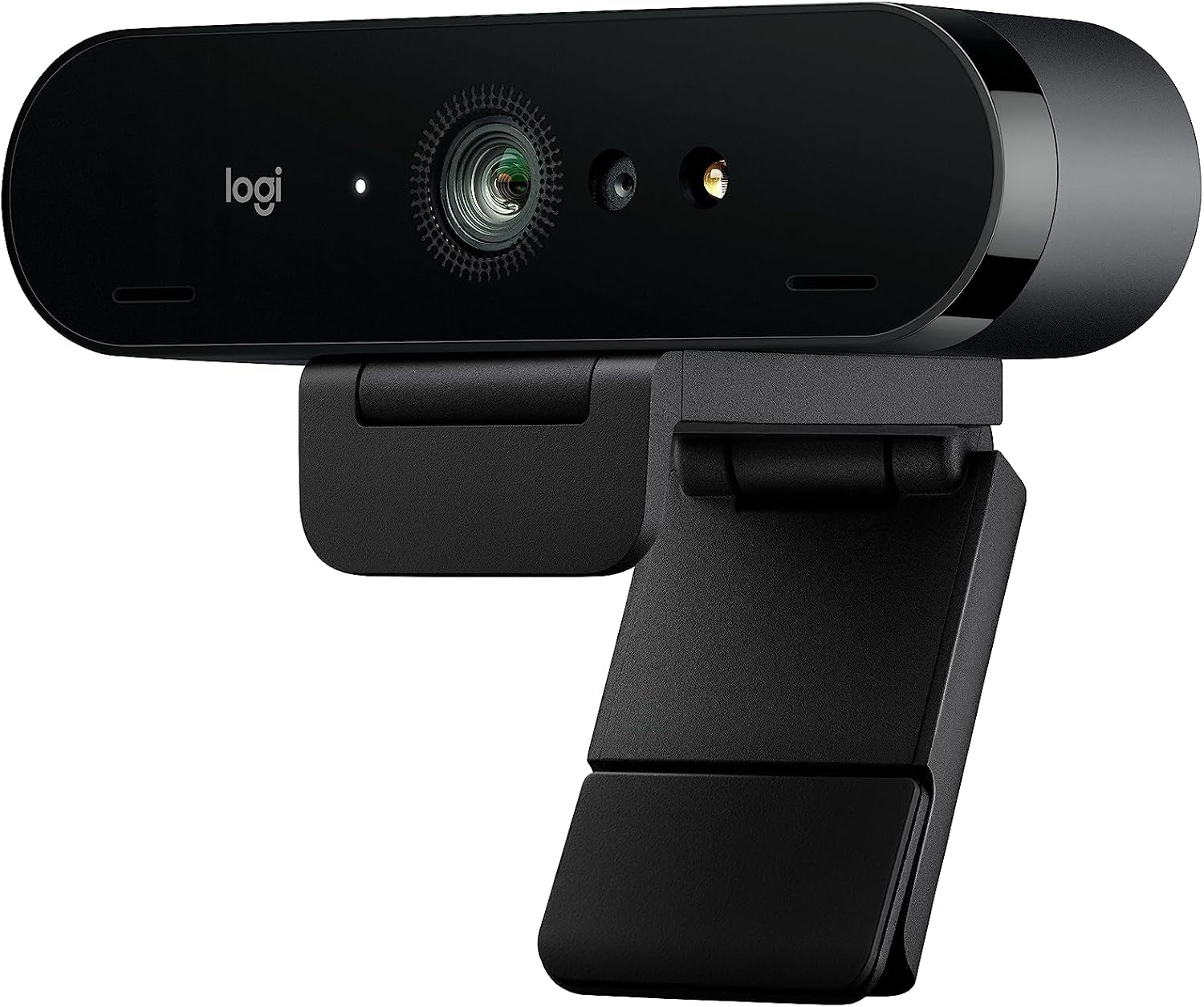
(function() { P.when('cr-A', 'ready').execute(function(A) { if(typeof A.toggleExpanderAriaLabel === 'function') { A.toggleExpanderAriaLabel('review_text_read_more', 'Read more of this review', 'Read less of this review'); } }); })(); .review-text-read-more-expander:focus-visible { outline: 2px solid #2162a1; outline-offset: 2px; border-radius: 5px; } If you have the money to invest in this webcam, I highly suggest making the purchase. Logitech has a great reputation when it comes to the webcam sector. I have several webcams and this is now my favorite. Hopefully, this review helps with any decision you are trying to make.This is one of the few webcams that supports 4K Ultra HD 2160p/30fps. I just upgraded to a 4k monitor, so maybe most people are not looking for a 4K webcam. At full HD 1080p/30 or 60 fps, this webcam also supports HD 720p/30, 60, or 90fps, it is still by far the best webcam I have right now. It is impressive! Even with makeup, you will probably notice a few flaws in your skin. It is that amazing!It does come with a privacy shutter that you can attach if you want a physical block of the camera. Not only that, but it snaps on easily. There is also a black drawstring travel bag to prevent scratches and dust when not in use or if you need to travel with it. It does not come with a tripod, but it does have a tripod thread mount.There is a detachable mounting clip. I tested it on an older, bulky laptop. It is wide, and it worked great. I purchased a tripod because I will primarily use this for my desktop. I didn't like the idea of it hanging on my monitor, as it doesn't have a plastic outside edge. My monitor screen runs to the very edge. If you have a similar monitor, I would highly suggest purchasing a tripod. Another consideration that might make you want a tripod, this webcam can’t be tilted up or down or turned left or right, so it’s basically stuck in a fixed position. With the tripod I bought, the top half has a ball with the plate of the screw that attaches to the bottom of the webcam. This setup on the tripod allows me to adjust it to where I need it.This webcam is compatible with video conferencing platforms like Skype for Business, Microsoft Teams, Cisco, Cisco Webex, Cisco Jabber, Microsoft Cortana, Windows Hello, Skype, Google Hangouts, and other VC applications, XSplit, OBS, Twitch, BlueJeans, Zoom, Fuze, GoToMeetings, and Ring Central. I use several of these platforms and compared to my older 920 Logitech webcam, I can see a huge difference in quality. I share videos with colleagues, and they have also noticed a difference. As for the platforms, many have a maximum of 720p or 1080p. You probably won't notice a difference when joining a meeting.Once you start using the webcam, you will see the autofocus and the auto light correction with high dynamic range (HRD). It tracks movements and quickly makes the right adjustments. There are also three fields of view, so you are not limited to a single default. The three views are 65-degree, 78-degree, and 90-degree. If you are not familiar with what each would offer, the 65-degree view is a close-up view of your face, the 78-degree is more balanced with your face and some of the background, and the 90-degree view shows more of the background with you in the center.You also have omnidirectional microphones with noise-canceling to reduce background sounds to make the voice clear. It does not take away a cat meowing in the background, but I do notice less noise from my chair if I slightly spin. I have not had any results where my voice is distorted, echoing, or that hollow sound. I think it helps to have two microphones built into this webcam. I want to mention, that the USB cable with this webcam is of high quality. It also is slightly over 7 feet in length.Pros:Great sound quality, crystal-clear video, autofocus, auto light correction, 3 adjustable fields of view, high dynamic range (HDR), the image quality of the camera is impressive, and offers a good range of resolutions with still image and video capture.Cons:The quality of the construction of accessories isn’t consistent with the camera. It feels like I got cheap accessories. Some might consider the price as a con, but I particularly do not. I feel the price matches the quality of this webcam and the features it does have.Tech:Supported resolution: 4K/30fps; 1080p/30 or 60 fps; 720p/30, 60, or 90 fpsDiagonal field of view: 65 degrees, 78 degrees, 90 degreesFocus type: AutofocusLens type: GlassBuilt-in mic: Stereo-dual Omnidirectional, with 2 microphonesDimensions: 1.06 inches high x 4.02 inches wide x 1.06 inches deepWeight: 2.22 ouncesCable Length: 7.2 feet
5.0 out of 5 stars Pleased with camera, mount lacking
ProsGood sensor, for what you can get on a computer (pc/laptop) I’ve tried it in light and dark rooms. It’t not better than what your getting with an iPhone or high end android device. But it’s a lot better than several I’ve used including other Logitech and some off brands and few Microsoft ones as well as several laptops. Why logitech cameras are so good is they use good parts, and have solid software. You really can't over come bad camera firmware even if you put in more expensive hardware. it also has a decent mic. It's an all around camera that you will always look good in an office setting or just conferencing. I think it's worth the money these days to have a good camera like this with everything having gotten so virtual. i use it for work, health care (pt sessions), and calls.No external branded weird software to get in the way. They kept this clean just as I like it. It’s just works. That’s what we want we are working no nonsense Logitech gets it.Software/drivers and hardware is good: Logitech generally an expensive company. You could say overpriced, but their stuff has worked well for me when competing products haven’t. The mice for example are fantastic. They have these little touches and never fails that’s not the review but I’m just saying their products are well together on the software end. Autofocus works no messing around with your operating system trying to get the camera to work. It works fine with Team and Zoom.ConsCost: I mean 170 is a lot of money for good but not high end camera. Think about a high end Iphone or a highend Samsung phone. You almost expect that for a 200 stand alone camera. This is sharp but it can’t touch those kinds of cameras on color or light handling. Does it matter for office calls. Ehh, but still your spending this you must care right? I did. I got tired of looking like a faded blurry mess which is why i upgraded to this. Your just not making memory here. They aren't artistic beautiful web cam pictures but you look pretty decent.The biggest con for me is the stand. I get it everyone will complain about a stand I’m telling you take their 910/920 series and give me that stand anyway. It sticks better on the monitor, it pivots way better. This thing has a tripod attachment, but I don’t know many offices workers sticking a tripod on the desk. This is the place where I thought they could do a ton better. I mean I can live with it, but it needlessly sucks. Once you get it right it’s basically set and forget well unless if you are a call with a whiteboard and moving around or something (I do that).It's a good camera. I ‘d probably do it again, because again the other ones just don’t create clear video or have other problems, I prefer to buy something good rather and keep it for like 10 years. I had a C910 for 10-11 years until it got a bit flakey. I bought a Microsoft one before that the cam studio where the autofocus never worked right and kept getting crappy ones form my it department that had weird issues or were impossible to see fine details. I finally expensed this, they pushed back and I just appealed to them … environmental care … buy suggesting continuing to buy me crap that breaks or doesn’t’ work will just fill landfills. Just get me a good camera and be done with it. They are happy because I went away and shut up about the camera. And I am because I ‘ve got Gorilla tape holding a great camera to my monitor. It’s win for everyone. I think you’ll be happy. You’ll be mildly annoyed with the stand. Don’t expect iphone. Expect good computer camera for calls.
5.0 out of 5 stars Price and functionality
This is a very nice web cam. For my streaming. I'm very pleased.
4.0 out of 5 stars Logitech 2017 Brio 4K Webcam - 4 Stars
The Logitech Brio 4K Webcam delivers impressive video quality that has significantly upgraded my video conferencing and content creation. The 4K resolution is noticeably sharper than my previous webcam, capturing fine details with excellent clarity. Colors appear vibrant and true-to-life, even in less-than-ideal lighting conditions thanks to the HDR capability.I particularly appreciate the adjustable field of view options (65°, 78°, and 90°), which allow me to frame my shots perfectly whether I'm sitting close to the screen or need to include more of my background. The autofocus works reliably and quickly adjusts when I move, maintaining sharpness without hunting.The included mounting options are versatile - the clip works securely on my monitor, and the tripod thread gives me additional setup flexibility. Windows Hello facial recognition is a convenient bonus feature that works flawlessly for quick computer login.I'm deducting one star because the Logitech software, while powerful, occasionally has stability issues requiring restarts. Additionally, in some lighting situations, the auto-exposure can be a bit aggressive, sometimes taking a moment to settle on the right brightness level.Overall, this webcam represents excellent value for anyone seeking professional-quality video. While not perfect, the Brio has proven to be a reliable and high-performing addition to my setup that I would recommend to others looking for a premium webcam experience.
5.0 out of 5 stars Works out of the box. Good picture
Suits on top of monitor. Picture quality fine. No complaints on sound. Only use it for zoom
Easy go - easy use
(function() { P.when('cr-A', 'ready').execute(function(A) { if(typeof A.toggleExpanderAriaLabel === 'function') { A.toggleExpanderAriaLabel('review_text_read_more', 'Read more of this review', 'Read less of this review'); } }); })(); .review-text-read-more-expander:focus-visible { outline: 2px solid #2162a1; outline-offset: 2px; border-radius: 5px; } For a better picture quality as online trainer I purchased the Logi Brio 4k. Setup was done after connecting it. There is some Logitech Software for the cam - but its not really necessary. I was impressed how much better the picture quality - especially under low light/non optimal light - improved in comparison to my Logitech c925e - which is already a very good one.As a bonus for me does the cam support login via Windows Hello - to login in Windows with your Face. Works really well for me.It's on the bigger side - compared with others. But ok. And its tripod mountable. Thats helpful sometimes. Also prolonging the cable to around 5m was no problem (had my share of problems with a Elgato Facecam Pro here).One thing - the included privacy flap - I didn't realised what the included plastic thing was for at first. Then I got it - you are supposed to clip it on top. An included privacy flap like in the c925e would have been nicer and easier to use.The only thing I regret is that I didn't bought it earlier ;-) ...
Good quality camera, fast delivery
My first camera, usually just use a laptop inbuilt camera but this webcam is so much better. Works well with MS Teams, have not tried other platforms. Good quality and looks professional. Not bulky. Easy to install, just plug in and play. Easy to adjust settings within an app (in my case its MS Teams). Privacy cover included which is great, so don't need to unplug after every use. Can be set up either on top of the monitor (sturdy clip included) or on a tripod or extended arm attachment (purchase separately) whichever works. Absolutely good investment and recommend this BRIO for either meetings or game streaming. I would give 5 🌟. Delivery was quicker than advised, which was a bonus. Packaging👌 no rips or damage. Overall five-star, good purchase. Thanks, Bolo 😊
Le top du top
Du Logitech...Matériel de choix. Que dire de plus
Super Facecam fürs Streamen/Aufnehmen oder Video Telefonat😊❤️
Super Webcam! Die nutze ich bis heute noch und habe sie glaube vor 2 oder 3 Jahren erst gekauft und sie funktioniert immer noch wie eine 1
Ottima videocamera
Qualità Logitec, funziona bene e con l’app Tune puoi personalizzare le funzioni
Visit the Logitech Store
Logitech Brio 4K Webcam
AED1,11430
Quantity:
Order today to get by 7-14 business days
This item qualifies for free delivery
Imported From: United States
At BOLO, we work hard to ensure the products you receive are new, genuine, and sourced from reputable suppliers.
BOLO is not an authorized or official retailer for most brands, nor are we affiliated with manufacturers unless specifically stated on a product page. Instead, we source verified sellers, authorized distributors or directly from the manufacturer.
Each product undergoes thorough inspection and verification at our consolidation and fulfilment centers to ensure it meets our strict authenticity and quality standards before being shipped and delivered to you.
If you ever have concerns regarding the authenticity of a product purchased from us, please contact Bolo Support. We will review your inquiry promptly and, if necessary, provide documentation verifying authenticity or offer a suitable resolution.
Your trust is our top priority, and we are committed to maintaining transparency and integrity in every transaction.
All product information, images, descriptions, and reviews originate from the manufacturer or from trusted sellers overseas. BOLO is not affiliated with, endorsed by, or an authorized retailer for most brands listed on our website unless stated otherwise.
While we strive to display accurate information, variations in packaging, labeling, instructions, or formulation may occasionally occur due to regional differences or supplier updates. For detailed or manufacturer-specific information, please contact the brand directly or reach out to BOLO Support for assistance.
Unless otherwise stated, all prices displayed on the product page include applicable taxes and import duties.
BOLO operates in accordance with the laws and regulations of United Arab Emirates. Any items found to be restricted or prohibited for sale within the UAE will be cancelled prior to shipment. We take proactive measures to ensure that only products permitted for sale in United Arab Emirates are listed on our website.
All items are shipped by air, and any products classified as “Dangerous Goods (DG)” under IATA regulations will be removed from the order and cancelled.
All orders are processed manually, and we make every effort to process them promptly once confirmed. Products cancelled due to the above reasons will be permanently removed from listings across the website.
Similar suggestions by Bolo
More from this brand
Similar items from “Webcams”
Share with
Or share with link
https://www.bolo.ae/products/UO01A5HBLP4
Visit the Logitech Store
Logitech Brio 4K Webcam

AED1,11430
Quantity:
Order today to get by 7-14 business days
This item qualifies for free delivery
Imported From: United States
At BOLO, we work hard to ensure the products you receive are new, genuine, and sourced from reputable suppliers.
BOLO is not an authorized or official retailer for most brands, nor are we affiliated with manufacturers unless specifically stated on a product page. Instead, we source verified sellers, authorized distributors or directly from the manufacturer.
Each product undergoes thorough inspection and verification at our consolidation and fulfilment centers to ensure it meets our strict authenticity and quality standards before being shipped and delivered to you.
If you ever have concerns regarding the authenticity of a product purchased from us, please contact Bolo Support. We will review your inquiry promptly and, if necessary, provide documentation verifying authenticity or offer a suitable resolution.
Your trust is our top priority, and we are committed to maintaining transparency and integrity in every transaction.
All product information, images, descriptions, and reviews originate from the manufacturer or from trusted sellers overseas. BOLO is not affiliated with, endorsed by, or an authorized retailer for most brands listed on our website unless stated otherwise.
While we strive to display accurate information, variations in packaging, labeling, instructions, or formulation may occasionally occur due to regional differences or supplier updates. For detailed or manufacturer-specific information, please contact the brand directly or reach out to BOLO Support for assistance.
Unless otherwise stated, all prices displayed on the product page include applicable taxes and import duties.
BOLO operates in accordance with the laws and regulations of United Arab Emirates. Any items found to be restricted or prohibited for sale within the UAE will be cancelled prior to shipment. We take proactive measures to ensure that only products permitted for sale in United Arab Emirates are listed on our website.
All items are shipped by air, and any products classified as “Dangerous Goods (DG)” under IATA regulations will be removed from the order and cancelled.
All orders are processed manually, and we make every effort to process them promptly once confirmed. Products cancelled due to the above reasons will be permanently removed from listings across the website.
Description:
Discontinued - Not Supported
Reviews:
5.0 out of 5 stars Excellent Quality
(function() { P.when('cr-A', 'ready').execute(function(A) { if(typeof A.toggleExpanderAriaLabel === 'function') { A.toggleExpanderAriaLabel('review_text_read_more', 'Read more of this review', 'Read less of this review'); } }); })(); .review-text-read-more-expander:focus-visible { outline: 2px solid #2162a1; outline-offset: 2px; border-radius: 5px; } If you have the money to invest in this webcam, I highly suggest making the purchase. Logitech has a great reputation when it comes to the webcam sector. I have several webcams and this is now my favorite. Hopefully, this review helps with any decision you are trying to make.This is one of the few webcams that supports 4K Ultra HD 2160p/30fps. I just upgraded to a 4k monitor, so maybe most people are not looking for a 4K webcam. At full HD 1080p/30 or 60 fps, this webcam also supports HD 720p/30, 60, or 90fps, it is still by far the best webcam I have right now. It is impressive! Even with makeup, you will probably notice a few flaws in your skin. It is that amazing!It does come with a privacy shutter that you can attach if you want a physical block of the camera. Not only that, but it snaps on easily. There is also a black drawstring travel bag to prevent scratches and dust when not in use or if you need to travel with it. It does not come with a tripod, but it does have a tripod thread mount.There is a detachable mounting clip. I tested it on an older, bulky laptop. It is wide, and it worked great. I purchased a tripod because I will primarily use this for my desktop. I didn't like the idea of it hanging on my monitor, as it doesn't have a plastic outside edge. My monitor screen runs to the very edge. If you have a similar monitor, I would highly suggest purchasing a tripod. Another consideration that might make you want a tripod, this webcam can’t be tilted up or down or turned left or right, so it’s basically stuck in a fixed position. With the tripod I bought, the top half has a ball with the plate of the screw that attaches to the bottom of the webcam. This setup on the tripod allows me to adjust it to where I need it.This webcam is compatible with video conferencing platforms like Skype for Business, Microsoft Teams, Cisco, Cisco Webex, Cisco Jabber, Microsoft Cortana, Windows Hello, Skype, Google Hangouts, and other VC applications, XSplit, OBS, Twitch, BlueJeans, Zoom, Fuze, GoToMeetings, and Ring Central. I use several of these platforms and compared to my older 920 Logitech webcam, I can see a huge difference in quality. I share videos with colleagues, and they have also noticed a difference. As for the platforms, many have a maximum of 720p or 1080p. You probably won't notice a difference when joining a meeting.Once you start using the webcam, you will see the autofocus and the auto light correction with high dynamic range (HRD). It tracks movements and quickly makes the right adjustments. There are also three fields of view, so you are not limited to a single default. The three views are 65-degree, 78-degree, and 90-degree. If you are not familiar with what each would offer, the 65-degree view is a close-up view of your face, the 78-degree is more balanced with your face and some of the background, and the 90-degree view shows more of the background with you in the center.You also have omnidirectional microphones with noise-canceling to reduce background sounds to make the voice clear. It does not take away a cat meowing in the background, but I do notice less noise from my chair if I slightly spin. I have not had any results where my voice is distorted, echoing, or that hollow sound. I think it helps to have two microphones built into this webcam. I want to mention, that the USB cable with this webcam is of high quality. It also is slightly over 7 feet in length.Pros:Great sound quality, crystal-clear video, autofocus, auto light correction, 3 adjustable fields of view, high dynamic range (HDR), the image quality of the camera is impressive, and offers a good range of resolutions with still image and video capture.Cons:The quality of the construction of accessories isn’t consistent with the camera. It feels like I got cheap accessories. Some might consider the price as a con, but I particularly do not. I feel the price matches the quality of this webcam and the features it does have.Tech:Supported resolution: 4K/30fps; 1080p/30 or 60 fps; 720p/30, 60, or 90 fpsDiagonal field of view: 65 degrees, 78 degrees, 90 degreesFocus type: AutofocusLens type: GlassBuilt-in mic: Stereo-dual Omnidirectional, with 2 microphonesDimensions: 1.06 inches high x 4.02 inches wide x 1.06 inches deepWeight: 2.22 ouncesCable Length: 7.2 feet
5.0 out of 5 stars Pleased with camera, mount lacking
ProsGood sensor, for what you can get on a computer (pc/laptop) I’ve tried it in light and dark rooms. It’t not better than what your getting with an iPhone or high end android device. But it’s a lot better than several I’ve used including other Logitech and some off brands and few Microsoft ones as well as several laptops. Why logitech cameras are so good is they use good parts, and have solid software. You really can't over come bad camera firmware even if you put in more expensive hardware. it also has a decent mic. It's an all around camera that you will always look good in an office setting or just conferencing. I think it's worth the money these days to have a good camera like this with everything having gotten so virtual. i use it for work, health care (pt sessions), and calls.No external branded weird software to get in the way. They kept this clean just as I like it. It’s just works. That’s what we want we are working no nonsense Logitech gets it.Software/drivers and hardware is good: Logitech generally an expensive company. You could say overpriced, but their stuff has worked well for me when competing products haven’t. The mice for example are fantastic. They have these little touches and never fails that’s not the review but I’m just saying their products are well together on the software end. Autofocus works no messing around with your operating system trying to get the camera to work. It works fine with Team and Zoom.ConsCost: I mean 170 is a lot of money for good but not high end camera. Think about a high end Iphone or a highend Samsung phone. You almost expect that for a 200 stand alone camera. This is sharp but it can’t touch those kinds of cameras on color or light handling. Does it matter for office calls. Ehh, but still your spending this you must care right? I did. I got tired of looking like a faded blurry mess which is why i upgraded to this. Your just not making memory here. They aren't artistic beautiful web cam pictures but you look pretty decent.The biggest con for me is the stand. I get it everyone will complain about a stand I’m telling you take their 910/920 series and give me that stand anyway. It sticks better on the monitor, it pivots way better. This thing has a tripod attachment, but I don’t know many offices workers sticking a tripod on the desk. This is the place where I thought they could do a ton better. I mean I can live with it, but it needlessly sucks. Once you get it right it’s basically set and forget well unless if you are a call with a whiteboard and moving around or something (I do that).It's a good camera. I ‘d probably do it again, because again the other ones just don’t create clear video or have other problems, I prefer to buy something good rather and keep it for like 10 years. I had a C910 for 10-11 years until it got a bit flakey. I bought a Microsoft one before that the cam studio where the autofocus never worked right and kept getting crappy ones form my it department that had weird issues or were impossible to see fine details. I finally expensed this, they pushed back and I just appealed to them … environmental care … buy suggesting continuing to buy me crap that breaks or doesn’t’ work will just fill landfills. Just get me a good camera and be done with it. They are happy because I went away and shut up about the camera. And I am because I ‘ve got Gorilla tape holding a great camera to my monitor. It’s win for everyone. I think you’ll be happy. You’ll be mildly annoyed with the stand. Don’t expect iphone. Expect good computer camera for calls.
5.0 out of 5 stars Price and functionality
This is a very nice web cam. For my streaming. I'm very pleased.
4.0 out of 5 stars Logitech 2017 Brio 4K Webcam - 4 Stars
The Logitech Brio 4K Webcam delivers impressive video quality that has significantly upgraded my video conferencing and content creation. The 4K resolution is noticeably sharper than my previous webcam, capturing fine details with excellent clarity. Colors appear vibrant and true-to-life, even in less-than-ideal lighting conditions thanks to the HDR capability.I particularly appreciate the adjustable field of view options (65°, 78°, and 90°), which allow me to frame my shots perfectly whether I'm sitting close to the screen or need to include more of my background. The autofocus works reliably and quickly adjusts when I move, maintaining sharpness without hunting.The included mounting options are versatile - the clip works securely on my monitor, and the tripod thread gives me additional setup flexibility. Windows Hello facial recognition is a convenient bonus feature that works flawlessly for quick computer login.I'm deducting one star because the Logitech software, while powerful, occasionally has stability issues requiring restarts. Additionally, in some lighting situations, the auto-exposure can be a bit aggressive, sometimes taking a moment to settle on the right brightness level.Overall, this webcam represents excellent value for anyone seeking professional-quality video. While not perfect, the Brio has proven to be a reliable and high-performing addition to my setup that I would recommend to others looking for a premium webcam experience.
5.0 out of 5 stars Works out of the box. Good picture
Suits on top of monitor. Picture quality fine. No complaints on sound. Only use it for zoom
Easy go - easy use
(function() { P.when('cr-A', 'ready').execute(function(A) { if(typeof A.toggleExpanderAriaLabel === 'function') { A.toggleExpanderAriaLabel('review_text_read_more', 'Read more of this review', 'Read less of this review'); } }); })(); .review-text-read-more-expander:focus-visible { outline: 2px solid #2162a1; outline-offset: 2px; border-radius: 5px; } For a better picture quality as online trainer I purchased the Logi Brio 4k. Setup was done after connecting it. There is some Logitech Software for the cam - but its not really necessary. I was impressed how much better the picture quality - especially under low light/non optimal light - improved in comparison to my Logitech c925e - which is already a very good one.As a bonus for me does the cam support login via Windows Hello - to login in Windows with your Face. Works really well for me.It's on the bigger side - compared with others. But ok. And its tripod mountable. Thats helpful sometimes. Also prolonging the cable to around 5m was no problem (had my share of problems with a Elgato Facecam Pro here).One thing - the included privacy flap - I didn't realised what the included plastic thing was for at first. Then I got it - you are supposed to clip it on top. An included privacy flap like in the c925e would have been nicer and easier to use.The only thing I regret is that I didn't bought it earlier ;-) ...
Good quality camera, fast delivery
My first camera, usually just use a laptop inbuilt camera but this webcam is so much better. Works well with MS Teams, have not tried other platforms. Good quality and looks professional. Not bulky. Easy to install, just plug in and play. Easy to adjust settings within an app (in my case its MS Teams). Privacy cover included which is great, so don't need to unplug after every use. Can be set up either on top of the monitor (sturdy clip included) or on a tripod or extended arm attachment (purchase separately) whichever works. Absolutely good investment and recommend this BRIO for either meetings or game streaming. I would give 5 🌟. Delivery was quicker than advised, which was a bonus. Packaging👌 no rips or damage. Overall five-star, good purchase. Thanks, Bolo 😊
Le top du top
Du Logitech...Matériel de choix. Que dire de plus
Super Facecam fürs Streamen/Aufnehmen oder Video Telefonat😊❤️
Super Webcam! Die nutze ich bis heute noch und habe sie glaube vor 2 oder 3 Jahren erst gekauft und sie funktioniert immer noch wie eine 1
Ottima videocamera
Qualità Logitec, funziona bene e con l’app Tune puoi personalizzare le funzioni
Similar suggestions by Bolo
More from this brand
Similar items from “Webcams”
Share with
Or share with link
https://www.bolo.ae/products/UO01A5HBLP4