Description:
What's in the box
Legal Disclaimer
1. Maximum wireless transmission rates are the physical rates derived from IEEE Standard 802.11 specifications. Range and coverage specifications along with the number of connected devices were defined according to test results under normal usage conditions. Actual wireless transmission rate, wireless coverage, and number of connected devices are not guaranteed, and will vary as a result of 1) environmental factors, including building materials, physical objects and obstacles, 2) network conditions, including local interference, volume and density of traffic, product location, network complexity, and network overhead and 3) client limitations, including rated performance, location, connection quality, and client condition. 2. Actual network speed may be limited by the rate of the product's Ethernet WAN or LAN port, the rate supported by the network cable, Internet service provider factors and other environmental conditions.
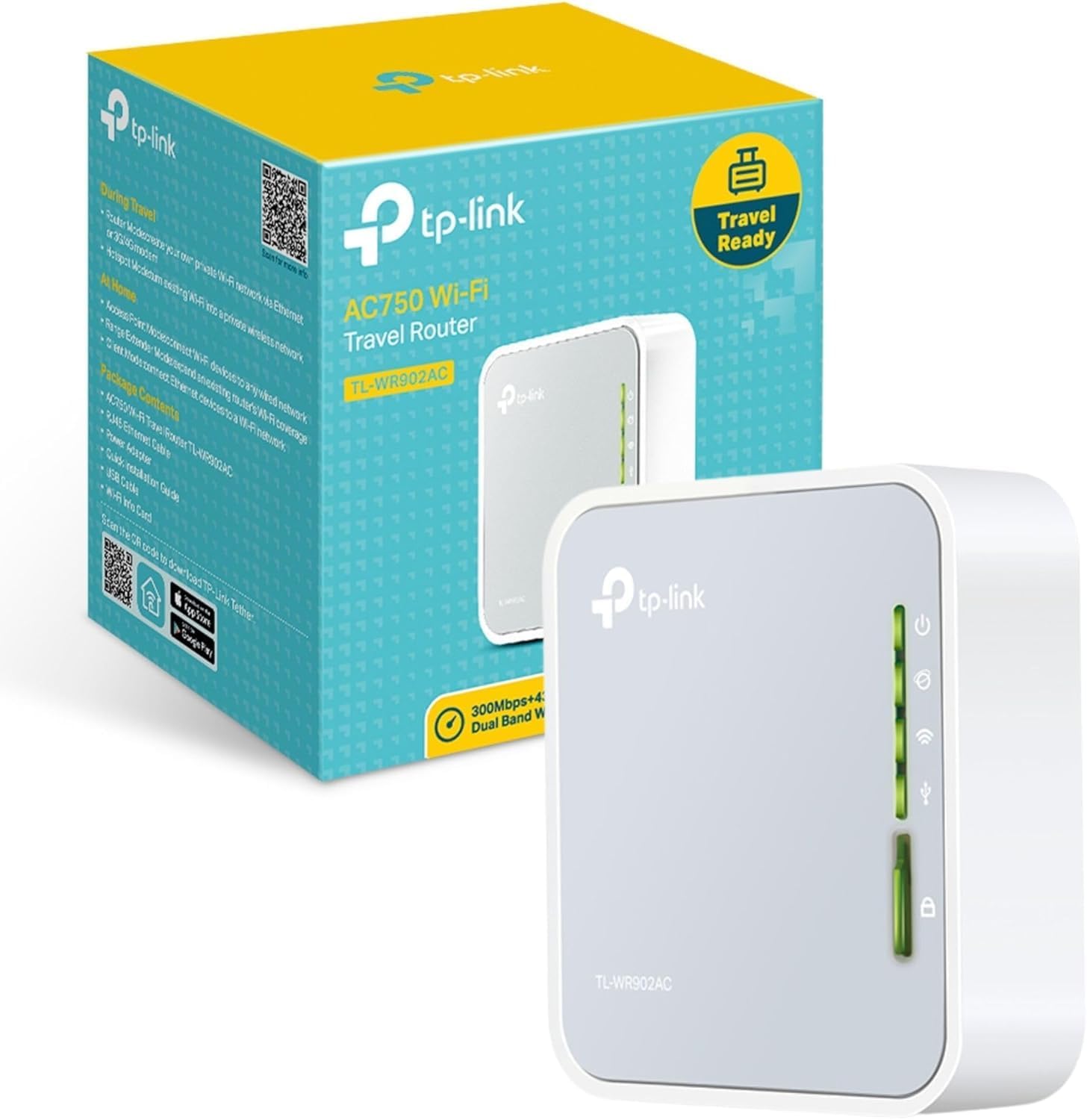
With the travel-sized and compact design, TL-WR902AC is small enough to put into your pocket and make sure you can have internet access wherever you go. The mini USB power supply and built-in adapter make it perfect for travelers, students, and anyone else living life on the go. Coming with the next generation Wi-Fi standard – 802.11ac, 3 times faster than wireless N speeds, TL-WR902AC delivers a combined wireless data transfer rate of up to 733Mbps, making it an ideal choice for various applications simultaneously. To meet the wireless needs of almost any situation you might encounter, the TL-WR902AC features Router, Hotspot, Range Extender, Client, and Access Point Modes. A multifunctional USB port allows you to share files and media through your internet browser with different computers. Also, the USB port can provide power supply (up to 5V/2A) to mobile devices like smart phones or tablets, making it easy to charge on the go. Frequency Range: 2.4GHz and 5GHz; Interface Available: 1 x 10/100Mbps WAN/LAN Port, 1 Reset Button, 1 USB 2.0 Port, 1 Mode Switch, 1 WPS Button; Protocols Supported: Supports IPv4; System Requirement: Windows 10/8.1/8/7/Vista/XP Mac OS or Linux-based operating system; Wireless Standards: IEEE 802.11ac/n/a 5GHz, IEEE 802.11b/g/n 2.4GHz.
Details:
| Brand | TP-Link |
|---|---|
| Model Name | travel router |
| Special Feature | Access Point Mode |
| Frequency Band Class | Dual-Band |
| Wireless Communication Standard | 802.11ax |
| Compatible Devices | Smartphone |
| Recommended Uses For Product | Home |
| Included Components | Router and QIG |
| Connectivity Technology | Wi-Fi |
| Color | Grey, White |
Visit the TP-Link Store
TP-Link WiFi Travel Router (WiFi 5)
AED23948
Quantity:
Order today to get by 7-14 business days
This item qualifies for free delivery
 Imported From: United States
At BOLO, we work hard to ensure the products you receive are new, genuine, and sourced from reputable suppliers.
Every product in the BOLO catalogue is sourced through our Verified Global Supply Network of verified sellers, authorized distributors or directly from the manufacturer.
Each product undergoes thorough inspection and verification at our consolidation and fulfilment centers to ensure it meets our strict authenticity and quality standards before being shipped and delivered to you.
If you ever have concerns regarding the authenticity of a product purchased from us, please contact Bolo Support. We will review your inquiry promptly and, if necessary, provide documentation verifying authenticity or offer a suitable resolution.
Your trust is our top priority, and we are committed to maintaining transparency and integrity in every transaction.
While we strive to display accurate information, variations in packaging, labeling, instructions, or formulation may occasionally occur due to regional differences or supplier updates. For detailed or manufacturer-specific information, please contact the brand directly or reach out to BOLO Support for assistance.
Unless otherwise stated, all prices displayed on the product page include applicable taxes and import duties.
BOLO operates in accordance with the laws and regulations of United Arab Emirates. Any items found to be restricted or prohibited for sale within the United Arab Emirates will be cancelled prior to shipment. We take proactive measures to ensure that only products permitted for sale in United Arab Emirates are listed on our website.
All items are shipped by air, and any products classified as “Dangerous Goods (DG)” under IATA regulations will be removed from the order and cancelled.
All orders are processed manually, and we make every effort to process them promptly once confirmed. Products cancelled due to the above reasons will be permanently removed from listings across the website.

Features

Portable and Compact
With the travel-sized and compact design, TL-WR902AC is small enough to put into your pocket and make sure you can have internet access wherever you go. The mini USB power supply and built-in adapter make it perfect for travelers, students, and anyone else living life on the go.

Excellent Wireless Speed with 11AC Wi-Fi
Coming with the next generation WiFi standard – 802.11ac, faster than wireless N speeds, TL-WR902AC delivers a combined wireless data transfer rate of up to 733Mbps, making it an ideal choice for various applications simultaneously.

Multi-functional USB Port for File Sharing and Charging
A multi-functional USB port allows you to share files and media through your internet browser with different computers. Also, the USB port can provide power supply (up to 5V/2A) to mobile devices like smart phones or tablets, making it easy to charge on the go.
At Home

1. Range Extender Mode
Extend your existing Wi-Fi network to maximize coverage and eliminate dead-zones.

2. Client Mode
Allow devices that require a wired connection to access an existing Wi-Fi network.

3. Access Point Mode
Create a wireless network for Wi-Fi enabled devices.
During Travel

4. Router Mode
Connect to a hotel's Ethernet to instantly create a private wireless network and share internet access to all your Wi-Fi devices.

5. Hotspot Mode
Connect to an outdoor WISP Access Point enjoy a private Wi-Fi hotspot for your devices in public areas.
Similar suggestions by Bolo
More from this brand
Similar items from “Routers”
Share with
Or share with link
https://www.bolo.ae/products/UO01A5EPMDU
Visit the TP-Link Store
TP-Link WiFi Travel Router (WiFi 5)
AED23948
Quantity:
Order today to get by 7-14 business days
This item qualifies for free delivery
Imported From: United States
At BOLO, we work hard to ensure the products you receive are new, genuine, and sourced from reputable suppliers.
Every product in the BOLO catalogue is sourced through our Verified Global Supply Network of verified sellers, authorized distributors or directly from the manufacturer.
Each product undergoes thorough inspection and verification at our consolidation and fulfilment centers to ensure it meets our strict authenticity and quality standards before being shipped and delivered to you.
If you ever have concerns regarding the authenticity of a product purchased from us, please contact Bolo Support. We will review your inquiry promptly and, if necessary, provide documentation verifying authenticity or offer a suitable resolution.
Your trust is our top priority, and we are committed to maintaining transparency and integrity in every transaction.
While we strive to display accurate information, variations in packaging, labeling, instructions, or formulation may occasionally occur due to regional differences or supplier updates. For detailed or manufacturer-specific information, please contact the brand directly or reach out to BOLO Support for assistance.
Unless otherwise stated, all prices displayed on the product page include applicable taxes and import duties.
BOLO operates in accordance with the laws and regulations of United Arab Emirates. Any items found to be restricted or prohibited for sale within the United Arab Emirates will be cancelled prior to shipment. We take proactive measures to ensure that only products permitted for sale in United Arab Emirates are listed on our website.
All items are shipped by air, and any products classified as “Dangerous Goods (DG)” under IATA regulations will be removed from the order and cancelled.
All orders are processed manually, and we make every effort to process them promptly once confirmed. Products cancelled due to the above reasons will be permanently removed from listings across the website.
Description:
What's in the box
Legal Disclaimer
1. Maximum wireless transmission rates are the physical rates derived from IEEE Standard 802.11 specifications. Range and coverage specifications along with the number of connected devices were defined according to test results under normal usage conditions. Actual wireless transmission rate, wireless coverage, and number of connected devices are not guaranteed, and will vary as a result of 1) environmental factors, including building materials, physical objects and obstacles, 2) network conditions, including local interference, volume and density of traffic, product location, network complexity, and network overhead and 3) client limitations, including rated performance, location, connection quality, and client condition. 2. Actual network speed may be limited by the rate of the product's Ethernet WAN or LAN port, the rate supported by the network cable, Internet service provider factors and other environmental conditions.
With the travel-sized and compact design, TL-WR902AC is small enough to put into your pocket and make sure you can have internet access wherever you go. The mini USB power supply and built-in adapter make it perfect for travelers, students, and anyone else living life on the go. Coming with the next generation Wi-Fi standard – 802.11ac, 3 times faster than wireless N speeds, TL-WR902AC delivers a combined wireless data transfer rate of up to 733Mbps, making it an ideal choice for various applications simultaneously. To meet the wireless needs of almost any situation you might encounter, the TL-WR902AC features Router, Hotspot, Range Extender, Client, and Access Point Modes. A multifunctional USB port allows you to share files and media through your internet browser with different computers. Also, the USB port can provide power supply (up to 5V/2A) to mobile devices like smart phones or tablets, making it easy to charge on the go. Frequency Range: 2.4GHz and 5GHz; Interface Available: 1 x 10/100Mbps WAN/LAN Port, 1 Reset Button, 1 USB 2.0 Port, 1 Mode Switch, 1 WPS Button; Protocols Supported: Supports IPv4; System Requirement: Windows 10/8.1/8/7/Vista/XP Mac OS or Linux-based operating system; Wireless Standards: IEEE 802.11ac/n/a 5GHz, IEEE 802.11b/g/n 2.4GHz.
Details:
| Brand | TP-Link |
|---|---|
| Model Name | travel router |
| Special Feature | Access Point Mode |
| Frequency Band Class | Dual-Band |
| Wireless Communication Standard | 802.11ax |
| Compatible Devices | Smartphone |
| Recommended Uses For Product | Home |
| Included Components | Router and QIG |
| Connectivity Technology | Wi-Fi |
| Color | Grey, White |
Features
Portable and Compact
With the travel-sized and compact design, TL-WR902AC is small enough to put into your pocket and make sure you can have internet access wherever you go. The mini USB power supply and built-in adapter make it perfect for travelers, students, and anyone else living life on the go.
Excellent Wireless Speed with 11AC Wi-Fi
Coming with the next generation WiFi standard – 802.11ac, faster than wireless N speeds, TL-WR902AC delivers a combined wireless data transfer rate of up to 733Mbps, making it an ideal choice for various applications simultaneously.
Multi-functional USB Port for File Sharing and Charging
A multi-functional USB port allows you to share files and media through your internet browser with different computers. Also, the USB port can provide power supply (up to 5V/2A) to mobile devices like smart phones or tablets, making it easy to charge on the go.
At Home
1. Range Extender Mode
Extend your existing Wi-Fi network to maximize coverage and eliminate dead-zones.
2. Client Mode
Allow devices that require a wired connection to access an existing Wi-Fi network.
3. Access Point Mode
Create a wireless network for Wi-Fi enabled devices.
During Travel
4. Router Mode
Connect to a hotel's Ethernet to instantly create a private wireless network and share internet access to all your Wi-Fi devices.
5. Hotspot Mode
Connect to an outdoor WISP Access Point enjoy a private Wi-Fi hotspot for your devices in public areas.
Similar suggestions by Bolo
More from this brand
Similar items from “Routers”
Share with
Or share with link
https://www.bolo.ae/products/UO01A5EPMDU