Deliver toUnited Arab Emirates
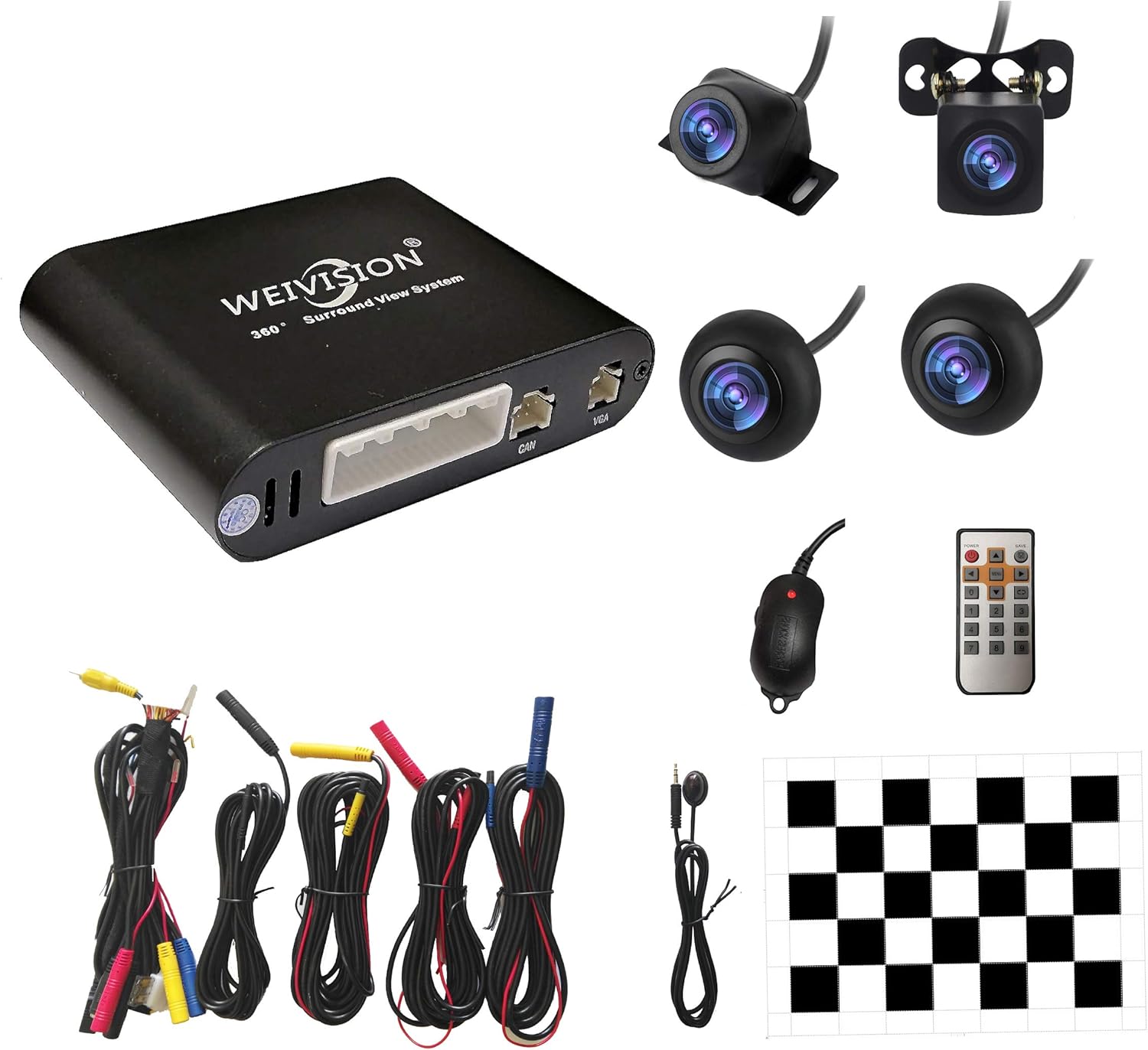
Universal 360 Degree Bird View System Car DVR Record Panoramic View All Round Rear View Camera System for All Car

Description:

  • Please be noted: this system should Professional Installation,this unversal model, the car side mirror should drill a 20mm hole to install the side camera.
  • 4 Super wide angle(above 170 degree) Cameras, Waterproof IP69, Night vision
  • Provide the driver a clear 360 degree bird's-eye view around vehicle, Universal for almost all the cars(Except long vehicle such as buses)
  • Eliminate most of the blind spots, makes much easier for parking and passing the narrow road
  • Seamless Splicing Technology, Auto image mosaic, Parking monitoring with shock sensor, auto record, the video format is MP4, you can view the video on PC or mobile.

  • Reviews:

    5.0 out of 5 stars One of the best sellers on Amazon by far

    j. · June 17, 2025

    (function() { P.when('cr-A', 'ready').execute(function(A) { if(typeof A.toggleExpanderAriaLabel === 'function') { A.toggleExpanderAriaLabel('review_text_read_more', 'Read more of this review', 'Read less of this review'); } }); })(); .review-text-read-more-expander:focus-visible { outline: 2px solid #2162a1; outline-offset: 2px; border-radius: 5px; } Ok ... I was ify at first but I'll tell u what .. seller a++++.... great product . For the most ey there Birdseye view is killer ... and there product support was best I've ever seen on Bolo... seller is more than words can say.... thank u and don't hesitate to buy from this seller... and Lucy great product support . She took care of every issue I had.. God bless all or u....

    5.0 out of 5 stars The best purchase ever

    M. · December 9, 2020

    I purchased a Weivision 360 bird view camera system back in July 2020 and installed it on my Scion Xb 2010. I have no experience at all in car wiring but with the help from YouTube reviews, the wiring diagram that comes with the cameras and tech support from Weivision I was able to install the whole Weivision 360 camera system on my own. I followed the installation, wiring and calibration instructions to the T and completed the installation. The system works as intended: the rear camera pops as soon as you shift to reverse and goes back to the front view camera automatically when shifting to Drive. The left and right view cameras works when you signal to turn. All of this due to the clear wiring instructions provided by Weivision that allowed me to tap into the right wires. The quality of the hardware is great from the insulated wires, the cameras, the host, the quality of the video and down to the color of the connectors: red, blue, yellow and black that leaves the guess work out to make the installation. a breeze. I called tech support to have the picture of my car displayed instead of the default one and the response from Lucy was fast. This is the best value package from the hardware to tech support for the money I paid that I purchased and received on 12-05-20. a second Weivision camera system to install it on my son’s Jeep.This time When running the wires through the doors I didn’t realize that the wires got pinched causing the cameras to fail. All I got was adjusting color bars displayed in the unit head. Thinking that I had bad cameras I reached out to Lucy again and she responded advising to disconnect the side and rear cameras leaving just the front camera connected. I right away got the front view camera displayed in the head unit. Since I had installed my first camera system on my car back in July, I went to it and borrowed from it the long blue and red extension cables, Disconnected the two side cameras from the bad extension cables and I re-connected, one by one, first the side cameras and lastly the rear camera using the good extension cables borrowed from my car. By Doing this I was able to have all the cameras working thanks to Lucy’s help in trouble shooting to resolve the lack of live video.When I removed the bad extension cables I found them really crushed, one of them almost cut off. It seems I got them too close to the window rack while testing the windows to make sure they were out of its way. Duh. Obviously they were not.Right there and then I realized that the system was really good and reliable as this mistake of mine did not get the host, the cameras nor my son’s car fried. I completed the installation today, 12-07-20.The camera system is great. It comes with everything needed to have a successful installation even if you know little to nothing about setting these systems up into your car’s wiring system. Take it from me who knew nothing about it and managed to have two successful installations even through the big mistake I made crushing the wires.Now I have two old cars from 2010 and 2012 with Weivision 360 bird view camera systems. This experience I got schooled me to install blind spot and back up sensors on the same cars.

    1.0 out of 5 stars Doa

    E.K. · July 14, 2025

    Worked for about 2 minutes, then blank screen. Rebooting it shows video for a brief moment, then nothing. Support not helpful. Waste of money

    4.0 out of 5 stars It works fine, there are a lot of details that they don’t give you.

    K. · March 9, 2025

    Everything looked spectacular. The detail was in installing the cameras, there are not many details in the manual. The rearview mirror cameras are marked with a white dot which has to be facing outwards, the one on the left side is pointing west and the right one pointing east, they have to be aligned, imagine a line that starts from left to right and that is how you guide yourself. The other problem I had was that nowhere in the manual did it specify that the IR Receiver had to be in a clear place where it can receive the signal from the remote control to calibrate, make the respective connections of the yellow, red and black power cables, put the vehicle in reverse and press the red power button on the module's remote control, then the menu button and thus be able to start calibrating, Also did not indicate that the pieces of cloth that are placed on the ground to calibrate had to be centered taking as a reference the location of the cameras, the only Guide was how to make the rectangle to place the pieces of cloth, make the rectangle respecting 10 centimeters of distance between the vehicle and the rectangle that must be made. They work well but if you are a person with little experience you will see chaos.

    5.0 out of 5 stars Review after 6 Months

    B. · June 27, 2025

    The media could not be loaded. Using it for more than 6 months works perfectly. Also, customer service helped me a lot after the purchase.

    5.0 out of 5 stars Excelent product

    A.C. · May 10, 2025

    I was surprise it a good product everything work and good customer service

    3.0 out of 5 stars night vision

    R. · July 5, 2025

    It has no night vision.

    5.0 out of 5 stars Love it! Works as described.

    D. · October 3, 2019

    I saw a similar system built into my brother-in-law's Mercedes and was totally impressed. I assumed incorrectly that a similar system for my lowly Chevy would be way too expensive. Now after I've got it installed and setup, I'm completely happy. This Weivision Universal 360 was a bargain.Now I have to say that installation was not trivial. The instructions were actually very good and helped me avoid most installation errors. The most difficult part was mounting the side view cams inside the side mirrors and running the single camera cable from the door into the car interior. The single thin connector/cable made this much easier than traditional phono type connectors. I used manual setup, with the checked cloths provided and the display looks great.For the front cam, I made a custom mount using a short piece of 3/4" PVC pipe , extending it so it could look down and see the bumper edge. The rear bumper mount worked fine as is. Velcroed the little IR remote to the shift console. This system makes NYC parallel parking actually fun. I have not tried the recording system.Words of warning: Although the installation instructions are excellent, I consider myself fairly "handy" and installation took many hours. Also, the cams are custom made for this system, wide angle and not 12v. I blew out the front cam while experimenting before installation. However, the excellent customer service from WEIVISION quickly sent me a replacement.

    Best upgrade ever

    R.D. · January 28, 2025

    (function() { P.when('cr-A', 'ready').execute(function(A) { if(typeof A.toggleExpanderAriaLabel === 'function') { A.toggleExpanderAriaLabel('review_text_read_more', 'Read more of this review', 'Read less of this review'); } }); })(); .review-text-read-more-expander:focus-visible { outline: 2px solid #2162a1; outline-offset: 2px; border-radius: 5px; } This kit was the best upgrade I gave my father's truck (as Nissan frontier, 2016). He absolutely loved the feature that my Genesis came with and when I found this, I had to give it a shot. The installation instructions could have been clearer, but the company was responsive and helpful. My dad now has a very functional, helpful birds eye view of his truck when he parks it, and never leaves the truck sticking out anymore. Also super handy for hooking up the boat trailer. Overall, excellent image quality, even in low light conditions.If you're thinking about it, just do it! You won't regret it at all!

    この価格でこの機能

    た. · August 14, 2023

    メーカー純正は手が届かず、この商品をみつけました。某YouTuberさんが、取付動画をあげてみえたので、取付けと調整は問題なく行えました。メーカー純正品と遜色ないです。ステアリング連動のガイドラインなどは当然ありません。常時電源への接続で24時間の監視モニターになりますが、バッテリーの消耗を気にしてACC接続としています。その際、画面右上の日時が常に初期値となるので、日時の表示が消せると嬉しいかな?本来のには機能は充分満足です。

    満足してます

    ゴ. · October 29, 2020

    日本語説明書があればもっと簡単に画像調整などフルに活用出来ると思うなんとか翻訳しながらがんばりますしっかりアラウンドビューになってるし、値段相応だとおもう初めてのアラウンドビュー装着でかなり苦労したが、ケーブルの長さも十分で、ハイエースにも取り付けできました。全体的に満足です

    オートキャリブレーション一発OK!!

    フ. · September 27, 2021

    一発OK!というと聞こえは良いのですが、実は長い長い道のりがありまして。。。今年春に購入、少々マニアックな旧車を手に入れたのはいいが、今まで乗っていたSUVには当たり前のように360°バードビューカメラがついておりそいつを見ながら白線の真ん中にピタッと駐車することに快感を覚えていたのと、小回りが利かない車なので今までと同じようにバック駐車しようとするとめっちゃずれる!こりゃやばいわ。隣の車にでも当てたら大変。ってことで後付けの360°バードビューカメラはないかなとBoloを探るとあるじゃん!しかもそんなにお高くない、10万超えるなら止めとこと考えていたのだがなんと\33,280(今はもっと安くなってますね)!とはいえ他にもあるのでは?。。。。あった!MiCarBa しかもこっちは値段違いが何個も。どっちがいいんだろう。。。全部のレビューを読み漁る漁る。うーんよくわからんが、あっちのほうが不具合が多いような気がする。よし!こっちをポチッと。ほどなく届いたのでインストールは馴染みのカーショップにお願いしました。さて車が帰ってきてどうかなー見えるかなー。あちゃ~。歪まくり。駐車場の枠線は斜めや映ってないやとワヤワヤ。店長は色々やってみたんですが、うまくいかなくて(^^;としゃーない自分で調整してみよう!会社の駐車場説明書を読んで計測して周囲にガムテープでラインを引いてキャリブレーションクロスを地面に貼り付け、んークロスが2枚しかない!あちゃー。確かMiCarBaの方のレビューでは位置さえわかればいいんでクロスいらんとか書いてあったなー。じゃあマニュアルキャリブレーション前提でポイントになりそうな点をガムテープで印付けしてマニュアル設定前提で位置決めをしていく。数値も測ってと。さあ設定するぞ!ところがこれがまったくもって分かりにくい。表示言語を選べるので日本語にしたのがまずかった。訳が変な訳なので意味するものがよくわからない。それでも説明書に沿って設定していくのだけど説明書がまったくもって説明不足。パラメーターがあってもこんな時はこのパラメーターを選ぶとかの説明が一切ない。例えば、カメラビューを選ぶのに 近い・中間・遠いと書かれていてもその基準はどこなのかわからない。おそらくカメラから地面が遠い近いなんだろうけどクーペでナンバープレートの辺に付けたら近いなんだろうなぁ。うちのは4駆なんでカメラの位置は高めではあるけど、中間の範囲なのか、遠いを選ぶべきか。俯瞰で範囲を大きくみるために1BOXでルーフの当たりにカメラを装着する人もいるかもとかいや、ねーだろってことまで考えてしまう。じゃまぁ中間でって具合に類推。カメラでポイントを見ながら合わせていくのもどこに合わせろとも書いてないのでなんとなくクロスの真ん中に合わせるのかな。次のは4隅を合わせていくのかな。あれ?エラーになっちゃった。このリモコン使いにくいんだよなー。じゃあ隅からちょっとずらして、、いけた!とまあこんな調子で、おそらくこういう意図なんだろうを類推を繰り返し。ふーそれではキャリブレーション!おっまあまあいけた、でもこの線斜め、隣の車止めがエライずれてる。もう一度修正。まあなんとかそれなりにそろった、これなら使えるわ。ふー。駐車の際使っていくと、いいじゃんいいじゃん。となると欲が出て。そういえば取説書の最後に画面に映る自車を自分の車に変えられますよって書いてあったのを思い出し。メーカーにメールしてみました。前の型のディフェンダーなんですがいけます?するとルーフトップの写真を撮って送ってこいとのこと。屋根の写真ってどうやって撮ったらいいの?困った。そこで会社の外階段の横に止めて会談の上から撮って送った。そしたら真上からの写真を送れという。真上からの写真なんて撮れます?歩道橋の下に停めて上から撮る?いかんいかん。どーしよう。そうだ!この車のミニカー持ってたよ!ミニカーなら真上から写せる!ヨシッと、撮りました。(実際にはスマホの影が入ったりして意外と難しい)送ると作ったぞーとファイルとともに画像変更の方法の説明書がメールできました。やった!早速変更!ファイルをUSBに移し、コネクタに接続。何々これでリカバリーを押すと良いのね。よし!これでどうだ!自動的に再起動となりモニターに映ったのはぐちゃぐちゃになった駐車場の枠線でした((+_+))苦労して設定した値が全部初期化されてしまったのでした・・・しばし呆然。ま、でも車が変更できたなら・・できてない((+_+))なんのためにデータをパーにしたのか。リカバリーをクリックする前に一度セーブをかけときゃ良かった。これでしばらくやる気出ず。もともと計測してテープ貼ったりかなり手間なんで休みの日で時間があってしかも天気が良くて駐車場が空いている時しか作業できないのです。バードビューじゃなくなったモニターを見てため息でしたがもう一度チャレンジすることにしました。MiCarBaのほうでキャリブレーションクロスを購入。ガムテープだと幅が広すぎるので黄色のマスキングテープとアスファルトにポイントを書き込むチョークを100均で購入。チャンスを待っていざ設定へ!周囲の白線などに影響されないよう駐車枠ではなく通路部に停めて車体から10cm離れたところにマスキングテープで線を引くバックドアにスペアタイヤがついているので、それ込みで位置決め車検証でなく実測で数値をメモしていく、サイドのシートはどこを基準にするかはっきりと記載はないが図を見てドアミラーに付けたカメラの真下がクロスの長径の真ん中に来るように設置この間風にあおられ何度かシートをテープで留めなおす。ここも数値実測。あれ?左右でずれてる。微調整。では本体設定!行くぞ!言語はややこしいので取説と同じ英語で!英語であることを抜きにしても不親切な取説書。各選択肢のどれを選んだら良いかの基準が不明。それでも発見したのは日本語表記の時”越野”と書いてあった車種をこれがSUVのことだろうと選んでいたが英語表記では”PickUp”だった。よってこれはSUVに設定。すると何と!モニターに愛車が映っているではないか!(正確には同車種のミニカー)テンション上がる~。基本設定のパラメーターを設定していく、数値は実測値選択肢は相変わらずよくわからないけど類推例のカメラビューは”遠い”で。一通り入力し終えて、各カメラでの見え方を確認。まあまあ説明書の写真に近くなった。まずオートキャリブレーションでほどほど合わせてからマニュアルセッティングで追い込んでいこう。とりあえず一度セーブね。ではオートキャリブレーション、オン!数秒待って出た画面は車周囲に引いたテープがきれいに直線になっておりキャリブレーションクロスも変形なくマスがそろっていて見るからに整ったバードビューの感じです。おーいんじゃね!マニュアル調整いらんか。良さそう。良いと思うけど。駐車枠に停めてみないと本当にできたかどうかわからない。でもこの位置から動かすと二度と同じ位置には戻れない。またテープ、クロス貼りと実測をイチからやらないといけない。うーんどうしよう。えい!このままでは埒があかん。動こう!と車を動かし駐車枠へ。するとアップした写真のようにバッチリでした!マニュアル調整は要りませんでした。といった次第。この後画像の明るさやコントラストなど調整して何度もしつこいくらいセーブ!書き忘れましたが、このシステムから出力されるモニターの方も先に調整して明るくよく字が判別できるようにしておくとやりやすいです。システムの方も輝度、コントラストなど調整ができるので最明るいくらいに調整しておくと良いです。なぜならリモコンで数値を入れていく際に画面の入力窓に立体感を出したいのか妙なグラデーションがかかっていて入力した数値が読みにくいのです。以上長文お読みいただきありがとうございました。

    取付後3ヶ月半で熱暴走

    ぽ. · July 6, 2022

    バードビューという技術に憧れ購入してみました。取付は一般的なドラレコより困難だと思います。前後カメラはいいとして、左右カメラをドアミラーの中に埋め込む作業と配線が手間です。セッティング難易度は語解力次第かと思います。本体は中国語と英語と辿々しい日本語、取説は英語のみ。日本語しか理解できない人にはかなり困難です。また、メーカーにも日本語を理解している人は居ない模様。タイトルの件ですが取り付けてから3ヶ月半でモニターに映らなくなりました。ここから追記販売者と2ヶ月間交渉の上、メーカーから本体だけ代品送ってきました。通常通り稼働しました。販売者に相談すると元の本体はこちらで処分していいと。メーカーの封印がされていたので分解しなかったのですが開けてみました。開けてはみたものの、私には分かりませんでしたね。トランジスタか単体MOSFETあたりが飛んだんだろうと推測してましたがマザーボートとなるとお手上げです。ただ、壊れた前後はかなり熱暴走していました。ケースがアルミ製ですがヒートシンクとしての役割り薄そうです。何故かCPU本体でなく左側の小さな半導体に小さな導熱シートが着いているだけです。新しく届いた本体に冷却ファンを着けてみました。ラズベリーパイに使われるような小さな25mm冷却ファンの12Vモデル2個セットがアマゾンで売っていたのでこれを本体の外側に着けてみました。2個パックたっだのでせっかくだから2個とも着けて、給電は本体のグランド(黒線)とアクセサリー(赤線)から取ってみました。キーをオンした時だけファンが回ります。仮設で目の届くところに置いてみました。以前は猛烈に熱かった本体がほぼ常温のようになってます。ファンなのでそれなりに音は発生していますがエンジンがかかっていると聞こえません。ハイブリットでも走行中は聞こえないと思います。以前はグローブボックスの中に設置していましたが熱がこもるので風通しのいいところに置き直したいですね。

    Universal 360 Degree Bird View System Car DVR Record Panoramic View All Round Rear View Camera System for All Car

    Product ID: UO00ME65B2T
    Condition: New

    3.9

    AED1,25965

    Price includes VAT & Import Duties
    Availability: In Stock

    Quantity:

    |

    Order today to get by 7-14 business days

    This item qualifies for free delivery

    Returns & Warranty policies

    Imported From: United States

    At BOLO, we work hard to ensure the products you receive are new, genuine, and sourced from reputable suppliers.

    BOLO is not an authorized or official retailer for most brands, nor are we affiliated with manufacturers unless specifically stated on a product page. Instead, we source verified sellers, authorized distributors or directly from the manufacturer.

    Each product undergoes thorough inspection and verification at our consolidation and fulfilment centers to ensure it meets our strict authenticity and quality standards before being shipped and delivered to you.

    If you ever have concerns regarding the authenticity of a product purchased from us, please contact Bolo Support. We will review your inquiry promptly and, if necessary, provide documentation verifying authenticity or offer a suitable resolution.

    Your trust is our top priority, and we are committed to maintaining transparency and integrity in every transaction.

    All product information, images, descriptions, and reviews originate from the manufacturer or from trusted sellers overseas. BOLO is not affiliated with, endorsed by, or an authorized retailer for most brands listed on our website unless stated otherwise.

    While we strive to display accurate information, variations in packaging, labeling, instructions, or formulation may occasionally occur due to regional differences or supplier updates. For detailed or manufacturer-specific information, please contact the brand directly or reach out to BOLO Support for assistance.

    Unless otherwise stated, all prices displayed on the product page include applicable taxes and import duties.

    BOLO operates in accordance with the laws and regulations of United Arab Emirates. Any items found to be restricted or prohibited for sale within the UAE will be cancelled prior to shipment. We take proactive measures to ensure that only products permitted for sale in United Arab Emirates are listed on our website.

    All items are shipped by air, and any products classified as “Dangerous Goods (DG)” under IATA regulations will be removed from the order and cancelled.

    All orders are processed manually, and we make every effort to process them promptly once confirmed. Products cancelled due to the above reasons will be permanently removed from listings across the website.

    Similar suggestions by Bolo

    More from this brand

    Similar items from “Vehicle Backup Cameras”

    Universal 360 Degree Bird View System Car DVR Record Panoramic View All Round Rear View Camera System for All Car

    Product ID: UO00ME65B2T
    Condition: New

    3.9

    Universal 360 Degree Bird View System Car DVR Record Panoramic View All Round Rear View Camera System for All Car-0

    AED1,25965

    Price includes VAT & Import Duties
    Availability: In Stock

    Quantity:

    |

    Order today to get by 7-14 business days

    This item qualifies for free delivery

    Returns & Warranty policies

    Imported From: United States

    At BOLO, we work hard to ensure the products you receive are new, genuine, and sourced from reputable suppliers.

    BOLO is not an authorized or official retailer for most brands, nor are we affiliated with manufacturers unless specifically stated on a product page. Instead, we source verified sellers, authorized distributors or directly from the manufacturer.

    Each product undergoes thorough inspection and verification at our consolidation and fulfilment centers to ensure it meets our strict authenticity and quality standards before being shipped and delivered to you.

    If you ever have concerns regarding the authenticity of a product purchased from us, please contact Bolo Support. We will review your inquiry promptly and, if necessary, provide documentation verifying authenticity or offer a suitable resolution.

    Your trust is our top priority, and we are committed to maintaining transparency and integrity in every transaction.

    All product information, images, descriptions, and reviews originate from the manufacturer or from trusted sellers overseas. BOLO is not affiliated with, endorsed by, or an authorized retailer for most brands listed on our website unless stated otherwise.

    While we strive to display accurate information, variations in packaging, labeling, instructions, or formulation may occasionally occur due to regional differences or supplier updates. For detailed or manufacturer-specific information, please contact the brand directly or reach out to BOLO Support for assistance.

    Unless otherwise stated, all prices displayed on the product page include applicable taxes and import duties.

    BOLO operates in accordance with the laws and regulations of United Arab Emirates. Any items found to be restricted or prohibited for sale within the UAE will be cancelled prior to shipment. We take proactive measures to ensure that only products permitted for sale in United Arab Emirates are listed on our website.

    All items are shipped by air, and any products classified as “Dangerous Goods (DG)” under IATA regulations will be removed from the order and cancelled.

    All orders are processed manually, and we make every effort to process them promptly once confirmed. Products cancelled due to the above reasons will be permanently removed from listings across the website.

    Description:

  • Please be noted: this system should Professional Installation,this unversal model, the car side mirror should drill a 20mm hole to install the side camera.
  • 4 Super wide angle(above 170 degree) Cameras, Waterproof IP69, Night vision
  • Provide the driver a clear 360 degree bird's-eye view around vehicle, Universal for almost all the cars(Except long vehicle such as buses)
  • Eliminate most of the blind spots, makes much easier for parking and passing the narrow road
  • Seamless Splicing Technology, Auto image mosaic, Parking monitoring with shock sensor, auto record, the video format is MP4, you can view the video on PC or mobile.

  • Reviews:

    5.0 out of 5 stars One of the best sellers on Amazon by far

    j. · June 17, 2025

    (function() { P.when('cr-A', 'ready').execute(function(A) { if(typeof A.toggleExpanderAriaLabel === 'function') { A.toggleExpanderAriaLabel('review_text_read_more', 'Read more of this review', 'Read less of this review'); } }); })(); .review-text-read-more-expander:focus-visible { outline: 2px solid #2162a1; outline-offset: 2px; border-radius: 5px; } Ok ... I was ify at first but I'll tell u what .. seller a++++.... great product . For the most ey there Birdseye view is killer ... and there product support was best I've ever seen on Bolo... seller is more than words can say.... thank u and don't hesitate to buy from this seller... and Lucy great product support . She took care of every issue I had.. God bless all or u....

    5.0 out of 5 stars The best purchase ever

    M. · December 9, 2020

    I purchased a Weivision 360 bird view camera system back in July 2020 and installed it on my Scion Xb 2010. I have no experience at all in car wiring but with the help from YouTube reviews, the wiring diagram that comes with the cameras and tech support from Weivision I was able to install the whole Weivision 360 camera system on my own. I followed the installation, wiring and calibration instructions to the T and completed the installation. The system works as intended: the rear camera pops as soon as you shift to reverse and goes back to the front view camera automatically when shifting to Drive. The left and right view cameras works when you signal to turn. All of this due to the clear wiring instructions provided by Weivision that allowed me to tap into the right wires. The quality of the hardware is great from the insulated wires, the cameras, the host, the quality of the video and down to the color of the connectors: red, blue, yellow and black that leaves the guess work out to make the installation. a breeze. I called tech support to have the picture of my car displayed instead of the default one and the response from Lucy was fast. This is the best value package from the hardware to tech support for the money I paid that I purchased and received on 12-05-20. a second Weivision camera system to install it on my son’s Jeep.This time When running the wires through the doors I didn’t realize that the wires got pinched causing the cameras to fail. All I got was adjusting color bars displayed in the unit head. Thinking that I had bad cameras I reached out to Lucy again and she responded advising to disconnect the side and rear cameras leaving just the front camera connected. I right away got the front view camera displayed in the head unit. Since I had installed my first camera system on my car back in July, I went to it and borrowed from it the long blue and red extension cables, Disconnected the two side cameras from the bad extension cables and I re-connected, one by one, first the side cameras and lastly the rear camera using the good extension cables borrowed from my car. By Doing this I was able to have all the cameras working thanks to Lucy’s help in trouble shooting to resolve the lack of live video.When I removed the bad extension cables I found them really crushed, one of them almost cut off. It seems I got them too close to the window rack while testing the windows to make sure they were out of its way. Duh. Obviously they were not.Right there and then I realized that the system was really good and reliable as this mistake of mine did not get the host, the cameras nor my son’s car fried. I completed the installation today, 12-07-20.The camera system is great. It comes with everything needed to have a successful installation even if you know little to nothing about setting these systems up into your car’s wiring system. Take it from me who knew nothing about it and managed to have two successful installations even through the big mistake I made crushing the wires.Now I have two old cars from 2010 and 2012 with Weivision 360 bird view camera systems. This experience I got schooled me to install blind spot and back up sensors on the same cars.

    1.0 out of 5 stars Doa

    E.K. · July 14, 2025

    Worked for about 2 minutes, then blank screen. Rebooting it shows video for a brief moment, then nothing. Support not helpful. Waste of money

    4.0 out of 5 stars It works fine, there are a lot of details that they don’t give you.

    K. · March 9, 2025

    Everything looked spectacular. The detail was in installing the cameras, there are not many details in the manual. The rearview mirror cameras are marked with a white dot which has to be facing outwards, the one on the left side is pointing west and the right one pointing east, they have to be aligned, imagine a line that starts from left to right and that is how you guide yourself. The other problem I had was that nowhere in the manual did it specify that the IR Receiver had to be in a clear place where it can receive the signal from the remote control to calibrate, make the respective connections of the yellow, red and black power cables, put the vehicle in reverse and press the red power button on the module's remote control, then the menu button and thus be able to start calibrating, Also did not indicate that the pieces of cloth that are placed on the ground to calibrate had to be centered taking as a reference the location of the cameras, the only Guide was how to make the rectangle to place the pieces of cloth, make the rectangle respecting 10 centimeters of distance between the vehicle and the rectangle that must be made. They work well but if you are a person with little experience you will see chaos.

    5.0 out of 5 stars Review after 6 Months

    B. · June 27, 2025

    The media could not be loaded. Using it for more than 6 months works perfectly. Also, customer service helped me a lot after the purchase.

    5.0 out of 5 stars Excelent product

    A.C. · May 10, 2025

    I was surprise it a good product everything work and good customer service

    3.0 out of 5 stars night vision

    R. · July 5, 2025

    It has no night vision.

    5.0 out of 5 stars Love it! Works as described.

    D. · October 3, 2019

    I saw a similar system built into my brother-in-law's Mercedes and was totally impressed. I assumed incorrectly that a similar system for my lowly Chevy would be way too expensive. Now after I've got it installed and setup, I'm completely happy. This Weivision Universal 360 was a bargain.Now I have to say that installation was not trivial. The instructions were actually very good and helped me avoid most installation errors. The most difficult part was mounting the side view cams inside the side mirrors and running the single camera cable from the door into the car interior. The single thin connector/cable made this much easier than traditional phono type connectors. I used manual setup, with the checked cloths provided and the display looks great.For the front cam, I made a custom mount using a short piece of 3/4" PVC pipe , extending it so it could look down and see the bumper edge. The rear bumper mount worked fine as is. Velcroed the little IR remote to the shift console. This system makes NYC parallel parking actually fun. I have not tried the recording system.Words of warning: Although the installation instructions are excellent, I consider myself fairly "handy" and installation took many hours. Also, the cams are custom made for this system, wide angle and not 12v. I blew out the front cam while experimenting before installation. However, the excellent customer service from WEIVISION quickly sent me a replacement.

    Best upgrade ever

    R.D. · January 28, 2025

    (function() { P.when('cr-A', 'ready').execute(function(A) { if(typeof A.toggleExpanderAriaLabel === 'function') { A.toggleExpanderAriaLabel('review_text_read_more', 'Read more of this review', 'Read less of this review'); } }); })(); .review-text-read-more-expander:focus-visible { outline: 2px solid #2162a1; outline-offset: 2px; border-radius: 5px; } This kit was the best upgrade I gave my father's truck (as Nissan frontier, 2016). He absolutely loved the feature that my Genesis came with and when I found this, I had to give it a shot. The installation instructions could have been clearer, but the company was responsive and helpful. My dad now has a very functional, helpful birds eye view of his truck when he parks it, and never leaves the truck sticking out anymore. Also super handy for hooking up the boat trailer. Overall, excellent image quality, even in low light conditions.If you're thinking about it, just do it! You won't regret it at all!

    この価格でこの機能

    た. · August 14, 2023

    メーカー純正は手が届かず、この商品をみつけました。某YouTuberさんが、取付動画をあげてみえたので、取付けと調整は問題なく行えました。メーカー純正品と遜色ないです。ステアリング連動のガイドラインなどは当然ありません。常時電源への接続で24時間の監視モニターになりますが、バッテリーの消耗を気にしてACC接続としています。その際、画面右上の日時が常に初期値となるので、日時の表示が消せると嬉しいかな?本来のには機能は充分満足です。

    満足してます

    ゴ. · October 29, 2020

    日本語説明書があればもっと簡単に画像調整などフルに活用出来ると思うなんとか翻訳しながらがんばりますしっかりアラウンドビューになってるし、値段相応だとおもう初めてのアラウンドビュー装着でかなり苦労したが、ケーブルの長さも十分で、ハイエースにも取り付けできました。全体的に満足です

    オートキャリブレーション一発OK!!

    フ. · September 27, 2021

    一発OK!というと聞こえは良いのですが、実は長い長い道のりがありまして。。。今年春に購入、少々マニアックな旧車を手に入れたのはいいが、今まで乗っていたSUVには当たり前のように360°バードビューカメラがついておりそいつを見ながら白線の真ん中にピタッと駐車することに快感を覚えていたのと、小回りが利かない車なので今までと同じようにバック駐車しようとするとめっちゃずれる!こりゃやばいわ。隣の車にでも当てたら大変。ってことで後付けの360°バードビューカメラはないかなとBoloを探るとあるじゃん!しかもそんなにお高くない、10万超えるなら止めとこと考えていたのだがなんと\33,280(今はもっと安くなってますね)!とはいえ他にもあるのでは?。。。。あった!MiCarBa しかもこっちは値段違いが何個も。どっちがいいんだろう。。。全部のレビューを読み漁る漁る。うーんよくわからんが、あっちのほうが不具合が多いような気がする。よし!こっちをポチッと。ほどなく届いたのでインストールは馴染みのカーショップにお願いしました。さて車が帰ってきてどうかなー見えるかなー。あちゃ~。歪まくり。駐車場の枠線は斜めや映ってないやとワヤワヤ。店長は色々やってみたんですが、うまくいかなくて(^^;としゃーない自分で調整してみよう!会社の駐車場説明書を読んで計測して周囲にガムテープでラインを引いてキャリブレーションクロスを地面に貼り付け、んークロスが2枚しかない!あちゃー。確かMiCarBaの方のレビューでは位置さえわかればいいんでクロスいらんとか書いてあったなー。じゃあマニュアルキャリブレーション前提でポイントになりそうな点をガムテープで印付けしてマニュアル設定前提で位置決めをしていく。数値も測ってと。さあ設定するぞ!ところがこれがまったくもって分かりにくい。表示言語を選べるので日本語にしたのがまずかった。訳が変な訳なので意味するものがよくわからない。それでも説明書に沿って設定していくのだけど説明書がまったくもって説明不足。パラメーターがあってもこんな時はこのパラメーターを選ぶとかの説明が一切ない。例えば、カメラビューを選ぶのに 近い・中間・遠いと書かれていてもその基準はどこなのかわからない。おそらくカメラから地面が遠い近いなんだろうけどクーペでナンバープレートの辺に付けたら近いなんだろうなぁ。うちのは4駆なんでカメラの位置は高めではあるけど、中間の範囲なのか、遠いを選ぶべきか。俯瞰で範囲を大きくみるために1BOXでルーフの当たりにカメラを装着する人もいるかもとかいや、ねーだろってことまで考えてしまう。じゃまぁ中間でって具合に類推。カメラでポイントを見ながら合わせていくのもどこに合わせろとも書いてないのでなんとなくクロスの真ん中に合わせるのかな。次のは4隅を合わせていくのかな。あれ?エラーになっちゃった。このリモコン使いにくいんだよなー。じゃあ隅からちょっとずらして、、いけた!とまあこんな調子で、おそらくこういう意図なんだろうを類推を繰り返し。ふーそれではキャリブレーション!おっまあまあいけた、でもこの線斜め、隣の車止めがエライずれてる。もう一度修正。まあなんとかそれなりにそろった、これなら使えるわ。ふー。駐車の際使っていくと、いいじゃんいいじゃん。となると欲が出て。そういえば取説書の最後に画面に映る自車を自分の車に変えられますよって書いてあったのを思い出し。メーカーにメールしてみました。前の型のディフェンダーなんですがいけます?するとルーフトップの写真を撮って送ってこいとのこと。屋根の写真ってどうやって撮ったらいいの?困った。そこで会社の外階段の横に止めて会談の上から撮って送った。そしたら真上からの写真を送れという。真上からの写真なんて撮れます?歩道橋の下に停めて上から撮る?いかんいかん。どーしよう。そうだ!この車のミニカー持ってたよ!ミニカーなら真上から写せる!ヨシッと、撮りました。(実際にはスマホの影が入ったりして意外と難しい)送ると作ったぞーとファイルとともに画像変更の方法の説明書がメールできました。やった!早速変更!ファイルをUSBに移し、コネクタに接続。何々これでリカバリーを押すと良いのね。よし!これでどうだ!自動的に再起動となりモニターに映ったのはぐちゃぐちゃになった駐車場の枠線でした((+_+))苦労して設定した値が全部初期化されてしまったのでした・・・しばし呆然。ま、でも車が変更できたなら・・できてない((+_+))なんのためにデータをパーにしたのか。リカバリーをクリックする前に一度セーブをかけときゃ良かった。これでしばらくやる気出ず。もともと計測してテープ貼ったりかなり手間なんで休みの日で時間があってしかも天気が良くて駐車場が空いている時しか作業できないのです。バードビューじゃなくなったモニターを見てため息でしたがもう一度チャレンジすることにしました。MiCarBaのほうでキャリブレーションクロスを購入。ガムテープだと幅が広すぎるので黄色のマスキングテープとアスファルトにポイントを書き込むチョークを100均で購入。チャンスを待っていざ設定へ!周囲の白線などに影響されないよう駐車枠ではなく通路部に停めて車体から10cm離れたところにマスキングテープで線を引くバックドアにスペアタイヤがついているので、それ込みで位置決め車検証でなく実測で数値をメモしていく、サイドのシートはどこを基準にするかはっきりと記載はないが図を見てドアミラーに付けたカメラの真下がクロスの長径の真ん中に来るように設置この間風にあおられ何度かシートをテープで留めなおす。ここも数値実測。あれ?左右でずれてる。微調整。では本体設定!行くぞ!言語はややこしいので取説と同じ英語で!英語であることを抜きにしても不親切な取説書。各選択肢のどれを選んだら良いかの基準が不明。それでも発見したのは日本語表記の時”越野”と書いてあった車種をこれがSUVのことだろうと選んでいたが英語表記では”PickUp”だった。よってこれはSUVに設定。すると何と!モニターに愛車が映っているではないか!(正確には同車種のミニカー)テンション上がる~。基本設定のパラメーターを設定していく、数値は実測値選択肢は相変わらずよくわからないけど類推例のカメラビューは”遠い”で。一通り入力し終えて、各カメラでの見え方を確認。まあまあ説明書の写真に近くなった。まずオートキャリブレーションでほどほど合わせてからマニュアルセッティングで追い込んでいこう。とりあえず一度セーブね。ではオートキャリブレーション、オン!数秒待って出た画面は車周囲に引いたテープがきれいに直線になっておりキャリブレーションクロスも変形なくマスがそろっていて見るからに整ったバードビューの感じです。おーいんじゃね!マニュアル調整いらんか。良さそう。良いと思うけど。駐車枠に停めてみないと本当にできたかどうかわからない。でもこの位置から動かすと二度と同じ位置には戻れない。またテープ、クロス貼りと実測をイチからやらないといけない。うーんどうしよう。えい!このままでは埒があかん。動こう!と車を動かし駐車枠へ。するとアップした写真のようにバッチリでした!マニュアル調整は要りませんでした。といった次第。この後画像の明るさやコントラストなど調整して何度もしつこいくらいセーブ!書き忘れましたが、このシステムから出力されるモニターの方も先に調整して明るくよく字が判別できるようにしておくとやりやすいです。システムの方も輝度、コントラストなど調整ができるので最明るいくらいに調整しておくと良いです。なぜならリモコンで数値を入れていく際に画面の入力窓に立体感を出したいのか妙なグラデーションがかかっていて入力した数値が読みにくいのです。以上長文お読みいただきありがとうございました。

    取付後3ヶ月半で熱暴走

    ぽ. · July 6, 2022

    バードビューという技術に憧れ購入してみました。取付は一般的なドラレコより困難だと思います。前後カメラはいいとして、左右カメラをドアミラーの中に埋め込む作業と配線が手間です。セッティング難易度は語解力次第かと思います。本体は中国語と英語と辿々しい日本語、取説は英語のみ。日本語しか理解できない人にはかなり困難です。また、メーカーにも日本語を理解している人は居ない模様。タイトルの件ですが取り付けてから3ヶ月半でモニターに映らなくなりました。ここから追記販売者と2ヶ月間交渉の上、メーカーから本体だけ代品送ってきました。通常通り稼働しました。販売者に相談すると元の本体はこちらで処分していいと。メーカーの封印がされていたので分解しなかったのですが開けてみました。開けてはみたものの、私には分かりませんでしたね。トランジスタか単体MOSFETあたりが飛んだんだろうと推測してましたがマザーボートとなるとお手上げです。ただ、壊れた前後はかなり熱暴走していました。ケースがアルミ製ですがヒートシンクとしての役割り薄そうです。何故かCPU本体でなく左側の小さな半導体に小さな導熱シートが着いているだけです。新しく届いた本体に冷却ファンを着けてみました。ラズベリーパイに使われるような小さな25mm冷却ファンの12Vモデル2個セットがアマゾンで売っていたのでこれを本体の外側に着けてみました。2個パックたっだのでせっかくだから2個とも着けて、給電は本体のグランド(黒線)とアクセサリー(赤線)から取ってみました。キーをオンした時だけファンが回ります。仮設で目の届くところに置いてみました。以前は猛烈に熱かった本体がほぼ常温のようになってます。ファンなのでそれなりに音は発生していますがエンジンがかかっていると聞こえません。ハイブリットでも走行中は聞こえないと思います。以前はグローブボックスの中に設置していましたが熱がこもるので風通しのいいところに置き直したいですね。

    Similar suggestions by Bolo

    More from this brand

    Similar items from “Vehicle Backup Cameras”