Description:
Details:
| Brand | Mobi Lock |
|---|---|
| Hardware Interface | Ethernet, USB, USB 2.0 |
| Color | white |
| Compatible Devices | Laptop, Desktop, Tablet, Mobile Device |
| Product Dimensions | 7.87"L x 0.98"W x 0.67"H |
| Data Link Protocol | Ethernet, USB |
| Data Transfer Rate | 100 megabits_per_second |
| Compatible Operating System Family | Windows |
| Minimum Required Operating System Version | Mac OS 10.12 Sierra, Windows 7 |
| Number of Items | 1 |
Visit the Mobi Lock Store
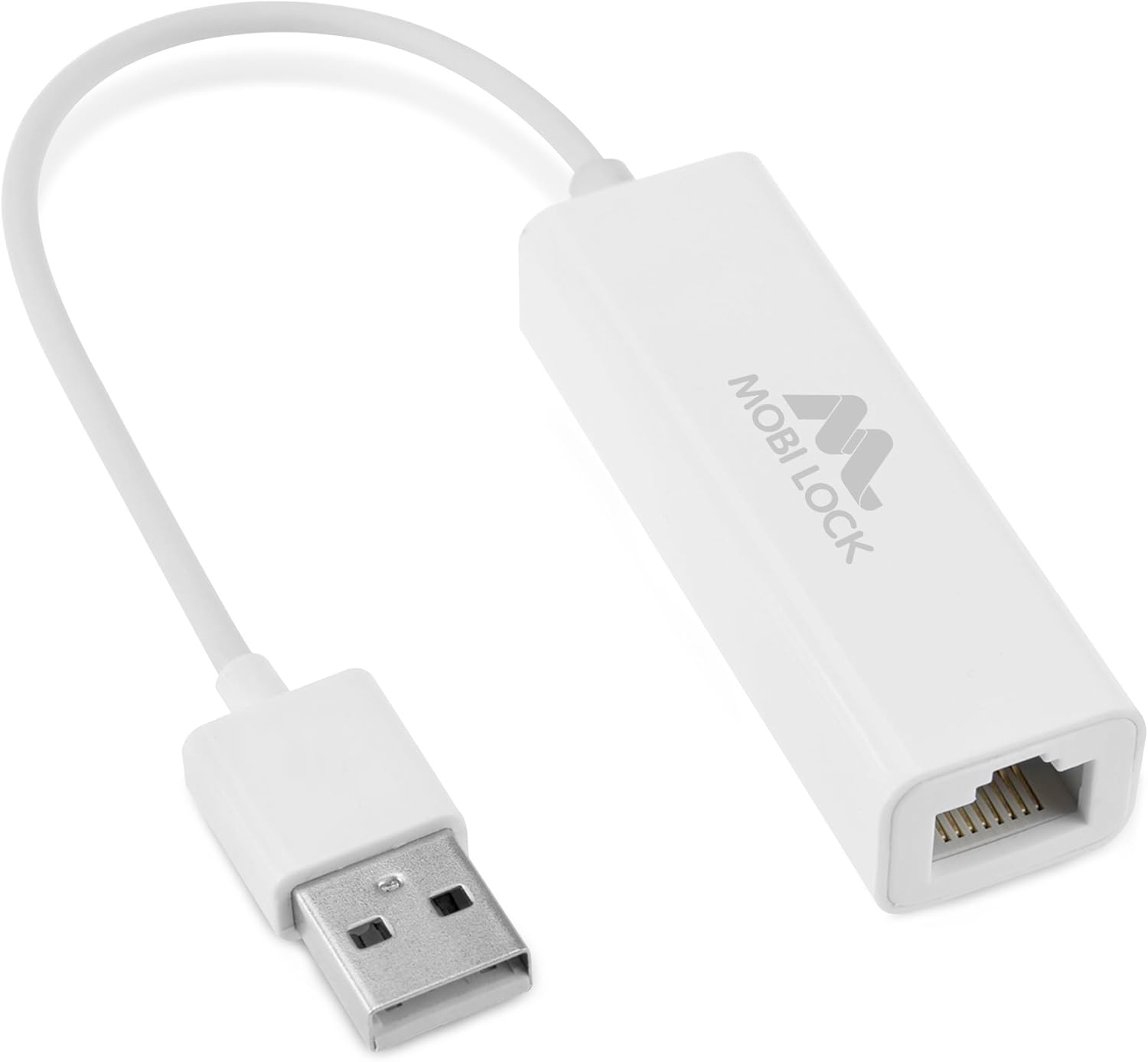
USB Ethernet LAN Network Adapter Compatible with Laptops and All USB 2.0 Compatible Computers Including Windows 7 to 11 Vista Mac OS X and macOS - by Mobi Lock
AED5670
Quantity:
Order today to get by 7-14 business days
Delivery fee of AED 20. Free for orders above AED 200.
 Imported From: United States
At BOLO, we work hard to ensure the products you receive are new, genuine, and sourced from reputable suppliers.
Every product in the BOLO catalogue is sourced through our Verified Global Supply Network of verified sellers, authorized distributors or directly from the manufacturer.
Each product undergoes thorough inspection and verification at our consolidation and fulfilment centers to ensure it meets our strict authenticity and quality standards before being shipped and delivered to you.
If you ever have concerns regarding the authenticity of a product purchased from us, please contact Bolo Support. We will review your inquiry promptly and, if necessary, provide documentation verifying authenticity or offer a suitable resolution.
Your trust is our top priority, and we are committed to maintaining transparency and integrity in every transaction.
While we strive to display accurate information, variations in packaging, labeling, instructions, or formulation may occasionally occur due to regional differences or supplier updates. For detailed or manufacturer-specific information, please contact the brand directly or reach out to BOLO Support for assistance.
Unless otherwise stated, all prices displayed on the product page include applicable taxes and import duties.
BOLO operates in accordance with the laws and regulations of United Arab Emirates. Any items found to be restricted or prohibited for sale within the United Arab Emirates will be cancelled prior to shipment. We take proactive measures to ensure that only products permitted for sale in United Arab Emirates are listed on our website.
All items are shipped by air, and any products classified as “Dangerous Goods (DG)” under IATA regulations will be removed from the order and cancelled.
All orders are processed manually, and we make every effort to process them promptly once confirmed. Products cancelled due to the above reasons will be permanently removed from listings across the website.

This USB 2.0 to Ethernet Network adapter from Mobi Lock enables you to add a network interface to your computer via USB port for a faster file transfer.
This is compatible with all existing 10/100 networks. With the Ethernet LAN wired network adapter, you can replace a broken internal network card or add a separate routable network interface.
Easy to Install & Use: This USB to Ethernet connector is driver-free and supports plug and play. Just simply insert the adapter into a USB 2.0 port on your computer and begin to transfer large video & audio files between your workstation and the network.
High-Speed Ethernet: Provides access to superfast connection thus, you can add a fast wired network interface with this USB 2.0 Ethernet adapter.
Finally, this Mobi Lock USB to Ethernet network adapter does not need external power or drivers to function. Just PLUG AND PLAY!

Seamless Internet Experience
Whether you're working from home, gaming, or streaming, a stable and fast internet connection is essential. The USB 2.0 to Ethernet Network Adapter provides a reliable wired connection for devices without an Ethernet port, ensuring smooth, uninterrupted access to your network. With high-speed data transfer of up to 100 Mbps, it delivers consistent, lag-free internet—perfect for browsing, video conferencing, or downloading large files. Enjoy a smooth and efficient internet experience every time.

- Compatible with Macbook Pro, Macbook Air, iMac with OSX 10.6 / 10.7 / 10.8 / 10.9 / 10.10 / 10.11 / 10.12
- Personal Computers and Laptops running Windows 11/10 / 8.1 / 8 / 7 / Vista / XP (Does not support Windows RT, Android)
- Linux kernel 3.x/2.6, Chrome OS
- Supports IPv4 and IPv6 protocols
- Compatible with IEEE 802.3 and IEEE 802.3u (10BASE-T and 100BASE-TX networks)
- NOT Compatible with iPhones and iPadsor any other Apple devices, games consoles, network (RJ-45) headsets, nor any devices using the 8 pin lightning connector.
Ultrabooks and laptops like Dell, HP, Toshiba, Samsung, Lenovo, Huawei, Acer, Asus and all desktops and laptops that has USB 2.0 ports.

Perfect for Various Uses
- Home Office: Get a secure and fast connection for remote work or virtual meetings.
- Gaming: Eliminate lag with a stable wired connection for PC gaming.
- Streaming & Video Conferencing: Enjoy buffer-free streaming and clear video calls.
- Travel: Stay connected in hotel rooms, airports, or cafes where Wi-Fi may not be reliable.
More Features

Simple and Easy to Use
The USB Ethernet adapter 2.0 is compatible with Ethernet networks while the USB to rj45 connector is powered via USB 2.0 for versatility and portability as an add-on or replacement.
This USB 2.0 LAN adapter is backward compatible with all 10/100 networks, allowing you to replace a broken internal network card or add a separate routable network interface.

Work Anywhere
Designed for on-the-go convenience, the USB Ethernet adapter 2.0 is COMPACT and LIGHT WEIGHT so, you can take this Ethernet to USB 2.0 converter and internet USB for laptops on your work and travels.
Its small size makes it portable and easy to store, fitting effortlessly into a pocket, purse, or laptop bag. Perfect for work and travel.

Fast and Reliable Functionality
Experience unbeatable speed and reliability with the USB 2.0 to Ethernet Network Adapter. Engineered to deliver a stable, high-speed connection, this adapter ensures that your internet performance stays strong.
However, this adapter DOES NOT WORK with iPhones and iPads or any other Apple devices, games consoles, network (RJ-45) headsets, nor any devices using the 8 pin lightning connector.
FREQUENTLY ASKED QUESTIONS

What are the steps to set up a USB to Ethernet adapter?
To set up a USB to Ethernet adapter, first locate an available USB port on your device and insert the USB connector of the adapter into it.
Next, connect an Ethernet cable to the adapter and plug the other end into a router, modem, or Ethernet switch.
Your device should recognize the adapter and establish a stable connection.

Do I need to install drivers for using a USB to Ethernet adapter?
Most operating systems will automatically handle driver installation, although manual steps may sometimes be necessary.
However, if your OS doesn't have the required drivers, you may need to update them from Device Manager.

How can I troubleshoot a USB to Ethernet adapter not working?
Verify that the adapter is securely connected to your device and that the Ethernet cable is inserted correctly.
Check your network connection settings and make sure the Ethernet option is enabled.
Update the adapter's drivers by going to Device Manager and select Network Adapters, then update the device.
To prevent cable issues, test your Ethernet cable by connecting it directly to another device.
Try connecting the adapter to another USB port on your device.
IF A DRIVER IS REQUIRED BY YOUR WINDOWS COMPUTER, YOU CAN MANUALLY INSTALL IT THROUGH THE STEPS BELOW.

Similar suggestions by Bolo
More from this brand
Similar items from “USB Network Adapters”
Share with
Or share with link
https://www.bolo.ae/products/UO00AYY10C4
Visit the Mobi Lock Store
USB Ethernet LAN Network Adapter Compatible with Laptops and All USB 2.0 Compatible Computers Including Windows 7 to 11 Vista Mac OS X and macOS - by Mobi Lock
AED5670
Quantity:
Order today to get by 7-14 business days
Delivery fee of AED 20. Free for orders above AED 200.
Imported From: United States
At BOLO, we work hard to ensure the products you receive are new, genuine, and sourced from reputable suppliers.
Every product in the BOLO catalogue is sourced through our Verified Global Supply Network of verified sellers, authorized distributors or directly from the manufacturer.
Each product undergoes thorough inspection and verification at our consolidation and fulfilment centers to ensure it meets our strict authenticity and quality standards before being shipped and delivered to you.
If you ever have concerns regarding the authenticity of a product purchased from us, please contact Bolo Support. We will review your inquiry promptly and, if necessary, provide documentation verifying authenticity or offer a suitable resolution.
Your trust is our top priority, and we are committed to maintaining transparency and integrity in every transaction.
While we strive to display accurate information, variations in packaging, labeling, instructions, or formulation may occasionally occur due to regional differences or supplier updates. For detailed or manufacturer-specific information, please contact the brand directly or reach out to BOLO Support for assistance.
Unless otherwise stated, all prices displayed on the product page include applicable taxes and import duties.
BOLO operates in accordance with the laws and regulations of United Arab Emirates. Any items found to be restricted or prohibited for sale within the United Arab Emirates will be cancelled prior to shipment. We take proactive measures to ensure that only products permitted for sale in United Arab Emirates are listed on our website.
All items are shipped by air, and any products classified as “Dangerous Goods (DG)” under IATA regulations will be removed from the order and cancelled.
All orders are processed manually, and we make every effort to process them promptly once confirmed. Products cancelled due to the above reasons will be permanently removed from listings across the website.
Description:
Details:
| Brand | Mobi Lock |
|---|---|
| Hardware Interface | Ethernet, USB, USB 2.0 |
| Color | white |
| Compatible Devices | Laptop, Desktop, Tablet, Mobile Device |
| Product Dimensions | 7.87"L x 0.98"W x 0.67"H |
| Data Link Protocol | Ethernet, USB |
| Data Transfer Rate | 100 megabits_per_second |
| Compatible Operating System Family | Windows |
| Minimum Required Operating System Version | Mac OS 10.12 Sierra, Windows 7 |
| Number of Items | 1 |
This USB 2.0 to Ethernet Network adapter from Mobi Lock enables you to add a network interface to your computer via USB port for a faster file transfer.
This is compatible with all existing 10/100 networks. With the Ethernet LAN wired network adapter, you can replace a broken internal network card or add a separate routable network interface.
Easy to Install & Use: This USB to Ethernet connector is driver-free and supports plug and play. Just simply insert the adapter into a USB 2.0 port on your computer and begin to transfer large video & audio files between your workstation and the network.
High-Speed Ethernet: Provides access to superfast connection thus, you can add a fast wired network interface with this USB 2.0 Ethernet adapter.
Finally, this Mobi Lock USB to Ethernet network adapter does not need external power or drivers to function. Just PLUG AND PLAY!
Seamless Internet Experience
Whether you're working from home, gaming, or streaming, a stable and fast internet connection is essential. The USB 2.0 to Ethernet Network Adapter provides a reliable wired connection for devices without an Ethernet port, ensuring smooth, uninterrupted access to your network. With high-speed data transfer of up to 100 Mbps, it delivers consistent, lag-free internet—perfect for browsing, video conferencing, or downloading large files. Enjoy a smooth and efficient internet experience every time.
- Compatible with Macbook Pro, Macbook Air, iMac with OSX 10.6 / 10.7 / 10.8 / 10.9 / 10.10 / 10.11 / 10.12
- Personal Computers and Laptops running Windows 11/10 / 8.1 / 8 / 7 / Vista / XP (Does not support Windows RT, Android)
- Linux kernel 3.x/2.6, Chrome OS
- Supports IPv4 and IPv6 protocols
- Compatible with IEEE 802.3 and IEEE 802.3u (10BASE-T and 100BASE-TX networks)
- NOT Compatible with iPhones and iPadsor any other Apple devices, games consoles, network (RJ-45) headsets, nor any devices using the 8 pin lightning connector.
Ultrabooks and laptops like Dell, HP, Toshiba, Samsung, Lenovo, Huawei, Acer, Asus and all desktops and laptops that has USB 2.0 ports.
Perfect for Various Uses
- Home Office: Get a secure and fast connection for remote work or virtual meetings.
- Gaming: Eliminate lag with a stable wired connection for PC gaming.
- Streaming & Video Conferencing: Enjoy buffer-free streaming and clear video calls.
- Travel: Stay connected in hotel rooms, airports, or cafes where Wi-Fi may not be reliable.
More Features
Simple and Easy to Use
The USB Ethernet adapter 2.0 is compatible with Ethernet networks while the USB to rj45 connector is powered via USB 2.0 for versatility and portability as an add-on or replacement.
This USB 2.0 LAN adapter is backward compatible with all 10/100 networks, allowing you to replace a broken internal network card or add a separate routable network interface.
Work Anywhere
Designed for on-the-go convenience, the USB Ethernet adapter 2.0 is COMPACT and LIGHT WEIGHT so, you can take this Ethernet to USB 2.0 converter and internet USB for laptops on your work and travels.
Its small size makes it portable and easy to store, fitting effortlessly into a pocket, purse, or laptop bag. Perfect for work and travel.
Fast and Reliable Functionality
Experience unbeatable speed and reliability with the USB 2.0 to Ethernet Network Adapter. Engineered to deliver a stable, high-speed connection, this adapter ensures that your internet performance stays strong.
However, this adapter DOES NOT WORK with iPhones and iPads or any other Apple devices, games consoles, network (RJ-45) headsets, nor any devices using the 8 pin lightning connector.
FREQUENTLY ASKED QUESTIONS
What are the steps to set up a USB to Ethernet adapter?
To set up a USB to Ethernet adapter, first locate an available USB port on your device and insert the USB connector of the adapter into it.
Next, connect an Ethernet cable to the adapter and plug the other end into a router, modem, or Ethernet switch.
Your device should recognize the adapter and establish a stable connection.
Do I need to install drivers for using a USB to Ethernet adapter?
Most operating systems will automatically handle driver installation, although manual steps may sometimes be necessary.
However, if your OS doesn't have the required drivers, you may need to update them from Device Manager.
How can I troubleshoot a USB to Ethernet adapter not working?
Verify that the adapter is securely connected to your device and that the Ethernet cable is inserted correctly.
Check your network connection settings and make sure the Ethernet option is enabled.
Update the adapter's drivers by going to Device Manager and select Network Adapters, then update the device.
To prevent cable issues, test your Ethernet cable by connecting it directly to another device.
Try connecting the adapter to another USB port on your device.
IF A DRIVER IS REQUIRED BY YOUR WINDOWS COMPUTER, YOU CAN MANUALLY INSTALL IT THROUGH THE STEPS BELOW.
Similar suggestions by Bolo
More from this brand
Similar items from “USB Network Adapters”
Share with
Or share with link
https://www.bolo.ae/products/UO00AYY10C4