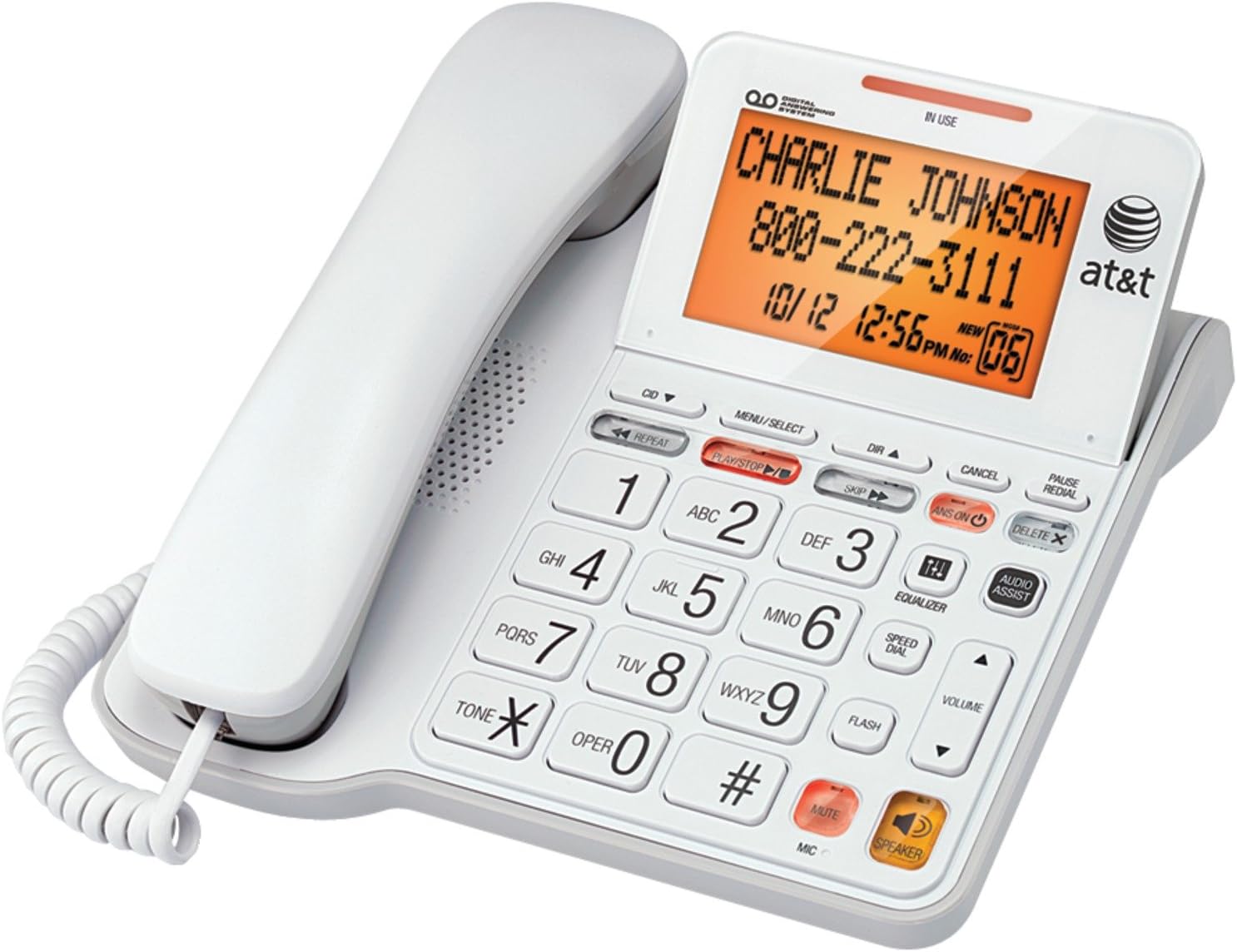
Description:
Cl4940Wht- Corded Answering System.Troubleshooting steps as follows:1. If you are having trouble hearing on the handset, try replacing the handset cord. 2. Please check if you can hear the dial tone. The volume may be turned down too low to hear the other party. Press VOLUME on the base to turn up the volume. 3. Try a handset and/or line cord from a working set. If this corrects the problem, replace the appropriate cord. 4. If you have connected this telephone to a phone jack that has not been used before, or that has not been used in sometime, there may be problems with this jack that you are not aware of. Use a telephone jack that you know is in proper working order. 5. You may have a line problem. To test for a line problem, test your unit at another location. If your unit works at another location, contact your local telephone company.
Reviews:
5.0 out of 5 stars Good Value and Easy SetUp.
(function() { P.when('cr-A', 'ready').execute(function(A) { if(typeof A.toggleExpanderAriaLabel === 'function') { A.toggleExpanderAriaLabel('review_text_read_more', 'Read more of this review', 'Read less of this review'); } }); })(); .review-text-read-more-expander:focus-visible { outline: 2px solid #2162a1; outline-offset: 2px; border-radius: 5px; } Easy setup,but be a little patient with it,I had to plug,unplug 3 or 4 times as I made selections on the menu,before I got a dial tone. I use a headset,this model has no headset btn,,so have to leave the handset on as a weight until ready to dial out. Comes preloaded with ans machine message,or make your own. see on my pic,that little light on the rt side ,that means ans machine is on. can turn it off also. I have xfinity voice,so cord goes to gateway,and ac power goes to regular outlet. Nice phone,and affordable.
5.0 out of 5 stars Incredible Phone Purchase
Incredible Phone Purchase. The User's Manual was developed for anyone/everyone to setup the phone with ease. There are functions to set your phone quality just the way you want it. Everything about this phone is easy and well designed. I will agree with only one comment that I read in reviews. I believe the date and time could be larger and that the ATT Model Number does not need to be displayed on the display screen. Otherwise, this phone is near perfection.
4.0 out of 5 stars User friendly phone
I love the big numbers for dialing. I wish some of the lettering was a little bigger for the call log and directory. The sound quality is very good. It was pretty easy to set up and it has what I need. I just needed a basic phone with the ability to look up the past numbers that called me. My old phone died and I was relieved to find one that had a big screen that was easy to read.
5.0 out of 5 stars good phone
works great.easy to use and set up. got at a great price big buttons are nice and the big screen. just plug and ready to use, sound is good.
5.0 out of 5 stars EZ to read, hear &use!
Great for WW2.vet nearing 100. Perfect phone. I like that i can get my messages by pressing a button instead of having to pick up receiver and call into voicemail. Large display, easy.to use! Its great!
3.0 out of 5 stars Decent phone.
I bought this phone for my mother, who isn't very good with technology, is a bit hard of hearing, and doesn't see very well.I specifically bought the phone for the large LCD display with the orange background, because of its high contrast, and the hearing assist feature.The ringer can be turned up nice and loud, and the hearing assist feature amplifies the caller enough that mom can easily hear the person on the other end. She can also read the caller ID display, so this phone has met my expectations.It's also pretty easy to use. When viewing the caller ID list, if she wants to call someone back, all she needs to do is pick up the handset and the phone will dial the number. So she can use this phone even though she's not very technologically savvy.There are a few things that I don't like about the phone.- Limited Directory listings. You can only store 25 numbers into memory. These days when you may have a home phone, plus two or three mobile numbers for a family member, 25 numbers just isn't adequate. Especially if you need to take into account: Children (and spouses) grandchildren, friends, etc... 50 would be a better limitation, while 100 numbers would probably be ideal.- Directory isn't alphabetical! I can't figure this one out, as it would seem that alphabetizing your phone list would be basic functionality. However, this phone doesn't seem to think so. What this means, is that it makes it difficult to find individual phone numbers using the directory. The directory has a feature (most phones do this) that you can enter the directory, then press one of the number keys to go directly to a letter of the alphabet. In theory, this makes it easy to locate a number. Calling a name starting with a "J"? Press the 5 button and start scrolling through the "J's". With this phone though, the numbers are in the directory in the order you've added them... So, you can press the 5 button to get to the J's, but scrolling down may go J, S, B, etc... This just doesn't make any sense to me... The manual says the entries will be sorted alphabetically if you go to a letter and scroll down, but this isn't the case. No matter how I try to scroll through the directory, it isn't sorted properly.- Abridged manual. For some reason, the manual included with this phone is the abridged version. If you want the full manual, you'll need to download the .PDF from AT&T's support site.The abridged manual doesn't describe some functionality that I would consider necessary information. For example, the abridged manual tells you how to add your home area code, as well as four alternate local area codes. What it doesn't explain is what this area code is used for. In my area, the area code is required on local calls, so the phone should display 10 numbers. Thinking that adding the area code would enable this functionality, I added it as my home area code. Then I was trying to figure out why the caller ID was only showing 7 numbers. So if you tried to call a number back using the caller ID information, the call wouldn't go through because it won't dial the area code first.After trying to figure out what was going on, I noticed that the manual said it was the abridged version... What? So I went to AT&T's website and downloaded the full manual. The full manual describes that the function of adding the area code is the opposite of what I would expect. Adding your home area code to the phone will cause the caller ID data to NOT show the area code! If you need the area code to make local calls, don't add your area code... The full manual also explains how to change this data on the fly using the pound key. If a number comes through as showing only 7 digits and you need 10, you can press the pound key to add the area code to the number. Why isn't this in the abridged manual?- Audio assist is per call. You can't tell the phone to always use audio assist. You must press the audio assist button each time you are on a call. I can see how this would make sense if multiple users are going to be using the phone, but if only a single person will be using it and they are hard of hearing, it would be nice to have a way to always enable the audio assist.
5.0 out of 5 stars Still Working Great
Have had this phone for a year or two now and it still works. Probably one of the few people to have a landline.
5.0 out of 5 stars Quality
Positive feedback
Like advertized
(function() { P.when('cr-A', 'ready').execute(function(A) { if(typeof A.toggleExpanderAriaLabel === 'function') { A.toggleExpanderAriaLabel('review_text_read_more', 'Read more of this review', 'Read less of this review'); } }); })(); .review-text-read-more-expander:focus-visible { outline: 2px solid #2162a1; outline-offset: 2px; border-radius: 5px; } Quality product, I like it.
Pleasant to deal with
Had an issue with phone, they acted professionally and resolved with issue right away. I was impressed with their communication and have no issue doing business with them again.
A Problem with Mains Lead
The Lead on this phone as it came from USA and Canada was intermittent and in the end stopped working i` have contacted the supplier awaiting a reply.
Great phone, easy to use and to read with large number buttons
I bought one of these phones and my wife liked it so much, I bought another one for her. The phone has lots of features: for instance speaker phone, and very large number buttons that are easy to see. We find it to be a very user friendly phone. It will store lots of phone numbers of friends and family, as well as speed dial stored contacts.
All good.
Great phone. Just needed to buy a 240v adaptor or Australia & it was from the USA. As I knew anyway.
Visit the AT&T Store
AT&T CL4940 Corded Standard Phone with Answering System and Backlit Display, White
AED31150


Quantity:
Order today to get by 7-14 business days
This item qualifies for free delivery
Imported From: United States
At BOLO, we work hard to ensure the products you receive are new, genuine, and sourced from reputable suppliers.
BOLO is not an authorized or official retailer for most brands, nor are we affiliated with manufacturers unless specifically stated on a product page. Instead, we source verified sellers, authorized distributors or directly from the manufacturer.
Each product undergoes thorough inspection and verification at our consolidation and fulfilment centers to ensure it meets our strict authenticity and quality standards before being shipped and delivered to you.
If you ever have concerns regarding the authenticity of a product purchased from us, please contact Bolo Support. We will review your inquiry promptly and, if necessary, provide documentation verifying authenticity or offer a suitable resolution.
Your trust is our top priority, and we are committed to maintaining transparency and integrity in every transaction.
All product information, images, descriptions, and reviews originate from the manufacturer or from trusted sellers overseas. BOLO is not affiliated with, endorsed by, or an authorized retailer for most brands listed on our website unless stated otherwise.
While we strive to display accurate information, variations in packaging, labeling, instructions, or formulation may occasionally occur due to regional differences or supplier updates. For detailed or manufacturer-specific information, please contact the brand directly or reach out to BOLO Support for assistance.
Unless otherwise stated, all prices displayed on the product page include applicable taxes and import duties.
BOLO operates in accordance with the laws and regulations of United Arab Emirates. Any items found to be restricted or prohibited for sale within the UAE will be cancelled prior to shipment. We take proactive measures to ensure that only products permitted for sale in United Arab Emirates are listed on our website.
All items are shipped by air, and any products classified as “Dangerous Goods (DG)” under IATA regulations will be removed from the order and cancelled.
All orders are processed manually, and we make every effort to process them promptly once confirmed. Products cancelled due to the above reasons will be permanently removed from listings across the website.
Similar suggestions by Bolo
More from this brand
Similar items from “Landline Phones”
Share with
Or share with link
https://www.bolo.ae/products/UO007O5IU0R
Visit the AT&T Store
AT&T CL4940 Corded Standard Phone with Answering System and Backlit Display, White


AED31150
Quantity:
Order today to get by 7-14 business days
This item qualifies for free delivery
Imported From: United States
At BOLO, we work hard to ensure the products you receive are new, genuine, and sourced from reputable suppliers.
BOLO is not an authorized or official retailer for most brands, nor are we affiliated with manufacturers unless specifically stated on a product page. Instead, we source verified sellers, authorized distributors or directly from the manufacturer.
Each product undergoes thorough inspection and verification at our consolidation and fulfilment centers to ensure it meets our strict authenticity and quality standards before being shipped and delivered to you.
If you ever have concerns regarding the authenticity of a product purchased from us, please contact Bolo Support. We will review your inquiry promptly and, if necessary, provide documentation verifying authenticity or offer a suitable resolution.
Your trust is our top priority, and we are committed to maintaining transparency and integrity in every transaction.
All product information, images, descriptions, and reviews originate from the manufacturer or from trusted sellers overseas. BOLO is not affiliated with, endorsed by, or an authorized retailer for most brands listed on our website unless stated otherwise.
While we strive to display accurate information, variations in packaging, labeling, instructions, or formulation may occasionally occur due to regional differences or supplier updates. For detailed or manufacturer-specific information, please contact the brand directly or reach out to BOLO Support for assistance.
Unless otherwise stated, all prices displayed on the product page include applicable taxes and import duties.
BOLO operates in accordance with the laws and regulations of United Arab Emirates. Any items found to be restricted or prohibited for sale within the UAE will be cancelled prior to shipment. We take proactive measures to ensure that only products permitted for sale in United Arab Emirates are listed on our website.
All items are shipped by air, and any products classified as “Dangerous Goods (DG)” under IATA regulations will be removed from the order and cancelled.
All orders are processed manually, and we make every effort to process them promptly once confirmed. Products cancelled due to the above reasons will be permanently removed from listings across the website.
Description:
Cl4940Wht- Corded Answering System.Troubleshooting steps as follows:1. If you are having trouble hearing on the handset, try replacing the handset cord. 2. Please check if you can hear the dial tone. The volume may be turned down too low to hear the other party. Press VOLUME on the base to turn up the volume. 3. Try a handset and/or line cord from a working set. If this corrects the problem, replace the appropriate cord. 4. If you have connected this telephone to a phone jack that has not been used before, or that has not been used in sometime, there may be problems with this jack that you are not aware of. Use a telephone jack that you know is in proper working order. 5. You may have a line problem. To test for a line problem, test your unit at another location. If your unit works at another location, contact your local telephone company.
Reviews:
5.0 out of 5 stars Good Value and Easy SetUp.
(function() { P.when('cr-A', 'ready').execute(function(A) { if(typeof A.toggleExpanderAriaLabel === 'function') { A.toggleExpanderAriaLabel('review_text_read_more', 'Read more of this review', 'Read less of this review'); } }); })(); .review-text-read-more-expander:focus-visible { outline: 2px solid #2162a1; outline-offset: 2px; border-radius: 5px; } Easy setup,but be a little patient with it,I had to plug,unplug 3 or 4 times as I made selections on the menu,before I got a dial tone. I use a headset,this model has no headset btn,,so have to leave the handset on as a weight until ready to dial out. Comes preloaded with ans machine message,or make your own. see on my pic,that little light on the rt side ,that means ans machine is on. can turn it off also. I have xfinity voice,so cord goes to gateway,and ac power goes to regular outlet. Nice phone,and affordable.
5.0 out of 5 stars Incredible Phone Purchase
Incredible Phone Purchase. The User's Manual was developed for anyone/everyone to setup the phone with ease. There are functions to set your phone quality just the way you want it. Everything about this phone is easy and well designed. I will agree with only one comment that I read in reviews. I believe the date and time could be larger and that the ATT Model Number does not need to be displayed on the display screen. Otherwise, this phone is near perfection.
4.0 out of 5 stars User friendly phone
I love the big numbers for dialing. I wish some of the lettering was a little bigger for the call log and directory. The sound quality is very good. It was pretty easy to set up and it has what I need. I just needed a basic phone with the ability to look up the past numbers that called me. My old phone died and I was relieved to find one that had a big screen that was easy to read.
5.0 out of 5 stars good phone
works great.easy to use and set up. got at a great price big buttons are nice and the big screen. just plug and ready to use, sound is good.
5.0 out of 5 stars EZ to read, hear &use!
Great for WW2.vet nearing 100. Perfect phone. I like that i can get my messages by pressing a button instead of having to pick up receiver and call into voicemail. Large display, easy.to use! Its great!
3.0 out of 5 stars Decent phone.
I bought this phone for my mother, who isn't very good with technology, is a bit hard of hearing, and doesn't see very well.I specifically bought the phone for the large LCD display with the orange background, because of its high contrast, and the hearing assist feature.The ringer can be turned up nice and loud, and the hearing assist feature amplifies the caller enough that mom can easily hear the person on the other end. She can also read the caller ID display, so this phone has met my expectations.It's also pretty easy to use. When viewing the caller ID list, if she wants to call someone back, all she needs to do is pick up the handset and the phone will dial the number. So she can use this phone even though she's not very technologically savvy.There are a few things that I don't like about the phone.- Limited Directory listings. You can only store 25 numbers into memory. These days when you may have a home phone, plus two or three mobile numbers for a family member, 25 numbers just isn't adequate. Especially if you need to take into account: Children (and spouses) grandchildren, friends, etc... 50 would be a better limitation, while 100 numbers would probably be ideal.- Directory isn't alphabetical! I can't figure this one out, as it would seem that alphabetizing your phone list would be basic functionality. However, this phone doesn't seem to think so. What this means, is that it makes it difficult to find individual phone numbers using the directory. The directory has a feature (most phones do this) that you can enter the directory, then press one of the number keys to go directly to a letter of the alphabet. In theory, this makes it easy to locate a number. Calling a name starting with a "J"? Press the 5 button and start scrolling through the "J's". With this phone though, the numbers are in the directory in the order you've added them... So, you can press the 5 button to get to the J's, but scrolling down may go J, S, B, etc... This just doesn't make any sense to me... The manual says the entries will be sorted alphabetically if you go to a letter and scroll down, but this isn't the case. No matter how I try to scroll through the directory, it isn't sorted properly.- Abridged manual. For some reason, the manual included with this phone is the abridged version. If you want the full manual, you'll need to download the .PDF from AT&T's support site.The abridged manual doesn't describe some functionality that I would consider necessary information. For example, the abridged manual tells you how to add your home area code, as well as four alternate local area codes. What it doesn't explain is what this area code is used for. In my area, the area code is required on local calls, so the phone should display 10 numbers. Thinking that adding the area code would enable this functionality, I added it as my home area code. Then I was trying to figure out why the caller ID was only showing 7 numbers. So if you tried to call a number back using the caller ID information, the call wouldn't go through because it won't dial the area code first.After trying to figure out what was going on, I noticed that the manual said it was the abridged version... What? So I went to AT&T's website and downloaded the full manual. The full manual describes that the function of adding the area code is the opposite of what I would expect. Adding your home area code to the phone will cause the caller ID data to NOT show the area code! If you need the area code to make local calls, don't add your area code... The full manual also explains how to change this data on the fly using the pound key. If a number comes through as showing only 7 digits and you need 10, you can press the pound key to add the area code to the number. Why isn't this in the abridged manual?- Audio assist is per call. You can't tell the phone to always use audio assist. You must press the audio assist button each time you are on a call. I can see how this would make sense if multiple users are going to be using the phone, but if only a single person will be using it and they are hard of hearing, it would be nice to have a way to always enable the audio assist.
5.0 out of 5 stars Still Working Great
Have had this phone for a year or two now and it still works. Probably one of the few people to have a landline.
5.0 out of 5 stars Quality
Positive feedback
Like advertized
(function() { P.when('cr-A', 'ready').execute(function(A) { if(typeof A.toggleExpanderAriaLabel === 'function') { A.toggleExpanderAriaLabel('review_text_read_more', 'Read more of this review', 'Read less of this review'); } }); })(); .review-text-read-more-expander:focus-visible { outline: 2px solid #2162a1; outline-offset: 2px; border-radius: 5px; } Quality product, I like it.
Pleasant to deal with
Had an issue with phone, they acted professionally and resolved with issue right away. I was impressed with their communication and have no issue doing business with them again.
A Problem with Mains Lead
The Lead on this phone as it came from USA and Canada was intermittent and in the end stopped working i` have contacted the supplier awaiting a reply.
Great phone, easy to use and to read with large number buttons
I bought one of these phones and my wife liked it so much, I bought another one for her. The phone has lots of features: for instance speaker phone, and very large number buttons that are easy to see. We find it to be a very user friendly phone. It will store lots of phone numbers of friends and family, as well as speed dial stored contacts.
All good.
Great phone. Just needed to buy a 240v adaptor or Australia & it was from the USA. As I knew anyway.
Similar suggestions by Bolo
More from this brand
Similar items from “Landline Phones”
Share with
Or share with link
https://www.bolo.ae/products/UO007O5IU0R