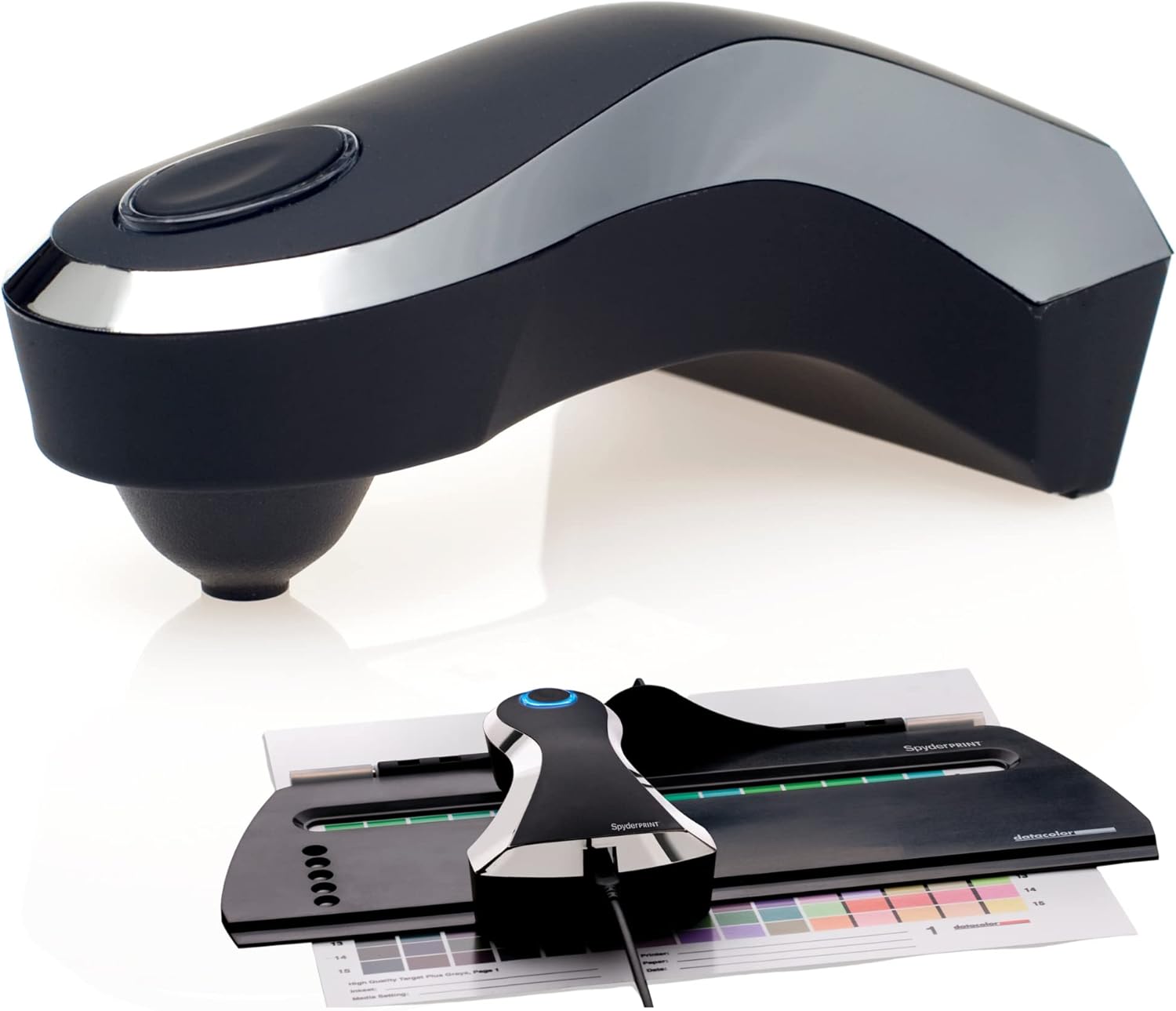
Description:
Spyderprint is the full-featured solution that professionals choose to manage color in their print output. By selecting any combination of printer, ink and media in the software, Spyderprint provides a full assortment of tools to let you push the limits of advanced inkjets to create gallery quality prints in color and black and white. Spyderprint gives you full control of your printer output with the ability to create any number of custom profiles to ICC Standards. Simply install the software, print your choice of targets with your printer and then use the SpyderGuide device to help step you through the easy process to calibrate and build a profile. Includes Spyderprint Spectrocolorimeter and Base, SpyderGuide, 6? USB cable, Spyderprint Software CD, Quick Start Guide (in 10 languages), Free Online Support.
From the Manufacturer
SpyderPRINT lets you effectively manage color in your print output. By selecting any combination of printer, ink, and media in the software, you can control your printer output to create gallery-quality prints in color or black and white. SpyderPRINT includes software and a SpyderGuide device and is designed for professional photographers, fine art printers, production professionals, and anyone who wants accurate print-to-screen matching.
SpyderPRINT
At a Glance:
- Effectively manage color in your print output
- Spectrocolorimeter creates custom profiles in minutes
- Gives you true-to-life reproduction of image files
- SpyderProof images provide soft-proofing tool
- Make adjustments to entire profile in image editor
- One-year warranty
Spectrocolorimeter creates custom color profiles in minutes. .
Software creates RGB ICC profiles for consistent, accurate prints. .
Easily Calibrate Printer and Display
With SpyderPRINT you can have full control of your printer output by creating any number of custom profiles to ICC standards*. Simply install the software, print your choice of targets with your printer, and use the SpyderGuide device to calibrate and build a profile.
After calibration, images can be viewed and edited with confidence. You will see less waste in your printed output and fewer unused prints. Images can be reliably assessed and adjusted, giving you true-to-life reproduction.
Custom Profiles in Minutes
Working with profiling speed and accuracy, SpyderPRINT's spectrocolorimeter gives you custom profiles with EZ targets for color and black and white.
The SpyderProof function gives you a series of images to review so you can evaluate each detail from a photographer's point of view and compare it with your own images. This feature serves as a soft-proofing tool for each printer profile you create.
Software Includes Extensive Editing Functions
The color and black-and-white tinting curves in the image editor software allow you to apply adjustments to a profile rather than to each individual image. The extended grays target adds precision gray and near gray data to profiles, enhancing the quality of tinted and black-and-white prints.
Flexible target options and high-patch profiling targets allow you to produce gallery quality prints in color or black and white. Select preset profile settings to produce profiles with specific combinations of highlight and shadow tint, detail, and neutrality settings.
System Requirements and Warranty Information
SpyderPRINT is compatible with Windows XP (32/64), Vista (32/64), and 7 (32/64) operating systems as well as Mac OS X 10.4 or higher. To use this device, you need a powered USB port, a color monitor resolution of at least 1,024 by 768 pixels, a 16-bit video card, 128 MB RAM, and 100 MB free hard disk space.
SpyderPRINT comes with a one-year hardware warranty and free online support.
* SpyderPRINT builds RGB ICC profiles. Please check with the manufacturer of your laser printer or the developer of your RIP software to determine if your laser printer or RIP is compatible with RGB ICC profiles.
What's in the Box
SpyderPRINT spectrocolorimeter and base, SpyderGuide, 6-foot USB cable, SpyderPRINT software CD, and quick-start guide.
Light balance reference tool.
Complete color management.
At-home lens calibration.
Color correction for HDTV.
Color color standard tool.
Reviews:
1.0 out of 5 stars Usability issues, buggy software, creates totally inaccurate printer/paper profiles
I had high expectations of this device given the price, and because I also own the Spyder5 PRO from Datacolor, which despite having a glitchy room-light switching feature, has always worked perfectly for calibrating my screens. So, you could say I trusted the Datacolor brand. Unfortunately, this SpyderPRINT product is garbage.Issues I experienced:1) The software was buggy on my Mac. Until I changed permissions on my ~/Library/ColorSync/Profiles folder, it would let me get all the way through the patch reading process, and then refuse to save the profile. However, the error message given was that the name I was trying to use to save was not allowed. It took me 30 minutes of research online to figure out that the problem was nothing to do with the naming of the profile.2) The hardware itself doesn't work very well. The unit doesn't seem to self-calibrate reliably, and will frequently set the wrong white point from the white patch in the cradle, which messes up the entire process. Additionally, the scanner doesn't fit very well in the plastic guide rail, and it's very easy for it to dislodge from the rail while scanning patches. Finally, the cable is so stiff that keeping the unit flat and level requires constant vigilance while scanning - if you loosen your grip the unit will want to pull away from the paper surface.3) The two issues above could be forgiven if it wasn't for this one: my unit generated totally inaccurate profiles from the targets I printed out. I profiled two different Hahnemuhle Fine Art papers on my Canon PIXMA Pro-10. These papers were fresh out of the box, the inks were factory OEM, the room lights were 5000K high CRI - heck, I even handled the paper with cotton gloves and allowed a 30-minute drying time! Furthermore, I correctly disabled Color Matching while printing the patches, and set the correct media type ("Other Fine Art Paper 1"). The targets seemed to print fine, but when I went to scan them the patches did not seem to match the expected colors very well. It wasn't until I went to print with the profile that I saw a marked reddish color shift that looked significantly different from the soft-proof. The printing was done from Photoshop, using the same media type, of an image edited on my calibrated EIZO display, with the correct profile selected and making sure Photoshop was managing colors instead of the printer. This clear mismatch suggests that the profile I created was quite inaccurate. To confirm my suspicion, I downloaded a Hahnemuhle-supplied generic ICC profile for my printer and paper type (which isn't custom to my specific printer unit) and the colors came out *WAY* closer to my screen than what printed using the SpyderPRINT profile. Upon pulling up the SpyderPRINT profile in ColorSync and comparing it to the manufacturer profile, they are really different - the difference is much greater than you would expect for a custom vs. generic printer/paper profile (see attached screenshot).A final annoyance with using this unit - in addition to the crap profiles it creates - is that it wants to print 8.5"x11" size targets, but it doesn't take into account that most Canon printers insist on a 30mm border for fine art papers. This meant I had to scale the printed target, dismiss the complaints from the software, and scan patches individually (which is supposed to be more accurate, but didn't seem to be, and took 3x as long).Bottom line: the SpyderPRINT is a waste of money, and doesn't work well at all.
4.0 out of 5 stars Not bad AT ALL. Better for me than the $2K X-Rite software I spent.
Ok, so I have the $2K i1 Pro2 and I got this as I wanted to compare them.I am NOT going into deep details, but I can say that this hands down does a great job of making your prints MUCH better with fine tuning the colors and tones. I used the Expert patchs of about 750 and with Gray tones, and I used the Click method of EACH patch of color. This took some time and patients, BUT, it is the right way to go. The other method is LAME, and dont EVEN think about printing on a large sheet with more patches. WASTE of time. Print on a 8.5x11 or something so that cheap plastic paper guide that is included can actually help. This is where the i1 X-Rite is far superior, but SURELY not worth the $ extra for personal use.So do the readings patch at a time, and you will be sure you got a good reading. My BW prints using color inks is not nutral and with excellent tone. Also colors are much better, rich and good separation.Very much worth $350 if you want to make higher quality prints. Would the X-Rite do better, not significant enough. The only time the X-rite makes sense is if you do this as a business with AMNY papers and are often making custom profiles. But if you have 3-5 fav papers, you certainly do not need to spend $2k... SHAME on X-Rite for the rip off I purchased. Sellers hype:" Oh, no this is the only great one that will do the job, others come close, but not as good". REALLY? you take a look at the prints? AND, this allows for tweaking and making adjustments, so if there is some image with hard tomes the printer is challenged on, you can make the call to tweak further manually.I am a photographer, print professional. I use LUT calibrated monitors using the Xrite as well. but my volume in print is low. For most folks who like to print seriously and are pros, you dont need Xrite. This is likely more accurate than Colormunki, and is suitable for such personal or client prints.
5.0 out of 5 stars Perfect.
The ultimate in print calibration. If youβre serious about matching screen and print output calibration is essential This is not the easiest to use that Iβve tried but itβs by far the most accurate.
1.0 out of 5 stars Device failed after 14 months of use, tech support was no help
Used the device for about a year on an off with no issues. Worked well. Results were good. Then one day the device stopped working. Nothing - -nada -zilch. Got in touch with customer support and their response was to basically try unplugging and re-plugging. If you do buy this, buy the insurance and demand a full replacement when the thing fails. Very disappointing. Will never buy a product from this company again.
4.0 out of 5 stars works fine
I use 3rd party ink from Precision Colors. After awhile I think the syringe got slightly contaminated when refilling so there was a slight color shift from the OEM ink profiles. Corrects it after profiling.only flaw was the measuring head had a slight dent when it arrived. QC might be a problem
Visit the datacolor Store
Datacolor Spyder Print - Advanced Data Analysis and Calibration Tool for Optimal Print Results, Perfect for Photographers, Graphic Designers, and Printing Professionals
AED2,20981
Quantity:
Order today to get by 7-14 business days
This item qualifies for free delivery
Imported From: United States
At BOLO, we work hard to ensure the products you receive are new, genuine, and sourced from reputable suppliers.
BOLO is not an authorized or official retailer for most brands, nor are we affiliated with manufacturers unless specifically stated on a product page. Instead, we source verified sellers, authorized distributors or directly from the manufacturer.
Each product undergoes thorough inspection and verification at our consolidation and fulfilment centers to ensure it meets our strict authenticity and quality standards before being shipped and delivered to you.
If you ever have concerns regarding the authenticity of a product purchased from us, please contact Bolo Support. We will review your inquiry promptly and, if necessary, provide documentation verifying authenticity or offer a suitable resolution.
Your trust is our top priority, and we are committed to maintaining transparency and integrity in every transaction.
All product information, images, descriptions, and reviews originate from the manufacturer or from trusted sellers overseas. BOLO is not affiliated with, endorsed by, or an authorized retailer for most brands listed on our website unless stated otherwise.
While we strive to display accurate information, variations in packaging, labeling, instructions, or formulation may occasionally occur due to regional differences or supplier updates. For detailed or manufacturer-specific information, please contact the brand directly or reach out to BOLO Support for assistance.
Unless otherwise stated, all prices displayed on the product page include applicable taxes and import duties.
BOLO operates in accordance with the laws and regulations of United Arab Emirates. Any items found to be restricted or prohibited for sale within the UAE will be cancelled prior to shipment. We take proactive measures to ensure that only products permitted for sale in United Arab Emirates are listed on our website.
All items are shipped by air, and any products classified as βDangerous Goods (DG)β under IATA regulations will be removed from the order and cancelled.
All orders are processed manually, and we make every effort to process them promptly once confirmed. Products cancelled due to the above reasons will be permanently removed from listings across the website.
More from this brand
Similar items from βColor Calibration Chartsβ
Share with
Or share with link
https://www.bolo.ae/products/UO006HNPEGT
Visit the datacolor Store
Datacolor Spyder Print - Advanced Data Analysis and Calibration Tool for Optimal Print Results, Perfect for Photographers, Graphic Designers, and Printing Professionals

AED2,20981
Quantity:
Order today to get by 7-14 business days
This item qualifies for free delivery
Imported From: United States
At BOLO, we work hard to ensure the products you receive are new, genuine, and sourced from reputable suppliers.
BOLO is not an authorized or official retailer for most brands, nor are we affiliated with manufacturers unless specifically stated on a product page. Instead, we source verified sellers, authorized distributors or directly from the manufacturer.
Each product undergoes thorough inspection and verification at our consolidation and fulfilment centers to ensure it meets our strict authenticity and quality standards before being shipped and delivered to you.
If you ever have concerns regarding the authenticity of a product purchased from us, please contact Bolo Support. We will review your inquiry promptly and, if necessary, provide documentation verifying authenticity or offer a suitable resolution.
Your trust is our top priority, and we are committed to maintaining transparency and integrity in every transaction.
All product information, images, descriptions, and reviews originate from the manufacturer or from trusted sellers overseas. BOLO is not affiliated with, endorsed by, or an authorized retailer for most brands listed on our website unless stated otherwise.
While we strive to display accurate information, variations in packaging, labeling, instructions, or formulation may occasionally occur due to regional differences or supplier updates. For detailed or manufacturer-specific information, please contact the brand directly or reach out to BOLO Support for assistance.
Unless otherwise stated, all prices displayed on the product page include applicable taxes and import duties.
BOLO operates in accordance with the laws and regulations of United Arab Emirates. Any items found to be restricted or prohibited for sale within the UAE will be cancelled prior to shipment. We take proactive measures to ensure that only products permitted for sale in United Arab Emirates are listed on our website.
All items are shipped by air, and any products classified as βDangerous Goods (DG)β under IATA regulations will be removed from the order and cancelled.
All orders are processed manually, and we make every effort to process them promptly once confirmed. Products cancelled due to the above reasons will be permanently removed from listings across the website.
Description:
Spyderprint is the full-featured solution that professionals choose to manage color in their print output. By selecting any combination of printer, ink and media in the software, Spyderprint provides a full assortment of tools to let you push the limits of advanced inkjets to create gallery quality prints in color and black and white. Spyderprint gives you full control of your printer output with the ability to create any number of custom profiles to ICC Standards. Simply install the software, print your choice of targets with your printer and then use the SpyderGuide device to help step you through the easy process to calibrate and build a profile. Includes Spyderprint Spectrocolorimeter and Base, SpyderGuide, 6? USB cable, Spyderprint Software CD, Quick Start Guide (in 10 languages), Free Online Support.
From the Manufacturer
SpyderPRINT lets you effectively manage color in your print output. By selecting any combination of printer, ink, and media in the software, you can control your printer output to create gallery-quality prints in color or black and white. SpyderPRINT includes software and a SpyderGuide device and is designed for professional photographers, fine art printers, production professionals, and anyone who wants accurate print-to-screen matching.
SpyderPRINT
At a Glance:
- Effectively manage color in your print output
- Spectrocolorimeter creates custom profiles in minutes
- Gives you true-to-life reproduction of image files
- SpyderProof images provide soft-proofing tool
- Make adjustments to entire profile in image editor
- One-year warranty
Spectrocolorimeter creates custom color profiles in minutes. .
Software creates RGB ICC profiles for consistent, accurate prints. .
Easily Calibrate Printer and Display
With SpyderPRINT you can have full control of your printer output by creating any number of custom profiles to ICC standards*. Simply install the software, print your choice of targets with your printer, and use the SpyderGuide device to calibrate and build a profile.
After calibration, images can be viewed and edited with confidence. You will see less waste in your printed output and fewer unused prints. Images can be reliably assessed and adjusted, giving you true-to-life reproduction.
Custom Profiles in Minutes
Working with profiling speed and accuracy, SpyderPRINT's spectrocolorimeter gives you custom profiles with EZ targets for color and black and white.
The SpyderProof function gives you a series of images to review so you can evaluate each detail from a photographer's point of view and compare it with your own images. This feature serves as a soft-proofing tool for each printer profile you create.
Software Includes Extensive Editing Functions
The color and black-and-white tinting curves in the image editor software allow you to apply adjustments to a profile rather than to each individual image. The extended grays target adds precision gray and near gray data to profiles, enhancing the quality of tinted and black-and-white prints.
Flexible target options and high-patch profiling targets allow you to produce gallery quality prints in color or black and white. Select preset profile settings to produce profiles with specific combinations of highlight and shadow tint, detail, and neutrality settings.
System Requirements and Warranty Information
SpyderPRINT is compatible with Windows XP (32/64), Vista (32/64), and 7 (32/64) operating systems as well as Mac OS X 10.4 or higher. To use this device, you need a powered USB port, a color monitor resolution of at least 1,024 by 768 pixels, a 16-bit video card, 128 MB RAM, and 100 MB free hard disk space.
SpyderPRINT comes with a one-year hardware warranty and free online support.
* SpyderPRINT builds RGB ICC profiles. Please check with the manufacturer of your laser printer or the developer of your RIP software to determine if your laser printer or RIP is compatible with RGB ICC profiles.
What's in the Box
SpyderPRINT spectrocolorimeter and base, SpyderGuide, 6-foot USB cable, SpyderPRINT software CD, and quick-start guide.
Light balance reference tool.
Complete color management.
At-home lens calibration.
Color correction for HDTV.
Color color standard tool.
Reviews:
1.0 out of 5 stars Usability issues, buggy software, creates totally inaccurate printer/paper profiles
I had high expectations of this device given the price, and because I also own the Spyder5 PRO from Datacolor, which despite having a glitchy room-light switching feature, has always worked perfectly for calibrating my screens. So, you could say I trusted the Datacolor brand. Unfortunately, this SpyderPRINT product is garbage.Issues I experienced:1) The software was buggy on my Mac. Until I changed permissions on my ~/Library/ColorSync/Profiles folder, it would let me get all the way through the patch reading process, and then refuse to save the profile. However, the error message given was that the name I was trying to use to save was not allowed. It took me 30 minutes of research online to figure out that the problem was nothing to do with the naming of the profile.2) The hardware itself doesn't work very well. The unit doesn't seem to self-calibrate reliably, and will frequently set the wrong white point from the white patch in the cradle, which messes up the entire process. Additionally, the scanner doesn't fit very well in the plastic guide rail, and it's very easy for it to dislodge from the rail while scanning patches. Finally, the cable is so stiff that keeping the unit flat and level requires constant vigilance while scanning - if you loosen your grip the unit will want to pull away from the paper surface.3) The two issues above could be forgiven if it wasn't for this one: my unit generated totally inaccurate profiles from the targets I printed out. I profiled two different Hahnemuhle Fine Art papers on my Canon PIXMA Pro-10. These papers were fresh out of the box, the inks were factory OEM, the room lights were 5000K high CRI - heck, I even handled the paper with cotton gloves and allowed a 30-minute drying time! Furthermore, I correctly disabled Color Matching while printing the patches, and set the correct media type ("Other Fine Art Paper 1"). The targets seemed to print fine, but when I went to scan them the patches did not seem to match the expected colors very well. It wasn't until I went to print with the profile that I saw a marked reddish color shift that looked significantly different from the soft-proof. The printing was done from Photoshop, using the same media type, of an image edited on my calibrated EIZO display, with the correct profile selected and making sure Photoshop was managing colors instead of the printer. This clear mismatch suggests that the profile I created was quite inaccurate. To confirm my suspicion, I downloaded a Hahnemuhle-supplied generic ICC profile for my printer and paper type (which isn't custom to my specific printer unit) and the colors came out *WAY* closer to my screen than what printed using the SpyderPRINT profile. Upon pulling up the SpyderPRINT profile in ColorSync and comparing it to the manufacturer profile, they are really different - the difference is much greater than you would expect for a custom vs. generic printer/paper profile (see attached screenshot).A final annoyance with using this unit - in addition to the crap profiles it creates - is that it wants to print 8.5"x11" size targets, but it doesn't take into account that most Canon printers insist on a 30mm border for fine art papers. This meant I had to scale the printed target, dismiss the complaints from the software, and scan patches individually (which is supposed to be more accurate, but didn't seem to be, and took 3x as long).Bottom line: the SpyderPRINT is a waste of money, and doesn't work well at all.
4.0 out of 5 stars Not bad AT ALL. Better for me than the $2K X-Rite software I spent.
Ok, so I have the $2K i1 Pro2 and I got this as I wanted to compare them.I am NOT going into deep details, but I can say that this hands down does a great job of making your prints MUCH better with fine tuning the colors and tones. I used the Expert patchs of about 750 and with Gray tones, and I used the Click method of EACH patch of color. This took some time and patients, BUT, it is the right way to go. The other method is LAME, and dont EVEN think about printing on a large sheet with more patches. WASTE of time. Print on a 8.5x11 or something so that cheap plastic paper guide that is included can actually help. This is where the i1 X-Rite is far superior, but SURELY not worth the $ extra for personal use.So do the readings patch at a time, and you will be sure you got a good reading. My BW prints using color inks is not nutral and with excellent tone. Also colors are much better, rich and good separation.Very much worth $350 if you want to make higher quality prints. Would the X-Rite do better, not significant enough. The only time the X-rite makes sense is if you do this as a business with AMNY papers and are often making custom profiles. But if you have 3-5 fav papers, you certainly do not need to spend $2k... SHAME on X-Rite for the rip off I purchased. Sellers hype:" Oh, no this is the only great one that will do the job, others come close, but not as good". REALLY? you take a look at the prints? AND, this allows for tweaking and making adjustments, so if there is some image with hard tomes the printer is challenged on, you can make the call to tweak further manually.I am a photographer, print professional. I use LUT calibrated monitors using the Xrite as well. but my volume in print is low. For most folks who like to print seriously and are pros, you dont need Xrite. This is likely more accurate than Colormunki, and is suitable for such personal or client prints.
5.0 out of 5 stars Perfect.
The ultimate in print calibration. If youβre serious about matching screen and print output calibration is essential This is not the easiest to use that Iβve tried but itβs by far the most accurate.
1.0 out of 5 stars Device failed after 14 months of use, tech support was no help
Used the device for about a year on an off with no issues. Worked well. Results were good. Then one day the device stopped working. Nothing - -nada -zilch. Got in touch with customer support and their response was to basically try unplugging and re-plugging. If you do buy this, buy the insurance and demand a full replacement when the thing fails. Very disappointing. Will never buy a product from this company again.
4.0 out of 5 stars works fine
I use 3rd party ink from Precision Colors. After awhile I think the syringe got slightly contaminated when refilling so there was a slight color shift from the OEM ink profiles. Corrects it after profiling.only flaw was the measuring head had a slight dent when it arrived. QC might be a problem
More from this brand
Similar items from βColor Calibration Chartsβ
Share with
Or share with link
https://www.bolo.ae/products/UO006HNPEGT