Deliver toUnited Arab Emirates
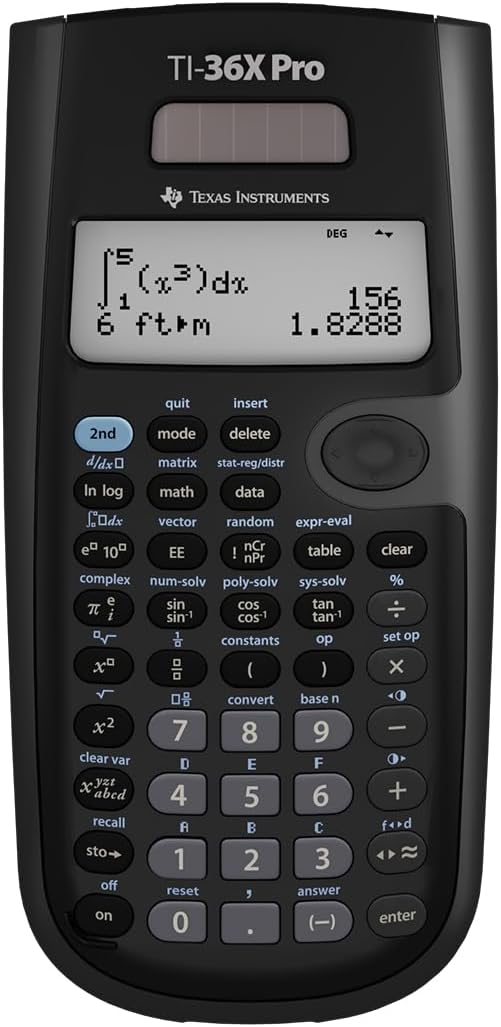
Texas Instruments TI-36X Pro Engineering/Scientific Calculator | 9.7 Inch | Black.

Description:

  • Ideal for curricula in which graphing technology may not be permitted.
  • MultiView display shows multiple calculations at the same time on screen.
  • MathPrint shows math expressions, symbols and stacked fractions as they appear in textbooks
  • Ideal for high school through college: Algebra 1 & 2, Geometry, Trigonometry, Statistics, Calculus, Biology, etc.
  • Convert fractions, decimals and terms including Pi into alternate representations.
  • Select degrees/radians, floating/fix, number format modes.

  • Ideal for curricula in which graphing technology may not be permitted.

    Amazon.com

    Ideal for students at every level, from junior high school algebra to college calculus, the Texas Instruments TI36 packs a lot of punch in a small, inexpensive unit. This solar-powered calculator combines features for statistical analysis, Boolean logic operations, and unit conversions in one sleek package.

    Math students will appreciate TI36X's ability to perform fractional equations and calculate angle units (radians, grads, degrees) when performing trigonometric functions. Everyone will find the calculator's English/metric conversions helpful.

    The TI36Xs single-line LCD is a little difficult to read when the unit is lying on a desk, and users in need of graphing functions will have to look elsewhere. Overall, however, for a calculator in this price range, the TI36X provides enough power for most high-level math and science needs.

    Reviews:

    5.0 out of 5 stars Reliable, Powerful, and Perfect for STEM Students!

    R.R. · March 26, 2025

    The TI-36X Pro is hands-down one of the best non-graphing calculators out there. I’ve been using it for engineering coursework, and it handles complex math, statistics, and scientific functions like a champ. The display is super clear, and I love the multi-line screen that lets you see inputs and results at the same time — way better than older models. It's intuitive once you get used to the layout, and the functionality is top-notch for everything from calculus to matrix operations. Also love that it’s permitted in exams where graphing calculators aren’t allowed — huge bonus!Solid build, sleek design, and definitely worth the investment if you're in any technical field.

    5.0 out of 5 stars Helpful school tool

    G.P. · December 3, 2025

    My son uses it everyday at school. It is very helpful to him and has so many great features. His teacher even told him it was a great device. Excellent price.

    5.0 out of 5 stars Excellent for work!

    C.H. · November 23, 2025

    I use this calculator every day in my field of work (surveying) and I don't think I will use another model or brand for quite a while.While I dont utilize every aspect of the calculator, I find that the value storage and four-line screen make a lot of what I do very convenient. The calculator has a pretty decent memory bank if you ever need to go back through your calculation history. My calculator has been exposed to rain, sweat, dust, cold, and heat and is still trucking. I leave it on my dash in the middle of summer under a hot Texas sun and have yet to run into any issues. The calculator is large enough that I'm not fat-fingering keys, but small and slim enough to throw in any pocket comfortably.Great tool!

    5.0 out of 5 stars Great calculator

    A.C. · January 19, 2026

    Works as expected. Arrived promptly and is great for school

    4.0 out of 5 stars Solid middle school and early high school calculator before moving to graphing calculators

    D.N. · July 4, 2025

    This is an easy-to-use calculator with plenty of functionality. Quite feature-packed, including a pretty print Fractions display. However, the arrow keys would have been more useful if they were independent buttons, and the LCD could be higher contrast to make it easier to read in dimmer lighting. This is a good calculator before moving on to something more advanced like a graphing calculator. With this calculator, you can perform basic levels algebra, including functionality for solving multiple linear equations and root finding for polynomials.

    5.0 out of 5 stars Texas Instruments Quality, Light Weight, Reasonable Price

    T.P. · September 25, 2024

    I bought this calculator when my old machine shop calculator died from being dropped too many times. There are a few things to note about this calculator for this type of calculation. And since I'm a retired mathematics teacher, I know a thing or two about calculators in education.First, this seems like a great choice for use in a machine shop. I need a high quality and durable calculator with trigonometric functions. This calculator is all that and more. The multi-line display is also convenient for seeing a record of previous keystrokes. Its quite a bit lighter than the old graphing calculator I was using, and I'm hoping that will make it more durable--lighter objects hit the floor with less force than heavier ones.This calculator has enough capability for educational use IF you don't need (or are not allowed to use) graphing or computer algebra functions. It is not a graphing calculator. And it won't do computer algebra operations such as solving equations, computing derivatives, etc. It's probably not the best choice for linear algebra (matrices, vectors, ...) or for advanced statistics. But it does have all the numerical functions you would expect to find in a classic scientific calculator.Last note is that this calculator has a snap-on lid instead of the old slide-on style I'm accustomed to (like on the TI-84). It's too early to say whether I like it more or less. Its definitely faster: just clip it on or off. But will it hang-on or survive as well as the old slide-on style if you occasionally drop it on a concrete floor?

    5.0 out of 5 stars Great calculator. Switched from using a TI-84 to this (TI-36X)

    S.O. · November 11, 2024

    This calculator packs a punch, and I love it. I used to primarily use a TI-84 as a physics major, but I had to purchase this calculator (TI-36X) for an engineering course. I was surprised to discover how useful it is, so I now use this primarily for both lab and lecture courses.It is easily portable and does not require a charging cord, so I never have to worry about not having a charged calculator for an exam. There are several useful functions I use often--the definite integral function being one of them. This calculator can also solve simple systems of equations. These are great for double checking hand calculations during an exam or lab. The rational number function is also great, and it will provide answers as fractions that can be turned into decimals. I am also able to switch back and forth between scientific and engineering mode, which is also very convenient for expressing answers in SI units with prefixes.Although it may seem like a "downgrade" from my TI-84, I really do not see it that way. I like having a simple calculator for exams and daily use. Compared to my TI-84, I am able to crunch numbers more quickly, in my opinion. Of course, I still use both calculators, but this one is my favorite of the two for these reasons.The only problem I have really ever experienced with this calculator is that there is a limit to the number of "entries" that you can type at once. I ran into this problem while computing several exponentials at once, but things can always be broken down into separate calculations.

    Better than the most advanced Casio or Sharp Scientific Calculators and has replaced my graphing calculator for many situations!

    K. · December 14, 2014

    I am a 3rd-year Engineering student, and this calculator has become my goto calculator for exams. I own at least 7 or 8 scientific calculators (lost count now), and 3 graphing calculators: these include the HP 50G Graphing calculator, the Sharp EL-516 and I have also used the Casio 115/991ES in the past (same calculator, just different branding between the US and Canada). The Sharp and Casio calculators are the most direct comparisons, while graphing calculators are obviously usually seen in a separate league.I won't compare this to TI's other scientific calculators, because this is simply the most powerful scientific calculator that TI makes.PROS compared to Sharp/Casio's most advanced scientific calculators:1) Multiline display, and the interface actually uses the multi-lines. If you look at the Casios and Sharps, they use the mult-lines for displaying fractions and the last answer, but never display more than the last answer. In comparison, this TI-36X Pro uses all four lines, so that the last three answers/equations can all be displayed. It's much more like a graphing calculator in this respect.2) One single mode for all functions; no need to switch between complex mode, normal mode, polynomial mode etc., like the Sharp and Casios do. It's merely for historic reasons that the Casios and Sharps still do this, and it makes so much more sense to have everything done in one mode (like a graphing calculator).3) Solid, tactile buttons that have a slight "click" when you push them. I really like this, because I don't even need to be looking at the keys to know whether my keypress has registered or not. I find with the Casios and Sharps (particularly the Sharps) that they have keys that are really easily depressed, and don't give you great feedback on whether they've been clicked.4) Really, really good interface. If you have ever used a graphing calculator from TI, you will feel right at home. The matrix equations, polynomial solver and and linear equation solver all have graphing calculator-like input, which should be both very familiar to many users, as well as intuitive for those new to TI UI design. For example, the polynomial solver is like a computer wizard, taking you through the steps for entering the coefficients of your equation. Really easy to use.5) Cycling through functions with a single button is pretty innovative, and I think faster than using the 2nd function or (even worse) relying on entering another mode or menu. For example, in order to access ASIN, you just hit the SIN/ASIN button twice to cycle to ASIN. It's really easy and doesn't require you to use two separate buttons.6) Really good definite integration and derivation. It works really well, and is faster than my Sharp (I performed a side-by-side comparison multiple times for speed).CONS1) The intuitive interface comes at the expense of a few more button clicks in a few situations. For example, the polynomial solver is dummy-proof for entering your coefficients, but I generally feel that the Casio and Sharp calculators can accomplish the same thing with 1-2 less clicks occasionally.2) Variables (other than 'x') are difficult to access. The variables are all stored under one button, which you cycle through. 'x' is easy to access since it is the first variable, but to access 'z', you need three button clicks. To access 'b' requires 6 button clicks. I would have preferred an alpha key for access keyboard variables, or a menu with number shortcuts.3) The silver buttons and silver rocker colour are poor. I know that many other reviews have complained about this too, and it is a bit annoying. It definitely doesn't make the calculator unusable or anything, but they are a bit hard to read, and I personally also feel that they look out-of-place on a calculator that otherwise has rather dull (and more professional) colours.4) This is a personal pet peeve, but above the "enter" button on the button-right, the TI-36X Pro has a Decimal/Fraction conversion button instead of the "multiplication" operator button; instead, the operator buttons have all been shifted up by one. TI has many other calculators, and most of them have the operator buttons right above the Enter key... which makes sense to me, since they are frequently used. I would have preferred to have the Decimal/Fraction conversion button above the operator keys, to make this keyboard more standard in comparison to other TI and HP calculator layouts. I sometimes hit the conversion key instead of the "addition" operator key as I am used to from other calculators (as a side-note, TI and HP prefer the single-column 1x4 layout of operator keys, whereas Casio and Sharp prefer the 2x2 layout of operator keys. You can easily adjust to either, although I personally prefer the TI/HP layout, as it's easier to access single-handed I think).PROS to graphing calculatorsWhat really pushes this calculator over-the-edge for me is that it feels like a graphing calculator in many respects; the interface is intuitive, the line display maximizes all your command history... and it does this while focussing on the main features you might need, such as matrix calculations or solving polynomial expressions. Obviously this can't do graphing, since it isn't a graphing calculator, but it does have a "function table" where you can enter a function and it automatically gives you the y values for an interval of x. That allows you to quickly plot a function's general curve on paper using the provided xy points. Very useful, and for this I have been able to stop needing a graphing calculator. Not only are graphing calculators not allowed on many exams, but some of the more advanced functions on graphing calculators (ie. matrixes) actually require fewer button presses to do on the TI-36X Pro. And I'm tired of changing batteries on a graphing calculator. In other words, I can actually accomplish stuff faster and more reliably on the TI-36X Pro.Honestly, this is a fabulous calculator. The Casio and Sharp calculators have been around far longer, so that's why you may hear some older users advocating for them, but the TI-36X Pro embraces a more intuitive UI with single-mode operation, and packs a few graphing calculator features which cover 99% of everything I do on a calculator in Engineering. I highly recommend this calculator for anyone in need of the most powerful scientific calculator on the market, or a graphing calculator user who finds that they don't need all that functionality and just want something a bit lighter to carry with them.

    Super

    I.E.M. · May 21, 2025

    Elle fait très bien le boulot

    Chulada de calculadora

    O.P. · October 17, 2021

    Esta es la primera calculadora de Texas Instruments que pruebo después de toda la vida utilizar Casio y tenía algo de miedo de que no me fuera a acostumbrar a la distribución de las teclas o funciones pero la verdad fue una transición muy sencilla y estoy mucho más a gusto con ella.Este modelo es perfecto desde prepa hasta universidad, resuelve ecuaciones, derivadas, integrales, matrices y cálculos estadísticos, es muy completa, equivalente a una 991 de Casio.Comparación Casio Vs TIVentajas• Historial, tanto resultados como operaciones que se guarda incluso después de apagarla, esto es la cosa más útil que he visto para problemas en los que tienes que hacer varios pasos, es muy cómodo tenerlos anotados en la misma calcu y volver a escribirlos con una tecla, para mí esto fue lo más decisivo para probarla• Teclas muy intuitivas: la distribución se ve rara al inicio pero sólo es agarrarle, por ejemplo la tecla que tiene Pi le das una vez y poner Pi, otra vez y es e, una vez más y es i, se me hace más rápido y menos complicado que el shift + tecla de las Casio.Contras:• El menos no funciona como signo negativo, son 2 teclas diferentes, al inicio se te puede ir y que no salga una operación por lo mismo• Si quieres notación científica tienes que ponerlo en la configuración, no hay una opción intermedia de que a partir de tantos decimales se ponga en automático, entonces me ha pasado algunas operaciones que el resultado es por ejemplo 1.6393627x10^-8 y si no activo notación científica me lo muestra como 0.000000001, entonces esto es un poquito molesto, pero es rápido cambiar la configuración y ya que la operación se guarda en el historial no es algo tan malo.

    Good

    A. · December 14, 2023

    Good

    Great for stats

    O.H. · February 15, 2024

    Mainly use it for distributions, makes life a whole lot easier.

    Texas Instruments TI-36X Pro Engineering/Scientific Calculator | 9.7 Inch | Black.

    Product ID: UO004AOMO2L
    Condition: New

    4.8

    (22,568 ratings)

    AED13653

    Price includes VAT & Import Duties
    Availability: In Stock

    Quantity:

    |

    Order today to get by 7-14 business days

    Delivery fee of AED 20. Free for orders above AED 200.

    Returns & Warranty policies

    Imported From: United States

    At BOLO, we work hard to ensure the products you receive are new, genuine, and sourced from reputable suppliers.

    BOLO is not an authorized or official retailer for most brands, nor are we affiliated with manufacturers unless specifically stated on a product page. Instead, we source verified sellers, authorized distributors or directly from the manufacturer.

    Each product undergoes thorough inspection and verification at our consolidation and fulfilment centers to ensure it meets our strict authenticity and quality standards before being shipped and delivered to you.

    If you ever have concerns regarding the authenticity of a product purchased from us, please contact Bolo Support. We will review your inquiry promptly and, if necessary, provide documentation verifying authenticity or offer a suitable resolution.

    Your trust is our top priority, and we are committed to maintaining transparency and integrity in every transaction.

    All product information, images, descriptions, and reviews originate from the manufacturer or from trusted sellers overseas. BOLO is not affiliated with, endorsed by, or an authorized retailer for most brands listed on our website unless stated otherwise.

    While we strive to display accurate information, variations in packaging, labeling, instructions, or formulation may occasionally occur due to regional differences or supplier updates. For detailed or manufacturer-specific information, please contact the brand directly or reach out to BOLO Support for assistance.

    Unless otherwise stated, all prices displayed on the product page include applicable taxes and import duties.

    BOLO operates in accordance with the laws and regulations of United Arab Emirates. Any items found to be restricted or prohibited for sale within the UAE will be cancelled prior to shipment. We take proactive measures to ensure that only products permitted for sale in United Arab Emirates are listed on our website.

    All items are shipped by air, and any products classified as “Dangerous Goods (DG)” under IATA regulations will be removed from the order and cancelled.

    All orders are processed manually, and we make every effort to process them promptly once confirmed. Products cancelled due to the above reasons will be permanently removed from listings across the website.

    More from this brand

    Similar items from “Scientific”

    Texas Instruments TI-36X Pro Engineering/Scientific Calculator | 9.7 Inch | Black.

    Product ID: UO004AOMO2L
    Condition: New

    4.8

    (22,568 ratings)
    Texas Instruments TI-36X Pro Engineering/Scientific Calculator | 9.7 Inch | Black.-0

    AED13653

    Price includes VAT & Import Duties
    Availability: In Stock

    Quantity:

    |

    Order today to get by 7-14 business days

    Delivery fee of AED 20. Free for orders above AED 200.

    Returns & Warranty policies

    Imported From: United States

    At BOLO, we work hard to ensure the products you receive are new, genuine, and sourced from reputable suppliers.

    BOLO is not an authorized or official retailer for most brands, nor are we affiliated with manufacturers unless specifically stated on a product page. Instead, we source verified sellers, authorized distributors or directly from the manufacturer.

    Each product undergoes thorough inspection and verification at our consolidation and fulfilment centers to ensure it meets our strict authenticity and quality standards before being shipped and delivered to you.

    If you ever have concerns regarding the authenticity of a product purchased from us, please contact Bolo Support. We will review your inquiry promptly and, if necessary, provide documentation verifying authenticity or offer a suitable resolution.

    Your trust is our top priority, and we are committed to maintaining transparency and integrity in every transaction.

    All product information, images, descriptions, and reviews originate from the manufacturer or from trusted sellers overseas. BOLO is not affiliated with, endorsed by, or an authorized retailer for most brands listed on our website unless stated otherwise.

    While we strive to display accurate information, variations in packaging, labeling, instructions, or formulation may occasionally occur due to regional differences or supplier updates. For detailed or manufacturer-specific information, please contact the brand directly or reach out to BOLO Support for assistance.

    Unless otherwise stated, all prices displayed on the product page include applicable taxes and import duties.

    BOLO operates in accordance with the laws and regulations of United Arab Emirates. Any items found to be restricted or prohibited for sale within the UAE will be cancelled prior to shipment. We take proactive measures to ensure that only products permitted for sale in United Arab Emirates are listed on our website.

    All items are shipped by air, and any products classified as “Dangerous Goods (DG)” under IATA regulations will be removed from the order and cancelled.

    All orders are processed manually, and we make every effort to process them promptly once confirmed. Products cancelled due to the above reasons will be permanently removed from listings across the website.

    Description:

  • Ideal for curricula in which graphing technology may not be permitted.
  • MultiView display shows multiple calculations at the same time on screen.
  • MathPrint shows math expressions, symbols and stacked fractions as they appear in textbooks
  • Ideal for high school through college: Algebra 1 & 2, Geometry, Trigonometry, Statistics, Calculus, Biology, etc.
  • Convert fractions, decimals and terms including Pi into alternate representations.
  • Select degrees/radians, floating/fix, number format modes.

  • Ideal for curricula in which graphing technology may not be permitted.

    Amazon.com

    Ideal for students at every level, from junior high school algebra to college calculus, the Texas Instruments TI36 packs a lot of punch in a small, inexpensive unit. This solar-powered calculator combines features for statistical analysis, Boolean logic operations, and unit conversions in one sleek package.

    Math students will appreciate TI36X's ability to perform fractional equations and calculate angle units (radians, grads, degrees) when performing trigonometric functions. Everyone will find the calculator's English/metric conversions helpful.

    The TI36Xs single-line LCD is a little difficult to read when the unit is lying on a desk, and users in need of graphing functions will have to look elsewhere. Overall, however, for a calculator in this price range, the TI36X provides enough power for most high-level math and science needs.

    Reviews:

    5.0 out of 5 stars Reliable, Powerful, and Perfect for STEM Students!

    R.R. · March 26, 2025

    The TI-36X Pro is hands-down one of the best non-graphing calculators out there. I’ve been using it for engineering coursework, and it handles complex math, statistics, and scientific functions like a champ. The display is super clear, and I love the multi-line screen that lets you see inputs and results at the same time — way better than older models. It's intuitive once you get used to the layout, and the functionality is top-notch for everything from calculus to matrix operations. Also love that it’s permitted in exams where graphing calculators aren’t allowed — huge bonus!Solid build, sleek design, and definitely worth the investment if you're in any technical field.

    5.0 out of 5 stars Helpful school tool

    G.P. · December 3, 2025

    My son uses it everyday at school. It is very helpful to him and has so many great features. His teacher even told him it was a great device. Excellent price.

    5.0 out of 5 stars Excellent for work!

    C.H. · November 23, 2025

    I use this calculator every day in my field of work (surveying) and I don't think I will use another model or brand for quite a while.While I dont utilize every aspect of the calculator, I find that the value storage and four-line screen make a lot of what I do very convenient. The calculator has a pretty decent memory bank if you ever need to go back through your calculation history. My calculator has been exposed to rain, sweat, dust, cold, and heat and is still trucking. I leave it on my dash in the middle of summer under a hot Texas sun and have yet to run into any issues. The calculator is large enough that I'm not fat-fingering keys, but small and slim enough to throw in any pocket comfortably.Great tool!

    5.0 out of 5 stars Great calculator

    A.C. · January 19, 2026

    Works as expected. Arrived promptly and is great for school

    4.0 out of 5 stars Solid middle school and early high school calculator before moving to graphing calculators

    D.N. · July 4, 2025

    This is an easy-to-use calculator with plenty of functionality. Quite feature-packed, including a pretty print Fractions display. However, the arrow keys would have been more useful if they were independent buttons, and the LCD could be higher contrast to make it easier to read in dimmer lighting. This is a good calculator before moving on to something more advanced like a graphing calculator. With this calculator, you can perform basic levels algebra, including functionality for solving multiple linear equations and root finding for polynomials.

    5.0 out of 5 stars Texas Instruments Quality, Light Weight, Reasonable Price

    T.P. · September 25, 2024

    I bought this calculator when my old machine shop calculator died from being dropped too many times. There are a few things to note about this calculator for this type of calculation. And since I'm a retired mathematics teacher, I know a thing or two about calculators in education.First, this seems like a great choice for use in a machine shop. I need a high quality and durable calculator with trigonometric functions. This calculator is all that and more. The multi-line display is also convenient for seeing a record of previous keystrokes. Its quite a bit lighter than the old graphing calculator I was using, and I'm hoping that will make it more durable--lighter objects hit the floor with less force than heavier ones.This calculator has enough capability for educational use IF you don't need (or are not allowed to use) graphing or computer algebra functions. It is not a graphing calculator. And it won't do computer algebra operations such as solving equations, computing derivatives, etc. It's probably not the best choice for linear algebra (matrices, vectors, ...) or for advanced statistics. But it does have all the numerical functions you would expect to find in a classic scientific calculator.Last note is that this calculator has a snap-on lid instead of the old slide-on style I'm accustomed to (like on the TI-84). It's too early to say whether I like it more or less. Its definitely faster: just clip it on or off. But will it hang-on or survive as well as the old slide-on style if you occasionally drop it on a concrete floor?

    5.0 out of 5 stars Great calculator. Switched from using a TI-84 to this (TI-36X)

    S.O. · November 11, 2024

    This calculator packs a punch, and I love it. I used to primarily use a TI-84 as a physics major, but I had to purchase this calculator (TI-36X) for an engineering course. I was surprised to discover how useful it is, so I now use this primarily for both lab and lecture courses.It is easily portable and does not require a charging cord, so I never have to worry about not having a charged calculator for an exam. There are several useful functions I use often--the definite integral function being one of them. This calculator can also solve simple systems of equations. These are great for double checking hand calculations during an exam or lab. The rational number function is also great, and it will provide answers as fractions that can be turned into decimals. I am also able to switch back and forth between scientific and engineering mode, which is also very convenient for expressing answers in SI units with prefixes.Although it may seem like a "downgrade" from my TI-84, I really do not see it that way. I like having a simple calculator for exams and daily use. Compared to my TI-84, I am able to crunch numbers more quickly, in my opinion. Of course, I still use both calculators, but this one is my favorite of the two for these reasons.The only problem I have really ever experienced with this calculator is that there is a limit to the number of "entries" that you can type at once. I ran into this problem while computing several exponentials at once, but things can always be broken down into separate calculations.

    Better than the most advanced Casio or Sharp Scientific Calculators and has replaced my graphing calculator for many situations!

    K. · December 14, 2014

    I am a 3rd-year Engineering student, and this calculator has become my goto calculator for exams. I own at least 7 or 8 scientific calculators (lost count now), and 3 graphing calculators: these include the HP 50G Graphing calculator, the Sharp EL-516 and I have also used the Casio 115/991ES in the past (same calculator, just different branding between the US and Canada). The Sharp and Casio calculators are the most direct comparisons, while graphing calculators are obviously usually seen in a separate league.I won't compare this to TI's other scientific calculators, because this is simply the most powerful scientific calculator that TI makes.PROS compared to Sharp/Casio's most advanced scientific calculators:1) Multiline display, and the interface actually uses the multi-lines. If you look at the Casios and Sharps, they use the mult-lines for displaying fractions and the last answer, but never display more than the last answer. In comparison, this TI-36X Pro uses all four lines, so that the last three answers/equations can all be displayed. It's much more like a graphing calculator in this respect.2) One single mode for all functions; no need to switch between complex mode, normal mode, polynomial mode etc., like the Sharp and Casios do. It's merely for historic reasons that the Casios and Sharps still do this, and it makes so much more sense to have everything done in one mode (like a graphing calculator).3) Solid, tactile buttons that have a slight "click" when you push them. I really like this, because I don't even need to be looking at the keys to know whether my keypress has registered or not. I find with the Casios and Sharps (particularly the Sharps) that they have keys that are really easily depressed, and don't give you great feedback on whether they've been clicked.4) Really, really good interface. If you have ever used a graphing calculator from TI, you will feel right at home. The matrix equations, polynomial solver and and linear equation solver all have graphing calculator-like input, which should be both very familiar to many users, as well as intuitive for those new to TI UI design. For example, the polynomial solver is like a computer wizard, taking you through the steps for entering the coefficients of your equation. Really easy to use.5) Cycling through functions with a single button is pretty innovative, and I think faster than using the 2nd function or (even worse) relying on entering another mode or menu. For example, in order to access ASIN, you just hit the SIN/ASIN button twice to cycle to ASIN. It's really easy and doesn't require you to use two separate buttons.6) Really good definite integration and derivation. It works really well, and is faster than my Sharp (I performed a side-by-side comparison multiple times for speed).CONS1) The intuitive interface comes at the expense of a few more button clicks in a few situations. For example, the polynomial solver is dummy-proof for entering your coefficients, but I generally feel that the Casio and Sharp calculators can accomplish the same thing with 1-2 less clicks occasionally.2) Variables (other than 'x') are difficult to access. The variables are all stored under one button, which you cycle through. 'x' is easy to access since it is the first variable, but to access 'z', you need three button clicks. To access 'b' requires 6 button clicks. I would have preferred an alpha key for access keyboard variables, or a menu with number shortcuts.3) The silver buttons and silver rocker colour are poor. I know that many other reviews have complained about this too, and it is a bit annoying. It definitely doesn't make the calculator unusable or anything, but they are a bit hard to read, and I personally also feel that they look out-of-place on a calculator that otherwise has rather dull (and more professional) colours.4) This is a personal pet peeve, but above the "enter" button on the button-right, the TI-36X Pro has a Decimal/Fraction conversion button instead of the "multiplication" operator button; instead, the operator buttons have all been shifted up by one. TI has many other calculators, and most of them have the operator buttons right above the Enter key... which makes sense to me, since they are frequently used. I would have preferred to have the Decimal/Fraction conversion button above the operator keys, to make this keyboard more standard in comparison to other TI and HP calculator layouts. I sometimes hit the conversion key instead of the "addition" operator key as I am used to from other calculators (as a side-note, TI and HP prefer the single-column 1x4 layout of operator keys, whereas Casio and Sharp prefer the 2x2 layout of operator keys. You can easily adjust to either, although I personally prefer the TI/HP layout, as it's easier to access single-handed I think).PROS to graphing calculatorsWhat really pushes this calculator over-the-edge for me is that it feels like a graphing calculator in many respects; the interface is intuitive, the line display maximizes all your command history... and it does this while focussing on the main features you might need, such as matrix calculations or solving polynomial expressions. Obviously this can't do graphing, since it isn't a graphing calculator, but it does have a "function table" where you can enter a function and it automatically gives you the y values for an interval of x. That allows you to quickly plot a function's general curve on paper using the provided xy points. Very useful, and for this I have been able to stop needing a graphing calculator. Not only are graphing calculators not allowed on many exams, but some of the more advanced functions on graphing calculators (ie. matrixes) actually require fewer button presses to do on the TI-36X Pro. And I'm tired of changing batteries on a graphing calculator. In other words, I can actually accomplish stuff faster and more reliably on the TI-36X Pro.Honestly, this is a fabulous calculator. The Casio and Sharp calculators have been around far longer, so that's why you may hear some older users advocating for them, but the TI-36X Pro embraces a more intuitive UI with single-mode operation, and packs a few graphing calculator features which cover 99% of everything I do on a calculator in Engineering. I highly recommend this calculator for anyone in need of the most powerful scientific calculator on the market, or a graphing calculator user who finds that they don't need all that functionality and just want something a bit lighter to carry with them.

    Super

    I.E.M. · May 21, 2025

    Elle fait très bien le boulot

    Chulada de calculadora

    O.P. · October 17, 2021

    Esta es la primera calculadora de Texas Instruments que pruebo después de toda la vida utilizar Casio y tenía algo de miedo de que no me fuera a acostumbrar a la distribución de las teclas o funciones pero la verdad fue una transición muy sencilla y estoy mucho más a gusto con ella.Este modelo es perfecto desde prepa hasta universidad, resuelve ecuaciones, derivadas, integrales, matrices y cálculos estadísticos, es muy completa, equivalente a una 991 de Casio.Comparación Casio Vs TIVentajas• Historial, tanto resultados como operaciones que se guarda incluso después de apagarla, esto es la cosa más útil que he visto para problemas en los que tienes que hacer varios pasos, es muy cómodo tenerlos anotados en la misma calcu y volver a escribirlos con una tecla, para mí esto fue lo más decisivo para probarla• Teclas muy intuitivas: la distribución se ve rara al inicio pero sólo es agarrarle, por ejemplo la tecla que tiene Pi le das una vez y poner Pi, otra vez y es e, una vez más y es i, se me hace más rápido y menos complicado que el shift + tecla de las Casio.Contras:• El menos no funciona como signo negativo, son 2 teclas diferentes, al inicio se te puede ir y que no salga una operación por lo mismo• Si quieres notación científica tienes que ponerlo en la configuración, no hay una opción intermedia de que a partir de tantos decimales se ponga en automático, entonces me ha pasado algunas operaciones que el resultado es por ejemplo 1.6393627x10^-8 y si no activo notación científica me lo muestra como 0.000000001, entonces esto es un poquito molesto, pero es rápido cambiar la configuración y ya que la operación se guarda en el historial no es algo tan malo.

    Good

    A. · December 14, 2023

    Good

    Great for stats

    O.H. · February 15, 2024

    Mainly use it for distributions, makes life a whole lot easier.

    More from this brand

    Similar items from “Scientific”